torque SKODA OCTAVIA 2016 3.G / (5E) Owner's Manual
[x] Cancel search | Manufacturer: SKODA, Model Year: 2016, Model line: OCTAVIA, Model: SKODA OCTAVIA 2016 3.G / (5E)Pages: 324, PDF Size: 48.85 MB
Page 13 of 324
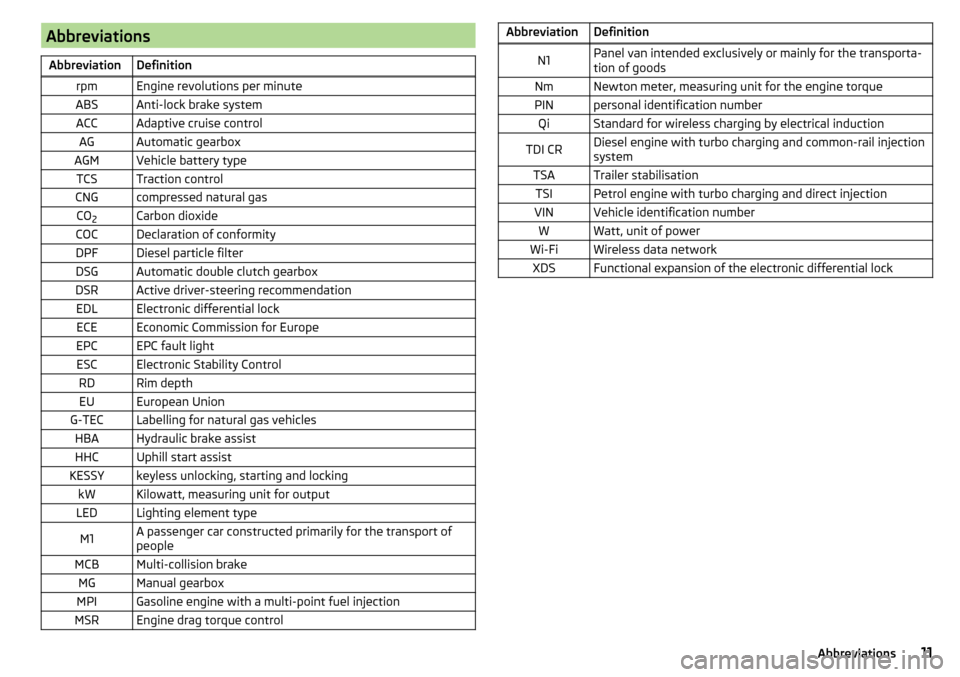
AbbreviationsAbbreviationDefinitionrpmEngine revolutions per minuteABSAnti-lock brake systemACCAdaptive cruise controlAGAutomatic gearboxAGMVehicle battery typeTCSTraction controlCNGcompressed natural gasCO2Carbon dioxideCOCDeclaration of conformityDPFDiesel particle filterDSGAutomatic double clutch gearboxDSRActive driver-steering recommendationEDLElectronic differential lockECEEconomic Commission for EuropeEPCEPC fault lightESCElectronic Stability ControlRDRim depthEUEuropean UnionG-TECLabelling for natural gas vehiclesHBAHydraulic brake assistHHCUphill start assistKESSYkeyless unlocking, starting and lockingkWKilowatt, measuring unit for outputLEDLighting element typeM1A passenger car constructed primarily for the transport of
peopleMCBMulti-collision brakeMGManual gearboxMPIGasoline engine with a multi-point fuel injectionMSREngine drag torque controlAbbreviationDefinitionN1Panel van intended exclusively or mainly for the transporta-
tion of goodsNmNewton meter, measuring unit for the engine torquePINpersonal identification numberQiStandard for wireless charging by electrical inductionTDI CRDiesel engine with turbo charging and common-rail injection
systemTSATrailer stabilisationTSIPetrol engine with turbo charging and direct injectionVINVehicle identification numberWWatt, unit of powerWi-FiWireless data networkXDSFunctional expansion of the electronic differential lock11Abbreviations
Page 202 of 324
The sensor is a component of the ACC » page 214 and Front Assist
» page 219 systems.
The sensor function may be impaired in the events of one of the following. ▶ The sensor cover is soiled (e.g. with mud, snow etc.).
▶ The area in front of and around the sensor cover is obscured (e.g. by labels,
auxiliary headlights etc.).
▶ When visibility is poor, (e.g. fog, heavy rain, thick snowfall).
If the sensor is covered or dirty, the corresponding message appears in the in-
strument cluster display for the ACC system » page 218, Malfunctions or Front
Assist system » page 221, Malfunctions .WARNING■
If you suspect that the sensor is damaged, deactivate the ACC system and
Front Assist system » page 216» page 220 . Have the sensor checked by a
specialist garage.■
A collision or damage in the front or lower area of the vehicle could affect
the sensor function - there is risk of accident! Have the sensor checked by
a specialist garage.
■
Do not cover the area in front of and around the sensor cover. This can
lead to impaired function of the sensor - risk of accidents!
CAUTION
Remove the snow with a brush and the ice with a solvent-free de-icer.
Braking and stabilisation systems
Introduction
This chapter contains information on the following subjects:
Stability Control (ESC)
200
ESC Sport
200
Anti-lock braking system (ABS)
201
Engine drag torque control (MSR)
201
Traction control (TCS)
201
Electronic Differential Lock (EDL and XDS)
201
Active steering assist (DSR)
202
Brake Assist (HBA)
202
Hill Start Assist (HHC)
202Multicollision brake (MCB)202Trailer stabilisation system (TSA)202
The brake and stabilization systems are automatically activated each time the
ignition is switched on, unless otherwise indicated.
The error display is in Chapter » page 32, Warning lights .
WARNINGThe general information relating to the use of assistance systems must be
observed » page 199, in section Introduction .
Stability Control (ESC)
Read and observe
on page 200 first.
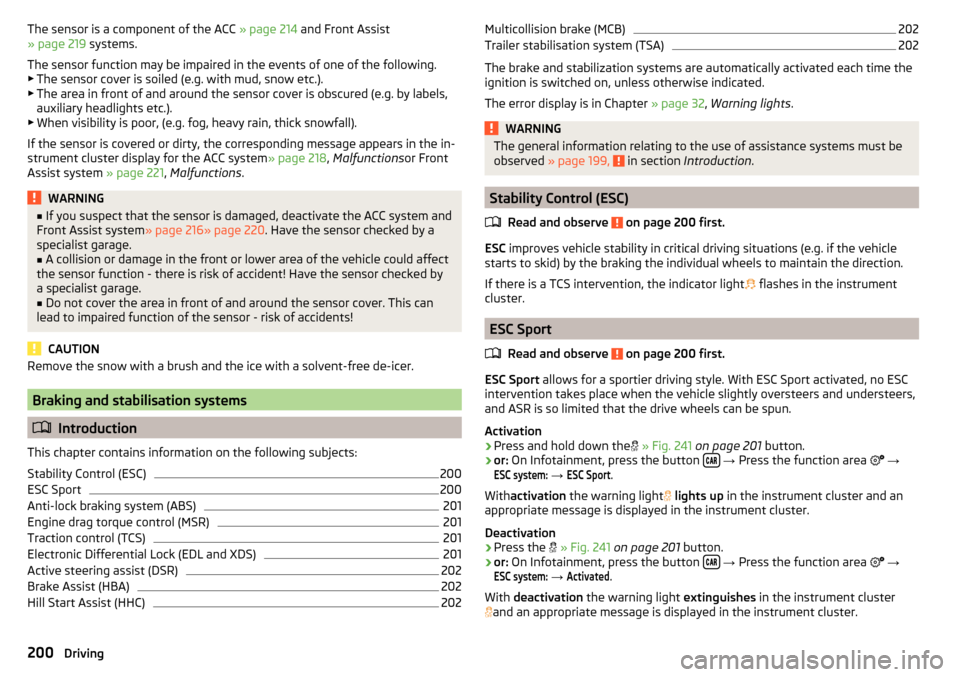
ESC improves vehicle stability in critical driving situations (e.g. if the vehicle
starts to skid) by the braking the individual wheels to maintain the direction.
If there is a TCS intervention, the indicator light flashes in the instrument
cluster.
ESC Sport
Read and observe
on page 200 first.
ESC Sport allows for a sportier driving style. With ESC Sport activated, no ESC
intervention takes place when the vehicle slightly oversteers and understeers,
and ASR is so limited that the drive wheels can be spun.
Activation
›
Press and hold down the
» Fig. 241 on page 201 button.
›
or: On Infotainment, press the button
→ Press the function area
→
ESC system:
→
ESC Sport
.
With activation the warning light
lights up in the instrument cluster and an
appropriate message is displayed in the instrument cluster.
Deactivation
›
Press the
» Fig. 241 on page 201 button.
›
or: On Infotainment, press the button
→ Press the function area
→
ESC system:
→
Activated
.
With deactivation the warning light extinguishes in the instrument cluster
and an appropriate message is displayed in the instrument cluster.
200Driving
Page 203 of 324
Anti-lock braking system (ABS)Read and observe
on page 200 first.
ABS prevents the wheels locking when braking. Thus helping the driver to
maintain control of the vehicle.
The intervention of the ABS is noticeable from the pulsating movements of
the brake pedal which is accompanied by noises.
When the ABS system is active, do not brake periodically or reduce the pres-
sure on the brake pedal.
Engine drag torque control (MSR)
Read and observe
on page 200 first.
MSR counteracts the tendency of the drive wheels to lock during downshifts
or sudden deceleration (e.g. on icy or an otherwise slippery road surface).
If the drive wheels should lock, then the engine speed is automatically in-
creased. This reduces the braking effect of the engine and the wheels can ro-
tate freely again.
Traction control (TCS)
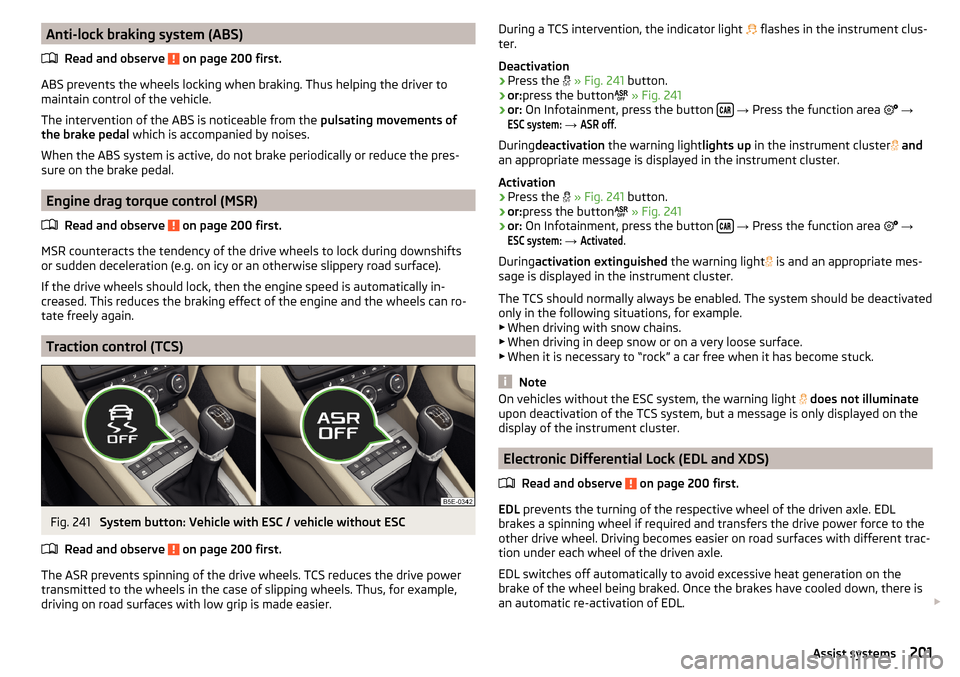
Fig. 241
System button: Vehicle with ESC / vehicle without ESC
Read and observe
on page 200 first.
The ASR prevents spinning of the drive wheels. TCS reduces the drive power transmitted to the wheels in the case of slipping wheels. Thus, for example,
driving on road surfaces with low grip is made easier.
During a TCS intervention, the indicator light flashes in the instrument clus-
ter.
Deactivation›
Press the
» Fig. 241 button.
›
or:press the button
» Fig. 241
›
or: On Infotainment, press the button
→ Press the function area
→
ESC system:
→
ASR off
.
During deactivation the warning light lights up in the instrument cluster
and
an appropriate message is displayed in the instrument cluster.
Activation
›
Press the
» Fig. 241 button.
›
or:press the button
» Fig. 241
›
or: On Infotainment, press the button
→ Press the function area
→
ESC system:
→
Activated
.
During activation extinguished the warning light
is and an appropriate mes-
sage is displayed in the instrument cluster.
The TCS should normally always be enabled. The system should be deactivated
only in the following situations, for example. ▶ When driving with snow chains.
▶ When driving in deep snow or on a very loose surface.
▶ When it is necessary to “rock” a car free when it has become stuck.
Note
On vehicles without the ESC system, the warning light does not illuminate
upon deactivation of the TCS system, but a message is only displayed on the
display of the instrument cluster.
Electronic Differential Lock (EDL and XDS)
Read and observe
on page 200 first.
EDL prevents the turning of the respective wheel of the driven axle. EDL
brakes a spinning wheel if required and transfers the drive power force to the
other drive wheel. Driving becomes easier on road surfaces with different trac-
tion under each wheel of the driven axle.
EDL switches off automatically to avoid excessive heat generation on the
brake of the wheel being braked. Once the brakes have cooled down, there is
an automatic re-activation of EDL.
201Assist systems
Page 269 of 324
›Jack up the vehicle
» page 269 until the wheel that needs changing is clear of
the ground.›
Unscrew the wheel bolts and place them on a clean surface (cloth, paper,
etc.).
›
Remove the wheel carefully.
›
Attach the spare wheel and slightly screw on the wheel bolts.
›
Lower the vehicle.
›
Tighten the wheel bolts opposite each other using the wheel wrench (“pull- ing crossways”) » page 269.
›
Replace the wheel trim » page 267and caps» page 268 .
When fitting a wheel with unidirectional tyres, ensure that the direction of ro-
tation is correct » page 261.
All bolts must be clean and must turn easily. If screws are corroded and diffi-
cult to move, these must be replaced.
WARNING■ Undo the wheel bolts just a little (about one turn), provided the vehicle
has not yet been jacked up. Otherwise the wheel could come loose and fall
off – There is a risk of an injury.■
Under no circumstances must the bolts be greased or oiled - There is a
risk of an accident.
Subsequent steps
After changing the wheel, the following work must be carried out.
›
Stow the replaced wheel in the well under the floor covering of the luggage
compartment and secure with a locking screw.
›
Stow the tool kit in the space provided and secure using the band.
›
Check tyre pressure on the mounted wheel and adjust if necessary and, with
vehicles with tyre pressure monitoring, save the tyre pressure values in the
system » page 229 .
›
Have the tightening torque of the wheel bolts checked as soon as possible.
The prescribed tightening torque is 120 Nm.
Replace the damaged wheel or consult a specialist garage about repair op-
tions.
WARNINGTightening torque which is too high can damage the threads and this can
result in permanent deformation of the contact surfaces on the rim. Where
tightening torque is too low, the wheels may become loose while driving -
risk of accident. Therefore drive cautiously and only at a moderate speed
until the tightening torque has been checked.
Removing/stowing the emergency or spare wheel
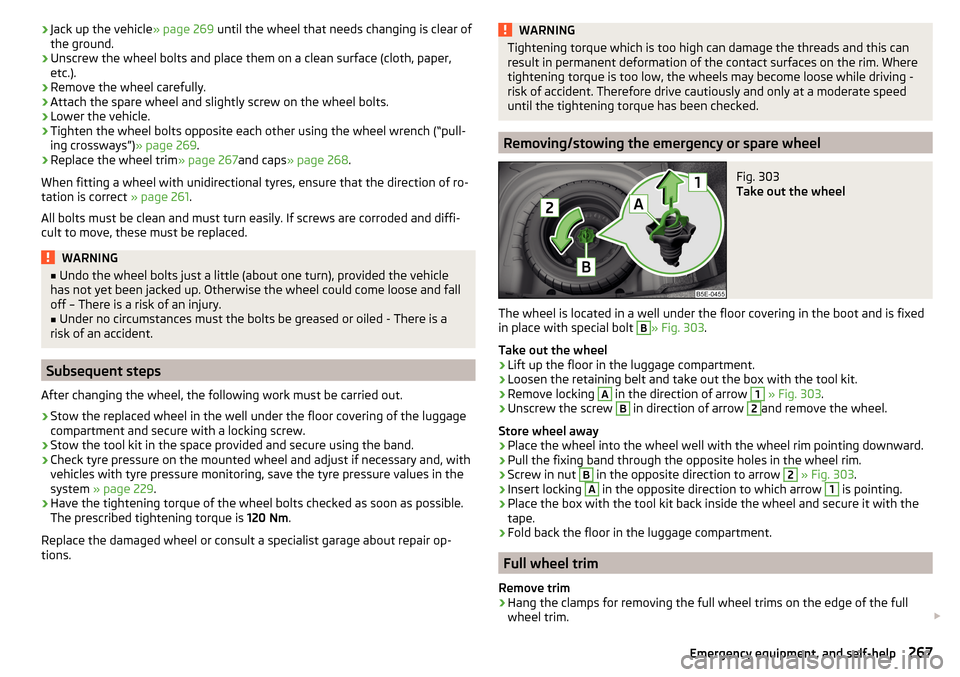
Fig. 303
Take out the wheel
The wheel is located in a well under the floor covering in the boot and is fixed
in place with special bolt
B
» Fig. 303 .
Take out the wheel
›
Lift up the floor in the luggage compartment.
›
Loosen the retaining belt and take out the box with the tool kit.
›
Remove locking
A
in the direction of arrow
1
» Fig. 303 .
›
Unscrew the screw
B
in direction of arrow
2
and remove the wheel.
Store wheel away
›
Place the wheel into the wheel well with the wheel rim pointing downward.
›
Pull the fixing band through the opposite holes in the wheel rim.
›
Screw in nut
B
in the opposite direction to arrow
2
» Fig. 303 .
›
Insert locking
A
in the opposite direction to which arrow
1
is pointing.
›
Place the box with the tool kit back inside the wheel and secure it with the
tape.
›
Fold back the floor in the luggage compartment.
Full wheel trim
Remove trim
›
Hang the clamps for removing the full wheel trims on the edge of the full
wheel trim.
267Emergency equipment, and self-help
Page 298 of 324

Vehicle-specific details per engine type
Introduction
This chapter contains information on the following subjects:
1.0 l/85 kW TSI engine296
1.2 ltr. / 63 kW TSI engine
296
1.4 l/81 kW TSI G-TEC engine
297
1.4 ltr./110 kW TSI engine
297
1.6 l/81 kW MPI engine
297
1.8 l/132 kW TSI engine
2982.0 l/162 kW TSI engine2982.0 ltr./169 kW TSI engine298
1.6 ltr./66 kW TDI CR engine
299
1.6 ltr./81 kW TDI CR engine
299
2.0 l/105 kW TDI CR engine
299
2.0 ltr./110 kW TDI CR engine
300
2.0 ltr./135 kW TDI CR engine
300The specified values have been determined in accordance with rules and under conditions set out by legal or technical requirements for determining operational
and technical data for motor vehicles.The emissions standard is detailed in the technical vehicle documentation as well as in the certificate of conformity (COC document), which can be obtained from a ŠKODA partner a)
.a)
Only valid for some countries and some models.
1.0 l/85 kW TSI engine
Output (kW at 1/min)85/5000-5500Maximum torque (Nm at 1/min)200/2000-3500Number of cylinders/displacement (cm 3
)3/999BodyOctaviaOctavia EstateGearboxMGDSGMGDSGTop speeds (km/h)202202200200Acceleration 0-100 km/h (s)9.91010.110.2
1.2 ltr. / 63 kW TSI engine
Output (kW at 1/min)63/4300-5300Maximum torque (Nm at 1/min)160/1400-3500Number of cylinders/displacement (cm 3
)4/1197BodyOctaviaOctavia EstateGearboxMGMGTop speeds (km/h)181178Acceleration 0-100 km/h (s)1212.2296Technical data
Page 299 of 324

1.4 l/81 kW TSI G-TEC engineOutput (kW at 1/min)81/4800-6000Maximum torque (Nm at 1/min)200/1500-3500Number of cylinders/displacement (cm3
)4/1395BodyOctaviaOctavia EstateGearboxMGDSGMGDSGTop speeds (km/h)195195193193Acceleration 0-100 km/h (s)10.9111111.1
1.4 ltr./110 kW TSI engine
Output (kW at 1/min)110/5000-6000Maximum torque (Nm at 1/min)250/1500-3500Number of cylinders/displacement (cm 3
)4/1395BodyOctaviaOctavia EstateGearboxMGDSGMGDSGTop speeds (km/h)219219216216Acceleration 0-100 km/h (s)8.18.28.28.3
1.6 l/81 kW MPI engine
Output (kW at 1/min)81/5800Maximum torque (Nm at 1/min)155/3800-4000Number of cylinders/displacement (cm 3
)4/1598BodyOctaviaOctavia EstateGearboxMGAGMGAGTop speeds (km/h)192190191188Acceleration 0-100 km/h (s)10.61210.812.2297Technical data
Page 300 of 324
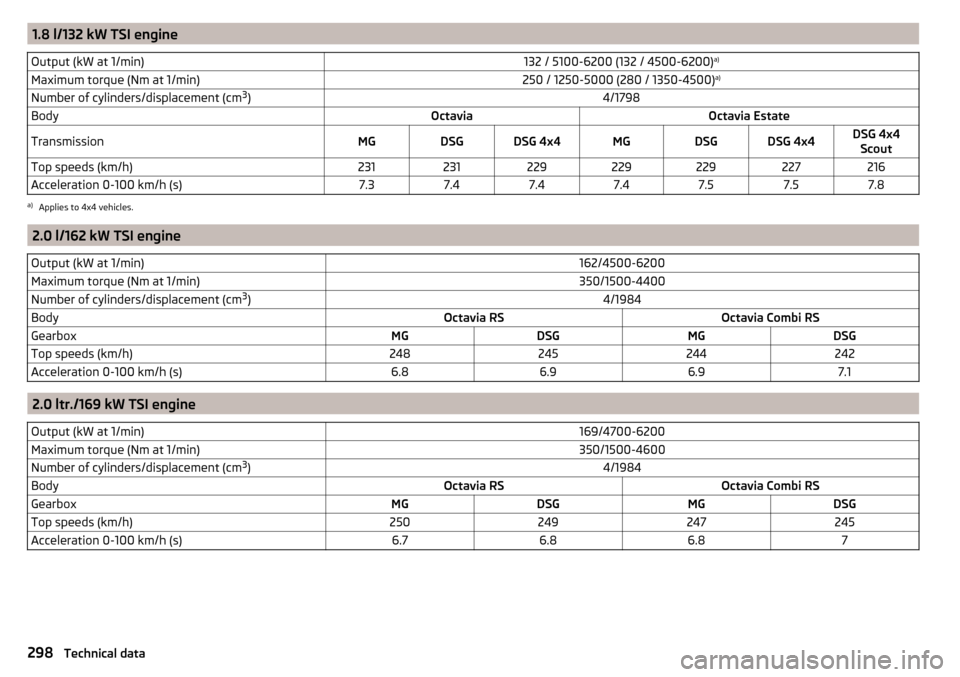
1.8 l/132 kW TSI engineOutput (kW at 1/min)132 / 5100-6200 (132 / 4500-6200)a)Maximum torque (Nm at 1/min)250 / 1250-5000 (280 / 1350-4500) a)Number of cylinders/displacement (cm 3
)4/1798BodyOctaviaOctavia EstateTransmissionMGDSGDSG 4x4MGDSGDSG 4x4DSG 4x4
ScoutTop speeds (km/h)231231229229229227216Acceleration 0-100 km/h (s)7.37.47.47.47.57.57.8a)
Applies to 4x4 vehicles.
2.0 l/162 kW TSI engine
Output (kW at 1/min)162/4500-6200Maximum torque (Nm at 1/min)350/1500-4400Number of cylinders/displacement (cm 3
)4/1984BodyOctavia RSOctavia Combi RSGearboxMGDSGMGDSGTop speeds (km/h)248245244242Acceleration 0-100 km/h (s)6.86.96.97.1
2.0 ltr./169 kW TSI engine
Output (kW at 1/min)169/4700-6200Maximum torque (Nm at 1/min)350/1500-4600Number of cylinders/displacement (cm 3
)4/1984BodyOctavia RSOctavia Combi RSGearboxMGDSGMGDSGTop speeds (km/h)250249247245Acceleration 0-100 km/h (s)6.76.86.87298Technical data
Page 301 of 324

1.6 ltr./66 kW TDI CR engineOutput (kW at 1/min)66/2750-4800Maximum torque (Nm at 1/min)230/1400-2700Number of cylinders/displacement (cm3
)4/1598BodyOctaviaOctavia EstateGearboxMGMGTop speeds (km/h)186183Acceleration 0-100 km/h (s)12.212.3
1.6 ltr./81 kW TDI CR engine
Output (kW at 1/min)81/3200-4000Maximum torque (Nm at 1/min)250/1500-3000Number of cylinders/displacement (cm 3
)4/1598BodyOctaviaOctavia EstateGearboxMG5MG6MG 4x4DSGMG5MG6MG 4x4MG 4x4
ScoutDSGTop speeds (km/h)197206193197194204191187194Acceleration 0-100 km/h (s)10.610.611.310.710.810.711.511.710.9
2.0 l/105 kW TDI CR engine
Output (kW at 1/min)105/3500-4000Maximum torque (Nm at 1/min)320/1750-3000Number of cylinders/displacement (cm 3
)4/1968BodyOctaviaOctavia EstateGearboxMGDSGMGDSGTop speeds (km/h)215212213210Acceleration 0-100 km/h (s)8.78.98.79299Technical data
Page 302 of 324
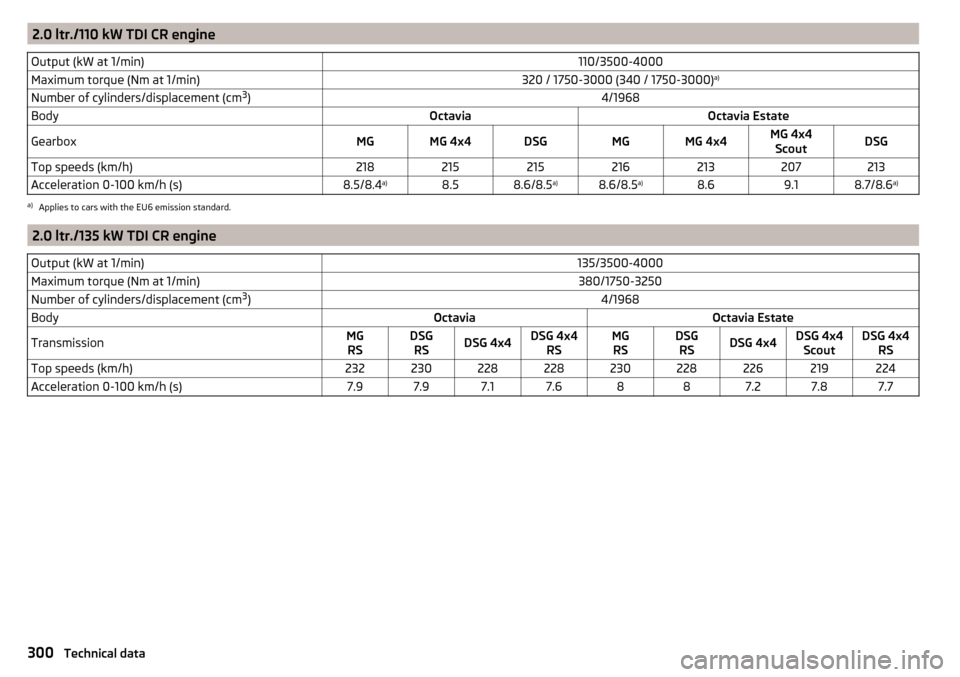
2.0 ltr./110 kW TDI CR engineOutput (kW at 1/min)110/3500-4000Maximum torque (Nm at 1/min)320 / 1750-3000 (340 / 1750-3000)a)Number of cylinders/displacement (cm 3
)4/1968BodyOctaviaOctavia EstateGearboxMGMG 4x4DSGMGMG 4x4MG 4x4
ScoutDSGTop speeds (km/h)218215215216213207213Acceleration 0-100 km/h (s)8.5/8.4 a)8.58.6/8.5 a)8.6/8.5a)8.69.18.7/8.6a)a)
Applies to cars with the EU6 emission standard.
2.0 ltr./135 kW TDI CR engine
Output (kW at 1/min)135/3500-4000Maximum torque (Nm at 1/min)380/1750-3250Number of cylinders/displacement (cm 3
)4/1968BodyOctaviaOctavia EstateTransmissionMG
RSDSG RSDSG 4x4DSG 4x4 RSMGRSDSG RSDSG 4x4DSG 4x4 ScoutDSG 4x4 RSTop speeds (km/h)232230228228230228226219224Acceleration 0-100 km/h (s)7.97.97.17.6887.27.87.7300Technical data
Page 306 of 324
Digital Service Plan244
Dipped beam64
Dipstick256
display natural gas supply
31
Petrol / diesel storage31
Display Cardinal points
41
Coolant temperature31
Gear changes42
In the instrument cluster41
Service intervals48
Display MAXI DOT46
Disposal Acceptance and recycling of used vehicles
242
Distance warning219
Warning light40
Diverting calls126
Door Child safety lock
54
Emergency locking276
Emergency locking of the driver's door276
Opening/ Closing54
Door warning41
double hooks96
Drive Driving through water
198
DriveGreen197
Driving Emissions
291
Fuel consumption291
Maximum speed296
through water198
Driving data Show
45
Driving mode221
Adaptive Chassis Control (DCC)221
Comfort222
Eco221
Individual222
Individual mode settings223
Mode selection and Infotainment display223
Normal222
Offroad222
Sports222
Driving Mode Selection221
DSR202
DVD139
DVD video Compatible sources
146
Supported file formats146
Dynamic Road Sign Display Additional display
228
Operation227
Dynamic route switch on / off
186
E
Economical driving
197
ECO TIP41
Eco tips41
Edit route181
EDS201
Electrical boot lid set the top position of the lid
58
Electric boot lid Force limiter
57
Manual operation57
Open/close58
Electric power windows59, 61
Malfunctions61
Electric tailgate Malfunctions
58
Electric Windows Button in driver’s door’
60
Electronic Differential Lock (EDL, XDS)201
Electronic immobiliser188
Elevation169
emergency Jump-starting272
Starting the engine / stopping at the push of a button
190
Emergency Hazard warning light system
68
Jump-starting272
Lever-release277
Starting the engine / stopping the push of a button
189
Towing the using the tow hitch275
Towing the vehicle273
Tyre repair270
Unlocking/locking the door276
Unlocking / locking the door276
Emergency call157
Emergency equipment Fire extinguisher
265
First aid kit265
Jack266
Reflective vest265
Vehicle tool kit266
Warning triangle265
Emergency spare Removing / stowing
267
Emission control system35
Emissions291
Engine Information messages
38
Run in196
Engine compartment252
Brake fluid257
Coolant256
Engine oil255
Overview254
Vehicle battery258
Windscreen washer fluid254
Engine drag torque control (MSR)201
Engine number288
304Index