Columbus SKODA OCTAVIA 2018 Owner´s Manual
[x] Cancel search | Manufacturer: SKODA, Model Year: 2018, Model line: OCTAVIA, Model: SKODA OCTAVIA 2018Pages: 340, PDF Size: 53.2 MB
Page 155 of 340
Images
Image viewer
main menu
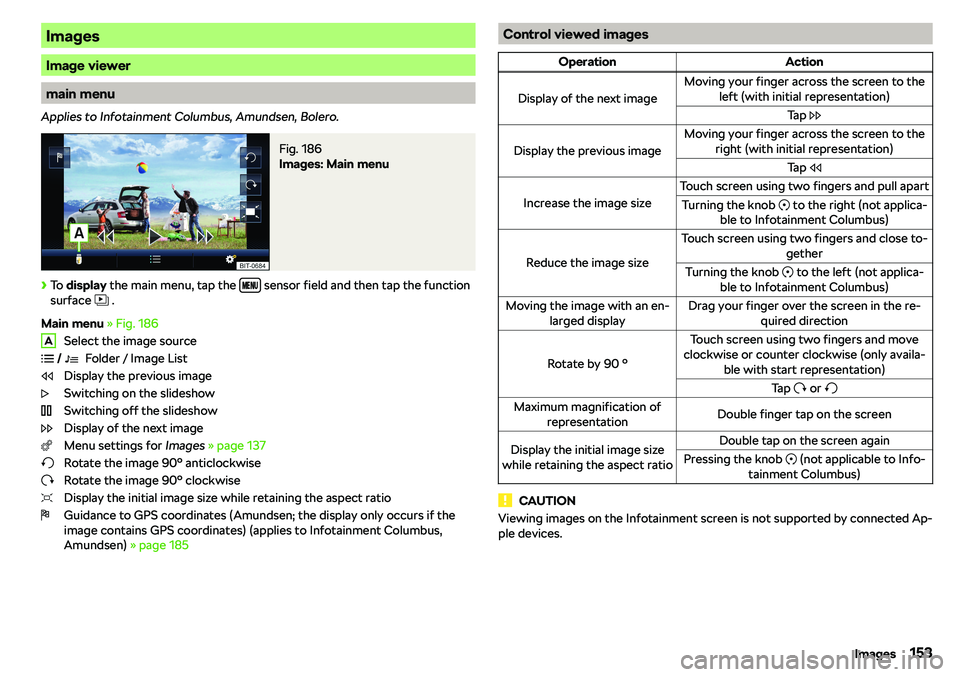
Applies to Infotainment Columbus, Amundsen, Bolero.
Fig. 186
Images: Main menu
Page 158 of 340
Media Command
Operation
Introduction to the subject
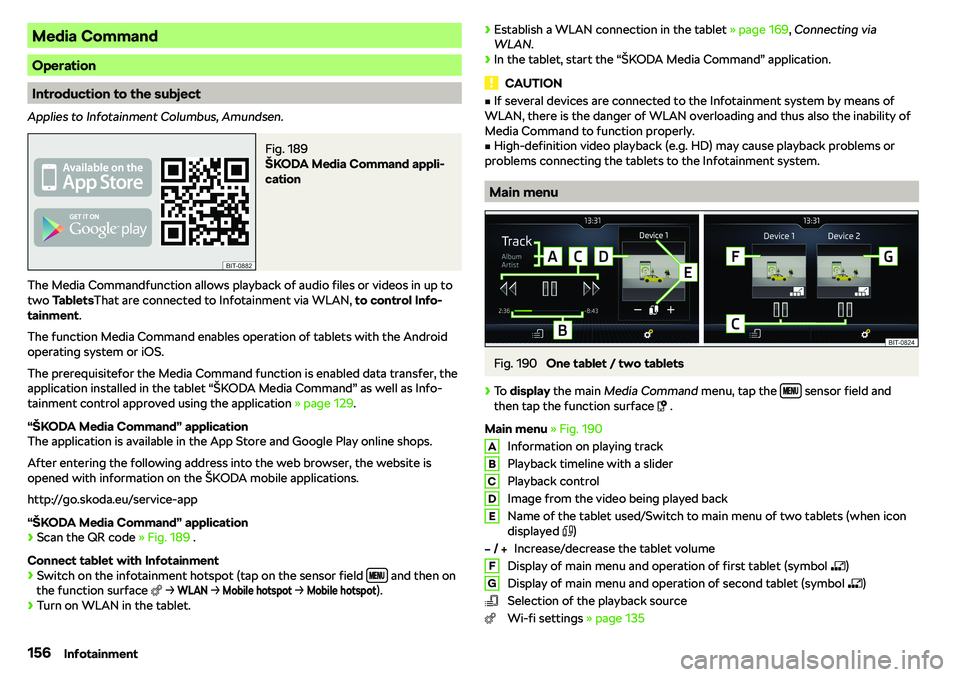
Applies to Infotainment Columbus, Amundsen.
Fig. 189
Page 160 of 340
Telephone
Introductory information
Introduction to the subject
WARNINGThe general binding country-specific regulations for operating mobile
phones in the vehicle must be observed.
Telephone
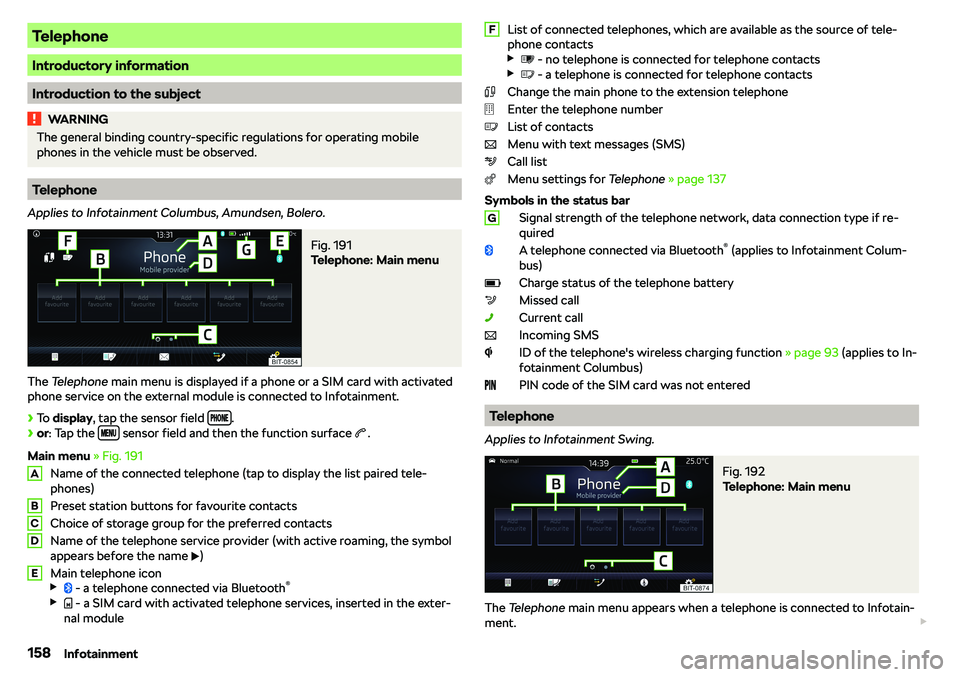
Applies to Infotainment Columbus, Amundsen, Bolero.
Fig. 191
Telephone: Main menu
The Telephone main menu is displayed if a phone or a SIM card with activated
phone service on the external module is connected to Infotainment.
Page 163 of 340
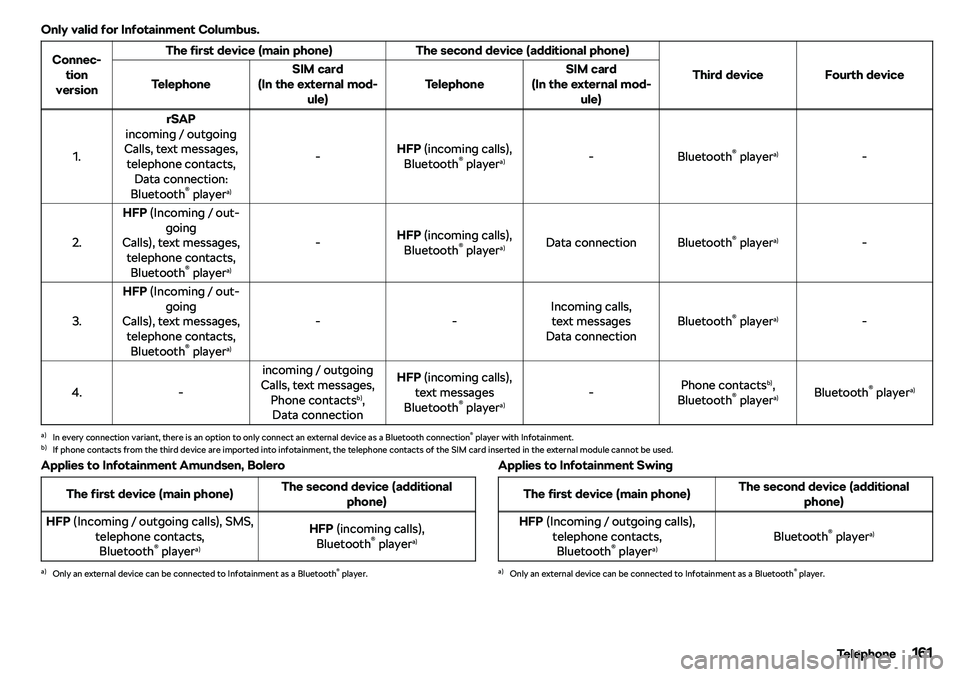
Only valid for Infotainment Columbus.Connec-tion
versionThe first device (main phone)The second device (additional phone)
Third deviceFourth deviceTelephoneSIM card
(In the external mod- ule)TelephoneSIM card
(In the external mod- ule)
1.
rSAP
incoming / outgoing
Calls, text messages, telephone contacts, Data connection:
Bluetooth
Page 168 of 340
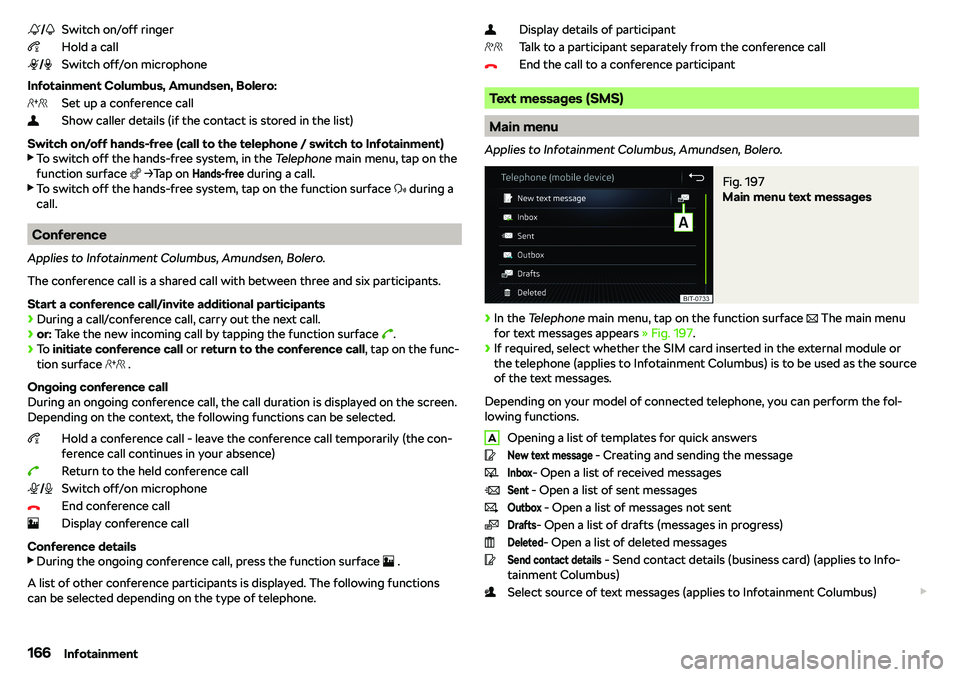
Switch on/off ringer
Hold a call
Switch off/on microphone
Infotainment Columbus, Amundsen, Bolero: Set up a conference call
Show caller details (if the contact is stored in the list)
Switch on/off hands-free (call to the telephone / switch to Infotainment)
Page 169 of 340
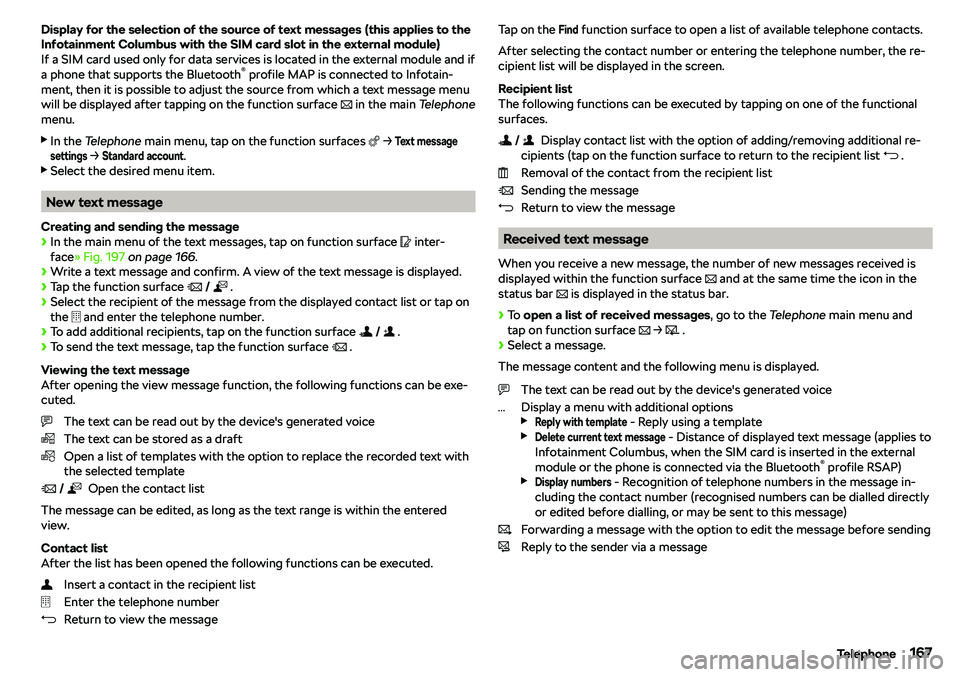
Display for the selection of the source of text messages (this applies to theInfotainment Columbus with the SIM card slot in the external module)If a SIM card used only for data services is located in the external module and if
a phone that supports the Bluetooth
Page 170 of 340
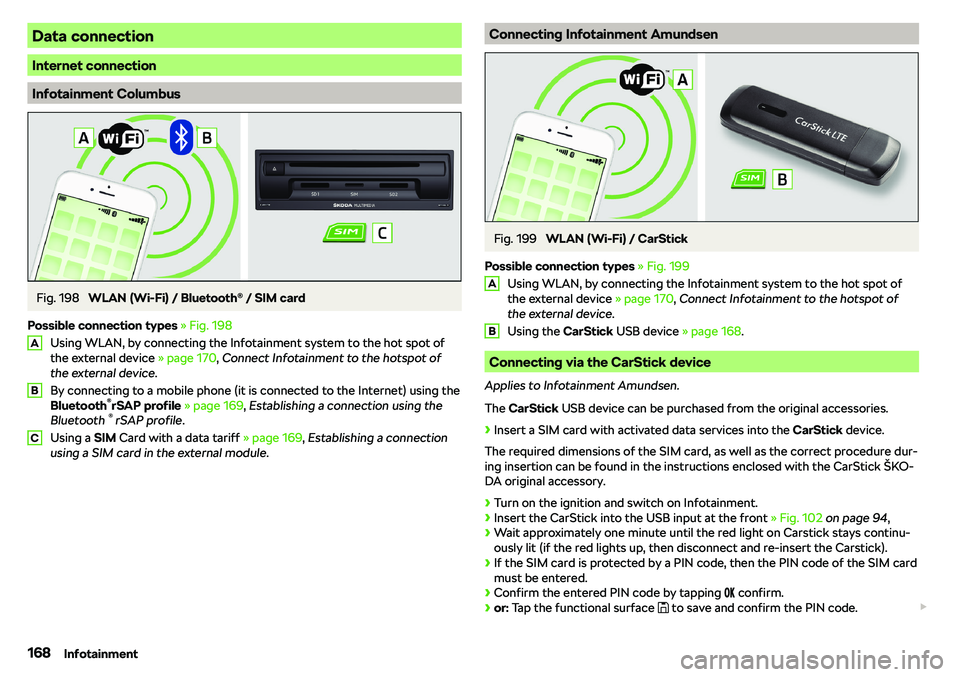
Data connection
Internet connection
Infotainment Columbus
Fig. 198
WLAN (Wi-Fi) / Bluetooth
Page 179 of 340
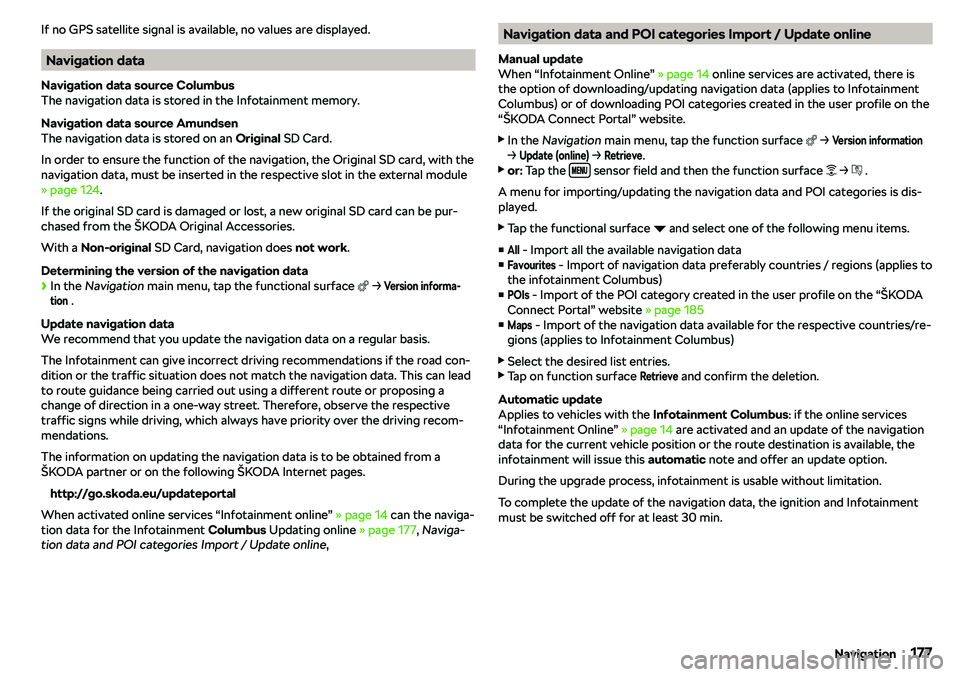
If no GPS satellite signal is available, no values are displayed.
Navigation data
Navigation data source Columbus
The navigation data is stored in the Infotainment memory.
Navigation data source Amundsen
The navigation data is stored on an Original SD Card.
In order to ensure the function of the navigation, the Original SD card, with the
navigation data, must be inserted in the respective slot in the external module
Page 321 of 340
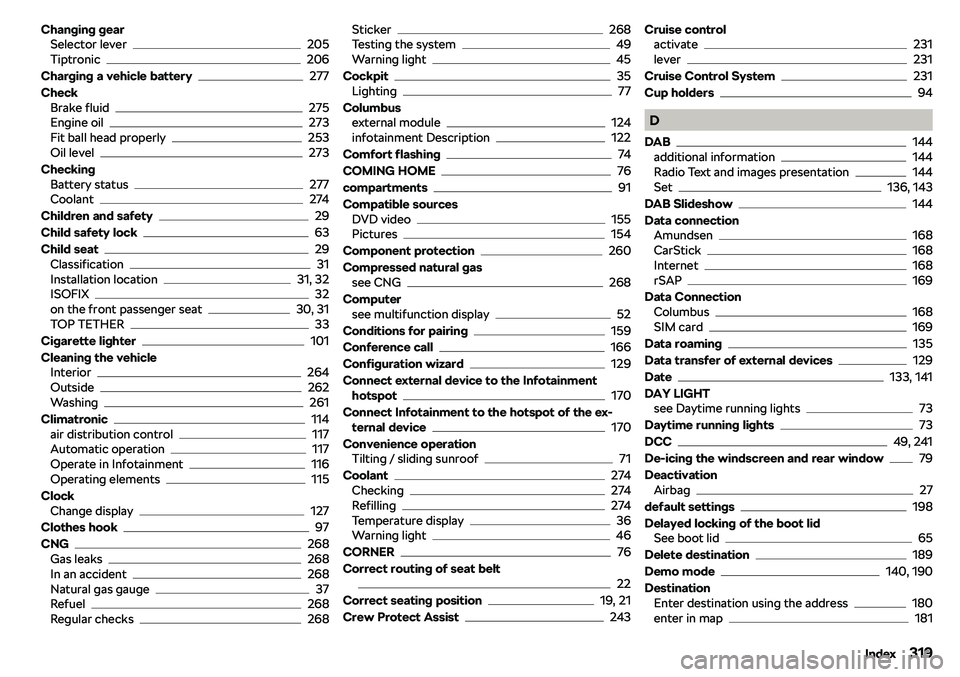
Changing gearSelector lever205
Tiptronic206
Charging a vehicle battery
277
Check Brake fluid
275
Engine oil273
Fit ball head properly253
Oil level273
Checking Battery status
277
Coolant274
Children and safety
29
Child safety lock
63
Child seat
29
Classification31
Installation location31, 32
ISOFIX32
on the front passenger seat30, 31
TOP TETHER33
Cigarette lighter
101
Cleaning the vehicle Interior
264
Outside262
Washing261
Climatronic
114
air distribution control117
Automatic operation117
Operate in Infotainment116
Operating elements115
Clock Change display
127
Clothes hook
97
CNG
268
Gas leaks268
In an accident268
Natural gas gauge37
Refuel268
Regular checks268
Sticker268
Testing the system49
Warning light45
Cockpit
35
Lighting77
Columbus external module
124
infotainment Description122
Comfort flashing
74
COMING HOME
76
compartments
91
Compatible sources DVD video
155
Pictures154
Component protection
260
Compressed natural gas see CNG
268
Computer see multifunction display
52
Conditions for pairing
159
Conference call
166
Configuration wizard
129
Connect external device to the Infotainment hotspot
170
Connect Infotainment to the hotspot of the ex- ternal device
170
Convenience operation Tilting / sliding sunroof
71
Coolant
274
Checking274
Refilling274
Temperature display36
Warning light46
CORNER
76
Correct routing of seat belt
22
Correct seating position
19, 21
Crew Protect Assist
243
Cruise control activate231
lever231
Cruise Control System
231
Cup holders
94
D
DAB
144
additional information144
Radio Text and images presentation144
Set136, 143
DAB Slideshow
144
Data connection Amundsen
168
CarStick168
Internet168
rSAP169
Data Connection Columbus
168
SIM card169
Data roaming
135
Data transfer of external devices
129
Date
133, 141
DAY LIGHT see Daytime running lights
73
Daytime running lights
73
DCC
49, 241
De-icing the windscreen and rear window
79
Deactivation Airbag
27
default settings
198
Delayed locking of the boot lid See boot lid
65
Delete destination
189
Demo mode
140, 190
Destination Enter destination using the address
180
enter in map181
319Index
Page 324 of 340
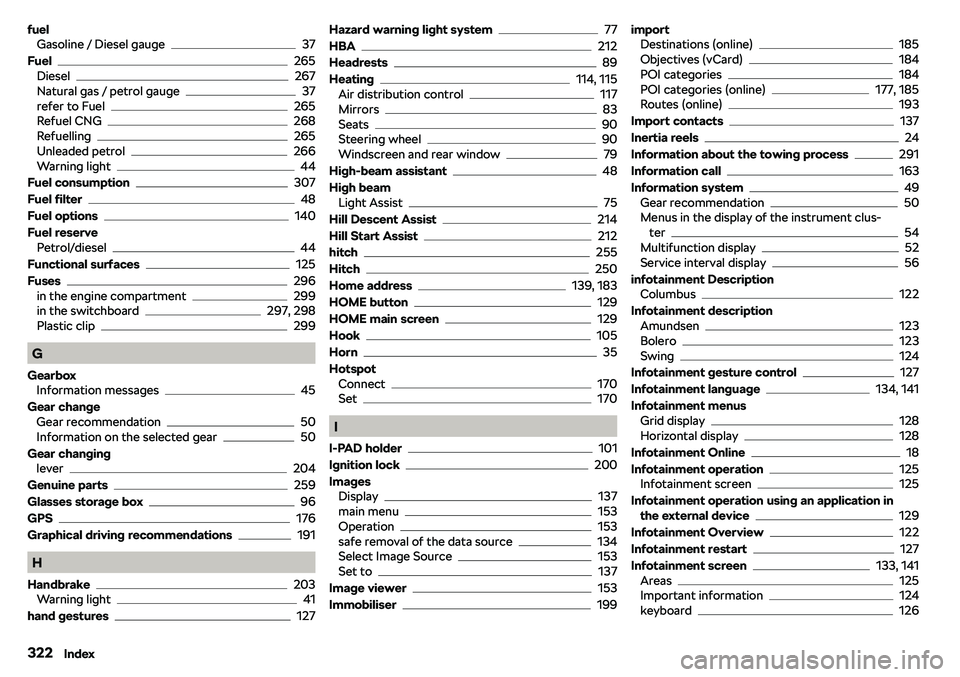
fuelGasoline / Diesel gauge37
Fuel
265
Diesel267
Natural gas / petrol gauge37
refer to Fuel265
Refuel CNG268
Refuelling265
Unleaded petrol266
Warning light44
Fuel consumption
307
Fuel filter
48
Fuel options
140
Fuel reserve Petrol/diesel
44
Functional surfaces
125
Fuses
296
in the engine compartment299
in the switchboard297, 298
Plastic clip299
G
Gearbox Information messages
45
Gear change Gear recommendation
50
Information on the selected gear50
Gear changing lever
204
Genuine parts
259
Glasses storage box
96
GPS
176
Graphical driving recommendations
191
H
Handbrake
203
Warning light41
hand gestures
127
Hazard warning light system77
HBA
212
Headrests
89
Heating
114, 115
Air distribution control117
Mirrors83
Seats90
Steering wheel90
Windscreen and rear window79
High-beam assistant
48
High beam Light Assist
75
Hill Descent Assist
214
Hill Start Assist
212
hitch
255
Hitch
250
Home address
139, 183
HOME button
129
HOME main screen
129
Hook
105
Horn
35
Hotspot Connect
170
Set170
I
I-PAD holder
101
Ignition lock
200
Images Display
137
main menu153
Operation153
safe removal of the data source134
Select Image Source153
Set to137
Image viewer
153
Immobiliser
199
import Destinations (online)185
Objectives (vCard)184
POI categories184
POI categories (online)177, 185
Routes (online)193
Import contacts
137
Inertia reels
24
Information about the towing process
291
Information call
163
Information system
49
Gear recommendation50
Menus in the display of the instrument clus- ter
54
Multifunction display52
Service interval display56
infotainment Description Columbus
122
Infotainment description Amundsen
123
Bolero123
Swing124
Infotainment gesture control
127
Infotainment language
134, 141
Infotainment menus Grid display
128
Horizontal display128
Infotainment Online
18
Infotainment operation
125
Infotainment screen125
Infotainment operation using an application in the external device
129
Infotainment Overview
122
Infotainment restart
127
Infotainment screen
133, 141
Areas125
Important information124
keyboard126
322Index