trip computer SKODA OCTAVIA TOUR 2009 1.G / (1U) Owner's Manual
[x] Cancel search | Manufacturer: SKODA, Model Year: 2009, Model line: OCTAVIA TOUR, Model: SKODA OCTAVIA TOUR 2009 1.G / (1U)Pages: 226, PDF Size: 13.11 MB
Page 20 of 226
Instruments and Indicator/Warning Lights19
Using the system
Safety
Driving Tips
General Maintenance
Breakdown assistance
Technical Data
The display disappears within 20 seconds after switching on the ignition. The trip
counter is also displayed af
ter pressing the reset button for the trip counter (for
more than 0,5 second).
Resetting Service Interval Display
It is only possible to reset the Service Interval Display, if a service message or at least
a pre-warning is shown on the display of the instrument cluster.
We recommend having this resetting performed by a specialist garage.
The specialist garage:
•
resets the memory of the display after the appropriate inspection,
•
makes an entry in the Service schedule,
•
affix the sticker with the entry of the following service interval to the side of the
dash panel on the driver's side.
Reset the service interval displays as follows by using the reset button
⇒ page 16, fig. 18 on the trip counter:
•
Press the reset button with the ignition switched off and and hold it down.
•
Switch the ignition on, release the reset button. The text Service or SERVICE
NOW appears in the display.
•
Turn the button for setting the clock to the right - as a result of this the display
is reset.Caution
We recommend that you do not reset the Service Interval Display yourself other-
wise this can result in the service interval display being incorrectly set, which may
also result in problems with operation of your vehicle.
Note
•
Never reset the display between service intervals otherwise this may result in
incorrect readouts.
•
information is retained in the Service Interval Display also after the battery of
the vehicle is disconnected.
•
it is necessary to re-code the Service Interval Display if a new instrument cluster
is installed during repair work. This work is carried out by a specialist garage.
•
The data displayed is the same after rese tting the display with flexible service
intervals (QG1) using the reset button as th at for a vehicle with fixed service inter-
vals (QG2). We therefore recommend having the Service Interval Display reset only
by a specialist garage which is familiar with the procedure for resetting the display
with a vehicle system tester.
•
Please refer to the brochure Service schedule for extensive information about
the service intervals.
Digital clockA clock-set button is installed on the bottom left beside the speedom-
eter for adjusting the clock ⇒page 16, fig. 18 .
Set hours
– Turn the reset button to the left.
Setting minutes
– Turn the reset button to the right.
WARNING
The clock should not be adjusted while driving for safety reasons but only
when the vehicle is stationary!Multi-functional indicator (onboard computer)*IntroductionThe multi-functional indicator appears in the display of the revolutions counter or
in the information display depending on the equipment fitted to your vehicle
⇒ page 23, fig. 23 .
A8
A7
s2ig.book Page 19 Monday, November 10, 2008 11:20 AM
Page 25 of 226
Instruments and Indicator/Warning Lights
24
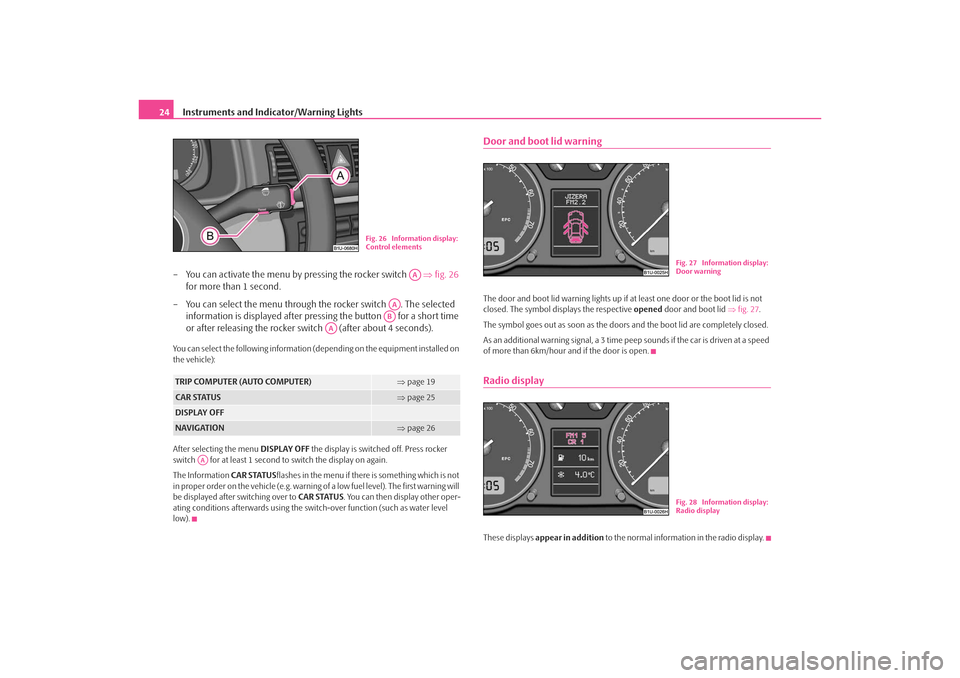
– You can activate the menu by pressing the rocker switch ⇒fig. 26
for more than 1 second.
– You can select the menu through the rocker switch . The selected information is displayed after pressing the button for a short time
or after releasing the rocker switch (after about 4 seconds).You can select the following information (d epending on the equipment installed on
the vehicle):
After selecting the menu DISPLAY OFF the display is switched off. Press rocker
switch for at least 1 second to switch the display on again.
The Information CAR STATUSflashes in the menu if there is something which is not
in proper order on the vehicle (e.g. warning of a low fuel level). The first warning will
be displayed after switching over to CAR STATUS. You can then display other oper-
ating conditions afterwards using the switch-over function (such as water level
low).
Door and boot lid warningThe door and boot lid warning lights up if at least one door or the boot lid is not
closed. The symbol displays the respective opened door and boot lid ⇒fig. 27 .
The symbol goes out as soon as the doors and the boot lid are completely closed.
As an additional warning signal, a 3 time pe ep sounds if the car is driven at a speed
of more than 6km/hour and if the door is open.Radio displayThese displays appear in addition to the normal information in the radio display.
TRIP COMPUTER (AUTO COMPUTER)
⇒page 19
CAR STATUS
⇒page 25
DISPLAY OFFNAVIGATION
⇒page 26
Fig. 26 Information display:
Control elements
AA
AAAB
AA
AA
Fig. 27 Information display:
Door warningFig. 28 Information display:
Radio display
s2ig.book Page 24 Monday, November 10, 2008 11:20 AM