key battery SKODA RAPID 2012 1.G User Guide
[x] Cancel search | Manufacturer: SKODA, Model Year: 2012, Model line: RAPID, Model: SKODA RAPID 2012 1.GPages: 180, PDF Size: 4.36 MB
Page 72 of 180
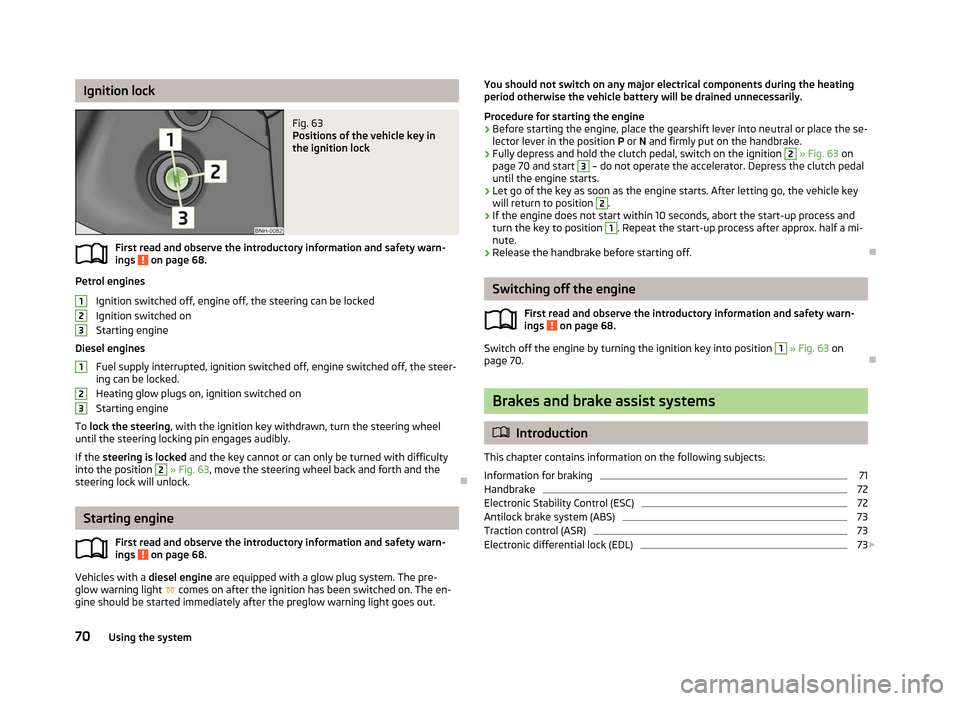
Ignition lock
Fig. 63
Positions of the vehicle key in
the ignition lock
First read and observe the introductory information and safety warn-
ings on page 68.
Petrol engines
Ignition switched off, engine off, the steering can be locked
Ignition switched on
Starting engine
Diesel engines Fuel supply interrupted, ignition switched off, engine switched off, the steer-
ing can be locked.
Heating glow plugs on, ignition switched on
Starting engine
To lock the steering , with the ignition key withdrawn, turn the steering wheel
until the steering locking pin engages audibly.
If the steering is locked and the key cannot or can only be turned with difficulty
into the position 2
» Fig. 63, move the steering wheel back and forth and the
steering lock will unlock. ÐStarting engine
First read and observe the introductory information and safety warn-
ings on page 68.
Vehicles with a diesel engine are equipped with a glow plug system. The pre-
glow warning light comes on after the ignition has been switched on. The en-
gine should be started immediately after the preglow warning light goes out.
ä 1
2
3
1
2
3
ä You should not switch on any major electrical components during the heating
period otherwise the vehicle battery will be drained unnecessarily.
Procedure for starting the engine
› Before starting the engine, place the gearshift lever into neutral or place the se-
lector lever in the position P or N and firmly put on the handbrake.
› Fully depress and hold the clutch pedal, switch on the ignition 2
» Fig. 63 on
page 70 and start 3
– do not operate the accelerator. Depress the clutch pedal
until the engine starts.
› Let go of the key as soon as the engine starts. After letting go, the vehicle key
will return to position 2
.
› If the engine does not start within 10
seconds, abort the start-up process and
turn the key to position 1
. Repeat the start-up process after approx. half a mi-
nute.
› Release the handbrake before starting off. Ð Switching off the engine
First read and observe the introductory information and safety warn-
ings on page 68.
Switch off the engine by turning the ignition key into position 1
» Fig. 63 on
page 70. Ð Brakes and brake assist systems
ä
Introduction
This chapter contains information on the following subjects:
Information for braking 71
Handbrake 72
Electronic Stability Control (ESC) 72
Antilock brake system (ABS) 73
Traction control (ASR) 73
Electronic differential lock (EDL) 73
£
ä
70 Using the system
Page 79 of 180

START/STOP
Fig. 69
Dash panel: Button for the
START-STOP system
The START-STOP system helps you to save fuel while at the same time reducing
harmful exhaust emissions and CO 2 emissions.
The function is automatically activated each time the ignition is switched on.
In the start-stop mode, the engine automatically switches to the vehicle's idle
phase, e.g. when stopped at traffic lights.
Information regarding the current state of the
START-STOP system is indicated in
the display of the instrument cluster.
Automatic engine shut down (stop phase)
› Stop the vehicle (where necessary, apply the handbrake).
› Take the vehicle out of gear.
› Release the clutch pedal.
Automatic renewed engine restart (start phase).
› Depress the clutch pedal.
Switching the
START-STOP system on and off
The START/STOP system can be switched on/off by pressing the button » Fig. 69
.
When start-stop mode is deactivated, the warning light in the button lights up.
If the vehicle is in the stop phase when manually switching off the system, the
engine starts immediately.
The
START-STOP system is very complex. Some of the procedures are hard to
check without servicing. The general conditions for the proper functioning of the
START-STOP system are listed in the following overview. Conditions for the automatic engine shut down (stop phase)
› The gearshift lever is in Neutral.
› The clutch pedal is not depressed.
› The driver has fastened the seat belt.
› The driver's door is closed.
› The bonnet is closed.
› The vehicle is at a standstill.
› The factory-fitted towing device is not electrically connected to a trailer.
› The engine is at operating temperature.
› The charge state of the vehicle battery is sufficient.
› The stationary vehicle is not on a steep slope or a steep downhill section.
› The engine speed is less than 1
200 rpm.
› The temperature of the vehicle battery is not too low or too high.
› There is sufficient pressure in the braking system.
› The difference between the outdoor- and the set temperature in the interior is
not too great.
› The vehicle speed since the last time the engine was switched off was greater
than 3 km/h.
› No cleaning of the diesel particle filter takes place
» page 21.
› The front wheels are not turned excessively (the steering angle is less than 3/4
of a steering wheel revolution).
Conditions for an automatic restart (start phase) › The clutch is depressed.
› The max./min. temperature is set.
› The defrost function for the windscreen is switched on.
› A high blower stage has been selected.
› The START STOP button is pressed.
Conditions for an automatic restart without driver intervention
› The vehicle moves at a speed of more than 3 km/h.
› The difference between the outdoor- and the set temperature in the interior is
too great.
› The charge state of the vehicle battery is not sufficient.
› There is insufficient pressure in the braking system.
If the driver's seat belt is removed for more than 30 seconds or the driver's door is
opened during stop mode, the engine must be started manually with the key. The
following messages in the instrument cluster display must be observed. £
77
Starting-off and Driving
Page 88 of 180

Connecting the mobile phone to the hands-free system
To connect a mobile phone with the hands-free system, the two devices must be
paired. Detailed information on this is provided in the operating instructions for
your mobile phone.
The following steps must be carried out for the connection 1)
.
› Activate Bluetooth ®
and the visibility of your mobile phone on your telephone.
› Switch on the ignition.
› Select the menu
Phone – New user in the information display and wait until
the control unit has completed the search.
› Select your mobile phone from the menu of the units found.
› Confirm the PIN 2
)
.
› If the hands-free system announces (as standard
SKODA_BT) on the display of
the mobile phone, enter the PIN 2)
within 30 seconds and wait, until the connec-
tion is established 3)
.
› After terminating the connection, confirm the creation of a new user profile in
the information display.
If there is no free space available to create a new user profile, delete an existing
user profile.
During the connecting procedure, no other mobile phone may be connected with
the hands-free system.
Up to four mobile phones can be paired with the hands-free system, whereby on-
ly one mobile phone can communicate with the hands-free system.
The visibility of the hands-free system is automatically switched off 3
minutes af-
ter the ignition is switched on and is also deactivated when the mobile phone has
connected to the hands-free system. Restoring the visibility of the hands-free system
If you have not managed to connect your mobile phone with the hands-free sys-
tem within 3
minutes of switching on the ignition, the visibility of the hands-free
system can be reestablished for 3 minutes in the following ways.
› By turning the ignition off and on.
› By turning voice control off and on.
› Via the information display in the menu item Bluetooth
– Visibility.
Creating a connection with an already paired mobile phone
After switching on the ignition, the connection is automatically established for
the already paired mobile phone 3)
. Check on your mobile phone if the automatic
connection has been established.
Disconnecting the connection
› By withdrawing the ignition key.
› By disconnecting the hands-free system in the mobile phone.
› By disconnecting the user in the information display in the menu
Bluetooth –
User .
Solving connection problems
If the system announces No paired phone found, check the operating state of the
mobile phone.
› Is the mobile phone switched on?
› Is the PIN code entered?
› Is Bluetooth ®
active?
› Is the visibility of the mobile phone active?
› Has the mobile phone already been paired with the hands-free system? Ð Symbols in the information display
Symbol Importance
Charge status of the phone battery a)
Signal strength a)
£1)
On vehicles fitted with the Amundsen+ navigation system, this function can be accessed via the navi-
gation system menu; refer to the operating instructions for the Amundsen+ navigation system.
2) Depending on the Bluetooth ®
version on the mobile phone, an automatically generated 6-digit PIN is
either displayed or the PIN 1234 has to be entered manually.
3) Some mobile phones have a menu, in which the authorisation for establishing a Bluetooth ®
connec-
tion is completed by inputting a code. If the authorisation input is required, it must always be per-
formed when re-establishing the Bluetooth connection.
86 Using the system
Page 175 of 180

O
Oil refer to Engine oil 129
Onboard computer see Multifunction display 11
Operation in winter De-icing windows 120
Diesel fuel 126
Vehicle battery 135
Outside temperature 13
Overview Engine compartment 128
Warning lights 16
P
Paint see Paint damage 119
Paint damage 119
Parking Parking aid 74
Parking ticket holder 58
Passive Safety 91
Periodic wiping 40
Petrol refer to Fuel 125
Polishing the paintwork refer to Taking care of your vehicle 119
Power steering 69
Preservation refer to Taking care of your vehicle 119
R
Radiator fan 131
Radio reception Aerial 120
Functional fault 120
Raise vehicle 148Rear mirror
Exterior mirror 42
Manual dimming interior mirror 42
Recirculated air mode Manual air conditioning system 64
Recommended gear 11
Refuelling 124
Fuel 124
Regulation Headlamp range 36
Remote control 27
Synchronisation process 28
Remote control key Replacing the battery 24
Replacement of parts 144
Replacing bulbs 159
Fuses 156
Vehicle battery 136
Wiper blades 41, 42
Replenishing Coolant 131
Engine oil 129
Windscreen washer fluid 132
Roof luggage rack Attachment points 52
Roof rack system Roof load 52
Running in Brake pads 109
Engine 109
The first 1 500 km 109
Tyres 109
S
Safe securing system 26
Safety 91
Child safety 105
Child safety seats 105
Head restraints 46ISOFIX 107
TOP TETHER 108
Save electrical energy 110
Seat Adjusting 45
Seat belt Warning light 18
Seat belt height adjuster 98
Seat belts 95
Cleaning 123
fastening and unfastening 97
Height adjustment 98
Seats folding forward 47
Head restraints 46
Heating 46
Selector lever see selector lever positions 80
Selector lever positions 80
Service display 10
Setting Manual air conditioning system 64
Manual dimming interior mirror 42
Steering wheel 69
Setting temperature Heating 60
Setting the clock Clock 11
Shifting Diving economically 110
Gearshift lever 74
Side airbag 101
Snow chains 143
Spare wheel 140
Speedometer 9
START/STOP Function 77
Starting engine 70
Jump-starting 152
173
Index
Page 176 of 180

START STOP
Jump-starting 153
Steering force assistance 69
Steering wheel 69
Storage 54
Storage compartments 54
Sun visors 39
Switching off the engine 70
T
Taking care of the vehicle Artificial leather 122
Material coverings 122
Materials 122
Natural leather 122
Seat belts 123
Taking care of your vehicle 117
Automatic car wash system 118
Chrome parts 119
Cleaning the wheels 121
Door lock cylinders 120
Headlight lenses 120
High-pressure cleaner 118
Plastic parts 119
Polishing the paintwork 119
Preservation 119
Rubber seals 120
Washing 118
Washing by hand 118
Wash system 118
TCS Warning light 20
Technical data 164
Telephone 84
Tiptronic 79
see automatic gearbox 81
Tool 145
TOP TETHER 108
Towing 153
Towing a trailer 115Towing eye 154
Towing protection 29
Traction control 73
Trailer 115
Towing a trailer 115
Transport Boot 48
Roof rack system 51
Transporting children safely 105
Two-way radio systems 84
Type plate 164
Tyre repair 149
Tyres see Wheels and tyres 139
U
Underbody protection 121
unlock Central locking system 26
Unlocking Remote control 28
Uphill start assist 72
USB 90
V
Vehicle battery Automatic load deactivation 136
Charging 135
Checking the electrolyte level 135
Operation in winter 135
Replacing 136
Safety instructions 133
Vehicle Condition see Auto Check Control 16
Vehicle data sticker 164
Vehicle dimensions 165
Vehicle key 24
Vehicle tool kit 145Visors
see Sun visors 39
W
Warning lights 16
Warning symbols see Warning lights 16
Warning triangle 145
Washing 117
Automatic car wash system 118
by hand 118
Chrome parts 119
High-pressure cleaner 118
Weights 164
Wheel bolts Anti-theft wheel bolt 149
Caps 141
Loosening and tightening 148
Wheels 137
Wheels and tyres Changing a wheel 146
Full wheel trim 141
General information 137
Handling wheels and tyres 139
new tyres 139
Service life of tyres 138
Snow chains 143
Spare wheel 140
Wheel bolts 142
Winter tyres 142
Windows De-icing 120
See Electrical power windows 31
Windscreen washer fluid Checking 132
Replenishing 132
Warning light 22
Winter 132
Windscreen washer system 132
Windscreen wipers 40
174 Index