ignition SKODA RAPID 2012 1.G Owner's Guide
[x] Cancel search | Manufacturer: SKODA, Model Year: 2012, Model line: RAPID, Model: SKODA RAPID 2012 1.GPages: 180, PDF Size: 4.36 MB
Page 37 of 180
Function DAY LIGHT (daytime running lights)
First read and observe the introductory information and safety warn-
ings on page 34.
Switching on daytime running lights
Turn the light switch
» Fig. 18 on page 34 – to position 0.
Deactivating daytime running lights
› Remove the cover of the fuse box
» page 157, Fuses in the dash panel.
› Press the button
» Fig. 18 on page 34 – on the right.
Activating daytime running lights
› Remove the cover of the fuse box
» page 157, Fuses in the dash panel.
› Press the button
» Fig. 18 on page 34 – on the left .
Deactivating daytime running lights on vehicles with the START-STOP system
› Switch off the ignition.
› At the same time, pull the turn signal light lever
» Fig. 21 on page 36 towards
the steering wheel, push it downwards, and hold it in this position.
› Switch on the ignition – wait until the left-turn signal light flashes 4x.
› Switch off the ignition – an audible signal sounds which confirms the deactiva-
tion of the daytime running lights.
› Release the turn signal lever.
Activating daytime running lights on vehicles with the
START-STOP system
› Switch off the ignition.
› At the same time, pull the turn signal light lever
» Fig. 21 on page 36 towards
the steering wheel, push it upwards, and hold it in this position.
› Switch on the ignition – wait until the right-turn signal light flashes 4x.
› Switch off the ignition – an audible signal sounds which confirms the activation
of the daytime running lights.
› Release the turn signal lever. Note
The daytime running lights will come on when the ignition is switched on. Ð
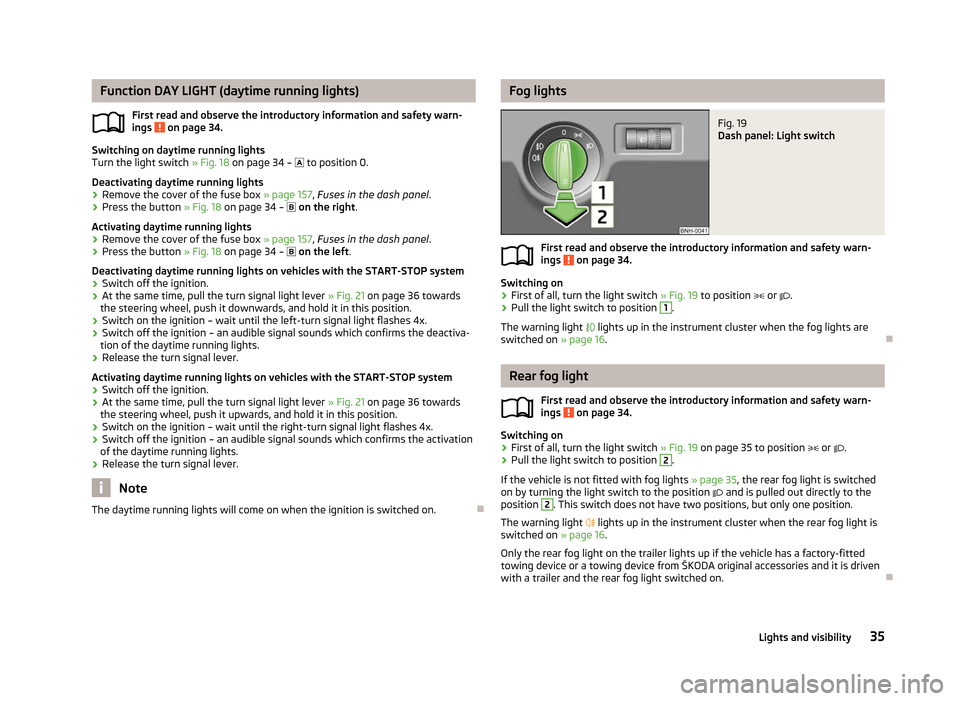
ä Fog lights
Fig. 19
Dash panel: Light switch
First read and observe the introductory information and safety warn-
ings on page 34.
Switching on
›
First of all, turn the light switch
» Fig. 19 to position or .
› Pull the light switch to position 1
.
The warning light lights up in the instrument cluster when the fog lights are
switched on » page 16. Ð Rear fog light
First read and observe the introductory information and safety warn-
ings on page 34.
Switching on
›
First of all, turn the light switch
» Fig. 19 on page 35 to position or .
› Pull the light switch to position 2
.
If the vehicle is not fitted with fog lights » page 35, the rear fog light is switched
on by turning the light switch to the position and is pulled out directly to the
position 2
. This switch does not have two positions, but only one position.
The warning light
lights up in the instrument cluster when the rear fog light is
switched on » page 16.
Only the rear fog light on the trailer lights up if the vehicle has a factory-fitted
towing device or a towing device from ŠKODA original accessories and it is driven
with a trailer and the rear fog light switched on. Ð
ä
ä
35
Lights and visibility
Page 39 of 180

Note
■ The turn signal system only operates when the ignition is switched on. The cor-
responding warning light or in the instrument cluster also flashes.
■ The turn signal is automatically cancelled after negotiating a curve.
■ The warning light flashes at twice its normal rate if a bulb for the turn signal
light fails. ÐParking light
First read and observe the introductory information and safety warn-
ings on page 34.
Parking light
› Switch off the ignition.
› Pull the turn signal light lever
» Fig. 21 on page 36 upwards or downwards – the
side light on the right or left side of the vehicle is switched.
Parking light on both sides
› Turn the light switch
» Fig. 18 on page 34 – into the position and lock the
vehicle. Note
■ The parking light can only be activated if the ignition is switched off.
■ If the right or left turn signal light has been switched on and the ignition is
switched off, the parking light is not automatically switched on. ÐFog lights with the function CORNER
First read and observe the introductory information and safety warn-
ings on page 34.
The fog lights with the function CORNER are designed to improve the illumination
of the surrounding area near the vehicle when turning, parking, etc. ä
ä The fog lights with the function CORNER are adjusted according to the steering
angle or after switching on the turn signal light
1)
in the following circumstances:
› the vehicle is stationary and the engine is running or it moves with a speed of
maximum 40 km/h;
› the daytime running lights are not switched on;
› the low beam is switched on;
› the fog lights are not switched on;
› no reverse gear is engaged. Ð Switches for the hazard warning light system
Fig. 22
Dash panel: Switch for hazard
warning lights
First read and observe the introductory information and safety warn-
ings on page 34.
›
Press switch
» Fig. 22 to switch the hazard warning light system on or off.
All the turn signal lights on the vehicle flash at the same time when the hazard
warning light system is switched on. The warning light for the turn signals and
the warning light in the switch also flash at the same time. The hazard warning
light system can also be operated if the ignition is switched off.
The hazard warning light system is switched on automatically if an airbag is de-
ployed in the event of an accident. Note
The hazard warning light system must be switched on if, for example:
■ you encounter a traffic congestion;
■ your vehicle breaks down or an emergency situation occurs. Ð
ä
1)
If both switch on versions are conflicting, for example if the steering wheel is turned to the left and
the right turn signal light is switched on, the turn signal light has the higher priority.
37
Lights and visibility
Page 40 of 180

Interior light
Interior lighting – version 1
Fig. 23
Interior lighting – version 1
Switching on
› Press switch A
» Fig. 23 towards the edge of the light, the symbol
appears.
Switching off
› Press the switch A
» Fig. 23 in the middle position
O.
Operating with the door contact switch
› Press switch A
» Fig. 23 towards the middle of the light, the symbol
ap-
pears.
Reading lights
› Press switch B
» Fig. 23 to switch the reading lights on or off.
If operating lights with the door contact switch is enabled (switch A
» Fig. 23 is
in position ), the light will come on when:
› the vehicle is unlocked;
› one of the doors is opened;
› or the ignition key is removed.
If operating lights with the door contact switch is enabled (switch A
is in position
), the light will turn off when:
› the vehicle is locked;
› the ignition is switched on;
› about 30 seconds after all the doors have been closed.
If a door remains open, or if the switch A
is in the position
, the interior light
goes out after 10
minutes to prevent the battery from discharging. Ð Interior lighting – version 2
Fig. 24
Interior lighting – version 2
Switching on
› Press the switch
» Fig. 24 into position .
Switching off
› Press the switch
» Fig. 24 into position 0.
Operating with the door contact switch
› Press the switch
» Fig. 24 into position .
The same principles apply for interior lighting version 2 as for » page 38, Interior
lighting – version 1 . Ð Interior lights at the rear
Fig. 25
Interior lights at the rear
Press switch » Fig. 25 to turn the light light on or off. Ð
38 Using the system
Page 42 of 180
The windshield wipers and the windshield washer system only operate if the igni-
tion is switched on.
The rear window is wiped once if the windscreen wipers are on when reverse
gear is selected.
Top up with windscreen wiper fluid
» page 132.WARNING
■ Properly maintained windscreen wiper blades are essential for clear visibility
and safe driving » page 41. ■ Do not use the windscreen washer system at low temperatures, without
heating the windscreen beforehand. Otherwise the window cleaner could
freeze on the windscreen and restrict the view to the front. CAUTION
■ In cold temperatures and during the winter, check before the journey or before
switching on the ignition that the wiper blades are not frozen to the windscreen.
If the windscreen wipers are switched on when the blades are frozen to the
windscreen, this may damage both the blades and windscreen wiper motor!
■ If the ignition is switched off while the windscreen wipers are switched on, the
windscreen wipers will continue wiping in the same mode after the ignition is
turned back on. The windscreen wipers could freeze up in cold temperatures be-
tween the time the ignition was turned off and when it was turned back on again.
■ Carefully detach frozen wiper blades from the front or rear window.
■ Remove snow and ice from the windscreen wipers before driving.
■ If the windscreen wipers are handled carelessly, there is a risk of damage to the
windscreen.
■ Replace the windscreen wiper blades once or twice a year for safety reasons.
These can be purchased from a ŠKODA Service Partner.
■ The ignition must not be switched on if the front windscreen wiper arms are fol-
ded out. The wiper blades would move back into their rest position and while do-
ing so damage the paintwork of the bonnet. Note
■ Keep the wiper blades clean. The wiper blades can become soiled with wax resi-
dues after washing in automatic vehicle wash systems » page 118.
■ On vehicles equipped with washer nozzles for the windscreen, these are heated
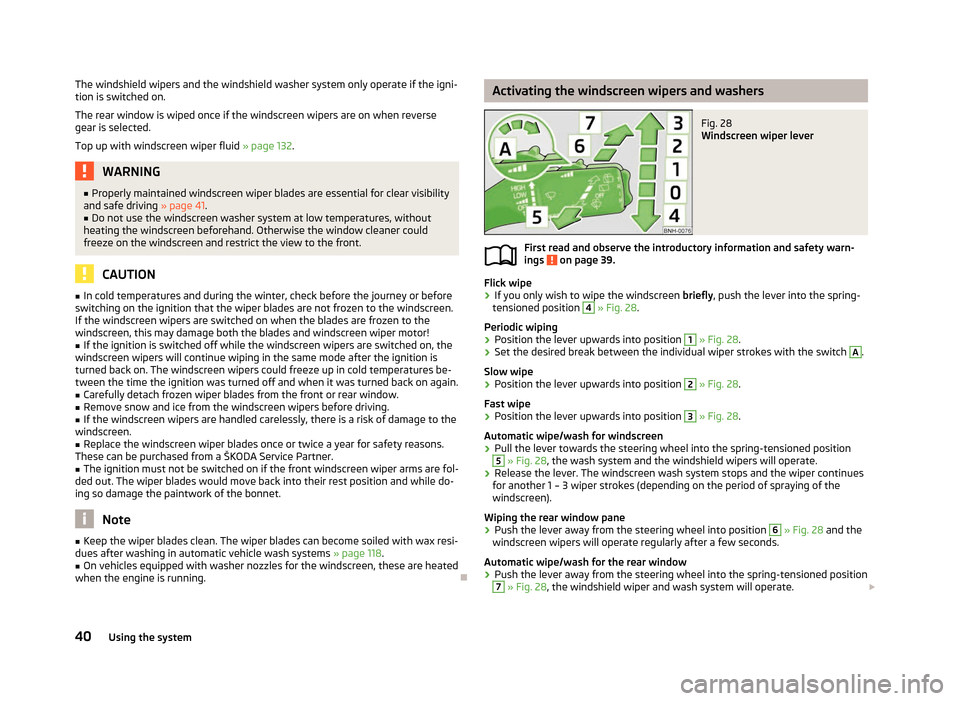
when the engine is running. Ð Activating the windscreen wipers and washers
Fig. 28
Windscreen wiper lever
First read and observe the introductory information and safety warn-
ings on page 39.
Flick wipe
› If you only wish to wipe the windscreen
briefly, push the lever into the spring-
tensioned position 4
» Fig. 28
.
Periodic wiping
› Position the lever upwards into position 1
» Fig. 28
.
› Set the desired break between the individual wiper strokes with the switch A
.
Slow wipe
› Position the lever upwards into position 2
» Fig. 28
.
Fast wipe
› Position the lever upwards into position 3
» Fig. 28
.
Automatic wipe/wash for windscreen
› Pull the lever towards the steering wheel into the spring-tensioned position 5
» Fig. 28, the wash system and the windshield wipers will operate.
› Release the lever. The windscreen wash system stops and the wiper continues
for another 1 – 3 wiper strokes (depending on the period of spraying of the
windscreen).
Wiping the rear window pane
› Push the lever away from the steering wheel into position 6
» Fig. 28 and the
windscreen wipers will operate regularly after a few seconds.
Automatic wipe/wash for the rear window
› Push the lever away from the steering wheel into the spring-tensioned position 7
» Fig. 28, the windshield wiper and wash system will operate.
£
ä
40 Using the system
Page 43 of 180
›
Release the lever. The washer system stops and the wiper continues for anoth-
er 1 to 3 wiper strokes (depending on the duration of the spraying process). The
lever will stay in position after releasing it 6
.
Switching windscreen wipers off
› Move the lever back into the home position 0
» Fig. 28
. ÐHeadlight cleaning system
First read and observe the introductory information and safety warn-
ings on page 39.
When the low beam or main beam are switched on, and the windscreen wiper
lever is pulled into the position 5
» Fig. 28
on page
40, the headlights are
sprayed briefly. To clean the headlights, the windshield is also sprayed after every
ten squirts.
You should remove stubborn dirt (such as insect residues) from the headlight len-
ses at regular intervals, for example when refuelling. The following guidelines
must be observed » page 120, Headlight lenses.
To ensure the proper operation of the cleaning system during the winter, any
snow should be removed from the washer nozzle fixtures and ice should be
cleared with a de-icing spray. CAUTION
Never remove the nozzles from the headlight cleaning system by hand – risk of
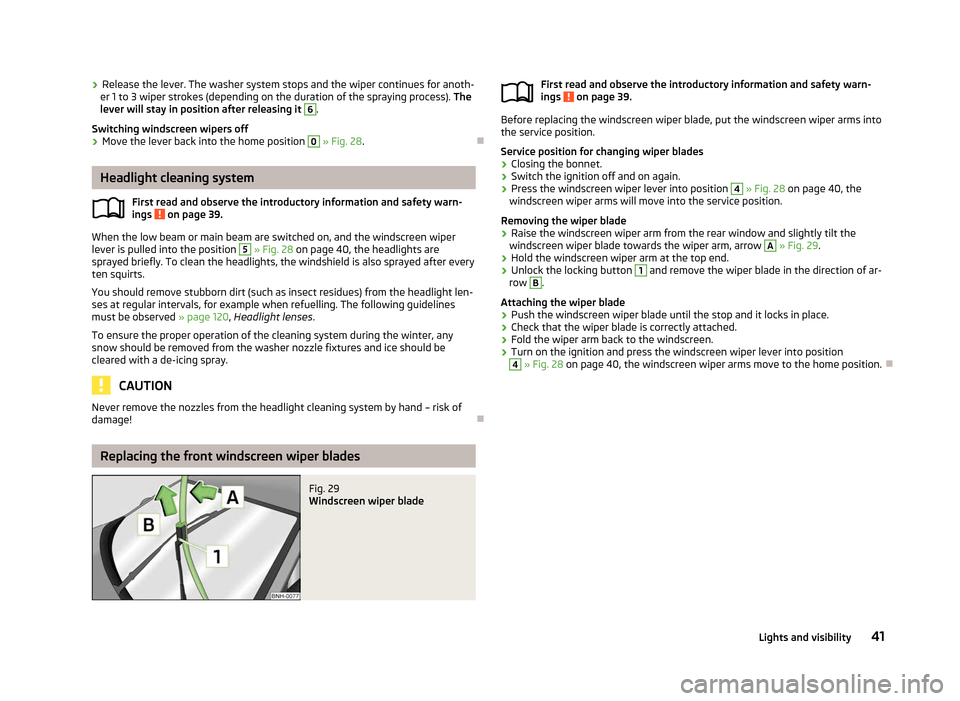
damage! ÐReplacing the front windscreen wiper blades
Fig. 29
Windscreen wiper blade
ä
First read and observe the introductory information and safety warn-
ings on page 39.
Before replacing the windscreen wiper blade, put the windscreen wiper arms into
the service position.
Service position for changing wiper blades
› Closing the bonnet.
› Switch the ignition off and on again.
› Press the windscreen wiper lever into position 4
» Fig. 28
on page
40, the
windscreen wiper arms will move into the service position.
Removing the wiper blade
› Raise the windscreen wiper arm from the rear window and slightly tilt the
windscreen wiper blade towards the wiper arm, arrow A
»
Fig. 29
.
› Hold the windscreen wiper arm at the top end.
› Unlock the locking button 1
and remove the wiper blade in the direction of ar-
row B
.
Attaching the wiper blade
› Push the windscreen wiper blade until the stop and it locks in place.
› Check that the wiper blade is correctly attached.
› Fold the wiper arm back to the windscreen.
› Turn on the ignition and press the windscreen wiper lever into position 4
» Fig. 28 on page 40
, the windscreen wiper arms move to the home position. Ð
ä
41
Lights and visibility
Page 55 of 180
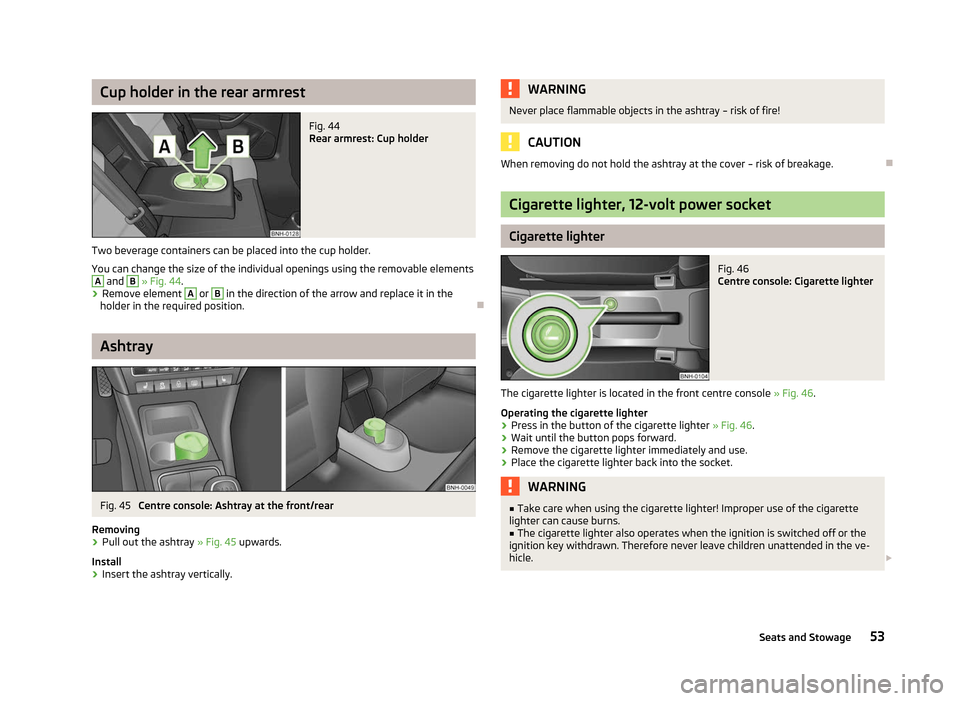
Cup holder in the rear armrest
Fig. 44
Rear armrest: Cup holder
Two beverage containers can be placed into the cup holder.
You can change the size of the individual openings using the removable elements A
and B
» Fig. 44.
› Remove element A
or B
in the direction of the arrow and replace it in the
holder in the required position. ÐAshtray
Fig. 45
Centre console: Ashtray at the front/rear
Removing › Pull out the ashtray
» Fig. 45 upwards.
Install
› Insert the ashtray vertically. WARNING
Never place flammable objects in the ashtray – risk of fire! CAUTION
When removing do not hold the ashtray at the cover – risk of breakage. Ð Cigarette lighter, 12-volt power socket
Cigarette lighter
Fig. 46
Centre console: Cigarette lighter
The cigarette lighter is located in the front centre console » Fig. 46.
Operating the cigarette lighter
› Press in the button of the cigarette lighter
» Fig. 46.
› Wait until the button pops forward.
› Remove the cigarette lighter immediately and use.
› Place the cigarette lighter back into the socket. WARNING
■ Take care when using the cigarette lighter! Improper use of the cigarette
lighter can cause burns. ■ The cigarette lighter also operates when the ignition is switched off or the
ignition key withdrawn. Therefore never leave children unattended in the ve-
hicle. £
53
Seats and Stowage
Page 56 of 180
Note
■ The cigarette lighter socket can also be used as a 12Volt socket for electrical ap-
pliances » page 54, 12-volt power socket.
■ Further information » page 144, Accessories, changes and replacement of
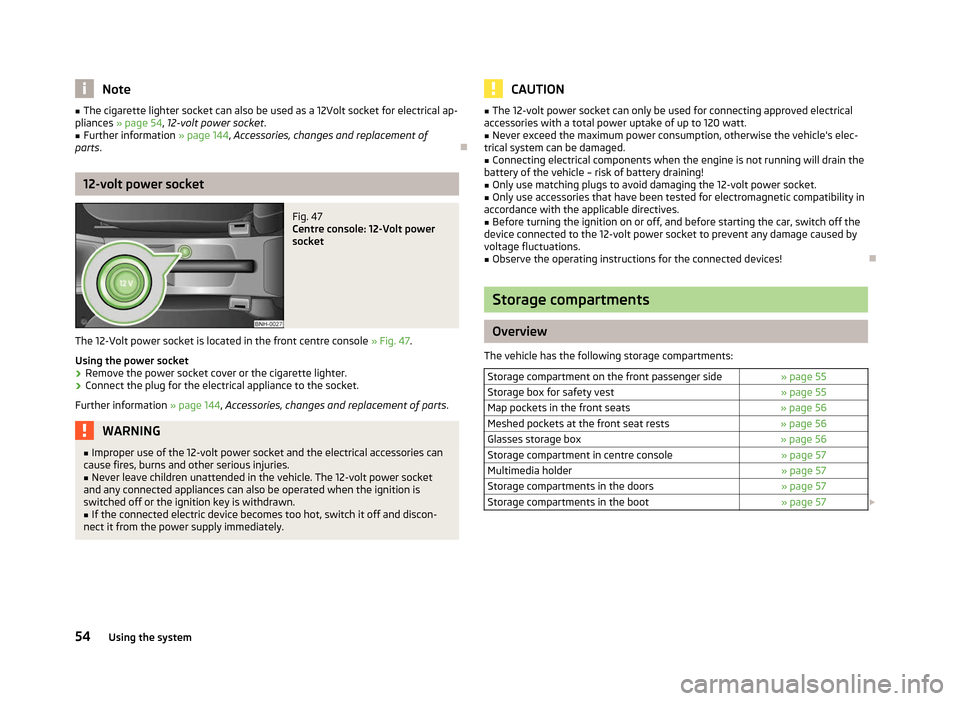
parts. Ð12-volt power socket
Fig. 47
Centre console: 12-Volt power
socket
The 12-Volt power socket is located in the front centre console » Fig. 47.
Using the power socket
› Remove the power socket cover or the cigarette lighter.
› Connect the plug for the electrical appliance to the socket.
Further information » page 144, Accessories, changes and replacement of parts .WARNING
■ Improper use of the 12-volt power socket and the electrical accessories can
cause fires, burns and other serious injuries.
■ Never leave children unattended in the vehicle. The 12-volt power socket
and any connected appliances can also be operated when the ignition is
switched off or the ignition key is withdrawn. ■ If the connected electric device becomes too hot, switch it off and discon-
nect it from the power supply immediately. CAUTION
■ The 12-volt power socket can only be used for connecting approved electrical
accessories with a total power uptake of up to 120
watt.
■ Never exceed the maximum power consumption, otherwise the vehicle's elec-
trical system can be damaged.
■ Connecting electrical components when the engine is not running will drain the
battery of the vehicle – risk of battery draining!
■ Only use matching plugs to avoid damaging the 12-volt power socket.
■ Only use accessories that have been tested for electromagnetic compatibility in
accordance with the applicable directives.
■ Before turning the ignition on or off, and before starting the car, switch off the
device connected to the 12-volt power socket to prevent any damage caused by
voltage fluctuations. ■ Observe the operating instructions for the connected devices! Ð Storage compartments
Overview
The vehicle has the following storage compartments: Storage compartment on the front passenger side » page 55
Storage box for safety vest » page 55
Map pockets in the front seats » page 56
Meshed pockets at the front seat rests » page 56
Glasses storage box » page 56
Storage compartment in centre console » page 57
Multimedia holder » page 57
Storage compartments in the doors » page 57
Storage compartments in the boot » page 57£54
Using the system
Page 68 of 180

Recirculated air mode
Switch cooling system on/off
Note
The interior temperature sensor 11
» Fig. 61
is located in the bottom part of the
device. Do not stick anything on or cover the sensor, otherwise it could have an
unfavourable effect on the Climatronic. ÐAutomatic mode
The automatic mode is used in order to maintain a constant temperature and to
demist the windows in the interior of the car.
Switching on
› Set a temperature between +18 °C and +29
℃.
› Move the air outlet vents
3 and 4 » Fig. 58 on page 60 so that the air flow is
directed slightly upwards.
› Press the button
AUTO 12
» Fig. 61 on page 65
; AUTO is shown in the display.
Automatic mode is switched off by pressing one of the buttons for the air distri-
bution or by increasing/decreasing the blower speed. The temperature is never-
theless regulated. ÐSetting temperature
› The required interior temperature can be set with the control dial 1
» Fig. 61
on page 65 after switching on the ignition.
The interior temperature can be set between +18 °C and +29 ℃. The interior tem-
perature is regulated automatically within this range. If you select the tempera-
ture below +18 ℃, “LO
” appears in the display. If you select the temperature high-
er than +29 ℃, “HI” appears in the display. In both limit positions the Climatronic
operates at maximum cooling or heating capacity, respectively. The temperature
is not controlled in this case.
Lengthy and uneven distribution of the air flow out of the vents (especially
around the feet) and large differences in temperature, for example, when getting
out of the vehicle, can cause susceptible individuals to catch a cold. Ð17
18 Recirculated air mode
Recirculated air mode prevents polluted air outside the vehicle from getting into
the vehicle, for example when driving through a tunnel or when standing in a
traffic jam.
Switching on
› Press the button
17
» Fig. 61 on page 65
; the symbol appears in the dis-
play.
Switching off
› Press the button
17
» Fig. 61 on page 65
again and the symbol disap-
pears from the display. WARNING
Do not leave recirculated air mode on over a longer period of time, as “stale”
air can cause fatigue of the driver and passengers, reduce attention levels and
also cause the windows to mist up. The risk of having an accident increases.
Switch off recirculated air mode as soon as the windows start to mist up. Note
If recirculated air mode is switched on for around 15 minutes, the symbol will
begin to flash in the display as a sign that the recirculated air mode is switched on
long-term. If the recirculated air mode is not switched off, the symbol flashes for
around 5 minutes. Ð Controlling blower
The Climatronic system controls the blower stages automatically in line with the
interior temperature. However, the blower stages can be manually adapted to
suit your particular needs.
› Turn the control dial 10
» Fig. 61 on page 65 to the left (reduce blower speed) or
right (increase blower speed).
If the blower is switched off, the Climatronic system is switched off. £
66 Using the system
Page 70 of 180

Starting-off and Driving
Starting and stopping the engine
ä
Introduction
This chapter contains information on the following subjects:
Adjusting the steering wheel position 69
Power steering 69
Electronic immobiliser 69
Ignition lock 70
Starting engine 70
Switching off the engine 70
WARNING
■ Never adjust the steering wheel when the vehicle is moving only when the
vehicle is stationary!
■ Maintain a distance of 25 cm 1
to the steering wheel
» Fig. 62 on page 69
– . Not maintaining this minimum distance will mean that the airbag system
will not be able to properly protect you – hazard!
■ The lever for adjusting the steering wheel must be locked whilst driving so
that the position of the steering wheel cannot accidently change during the
journey – risk of accident!
■ If the steering wheel is adjusted further towards the head, the protection
provided by the driver airbag in the event of an accident is reduced. Check
that the steering wheel is aligned to the chest. ■ When driving, hold the steering wheel with both hands firmly on the outer
edge in the 9 o'clock and 3
o'clock position. Never hold the steering wheel in
the 12 o'clock position or in any other way (e.g. in the middle or inner edge of
the steering wheel). In such cases, you could severely injure the arms, hands
and head when the driver airbag is deployed.
■ When driving, the ignition key must always be in the position 2
» Fig. 63 on
page 70 (ignition switched on) without the engine running. This position is
indicated by the warning lights coming on. If this is not the case, it could result
in unexpected locking of the steering wheel – risk of accident! WARNING (Continued)
■ Only pull the ignition key from the ignition lock when the vehicle has come
to a complete stop (by applying the handbrake). Otherwise the steering wheel
could block – risk of accident!
■ When leaving the vehicle, the ignition must always be removed. This is par-
ticularly important if children are left in the vehicle. Otherwise the children
could, for example, start the engine – risk of accident or injury!
■ Never leave the engine running in unventilated or closed rooms. The ex-
haust gases of the engine contain besides the odorless and colourless carbon
monoxide a poisonous gas – hazard! Carbon monoxide can cause uncon-
sciousness and death. ■ Never leave the vehicle unattended with the engine running.
■ Never switch off the engine before the vehicle is stationary – risk of acci-
dent! CAUTION
■ You will place great stresses on the power steering system if the steering is
turned to full lock when the vehicle is stationary. Turning the steering to full lock
in such a situation will be accompanied by noises. Never leave the steering wheel
at full lock for more than 15
seconds when the engine is running – risk of damag-
ing the power steering!
■ The starter may only be operated (ignition key position 3
» Fig. 63 on
page 70), if the engine is not running. The starter or engine can be damaged if
the starter is activated when the engine is running. ■ Let go of the ignition key as soon as the engine starts otherwise the starter
could be damaged. ■ Avoid high engine revolutions, full throttle and high engine loads as long as the
engine has not yet reached its operating temperature – risk of damaging the en-
gine!
■ Do not tow start the engine – danger of damaging the engine! On vehicles with
a catalytic converter, unburnt fuel may get into the catalytic converter where it
may ignite. This in turn may damage the catalytic converter. The battery from an-
other vehicle can be used as a jump-start aid » page 152, Jump-starting.
■ Do not switch the engine off immediately at the end of your journey after the
engine has been operated over a prolonged period at high loads but leave it to
run at an idling speed for about 1
minute. This prevents any possible accumulation
of heat when the engine is switched off. £
68 Using the system
Page 71 of 180

For the sake of the environment
Do not warm up the engine while the vehicle is stationary. If possible, start your
journey as soon as the engine has started. Through this the engine reaches its
operating temperature more rapidly and the pollutant emissions are lower. Note
■ The engine can only be started with a genuine ŠKODA key with the matching
code. ■ The engine running noises may louder at first be louder for a short time after
starting the cold engine. This is quite normal and is not an operating problem. ■ After switching off the ignition, the radiator fan can intermittently continue to
operate for approx. 10
minutes.
■ If the engine does not start up after a second attempt, the fuse for the fuel
pump may have a fault. Check the fuse and replace, if necessary » page 157,
Fuses in the dash panel
or seek assistance from a ŠKODA specialist garage.
■ We recommend locking the steering wheel
whenever leaving the vehicle. This
acts as a deterrent against the attempted theft of your car. ÐAdjusting the steering wheel position
Fig. 62
Adjustable steering wheel: Lever below the steering column/safe
distance to the steering wheel
First read and observe the introductory information and safety warn-
ings on page 68.
The height and forward/back position of the steering wheel can be adjusted.
›
First of all adjust the driver's seat
» page 44, Front seats.
› Pull the lever below the steering wheel down
» Fig. 62 – .
ä ›
Adjust the steering wheel to the desired position (with regard to the height and
forward/back position).
› Push the lever upwards to the stop. Ð Power steering
First read and observe the introductory information and safety warn-
ings on page 68.
The power steering enables you to steer the vehicle with less physical force.
It is still possible to fully steer the vehicle if the power steering fails or if the en-
gine is not running (vehicle being towed in). However, greater physical effort is
required to turn the steering wheel. Ð Electronic immobiliser
First read and observe the introductory information and safety warn-
ings on page 68.
An electronic chip is integrated in the head of the key. The immobiliser is deacti-
vated with the aid of this chip when the key is inserted in the ignition lock. The
electronic immobiliser is automatically activated when the ignition key is with-
drawn from the lock.
The engine will not start if a non-authorized ignition key is used.
The following is displayed in the information display: Immobilizer active. Ð
ä
ä
69
Starting-off and Driving