maxi dot SKODA RAPID 2013 1.G Owner's Guide
[x] Cancel search | Manufacturer: SKODA, Model Year: 2013, Model line: RAPID, Model: SKODA RAPID 2013 1.GPages: 226, PDF Size: 15.16 MB
Page 32 of 226
Before the next service interval is reached, a message concerning the kilometres
and days remaining until the next service is due is shown for about 10 seconds
after the ignition is switched on. Alternatively, this information can be displayed
manually at any time if required.
The kilometre indicator or the days indicator reduces in steps of 100 km or, where
applicable, days until the service due date is reached.
Note
■ Information is retained in the Service Interval Display even after the vehicle bat-
tery is disconnected.■
If the instrument cluster is exchanged after a repair, the correct values must be
entered in the counter for the Service Interval Display. This work is carried out by a specialist garage.
■
In certain national versions, the displays appear with Imperial values.
■
For more information on the service intervals, see » page 147, Service intervals .
Prompt in the segment display
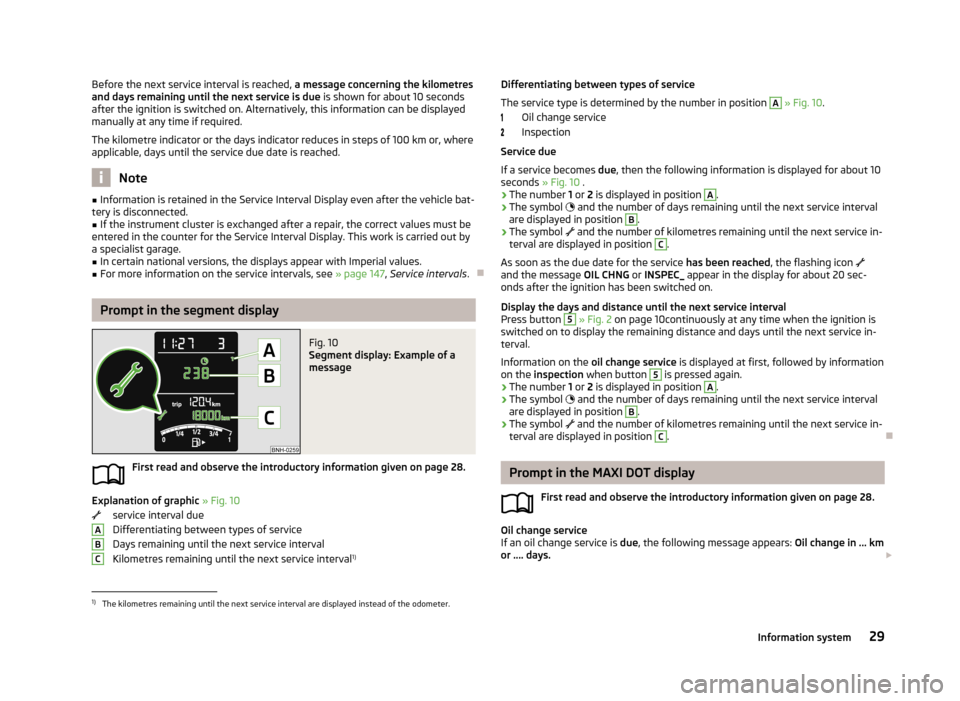
Fig. 10
Segment display: Example of a
message
First read and observe the introductory information given on page 28.
Explanation of graphic » Fig. 10
service interval due
Differentiating between types of service Days remaining until the next service interval
Kilometres remaining until the next service interval 1)
ABCDifferentiating between types of service
The service type is determined by the number in position A
» Fig. 10 .
Oil change service
Inspection
Service due
If a service becomes due, then the following information is displayed for about 10
seconds » Fig. 10 .
› The number
1 or 2 is displayed in position
A
.
› The symbol
and the number of days remaining until the next service interval
are displayed in position
B
.
› The symbol
and the number of kilometres remaining until the next service in-
terval are displayed in position
C
.
As soon as the due date for the service has been reached, the flashing icon
and the message OIL CHNG or INSPEC_ appear in the display for about 20 sec-
onds after the ignition has been switched on.
Display the days and distance until the next service interval
Press button
5
» Fig. 2 on page 10continuously at any time when the ignition is
switched on to display the remaining distance and days until the next service in- terval.
Information on the oil change service is displayed at first, followed by information
on the inspection when button
5
is pressed again.
› The number
1 or 2 is displayed in position
A
.
› The symbol
and the number of days remaining until the next service interval
are displayed in position
B
.
› The symbol
and the number of kilometres remaining until the next service in-
terval are displayed in position
C
.
Prompt in the MAXI DOT display
First read and observe the introductory information given on page 28.
Oil change service
If an oil change service is due, the following message appears: Oil change in ... km
or .... days.
1)
The kilometres remaining until the next service interval are displayed instead of the odometer.
29Information system
Page 33 of 226
As soon as the service interval date has been reached, the message Oil change
now! appears once the ignition has been switched on.
Inspection
If an inspection is due, the following message appears: Inspection in ... km or ...
days.
As soon as the service interval date has been reached, the message Inspection
now! appears once the ignition has been switched on.
Displaying the distance and days until the next service interval You can view the remaining distance and days until the next service appointmentat any time when the ignition is switched on by going to the Settings menu
item » page 28 or from the vehicle status in the main menu of the Maxi DOTdis-
play. » page 28
The following message is displayed for 10 seconds. Oil change ... km / ... days
Inspection ... km / ... days
30Using the system
Page 44 of 226
Lights and visibility
Lights
Introduction
This chapter contains information on the following subjects:
Parking light and low beam
41
Daytime running lights(DAY LIGHT)
42
Turn signal and main beam
43
Fog lights
43
Fog lights with CORNER function
43
Rear fog light
44
Hazard warning light system
44
Parking light
45
Unless otherwise stated, the lights only work when the ignition is switched on.
On models fitted with right-hand steering, the position of some of the controls
differs from that shown in » Fig. 21 on page 41. The symbols which mark the po-
sitions of the controls are identical.
WARNING■ The activation of the lights should only be undertaken in accordance with
national legal requirements.■
The driver is always responsible for the correct settings and use of the
lights.
■
Never drive with only the side lights on! The side lights are not bright
enough to light up the road sufficiently in front of you or to be seen by other oncoming traffic. Therefore always switch on the low beam when it is dark or if visibility is poor.
NoteThe headlights may mist up temporarily. When the driving lights are switched on,
the light outlet surfaces are free from mist after a short period, although the
headlight lenses may still be misted up in the peripheral areas. This mist has no
influence on the life of the lighting system.
Parking light and low beam
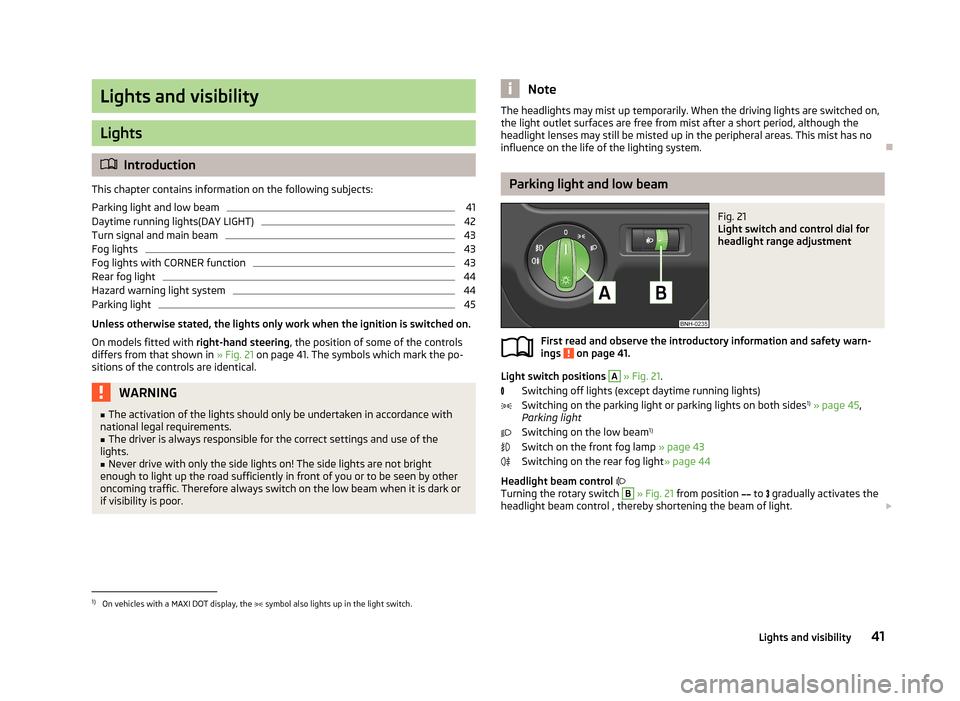
Fig. 21
Light switch and control dial for
headlight range adjustment
First read and observe the introductory information and safety warn-
ings on page 41.
Light switch positions
A
» Fig. 21 .
Switching off lights (except daytime running lights) Switching on the parking light or parking lights on both sides 1)
» page 45 ,
Parking light
Switching on the low beam 1)
Switch on the front fog lamp » page 43
Switching on the rear fog light » page 44
Headlight beam control
Turning the rotary switch
B
» Fig. 21 from position
to
gradually activates the
headlight beam control , thereby shortening the beam of light.
1)
On vehicles with a MAXI DOT display, the
symbol also lights up in the light switch.
41Lights and visibility
Page 48 of 226
Parking lightFirst read and observe the introductory information and safety warn-
ings
on page 41.
Parking light switching on
›
Switch off the ignition.
›
Place the control lever into position
A
or
B
as far as it can go » Fig. 22 on
page 43 - the parking light on the right/left-hand side of the vehicle is switched
on.
Switching on the side light on both sides
›
Turn the light switch
A
to position » Fig. 21 on page 41 and lock the vehicle.
Note
■
The parking light can only be activated if the ignition is switched off.■If the right or left turn signal light has been switched on and the ignition is
switched off, the parking light is not automatically switched on.■
On vehicles with a MAXI DOT display, the symbol in the light switch also
lights up when the two-sided parking light is switched on.
Interior lighting
Front interior lighting – version 1
Fig. 25
Front interior lighting – version 1
Slide switch positions
A
» Fig. 25 .
switching on
switching off (middle position)
Control with the door contact switch
Switch for reading light B » Fig. 25
Switch the reading light on/off
If light operation with the door contact switch is enabled, the light will come on
when one of the following events occurs:
› The vehicle is unlocked.
› One of the doors is opened.
› The ignition key is removed.
If light operation with the door contact switch is enabled, the light will go off
when one of the following events occurs:
› The vehicle is locked.
› The ignition is switched on.
› About 30 seconds after all the doors have been closed.
Note
If the interior light remains switched on when the ignition is switched off or if one
of the doors is open, the light will automatically go out after around 10 minutes.
Interior lighting – version 2
Fig. 26
Interior lighting – version 2
Slide switch positions » Fig. 26 .
switching on
switching off
control using the door contact switch (middle position)
The same principles apply for interior lighting version 2 as for » page 45, Front in-
terior lighting – version 1 .
45Lights and visibility
Page 88 of 226
Communication and multimedia
Universal telephone installation GSM II
Introduction
This chapter contains information on the following subjects:
Introductory information
85
Phone Phonebook
86
Control telephone from the multifunction steering wheel - Version 1
86
Control telephone from the multifunction steering wheel - Version 2
87
Symbols in the display
88
Connecting the mobile phone to the hands-free system
88
Telephone operation in the MAXI DOT display
89
ŠKODA permits the operation of mobile phones and two-way radio systems with
a professionally installed external aerial and a maximum transmission power of
up to 10 watts.
Please consult a ŠKODA Partner for information about the possibility of installing and operating mobile phones and two-way radio systems with a transmission power of more than 10 W.
Operating mobile phones or two-way radio systems may interfere with the func-
tionality of the electronic systems in your vehicle.
The reasons for this are as follows:
› no external aerial;
› external aerial incorrectly installed;
› transmission power greater than 10 watts.
WARNING■
Concentrate fully at all times on your driving! As the driver, you are fully re-
sponsible for the operation of your vehicle.■
The national regulations for using a mobile phone in a vehicle must be ob-
served.
WARNING (Continued)■ If a mobile phone or a two-way radio system is operated in a vehicle without
an external aerial or an external aerial which has been installed incorrectly,
this can increase the strength of the electromagnetic field inside the vehicle.■
Two-way radio systems, mobile phones or mounts must not be installed on
airbag covers or within the immediate deployment range of the airbags.
■
Never leave a mobile phone on a seat, on the dash panel or in any area
where it can become a projectile during a sudden braking manoeuvre, an acci-
dent or a collision — risk of injury.
■
The Bluetooth ®
function must be switched off by a specialist company be-
fore the vehicle can be transported by air.
Note
■ We recommend that the installation of mobile phones and two-way radio sys-
tems in a vehicle be carried out by a specialist garage.■
Not all mobile phones that enable Bluetooth ®
communication are compatible
with the universal telephone preinstallation GSM II. You can ask a ŠKODA Partner
whether your telephone is compatible with the GSM II universal telephone fitting.
■
The range of the Bluetooth ®
connection to the hands-free system is restricted
to the vehicle interior. The range is dependent on local factors, e.g. obstacles be- tween the devices and mutual interferences with other devices. If your mobilephone is in a jacket pocket, for example, this can lead to difficulties when estab-lishing a connection with the hands-free-system or transferring data.
Introductory information
First read and observe the introductory information and safety warn-
ings
on page 85.
The universal telephone preinstallation GSM II (hands-free system) includes a
convenience mode for the mobile phone via voice control, the multifunction
steering wheel, the radio or navigation system.
The universal telephone preinstallation GSM II comprises the following functions. › Phone Phonebook
» page 86.
› Convenience operation of the telephone via the multifunction steering
wheel » page 87 .
› Telephone operation in the MAXI DOT display
» page 89.
› Voice control of the telephone
» page 90.
› Music playback from the telephone or other multimedia units
» page 92.
85Communication and multimedia
Page 91 of 226
Button/adjust-ment
wheel » Fig. 82ActionOperation
2Turn upwardsIncrease the volume2Turn downwardsDecrease volumea)
Valid for vehicles with the Amundsen+ navigation system.
b)
Valid for vehicles without the Amundsen+ navigation system.
Symbols in the display
First read and observe the introductory information and safety warn-
ings
on page 85.
The following symbols are displayed in the Maxi DOT display:
SymbolMeaningCharge status of the phone battery a)Signal strengtha)a phone is connected to the hands-free system.The hands-free system is visible to other devices.A multimedia unit is connected to the hands-free system.a)
This function is only supported by some mobile phones.
Connecting the mobile phone to the hands-free system
First read and observe the introductory information and safety warn-
ings
on page 85.
To connect a mobile phone with the hands-free system, the two devices must be paired. Detailed information on this is provided in the operating instructions for
your mobile phone.
The following steps must be carried out for pairing 1)
.›
Activate Bluetooth ®
and the visibility of your mobile phone on your telephone.
›
Switch on the ignition.
›
Select the Phone - New user menu in the MAXI DOT display and wait until the
hands-free system has completed the search.
›
Select the phone you wish to connect from the list of units found.
›
Confirm the PIN 2)
.
›
If the hands-free system announces (as standard SKODA_BT) on the display of
the mobile phone, enter the PIN 2)
within 30 seconds and wait, until the connec-
tion is established 3)
.
›
To finish pairing in the MAXI DOT display, confirm the creation of the new user
profile.
If there is no free space available to create a new user profile, delete an existing
user profile.
During the connecting procedure, no other mobile phone may be connected with the hands-free system.
Up to four mobile phones can be paired with the hands-free system, whereby on- ly one mobile phone can communicate with the hands-free system.
The visibility of the hands-free system is automatically switched off 3 minutes af-
ter the ignition is switched on and is also deactivated when the mobile phone has connected to the hands-free system.
1)
On vehicles fitted with the Amundsen+ navigation system, this function can be accessed via the navi-
gation system menu; refer to the » operating instructions for the Amundsen+ navigation system .
2)
Depending on the Bluetooth®
version on the mobile phone, an automatically generated 6-digit PIN
(SSP) is either displayed, or the PIN 1234 has to be entered manually.
3)
Some mobile phones have a menu, in which the authorisation for establishing a Bluetooth ®
connec-
tion is completed by inputting a PIN number. If the authorisation input is required, it must always be
performed when re-establishing the Bluetooth connection.
88Using the system
Page 92 of 226
Restoring the visibility of the hands-free system
If you have not managed to connect your mobile phone with the hands-free sys-
tem within 3 minutes of switching on the ignition, the visibility of the hands-free
system can be re-established for 3 minutes in one of the following ways.
› By turning the ignition off and on.
› By turning voice control off and on.
› In the MAXI DOT display under menu item
Bluetooth - Visibility .
Creating a connection with an already paired mobile phone
After switching on the ignition, the connection is automatically established for
the already paired mobile phone 1)
. Check on your mobile phone if the automatic
connection has been established.
Disconnecting the connection
The connection to a connected mobile phone can be ended in the following ways. › By withdrawing the ignition key.
› By disconnecting the hands-free system in the mobile phone.
› By disconnecting from the user in the MAXI DOT display under the menu item
Bluetooth - User .
Solving connection problems
If the hands-free system reports No paired phone found, check the operating
status of the mobile phone.
› Is the mobile phone switched on?
› Is the PIN code entered?
› Is Bluetooth ®
active?
› Is the visibility of the mobile phone active?
› Has the mobile phone already been paired with the hands-free system?
Telephone operation in the MAXI DOT display
First read and observe the introductory information and safety warn-ings
on page 85.
The following menu items can be selected from the Phone menu.
› Telephone book
› Dial number 2)
› Call lists
› Voice mailbox
› Bluetooth 2)
› Settings 3)
› Back
Telephone book
The Phone book menu item lists the contacts downloaded from the telephone
memory and the mobile phone SIM card.
Dial number
Any telephone number can be entered in the Dial number menu item. The re-
quired numbers must be selected one after the other using adjustment wheel
and confirmed by pressing the adjustment wheel. You can select digits 0-9, sym-
bols
,
, # and the Cancel, Call and Delete functions.
Call lists
The following menu items can be selected in the Call list menu item.
■ Missed calls
■ Dialled numbers
■ Received calls
Voice mailbox
In the Voice mailbox menu item, you can set the number of the voice mailbox 2)
and then dial the number.
1)
Some mobile phones have a menu, in which the authorisation for establishing a Bluetooth®
connec-
tion is completed by inputting a PIN number. If the authorisation input is required, it must always be
performed when re-establishing the Bluetooth connection.
2)
On vehicles fitted with the Amundsen+ navigation system, this function can be accessed via the navi-
gation system menu; refer to the » operating instructions for the Amundsen+ navigation system .
3)
This function is not available in vehicles fitted with the Amundsen+ navigation system.
89Communication and multimedia
Page 103 of 226
Information on brakingFirst read and observe the introductory information and safety warn-
ings
on page 99.
If the brakes are applied in full and the control unit for the braking system consid-
ers the situation to be dangerous for the following traffic, the brake light flashes
automatically.
After the speed was reduced below around 10 km/h or the vehicle was stopped,
the brake light stops flashing and the hazard warning light system switches on.
The hazard warning light system is switched off automatically after accelerating
or driving off again.
Before travelling a long distance at a steep gradient, reduce speed and shift into
the next lowest gear. As a result, the braking effect of the engine will be used,
reducing the load on the brakes. Any additional braking should be completed in-
termittently, not continuously.
Wear-and-tear
The wear of the brake pads is dependent on the operating conditions and driving style.
The brake pads wear more quickly if a lot of journeys are completed in towns and
over short distances or if a very sporty style of driving is adopted.
Under these severe conditions , the thickness of the brake pads must also be
checked by a specialist garage between service intervals.
Wet roads or road salt
The performance of the brakes can be delayed as the brake discs and brake pads may be moist or have a coating of ice or layer of salt on them in winter. The
brakes are cleaned and dried by applying the brakes several times.
Corrosion
Corrosion on the brake discs and dirt on the bake pads occur if the vehicle has been parked for a long period and if you do not make much use of the braking
system. The brakes are cleaned and dried by applying the brakes several times.
Faults in the brake surface
If it is found that the braking distance has suddenly become longer and that the brake pedal can be depressed further, the brake system may be faulty.
Visit a specialist garage immediately and adjust your style of driving appropriate-
ly, as you will not know the exact extent of the damage.
Low brake fluid level
An insufficient level of brake fluid may result in problems in the brake system. The level of the brake fluid is monitored electronically » page 15, Brake system .
Brake booster
The brake booster increases the pressure generated with the brake pedal. The
brake booster only operates when the engine is running.
Handbrake
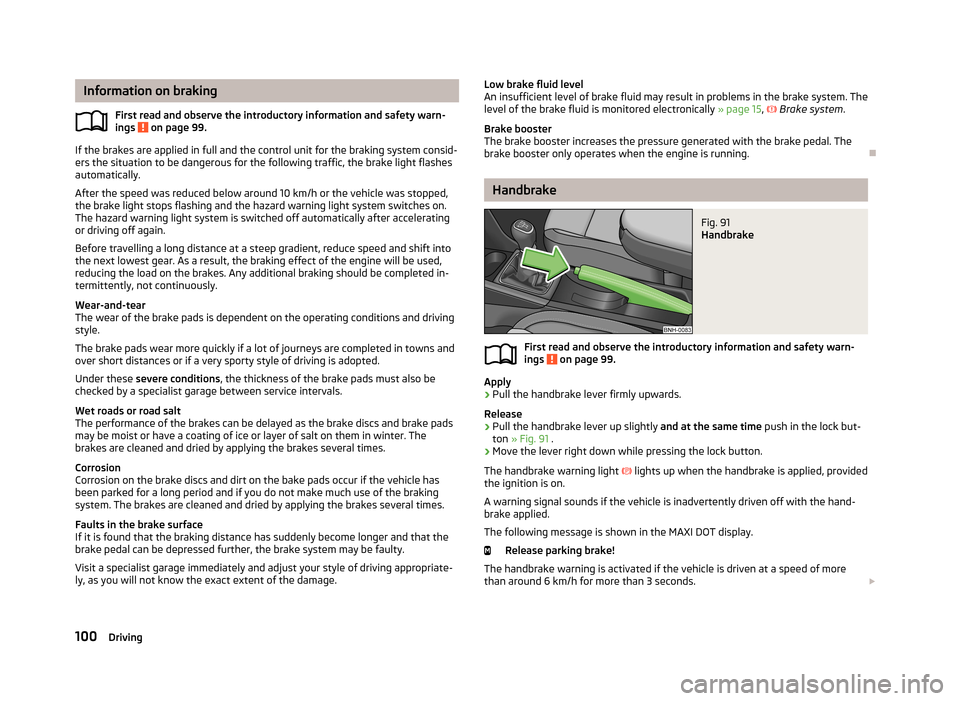
Fig. 91
Handbrake
First read and observe the introductory information and safety warn- ings on page 99.
Apply
›
Pull the handbrake lever firmly upwards.
Release
›
Pull the handbrake lever up slightly and at the same time push in the lock but-
ton » Fig. 91 .
›
Move the lever right down while pressing the lock button.
The handbrake warning light
lights up when the handbrake is applied, provided
the ignition is on.
A warning signal sounds if the vehicle is inadvertently driven off with the hand-
brake applied.
The following message is shown in the MAXI DOT display. Release parking brake!
The handbrake warning is activated if the vehicle is driven at a speed of more
than around 6 km/h for more than 3 seconds.
100Driving
Page 180 of 226
Always check the inflation pressure when the tyres are cold. Do not reduce the
higher pressure of warm tyres.
With greater additional load, adjust the tyre inflation pressure accordingly.
Driving style
Fast cornering, sharp acceleration and braking increase the wear of your tyres.
Balancing wheels
The wheels of a new vehicle are balanced. When driving, however, there are a
range of factors that may result in an imbalance. This may become apparent by a
“vibration” in the steering.
Have the wheels rebalanced after replacing the tyres.
Wheel alignment errors
Incorrect wheel alignment at the front or rear leads to excess wear of the tyres.
Tyre damage
Drive over kerbs and other such obstacles slowly and at right angles wherever
possible in order to avoid damage to tyres and wheel trims.
We recommend checking your tyres and wheel rims for damage (punctures, cuts,
splits and bulges, etc.) on a regular basis. Remove foreign bodies (e.g. small
stones) from the tyre tread immediately.
Replacing wheels
If significantly greater wear is present on the front tyres, we recommend replac-
ing the front wheels with the rear wheels as shown in the diagram » Fig. 142 . You
will then obtain approximately the same life for all the tyres.
We recommend that you swap the tyres every 10,000 km in order to achieve even wear on all tyres and to ensure optimal service life for the tyres.
Storing tyres
Identify disassembled tyres so that the previous direction of rotation can be maintained if the tyres are reassembled.
Always store wheels or tyres in a cool, dry place that is as dark as possible. Tyres
which are not fixed to a wheel trim should be stored upright.
Wear indicators
The base of the tread of the tyres has 1.6 mm high wear indicators installed.
These wear indicators are evenly spaced around the circumference of the tyre, depending on the make » Fig. 141 -
. Markings on the walls of the tyres through
the letters “TWI”, triangular symbols or other symbols identify the position of the
wear indicators.Tyre age
Tyres age and lose their original characteristics, even if they are not being used.
Therefore, we recommend not using summer or winter tyres older than 6 or 4
years old respectively.
New tyres
First read and observe the introductory information and safety warn-
ings
on page 175.
Only use radial tyres of the same type, size (rolling circumference) and tread pat-
tern on one axle on all four wheels.
The tyre/wheel combinations which are approved for your vehicle are indicated in
your vehicle documents.
Where possible, replace tyres by axle. Always fit the tyres with the deeper tread
depth to the front wheels.
Explanation of tyre markings
195/55 R 15 85 H
What this means is:
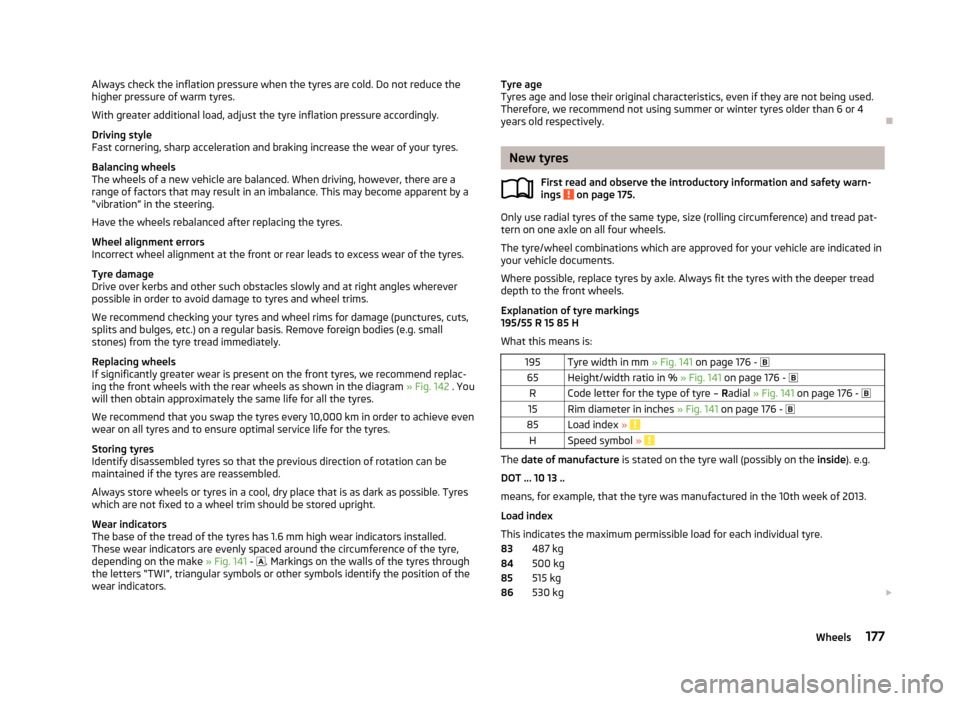
195Tyre width in mm » Fig. 141 on page 176 - 65Height/width ratio in % » Fig. 141 on page 176 - RCode letter for the type of tyre – Radial » Fig. 141 on page 176 - 15Rim diameter in inches » Fig. 141 on page 176 - 85Load index » HSpeed symbol »
The date of manufacture is stated on the tyre wall (possibly on the inside). e.g.
DOT ... 10 13 ..
means, for example, that the tyre was manufactured in the 10th week of 2013.
Load index
This indicates the maximum permissible load for each individual tyre. 487 kg
500 kg
515 kg
530 kg
83848586177Wheels
Page 184 of 226
Winter tyresFirst read and observe the introductory information given on page 180.
Fitting winter tyres will significantly improve the handling of your vehicle whendriving in wintry road conditions. Summer tyres have less grip on ice, snow and attemperatures below 7 °C. This is especially true of vehicles fitted with wide tyres
or high-speed tyres .
In order to achieve the best possible handling properties, winter tyres must be fit-
ted on all four wheels, the minimum tread depth must be 4 mm and tyres must be
no older than 4 years.
Winter tyres of a lower speed category can be used provided that the permissible
maximum speed of these tyres is not exceeded even if the possible maximum
speed of the vehicle is higher.
The speed limit for winter tyres can be set in the MAXI DOT display in the menu
item Winter tyres » page 28 .
For the sake of the environment
Fit the summer tyres on again in good time as they provide better handling prop-
erties, a shorter braking distance, less tyre noise, and reduced tyre wear on roadswhich are free of snow and ice as well as at temperatures above 7 °C. The fuel
consumption is also lower.
Snow chains
First read and observe the introductory information given on page 180.
When driving in wintry road conditions, snow chains improve not only traction,but also the braking performance.
Snow chains must only be mounted on the front wheels.
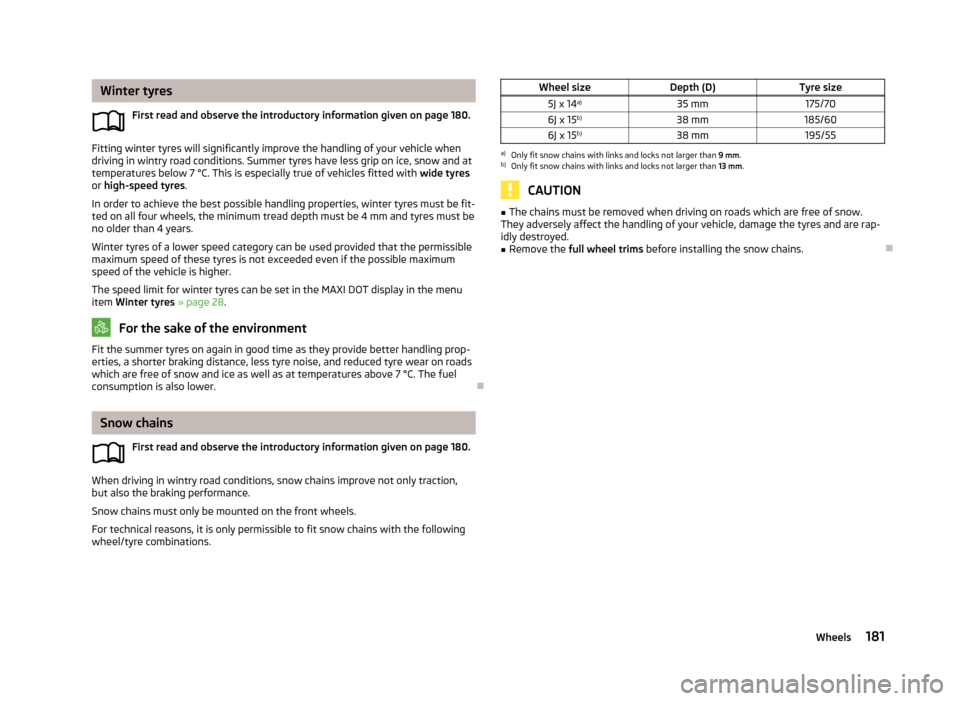
For technical reasons, it is only permissible to fit snow chains with the following wheel/tyre combinations.
Wheel sizeDepth (D)Tyre size5J x 14 a)35 mm175/706J x 15 b)38 mm185/606J x 15b)38 mm195/55a)
Only fit snow chains with links and locks not larger than
9 mm.
b)
Only fit snow chains with links and locks not larger than 13 mm.
CAUTION
■
The chains must be removed when driving on roads which are free of snow.
They adversely affect the handling of your vehicle, damage the tyres and are rap-
idly destroyed.■
Remove the full wheel trims before installing the snow chains.
181Wheels