warning SKODA RAPID 2013 1.G Manual PDF
[x] Cancel search | Manufacturer: SKODA, Model Year: 2013, Model line: RAPID, Model: SKODA RAPID 2013 1.GPages: 226, PDF Size: 15.16 MB
Page 115 of 226
The TCS should normally always be enabled. The system should be deactivated
only in the following situations, for example.
› When driving with snow chains.
› When driving in deep snow or on a very loose surface.
› When “rocking a car free” when it has become stuck.
Ensure the TCS is activated again afterwards.
Antilock Braking System (ABS)
First read and observe the introductory information and safety warn-
ings
on page 111.
ABS prevents the wheels locking when braking. Thus helping the driver to main-
tain control of the vehicle.
The intervention of the ABS is noticeable from the pulsating movements of the
brake pedal which is accompanied by noises.
When the ABS system is active, do not brake periodically or reduce the pressure
on the brake pedal.
Traction Control System (TCS)
First read and observe the introductory information and safety warn-
ings
on page 111.
If the wheels are slipping, the TCS adapts the engine speed to the conditions of
the road surface. The TCS makes it much easier to start off, accelerate and climb
steep hills even if the conditions of the road surface are unfavourable.
The TCS function is activated automatically each time the ignition is switched on.
If your vehicle is fitted with the ESC system, the ASR is integrated into the ESC
system » page 111 .
During an intervention of the system, the TCS warning light 1)
flashes in the in-
strument cluster.
Electronic Differential Lock (EDL)
First read and observe the introductory information and safety warn-
ings
on page 111.
If one of the wheels starts to spin, the EDL system brakes the spinning wheel and transfers the driving force to the other wheels. This ensures the stability of the
vehicle and a quick journey.
The EDL switches off automatically in order to avoid excessive heat generation
on the brake of the wheel being braked. The vehicle can continue to be driven
and has the same characteristics as a vehicle not fitted with EDL. The EDL
switches on again automatically as soon as the brake has cooled down.
Hydraulic Brake Assist (HBA)
First read and observe the introductory information and safety warn-ings
on page 111.
The HBA increases the braking effect and helps to reduce the braking distance.
The HBA is activated by the very quick operation of the brake pedal. In order to
achieve the shortest possible braking distance, the brake pedal must be applied
firmly until the vehicle has come to a standstill.
The HBA function is automatically deactivated when the brake pedal is released.
The ABS is activated faster and more effectively with the intervention of the HBA.
Hill Hold Control (HHC)
First read and observe the introductory information and safety warn-ings
on page 111.
When driving on slopes, HHC allows you to move your foot from the brake pedal
to the accelerator pedal without having to use the handbrake.
The system holds the brake pressure produced by the activation of the brakepedal for approx. 2 seconds after the brake pedal is released.
1)
Valid for vehicles without Electronic Stability Control (ESC).
112Driving
Page 116 of 226
The brake pressure drops gradually the more you operate the accelerator pedal. Ifthe vehicle does not start off within 2 seconds, it starts to roll back.
The HHC is active from a 5% slope if the driver's door is closed. HHC is only ever active on slopes when in forward or reverse start off. When driving downhill, it isinactive.
Parking aid
Introduction
This chapter contains information on the following subjects:
Function
113
Activation/deactivation
114WARNING■ The parking aid is not a substitute for the driver paying proper attention and
it is always the driver's responsibility to take care when reversing the vehicle
or carrying out similar manoeuvres. Pay particular attention to small children
and animals as they may not be recognised by the system sensors.■
Before reversing, you should make sure that there are no small obstacles,
such as rocks, thin posts, trailer drawbars etc. behind your vehicle. Such ob-
stacles may not be recognised by the system sensors.
■
Under certain circumstances, surfaces of certain objects and types of cloth-
ing cannot reflect the system signals. Thus, these objects or people who wear
such clothing are not recognised by the System sensors.
■
External sound sources can have a detrimental effect on the system. Under
adverse conditions, this may cause objects or people to not be recognised by
the system.
CAUTION
■ If a continuous tone sounds for about 3 seconds after activating the system and
there is no obstacle close to your car, this indicates a system fault. Have the fault
rectified by a specialist garage.■
The sensors must be kept clean (free of ice, etc.) to enable the system to oper-
ate properly.
■ The system function may be limited under adverse weather conditions (heavy
rain, water vapour, very low or high temperatures etc.).■
Additionally installed modules such as bicycle carriers can impair the function of
the parking aid.
Function
Fig. 101
Range of sensors
First read and observe the introductory information and safety warn-
ings on page 113.
The parking aid (hereafter referred to solely as system) only works when the igni- tion is switched on.
The system supports the driver via audible signals and the display on the radio or
the factory-installed navigation system when parking and manoeuvring » Radio
user guide, Navigation system user guide.
The system uses ultrasound waves to calculate the distance between the bumper
and an obstacle. The ultrasonic sensors are integrated in the rear bumper.
Explanation of graphic - range of sensors in the vicinity of the vehicle
Range » Fig. 101Range of sensors a)A160 cmB60 cma)
These are only the approximate ranges of sensors.
The interval between the acoustic signals becomes shorter as the clearance is re- duced. A continuous tone sounds from a distance of approx. 30 cm - danger area.
From this moment on do not continue reversing!
113Assist systems
Page 117 of 226
The length of the vehicle can be increased with an installed detachable towing
device. The danger area thus begins at a distance of around 35 cm on vehicles
equipped with a factory-fitted towing device.
Activation/deactivation
First read and observe the introductory information and safety warn-
ings
on page 113.
The system is activated automatically by engaging the reverse gear. This is con-
firmed by a brief audible signal.
The system is deactivated by disengaging reverse gear.
Note
For vehicles with a factory-fitted towing device, the system cannot be activated
when towing a trailer.
Cruise Control System
Introduction
This chapter contains information on the following subjects:
Activating/deactivating
115
Storing and maintaining speed
115
Changing the stored speed
115
Switching off temporarily
115
The Cruise Control System (CCS) maintains a set speed, more than 25 km/h, with-
out you having to actuate the accelerator pedal.
This is only possible within the range which is permitted by the power output and
braking power of the engine.
The warning light
illuminates in the instrument cluster when the cruise control
system is switched on.
WARNING■ For safety reasons, the cruise control system must not be used in dense
traffic or on unfavourable road surfaces (such as icy roads, slippery roads,
loose gravel) – risk of accident!■
The saved speed may only be resumed if it is not too high for the current
traffic conditions.
■
Always deactivate the cruise control system after use to prevent the system
being switched on unintentionally.
CAUTION
■ The cruise control system is not able to maintain a constant speed when driving
in areas with steeper gradients. The weight of the vehicle increases the speed at which it travels. In such cases, select a lower gear or brake the vehicle using the
footbrake.■
The cruise control system cannot be activated when first gear or reverse gear is
selected (vehicles with manual transmission).
■
The cruise control system cannot be activated when the selector lever is in po-
sitions P, N or R (vehicles with automatic transmission).
■
The cruise control system may automatically switch off when some brake assist
systems (e.g. ESC) intervene, when the maximum permissible engine speed is ex-
ceeded, etc.
114Driving
Page 119 of 226
START-STOP
Introduction
This chapter contains information on the following subjects:
Starting/shutting down the engine
116
Operating conditions of the system
117
Manually activating/deactivating the system
117
Information messages
118
The START-STOP system helps you to save fuel while at the same time reducing
harmful exhaust emissions and CO 2 emissions.
The function is automatically activated each time the ignition is switched on.
In the start-stop mode, the engine automatically switches to the vehicle's idle phase, e.g. when stopped at traffic lights. The engine restarts automatically
where necessary.
The system can work only if the following basic conditions are met. The driver's door is closed.
The driver has fastened the seat belt. The bonnet is closed.The driving speed was higher than 4 km/h after the last stop.
No trailer is coupled.
WARNING■ The brake servo unit and power steering only operate if the engine is run-
ning.■
Never let the vehicle roll with the engine switched off.
CAUTION
Always deactivate the START-STOP system before driving through wa-
ter » page 109 .Note■
If the driver's seat belt is removed for more than approx. 30 seconds or the driv-
er's door is opened during stop mode on vehicles with manual transmission or au- tomatic transmission (when the selector lever in position P), the engine must be
started manually.■
After manually starting the engine on vehicles with manual transmission, auto-
matic engine shut down is not possible until the vehicle has travelled the re-
quired minimum distance for START-STOP mode.
■
If, on vehicles with automatic transmission, the selector lever positions D, S or N
are selected after driving in reverse, the vehicle will first need to achieve a speed
of over 10 km/h before automatic engine shut down can take place again.
■
Changes to the outdoor temperature can have an effect on the internal temper-
ature of the vehicle battery even after several hours. If the vehicle remains out-
doors for a long time in minus temperatures or in direct sunlight, it can take sev-
eral hours until the internal temperature of the vehicle battery reaches a suitable temperature for proper operation of the START STOP system.
■
If Climatronic is running in automatic mode, the engine may not switch off auto-
matically under certain conditions.
Starting/shutting down the engine
First read and observe the introductory information and safety warn-ings
on page 116.
Vehicles with manual transmission
›
Stop the vehicle (where necessary, apply the handbrake).
›
Put the gear stick into Neutral.
›
Release the clutch pedal.
Automatic engine shut down (STOP phase) takes place. The warning symbol
appears in the instrument cluster display.
›
Depress the clutch pedal.
The automatic start procedure takes place again (START phase). The warning
symbol
goes out.
Vehicles with automatic transmission
›
Bring the vehicle to a stop and depress the brake pedal.
Automatic engine shut down takes place. The warning symbol
appears in the
instrument cluster display.
›
Release the brake pedal.
116Driving
Page 120 of 226
The automatic start procedure takes place again. The warning symbol goes
out.
Further information on automatic transmission Engine shut down takes place when the selector lever is in positions P, D , S and N
and in Tiptronic mode.
When the selector lever is in position P, the engine remains shut down even after
you release the brake pedal. Start the engine by pressing the gas pedal or by moving the selector lever into a different mode and releasing the brake pedal.
If the selector lever is moved into position R during the STOP phase , the engine
will re-start.
No automatic engine shutdown takes place when the vehicle is moving at low speed (e.g. during a traffic jam or when tuning) and remains stationary after
pressing the brake pedal lightly. Automatic engine shutdown takes place if you
press the brake pedal down with more force.
Operating conditions of the system
First read and observe the introductory information and safety warn-ings
on page 116.
The START-STOP system is very complex. Some of the procedures are hard to check without servicing.
No engine shut down is carried out
Before each STOP phase, the system checks whether certain conditions have
been met. No engine shut down takes place in the following situations.
› The engine has not reached the minimum temperature for the START STOP
mode.
› The temperature inside the vehicle has not reached the desired temperature
set in the air-conditioning system/heating.
› The external temperature is very low/high.
› The intensive windscreen heater (Climatronic) or windscreen heater/ventilation
is switched on with the maximum air temperature setting (manual air condition-
ing system).
› The parking aid is activated.
› The charge state of the vehicle battery is too low.
› The stationary vehicle is on a steep slope or a steep downhill section.
› The idling speed is too high.
› The steering angle is too large (manoeuvring).
› The selector lever position
R is selected (e.g. when parking).
The warning symbol appears in the instrument cluster display.
The automatic start procedure takes place again
During the STOP phase, the engine fires up without any active driver intervention, e.g. in the following situations.
› The vehicle begins to roll, e.g. on a slope.
› The difference between the temperature setting of the air-conditioning sys-
tem/heating and the temperature of the interior is too large.
› The intensive windscreen heater (Climatronic) or windscreen heater/ventilation
is switched on with the maximum air temperature setting (manual air condition-
ing system).
› The brake pedal was pressed several times (the pressure in the braking system
is too low).
› The charge state of the vehicle battery is too low.
› The current consumption is too high.
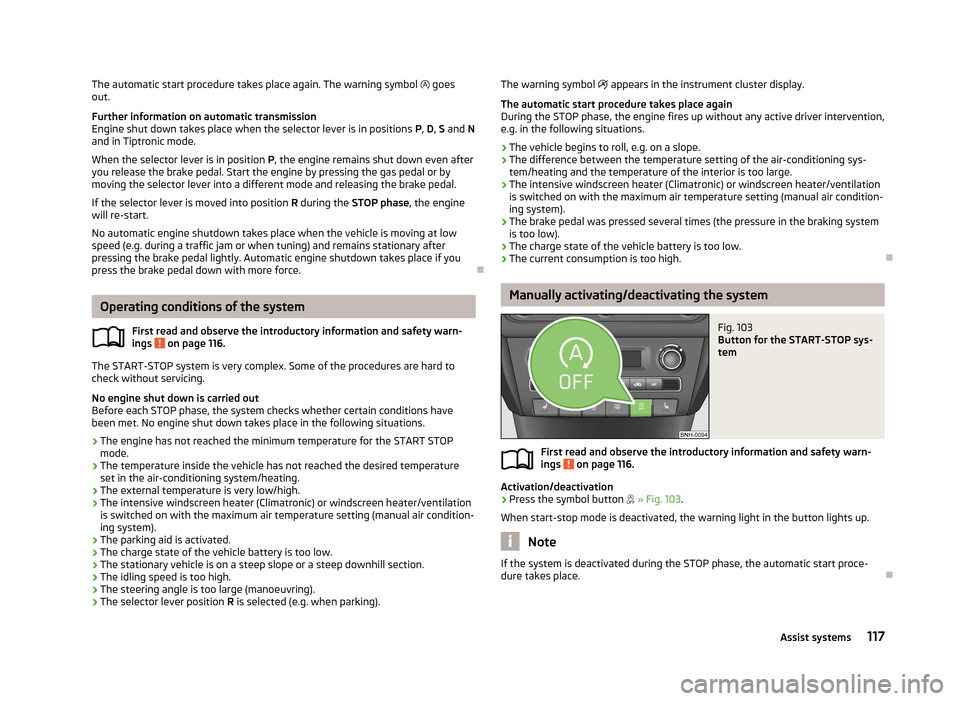
Manually activating/deactivating the system
Fig. 103
Button for the START-STOP sys-
tem
First read and observe the introductory information and safety warn-
ings on page 116.
Activation/deactivation
›
Press the symbol button
» Fig. 103 .
When start-stop mode is deactivated, the warning light in the button lights up.
Note
If the system is deactivated during the STOP phase, the automatic start proce-
dure takes place.
117Assist systems
Page 122 of 226
Towing a trailer
Towing device
Introduction
This chapter contains information on the following subjects:
Description
119
Adjusting the ready position
120
Fitting the ball head
121
Check proper fitting
121
Removing the ball head
122
Use and care
122
If your vehicle has already been factory-fitted with a towing device or is fitted
with a towing device from ŠKODA Original Accessories, then it meets all of the
technical requirements and national legal regulations for towing a trailer.
Your vehicle is fitted with a 13-pin power socket for the electrical connection be-
tween the vehicle and trailer. If the trailer that is to be towed has a 7-pin connec-
tor , you can use a suitable adapter from ŠKODA Original Accessories.
The maximum trailer drawbar load is 50 kg.
WARNING■
Check that the tow bar is seated correctly and is secured in the mounting
recess before the start of every journey.■
Do not use the tow bar if it is not correctly inserted and secured in the
mounting recess.
■
Do not use the towing device if it is damaged or if there are parts missing.
■
Do not modify or adapt the towing device in any way.
■
Never release the tow bar while the trailer is still coupled.
CAUTION
Take care when handling the tow bar so as to avoid damaging the paintwork on
the bumper.
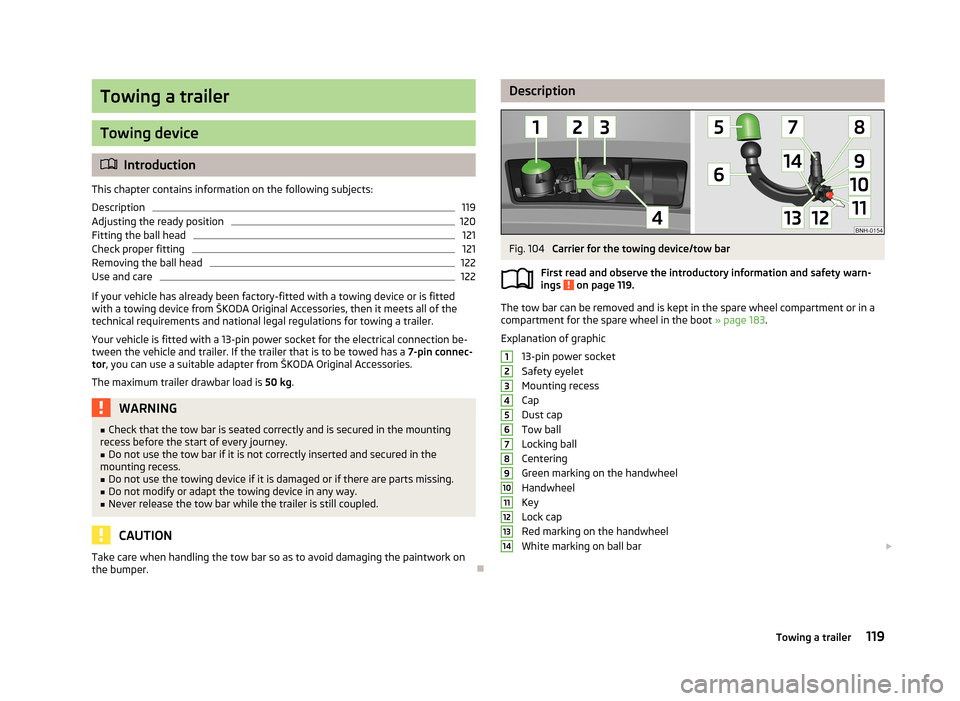
DescriptionFig. 104
Carrier for the towing device/tow bar
First read and observe the introductory information and safety warn-
ings
on page 119.
The tow bar can be removed and is kept in the spare wheel compartment or in a
compartment for the spare wheel in the boot » page 183.
Explanation of graphic 13-pin power socket
Safety eyelet
Mounting recess
Cap
Dust cap
Tow ball
Locking ball
Centering
Green marking on the handwheel
Handwheel
Key
Lock cap
Red marking on the handwheel
White marking on ball bar
1234567891011121314119Towing a trailer
Page 123 of 226
NoteOn the bottom of the key is a code number. If you lose a key, please contact a
specialist garage, who will be able to use this code number to provide you with a new one.
Adjusting the ready position
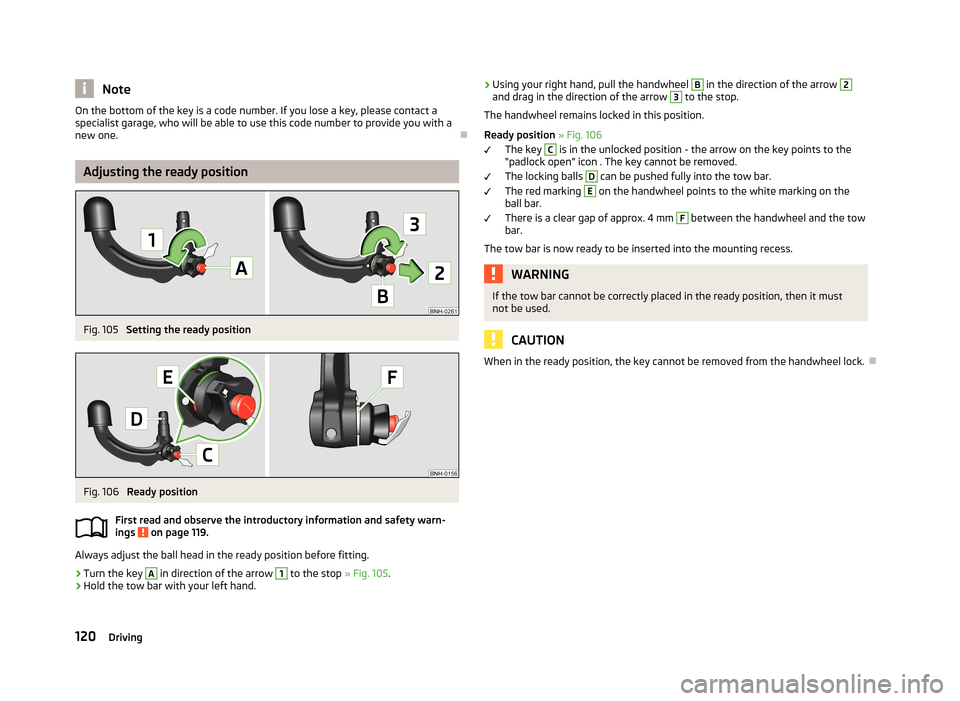
Fig. 105
Setting the ready position
Fig. 106
Ready position
First read and observe the introductory information and safety warn-
ings
on page 119.
Always adjust the ball head in the ready position before fitting.
›
Turn the key
A
in direction of the arrow
1
to the stop » Fig. 105.
›
Hold the tow bar with your left hand.
›Using your right hand, pull the handwheel B in the direction of the arrow 2and drag in the direction of the arrow 3 to the stop.
The handwheel remains locked in this position.
Ready position » Fig. 106
The key C
is in the unlocked position - the arrow on the key points to the
“padlock open” icon . The key cannot be removed.
The locking balls
D
can be pushed fully into the tow bar.
The red marking
E
on the handwheel points to the white marking on the
ball bar.
There is a clear gap of approx. 4 mm
F
between the handwheel and the tow
bar.
The tow bar is now ready to be inserted into the mounting recess.
WARNINGIf the tow bar cannot be correctly placed in the ready position, then it must
not be used.
CAUTION
When in the ready position, the key cannot be removed from the handwheel lock.120Driving
Page 124 of 226
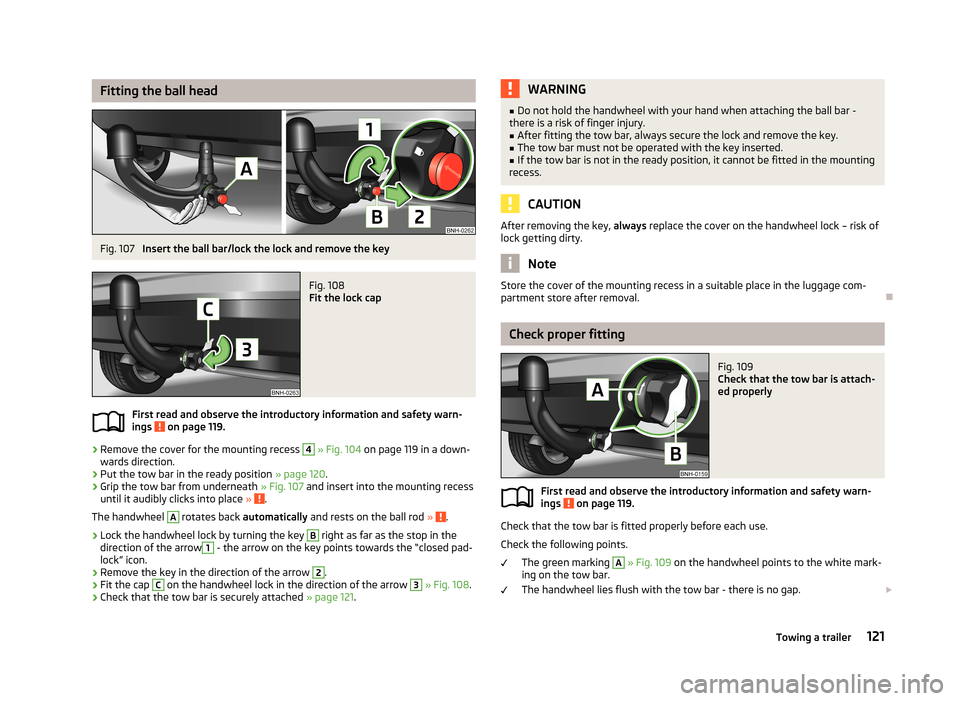
Fitting the ball headFig. 107
Insert the ball bar/lock the lock and remove the key
Fig. 108
Fit the lock cap
First read and observe the introductory information and safety warn-
ings on page 119.
›
Remove the cover for the mounting recess
4
» Fig. 104 on page 119 in a down-
wards direction.
›
Put the tow bar in the ready position » page 120.
›
Grip the tow bar from underneath » Fig. 107 and insert into the mounting recess
until it audibly clicks into place » .
The handwheel
A
rotates back automatically and rests on the ball rod » .
›
Lock the handwheel lock by turning the key
B
right as far as the stop in the
direction of the arrow
1
- the arrow on the key points towards the “closed pad-
lock” icon.
›
Remove the key in the direction of the arrow
2
.
›
Fit the cap
C
on the handwheel lock in the direction of the arrow
3
» Fig. 108 .
›
Check that the tow bar is securely attached » page 121.
WARNING■
Do not hold the handwheel with your hand when attaching the ball bar -
there is a risk of finger injury.■
After fitting the tow bar, always secure the lock and remove the key.
■
The tow bar must not be operated with the key inserted.
■
If the tow bar is not in the ready position, it cannot be fitted in the mounting
recess.
CAUTION
After removing the key, always replace the cover on the handwheel lock – risk of
lock getting dirty.
Note
Store the cover of the mounting recess in a suitable place in the luggage com-
partment store after removal.
Check proper fitting
Fig. 109
Check that the tow bar is attach-
ed properly
First read and observe the introductory information and safety warn-
ings on page 119.
Check that the tow bar is fitted properly before each use.
Check the following points. The green marking
A
» Fig. 109 on the handwheel points to the white mark-
ing on the tow bar.
The handwheel lies flush with the tow bar - there is no gap.
121Towing a trailer
Page 125 of 226
The handwheel is locked and the key is removed.
The cap B
is on the handwheel.
The tow bar does not come out of the mounting recess even after heavy
“shaking”.WARNINGDo not use the towing device unless the tow bar has been properly locked!
Removing the ball head
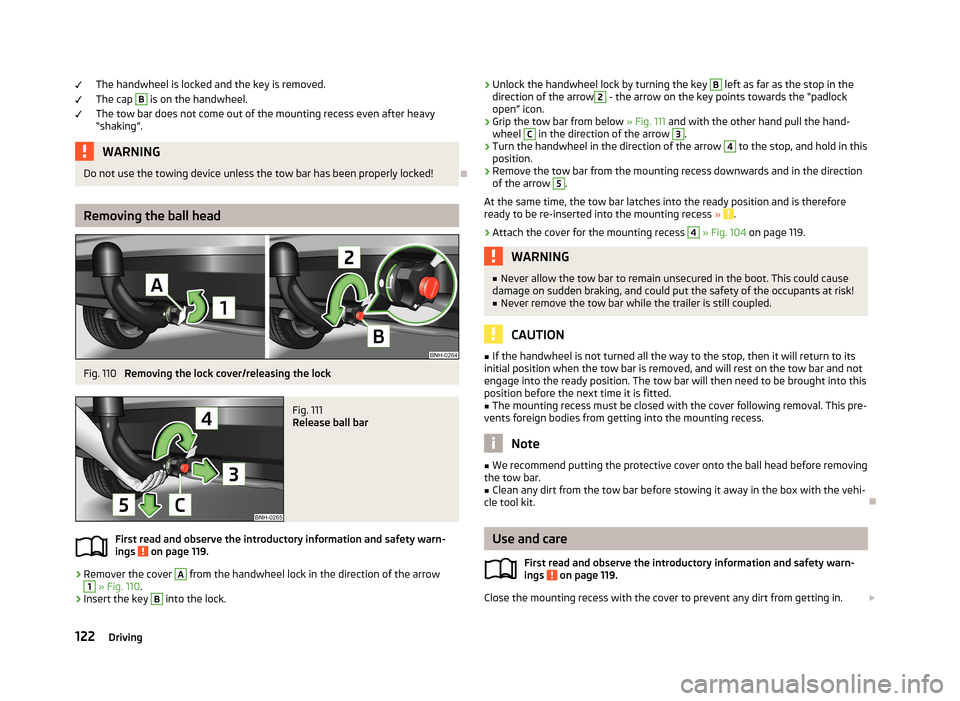
Fig. 110
Removing the lock cover/releasing the lock
Fig. 111
Release ball bar
First read and observe the introductory information and safety warn-
ings on page 119.
›
Remover the cover
A
from the handwheel lock in the direction of the arrow
1
» Fig. 110 .
›
Insert the key
B
into the lock.
›
Unlock the handwheel lock by turning the key B left as far as the stop in the
direction of the arrow2 - the arrow on the key points towards the “padlock
open” icon.›
Grip the tow bar from below » Fig. 111 and with the other hand pull the hand-
wheel
C
in the direction of the arrow
3
.
›
Turn the handwheel in the direction of the arrow
4
to the stop, and hold in this
position.
›
Remove the tow bar from the mounting recess downwards and in the direction
of the arrow
5
.
At the same time, the tow bar latches into the ready position and is therefore
ready to be re-inserted into the mounting recess »
.
›
Attach the cover for the mounting recess
4
» Fig. 104 on page 119.
WARNING■
Never allow the tow bar to remain unsecured in the boot. This could cause
damage on sudden braking, and could put the safety of the occupants at risk!■
Never remove the tow bar while the trailer is still coupled.
CAUTION
■ If the handwheel is not turned all the way to the stop, then it will return to its
initial position when the tow bar is removed, and will rest on the tow bar and not
engage into the ready position. The tow bar will then need to be brought into this position before the next time it is fitted.■
The mounting recess must be closed with the cover following removal. This pre-
vents foreign bodies from getting into the mounting recess.
Note
■ We recommend putting the protective cover onto the ball head before removing
the tow bar.■
Clean any dirt from the tow bar before stowing it away in the box with the vehi-
cle tool kit.
Use and care
First read and observe the introductory information and safety warn-
ings
on page 119.
Close the mounting recess with the cover to prevent any dirt from getting in.
122Driving
Page 126 of 226
Always check the tow bar before hitching a trailer. Apply suitable grease where
necessary.
Use the protective cover when stowing away the tow bar, in order to stop the
boot from getting dirty.
In the event of dirt, clean the surfaces of the mounting recess and treat with a
suitable preservative.
CAUTION
Apply grease to the upper part of the mounting recess. Make sure you do not re-
move any grease.
Trailer
Introduction
This chapter contains information on the following subjects:
Loading a trailer
123
Driving with a trailer
124
Anti-theft alarm system
125WARNINGAlways drive particularly carefully with the trailer.
Loading a trailer
First read and observe the introductory information and safety warn-
ings
on page 123.
The vehicle/trailer combination must be balanced, whereby the maximum permis-
sible drawbar load must be utilised. If the drawbar load is too low, it jeopardises the performance of the vehicle/trailer combination.
Distribution of the load
Distribute the load in the trailer in such a way that heavy items are located as close to the axle as possible. Secure the items from slipping.
The distribution of the weight is very poor if your vehicle is unladen and the trail-
er is laden. Maintain a particularly low speed if you cannot avoid driving with this
combination.
Tyre pressure
Correct the tyre inflation pressure on your vehicle for a “full load” » page 176,
Service life of tyres .
Trailer load
The permissible trailer load must not be exceeded under any circumstan- ces » page 207 , Technical data .
The trailer loads specified apply only to altitudes up to 1 000 metres above mean
sea level.
The engine output falls as altitude increases, as does the vehicle's climbing pow-
er. Therefore, for every additional 1000 m in height (or part), the maximum per-
missible towed weight must be reduced by 10%.
The towed weight is made up of the actual weights of the loaded towing vehicle
and the loaded trailer.
The trailer and drawbar load information on the type plate of the towing device is
merely a test value for the towing device. The vehicle-specific values are detailed
in the vehicle documents.WARNING■ Do not exceed the maximum permissible axle and drawbar load and the
maximum permissible total or towed weight of the vehicle and the trailer –
risk of accident and serious injury!■
Slipping loads can significantly impair the stability and safety of the vehicle/
trailer combination – risk of accident and serious injury!
123Towing a trailer