seats SKODA RAPID 2015 1.G Owner's Guide
[x] Cancel search | Manufacturer: SKODA, Model Year: 2015, Model line: RAPID, Model: SKODA RAPID 2015 1.GPages: 204, PDF Size: 27.52 MB
Page 72 of 204
›To re-insert the head restraint, push it far enough down in the direction of
arrow 7 into the seat backrest until the locking button clicks into place.WARNINGPlease note the following points about the head restraint settings » page 8 , Correct and safe seated position .
CAUTION
Store the head restraints that were removed in such a way that they are not
damaged or soiled.
Note
In sports seats, the headrests are integrated into the seat backrests and can-
not be removed.
Seat features
Introduction
This chapter contains information on the following subjects:
Front seat heating
70
Front armrest setting
71
Rear armrest setting
71
Seat backrests
71
Front seat heating
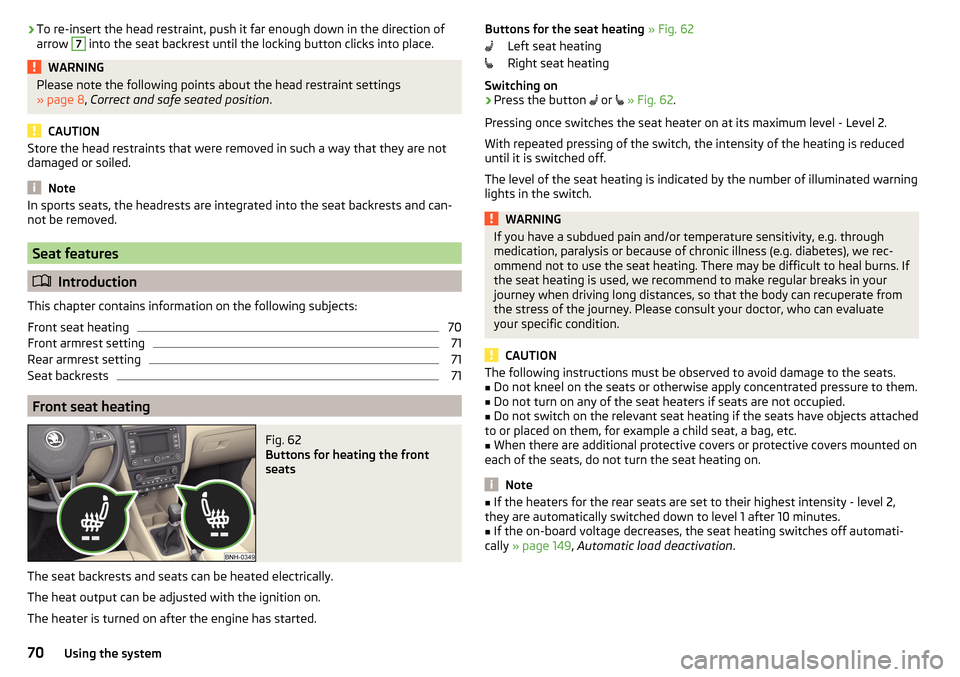
Fig. 62
Buttons for heating the front
seats
The seat backrests and seats can be heated electrically.
The heat output can be adjusted with the ignition on.
The heater is turned on after the engine has started.
Buttons for the seat heating » Fig. 62
Left seat heating
Right seat heating
Switching on›
Press the button
or
» Fig. 62 .
Pressing once switches the seat heater on at its maximum level - Level 2.
With repeated pressing of the switch, the intensity of the heating is reduced
until it is switched off.
The level of the seat heating is indicated by the number of illuminated warning
lights in the switch.
WARNINGIf you have a subdued pain and/or temperature sensitivity, e.g. through
medication, paralysis or because of chronic illness (e.g. diabetes), we rec-
ommend not to use the seat heating. There may be difficult to heal burns. If
the seat heating is used, we recommend to make regular breaks in your
journey when driving long distances, so that the body can recuperate from
the stress of the journey. Please consult your doctor, who can evaluate
your specific condition.
CAUTION
The following instructions must be observed to avoid damage to the seats.■Do not kneel on the seats or otherwise apply concentrated pressure to them.■
Do not turn on any of the seat heaters if seats are not occupied.
■
Do not switch on the relevant seat heating if the seats have objects attached
to or placed on them, for example a child seat, a bag, etc.
■
When there are additional protective covers or protective covers mounted on
each of the seats, do not turn the seat heating on.
Note
■ If the heaters for the rear seats are set to their highest intensity - level 2,
they are automatically switched down to level 1 after 10 minutes.■
If the on-board voltage decreases, the seat heating switches off automati-
cally » page 149 , Automatic load deactivation .
70Using the system
Page 73 of 204
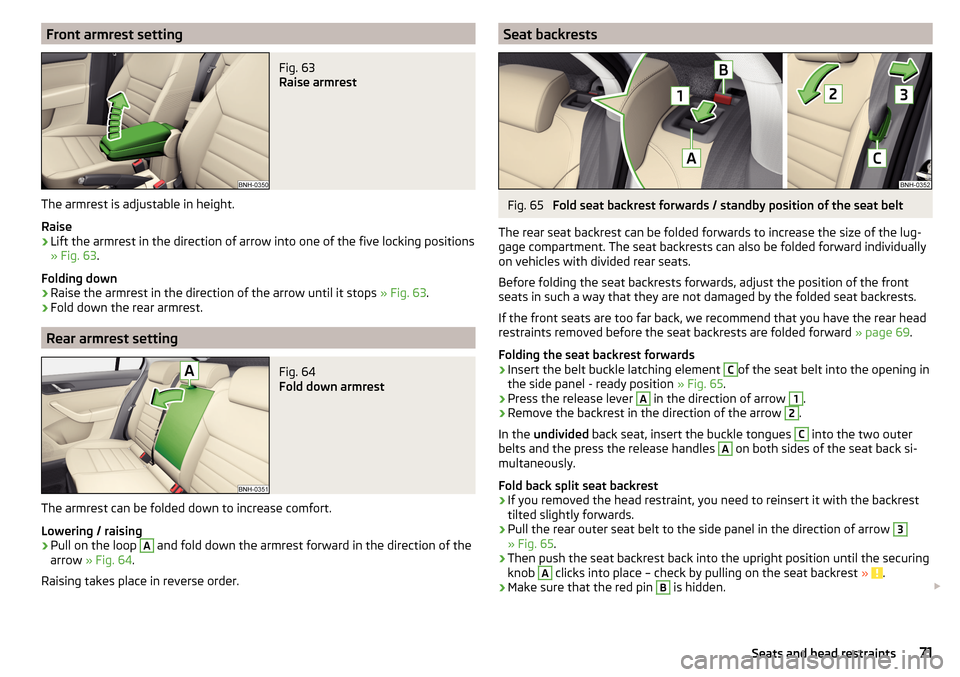
Front armrest settingFig. 63
Raise armrest
The armrest is adjustable in height.
Raise
›
Lift the armrest in the direction of arrow into one of the five locking positions
» Fig. 63 .
Folding down
›
Raise the armrest in the direction of the arrow until it stops » Fig. 63.
›
Fold down the rear armrest.
Rear armrest setting
Fig. 64
Fold down armrest
The armrest can be folded down to increase comfort.
Lowering / raising
›
Pull on the loop
A
and fold down the armrest forward in the direction of the
arrow » Fig. 64 .
Raising takes place in reverse order.
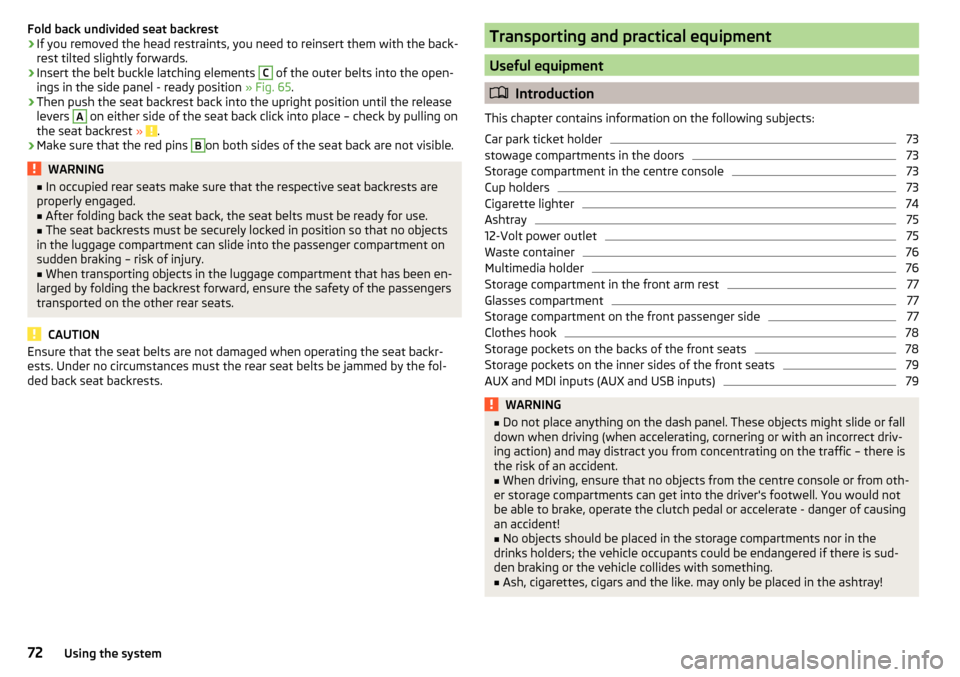
Seat backrestsFig. 65
Fold seat backrest forwards / standby position of the seat belt
The rear seat backrest can be folded forwards to increase the size of the lug-
gage compartment. The seat backrests can also be folded forward individually
on vehicles with divided rear seats.
Before folding the seat backrests forwards, adjust the position of the front
seats in such a way that they are not damaged by the folded seat backrests.
If the front seats are too far back, we recommend that you have the rear head
restraints removed before the seat backrests are folded forward » page 69.
Folding the seat backrest forwards
›
Insert the belt buckle latching element
C
of the seat belt into the opening in
the side panel - ready position » Fig. 65.
›
Press the release lever
A
in the direction of arrow
1
.
›
Remove the backrest in the direction of the arrow
2
.
In the undivided back seat, insert the buckle tongues
C
into the two outer
belts and the press the release handles
A
on both sides of the seat back si-
multaneously.
Fold back split seat backrest
›
If you removed the head restraint, you need to reinsert it with the backrest
tilted slightly forwards.
›
Pull the rear outer seat belt to the side panel in the direction of arrow
3
» Fig. 65 .
›
Then push the seat backrest back into the upright position until the securing
knob
A
clicks into place – check by pulling on the seat backrest » .
›
Make sure that the red pin
B
is hidden.
71Seats and head restraints
Page 74 of 204
Fold back undivided seat backrest›If you removed the head restraints, you need to reinsert them with the back-
rest tilted slightly forwards.›
Insert the belt buckle latching elements
C
of the outer belts into the open-
ings in the side panel - ready position » Fig. 65.
›
Then push the seat backrest back into the upright position until the release
levers
A
on either side of the seat back click into place – check by pulling on
the seat backrest » .
›
Make sure that the red pins
B
on both sides of the seat back are not visible.
WARNING■
In occupied rear seats make sure that the respective seat backrests are
properly engaged.■
After folding back the seat back, the seat belts must be ready for use.
■
The seat backrests must be securely locked in position so that no objects
in the luggage compartment can slide into the passenger compartment on
sudden braking – risk of injury.
■
When transporting objects in the luggage compartment that has been en-
larged by folding the backrest forward, ensure the safety of the passengers
transported on the other rear seats.
CAUTION
Ensure that the seat belts are not damaged when operating the seat backr-
ests. Under no circumstances must the rear seat belts be jammed by the fol-
ded back seat backrests.Transporting and practical equipment
Useful equipment
Introduction
This chapter contains information on the following subjects:
Car park ticket holder
73
stowage compartments in the doors
73
Storage compartment in the centre console
73
Cup holders
73
Cigarette lighter
74
Ashtray
75
12-Volt power outlet
75
Waste container
76
Multimedia holder
76
Storage compartment in the front arm rest
77
Glasses compartment
77
Storage compartment on the front passenger side
77
Clothes hook
78
Storage pockets on the backs of the front seats
78
Storage pockets on the inner sides of the front seats
79
AUX and MDI inputs (AUX and USB inputs)
79WARNING■ Do not place anything on the dash panel. These objects might slide or fall
down when driving (when accelerating, cornering or with an incorrect driv-
ing action) and may distract you from concentrating on the traffic – there is
the risk of an accident.■
When driving, ensure that no objects from the centre console or from oth-
er storage compartments can get into the driver's footwell. You would not
be able to brake, operate the clutch pedal or accelerate - danger of causing
an accident!
■
No objects should be placed in the storage compartments nor in the
drinks holders; the vehicle occupants could be endangered if there is sud-
den braking or the vehicle collides with something.
■
Ash, cigarettes, cigars and the like. may only be placed in the ashtray!
72Using the system
Page 80 of 204
The storage compartment is equipped with an inner light that illuminates
when opening and closing the storage compartment.
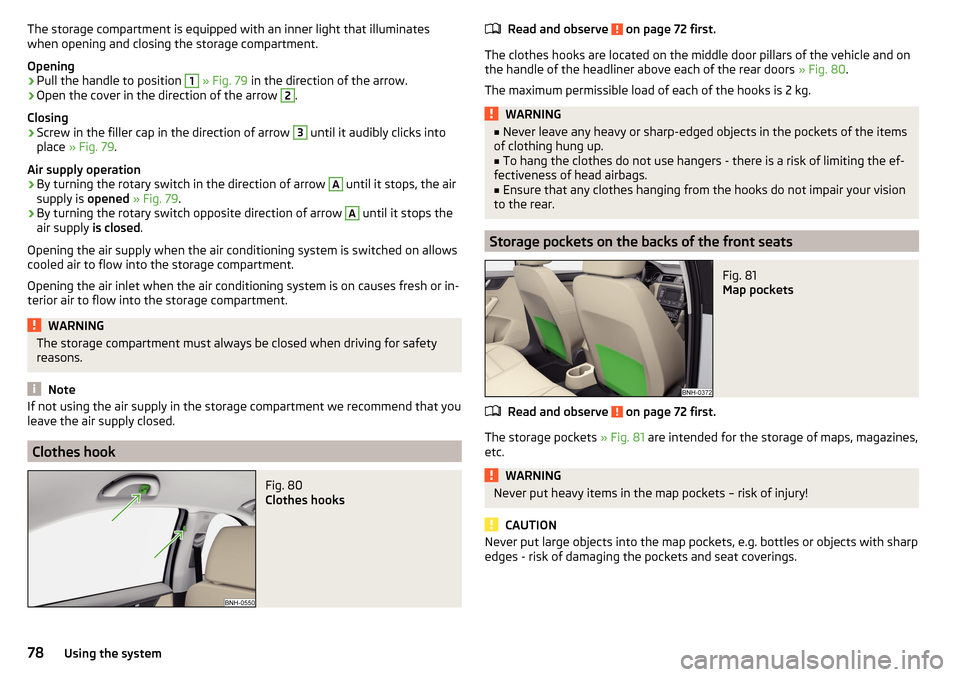
Opening›
Pull the handle to position
1
» Fig. 79 in the direction of the arrow.
›
Open the cover in the direction of the arrow
2
.
Closing
›
Screw in the filler cap in the direction of arrow
3
until it audibly clicks into
place » Fig. 79 .
Air supply operation
›
By turning the rotary switch in the direction of arrow
A
until it stops, the air
supply is opened » Fig. 79 .
›
By turning the rotary switch opposite direction of arrow
A
until it stops the
air supply is closed.
Opening the air supply when the air conditioning system is switched on allows
cooled air to flow into the storage compartment.
Opening the air inlet when the air conditioning system is on causes fresh or in-
terior air to flow into the storage compartment.
WARNINGThe storage compartment must always be closed when driving for safety
reasons.
Note
If not using the air supply in the storage compartment we recommend that you
leave the air supply closed.
Clothes hook
Fig. 80
Clothes hooks
Read and observe on page 72 first.
The clothes hooks are located on the middle door pillars of the vehicle and on
the handle of the headliner above each of the rear doors » Fig. 80.
The maximum permissible load of each of the hooks is 2 kg.
WARNING■ Never leave any heavy or sharp-edged objects in the pockets of the items
of clothing hung up.■
To hang the clothes do not use hangers - there is a risk of limiting the ef-
fectiveness of head airbags.
■
Ensure that any clothes hanging from the hooks do not impair your vision
to the rear.
Storage pockets on the backs of the front seats
Fig. 81
Map pockets
Read and observe on page 72 first.
The storage pockets » Fig. 81 are intended for the storage of maps, magazines,
etc.
WARNINGNever put heavy items in the map pockets – risk of injury!
CAUTION
Never put large objects into the map pockets, e.g. bottles or objects with sharp
edges - risk of damaging the pockets and seat coverings.78Using the system
Page 81 of 204
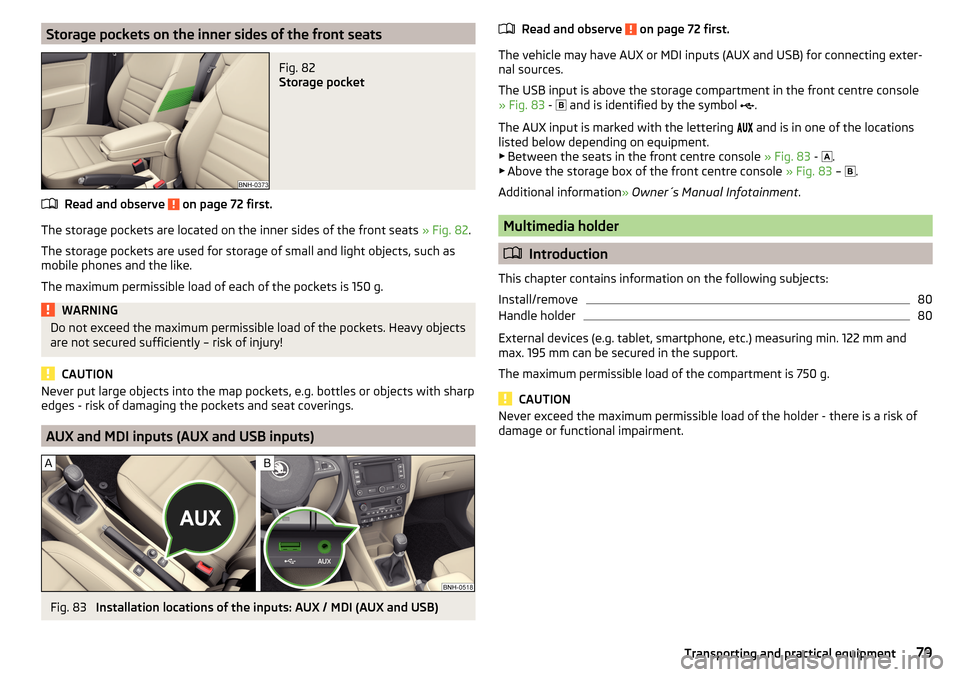
Storage pockets on the inner sides of the front seatsFig. 82
Storage pocket
Read and observe on page 72 first.
The storage pockets are located on the inner sides of the front seats » Fig. 82.
The storage pockets are used for storage of small and light objects, such as
mobile phones and the like.
The maximum permissible load of each of the pockets is 150 g.
WARNINGDo not exceed the maximum permissible load of the pockets. Heavy objects
are not secured sufficiently – risk of injury!
CAUTION
Never put large objects into the map pockets, e.g. bottles or objects with sharp
edges - risk of damaging the pockets and seat coverings.
AUX and MDI inputs (AUX and USB inputs)
Fig. 83
Installation locations of the inputs: AUX / MDI (AUX and USB)
Read and observe on page 72 first.
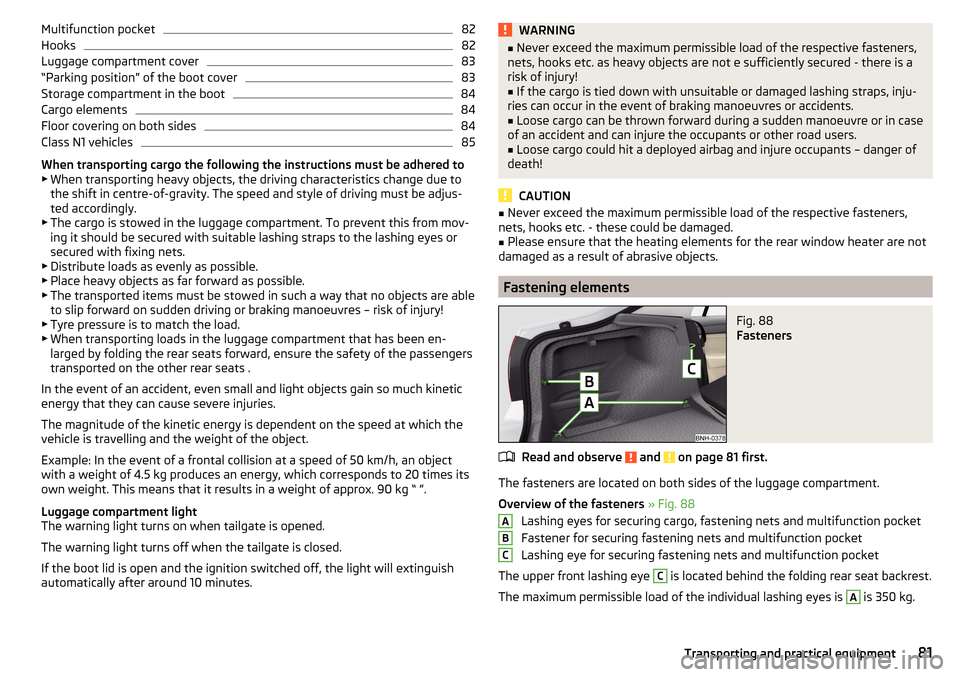
The vehicle may have AUX or MDI inputs (AUX and USB) for connecting exter-
nal sources.
The USB input is above the storage compartment in the front centre console
» Fig. 83 -
and is identified by the symbol .
The AUX input is marked with the lettering
and is in one of the locations
listed below depending on equipment.
▶ Between the seats in the front centre console » Fig. 83 -
.
▶ Above the storage box of the front centre console » Fig. 83 –
.
Additional information » Owner´s Manual Infotainment .
Multimedia holder
Introduction
This chapter contains information on the following subjects:
Install/remove
80
Handle holder
80
External devices (e.g. tablet, smartphone, etc.) measuring min. 122 mm and
max. 195 mm can be secured in the support.
The maximum permissible load of the compartment is 750 g.
CAUTION
Never exceed the maximum permissible load of the holder - there is a risk of
damage or functional impairment.79Transporting and practical equipment
Page 83 of 204
Multifunction pocket82Hooks82
Luggage compartment cover
83
“Parking position” of the boot cover
83
Storage compartment in the boot
84
Cargo elements
84
Floor covering on both sides
84
Class N1 vehicles
85
When transporting cargo the following the instructions must be adhered to
▶ When transporting heavy objects, the driving characteristics change due to
the shift in centre-of-gravity. The speed and style of driving must be adjus-
ted accordingly.
▶ The cargo is stowed in the luggage compartment. To prevent this from mov-
ing it should be secured with suitable lashing straps to the lashing eyes or
secured with fixing nets.
▶ Distribute loads as evenly as possible.
▶ Place heavy objects as far forward as possible.
▶ The transported items must be stowed in such a way that no objects are able
to slip forward on sudden driving or braking manoeuvres – risk of injury!
▶ Tyre pressure is to match the load.
▶ When transporting loads in the luggage compartment that has been en-
larged by folding the rear seats forward, ensure the safety of the passengers
transported on the other rear seats .
In the event of an accident, even small and light objects gain so much kinetic energy that they can cause severe injuries.
The magnitude of the kinetic energy is dependent on the speed at which the
vehicle is travelling and the weight of the object.
Example: In the event of a frontal collision at a speed of 50 km/h, an object
with a weight of 4.5 kg produces an energy, which corresponds to 20 times its
own weight. This means that it results in a weight of approx. 90 kg “ ”.
Luggage compartment light
The warning light turns on when tailgate is opened.
The warning light turns off when the tailgate is closed.
If the boot lid is open and the ignition switched off, the light will extinguish
automatically after around 10 minutes.
WARNING■ Never exceed the maximum permissible load of the respective fasteners,
nets, hooks etc. as heavy objects are not e sufficiently secured - there is a
risk of injury!■
If the cargo is tied down with unsuitable or damaged lashing straps, inju-
ries can occur in the event of braking manoeuvres or accidents.
■
Loose cargo can be thrown forward during a sudden manoeuvre or in case
of an accident and can injure the occupants or other road users.
■
Loose cargo could hit a deployed airbag and injure occupants – danger of
death!
CAUTION
■ Never exceed the maximum permissible load of the respective fasteners,
nets, hooks etc. - these could be damaged.■
Please ensure that the heating elements for the rear window heater are not
damaged as a result of abrasive objects.
Fastening elements
Fig. 88
Fasteners
Read and observe and on page 81 first.
The fasteners are located on both sides of the luggage compartment.
Overview of the fasteners » Fig. 88
Lashing eyes for securing cargo, fastening nets and multifunction pocket
Fastener for securing fastening nets and multifunction pocket
Lashing eye for securing fastening nets and multifunction pocket
The upper front lashing eye
C
is located behind the folding rear seat backrest.
The maximum permissible load of the individual lashing eyes is
A
is 350 kg.
ABC81Transporting and practical equipment
Page 85 of 204
Luggage compartment coverFig. 93
Remove the luggage compartment cover
Read and observe
and on page 81 first.
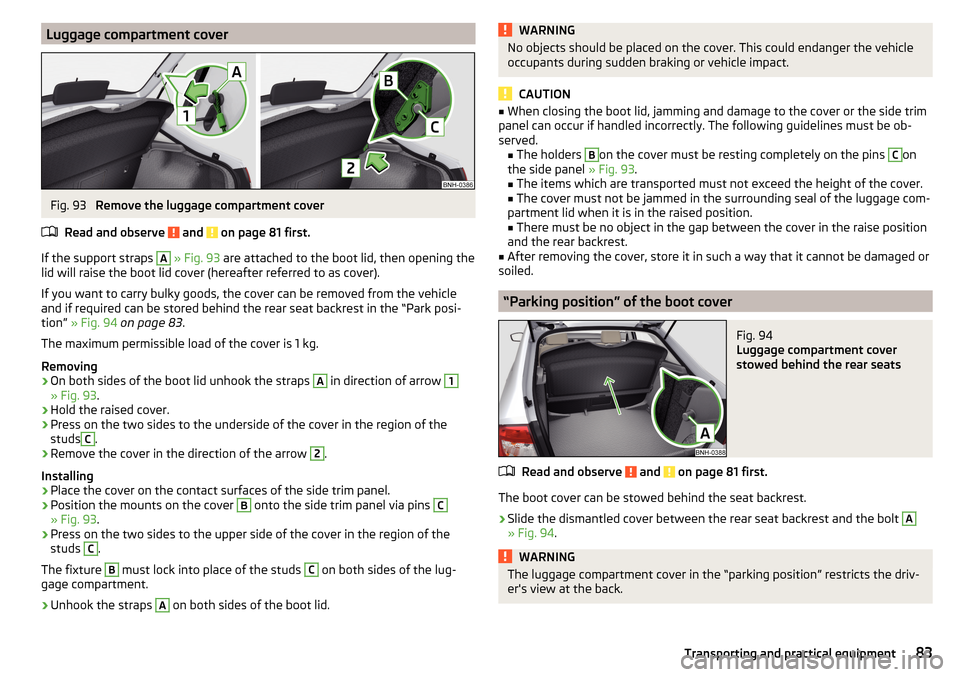
If the support straps
A
» Fig. 93 are attached to the boot lid, then opening the
lid will raise the boot lid cover (hereafter referred to as cover).
If you want to carry bulky goods, the cover can be removed from the vehicle
and if required can be stored behind the rear seat backrest in the “Park posi-
tion” » Fig. 94 on page 83 .
The maximum permissible load of the cover is 1 kg.
Removing
›
On both sides of the boot lid unhook the straps
A
in direction of arrow
1
» Fig. 93 .
›
Hold the raised cover.
›
Press on the two sides to the underside of the cover in the region of the
studs
C
.
›
Remove the cover in the direction of the arrow
2
.
Installing
›
Place the cover on the contact surfaces of the side trim panel.
›
Position the mounts on the cover
B
onto the side trim panel via pins
C
» Fig. 93 .
›
Press on the two sides to the upper side of the cover in the region of the
studs
C
.
The fixture
B
must lock into place of the studs
C
on both sides of the lug-
gage compartment.
›
Unhook the straps
A
on both sides of the boot lid.
WARNINGNo objects should be placed on the cover. This could endanger the vehicle
occupants during sudden braking or vehicle impact.
CAUTION
■ When closing the boot lid, jamming and damage to the cover or the side trim
panel can occur if handled incorrectly. The following guidelines must be ob-
served. ■ The holders B
on the cover must be resting completely on the pins
C
on
the side panel » Fig. 93.
■ The items which are transported must not exceed the height of the cover.
■ The cover must not be jammed in the surrounding seal of the luggage com-
partment lid when it is in the raised position. ■ There must be no object in the gap between the cover in the raise position
and the rear backrest.
■
After removing the cover, store it in such a way that it cannot be damaged or
soiled.
“Parking position” of the boot cover
Fig. 94
Luggage compartment cover
stowed behind the rear seats
Read and observe and on page 81 first.
The boot cover can be stowed behind the seat backrest.
›
Slide the dismantled cover between the rear seat backrest and the bolt
A
» Fig. 94 .
WARNINGThe luggage compartment cover in the “parking position” restricts the driv-
er's view at the back.83Transporting and practical equipment
Page 86 of 204
Storage compartment in the bootFig. 95
Remove the tray cover on the left / right
Read and observe
and on page 81 first.
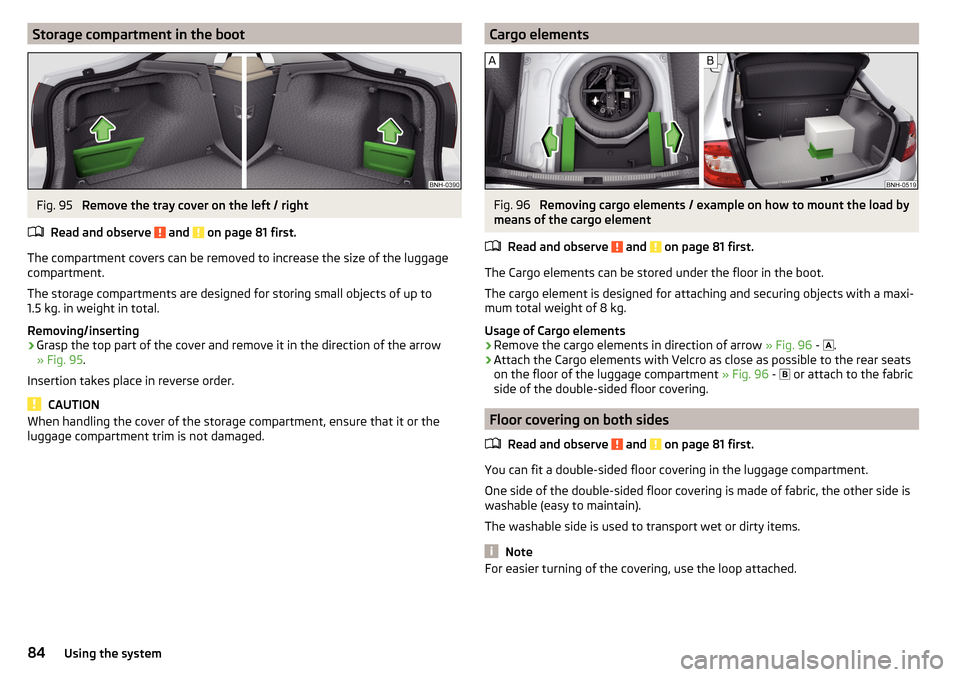
The compartment covers can be removed to increase the size of the luggage
compartment.
The storage compartments are designed for storing small objects of up to
1.5 kg. in weight in total.
Removing/inserting
›
Grasp the top part of the cover and remove it in the direction of the arrow
» Fig. 95 .
Insertion takes place in reverse order.
CAUTION
When handling the cover of the storage compartment, ensure that it or the
luggage compartment trim is not damaged.Cargo elementsFig. 96
Removing cargo elements / example on how to mount the load by
means of the cargo element
Read and observe
and on page 81 first.
The Cargo elements can be stored under the floor in the boot.
The cargo element is designed for attaching and securing objects with a maxi-
mum total weight of 8 kg.
Usage of Cargo elements
›
Remove the cargo elements in direction of arrow » Fig. 96 -
.
›
Attach the Cargo elements with Velcro as close as possible to the rear seats
on the floor of the luggage compartment » Fig. 96 -
or attach to the fabric
side of the double-sided floor covering.
Floor covering on both sides
Read and observe
and on page 81 first.
You can fit a double-sided floor covering in the luggage compartment.
One side of the double-sided floor covering is made of fabric, the other side is
washable (easy to maintain).
The washable side is used to transport wet or dirty items.
Note
For easier turning of the covering, use the loop attached.84Using the system
Page 138 of 204
Seat coversRead and observe
and on page 134 first.
Electrically heated seats
Use a specific cleaning agent such as dry foam or similar to clean the covers. »
.
Seats without seat heating
Thoroughly vacuum the seat covers with a vacuum cleaner before cleaning.
Clean the seat covers with a damp cloth or cleaning products specially de-
signed for this purpose.
Indented points arising on the fabrics by everyday use, can be removed by
brushing against the direction of hair with a damp brush.
Always clean all parts of the covers, so that there are no visible edges. Then
allow the seat to dry completely.
CAUTION
■ Do not clean the covers of electrically heated seats either with water or with
other liquids - there is a risk of damaging the seat heating system.■
Regularly remove dust from the seat covers using a vacuum cleaner.
■
Electrically heated seats must not be dried after cleaning by switching on the
heater.
■
Do not sit on wet seats - risk of seat deformation.
■
Always clean the seats “from seam to seam”.
Safety belts
Read and observe
and on page 134 first.
Wash dirty seat belts with mild soapy water.
Remove coarse dirt with a soft brush.
WARNING■ The seat belts must not be removed for cleaning.■Never clean the seat belts chemically as chemical cleaning products could
destroy the fabric.■
The seat belts must not be allowed to come into contact with corrosive
liquids (e.g. acids).
■
The seat belts must be fully dried before being rolled up.
Inspecting and replenishing
Fuel
Introduction
This chapter contains information on the following subjects:
Petrol and diesel refuelling
137
Lead-free petrol
137
Diesel fuel
138
The correct fuel grades for your vehicle are specified on the inside of the fuel
filler flap » Fig. 142 on page 137 .
WARNING■
The operating instructions of the refuelling system must always be fol-
lowed.■
Do not smoke when refuelling and do not use a mobile phone.
■
The fuel and fuel vapours are explosive - it can be fatal!
CAUTION
■ Never drive until the fuel tank is completely empty! The irregular supply of
fuel can cause misfiring, which can result in damage to parts of the engine and
the exhaust system.■
Immediately remove any fuel that has spilled onto the vehicle's paintwork –
risk of paint damage.
■
If the vehicle was not purchased in the country where it was intended to be
operated, you should check whether the fuel specified by the manufacturer is
offered in the country where the vehicle will be operated. You should also per-
haps check whether the manufacturer has recommended a different fuel for
operation of the vehicle in the corresponding country. If no prescribed fuel is
available, then you must check whether it is permitted by the manufacturer to
operate the vehicle with another fuel type.
136General Maintenance
Page 174 of 204
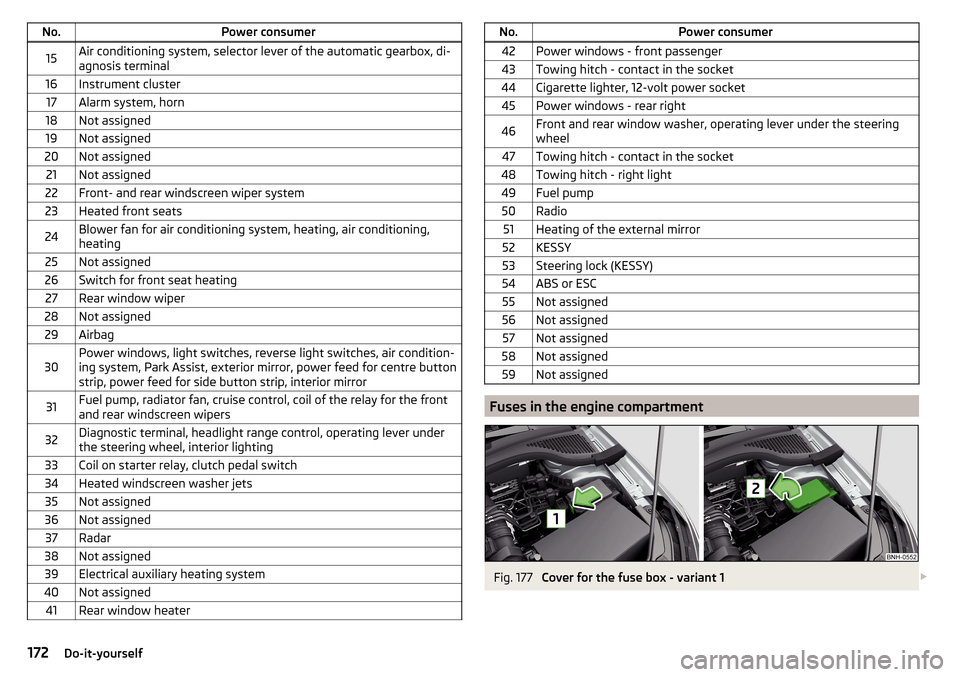
No.Power consumer15Air conditioning system, selector lever of the automatic gearbox, di-
agnosis terminal16Instrument cluster17Alarm system, horn18Not assigned19Not assigned20Not assigned21Not assigned22Front- and rear windscreen wiper system23Heated front seats24Blower fan for air conditioning system, heating, air conditioning,
heating25Not assigned26Switch for front seat heating27Rear window wiper28Not assigned29Airbag30Power windows, light switches, reverse light switches, air condition-
ing system, Park Assist, exterior mirror, power feed for centre button
strip, power feed for side button strip, interior mirror31Fuel pump, radiator fan, cruise control, coil of the relay for the front
and rear windscreen wipers32Diagnostic terminal, headlight range control, operating lever under
the steering wheel, interior lighting33Coil on starter relay, clutch pedal switch34Heated windscreen washer jets35Not assigned36Not assigned37Radar38Not assigned39Electrical auxiliary heating system40Not assigned41Rear window heaterNo.Power consumer42Power windows - front passenger43Towing hitch - contact in the socket44Cigarette lighter, 12-volt power socket45Power windows - rear right46Front and rear window washer, operating lever under the steering
wheel47Towing hitch - contact in the socket48Towing hitch - right light49Fuel pump50Radio51Heating of the external mirror52KESSY53Steering lock (KESSY)54ABS or ESC55Not assigned56Not assigned57Not assigned58Not assigned59Not assigned
Fuses in the engine compartment
Fig. 177
Cover for the fuse box - variant 1
172Do-it-yourself