battery SKODA RAPID SPACEBACK 2013 1.G User Guide
[x] Cancel search | Manufacturer: SKODA, Model Year: 2013, Model line: RAPID SPACEBACK, Model: SKODA RAPID SPACEBACK 2013 1.GPages: 193, PDF Size: 14.8 MB
Page 59 of 193

COMING HOME / LEAVING HOMERead and observe
on page 53 first.
COMING HOME (hereinafter referred to only as a function) switches the light
automatically for a short time after leaving the vehicle.
LEAVING HOME (hereinafter referred to only as a function) switches the light
automatically for a short time when approaching the vehicle.
The function switches on the following light, depending on the equipment
fitted.
› Parking lights
› Low beam
› Entry lighting in the exterior mirrors
› Licence plate light
COMING HOME
The daytime running lights are switched on automatically if the following
conditions are met.
The light switch is in position
» Fig. 38 on page 55 .
The visibility in the vehicle environment is reduced.
The ignition is switched off.
The function was activated before leaving the vehicle by briefly switching
on the headlight flasher » page 55, Turn signal and main beam .
The driver's door was open - within 60 seconds after turning off the igni-
tion.
The light goes out 10 seconds after closing all of the doors and the boot lid.
If a door or the boot lid remains open, the light goes out after 60 seconds.
LEAVING HOME
The daytime running lights are switched on automatically if the following
conditions are met.
The light switch is in position
» Fig. 38 on page 55 .
The visibility in the vehicle environment is reduced.
The ignition is switched off.
The vehicle was unlocked with the radio remote control.
The light goes off after 10 seconds or when locking the vehicle.
CAUTION■
Do not attach any stickers or similar objects in front of the light sensor on
the windscreen to avoid impairing the function or its reliability.■
If this function is activated, the battery will be heavily discharged particularly
in short-haul traffic.
Note
Poorer visibility are evaluated on the basis of information that is collected from
the sensor mounted in the interior mirror holder.
Hazard warning light system
Fig. 40
Button for hazard warning light
system
Read and observe on page 53 first.
Switching on/off
›
Press the button
» Fig. 40 .
All the turn signal lights on the vehicle flash at the same time when the hazard
warning light system is switched on. The warning light for the turn signals and
the warning light in the button also flash at the same time. The hazard warn-
ing light system can also be operated if the ignition is switched off.
If one of the airbags is deployed, the hazard warning light system will switch
on automatically.
If the turn signal light is switched on when the hazard warning light and the
ignition are both switched on, then only the turn signal light on the corre-
sponding vehicle side will flash.
57Lights and visibility
Page 60 of 193

WARNINGSwitch on the hazard warning light system if, for example, the following oc-
curs.■
You encounter a traffic congestion.
■
The vehicle has broken down.
Parking light
Read and observe
on page 53 first.
The parking light is provided for a temporary lighting of the parked vehicle.
Parking light switching on
›
Switch off the ignition.
›
Place the control lever into position
A
or
B
as far as it can go
» Fig. 37 on
page 55 - the parking light on the right/left-hand side of the vehicle is
switched on.
If the right or left turn signal light has been switched on and the ignition is
switched off, the parking light is not automatically switched on.
Switching on the side light on both sides
›
Turn the light switch
A
to position
» Fig. 36 on page 53 and lock the vehi-
cle.
On vehicles with a MAXI DOT display, the symbol in the light switch also
lights up when the two-sided parking light is switched on.
CAUTION
Turning on the parking light means the battery is heavily loaded, especially
over short distances.
Driving abroad
Read and observe
on page 53 first.
The low beam is set asymmetrically. It illuminates the side of the road on
which the vehicle is being driven to a greater extent.
When driving in countries with opposing traffic system (traffic on the left/
right), asymmetric headlight adjustment can dazzle oncoming traffic. In order
to avoid this, the headlights must be adjusted at a specialist garage.
NoteYou can find out more information on adjusting the headlights at a specialist
garage.
Interior lighting
Front interior light
Fig. 41
Front interior light - Version 1 / Version 2
Positions of sliding switch
A
» Fig. 41
Switching on
Switching off
Operating with the door contact switch
Switch for reading light
B
» Fig. 41
Switching left reading lamp on/off
Switching right reading lamp on/off
Conditions for the lighting operation with the door contact switch
The system is turned on when any of the following is present.
› The vehicle is unlocked.
› One of the doors is opened.
› The ignition key is removed.
The system is turned off when any of the following is present.
› The vehicle is locked.
› The ignition is switched on.
› About 30 seconds after all the doors have been closed.
58Using the system
Page 61 of 193
NoteThe activated light turns on automatically for about 10 minutes after the igni-
tion is switched off.
Rear interior light
Applies to vehicles with a panorama roof
Fig. 42
Interior lights at the rear
Interior light, rear - movement of the diffusing panel » Fig. 42
Switching on
Switching off
Operating with the door contact switch 1)
Visibility
Introduction
This chapter contains information on the following subjects:
Rear window heater
59
Front sun visors
60
Sun screen of the panoramic roof
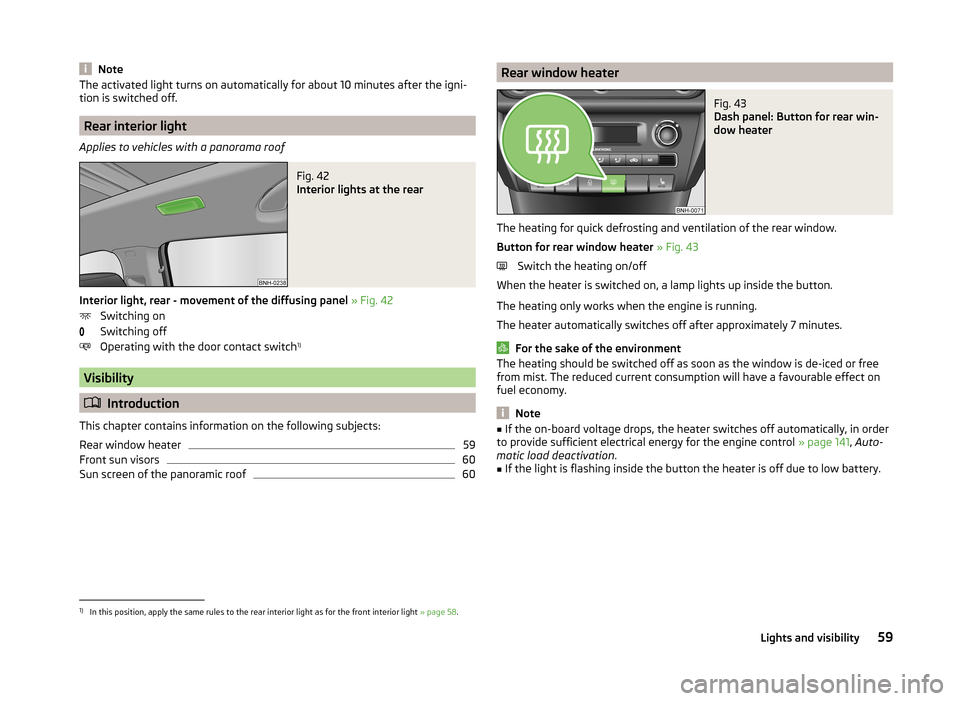
60Rear window heaterFig. 43
Dash panel: Button for rear win-
dow heater
The heating for quick defrosting and ventilation of the rear window.
Button for rear window heater » Fig. 43
Switch the heating on/off
When the heater is switched on, a lamp lights up inside the button.
The heating only works when the engine is running.
The heater automatically switches off after approximately 7 minutes.
For the sake of the environment
The heating should be switched off as soon as the window is de-iced or free
from mist. The reduced current consumption will have a favourable effect on
fuel economy.
Note
■ If the on-board voltage drops, the heater switches off automatically, in order
to provide sufficient electrical energy for the engine control » page 141, Auto-
matic load deactivation .■
If the light is flashing inside the button the heater is off due to low battery.
1)
In this position, apply the same rules to the rear interior light as for the front interior light » page 58.
59Lights and visibility
Page 73 of 193

WARNING■Take care when using the cigarette lighter! Improper usage can cause
burns.■
The cigarette lighter also operates when the ignition is switched off or
the ignition key withdrawn. Therefore, when leaving the vehicle, never
leave people who are not completely independent, such as children, unat-
tended in the vehicle. These could operate the lighter and get burned, start
a fire or damage the interior.
Note
■ The cigarette lighter socket can also be used as a 12-Volt socket for electrical
appliances » page 71, 12-Volt power outlet .■
Further information » page 119, Service work, adjustments and technical al-
terations .
Ashtray
Fig. 64
Ashtray: front / rear
Read and observe
on page 68 first.
The ashtray can be used for discarding ash, cigarettes, cigars and the like » .
Removing
›
Remove the ashtray » Fig. 64 by pulling upwards.
Installing
›
Insert the ashtray vertically.
WARNINGNever place flammable objects in the ashtray – risk of fire!CAUTIONWhen removing, do not hold the ashtray at the cover – risk of breakage.
12-Volt power outlet
Fig. 65
12-Volt power socket
Read and observe on page 68 first.
The 12-volt electrical outlet (hereinafter referred to only as socket) in the front center console » Fig. 65.
Use
›
Remove the power socket cover or the cigarette lighter.
›
Connect the plug for the electrical appliance to the socket.
The power socket and any connected appliances can also be operated when
the ignition is switched off or the ignition key is withdrawn »
.
WARNING■
Improper use of the power sockets and the electrical accessories can
cause fires, burns and other serious injuries. Therefore, when leaving the
vehicle, never leave people who are not completely independent, such as
children, unattended in the vehicle.■
If the connected electric device becomes too hot, switch it off and discon-
nect it from the power supply immediately.
CAUTION
■ The power socket can only be used for connecting approved electrical acces-
sories with a total power uptake of up to 120 watt.■
Never exceed the maximum power consumption, otherwise the vehicle's
electrical system can be damaged.
■
Connecting appliances when the engine is not running will drain the battery
of the vehicle!
71Transporting and practical equipment
Page 93 of 193
Button /
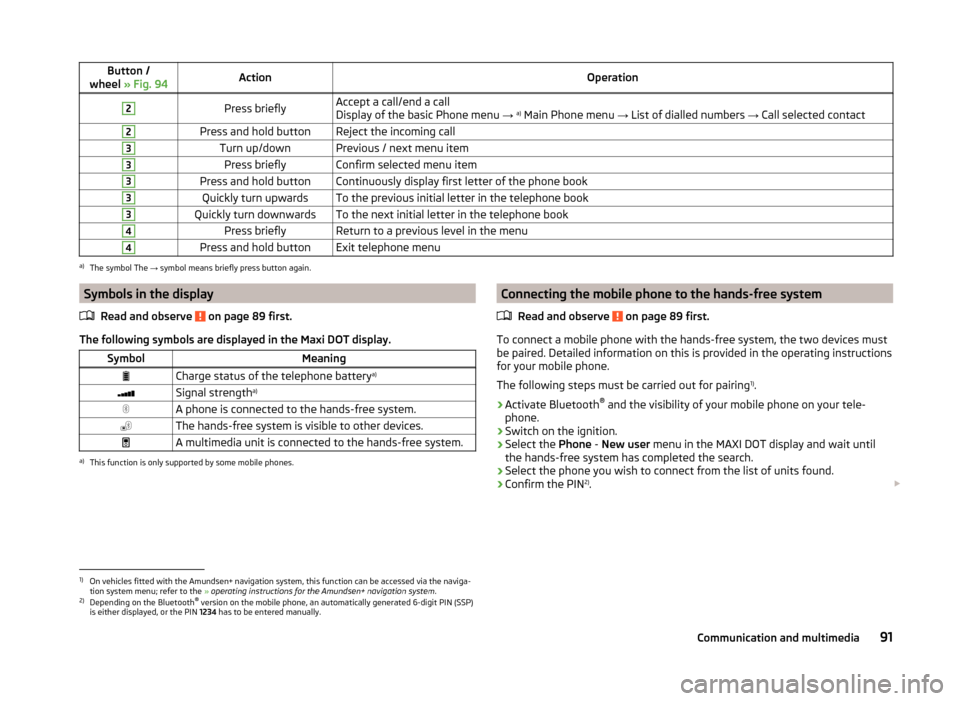
wheel » Fig. 94ActionOperation2Press brieflyAccept a call/end a call
Display of the basic Phone menu → a)
Main Phone menu → List of dialled numbers → Call selected contact2Press and hold buttonReject the incoming call3Turn up/downPrevious / next menu item3Press brieflyConfirm selected menu item3Press and hold buttonContinuously display first letter of the phone book3Quickly turn upwardsTo the previous initial letter in the telephone book3Quickly turn downwardsTo the next initial letter in the telephone book4Press brieflyReturn to a previous level in the menu4Press and hold buttonExit telephone menua)
The symbol The → symbol means briefly press button again.
Symbols in the display
Read and observe
on page 89 first.
The following symbols are displayed in the Maxi DOT display.
SymbolMeaningCharge status of the telephone battery a)Signal strengtha)A phone is connected to the hands-free system.The hands-free system is visible to other devices.A multimedia unit is connected to the hands-free system.a)
This function is only supported by some mobile phones.
Connecting the mobile phone to the hands-free system
Read and observe
on page 89 first.
To connect a mobile phone with the hands-free system, the two devices mustbe paired. Detailed information on this is provided in the operating instructions
for your mobile phone.
The following steps must be carried out for pairing 1)
.
›
Activate Bluetooth ®
and the visibility of your mobile phone on your tele-
phone.
›
Switch on the ignition.
›
Select the Phone - New user menu in the MAXI DOT display and wait until
the hands-free system has completed the search.
›
Select the phone you wish to connect from the list of units found.
›
Confirm the PIN 2)
.
1)
On vehicles fitted with the Amundsen+ navigation system, this function can be accessed via the naviga-
tion system menu; refer to the » operating instructions for the Amundsen+ navigation system .
2)
Depending on the Bluetooth®
version on the mobile phone, an automatically generated 6-digit PIN (SSP)
is either displayed, or the PIN 1234 has to be entered manually.
91Communication and multimedia
Page 98 of 193
Button /
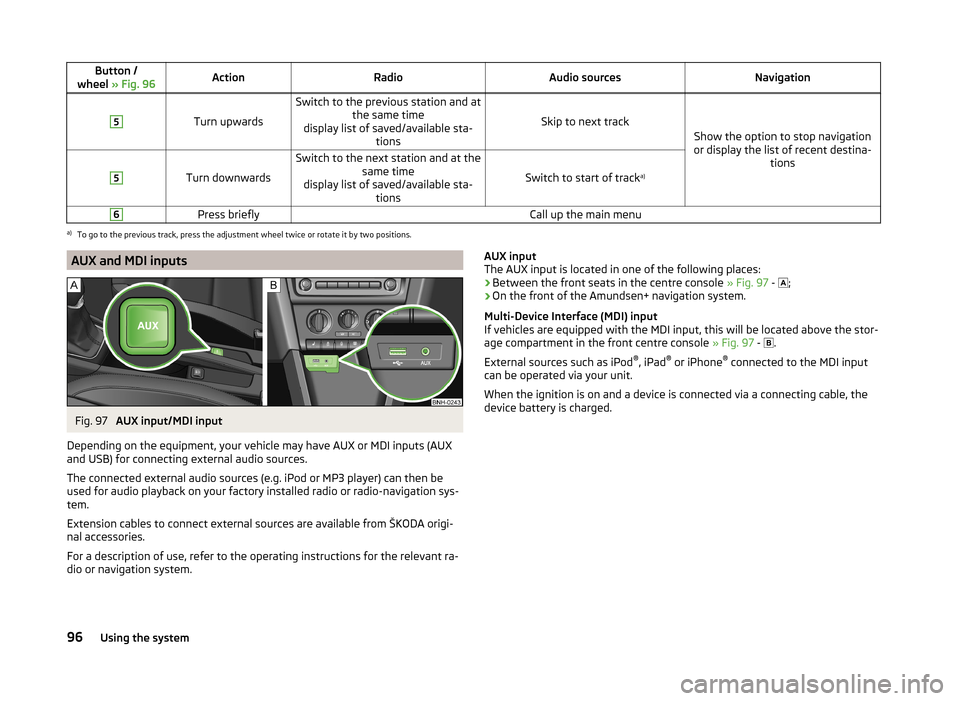
wheel » Fig. 96ActionRadioAudio sourcesNavigation5
Turn upwards
Switch to the previous station and at
the same time
display list of saved/available sta- tions
Skip to next track
Show the option to stop navigation
or display the list of recent destina- tions
5
Turn downwards
Switch to the next station and at thesame time
display list of saved/available sta- tions
Switch to start of track a)
6Press brieflyCall up the main menua)
To go to the previous track, press the adjustment wheel twice or rotate it by two positions.
AUX and MDI inputsFig. 97
AUX input/MDI input
Depending on the equipment, your vehicle may have AUX or MDI inputs (AUX
and USB) for connecting external audio sources.
The connected external audio sources (e.g. iPod or MP3 player) can then be
used for audio playback on your factory installed radio or radio-navigation sys-
tem.
Extension cables to connect external sources are available from ŠKODA origi-
nal accessories.
For a description of use, refer to the operating instructions for the relevant ra-
dio or navigation system.
AUX input
The AUX input is located in one of the following places:
› Between the front seats in the centre console
» Fig. 97 -
;
› On the front of the Amundsen+ navigation system.
Multi-Device Interface (MDI) input
If vehicles are equipped with the MDI input, this will be located above the stor-
age compartment in the front centre console » Fig. 97 -
.
External sources such as iPod ®
, iPad ®
or iPhone ®
connected to the MDI input
can be operated via your unit.
When the ignition is on and a device is connected via a connecting cable, the
device battery is charged.96Using the system
Page 99 of 193
Driving
Starting-off and Driving
Starting and turning off the engine
Introduction
This chapter contains information on the following subjects:
Electronic immobilizer
97
Lock/unlock steering lock
97
Switch on the ignition and start the engine
98
Switching off the engine
98
With the key in the ignition, the ignition can be switched on and off and the
engine can be started / stopped.
WARNING■ While driving with the engine stopped, the ignition must always be
switched on » page 98, Switch on the ignition and start the engine .
■ With the ignition off, the steering may lock » page 97 - danger of an
accident!■
Do not withdraw the ignition key from the ignition lock until the vehicle
has come to a stop » page 100, Parking . Otherwise, the steering could be
blocked – risk of accident!
■
Never leave the key in the vehicle when you exit the vehicle. Unauthor-
ized persons, such as children, for example, could lock the car, turn on the
ignition or start the engine - there is a danger of injury and accidents!
■
Never leave the vehicle unattended with the engine running - there is
risk of accident, damage or theft!
■
Never switch off the engine before the vehicle is stationary – risk of acci-
dent!
WARNING■ Never (e.g. in garages) run the engine in a closed place - there is the dan-
ger of poisoning and death!■
Do not leave any items (e.g. cloths or tools) in the engine compartment.
This presents a fire hazard and the risk of engine damage.
■
Never cover the engine with additional insulation material (e.g. with a
cover) – risk of fire!
CAUTION■ Only start the engine when the engine and the vehicle are stationary - there
is a danger of starter and engine damage!■
Do not tow start the engine – there is a risk of damaging the engine and the
catalytic converter! The battery from another vehicle can be used as a jump-
start aid » page 157 .
Note
Do not warm up the engine while the vehicle is stationary. If possible, start
your journey as soon as the engine has started. Through this, the engine rea-
ches its operating temperature faster.
Electronic immobilizer
Read and observe
and on page 97 first.
The electronic immobilizer makes a possible attempted theft or unauthorized
use of your vehicle more difficult.
An electronic chip is integrated in the head of the key. The immobiliser is deac-
tivated with the aid of this chip when the key is inserted in the ignition lock.
The electronic immobiliser is automatically activated when the ignition key is
withdrawn from the lock.
The engine will not start if a non-authorized ignition key is used.
The following message is shown in the information cluster display. Immobilizer active.
IMMOBILIZER
Lock/unlock steering lock
Read and observe
and on page 97 first.
The steering lock (steering lock) deters any attempted theft of your vehicle.
Locking
›
Withdraw the ignition key.
›
Turn the steering wheel to the left or right until the steering lock clicks into
place.
Unlocking
›
Insert the key into the ignition lock.
›
Switch on the ignition » page 98.
97Starting-off and Driving
Page 100 of 193
The vehicle is unlocked.
If the ignition switch cannot be turned on, then turn the steering wheel back
and forth slightly and thereby unlock the steering lock.
Switch on the ignition and start the engine
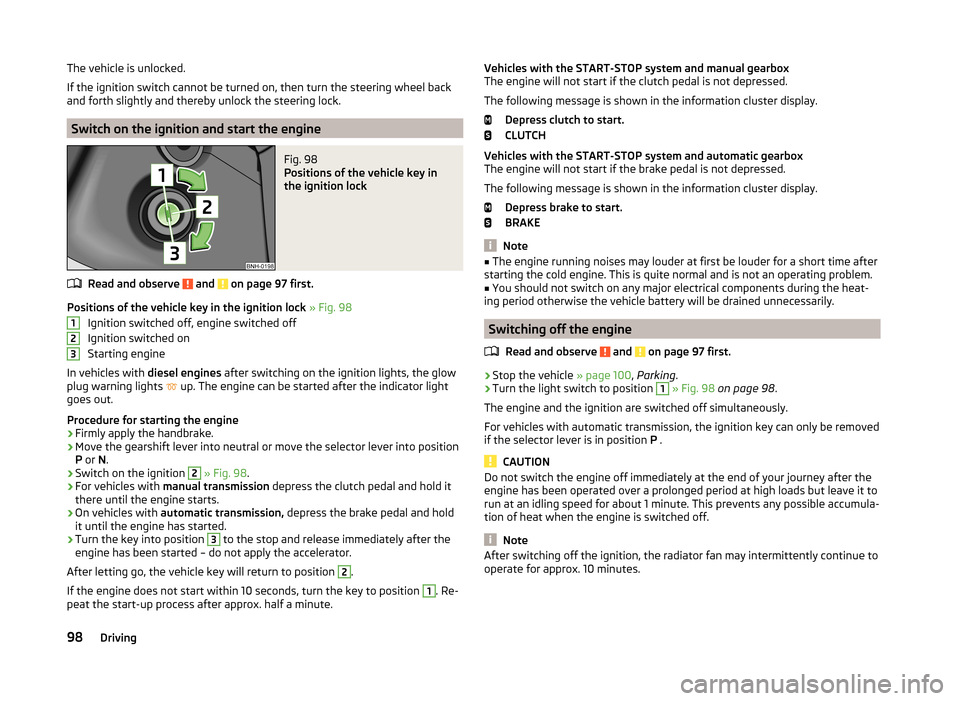
Fig. 98
Positions of the vehicle key in
the ignition lock
Read and observe and on page 97 first.
Positions of the vehicle key in the ignition lock » Fig. 98
Ignition switched off, engine switched off
Ignition switched on
Starting engine
In vehicles with diesel engines after switching on the ignition lights, the glow
plug warning lights up. The engine can be started after the indicator light
goes out.
Procedure for starting the engine
›
Firmly apply the handbrake.
›
Move the gearshift lever into neutral or move the selector lever into position
P or N.
›
Switch on the ignition
2
» Fig. 98 .
›
For vehicles with manual transmission depress the clutch pedal and hold it
there until the engine starts.
›
On vehicles with automatic transmission, depress the brake pedal and hold
it until the engine has started.
›
Turn the key into position
3
to the stop and release immediately after the
engine has been started – do not apply the accelerator.
After letting go, the vehicle key will return to position
2
.
If the engine does not start within 10 seconds, turn the key to position
1
. Re-
peat the start-up process after approx. half a minute.
123Vehicles with the START-STOP system and manual gearbox
The engine will not start if the clutch pedal is not depressed.
The following message is shown in the information cluster display. Depress clutch to start.
CLUTCH
Vehicles with the START-STOP system and automatic gearbox
The engine will not start if the brake pedal is not depressed.
The following message is shown in the information cluster display. Depress brake to start.
BRAKE
Note
■ The engine running noises may louder at first be louder for a short time after
starting the cold engine. This is quite normal and is not an operating problem.■
You should not switch on any major electrical components during the heat-
ing period otherwise the vehicle battery will be drained unnecessarily.
Switching off the engine
Read and observe
and on page 97 first.
›
Stop the vehicle » page 100, Parking .
›
Turn the light switch to position
1
» Fig. 98 on page 98 .
The engine and the ignition are switched off simultaneously.
For vehicles with automatic transmission, the ignition key can only be removed
if the selector lever is in position P .
CAUTION
Do not switch the engine off immediately at the end of your journey after the
engine has been operated over a prolonged period at high loads but leave it to
run at an idling speed for about 1 minute. This prevents any possible accumula-
tion of heat when the engine is switched off.
Note
After switching off the ignition, the radiator fan may intermittently continue to
operate for approx. 10 minutes.98Driving
Page 105 of 193
The selector lever is not locked when quickly moving across the position N
(e.g. from R to D). This, for example, helps to rock out a vehicle that is stuck,
e.g. in a bank of snow. The selector lever lock will engage if the lever is in posi-
tion N for more than approx. 2 seconds without the brake pedal being de-
pressed.
Releasing selector lever from mode P or N (selector lever lock)›
Press the brake pedal and the lock button at the same time in the direction
of the arrow » Fig. 102 on page 102 .
Just depress the brake pedal, if you would like to change from the mode N to
D .
Defective selector lever lock
If the selector lever lock is defective or its power supply is interrupted (e.g. dis-
charged vehicle battery, faulty fuse), the selector lever can no longer be moved
out of position P in the normal manner and the vehicle can no longer be driven.
The selector lever must be emergency released » page 162.
Note
If you want to move the selector lever from mode P to mode D or vice versa,
move the selector lever quickly. This prevents modes R or N from being acci-
dentally selected.
Manual shifting of gears (Tiptronic)
Fig. 103
Selector lever
Read and observe and on page 101 first.
Tiptronic mode makes it possible to manually shift gears on the selector lever. This mode can be selected both while stopping and while driving.
The currently selected gear is indicated in the » Fig. 101 on page 102 display.
The gear shift indicator must be observed when changing gear » page 38.
Switching to manual shifting›Push the gear selector from mode D towards the right, or left in a right-hand
drive vehicle.
Shifting up gears›
Push the selector lever
+
» Fig. 103 forwards.
Shifting down gears
›
Push the selector lever
-
» Fig. 103 backwards.
Note
■
It may be beneficial, for example, when travelling downhill, to use manual
shifting of gears. Shifting to a lower gear reduces the load on the brakes and
hence the wear on the brakes » page 99, Information on braking .■
When accelerating, the gearbox automatically shifts up into the higher gear
just before the maximum permissible engine speed is reached.
■
If a lower gear is selected, the gearbox does not shift down until there is no
risk of the engine over-revving.
Starting-off and driving
Read and observe
and on page 101 first.
Starting off
›
Start the engine.
›
Firmly depress and hold the brake pedal.
›
Press the lock button in the direction of the arrow » Fig. 102 on page 102 and
keep pressing.
›
Move the selector lever into the desired position » page 102and then release
the lock button.
›
Release the brake pedal and accelerate.
Stopping (while the car is moving)
›
Depress the brake pedal and bring the vehicle to a stop.
›
Keep holding the brake pedal until driving is resumed.
The selector lever position N does not have to be selected when stopping for a
short time, such as at a cross roads.
Kickdown
The kickdown function allows you to achieve the maximum acceleration of
your vehicle while driving.
When the accelerator pedal is fully depressed, the kickdown function is activa-
ted in any forward driving mode.
103Starting-off and Driving
Page 112 of 193

Operating conditions of the systemFig. 108
MAXI DOT display: Engine is au-
tomatically switched off / auto-
matic engine cut off is not possi-
ble
Read and observe on page 109 first.
For system-dependent automatic engine shutdown
to work, the following conditions must be met.
The driver's door is closed.
The driver has fastened the seat belt.
The bonnet is closed.
The driving speed was higher than 4 km/h after the last stop.
No trailer is coupled.
Some additional conditions for the system to function correctly cannot be in-
fluenced or recognised by the driver. Therefore, the system can react differ-
ently in situations which are identical from the driver's perspective.
If after stopping the car, the message START-STOP NOT POSSIBLE appears in
the segment display and/or in MAXI DOT-Display, » Fig. 108
then the condi-
tions for automatic engine shutdown have not been fulfilled.
Running the engine e.g. is essential for the following reasons.
› The engine temperature for the proper function of the system has not yet
been reached.
› The charge state of the vehicle battery is too low.
› The current consumption is too high.
› High air-conditioning or heating capacity (high fan speed, big difference be-
tween the desired and actual interior temperature).
Note■ If the vehicle remains outdoors for a long time in minus temperatures or in
direct sunlight, it can take several hours until the internal temperature of the
vehicle battery reaches a suitable temperature for proper operation of the
START STOP system.■
If the driver's seat belt is removed for more than approx. 30 seconds or the
driver's door is opened during stop mode, the engine will have to be started
manually.
■
After the manual engine start and with a manual gearbox the automatic en-
gine shutdown can take place only when a minimum distance required for the
system function has been covered.
Operation in vehicles with manual gearbox
Read and observe
on page 109 first.
In compliance with the operating conditions, automatic engine shutdown / au-
tomatic engine start takes place as described.
Automatic engine shutdown
›
Stop the vehicle.
›
Put the gear stick into Neutral.
›
Release the clutch pedal.
Automatic engine shutdown takes place, segment display shows START-STOP
ACTIVE or a check mark appears in the MAXI DOT display symbol
» Fig. 108
on
page 110 .
Automatic engine start
›
Depress the clutch pedal.
The automatic start procedure takes place again.
Operation in vehicles with automatic gearbox
Read and observe
on page 109 first.
In compliance with the operating conditions, automatic engine shutdown / au-
tomatic engine start takes place as described.
Automatic engine shutdown
›
Bring the vehicle to a stop and depress the brake pedal.
110Driving