light SKODA RAPID SPACEBACK 2013 1.G Owner's Guide
[x] Cancel search | Manufacturer: SKODA, Model Year: 2013, Model line: RAPID SPACEBACK, Model: SKODA RAPID SPACEBACK 2013 1.GPages: 193, PDF Size: 14.8 MB
Page 56 of 193

Light switch positions - pulling the switch A
Switch on the front fog lamp » page 56
Switching on the rear fog light » page 56
Headlight range control - knob
B
Turning the rotary switch from the position
in
gradually adjusts the head-
light range control and thereby shortens the light cone.
The positions of the width of illumination correspond approximately to the fol-
lowing car load.
Front seats occupied, boot empty
All seats occupied, boot empty
All seats occupied, boot loaded
Driver seat occupied, boot loaded
We recommend you adjust the headlight beam when the low beam is switched
on.
WARNINGAlways adjust the headlight beam to meet the following conditions.■The vehicle does not dazzle other road users, especially oncoming vehi-
cles.■
The beam range is sufficient for safe driving.
Note
■ An audible warning signal will sound if the light switch is in the or posi-
tion, the ignition key is removed and the driver's door is opened. The audible
warning signal is switched off after a few seconds or as a result of door con-
tact when the driver's door is closed. However, the side lights remain on to illu-
minate the parked vehicle if necessary.■
If leaving the vehicle without needing the parking lights on, always turn
the light switch to position
.
Daytime running lights(DAY LIGHT)
Read and observe
on page 53 first.
The daytime running lights (the only function) provides the lighting of the frontvehicle range.
The daytime running lights are switched on automatically if the following
conditions are met.
The light switch is in the position
or
» Fig. 36 on page 53 .
The ignition is switched on.
The parking aid is activated.
Deactivating the function›
Switch off the ignition.
›
Remove the fuse for the daytime running lights » page 164, Fuses in the
dash panel .
Activating the function
›
Switch off the ignition.
›
Use a fuse of appropriate amperage for the daytime running
lights » page 164 , Fuses in the dash panel .
Disable function on vehicles with the START-STOP system or with the
automatic driving light control
›
Switch off the ignition.
›
Slide the turn signal light lever ( » Fig. 37 on page 55 ) downwards and hold
it in this position.
›
Switch on the ignition – wait until the left-turn signal light flashes 4x.
›
Switch off the ignition – an audible signal sounds which confirms the deacti-
vation of the function.
›
Release the turn signal stalk.
Function on vehicles with the START-STOP system or with the automatic
driving light control
›
Switch off the ignition.
›
Slide the turn signal light lever ( » Fig. 37 on page 55 ) upwards and hold it in
this position.
›
Switch on the ignition – wait until the right-turn signal light flashes 4x.
›
Switch off the ignition – an audible signal sounds which confirms the activa-
tion of the function.
›
Release the turn signal stalk.
WARNINGWhen the daytime running light is switched on, the side lights (neither at
the front nor the rear) and the number plate lights are not lit. Therefore al-
ways switch on the low beam when the visibility is poor.54Using the system
Page 57 of 193

Turn signal and main beamFig. 37
Operating lever: Turn signal and
main beam operation
Read and observe on page 53 first.
Lever positions
ASwitch on right turn signalBSwitch on left turn signalCSwitch on high beam (spring-loaded position)D Switching off main beam / switching on headlamp flasher (spring-
loaded position)
Main beam
The main beam can only be switched on when the low beam lights are on.
When the high beam or headlight flasher is on, the warning light lights up in
the instrument cluster.
Flashing
When the left flashing light is switched on, the warning light flashes in the
instrument cluster.
When the right flashing light is switched on, the warning light flashes in the
instrument cluster.
The flashing light is turned on even before the upper and lower pressure point.
This is advantageous in some manoeuvres. For example, when changing lanes
hold the control lever of each pressure point.
The turn signal light switches itself off automatically when driving around a
curve or after making a turn.
The warning light flashes at twice its normal rate if a bulb for the turn signal
light fails.
“Convenience turn signal”
If you only wish to flash three times, briefly push the lever to the upper or low-
er pressure point and release again.WARNINGOnly turn on the main beam or the headlight flasher if other road users will
not be dazzled.
Note
The headlight flasher can be operated even if the ignition is switched off.
Automatic driving lamp control
Fig. 38
Light switch: AUTO position
Read and observe on page 53 first.
If the light switch is in position
» Fig. 38 , the parking lights, low beam and
number plate lights are switched on or off automatically.
Switching on/off of the light is regulated on the basis of data gathered by the
sensor fitted in the holder of the rear-view mirror below the windscreen.
If the light switch is in position
, the lettering
illuminates next to the
light switch. If the light is switched on automatically, the symbol
next to the
light switch also lights up.
Automatic driving light control during rain
The daytime running lights are switched on automatically if the following con-
ditions are met.
The light switch is in position
» Fig. 38 .
Automatic wiping with rain - position
1
or wiping - position
2
or
3
is
turned on » page 61, Activating the windscreen wipers and washers .
The windscreen wipers are on for more than 15 s.
55Lights and visibility
Page 58 of 193

The light turns off about 4 minutes after turning off the wipers.
CAUTION
Do not attach any stickers or similar objects in front of the light sensor on the
windscreen to avoid impairing the function or its reliability.
Fog lights
Fig. 39
Light switch - Switch front and
rear fog light
Read and observe on page 53 first.
Switching on/off
›
Turn the light switch to position
or
» Fig. 39 .
›
Pull the light switch to position
1
.
The rear fog light is switched off in the reverse order.
The warning light
» page 30 lights up in the instrument cluster when the
fog lights are switched on.
Fog lights with CORNER function
Read and observe
on page 53 first.
The CORNER function lights the front fog lamp on each side of the vehicle to
illuminate the area around the vehicle when turning, parking, etc.
The CORNER function is switched on automatically if the following conditions
are met.
The turn signal is switched on or the front wheels are turned sharply to
the right or left 1)
.
The engine is running.
The vehicle is stopped or moves at a speed of no more than 40 km/h.
The low beam is switched on or the light switch is in the position
and
the low beam is switched on.
The daytime running lights are not switched on.
The fog lights are not switched on.
Note
The two fog lights are switched on when you shift into the reverse gear.
Rear fog light
Read and observe
on page 53 first.
Switching on/off
›
Turn the light switch to position or
» Fig. 39 on page 56 .
›
Pull the light switch to position
2
.
The rear fog light is switched off in the reverse order.
If the vehicle is not fitted with fog lights » page 56, the rear fog light is switch-
ed on by turning the light switch to the position and is pulled out directly to
the position
2
. This switch can only be put into one position.
The warning light
» page 30 lights up in the instrument cluster when the
rear fog light is switched on.
Only the rear fog light on the trailer lights up if the vehicle has a factory-fitted
towing device or a towing device from ŠKODA original accessories and it is
driven with a trailer.
1)
If both switch-on conditions are conflicting, for example, if the front wheels are turned to the left and
the right turn signal light is switched on, the turn signal light has the higher priority.
56Using the system
Page 59 of 193

COMING HOME / LEAVING HOMERead and observe
on page 53 first.
COMING HOME (hereinafter referred to only as a function) switches the light
automatically for a short time after leaving the vehicle.
LEAVING HOME (hereinafter referred to only as a function) switches the light
automatically for a short time when approaching the vehicle.
The function switches on the following light, depending on the equipment
fitted.
› Parking lights
› Low beam
› Entry lighting in the exterior mirrors
› Licence plate light
COMING HOME
The daytime running lights are switched on automatically if the following
conditions are met.
The light switch is in position
» Fig. 38 on page 55 .
The visibility in the vehicle environment is reduced.
The ignition is switched off.
The function was activated before leaving the vehicle by briefly switching
on the headlight flasher » page 55, Turn signal and main beam .
The driver's door was open - within 60 seconds after turning off the igni-
tion.
The light goes out 10 seconds after closing all of the doors and the boot lid.
If a door or the boot lid remains open, the light goes out after 60 seconds.
LEAVING HOME
The daytime running lights are switched on automatically if the following
conditions are met.
The light switch is in position
» Fig. 38 on page 55 .
The visibility in the vehicle environment is reduced.
The ignition is switched off.
The vehicle was unlocked with the radio remote control.
The light goes off after 10 seconds or when locking the vehicle.
CAUTION■
Do not attach any stickers or similar objects in front of the light sensor on
the windscreen to avoid impairing the function or its reliability.■
If this function is activated, the battery will be heavily discharged particularly
in short-haul traffic.
Note
Poorer visibility are evaluated on the basis of information that is collected from
the sensor mounted in the interior mirror holder.
Hazard warning light system
Fig. 40
Button for hazard warning light
system
Read and observe on page 53 first.
Switching on/off
›
Press the button
» Fig. 40 .
All the turn signal lights on the vehicle flash at the same time when the hazard
warning light system is switched on. The warning light for the turn signals and
the warning light in the button also flash at the same time. The hazard warn-
ing light system can also be operated if the ignition is switched off.
If one of the airbags is deployed, the hazard warning light system will switch
on automatically.
If the turn signal light is switched on when the hazard warning light and the
ignition are both switched on, then only the turn signal light on the corre-
sponding vehicle side will flash.
57Lights and visibility
Page 60 of 193

WARNINGSwitch on the hazard warning light system if, for example, the following oc-
curs.■
You encounter a traffic congestion.
■
The vehicle has broken down.
Parking light
Read and observe
on page 53 first.
The parking light is provided for a temporary lighting of the parked vehicle.
Parking light switching on
›
Switch off the ignition.
›
Place the control lever into position
A
or
B
as far as it can go
» Fig. 37 on
page 55 - the parking light on the right/left-hand side of the vehicle is
switched on.
If the right or left turn signal light has been switched on and the ignition is
switched off, the parking light is not automatically switched on.
Switching on the side light on both sides
›
Turn the light switch
A
to position
» Fig. 36 on page 53 and lock the vehi-
cle.
On vehicles with a MAXI DOT display, the symbol in the light switch also
lights up when the two-sided parking light is switched on.
CAUTION
Turning on the parking light means the battery is heavily loaded, especially
over short distances.
Driving abroad
Read and observe
on page 53 first.
The low beam is set asymmetrically. It illuminates the side of the road on
which the vehicle is being driven to a greater extent.
When driving in countries with opposing traffic system (traffic on the left/
right), asymmetric headlight adjustment can dazzle oncoming traffic. In order
to avoid this, the headlights must be adjusted at a specialist garage.
NoteYou can find out more information on adjusting the headlights at a specialist
garage.
Interior lighting
Front interior light
Fig. 41
Front interior light - Version 1 / Version 2
Positions of sliding switch
A
» Fig. 41
Switching on
Switching off
Operating with the door contact switch
Switch for reading light
B
» Fig. 41
Switching left reading lamp on/off
Switching right reading lamp on/off
Conditions for the lighting operation with the door contact switch
The system is turned on when any of the following is present.
› The vehicle is unlocked.
› One of the doors is opened.
› The ignition key is removed.
The system is turned off when any of the following is present.
› The vehicle is locked.
› The ignition is switched on.
› About 30 seconds after all the doors have been closed.
58Using the system
Page 61 of 193
NoteThe activated light turns on automatically for about 10 minutes after the igni-
tion is switched off.
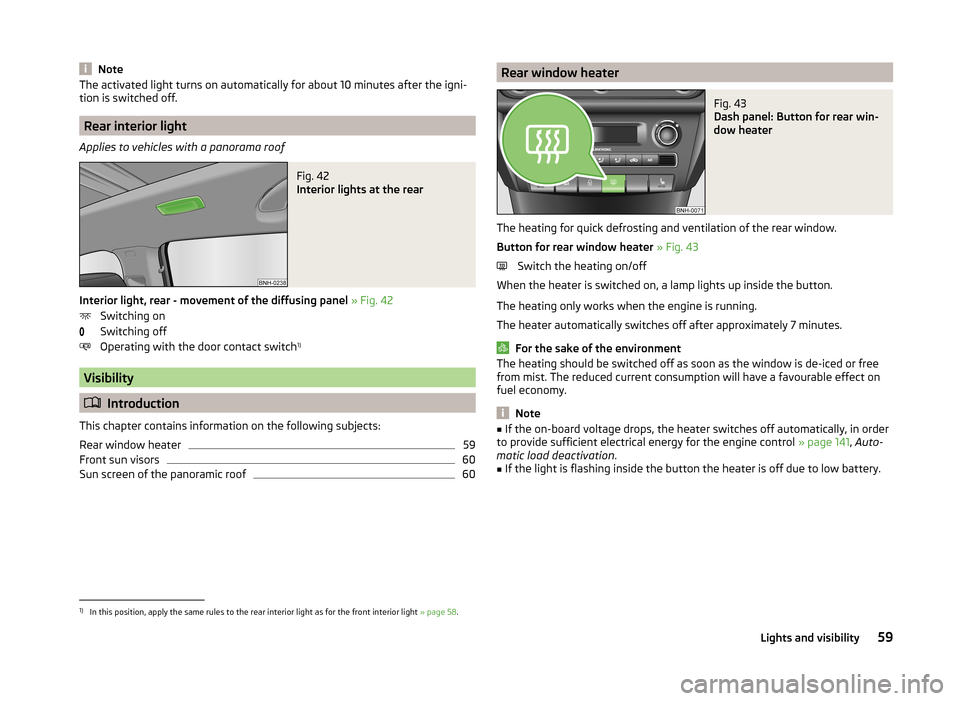
Rear interior light
Applies to vehicles with a panorama roof
Fig. 42
Interior lights at the rear
Interior light, rear - movement of the diffusing panel » Fig. 42
Switching on
Switching off
Operating with the door contact switch 1)
Visibility
Introduction
This chapter contains information on the following subjects:
Rear window heater
59
Front sun visors
60
Sun screen of the panoramic roof
60Rear window heaterFig. 43
Dash panel: Button for rear win-
dow heater
The heating for quick defrosting and ventilation of the rear window.
Button for rear window heater » Fig. 43
Switch the heating on/off
When the heater is switched on, a lamp lights up inside the button.
The heating only works when the engine is running.
The heater automatically switches off after approximately 7 minutes.
For the sake of the environment
The heating should be switched off as soon as the window is de-iced or free
from mist. The reduced current consumption will have a favourable effect on
fuel economy.
Note
■ If the on-board voltage drops, the heater switches off automatically, in order
to provide sufficient electrical energy for the engine control » page 141, Auto-
matic load deactivation .■
If the light is flashing inside the button the heater is off due to low battery.
1)
In this position, apply the same rules to the rear interior light as for the front interior light » page 58.
59Lights and visibility
Page 62 of 193
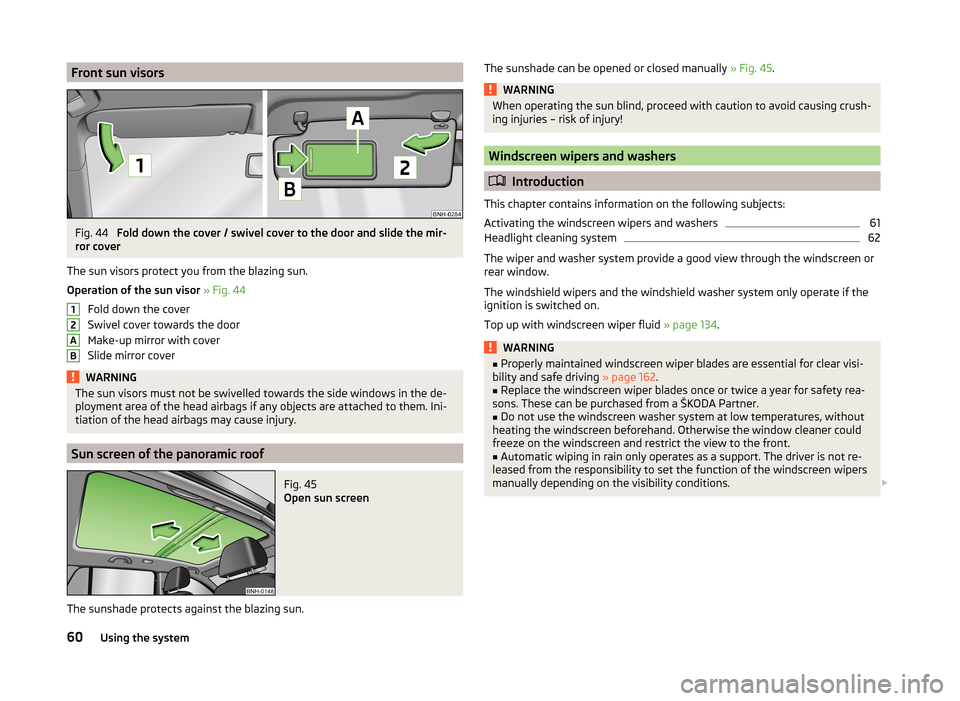
Front sun visorsFig. 44
Fold down the cover / swivel cover to the door and slide the mir-
ror cover
The sun visors protect you from the blazing sun.
Operation of the sun visor » Fig. 44
Fold down the cover
Swivel cover towards the door
Make-up mirror with cover
Slide mirror cover
WARNINGThe sun visors must not be swivelled towards the side windows in the de-
ployment area of the head airbags if any objects are attached to them. Ini-
tiation of the head airbags may cause injury.
Sun screen of the panoramic roof
Fig. 45
Open sun screen
The sunshade protects against the blazing sun.
12ABThe sunshade can be opened or closed manually » Fig. 45.WARNINGWhen operating the sun blind, proceed with caution to avoid causing crush-
ing injuries – risk of injury!
Windscreen wipers and washers
Introduction
This chapter contains information on the following subjects:
Activating the windscreen wipers and washers
61
Headlight cleaning system
62
The wiper and washer system provide a good view through the windscreen or
rear window.
The windshield wipers and the windshield washer system only operate if the
ignition is switched on.
Top up with windscreen wiper fluid » page 134.
WARNING■
Properly maintained windscreen wiper blades are essential for clear visi-
bility and safe driving » page 162.■
Replace the windscreen wiper blades once or twice a year for safety rea-
sons. These can be purchased from a ŠKODA Partner.
■
Do not use the windscreen washer system at low temperatures, without
heating the windscreen beforehand. Otherwise the window cleaner could
freeze on the windscreen and restrict the view to the front.
■
Automatic wiping in rain only operates as a support. The driver is not re-
leased from the responsibility to set the function of the windscreen wipers
manually depending on the visibility conditions.
60Using the system
Page 63 of 193

CAUTION■If the ignition is switched off while the windscreen wipers are switched on,
the windscreen wipers will continue wiping in the same mode after the igni-
tion is turned back on. The windscreen wipers could freeze up in cold tempera-
tures between the time the ignition was turned off and when it was turned
back on again.■
In cold temperatures and during the winter, check before the journey or be-
fore switching on the ignition that the wiper blades are not frozen to the
windscreen. If the windscreen wipers are switched on when the blades are fro-
zen to the windscreen, this may damage both the blades and windscreen wip-
er motor!
■
Carefully peel frozen wiper blades off the windscreen.
■
Remove snow and ice from the windscreen wipers before driving.
■
Do not switch on the ignition if the front wiper arms are retracted. The wiper
blades would move back into their rest position and while doing so damage
the paintwork of the bonnet.
■
If the windscreen wipers are handled carelessly, there is a risk of damage to
the windscreen.
Note
■ To avoid streaking, the wiper blades must be kept clean » page 126.■The windscreen washer nozzles for the windscreen are heated when the en-
gine is running and the outside temperature is less than approx. +10 °C.
Activating the windscreen wipers and washers
Fig. 46
Operating lever: Windscreen
wipers and washer settings
Read and observe and on page 60 first.
Lever positions
0Wipers off1Periodic windscreen wiping/automatic wiping in rain2Slow windscreen wiping3Rapid windscreen wiping4 Flick windscreen wiping, service position of the wiper
arms » page 162 , (spring-loaded position)5Automatic wipe/wash for windscreen (spring-tensioned position)6Wiping the rear window pane (the windscreen wiper wipes at regu-
lar intervals after a few seconds)7Automatic wipe/wash for the rear window (spring-tensioned posi-
tion)ASwitch for setting the desired break between the individual wiper
passes or the speed of the automatic wiping in rain (operating lever
in position 1
)
Interval windscreen wiping
The wiping intervals are also speed-dependent regulated.
Automatic windscreen wiping in rain
The wiping intervals are controlled depending on the rain intensity.
Automatic wipe/wash for windscreen
The wash system operates immediately, the windscreen wipers wipe some-
what later.
Letting go of the operating lever will cause the windscreen wash system to
stop and the wipers to continue for another 1 to 3 wiper strokes (depending on
the spraying duration).
Automatic wipe/wash for the rear window
The wash system operates immediately, the windscreen wiper wipes some-
what later.
Letting go of the operating lever will cause the windscreen wash system to
stop and the wiper to continue for another 1 to 3 wiper strokes (depending on
the spraying duration). The operating lever remains in position
6
.
Note
The rear window is wiped once automatically if the windscreen wipers are on
when reverse gear is selected.61Lights and visibility
Page 64 of 193
Headlight cleaning systemRead and observe
and on page 60 first.
After the ignition is switched on, the headlights are always cleaned at the first
and after every tenth spray of the windscreen (setting
5
» Fig. 46 on page 61 ),
when the low beam or main beam is switched on.
You should remove stubborn dirt (such as insect residues) from the headlight
lenses at regular intervals, for example when refuelling. The following guide-
lines must be observed » page 125, Headlight glasses .
To ensure the proper operation of the cleaning system during the winter, any
snow should be removed from the washer nozzle fixtures and ice should be
cleared with a de-icing spray.
CAUTION
Never remove the nozzles from the headlight cleaning system by hand – risk of
damage!
Rear mirror
Introduction
This chapter contains information on the following subjects:
Interior mirror
62
Exterior mirror
63WARNING■ Make sure that the mirror is not covered by ice, snow, mist or other ob-
jects.■
Convex (curved outward) or aspheric exterior mirrors increase the field of
vision. They do, however, make objects appear smaller in the mirror. These
mirrors are therefore only of limited use for estimating distances to the fol-
lowing vehicles.
■
Whenever possible use the interior mirror for estimating the distances to
the following vehicles.
■
The illuminated display of an external navigation unit can lead to opera-
tional faults to the automatic dimming interior mirror – risk of accident.
WARNINGThe mirrors with automatic dimming contain an electrolyte liquid which can
escape if mirror glass is broken.■
The leaking electrolytic fluid can irritate the skin, eyes and breath appara-
tus. Immediately seek out fresh air and leave the vehicle. If this is not pos-
sible, at least open the window.
■
If you swallow electrolytic fluid, seek medical assistance immediately.
■
If your eyes or skin come into contact with the electrolytic fluid, immedi-
ately wash the affected area for a few minutes long with a lot of water.
Then consult a doctor immediately.
Interior mirror
Fig. 47
Interior mirror: manual dimming / auto-darkening / light sensor
Read and observe
on page 62 first.
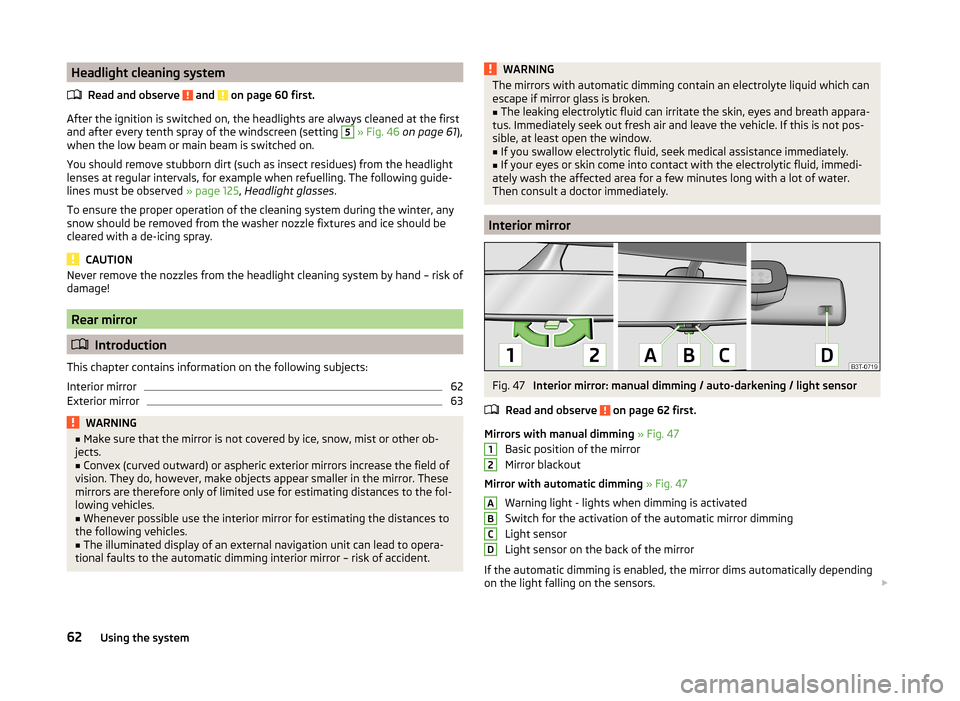
Mirrors with manual dimming » Fig. 47
Basic position of the mirror
Mirror blackout
Mirror with automatic dimming » Fig. 47
Warning light - lights when dimming is activated
Switch for the activation of the automatic mirror dimming
Light sensor
Light sensor on the back of the mirror
If the automatic dimming is enabled, the mirror dims automatically depending
on the light falling on the sensors.
12ABCD62Using the system
Page 65 of 193
When the interior lights are switched on or the reverse gear is engaged, the
mirror always moves back into the basic position (not dimmed).
Do not attach external navigation devices on to the windscreen or in the vicini-
ty of the automatic dimming mirror » page 62,
in section Introduction .
CAUTION
Automatic mirror dimming operates only properly if the light striking the sen-
sors is not affected by other objects.
Exterior mirror
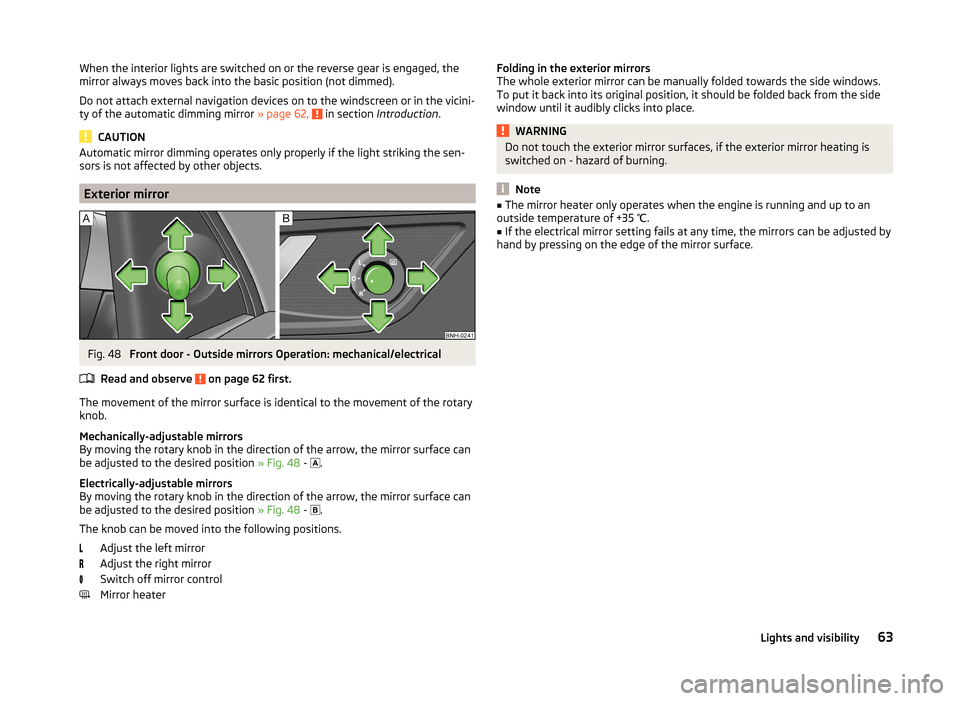
Fig. 48
Front door - Outside mirrors Operation: mechanical/electrical
Read and observe
on page 62 first.
The movement of the mirror surface is identical to the movement of the rotary
knob.
Mechanically-adjustable mirrors
By moving the rotary knob in the direction of the arrow, the mirror surface can
be adjusted to the desired position » Fig. 48 -
.
Electrically-adjustable mirrors
By moving the rotary knob in the direction of the arrow, the mirror surface can
be adjusted to the desired position » Fig. 48 -
.
The knob can be moved into the following positions. Adjust the left mirror
Adjust the right mirror
Switch off mirror control
Mirror heater
Folding in the exterior mirrors
The whole exterior mirror can be manually folded towards the side windows.
To put it back into its original position, it should be folded back from the side
window until it audibly clicks into place.WARNINGDo not touch the exterior mirror surfaces, if the exterior mirror heating is
switched on - hazard of burning.
Note
■ The mirror heater only operates when the engine is running and up to an
outside temperature of +35 ℃.■
If the electrical mirror setting fails at any time, the mirrors can be adjusted by
hand by pressing on the edge of the mirror surface.
63Lights and visibility