tow SKODA RAPID SPACEBACK 2017 User Guide
[x] Cancel search | Manufacturer: SKODA, Model Year: 2017, Model line: RAPID SPACEBACK, Model: SKODA RAPID SPACEBACK 2017Pages: 184, PDF Size: 28.06 MB
Page 58 of 184
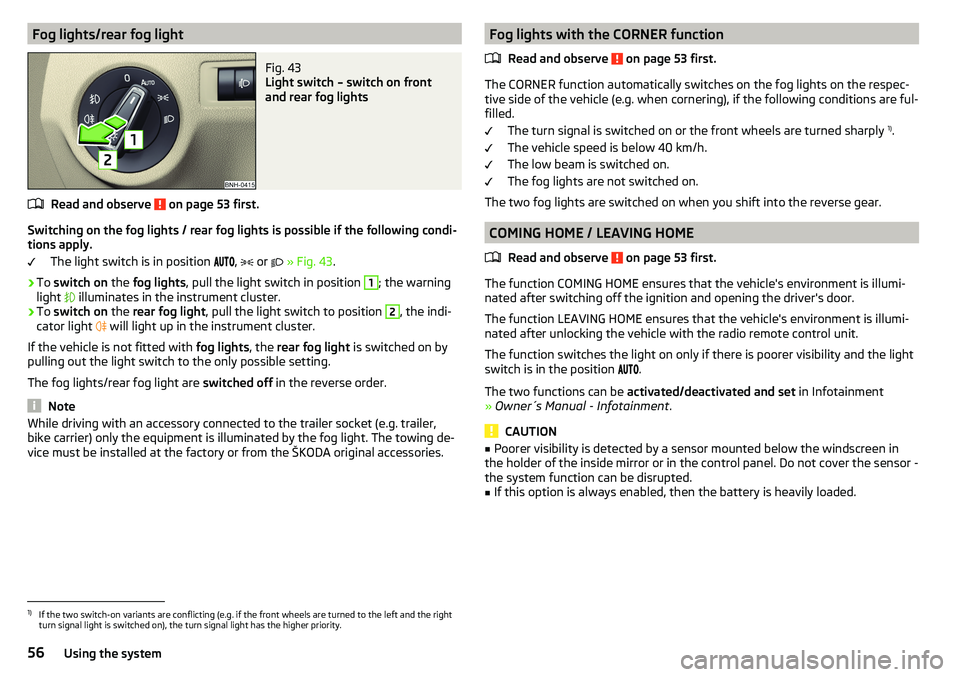
Fog lights/rear fog lightFig. 43
Light switch – switch on front
and rear fog lights
Read and observe on page 53 first.
Switching on the fog lights / rear fog lights is possible if the following condi-
tions apply.
The light switch is in position ,
or
» Fig. 43 .
›
To switch on the fog lights , pull the light switch in position
1
; the warning
light illuminates in the instrument cluster.
›
To
switch on the rear fog light , pull the light switch to position
2
, the indi-
cator light will light up in the instrument cluster.
If the vehicle is not fitted with fog lights, the rear fog light is switched on by
pulling out the light switch to the only possible setting.
The fog lights/rear fog light are switched off in the reverse order.
Note
While driving with an accessory connected to the trailer socket (e.g. trailer,
bike carrier) only the equipment is illuminated by the fog light. The towing de-
vice must be installed at the factory or from the ŠKODA original accessories.Fog lights with the CORNER function
Read and observe
on page 53 first.
The CORNER function automatically switches on the fog lights on the respec-tive side of the vehicle (e.g. when cornering), if the following conditions are ful-
filled.
The turn signal is switched on or the front wheels are turned sharply 1)
.
The vehicle speed is below 40 km/h.
The low beam is switched on.
The fog lights are not switched on.
The two fog lights are switched on when you shift into the reverse gear.
COMING HOME / LEAVING HOME
Read and observe
on page 53 first.
The function COMING HOME ensures that the vehicle's environment is illumi-
nated after switching off the ignition and opening the driver's door.
The function LEAVING HOME ensures that the vehicle's environment is illumi-
nated after unlocking the vehicle with the radio remote control unit.
The function switches the light on only if there is poorer visibility and the light
switch is in the position .
The two functions can be activated/deactivated and set in Infotainment
» Owner´s Manual - Infotainment .
CAUTION
■
Poorer visibility is detected by a sensor mounted below the windscreen in
the holder of the inside mirror or in the control panel. Do not cover the sensor -
the system function can be disrupted.■
If this option is always enabled, then the battery is heavily loaded.
1)
If the two switch-on variants are conflicting (e.g. if the front wheels are turned to the left and the right
turn signal light is switched on), the turn signal light has the higher priority.
56Using the system
Page 61 of 184

The rear light - variant 1 is operated together with the automatic operation of
the light at the front 1)
.
▶ When the front lighting is switched on, the rear lighting also turns on auto-
matically.
▶ When the front lighting is switched off, the rear lighting can be switched
on/off as required.
Visibility
Introduction
This chapter contains information on the following subjects:
Windscreen and rear window heater
59
Sun visors
59
Sun screen of the panoramic roof
60WARNINGNo objects should be attached to the sun visor that could restrict the view
or endanger the vehicle occupants during sudden braking or in a collision.
Windscreen and rear window heater
Fig. 47
Buttons for the windscreen and
rear window heater
Read and observe on page 59 first.
The heating for quick defrosting and ventilation of the windscreen and rear window.
The heating only works when the engine is running.
Buttons for the heating (depending on vehicle equipment) » Fig. 47
Switching on/off the windscreen heater
Switch on/off the rear window heater
When the heater is switched on, a lamp illuminates inside the button.
The heating automatically switches off after ten minutes.
Note
■ If the on-board voltage decreases, the heating switches off automatically
» page 133 , Automatic shutdown of consumers - vehicle battery discharge
protection .■
If the light is flashing inside the button, the heater will not function due to
low battery.
Sun visors
Fig. 48
Fold down the cover / swivel cover to the door and slide the mir-
ror cover
Read and observe
on page 59 first.
Operation and description of the sun visor » Fig. 48
Swivel cover towards the windscreen
Swivel cover towards the door
Make-up mirror with cover
Slide mirror cover
12AB1)
This function only applies to certain countries. In some countries, the light at the rear is controlled inde-
pendently from the light at the front.
59Lights and visibility
Page 65 of 184
Folding in the exterior mirrors
The mirror can be manually folded in towards the side window. To put it back
into its original position, it should be folded back from the side window until it
audibly clicks into place.WARNINGDo not touch the exterior mirror surfaces, if the exterior mirror heating is
switched on - hazard of burning.Seats and head restraints
Front seats
Introduction
This chapter contains information on the following subjects:
Adjusting the front seats
63
Setting the armrest height
64WARNING■ Only adjust the driver's seat when the vehicle is stationary – otherwise
risk of accident!■
Caution when adjusting the seat! You may suffer injuries or bruises as a
result of adjusting the seat without paying proper attention.
Adjusting the front seats
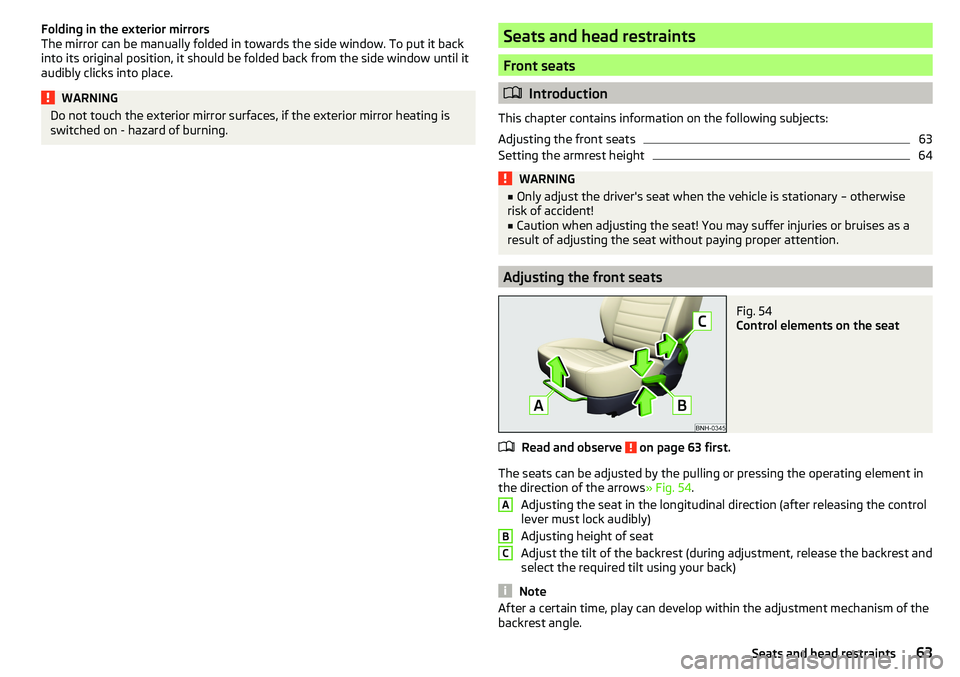
Fig. 54
Control elements on the seat
Read and observe on page 63 first.
The seats can be adjusted by the pulling or pressing the operating element in
the direction of the arrows » Fig. 54.
Adjusting the seat in the longitudinal direction (after releasing the control
lever must lock audibly)
Adjusting height of seat
Adjust the tilt of the backrest (during adjustment, release the backrest and
select the required tilt using your back)
Note
After a certain time, play can develop within the adjustment mechanism of the
backrest angle.ABC63Seats and head restraints
Page 69 of 184

Useful features
Interior fittings
Introduction
This chapter contains information on the following subjects:
Ticket holder
67
stowage compartments in the doors
68
Storage compartment in the centre console
68
USB and AUX input
68
Storage compartment on the dashboard
68
Cup holders
69
Waste container
69
Cigarette lighter
70
Ashtray
70
12-volt socket
71
Multimedia holder
71
Storage compartment in the front arm rest
72
Glasses compartment
72
Storage compartment on the front passenger side
72
Storage compartment for umbrella
73
Clothes hook
73
Storage pockets on the backs of the front seats
73
Storage pockets on the inner sides of the front seats
73WARNING■ Do not place anything on the dashboard. These objects might slide or fall
down when driving and may distract you from concentrating on the traffic –
risk of accident!■
Make sure that while driving no objects can enter the driver's footwell -
they could cause an accident!
■
Do not carry any objects on the front passenger seat, except objects de-
signed for this purpose (e.g. child seats) – risk of accident!
■
No objects should be placed in the storage compartments nor in the
drinks holders; the vehicle occupants could be endangered if there is sud-
den braking or the vehicle collides with something.
WARNING (Continued)■ For safety reasons, lockable storage compartments should be closed
while driving - there is a risk of injury from the opened lid or through the
loose objects in the compartment.■
Make sure no objects protrude from the storage compartments - danger
of injury!
■
Do not exceed the permissible loads for the storage compartments and
pockets - risk of injury and risk of damage to the compartments and pock-
ets!
■
Ash, cigarettes, cigars and the like should only be stored in the ashtray -
danger of fire/burns!
■
The storage compartments, multimedia holder and waste container are
not a substitute for the ashtray and must not be used for such purposes –
risk of fire!
CAUTION
Do not place any large or sharp objects in the storage compartments and pock-
ets - there is a risk of damage to the compartments and pockets.
Ticket holder
Fig. 62
Ticket holder
Read and observe and on page 67 first.
The ticket holder » Fig. 62 is provided for the holding and displaying e.g. car
park tickets.
67Useful features
Page 70 of 184

stowage compartments in the doorsFig. 63
Storage compartment: in the front door/in the rear door
Read and observe
and on page 67 first.
Storage compartments » Fig. 63
Storage compartment
Bottle holder with a capacity of max. 1.5 l
Bottle holder with a capacity of max. 0.5 l
WARNINGThe storage compartment A » Fig. 63 is to be used exclusively for storing
objects which do not stick out - danger of restricting the effectiveness of
the side airbags.
Storage compartment in the centre console
Fig. 64
Non-lockable compartment, front / rear
ABCRead and observe and on page 67 first.
The non-lockable storage compartment is located in the front centre console
A
and in the rear centre console
B
» Fig. 64 .
USB and AUX input
Fig. 65
USB and AUX inputs
Read and observe and on page 67 first.
The USB input (marked with
) and AUX input (marked with
) are located
above the storage compartment in the front centre console » Fig. 65.
Information on use » Owner´s Manual - Infotainment .
Storage compartment on the dashboard
Fig. 66
Storage compartment
Read and observe and on page 67 first.
The storage compartment is located in the middle part of the dashboard
» Fig. 66 .
68Using the system
Page 73 of 184

12-volt socketFig. 73
12-volt socket cover: in the front centre console / in the luggage
compartment
Read and observe
and on page 67 first.
›
To use , remove the cover of the socket » Fig. 73 -
or open the cover of the
socket » Fig. 73 -
.
›
Connect the plug for the electrical appliance to the socket.
WARNING■
Do not place anything on the dashboard. These objects might slide or fall
down when driving and may distract you from concentrating on the traffic –
risk of accident!■
Make sure that while driving no objects can enter the driver's footwell -
they could cause an accident!
■
Stow all devices safely during the journey to prevent them from being
thrown around the interior in the event of a sudden braking manoeuvre or
an accident – risk of death!
■
The devices may warm up during operation – risk of injury or fire!
■
Improper use of the power sockets and the electrical accessories can
cause fires, burns and other serious injuries.
■
The socket also works if the ignition is switched off. When leaving the ve-
hicle, never leave persons who are not completely independent, such as
children, unattended in the vehicle.
CAUTION■ The sockets can only be used for the connection of approved electrical ac-
cessories with a total power consumption of up to 120 watts - otherwise the
electrical system of the vehicle may be damaged.■
Connecting appliances when the engine is not running will drain the battery
of the vehicle!
■
Before switching the ignition on / off or before starting the engine, switch
off the devices which are connected to the sockets - there is a risk of damage
to the equipment due to voltage fluctuations.
Multimedia holder
Fig. 74
Multimedia holder
Read and observe and on page 67 first.
Multimedia holder » Fig. 74
Storage compartment for storing two coins
Storage compartment for storing the vehicle key
Storage compartment for storing a mobile phone
ABC71Useful features
Page 79 of 184
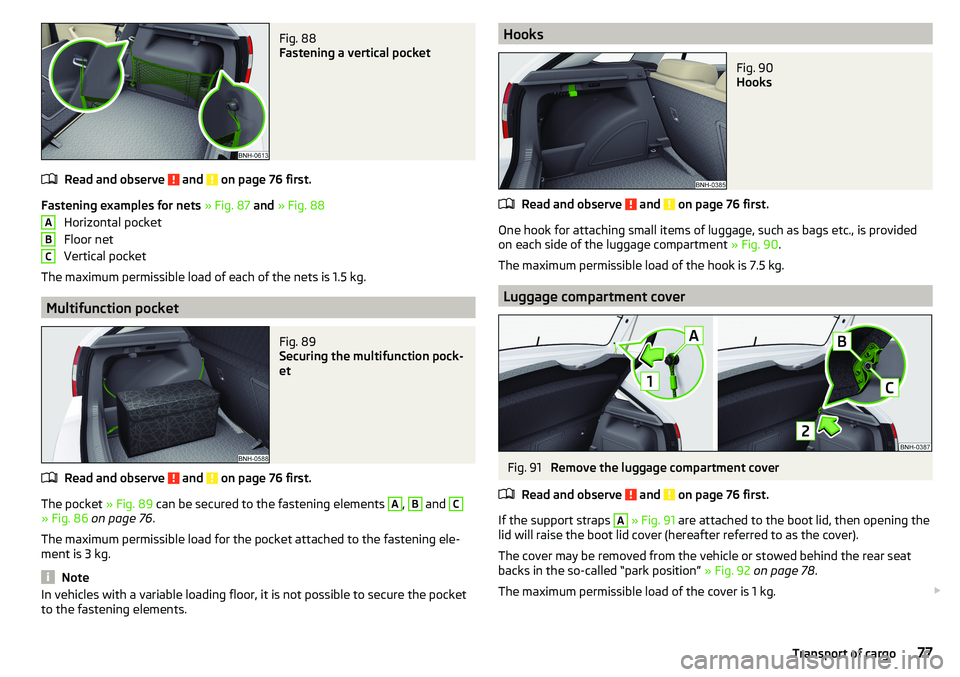
Fig. 88
Fastening a vertical pocket
Read and observe and on page 76 first.
Fastening examples for nets » Fig. 87 and » Fig. 88
Horizontal pocket
Floor net
Vertical pocket
The maximum permissible load of each of the nets is 1.5 kg.
Multifunction pocket
Fig. 89
Securing the multifunction pock-
et
Read and observe and on page 76 first.
The pocket » Fig. 89 can be secured to the fastening elements
A
,
B
and
C
» Fig. 86 on page 76 .
The maximum permissible load for the pocket attached to the fastening ele-
ment is 3 kg.
Note
In vehicles with a variable loading floor, it is not possible to secure the pocket
to the fastening elements.ABCHooksFig. 90
Hooks
Read and observe and on page 76 first.
One hook for attaching small items of luggage, such as bags etc., is provided
on each side of the luggage compartment » Fig. 90.
The maximum permissible load of the hook is 7.5 kg.
Luggage compartment cover
Fig. 91
Remove the luggage compartment cover
Read and observe
and on page 76 first.
If the support straps
A
» Fig. 91 are attached to the boot lid, then opening the
lid will raise the boot lid cover (hereafter referred to as the cover).
The cover may be removed from the vehicle or stowed behind the rear seat
backs in the so-called “park position” » Fig. 92 on page 78 .
The maximum permissible load of the cover is 1 kg.
77Transport of cargo
Page 80 of 184
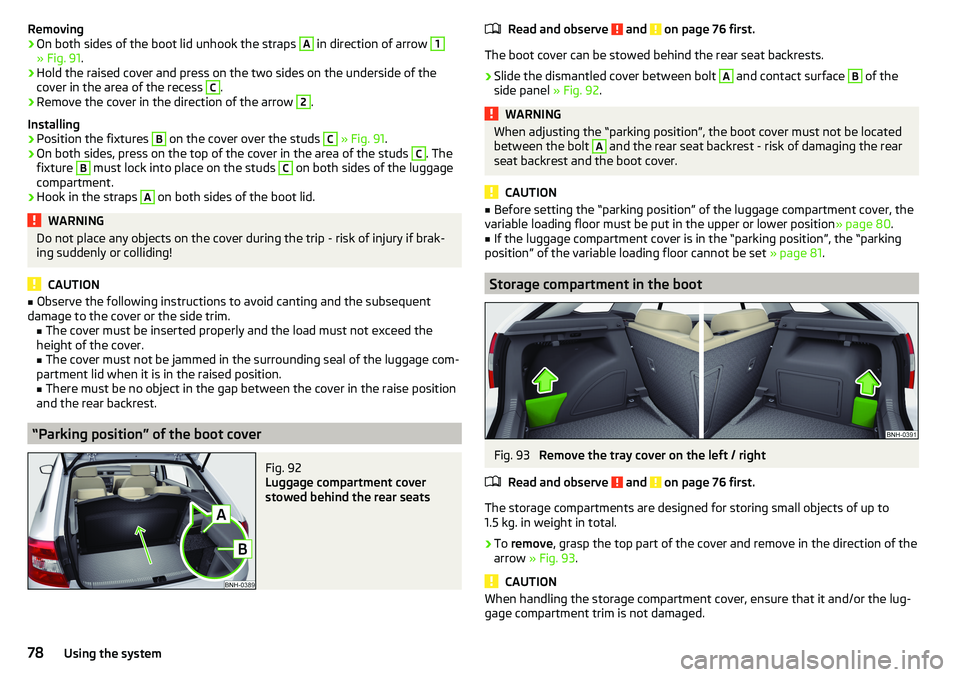
Removing›On both sides of the boot lid unhook the straps A in direction of arrow 1
» Fig. 91.
›
Hold the raised cover and press on the two sides on the underside of the
cover in the area of the recess
C
.
›
Remove the cover in the direction of the arrow
2
.
Installing
›
Position the fixtures
B
on the cover over the studs
C
» Fig. 91 .
›
On both sides, press on the top of the cover in the area of the studs
C
. The
fixture
B
must lock into place on the studs
C
on both sides of the luggage
compartment.
›
Hook in the straps
A
on both sides of the boot lid.
WARNINGDo not place any objects on the cover during the trip - risk of injury if brak-
ing suddenly or colliding!
CAUTION
■ Observe the following instructions to avoid canting and the subsequent
damage to the cover or the side trim. ■ The cover must be inserted properly and the load must not exceed the
height of the cover.
■ The cover must not be jammed in the surrounding seal of the luggage com-
partment lid when it is in the raised position. ■ There must be no object in the gap between the cover in the raise position
and the rear backrest.
“Parking position” of the boot cover
Fig. 92
Luggage compartment cover
stowed behind the rear seats
Read and observe and on page 76 first.
The boot cover can be stowed behind the rear seat backrests.
›
Slide the dismantled cover between bolt
A
and contact surface
B
of the
side panel » Fig. 92.
WARNINGWhen adjusting the “parking position”, the boot cover must not be located
between the bolt A and the rear seat backrest - risk of damaging the rear
seat backrest and the boot cover.
CAUTION
■ Before setting the “parking position” of the luggage compartment cover, the
variable loading floor must be put in the upper or lower position » page 80.■
If the luggage compartment cover is in the “parking position”, the “parking
position” of the variable loading floor cannot be set » page 81.
Storage compartment in the boot
Fig. 93
Remove the tray cover on the left / right
Read and observe
and on page 76 first.
The storage compartments are designed for storing small objects of up to
1.5 kg. in weight in total.
›
To remove , grasp the top part of the cover and remove in the direction of the
arrow » Fig. 93 .
CAUTION
When handling the storage compartment cover, ensure that it and/or the lug-
gage compartment trim is not damaged.78Using the system
Page 82 of 184
Proper functioning of the electrical installation is essential for safe vehicle op-
eration. It is important to ensure that the electrical installation is not damaged
during the adjustment process or when the storage area is being loaded and
unloaded.
Variable loading floor in the luggage compartment (Estate)
Introduction
This chapter contains information on the following subjects:
Set in the upper / lower position
80
Removing/inserting
80
Folding up/down, “parking position”
81
Set in the upper / lower position
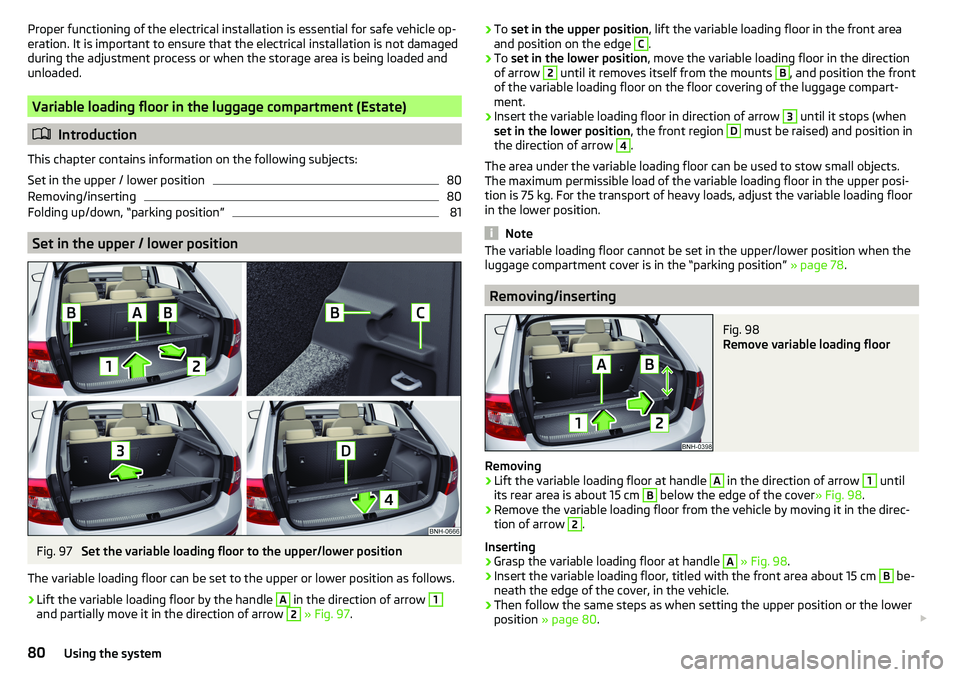
Fig. 97
Set the variable loading floor to the upper/lower position
The variable loading floor can be set to the upper or lower position as follows.
›
Lift the variable loading floor by the handle
A
in the direction of arrow
1
and partially move it in the direction of arrow
2
» Fig. 97 .
›To
set in the upper position , lift the variable loading floor in the front area
and position on the edge C.›
To set in the lower position , move the variable loading floor in the direction
of arrow
2
until it removes itself from the mounts
B
, and position the front
of the variable loading floor on the floor covering of the luggage compart-
ment.
›
Insert the variable loading floor in direction of arrow
3
until it stops (when
set in the lower position , the front region
D
must be raised) and position in
the direction of arrow
4
.
The area under the variable loading floor can be used to stow small objects.
The maximum permissible load of the variable loading floor in the upper posi-
tion is 75 kg. For the transport of heavy loads, adjust the variable loading floor
in the lower position.
Note
The variable loading floor cannot be set in the upper/lower position when the
luggage compartment cover is in the “parking position” » page 78.
Removing/inserting
Fig. 98
Remove variable loading floor
Removing
›
Lift the variable loading floor at handle
A
in the direction of arrow
1
until
its rear area is about 15 cm
B
below the edge of the cover » Fig. 98.
›
Remove the variable loading floor from the vehicle by moving it in the direc-
tion of arrow
2
.
Inserting
›
Grasp the variable loading floor at handle
A
» Fig. 98 .
›
Insert the variable loading floor, titled with the front area about 15 cm
B
be-
neath the edge of the cover, in the vehicle.
›
Then follow the same steps as when setting the upper position or the lower
position » page 80 .
80Using the system
Page 95 of 184

Selector lever lockFig. 111
Shift lock button
Read and observe and on page 92 first.
The selector lever is locked in modes P and N to prevent the forwards travel
mode from being selected accidentally and setting the vehicle in motion.
The selector lever is locked only when the vehicle is stationary and at speeds
up to 5 km/h.
The selector lever lock is indicated by the illumination of the warning light .
Releasing selector lever from mode P or N (selector lever lock)
›
Press the brake pedal and the lock button at the same time in the direction
of
1
» Fig. 111 .
To move the selector lever from mode N to D / S only the brake pedal is press-
ed.
The selector lever is not locked when quickly moving across the position N
(e.g. from R to D/S ). This, for example, helps to rock out a vehicle that is stuck,
e.g. in a bank of snow. The selector lever lock will engage if the lever is in posi-
tion N for more than approx. 2 seconds without the brake pedal being de-
pressed.
If it is not possible to release the gear selector from mode P in the usual man-
ner, then this can be emergency unlocked » page 151.
Note
If you want to switch the selector lever from mode P to mode D/S or vice ver-
sa, move the selector lever quickly. This prevents modes R or N from being ac-
cidentally selected.Manual shifting (Tiptronic)Fig. 112
Selector lever
Read and observe and on page 92 first.
Tiptronic mode makes it possible to manually shift gears on the selector lever. This mode can be selected both while stopping and while driving.
Switching to manual shifting using the selector lever
›
Push the gear selector from position D/S towards the right, or left in a right-
hand drive vehicle. The current gear is maintained.
Gear changing
›
To change up , tap the selector lever forwards
+
» Fig. 112 .
›
To change down , tap the selector lever backwards
-
» Fig. 112.
The currently selected gear is indicated in the » Fig. 110 on page 92 display.
The gearshift indicator should be observed when changing gear » page 38.
When accelerating, the gearbox automatically shifts up into the higher gear
just before the maximum permissible engine speed is reached. If a lower gear
is selected, the gearbox does not shift down until there is no risk of the engine
over-revving.
Note
It may be beneficial, for example, when travelling downhill, to use manual
shifting of gears. Shifting to a lower gear reduces the load on the brakes and
hence the wear of the brakes.93Starting-off and Driving