door lock SKODA RAPID SPACEBACK 2017 Owner's Manual
[x] Cancel search | Manufacturer: SKODA, Model Year: 2017, Model line: RAPID SPACEBACK, Model: SKODA RAPID SPACEBACK 2017Pages: 184, PDF Size: 28.06 MB
Page 126 of 184
Protection of cavities
All the cavities of your vehicle which are at risk from corrosion are protected by
a layer of long-lasting protective wax applied in the factory.
If any small amount of wax flow out of the cavities at high temperatures, these
must be removed with a plastic scraper and the stains cleaned using a petrole-
um cleaner.
Underbody
The underside of your vehicle is already permanently protected by the factory
against chemical and mechanical influences.
We recommend having the protective coating checked — preferably before the
beginning of winter and at the end of winter.
Product life of the films
Environmental influences (e.g. sunlight, humidity, air pollution, rockfall) affect
the life of the films. Films will age and become brittle – this is entirely normal;
this is not a fault.
Sunlight may also affect the strength of the film colour.
When transporting a load on the roof rack (e.g. roof box or similar), there is an
increased risk of film damage (e.g. of chipping from the secured load).
CAUTION
■ Vehicle paint
■ Repair damaged areas as soon as possible.
■ Matt-painted parts should not be treated with polishes or hard waxes.
■ Do not polish in a dusty environment - risk of paint scratches.
■ Do not apply any paint care products to door seals or window guides.■
Plastic parts
■ Do not use paint polish.
■
Chromed and anodised parts
■ Do not polish in a dusty environment - risk of surface scratches.
■
Films
The following instructions must be observed, otherwise there is a risk of film
damage. ■ Do not use dirty cloths or sponges for cleaning.
■ Do not use a scraper or other means to remove ice and snow.
■ Do not polish the films
■ Do not use a high pressure cleaner on the films.
■
Rubber seals
■ Do not treat the door seals and window guides deal with anything - the
protective varnish coating could be damaged.
■ Windows and door mirrors
■ Do not clean the insides of the windows/mirrors with sharp objects - risk of
damage to the filaments or the antenna. ■ Do not use a cloth which has been used to polish the body - this could dirty
the window and impair visibility.■
Head / taillights
■ Do not wipe head/taillights dry, do not use any sharp objects - risk of dam-
age to the protective coating and cracks forming on the headlight glass cov-
ers.
■
Reversing camera
The following instructions must be observed, otherwise there is a risk of
camera damage.
■ Do not remove snow / ice with warm / hot water.
■ To wash, never use a pressure washer or steam jet.
■ For cleaning, do not use abrasive cleaners.
■
Door lock cylinders
■ Make sure that as little water as possible gets into the locking cylinder
when washing the vehicle - there is a risk of freezing the lock cylinder!
■
Wheels
■ Heavy soiling of the wheels can affect the balance of the wheels - the re-
sult can be a vibration, which can cause premature wear of the steering.
Removing ice and snow from the windows
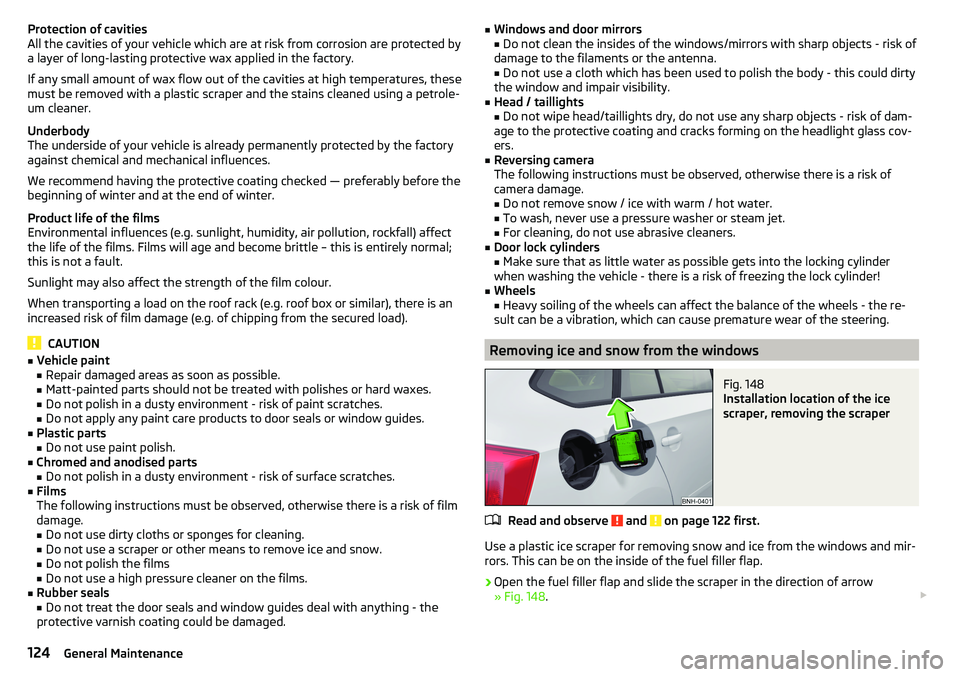
Fig. 148
Installation location of the ice
scraper, removing the scraper
Read and observe and on page 122 first.
Use a plastic ice scraper for removing snow and ice from the windows and mir-
rors. This can be on the inside of the fuel filler flap.
›
Open the fuel filler flap and slide the scraper in the direction of arrow
» Fig. 148 .
124General Maintenance
Page 131 of 184

Opening and closing the bonnetFig. 151
Opening the bonnet
Read and observe
and on page 128 first.
Open flap
›
Ensure that the windscreen wipers are not raised away from the windscreen
- risk of damage to the bonnet.
›
Open the driver's door and pull the unlocking lever below the dashboard in
the direction of arrow
1
» Fig. 151 .
›
Press the release lever in the direction of arrow
2
and the bonnet will be
unlocked.
›
Raise the bonnet in the direction of the arrow
3
.
›
Remove the lid prop in the direction of arrow
4
from the holder.
›
Secure the open flap inserting the end of the post into the opening in the di-
rection of arrow
5
.
Close the flap
›
Lift the bonnet.
›
Decouple the bonnet support and press into the holder designed to hold it.
›
Drop down the bonnet lid from a height of about 20 cm applying light pres-
sure until it clicks safely into place.
WARNING■ Never drive with the bonnet lid not properly closed - risk of accident!■Make sure that when closing the bonnet, no body parts are crushed -
there is danger of injury!
Engine compartment overview
Fig. 152
Arrangement (example) in the engine compartment
Read and observe
and on page 128 first.
Coolant expansion reservoir
132
Windscreen washer fluid reservoir
130
Engine oil dipstick
131
Engine oil filler opening
131
Brake fluid reservoir
133
Vehicle battery
133ABCDEF129Inspecting and replenishing
Page 152 of 184

Remote - change batteryFig. 176
Remove cover/take out battery
›
Pop out the key bit.
›
Press off the battery cover
A
» Fig. 176 with your thumb or by using a flat
screwdriver in region
B
.
›
Open the battery in the direction of arrow
1
.
›
Remove the discharged battery in the direction of arrow
2
and install a new
battery.
›
Insert the battery cover
A
and press it down until it clicks audibly into place.
The key has to be synchronised if the vehicle cannot be unlocked or locked
with the key after replacing the battery » page 49.
CAUTION
■
The replacement battery must correspond to the original specification.■Pay attention to the correct polarity when changing the battery.
Note
■We recommend you have the battery replaced by a specialist garage.■If a key has an affixed decorative cover, this will be destroyed when the bat-
tery is replaced. A replacement cover can be purchased from a ŠKODA Partner.
Emergency unlocking / unlocking of doors
Introduction
This chapter contains information on the following subjects:
Unlocking/locking the driver's door
150
Locking the door without locking cylinders
151Unlock the boot lid151Selector lever-emergency unlocking151
Unlocking/locking the driver's door
Fig. 177
Handle on the driver's door: open
lock cover
The driver's door can be emergency unlocked / emergency locked using the
key via the lock cylinder.
›
Pull on the door handle and hold.
›
Insert the key into the recess on the lower side of the cover and fold up
» Fig. 177 in the direction of arrow.
›
Release the door handle.
›
Insert the vehicle key bit into the lock cylinder and unlock or lock the vehicle.
›
Pull on the door handle and hold.
›
Replace the cover.
CAUTION
Make sure you do not damage the paint when performing an emergency lock-
ing/unlocking.150Do-it-yourself
Page 153 of 184

Locking the door without locking cylindersFig. 178
Emergency locking: Left/right rear door
›
Open the corresponding back door remove the trim
A
» Fig. 178 .
›
Insert the key into the slot and turn in the direction of the arrow (spring-loa-
ded position).
›
Replace the cover
A
.
After closing, the door is locked.
Unlock the boot lid
Fig. 179
Unlocking the door
The boot lid can be unlocked manually from inside the vehicle.
›
Insert a screwdriver or similar tool into the recess in the trim » Fig. 179 as far
as the stop.
›
Unlock the lid by moving it in the direction of the arrow.
Selector lever-emergency unlockingFig. 180
Remove / release the selector lever
›
Firmly apply the handbrake.
›
With one hand on the edge of the cover, push in direction of arrow
1
» Fig. 180 .
›
At the same time lift the cover on the selector lever gaiter with the other
hand in direction of arrow
2
.
›
Press on the yellow plastic part in the direction of arrow
3
, simultaneously
press the lock button in the selector lever handle and put the lever in posi-
tion N.
If the selector lever is moved again to position P, it is once again blocked.
CAUTION
Make sure when lifting not to damage cover parts by the screwdriver in the
shift lever environment.
Replacing windscreen wiper blades
Introduction
This chapter contains information on the following subjects:
Replacing the windscreen wiper blades
152
Replacing the rear window wiper blade
152WARNINGReplace the windscreen wiper blades once or twice a year for safety rea-
sons.151Emergency equipment and self-help
Page 171 of 184

Index
A
ABS Operation
97
Warning light32
Acceptance and recycling of used vehicles
120
Accessories118
Adjusting Steering wheel
11
Adjusting the seats10
Adjustment Beam range
54
Advance warning / emergency braking37
Advice on tyre/wheel usage136
Air-conditioning system Air outlet vents
84
Airbag15
Adjustments and impairments to the airbag system
119
Deactivation18
Deployment16
Warning light32
Airbag system15
Air conditioning82
Air distribution control84
Climatronic83
Manual air conditioning82
Air distribution control84
Air outlet vents84
Alarm49
Trailer117
All-year tyres139
Anti-lock braking system (ABS)97
Anti-theft alarm system49
Trailer117
Anti-theft wheel bolts143
Armrest Front64
Rear65
Ashtray70
Assembling the tow bar, Step 1
113
tow bar, Step 2113
Assist systems96
Auto Check Control38
Automatic drive Selector lever
92
Automatic driving light control55
Automatic gearbox92
Kickdown94
Malfunction34
Selector lever-emergency unlocking151
Selector lever lock93
Starting-off and driving94
Tiptronic93
Warning light34
Automatic shutdown of consumers133
Automatic transmission Selector lever lock
93
AUX68
Avoiding damage to your vehicle95
B
Ball bar Standby position
112
Ball head Check fitting
114
Ready position112
Battery Change in key
150
Belts12
Belt tensioners14
Bluetooth See Owner´s Manual -Infotainment
6
Bonnet Closing129
Opening129
Boot Cargo element
79
Class N1 vehicles79
Hooks77
See boot lid51
Storage compartments78
Boot cover Parking position
78
Boot lid Automatic locking
51
Open/Close51
Brake Assist (HBA)98
Brake booster89
Brake fluid133
Check133
specification133
Brake pads New
89
Brake pedal (automatic transmission) Warning light
34
Brakes Brake booster
89
Brake fluid133
Braking and stabilisation systems96
Handbrake90
Information on braking89
Warning lights30
Brake system96
Braking Running in
94
Breakdown kit145
Breakdown service see Help in an emergency
8
Buttons in the door Electric window
52
169Index
Page 173 of 184

DisposalAcceptance and recycling of used vehicles120
Distance warning107
Warning light36
Door Child safety lock
49
Emergency locking151
Emergency locking of the driver's door150
Opening/Closing48
Door alarm37
Drive Driving through water
95
DriveGreen94
Driving Emissions
163
Fuel consumption163
Maximum speed167
through water95
E
Economical driving
94
EDL98
Electric power windows Operational faults
53
Electric window51
Buttons in the driver´s door52
Electronic Differential Lock (EDL)98
Electronic immobiliser86
Emergency Hazard warning light system
57
Jump-starting147
Selector lever-unlocking151
Starting / stopping the engine with the push of a button
87
Starting the engine / stopping with the push of a button
88
Towing the vehicle148
Towing the vehicle using the trailer device149
Tyre repair145
Unlocking/locking the door150
Unlocking / locking the door151
Emergency equipment Fire extinguisher
140
First aid kit140
Jack141
Reflective vest140
Vehicle tool kit141
Warning triangle140
Emergency spare Removing / stowing
142
Emission control system32
Emissions163
Engine Information messages
35
Running in94
Engine compartment128
Brake fluid133
Coolant131
Engine oil130
Overview129
Vehicle battery133
Windscreen washer fluid130
Engine drag torque control (MSR)97
Engine number162
engine oil specification
130
Engine oil130
Check131
Oil changing130
Refilling131
Warning light35
EPC32
ESC Operation
97
Warning light31
Extended warranty5
F
Fastening elements
76
Fatigue detection108
Films123
Fire extinguisher140
First aid kit140
Flashing55
Floor covering in the luggage compartment79
Fog lights Warning light
34
Fog lights/rear fog light56
Fog lights with the CORNER function56
Footmats91
refer to footmats91
Force limiter Window
53
Front Assist105
Deactivation/activation108
Distance warning107
Malfunctions108
Operation106
Radar sensor106
Warning and automatic braking107
Warning light36, 37
Front seats63
Fuel126
Diesel127
Fuel gauge29
refer to Fuel126
Refuelling126
Unleaded petrol126
Warning light33
Fuel consumption163
Fuel reserve33
Fuses153
in the dashboard153, 154
in the engine compartment155, 156
G
Gearbox Information messages
34
171Index
Page 174 of 184

Gear changeGear recommendation38
Information on the selected gear38
Gear changing Gear stick
91
Genuine parts119
Glasses compartment72
GPS See Owner´s Manual -Infotainment
6
H
Handbrake
90
Warning light30
Hazard warning light system57
HBA98
Headrests65
Heating82
Air distribution control84
Mirrors62
Seats66
Windscreen and rear window59
Help in an emergency8
HHC98
Hill Start Assist (HHC)98
Hitch111
Hooks77
Horn27
I
Ignition lock
87
Images See Owner´s Manual -Infotainment
6
Immobiliser86
In an emergency Changing a wheel
141
Inertia reels14
Information about the towing process148
Information system37
Auto Check Control37
Door alarm37
Gear recommendation38
MAXI DOT display41
Multifunction display39
Service interval display42
Infotainment6
Instrument cluster28
See instrument cluster28
Warning lights29
interior light58
Interior lighting58
Interior monitor50
iPad holder74
ISOFIX22, 23
J
Jack
141
Jacking points Raise vehicle
144
Jump-starting147
K
KESSY Unlocking/locking
47
key Switch on/off ignition
87
Key Change battery
150
Lock46
Starting / stopping the engine87
Unlock46
L
Lamp failure Warning light
36
Lamps Warning light
36
LEAVING HOME56
Lever Cruise control
104
Front Assist108
Operation of the information system39
Speed regulating system105
Turn signal/main beam55
Windscreen wipers60, 61
Light Automatic driving light control
55
Beam range adjustment54
Cockpit57
COMING HOME / LEAVING HOME56
Daytime running lights54
Driving abroad57
Flash55
Fog lights/rear fog light56
Fog lights with the CORNER function56
Hazard warning light system57
Headlight cleaning system61
Low beam54
Parking light54, 57
Replacing bulbs156
Switching on/off54
Turn signal/main beam55
Light bulbs Replacing
156
Lighting Interior lighting
57
Luggage compartment75
Lights53
Warning lights29
Load163
Lock Individual settings
48
Key46
Locking Central locking button
47
in case of emergency151
KESSY47
Remote control46
172Index
Page 177 of 184
Speed limiter104
Warning light34
Speed regulating system Warning light
34
Speed symbol138
Spoiler119
Stabilisation system96
Stability Control (ESC)97
START-STOP88
Jump-starting147
Manually deactivating/activating the system89
operation88
Warning light36
START-STOP system88
Start engine immobiliser
86
Starter button Lock / unlock the steering lock
86
Problems with the engine start88
Starting / stopping the engine87
Switch on/off ignition87
Starting engine Jump-starting
147
Starting the engine Jump-starting
147
Key87
Starter button87
Steering lock (KESSY system) Warning light
31
Steering wheel Buttons
39
Correct posture11
setting11
Stopping See Parking
91
Stopping the engine Key
87
Starter button87
Storage67
Storage compartment Glasses compartment72
in the boot78
in the centre console68
in the front arm rest72
on the dashboard68
on the front passenger side72
Storage compartments67
Storage net bag79
Stowage compartments in the doors
68
Sun visors59, 60
Switch Car battery
135
Switch light on/off54
Switch off Alarm
50
Switch off ignition87
Key87
Switch off TCS Warning light
32
Switch on ignition87
Key87
T
Tablet holder
74
TCS Deactivate/activate
97
Function97
Warning light31, 32
Technical data162
Telephone See Owner´s Manual -Infotainment
6
Ticket holder67
Time38
Tiptronic93
Tools141
TOP TETHER24
Towing149
Towing a trailer117
Towing away148
Towing device115
Accessories115
Description111
Vertical load111
Towing eye149
Towing protection50
Towing the vehicle148
Traction control (TCS)31, 97
Trailer Connect and disconnect
115
Load116
Loading116
Towing a trailer117
Trailer stabilization system (TSA)98
Trailer towing111
Transport Luggage compartment
75
Roof rack81
Towing device and trailer111
Transporting children19
Triangle140
TSA98
Turn signal55
Turn signal system Warning light
33, 34
Tyre load capacity138
Tyre pressure137
Warning light33
Tyre pressure monitoring109
Warning light33
Tyre repair145
Tyres136
damage136
Explanation of the label138
new136
Tyre pressure137
Wear indicator137
175Index