infotainment SKODA RAPID SPACEBACK 2017 Owner's Manual
[x] Cancel search | Manufacturer: SKODA, Model Year: 2017, Model line: RAPID SPACEBACK, Model: SKODA RAPID SPACEBACK 2017Pages: 184, PDF Size: 28.06 MB
Page 70 of 184

stowage compartments in the doorsFig. 63
Storage compartment: in the front door/in the rear door
Read and observe
and on page 67 first.
Storage compartments » Fig. 63
Storage compartment
Bottle holder with a capacity of max. 1.5 l
Bottle holder with a capacity of max. 0.5 l
WARNINGThe storage compartment A » Fig. 63 is to be used exclusively for storing
objects which do not stick out - danger of restricting the effectiveness of
the side airbags.
Storage compartment in the centre console
Fig. 64
Non-lockable compartment, front / rear
ABCRead and observe and on page 67 first.
The non-lockable storage compartment is located in the front centre console
A
and in the rear centre console
B
» Fig. 64 .
USB and AUX input
Fig. 65
USB and AUX inputs
Read and observe and on page 67 first.
The USB input (marked with
) and AUX input (marked with
) are located
above the storage compartment in the front centre console » Fig. 65.
Information on use » Owner´s Manual - Infotainment .
Storage compartment on the dashboard
Fig. 66
Storage compartment
Read and observe and on page 67 first.
The storage compartment is located in the middle part of the dashboard
» Fig. 66 .
68Using the system
Page 91 of 184

Requirements for the system to function correctly
The following conditions must be met for the system to function correctly.
The driver's door is closed.
The driver has fastened the seat belt.
The driving speed was higher than 4 km/h after the last stop.
No trailer or other accessory is connected to the trailer socket.
System status
The system status is shown in the display when the vehicle comes to a halt
» Fig. 106 .
The engine is switched off automatically; when moving off, the ignition
process will be initiated automatically.
The engine is not switched off automatically.
The engine does not shut down when the vehicle stops, if e.g. the following
applies.
▶ The engine temperature for the proper function of the system has not yet
been reached.
▶ The charge state of the vehicle battery is too low.
▶ The current consumption is too high.
▶ High air conditioning or heating output (high fan speed, big difference be-
tween the desired and actual interior temperature).
If the engine has shut down automatically but the system detects that the en- gine is required to run (e.g. if the brake pedal is pressed repeatedly) then the
system automatically starts up the engine.
More information about the current system status can be displayed on the In-
fotainment screen » Owner´s Manual - Infotainment .
If there is a system fault , the following message will appear in the display of
the instrument cluster. Seek help from a specialist garage.Note■ If the driver's seat belt is removed for more than 30 seconds or the driver's
door is opened after the engine has switched off automatically, the engine will
have to be restarted manually.■
No automatic engine shut-down takes place when a vehicle with automatic
transmission is moving at low speed (e.g. during a traffic jam) and remains sta-
tionary after pressing the brake pedal lightly. Automatic engine shut-down
takes place if you press the brake pedal down with more force.
■
For vehicles with automatic transmission there is no automatic engine shut-
down when the system detects a manoeuvring action due to a large steering
angle.
Manually deactivating/activating the system
Fig. 107
Button for the START-STOP sys-
tem
›
To deactivate/activate the system, press the
button » Fig. 107 .
When the system is deactivated, the symbol
in the button lights up.
If the system is deactivated, it will be reactivated automatically after the igni-
tion has been switched off and on.
Note
If the system is deactivated when the engine is turned off automatically, then
the automatic start process takes place.
Brakes and parking
Introduction
This chapter contains information on the following subjects:
Handbrake
90
Parking
91
89Starting-off and Driving
Page 96 of 184
Starting-off and drivingRead and observe
and on page 92 first.
Moving off and pausing temporarily
›
Firmly depress and hold the brake pedal.
›
Start the engine.
›
Press the locking button and move the selector lever to the desired position
» page 92 .
›
Release the brake pedal and accelerate.
The selector lever position N does not have to be selected when stopping for a
short time (e.g. at a crossroads). However, the brake pedal should be de-
pressed, in order to prevent the vehicle from rolling.
Accelerating at maximum speed during the journey (kickdown function)
If the accelerator pedal is depressed while the vehicle is in forward drive mode,
the kick-down function is turned on.
The gear change is adjusted accordingly to achieve maximum acceleration.
WARNINGRapid acceleration ( e.g. on slippery roads) can lead to a loss of control over
the vehicle – risk of accident!
Running in and economical driving
Introduction
This chapter contains information on the following subjects:
Running in the engine
94
Tips on economical driving
94
DriveGreen function
94
Running in the engine
During the first 1,500 km, the driving style is decisive for successful the run-
ning in process is.
During the first 1,000 km , the engine should not be charged with more than
3/4 of the maximum permitted engine revs and without the trailer.
From about 1,000 to 1,500 km , the engine can be pushed up to the maximum
permitted engine speed.
Tips on economical driving
Fuel consumption depends on the driving style, road and weather conditions,
and similar such factors.
For an economical driving style, the following instructions must be observed. ▶ Avoid unnecessary acceleration and braking.
▶ Engage the recommended gear » page 38.
▶ Avoid full throttle and high speeds.
▶ Reduce idling.
▶ Avoid short distances.
▶ Ensure the correct tyre inflation pressure is maintained » page 137.
▶ Avoid unnecessary ballast.
▶ Remove the roof rack before driving if it is not needed.
▶ Only turn on electrical consumers (e.g. seat heating) for as long as necessary.
▶ Briefly ventilate before turning on the cooling system, do not use the cooling
system with the windows open.
▶ Do not leave windows open at high speeds.
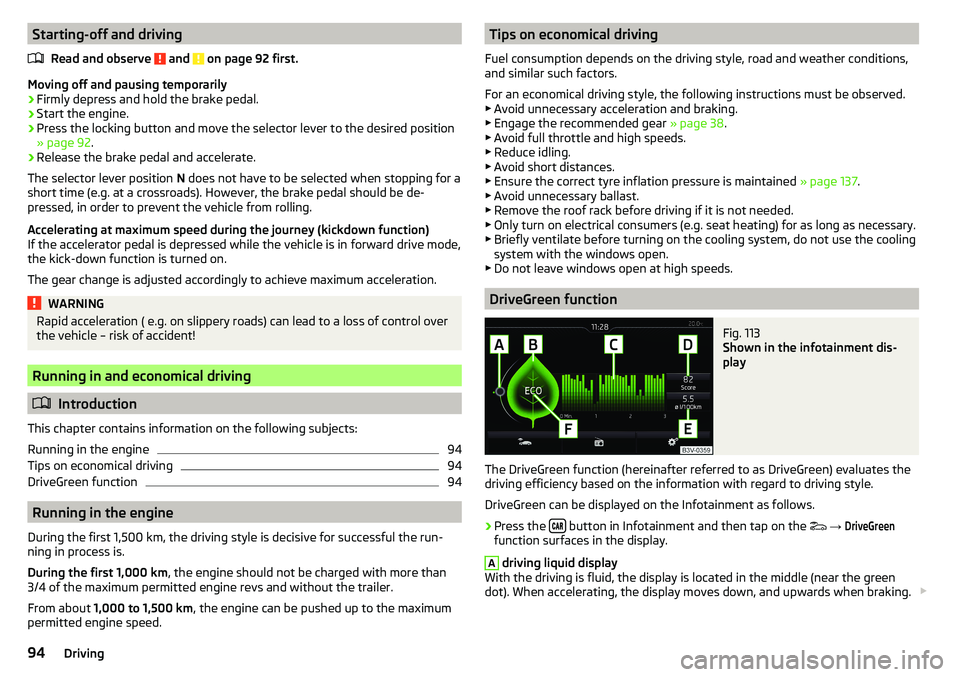
DriveGreen function
Fig. 113
Shown in the infotainment dis-
play
The DriveGreen function (hereinafter referred to as DriveGreen) evaluates the
driving efficiency based on the information with regard to driving style.
DriveGreen can be displayed on the Infotainment as follows.
›
Press the button in Infotainment and then tap on the
→
DriveGreen
function surfaces in the display.
A
driving liquid display
With the driving is fluid, the display is located in the middle (near the green
dot). When accelerating, the display moves down, and upwards when braking.
94Driving
Page 99 of 184

WARNINGThe general information relating to the use of assistance systems must be
observed » page 96, in section Introduction .
Stability Control (ESC)
Read and observe
on page 97 first.
The ESC improves vehicle stability when driving at the limit (e.g. if the vehicle
starts to skid) by braking individual wheels to maintain the desired direction.
If there is a TCS intervention, the warning light flashes in the instrument
cluster.
Anti-lock braking system (ABS)
Read and observe
on page 97 first.
ABS prevents the wheels from locking when braking. Thereby, it helps the
driver to maintain control of the vehicle.
The intervention of the ABS is noticeable from the pulsating movements of
the brake pedal which is accompanied by noises.
When the ABS system is active, do not brake periodically or reduce the pres- sure on the brake pedal.
Engine drag torque control (MSR)
Read and observe
on page 97 first.
MSR counteracts the tendency of the drive wheels to lock during downshifts
or sudden deceleration (e.g. on icy or an otherwise slippery road surface).
If the drive wheels should lock, then the engine speed is automatically in-
creased. This reduces the braking effect of the engine and the wheels can ro-
tate freely again.
Traction control (TCS)Fig. 115
Button for the TCS system
Read and observe on page 97 first.
TCS prevents the spinning of the wheels of the driven axle. TCS reduces the
drive power transmitted to the wheels in the case of slipping wheels. Thereby,
for example, driving on road surfaces with low grip is made easier.
During a TCS intervention, the indicator light flashes in the instrument clus-
ter.
The deactivation/activation of TCS can be carried out, depending on equip-
ment, in one of the following ways. ▶ Infotainment » Owner's Manual - Infotainment .
▶ By pressing the
» Fig. 115 button.
With deactivation , the warning light
lights
up in the instrument cluster and
an appropriate message is displayed in the instrument cluster.
With activation , the warning light
is
extinguished and an appropriate mes-
sage is displayed in the instrument cluster.
The TCS should normally always be enabled. The system should be deactivated
only in the following situations, for example. ▶ When driving with snow chains.
▶ When driving in deep snow or on a very loose surface.
▶ When “rocking a car free” when it has become stuck.
97Assist systems
Page 101 of 184

Parking assistance (ParkPilot)
Introduction
This chapter contains information on the following subjects:
Function
99
Display in the Infotainment display
100
Activation / deactivation
100
Automatic system activation when moving forward
101
Park Assist (hereinafter referred to as the system) draws attention via acoustic
signals or the Infotainment display when manoeuvring around obstacles in the
vicinity of the vehicle.
WARNING■ The general information relating to the use of assistance systems must
be observed » page 96, in section Introduction .■
Moving persons or objects may not be recognised by the system sensors.
■
Under certain circumstances, surfaces of certain objects and types of
clothing cannot reflect the system signals. There is a danger that such ob-
jects or people may not be recognised by the system sensors.
■
External noise sources may affect the signals of the system sensors.
There is a danger that obstacles may not be recognised by the system sen-
sors.
■
Before reversing, you should satisfy yourself that there are no small ob-
stacle, such as a rock, thin post etc., in front or behind your vehicle. Such
obstacles may not be recognised by the system sensors.
CAUTION
■ Keep the system sensors » Fig. 116 on page 99 clean, snow-and ice-free
and do not cover with any objects of any kind, otherwise the system function-
ing may be impaired.■
In adverse weather conditions (heavy rain, water vapour, very low or high
temperatures, etc.), the functioning of the system may be impaired - “incorrect
recognition of obstacles”.
■
Accessories additionally installed on the vehicle rear, such as bicycle carriers,
can impair the system function.
FunctionFig. 116
Installation location of the sensors on the left side of the vehicle:
front / rear
Fig. 117
Sampled areas and range of the
sensors
Read and observe and on page 99 first.
The system uses ultrasound waves to calculate the distance between the
bumper and an obstacle. The ultrasonic sensors are, depending on vehicle
equipment,, located in the back or in the front bumper » Fig. 116.
Depending on the equipment, the following system variants are possible
» Fig. 117 .
▶ Variant 1: warns of obstacles in the areas
C
,
D
.
▶ Variant 2: warns of obstacles in the areas
A
,
B
,
C
,
D
.
99Assist systems
Page 102 of 184

Approximate range of sensors (in cm)Area » Fig. 117Variant 1
(3 sensors)Variant 2
(7 sensors)A-120B-60C160160D6060
Audible signals
The interval between the acoustic signals becomes shorter as the clearance is
reduced. At a distance of approx. 30 cm, a continuous tone starts to sound -
danger area. From this moment do not continue to move towards the obsta-
cle!
The acoustic signals can be set in Infotainment » Owner´s Manual - Infotain-
ment .
Towing a trailer
When towing, or when another accessory is connected to the trailer socket on-
ly the areas
A
and
B
» Fig. 117 are active in the system.
Note
The signal tones for front obstacle recognition are factory-set to be higher
than for rear obstacle recognition.
Display in the Infotainment display
Fig. 118
Display
Read and observe and on page 99 first.
Function surfaces and warnings » Fig. 118ARoad display. Depending on the Infotainment type: Switching off park assistant dis-
play. Switching audible parking signals on/off.Change to rear-view camera display.There is an obstacle in the collision area (the distance to the obstacle
is less than 30 cm).
Stop moving in the direction of the obstacle!There is an obstacle in the road (the distance to the obstacle is great-
er than 30 cm).An obstacle is located outside of the road (the distance to the obsta-
cle is greater than 30 cm).System failure (there is no indication of obstacles).
Road display
The road display
A
» Fig. 118 indicates the road on which the vehicle would
take the current steering wheel and shift / selector lever position.
The shift lever is in the neutral position and the gear selector is in mode N, the
road display is at the front.
Activation / deactivation
Fig. 119
System key (option 2)
Read and observe and on page 99 first.
Activation
The activation of the system is initiated when the reverse gear is engaged, or
vehicles with the variant 2, also by pressing the button
» Fig. 119 .
When activating, an alarm sounds and the symbol illuminates in the button.
Deactivation
On vehicles with Version 1, the system can be deactivated by moving out of re-
verse gear.
100Driving
Page 103 of 184

For vehicles with variant 2, the system is automatically deactivated by press-
ing the button or at a speed above 15 km/h (the symbol in the button
goes out).
Displaying an error
If a warning signal sounds for 3 seconds after activating the system and there
is no obstacle close to your car, this indicates a system fault. The fault is also
indicated by the symbol
flashing in the button. Seek help from a specialist
garage.
Note
The system can only be activated with the button at a speed of below 15
km/h.
Automatic system activation when moving forward
Fig. 120
Infotainment display: Display
with automatic activation
Read and observe and on page 99 first.
The automatic system activation occurs when moving forward at a speed be- low 10 km/h when the vehicle approaches an obstacle.
After activation, the following is shown in the left pane of the Infotainment
display » Fig. 120 .
Acoustic signals are sounded as of a distance from the obstacle of around
50 cm.
The automatic display can be activated / deactivated in Infotainment » Owner
´s Manual - Infotainment .
Reversing camera
Introduction
This chapter contains information on the following subjects:
Operation
102
Guidelines and function keys
102
The rear view camera (following as system) helps the driver when parking and
manoeuvring by displaying the area behind the vehicle in the Infotainment dis-
play (following as display).
WARNING■ The general information relating to the use of assistance systems must
be observed » page 96, in section Introduction .■
The camera may not be soiled or obscured, otherwise the system function
will be significantly affected - there is a risk of accident. For information on
cleaning » page 123 , Exterior car care .
CAUTION
■
The camera image is distorted by contrast with eyesight. The display is
therefore only of limited use for estimating distances to following vehicles.■
Some items, such as thin columns, chain link fences or lattice, may not be
represented adequately in terms of display resolution.
■
In a crash or damage, the vehicle's rear camera can possibly deviate from the
correct position. If this is the case, have the sensor checked by a specialist ga-
rage.
Note
The camera must be equipped with a cleaning system » page 61. The spraying
is carried out automatically when the rear window is sprayed.101Assist systems
Page 104 of 184

OperationFig. 121
Installation location of the camera / scanned area behind the ve-
hicle
Read and observe
and on page 101 first.
The camera for capturing the area behind the vehicle is in the grip of the bootlid » Fig. 121 .
Area behind the vehicle » Fig. 121
Detection range of the camera
Area outside the detection range of the camera
The system can assist the driver when parking and manoeuvring under the fol- lowing basic conditions.
The ignition is switched on.
The reverse gear is engaged. 1)
The luggage compartment lid is completely closed.
The vehicle is travelling at less than 15 km/h.
The area behind the vehicle is clearly visible.
The selected parking / manoeuvring area is clear and even.
Note
■ The display can be interrupted by pressing the symbol button » Fig. 119 on
page 100 .■
After disengaging the reverse gear, automatic display of the parking aid is
carried out (variant 2, 3) » page 99.
ABGuidelines and function keysFig. 122
Infotainment display: orientation lines / functional surfaces
Read and observe
and on page 101 first.
Orientation lines are shown along with the monitored area behind the vehicle
in the display.
Distance of the orientation lines behind the vehicle » Fig. 122
The distance is about 40 cm (safety distance limit).
The distance is about 100 cm.
The distance is about 200 cm.
The distance may vary slightly depending on the load of the vehicle and the
road inclination.
The distance between the side lines corresponds approximately to the vehicle
width including mirrors.
Functional surfaces » Fig. 122
Depending on the Infotainment type: Turns the display of the area be-
hind the vehicle off
Display settings - brightness, contrast, colour Switching on/off audible parking signals
Switching on/off the reduced park assistance display
Change to park assistance display
ABC
1)
The area behind the vehicle can be displayed for a few seconds more after disengaging the reverse gear.
102Driving
Page 110 of 184

Deactivation/activationFig. 132
Keys / dial: on the operating lever / the multifunction steering
wheel
Read and observe
and on page 106 first.
The system is automatically activated each time the ignition is switched on.The system should only be disabled in exceptional cases »
.
On vehicles with the MAXI DOT display, the system can be activated/deactiva- ted in the main menu » page 42, Menu item
Assist systems
.
Deactivation / activation in vehicles with segment display
Button
» Fig. 132ActionFunctionAHold up / downShow Front Assist menu itemBPressDeactivate/activate system
Deactivation / activation in vehicles with multi-function steering wheel
Button / dial
» Fig. 132ActionFunction
CPressShow Front Assist menu itemDPressDeactivate/activate system
Disable / enable and setting in the Infotainment
In Infotainment, the entire system or the functions warning and distance
warning can be deactivated/activated » Owner´s Manual - Infotainment .
If the distance-warning function was deactivated before the ignition was
switched off, it remains deactivated after the ignition is switched on again.WARNINGIn the following situations, Front Assist should be switched off for safety
reasons.■
When the vehicle is being towed away.
■
When the vehicle is on a rolling test bench.
■
If an unfounded warning or a system action was taken.
■
When on a truck, or a car ferry service or similar.
Malfunctions
Read and observe
and on page 106 first.
If, for some unknown reason, the system is not available, an appropriate mes-
sage appears in the display of the instrument cluster.
Sensor covered / dirty
If the sensor is dirty or covered, a message indicating that there is no sensor
view appears. Clean the sensor cover or remove the obstacle » Fig. 129 on
page 106 .
System unavailable
If the system is currently unavailable, a message concerning the unavailability
appears. Stop the vehicle, switch off the engine and then start it again. If the
system still is not available, seek the assistance of a specialist garage.
Fatigue detection
The fatigue detection system (hereinafter referred to as the system) recom-
mends the driver takes a break from driving when driver fatigue can be detec-
ted due to the driver's steering behaviour.
From the starting of the journey, the system evaluates the steering behaviour
at speeds 65-200 km/h. If, while driving, there have been changes in the steer-
ing behaviours that are evaluated by the system as indicating possible fatigue,
a break recommendation is issued.
Conditions under which a break from driving is detected by the system ▶ The vehicle is stopped and the ignition switched off.
▶ The vehicle is stopped, the seat belt removed and the driver's door opened.
▶ The vehicle is stopped for more than 15 minutes.
108Driving
Page 111 of 184

If none of these conditions are met or if the driving style is not changed, the
system recommends a driving break again after 15 minutes.
The system can be activated/deactivated in Infotainment » Owner´s Manual -
Infotainment .
Pause recommendation
The icon appears and the following message for a few seconds in the display
of the instrument cluster and a message about the detected fatigue. An au-
dible signal is also emitted.WARNING■ The general information relating to the use of assistance systems must
be observed » page 96, in section Introduction .■
For the driving ability is always the driver's responsibility. Never drive if
you feel tired.
■
The system may not detect all cases where a break is needed.
■
Therefore, take regular, sufficient breaks during long trips.
■
There will be no system warning during the so-called micro-sleep.
Note
■ In some situations, the system may evaluate the driving incorrectly and thus
mistakenly recommend a break (e.g. sporty driving, adverse weather condi-
tions or poor road conditions).■
The system is designed primarily for use on motorways.
Tyre pressure monitoring
Introduction
This chapter contains information on the following subjects:
Storing the tyre pressure values
109
Storing the tyre pressure values and Infotainment display
110
Storing the tyre pressure values by means of the button
110
The tyre pressure monitoring function (hereinafter referred to as the system)
monitors the tyre pressure while driving.
If the tyre inflation pressure changes, the warning light
lights up in the in-
strument cluster and an audible signal is heard » page 33,
Tyre pressure .
The system can only function properly if the tyres have the prescribed inflation
pressure and this pressure values are stored in the system.
WARNING■ The general information relating to the use of assistance systems must
be observed » page 96, in section Introduction .■
Having the correct tyre inflation pressure is always the driver's responsi-
bility. Tyre pressure should be checked regularly » page 137.
■
The system cannot warn in case of very rapid tyre inflation pressure loss,
e.g. in case of sudden tyre damage.
Storing the tyre pressure values
Read and observe
on page 109 first.
The tyre pressure values are always stored in the system, if one of the fol-
lowing events occurs. ▶ Change of tyre inflation pressure.
▶ Change one or more wheels.
▶ Change in position of a wheel on the vehicle.
▶ The warning light in the instrument cluster.
The storage of the tyre pressure values depends on equipment, either in the
infotainment or by pressing a button.
WARNINGBefore storing the pressures, the tyres must be inflated to the specified in-
flation pressure » page 137. When storing incorrect pressure values, the
system could possibly not issue any warnings, even with a too low tyre
pressure.
CAUTION
The tyre pressure values are to be saved every 10,000 km or once annually to
ensure correct system functioning.109Assist systems