light SKODA RAPID SPACEBACK 2017 Service Manual
[x] Cancel search | Manufacturer: SKODA, Model Year: 2017, Model line: RAPID SPACEBACK, Model: SKODA RAPID SPACEBACK 2017Pages: 184, PDF Size: 28.06 MB
Page 68 of 184

›To
remove , hold the locking button A in the direction of arrow 1, at the
same time, using a flat screwdriver (with a max. width of 5 mm), press the
locking button in the opening B
in the direction of arrow
2
and remove the
rest in the direction of arrow
3
» Fig. 60 .
›
To insert the headrest, push the headrest into the seat backrest in the direc-
tion of arrow
4
until the locking button clicks into place.
Seat heaters
Fig. 61
Buttons for heating the front /rear seats
The seat backrests and surfaces of the front seats and the outer rear seats
can be heated electronically.
Seat heating buttons » Fig. 61
Left seat heating
Right seat heating
›
To turn on the heater at maximum heat (level 2), press button
or
.
By repeatedly pressing the button, the heat is turned down until it is com-
pletely switched off . The level of the seat heating is indicated by the number
of illuminated warning lights in the switch.
The seat heating only operates when the engine is running.
WARNINGIf you are sensitive to pain and/or temperature, e.g. through medication,
paralysis or because of chronic illness (e.g. diabetes), we recommend not to
use the seat heating. If the seat heating is used, we recommend to make
regular breaks in your journey when driving long distances, so that the
body can recuperate from the stress of the journey. Please consult your
doctor, who can evaluate your specific condition.CAUTIONThe following instructions must be observed to avoid damage to the seats.■Do not kneel on the seats or apply concentrated pressure to them.■
Do not switch on the heating for unoccupied seats.
■
Do not switch on the heating for seats which have objects on them (e.g. a
child seat, bag or similar).
■
Do not switch on the heating for seats which have seat covers or protective
covers on them.
Note
■ If the heaters are set to their highest intensity (level 2), they are automatical-
ly switched down to level 1 after 10 minutes.■
If the on-board voltage decreases, the seat heating switches off automati-
cally » page 133 , Automatic shutdown of consumers - vehicle battery dis-
charge protection .
66Using the system
Page 69 of 184

Useful features
Interior fittings
Introduction
This chapter contains information on the following subjects:
Ticket holder
67
stowage compartments in the doors
68
Storage compartment in the centre console
68
USB and AUX input
68
Storage compartment on the dashboard
68
Cup holders
69
Waste container
69
Cigarette lighter
70
Ashtray
70
12-volt socket
71
Multimedia holder
71
Storage compartment in the front arm rest
72
Glasses compartment
72
Storage compartment on the front passenger side
72
Storage compartment for umbrella
73
Clothes hook
73
Storage pockets on the backs of the front seats
73
Storage pockets on the inner sides of the front seats
73WARNING■ Do not place anything on the dashboard. These objects might slide or fall
down when driving and may distract you from concentrating on the traffic –
risk of accident!■
Make sure that while driving no objects can enter the driver's footwell -
they could cause an accident!
■
Do not carry any objects on the front passenger seat, except objects de-
signed for this purpose (e.g. child seats) – risk of accident!
■
No objects should be placed in the storage compartments nor in the
drinks holders; the vehicle occupants could be endangered if there is sud-
den braking or the vehicle collides with something.
WARNING (Continued)■ For safety reasons, lockable storage compartments should be closed
while driving - there is a risk of injury from the opened lid or through the
loose objects in the compartment.■
Make sure no objects protrude from the storage compartments - danger
of injury!
■
Do not exceed the permissible loads for the storage compartments and
pockets - risk of injury and risk of damage to the compartments and pock-
ets!
■
Ash, cigarettes, cigars and the like should only be stored in the ashtray -
danger of fire/burns!
■
The storage compartments, multimedia holder and waste container are
not a substitute for the ashtray and must not be used for such purposes –
risk of fire!
CAUTION
Do not place any large or sharp objects in the storage compartments and pock-
ets - there is a risk of damage to the compartments and pockets.
Ticket holder
Fig. 62
Ticket holder
Read and observe and on page 67 first.
The ticket holder » Fig. 62 is provided for the holding and displaying e.g. car
park tickets.
67Useful features
Page 72 of 184
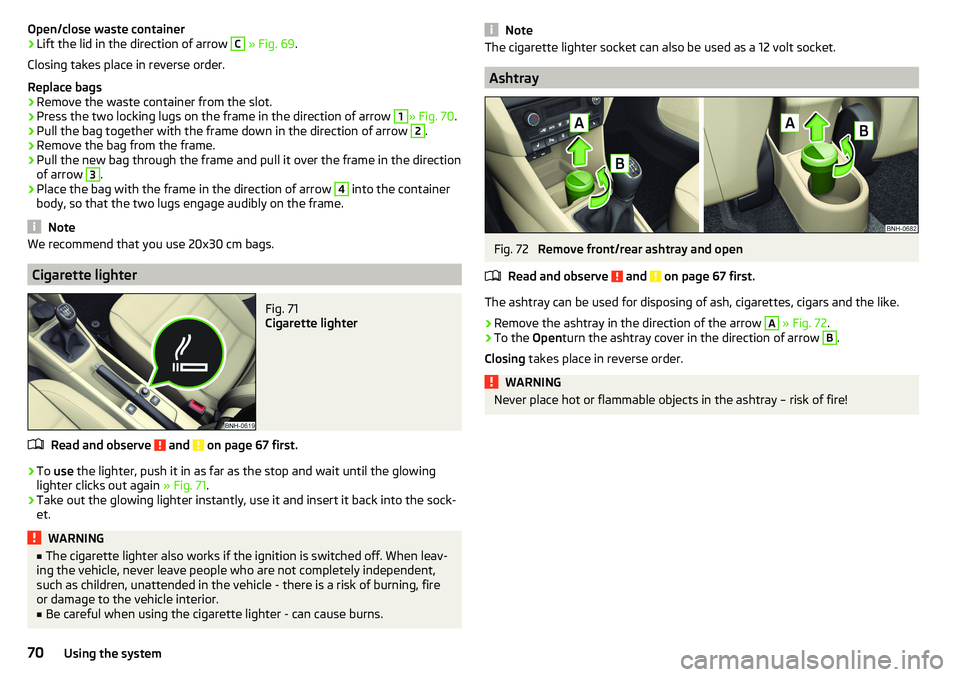
Open/close waste container›Lift the lid in the direction of arrow C » Fig. 69 .
Closing takes place in reverse order.
Replace bags›
Remove the waste container from the slot.
›
Press the two locking lugs on the frame in the direction of arrow
1
» Fig. 70 .
›
Pull the bag together with the frame down in the direction of arrow
2
.
›
Remove the bag from the frame.
›
Pull the new bag through the frame and pull it over the frame in the direction
of arrow
3
.
›
Place the bag with the frame in the direction of arrow
4
into the container
body, so that the two lugs engage audibly on the frame.
Note
We recommend that you use 20x30 cm bags.
Cigarette lighter
Fig. 71
Cigarette lighter
Read and observe and on page 67 first.
›
To use the lighter, push it in as far as the stop and wait until the glowing
lighter clicks out again » Fig. 71.
›
Take out the glowing lighter instantly, use it and insert it back into the sock-
et.
WARNING■ The cigarette lighter also works if the ignition is switched off. When leav-
ing the vehicle, never leave people who are not completely independent,
such as children, unattended in the vehicle - there is a risk of burning, fire
or damage to the vehicle interior.■
Be careful when using the cigarette lighter - can cause burns.
NoteThe cigarette lighter socket can also be used as a 12 volt socket.
Ashtray
Fig. 72
Remove front/rear ashtray and open
Read and observe
and on page 67 first.
The ashtray can be used for disposing of ash, cigarettes, cigars and the like.
›
Remove the ashtray in the direction of the arrow
A
» Fig. 72 .
›
To the Openturn the ashtray cover in the direction of arrow
B
.
Closing takes place in reverse order.
WARNINGNever place hot or flammable objects in the ashtray – risk of fire!70Using the system
Page 74 of 184
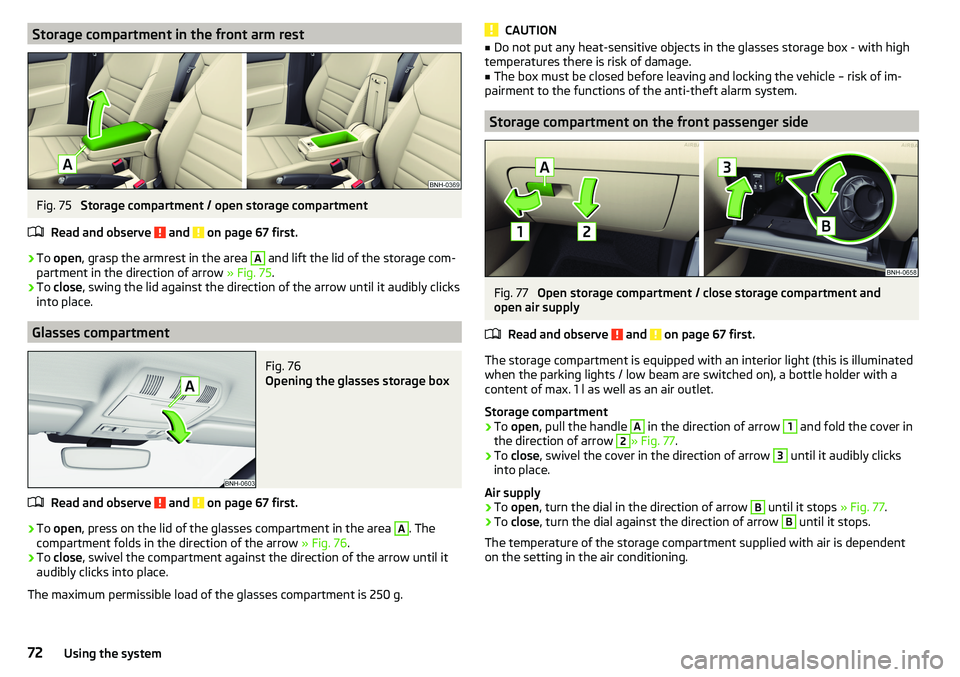
Storage compartment in the front arm restFig. 75
Storage compartment / open storage compartment
Read and observe
and on page 67 first.
›
To open , grasp the armrest in the area
A
and lift the lid of the storage com-
partment in the direction of arrow » Fig. 75.
›
To close , swing the lid against the direction of the arrow until it audibly clicks
into place.
Glasses compartment
Fig. 76
Opening the glasses storage box
Read and observe and on page 67 first.
›
To open , press on the lid of the glasses compartment in the area
A
. The
compartment folds in the direction of the arrow » Fig. 76.
›
To close , swivel the compartment against the direction of the arrow until it
audibly clicks into place.
The maximum permissible load of the glasses compartment is 250 g.
CAUTION■ Do not put any heat-sensitive objects in the glasses storage box - with high
temperatures there is risk of damage.■
The box must be closed before leaving and locking the vehicle – risk of im-
pairment to the functions of the anti-theft alarm system.
Storage compartment on the front passenger side
Fig. 77
Open storage compartment / close storage compartment and
open air supply
Read and observe
and on page 67 first.
The storage compartment is equipped with an interior light (this is illuminated
when the parking lights / low beam are switched on), a bottle holder with a
content of max. 1 l as well as an air outlet.
Storage compartment
›
To open , pull the handle
A
in the direction of arrow
1
and fold the cover in
the direction of arrow
2
» Fig. 77 .
›
To
close , swivel the cover in the direction of arrow
3
until it audibly clicks
into place.
Air supply
›
To open , turn the dial in the direction of arrow
B
until it stops » Fig. 77.
›
To close , turn the dial against the direction of arrow
B
until it stops.
The temperature of the storage compartment supplied with air is dependent
on the setting in the air conditioning.
72Using the system
Page 75 of 184
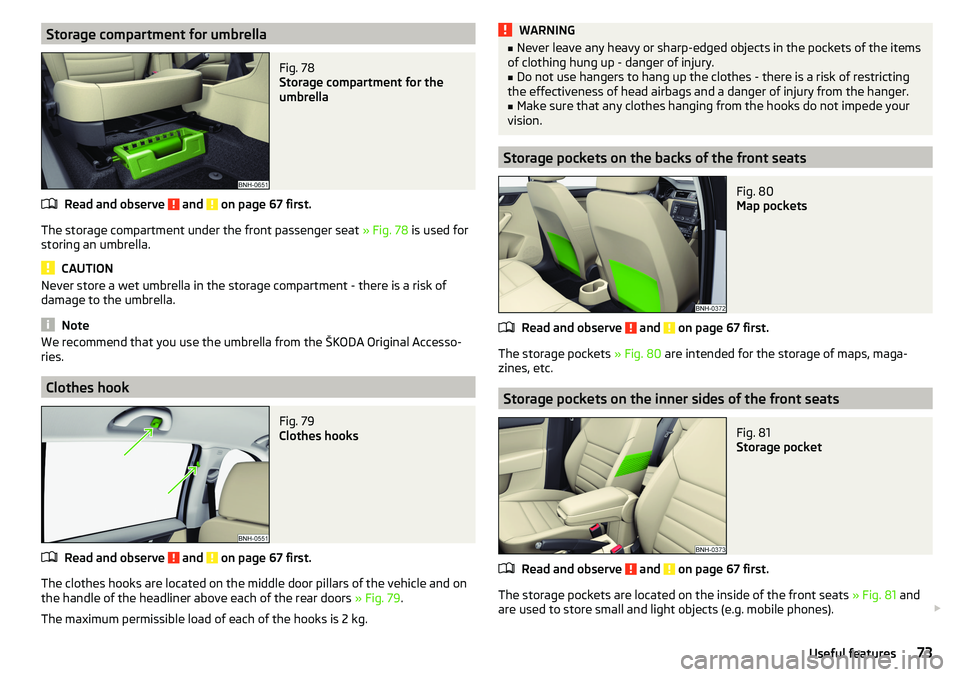
Storage compartment for umbrellaFig. 78
Storage compartment for the
umbrella
Read and observe and on page 67 first.
The storage compartment under the front passenger seat » Fig. 78 is used for
storing an umbrella.
CAUTION
Never store a wet umbrella in the storage compartment - there is a risk of
damage to the umbrella.
Note
We recommend that you use the umbrella from the ŠKODA Original Accesso-
ries.
Clothes hook
Fig. 79
Clothes hooks
Read and observe and on page 67 first.
The clothes hooks are located on the middle door pillars of the vehicle and on the handle of the headliner above each of the rear doors » Fig. 79.
The maximum permissible load of each of the hooks is 2 kg.
WARNING■ Never leave any heavy or sharp-edged objects in the pockets of the items
of clothing hung up - danger of injury.■
Do not use hangers to hang up the clothes - there is a risk of restricting
the effectiveness of head airbags and a danger of injury from the hanger.
■
Make sure that any clothes hanging from the hooks do not impede your
vision.
Storage pockets on the backs of the front seats
Fig. 80
Map pockets
Read and observe and on page 67 first.
The storage pockets » Fig. 80 are intended for the storage of maps, maga-
zines, etc.
Storage pockets on the inner sides of the front seats
Fig. 81
Storage pocket
Read and observe and on page 67 first.
The storage pockets are located on the inside of the front seats » Fig. 81 and
are used to store small and light objects (e.g. mobile phones).
73Useful features
Page 77 of 184
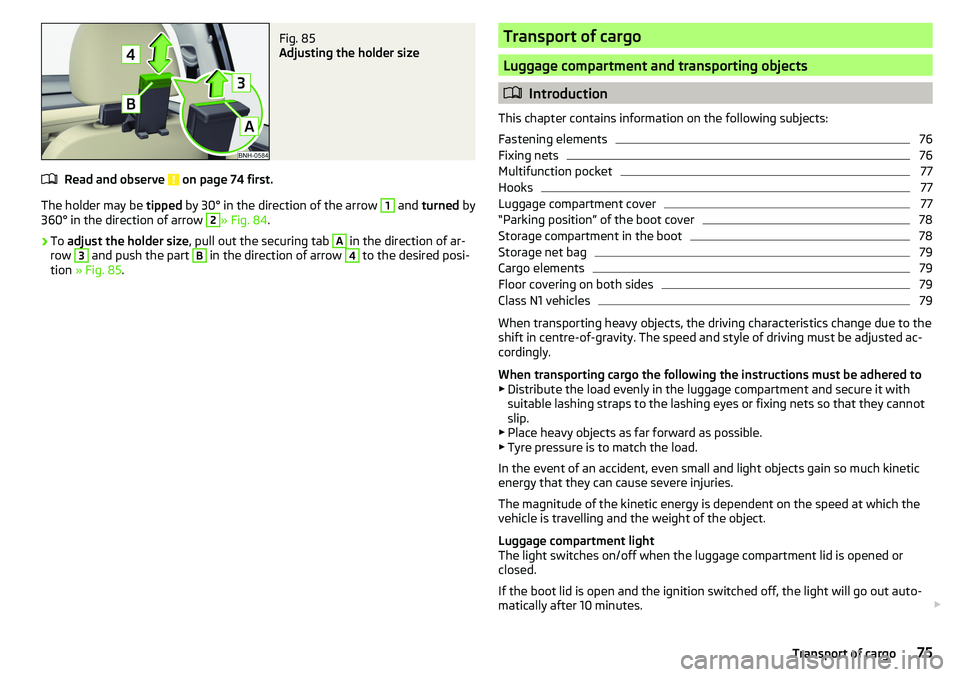
Fig. 85
Adjusting the holder size
Read and observe on page 74 first.
The holder may be tipped by 30° in the direction of the arrow
1
and turned by
360° in the direction of arrow
2
» Fig. 84 .
›
To adjust the holder size , pull out the securing tab
A
in the direction of ar-
row
3
and push the part
B
in the direction of arrow
4
to the desired posi-
tion » Fig. 85 .
Transport of cargo
Luggage compartment and transporting objects
Introduction
This chapter contains information on the following subjects:
Fastening elements
76
Fixing nets
76
Multifunction pocket
77
Hooks
77
Luggage compartment cover
77
“Parking position” of the boot cover
78
Storage compartment in the boot
78
Storage net bag
79
Cargo elements
79
Floor covering on both sides
79
Class N1 vehicles
79
When transporting heavy objects, the driving characteristics change due to the
shift in centre-of-gravity. The speed and style of driving must be adjusted ac-
cordingly.
When transporting cargo the following the instructions must be adhered to
▶ Distribute the load evenly in the luggage compartment and secure it with
suitable lashing straps to the lashing eyes or fixing nets so that they cannot
slip.
▶ Place heavy objects as far forward as possible.
▶ Tyre pressure is to match the load.
In the event of an accident, even small and light objects gain so much kinetic
energy that they can cause severe injuries.
The magnitude of the kinetic energy is dependent on the speed at which the
vehicle is travelling and the weight of the object.
Luggage compartment light
The light switches on/off when the luggage compartment lid is opened or
closed.
If the boot lid is open and the ignition switched off, the light will go out auto-
matically after 10 minutes.
75Transport of cargo
Page 84 of 184
Heating and ventilation
Heating, manual air conditioning system, Climatronic
Introduction
This chapter contains information on the following subjects:
Heating and manual air conditioning
82
Climatronic (automatic air conditioning)
83
Climatronic - automatic mode
84
Air distribution control
84
Air outlet vents
84
The heater heats and ventilates the vehicle interior. The air conditioning sys-
tem also cools and dehumidifies the vehicle interior.
The heating effect is dependent upon the coolant temperature, thus full heat
output only occurs when the engine has reached its operating temperature.
The cooling system works under the following conditions. The cooling system is switched on.
The engine is running.
The outside temperature is above 2 °C.
The blower is switched on.
When the cooling system is switched on, it prevents misting of the windscreen
and windows.
It is possible to boost the effectiveness of the cooling system by briefly acti-
vating the air recirculation system » page 84.
Health protection
To reduce health risks (e.g. common colds), the following instructions for the
use of the cooling system are to be observed. ▶ The difference between the outside temperature and the inside temperature
should not be greater than 5 °C.
▶ The cooling system should be turned off about 10 minutes before the end of
the journey.
▶ Once a year, a disinfection of the air conditioner is to be carried out by a spe-
cialist company.
WARNING■ The blower should always be on to prevent the windows from misting.
Otherwise there is a risk of accident.■
Under certain circumstances, air at a temperature of about 5 °C can flow
out of the vents when the cooling system is switched on.
Note
■ The air inlet in front of the windscreen must be free of e.g. ice, snow or
leaves to ensure that the heating and cooling system operates properly.■
After switching on the cooling Condensation from the evaporator of the air
conditioning may drip down and form a puddle below the vehicle. This is not a
leak!
■
If the coolant temperature is too high, the cooling system is switched off to
ensure that the engine cools down.
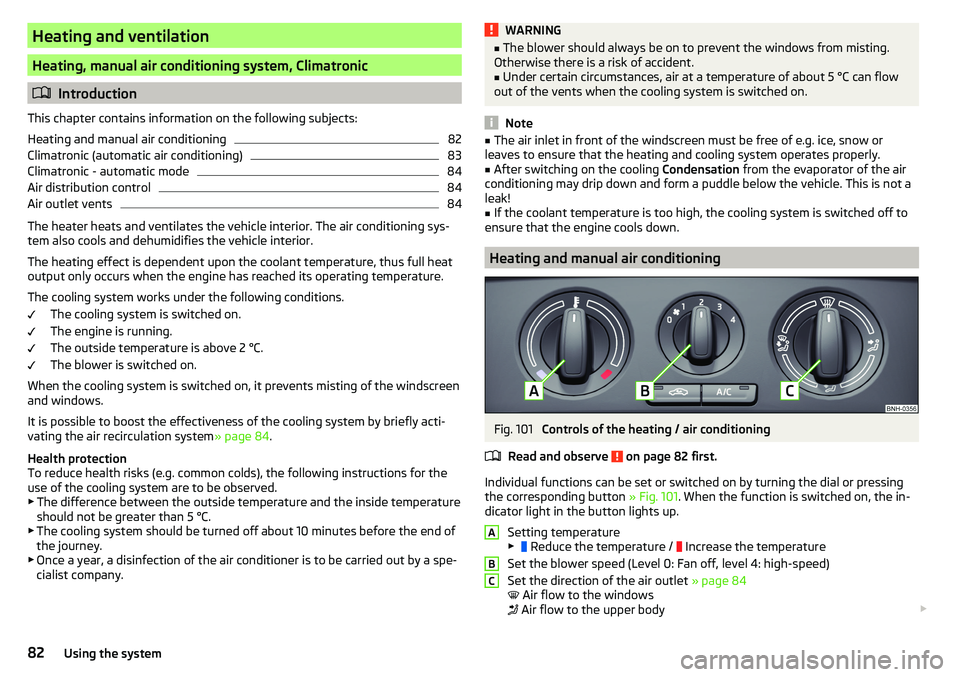
Heating and manual air conditioning
Fig. 101
Controls of the heating / air conditioning
Read and observe
on page 82 first.
Individual functions can be set or switched on by turning the dial or pressing the corresponding button » Fig. 101. When the function is switched on, the in-
dicator light in the button lights up.
Setting temperature
▶ Reduce the temperature /
Increase the temperature
Set the blower speed (Level 0: Fan off, level 4: high-speed)
Set the direction of the air outlet » page 84
Air flow to the windows
Air flow to the upper body
ABC82Using the system
Page 85 of 184
Air flow in the footwell
Air flow to the windows and the footwell
Switch recirculation on/off » page 84
Switch the cooling system on/off
Information on the cooling system
After pressing the button
» Fig. 101 , the warning light on the button lights
up, even if not all the conditions for the cooling system have been met. The
cooling system starts to work as soon as the following conditions have been
met » page 82 .
Note
To ensure adequate thermal comfort, during operation of the manual air condi-
tioning there could be an increase in the engine idle speed in some circum-
stances.
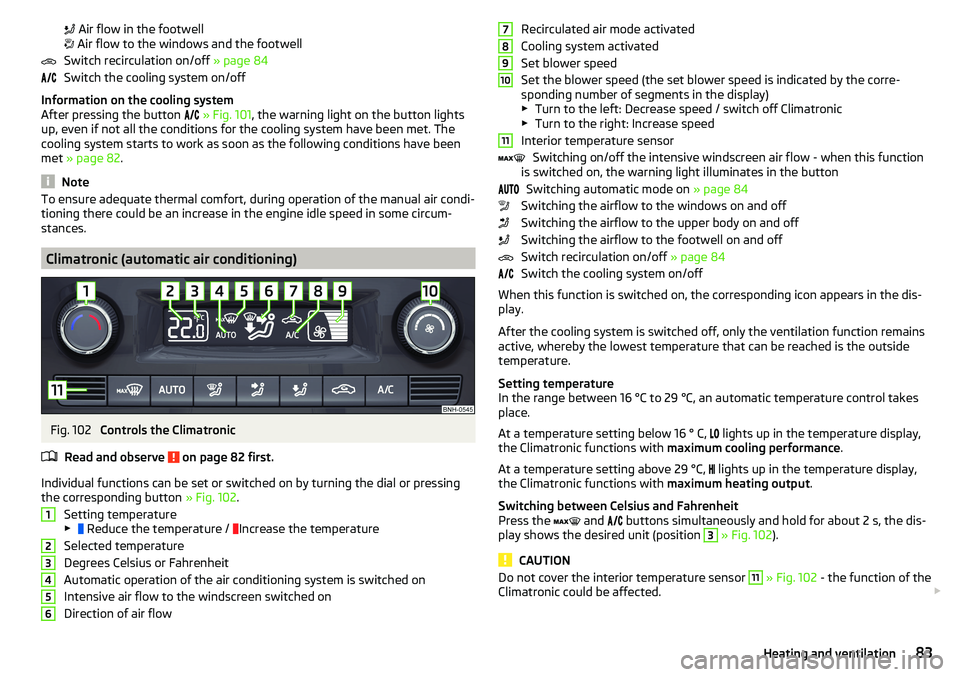
Climatronic (automatic air conditioning)
Fig. 102
Controls the Climatronic
Read and observe
on page 82 first.
Individual functions can be set or switched on by turning the dial or pressing the corresponding button » Fig. 102.
Setting temperature
▶ Reduce the temperature /
Increase the temperature
Selected temperature
Degrees Celsius or Fahrenheit
Automatic operation of the air conditioning system is switched on
Intensive air flow to the windscreen switched on
Direction of air flow
123456Recirculated air mode activated
Cooling system activated
Set blower speed
Set the blower speed (the set blower speed is indicated by the corre-
sponding number of segments in the display)
▶ Turn to the left: Decrease speed / switch off Climatronic
▶ Turn to the right: Increase speed
Interior temperature sensor Switching on/off the intensive windscreen air flow - when this function
is switched on, the warning light illuminates in the button
Switching automatic mode on » page 84
Switching the airflow to the windows on and off
Switching the airflow to the upper body on and off
Switching the airflow to the footwell on and off
Switch recirculation on/off » page 84
Switch the cooling system on/off
When this function is switched on, the corresponding icon appears in the dis-
play.
After the cooling system is switched off, only the ventilation function remains
active, whereby the lowest temperature that can be reached is the outside
temperature.
Setting temperature
In the range between 16 °C to 29 °C, an automatic temperature control takes
place.
At a temperature setting below 16 ° C, lights up in the temperature display,
the Climatronic functions with maximum cooling performance .
At a temperature setting above 29 °C, lights up in the temperature display,
the Climatronic functions with maximum heating output.
Switching between Celsius and Fahrenheit
Press the and
buttons simultaneously and hold for about 2 s, the dis-
play shows the desired unit (position 3
» Fig. 102 ).
CAUTION
Do not cover the interior temperature sensor 11 » Fig. 102 - the function of the
Climatronic could be affected. 789101183Heating and ventilation
Page 88 of 184

Driving
Starting-off and Driving
Starting and stopping the engine
Introduction
This chapter contains information on the following subjects:
Electronic immobiliser and steering lock
86
Switch on/off ignition
87
Starting / stopping the engine
87
Problems with the engine start - vehicles with starter button
88
Depending on equipment fitted, it is possible to switch the ignition on/off and
start/stop the engine with the key in the ignition or using the starter button .
WARNING■
Never switch off the engine before the vehicle is stationary – risk of acci-
dent!■
While driving with the engine stopped the ignition must always be
switched on. Otherwise, the steering may lock - danger of an accident!
■
Do not withdraw the ignition key from the ignition lock until the vehicle
has come to a stop » page 91, Parking . Otherwise, the steering may lock -
danger of an accident!
■
Never leave the vehicle unattended with the engine running - there is a
risk of theft etc!
■
Never (e.g. in garages) run the engine in a closed place - there is the dan-
ger of poisoning and death!
CAUTION
■ Only start the engine when the engine and the vehicle are stationary - there
is a danger of starter and engine damage!■
Do not push-start the engine – risk of damaging the engine and the catalytic
converter. The battery from another vehicle can be used as a jump-start aid.
■
On vehicles with the starter button, pay attention to where the key is loca-
ted. The system can recognize the valid key, even if it has been accidentally
left on the vehicle roof - there is danger of loss or damage to the key!
NoteDo not warm up the engine while the vehicle is stationary. If possible, start
your journey as soon as the engine has started. Through this, the engine rea-
ches its operating temperature faster.
Electronic immobiliser and steering lock
Read and observe
and on page 86 first.
The electronic immobiliser (hereinafter referred to as immobiliser) makes the
theft or unauthorised use of your vehicle more difficult.
Immobiliser
The immobiliser allows the engine to start provided an original vehicle key only
is used.
Malfunction of the immobiliser
If the immobiliser components in the key fail, it is not possible to start the en-
gine. A corresponding message appears in the display of the instrument clus-
ter to explain that the immobiliser is active.
To start, use the other vehicle key or seek help from a specialist garage.
Steering lock - lock
›
On vehicles with ignition lock, remove the key and turn the steering wheel
until the steering lock engages.
›
On vehicles with a starter button, switch off the ignition and open the driv-
er's door. If the driver's door is opened and the ignition is switched off after-
wards, the steering is only locked automatically after the vehicle has been
locked.
Steering lock - unlock
›
On vehicles with ignition lock, insert the key into the ignition and turn on the
ignition. If this is not possible, then move the steering wheel slightly back
and forth, as a result of which the steering lock should unlock.
›
On vehicles with starter button, get into the car and close the driver's door.
Under certain circumstances, the steering lock can be unlocked only when
the ignition is switched on or the engine is started.
WARNINGNever let the vehicle roll with locked steering lock - risk of accident!86Driving
Page 89 of 184

Switch on/off ignitionFig. 104
Positions of the vehicle key in the ignition lock / starter button
Read and observe
and on page 86 first.
Positions of the vehicle key in the ignition lock » Fig. 104 -
Ignition switched off, engine switched off
Ignition switched on
Starting engine
Switching on /off ignition in vehicles with starter button
›
Press the » Fig. 104 -
button, the ignition is turned on / off.
On vehicles with manual transmission , the pedal must not be depressed to
switch on / off the ignition, otherwise the engine will start.
On vehicles with automatic transmission , the brake pedal must not be de-
pressed to switch on / off the ignition, otherwise the engine will start.
Starting / stopping the engine
Read and observe
and on page 86 first.
Before starting the engine
›
Firmly apply the handbrake.
›
For vehicles with manual transmission , shift gear stick to neutral, depress
the clutch pedal and hold it there until the engine starts.
›
For vehicles with automatic transmission , place the selector lever in position
P or N and » depress the brake pedal until the engine starts.
123Starting the engine›On vehicles with ignition lock, turn the key to position 3 and the engine
starts » Fig. 104 on page 87
. Then release the key, the engine will start au-
tomatically.
If the engine does not start within 10 seconds, turn the key to position 1
. Re-
peat the start-up process after 30 s.
›
On vehicles with starter button, press the button briefly » Fig. 104 on
page 87 -
, the motor will start automatically.
For vehicles with diesel engines the glow plug warning light
goes on during
starting. The engine can be started after the indicator light goes out.
Switching off the engine
›
Stop the vehicle.
›
On vehicles with ignition lock, turn the key to position
1
» Fig. 104 on
page 87
.
›
On vehicles with
starter button, press the button » Fig. 104 on page 87 -
,
the engine and the ignition will be switched off simultaneously.
For vehicles with automatic transmission, the ignition key can only be removed
if the selector lever is in position P.
Do not switch the engine off immediately at the end of your journey if the en-
gine has been working at high revs over a prolonged period, but leave it to run
at an idling speed for about 1 minute. This prevents any possible accumulation
of heat when the engine is switched off.
Emergency shutdown of the engine in vehicles with starter button
The system is equipped with a protective device against accidental switching
off, the engine can only be shut off while driving in the event of an emergency.
›
Keep the knob pressed » Fig. 104 on page 87 -
or press it twice within 1
second.
After the emergency stop of the engine, the steering lock will remain un-
locked.
CAUTION
When the outdoor temperature is below -10 ° C, the selector lever when start-
ing must always be in P mode. 87Starting-off and Driving