fuel consumption SKODA RAPID SPACEBACK 2017 Owners Manual
[x] Cancel search | Manufacturer: SKODA, Model Year: 2017, Model line: RAPID SPACEBACK, Model: SKODA RAPID SPACEBACK 2017Pages: 184, PDF Size: 28.06 MB
Page 38 of 184

Lamp failureRead and observe
on page 30 first.
illuminates – one of the lamps is faulty.
A message will appear in the display about the affected lamp.
Diesel particle filter (diesel)
Read and observe
on page 30 first.
The diesel particulate filter separates the soot particles from the exhaust. The soot particles collect in the diesel particulate filter where they are burnt on a
regular basis.
illuminates – the filter is clogged with soot.
To clean the filter, and where traffic conditions permit »
, drive as follows for
at least 15 minutes or until the indicator light goes out.
4. or 5. Gear engaged (automatic gearbox: position D / S).
Vehicle speed at least 70 km/h.
Engine speed between 1,800-2,500 rpm.
If the filter is properly cleaned, the warning light extinguishes.
If the filter is not properly cleaned, the warning light does not go out and
the warning light begins to flash.
▶ Continued driving is possible with appropriate caution. Seek assistance from
a specialist garage immediately.
WARNING■ Always adjust the speed and driving style to the actual weather, road, ter-
rain and traffic conditions.■
The diesel particulate filter reaches very high temperatures - there is a
fire hazard and serious injury could be caused. Therefore, never stop the
vehicle at places where the underside of your vehicle can come into contact
with flammable materials, such as dry grass, undergrowth, leaves, spilled
fuel or the like.
CAUTION■ As long as the warning light illuminates, one must take into account an
increased fuel consumption and a power reduction of the engine.■
Using diesel fuel with increased sulphur content can significantly reduce the
service life of the diesel particle filter. A ŠKODA Partner will be able to tell you
which countries use diesel fuel with increased sulphur content.
Note
We encourage you to avoid constant short journeys. This will improve the com-
bustion process of the soot particles in the diesel particulate filter.
Windscreen washer fluid level
Read and observe
on page 30 first.
illuminates – the windscreen washer fluid level is too low.
▶ Top up the windscreen washer fluid » page 130.
START-STOP system
Read and observe
on page 30 first.
The warning lights
indicates the state of the START STOP system
» page 88 , START-STOPsystem .
Display of a low temperature
Read and observe
on page 30 first.
illuminates – the outside temperature is below +4 °C.
WARNINGEven at temperatures of around +4 °C, black ice may still be on the road
surface! You should therefore not only rely on the outside temperature dis- play for accurate information as to whether there is ice on the road.
Distance warning (Front Assist)
Read and observe
on page 30 first.
The warning light is only shown in the MAXI DOTdisplay.
36Using the system
Page 42 of 184
The units and the display of some information can be set in Infotainment
» Owner´s Manual - Infotainment .
Information overview
Overview of driving data (depending on the vehicle equipment).
Range - drive distance in km which can be covered with the existing tank ca-
pacity and with the same driving style. If you drive more efficiently this value
can increase.
Average fuel consumption - is calculated continuously since the last clearing
of the memory. After erasing the memory, no data will appear for the first 100
m driven.
Current fuel consumption - when the vehicle is stationary or moving slowly,
the fuel consumption is displayed in l/h (in models in some countries the fol-
lowing appears --,- km/l).
Oil temperature - if the temperature is lower than 50 °C or if there is a fault in
the system for checking the oil temperature, the symbols are displayed.
Warning when the preset speed is exceeded - allows the setting of a speed
limit where, if exceeded, an acoustic warning signal and a warning message
appears on the display of the instrument cluster.
Current Speed - digital speedometer.
Average speed - value constantly recalculated, for distance since last clearing
the memory. After erasing the memory, no data will appear for the first 300 m
driven.
Distance driven - distance driven since the memory was last cleared.
Driving time - driving time since last clearing the memory.
Coolant temperature - if the coolant temperature is in the range 70-120 °C, the
engine operating temperature has been reached. If the temperature is below
70 ° C, high engine speeds and straining the engine should be avoided. If the
temperature is above 120 ° C, the warning light lights up the instrument
cluster » page 35 .
Warning when exceeding the set speed
The system offers the possibility to set a speed limit beyond which an acoustic
warning signal will sound and the following warning message appears in the
display of the instrument cluster.
Adjust the speed limit while the vehicle is stationary›Select the menu item
Warning at
at ( ) or ( ) and confirm.›
Set the desired speed limit is 5 km/h steps.
›
Confirm the set value, or wait several seconds; your settings will be saved
automatically.
Adjusting the speed limit while the vehicle is moving
›
Select the menu item
Warning at
at (
) or
(
) and confirm.
›
Drive at the desired speed.
›
Confirm the current speed as the speed limit.
The set speed limit can be manually adjusted later if needed.
Reset speed limit
›
Select the menu item
Warning at
at ( ) or
(
) and confirm.
›
By confirming the speed stored in the memory, the speed limit is reset.
The set driving mode remains stored even after switching the ignition on and
off. After a gap between driving exceeding 2 hours, the pre-set speed limit is
deactivated.
Memory
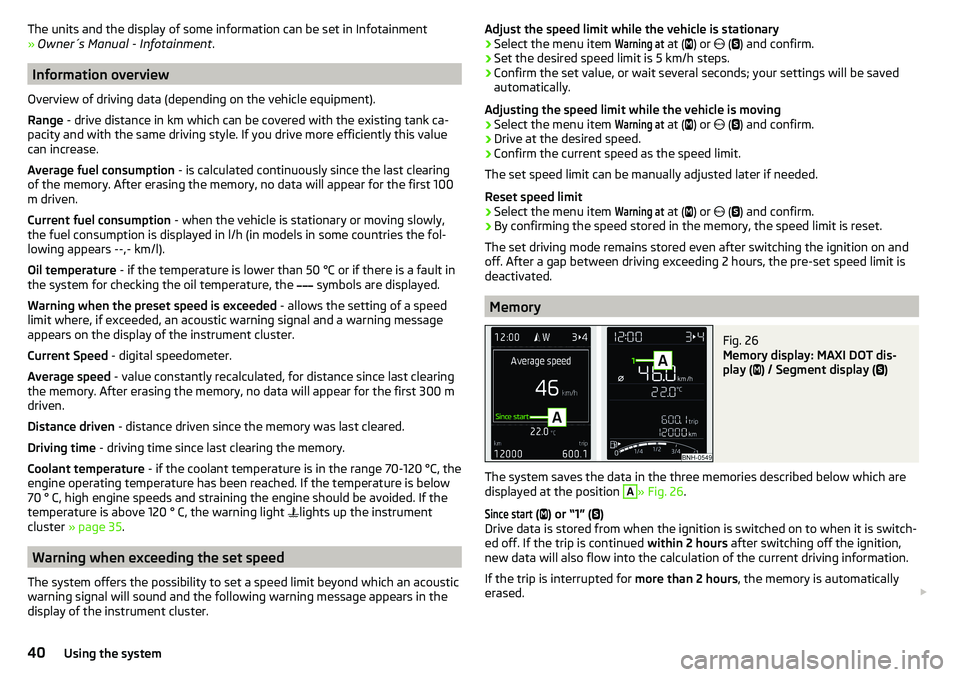
Fig. 26
Memory display: MAXI DOT dis-
play (
) / Segment display (
)
The system saves the data in the three memories described below which are
displayed at the position
A
» Fig. 26 .
Since start
(
) or “1” (
)
Drive data is stored from when the ignition is switched on to when it is switch-
ed off. If the trip is continued within 2 hours after switching off the ignition,
new data will also flow into the calculation of the current driving information.
If the trip is interrupted for more than 2 hours, the memory is automatically
erased.
40Using the system
Page 43 of 184

Long-term ( ) and “2” ( )
The memory gathers driving data from any number of individual journeys up to
a total of 99 hours and 59 minutes driving time or 9999 kilometres driven.
The indicator is automatically set back to zero if one of the indicated values is
exceeded.Since refuel
(
) or “3” (
)
The driving data is stored in the memory since the last fuel refuelling.
The memory is erased automatically the next time you fill up.
›
For the Storage choice , repeatedly confirm the selected indication and select
the desired memory.
›
For Deleting the memory for the selected information, hold down the button
confirming the specification.
The following driving data is stored in different memory banks.
▶ Average fuel consumption.
▶ Distance driven.
▶ Average speed.
▶ Driving time.
Note
Disconnecting the vehicle battery will delete all memory data.
MAXI DOT display
Introduction
This chapter contains information on the following subjects:
Menu item
Navigation41
Menu item
Audio41
Menu item
Telephone42
Menu item
Assist systems42
The MAXI DOT display is a user interface which, depending on the equipment
configuration, provides information about the Infotainment, the multifunction
display, the assistance systems etc.
The menus with details can be operated and displayed using the buttons on
the operating lever or the multifunction steering wheel » page 39.
Main menu items (depending on vehicle equipment)
■Driving data
» page 39
■
Assist systems
» page 42
■
Navigation
» page 41
■
Audio
» page 41
■
Telephone
» page 42 ;
■
Vehicle
» page 38 , Auto Check Control
Note
■
If warning messages are displayed, these messages must first be confirmed
to access the main menu.■
The display language can also be set in Infotainment » Owner´s Manual -In-
fotainment .
■
For vehicles without Infotainment, the display language can only be adjusted
by a specialist garage.
Menu item
Navigation
The following information is displayed in the
Navigation
menu item.
▶ Driving recommendations
▶ Compass
▶ Last destinations
Menu item
Audio
The following information is displayed in the
Audio
menu item.
Radio
▶ Currently playing station (name/frequency).
▶ The selected frequency range (e.g. FM) optionally with the number of the sta-
tion button (e.g. FM 3), if the station is stored in the memory list.
▶ List of available stations (if more than 5 stations can be received).
▶ TP traffic announcements.
Media
▶ Name of the track being played, if necessary, further information regarding
title (e.g. artist, album name), if this information is stored as a so called ID3
tag on the audio source.
41Information system
Page 96 of 184
Starting-off and drivingRead and observe
and on page 92 first.
Moving off and pausing temporarily
›
Firmly depress and hold the brake pedal.
›
Start the engine.
›
Press the locking button and move the selector lever to the desired position
» page 92 .
›
Release the brake pedal and accelerate.
The selector lever position N does not have to be selected when stopping for a
short time (e.g. at a crossroads). However, the brake pedal should be de-
pressed, in order to prevent the vehicle from rolling.
Accelerating at maximum speed during the journey (kickdown function)
If the accelerator pedal is depressed while the vehicle is in forward drive mode,
the kick-down function is turned on.
The gear change is adjusted accordingly to achieve maximum acceleration.
WARNINGRapid acceleration ( e.g. on slippery roads) can lead to a loss of control over
the vehicle – risk of accident!
Running in and economical driving
Introduction
This chapter contains information on the following subjects:
Running in the engine
94
Tips on economical driving
94
DriveGreen function
94
Running in the engine
During the first 1,500 km, the driving style is decisive for successful the run-
ning in process is.
During the first 1,000 km , the engine should not be charged with more than
3/4 of the maximum permitted engine revs and without the trailer.
From about 1,000 to 1,500 km , the engine can be pushed up to the maximum
permitted engine speed.
Tips on economical driving
Fuel consumption depends on the driving style, road and weather conditions,
and similar such factors.
For an economical driving style, the following instructions must be observed. ▶ Avoid unnecessary acceleration and braking.
▶ Engage the recommended gear » page 38.
▶ Avoid full throttle and high speeds.
▶ Reduce idling.
▶ Avoid short distances.
▶ Ensure the correct tyre inflation pressure is maintained » page 137.
▶ Avoid unnecessary ballast.
▶ Remove the roof rack before driving if it is not needed.
▶ Only turn on electrical consumers (e.g. seat heating) for as long as necessary.
▶ Briefly ventilate before turning on the cooling system, do not use the cooling
system with the windows open.
▶ Do not leave windows open at high speeds.
DriveGreen function
Fig. 113
Shown in the infotainment dis-
play
The DriveGreen function (hereinafter referred to as DriveGreen) evaluates the
driving efficiency based on the information with regard to driving style.
DriveGreen can be displayed on the Infotainment as follows.
›
Press the button in Infotainment and then tap on the
→
DriveGreen
function surfaces in the display.
A
driving liquid display
With the driving is fluid, the display is located in the middle (near the green
dot). When accelerating, the display moves down, and upwards when braking.
94Driving
Page 97 of 184
B“Green leaf”
The greener the leaf, the more economic the driving style. With less economi-
cal driving, the leaf is presented without any green colouring or it can be com-
pletely hidden.C
bar graph
The higher the green bars, the more economical the driving style. Each bar
shows the driving efficiency in 5-second steps, the current bar is on the left.
D
scoring (0 - 100)
The higher the indicated value, the more economical the driving style. When
you tap the function surface
D
, a detailed assessment showing the driving ef-
ficiency during the last 30 minutes is displayed.
If the trip lasts less than 30 minutes from the start, then the overview will add the assessment from the previous journey (the bars are shown in dark green).
E
the average fuel consumption from the start
When you tap the
E
function surface, a detailed overview of the average fuel
consumption during the last 30 minutes is shown.
If the trip lasts less than 30 minutes from the start, then the overview will add the overview of the average fuel consumption from the previous journey (the
bars are shown in dark green).
F
symbols
The display may show the following four symbols, which give information on
the current driving style.
Economical driving style
The current speed has a negative effect on fuel consumption.
If the driving is not fluid, drive with anticipation
Recommended gear
Tips for economical driving
Tap on the
B
leaf to display tips for economical driving.
Note
Resetting the single-trip memory “Since start” also resets the average con-
sumption E and the driving assessment D.Avoiding damage to your vehicle
Introduction
This chapter contains information on the following subjects:
Driving Tips
95
Driving through water
95
Driving Tips
Only drive on roads and terrain that are appropriate to the vehicle parameters
» page 162 , Technical data .
The driver is always responsible for deciding whether the vehicle can cope
with the conditions and the terrain.
WARNING■ Adjust the speed and driving style to the current visibility, weather, road
and traffic conditions. Too high a speed or an erroneous manoeuvre may
cause serious injury and damage to the vehicle.■
Combustible objects such as dry leaves or twigs caught under the base of
the vehicle could ignite on hot vehicle parts - risk of fire!
CAUTION
■ Pay attention to the ground clearance of the vehicle! When driving over ob-
jects which are larger than the ground clearance, the vehicle can get damaged.■
Any objects that get trapped under the vehicle floor must be removed as
soon as possible. These items can cause damage to the vehicle (e.g. to parts of
the fuel or brake system).
Driving through water
Fig. 114
Maximum permissible water lev-
el when driving through water
95Starting-off and Driving
Page 129 of 184

The vehicle can only operate with unleaded petrol that meets standard EN
228 1)
, and contains maximum 10% bioethanol (E10).
Prescribed fuel 95 / min. 92 or 93 RON / ROZ
We recommend using petrol 95 RON.
Optionally, the petrol 92 or. 93 RON can be used (slight power loss, a slightly
increased fuel consumption).
In an emergency , petrol 91 RON can be used (slight power loss, slightly in-
creased fuel consumption) »
.
Specified petrol is unleaded, min. 95 RON / ROZ
Use min. 95 ROZ petrol.
In an emergency , 91 . 92 or 93 ROZ petrol can be used (slight loss of power,
slightly increased fuel consumption) »
.
Prescribed petrol 98/(95) RON / ROZ
We recommend using petrol 98 RON.
Optionally, petrol 95 ROZ can be used (slight power loss, a slightly increased
fuel consumption).
In an emergency , 91 . 92 or 93 ROZ petrol can be used (slight loss of power,
slightly increased fuel consumption) »
.
CAUTION
The following instructions must be observed, otherwise there is a risk of dam-
age to the engine and to the exhaust system.■
When petrol with a lower than the prescribed octane is used, only continue
driving at mid-range engine speeds and with minimal strain on the engine. Re-
fuel using petrol of the prescribed octane number as soon as possible.
■
Lower than 91 octane petrol should not be used, even in an emergency!
■
If a fuel other than unleaded fuel which complies to the above mentioned
standards (e.g. leaded petrol) is put in the tank by mistake, do not start the en-
gine or switch on the ignition.
CAUTIONPetrol additives (additives)■Unleaded petrol complying with the EN 228 standard 1 )
meets all the condi-
tions for problem-free engine operation. We therefore do not recommend mix-
ing fuel additives into the petrol - risk of engine damage or damage to the ex-
haust system.■
The following additives may not be used - risk of engine damage or damage
to the exhaust system! ■Additives with metal components (metallic additives), in particular with
manganese and iron content.
■ Fuels with metallic content (e.g. LRP - lead replacement petrol).
Note
■Unleaded petrol that has a higher octane number than that required by the
engine can be used without limitations.■
The use of petrol with an octane rating higher than 95 ROZ does not result in
either a noticeable increase in power nor lower fuel consumption in vehicles
for which unleaded petrol 95/min 92 or 93 ROZ is specified.
■
On vehicles using the prescribed petrol of min. 95 ROZ, the use of petrol with
a higher octane number than 95 ROZ can lead to an increase in power and re-
duction in fuel consumption.
Diesel fuel
Read and observe
and on page 126 first.
The correct fuel for your vehicle is specified on the inside of the fuel filler
flap » Fig. 149 on page 126 .
The vehicle can only be operated using diesel fuel that complies with the
standard EN 5902)
and contains a maximum 7% biodiesel (B7)3)
.
Operating under different weather conditions
Use only diesel in accordance with the current or expected weather conditions.
Ask the petrol station personnel whether the diesel fuel offered corresponds
to these conditions.
1)
In Germany also DIN 51626-1 or E10 for unleaded petrol with octane number 91 or 95 or DIN 51626-2 or E5
for unleaded petrol with octane number 95 and 98.
2)
In Germany also DIN 51628, in Austria ÖNORM C 1590, in Russia GOST R 52368-2005 / EN 590:2004.
3)
In Germany according to the DIN 52638 standard, in Austria ÖNORM C 1590, in France EN 590.
127Inspecting and replenishing
Page 139 of 184

Tyre pressureFig. 158
Label with a table of tyre sizes and tyre pressure value / inflate
tyres
The prescribed tyre inflation is on the sticker with pictograms
A
» Fig. 158 (for
some countries, the pictograms are replaced with a text).
Tyre pressure is always to match the load .
Inflation pressure for half load
Inflation pressure for environmentally friendly operation (slightly lower
fuel consumption and emissions)
Inflation pressure for full load
Tyre diameter in inches
This information serves merely as information for the prescribed tyre pres-
sure. This is not a list of shared tyre sizes for your vehicle. These are in the
vehicle's technical documentation, in the declaration of conformity (in so-
called COC document) and listed on the vehicle data » page 162.
Tyre pressure value on the front axle
Tyre pressure value on the rear axle
Check tyre pressures
Check the tyre pressure (including that of the emergency or spare wheel) at
least once a month and also before setting off on a long journey.
Always check the inflation pressure when the tyres are cold. Do not reduce the
higher pressure on warm tyres.
In vehicles with tyre pressure monitoring, tyre pressure values must be saved
each time the pressures are changed » page 109.
BCDEFGWARNING■
Do not drive with incorrect tyre pressure - risk of accident.■In the event of very rapid pressure loss (e.g. in the event of tyre damage)
an attempt should be made to bring the vehicle carefully to a stop without
sudden steering movements and without any hard braking - risk of acci-
dent.
Note
The declaration of conformity (COC document), can be obtained from a ŠKODA 1)
partner.
Tyre wear and wheel change
Fig. 159
Tyre wear indicator / wheel change
Tyre wear increases in the following circumstances.
▶ Incorrect tyre pressures.
▶ Driving style (e.g. fast cornering, rapid acceleration / braking).
▶ Incorrect wheel balancing (you should have the wheels balanced after
changing/repair tyres or if the steering “is drifting”).
▶ Wheel alignment errors.
There are wear indicator markers in the tyre profiles, indicating whether the
minimum permissible tread depth has been reached » Fig. 159 -
. A tyre
should be regarded as worn out when this indicator is flush with the tread.
Markings on the walls of the tyres with the letters “TWI” and/or other symbols (e.g. ), identify the position of the wear indicators.
To ensure uniform wear on all tyres, we recommend that you change the
wheels every 10 000 km, in line with the schedule » Fig. 159 -
.
1)
Only valid for some countries and some models.
137Wheels
Page 164 of 184

Technical data
Technical data
Basic vehicle data
Introduction
This chapter contains information on the following subjects:
Vehicle data
162
Operating weight
163
Payload
163
Measurement of fuel consumption and CO 2 emissions according to ECE
Regulations and EU Directives
163
Dimensions
165
Departure angle
166
The details given in the vehicle's technical documentation always take prece-
dence over the details in the Owner's Manual.
The performance values listed were determined without performance-reduc- ing equipment, e.g. air conditioning system.
The values given have been determined in accordance with regulations and in
conditions prescribed by legal or technical provisions for determining the oper-
ating and technical data of vehicles.
The listed values are for the basic model without optional equipment.
Vehicle dataFig. 199
Vehicle data sticker/type plate
Vehicle data sticker
The vehicle data sticker » Fig. 199 -
is located on the base of the luggage
compartment and is also stuck into the Owner's Manual.
The vehicle data sticker contains the following data. Vehicle identification number (VIN)
Vehicle type
Gearbox code/paint number/interior equipment/engine output/engine code
Partial vehicle description
Approved tyre diameter in inches 1)
The approved tyres and rim sizes for your vehicle are listed in the vehicle's
technical documentation (the so called COC document) and this also states the
declaration of conformity.
Type plate
The type plate » Fig. 199 -
is located at the bottom of the B-pillar on the
right-hand driver's side.
The type plate contains the following data. Vehicle manufacturers
Vehicle identification number (VIN)
Maximum permissible gross weight
Maximum permissible towed weight (towing vehicle and trailer)
1234567891)
Only valid for some countries.
162Technical data
Page 165 of 184

Maximum permissible front axle load
Maximum permissible rear axle load
Vehicle identification number (VIN)
The vehicle identification number - VIN (vehicle body number) is stamped into
the engine compartment on the right hand suspension strut dome. This num-
ber is also located on a sign on the lower left hand edge below the windscreen
(together with a VIN bar code), and on the type plate.
The VIN number can also be displayed in Infotainment » Owner´s Manual - In-
fotainment .
Engine number
The engine number (three-digit identifier and serial number) is stamped on the
engine block.
Supplementary Information (applies to Russia)
The full type approval number of the means of transport is indicated in the
registration documents, field 17.
Maximum permissible towed weight
The listed maximum allowable trailer weight is only valid for altitudes up to
1000 m above sea level.
The engine output falls as altitude increases, as does the vehicle's climbing
power. Therefore, for every additional 1,000 m in height (or part), the maximum
permissible towed weight must be reduced by 10%.
The towed weight is made up of the actual weights of the loaded towing vehi-
cle and the loaded trailer.WARNINGDo not exceed the specified maximum permissible weights – risk of acci-
dent and damage!
Operating weight
This value is only a guide value and corresponds to the lowest possible operat-
ing weight without any equipment added that would also increase the weight
(e.g. air conditioning, emergency or spare wheel etc.). It also includes a weight
allowance for the driver (75 kg), the weight of the operating fluids, the tool kit
and a fuel tank filled to 90 % capacity.
1011Operating weightEngineGearboxOperating weight (kg)1.2 l/66 kW TSIMG1160DSG11941.2 ltr./81 kW TSIMG11801.4 ltr./92 kW TSIDSG1212DSG (Green tec)12211.6 l./81 kW MPIMG1160AG12001.4 l/66 kW TDI CRMG1229DSG12501.6 l/85 kW TDI CRMG1275
Note
If required, you can find out the precise weight of your vehicle at a specialist
garage.
Payload
It is possible to calculate the approximate maximum payload from the differ-
ence between the permissible total weight and the operating weight.
The payload consists of the following weights.
▶ The weight of the passengers.
▶ The weight of all items of luggage and other loads.
▶ The weight of the roof, including the roof rack system.
▶ The weight of the equipment that is excluded from the operating weight.
▶ Trailer draw-bar load when towing a trailer (max. 50 kg).
Measurement of fuel consumption and CO
2 emissions according to
ECE Regulations and EU Directives
The data on fuel consumption and CO 2 emissions were not available at the
time of going to press.
The data on fuel consumption and CO 2 emissions are given on the ŠKODA
websites or in the sales and technical vehicle documentation.
The measurement of the intra-urban cycle begins with a cold start of the en-
gine. Afterwards urban driving is simulated.
163Technical data
Page 166 of 184

In the extra-urban driving cycle, the vehicle is accelerated and decelerated in
all gears, corresponding to daily routine driving conditions. The driving speed
varies between 0 and 120 km/h.
The calculation of the combined fuel consumption considers a weighting of
about 37 % for the intra-urban cycle and 63 % for the extra-urban cycle.
Note
■ The emission and fuel consumption figures given on the ŠKODA websites or
in the commercial and technical vehicle documentation have been established
in accordance with rules and under conditions that are set out by statutory or
technical rules for the determination of operational and technical data of mo-
tor vehicles.■
Depending on the extent of the equipment, the driving style, traffic condi-
tions, weather influences and vehicle condition, consumption values can in
practice result in fuel economy figures in the use of the vehicle that differ from
the fuel consumption values listed on the ŠKODA websites or in the commer-
cial and technical vehicle documentation.
164Technical data