window SKODA ROOMSTER 2006 1.G Owner's Guide
[x] Cancel search | Manufacturer: SKODA, Model Year: 2006, Model line: ROOMSTER, Model: SKODA ROOMSTER 2006 1.GPages: 274, PDF Size: 48.64 MB
Page 106 of 274
Heating and air conditioning system 105
Using the systemSafetyDriving TipsGeneral MaintenanceBreakdown assistanceTechnical Data
Note
•If the cooling system has not been switched on for a lengthy period,
odours may be produced at the evaporator because of deposits. Switch
the cooling system on at least once a month for approximately 5 minutes
at the highest blower stage - also during the cold season of the year - in
order to remove such odours. Also open a window for a short time.
•We recommend that you do not smoke in the vehicle when the recir-
culating air mode is operating since the smoke which is drawn at the evap-
orator from the interior of the vehicle forms deposits in the evaporator of
the air conditioning system. This produces a permanent odour when the
air conditioning system is operating which can only be eliminated through
considerable effort and expense (replacement of compressor).
•The used air streams out through the air removal openings in the
luggage compartment.
•Using the cooling economically ⇒page 103.
•Operational problems ⇒page 103.
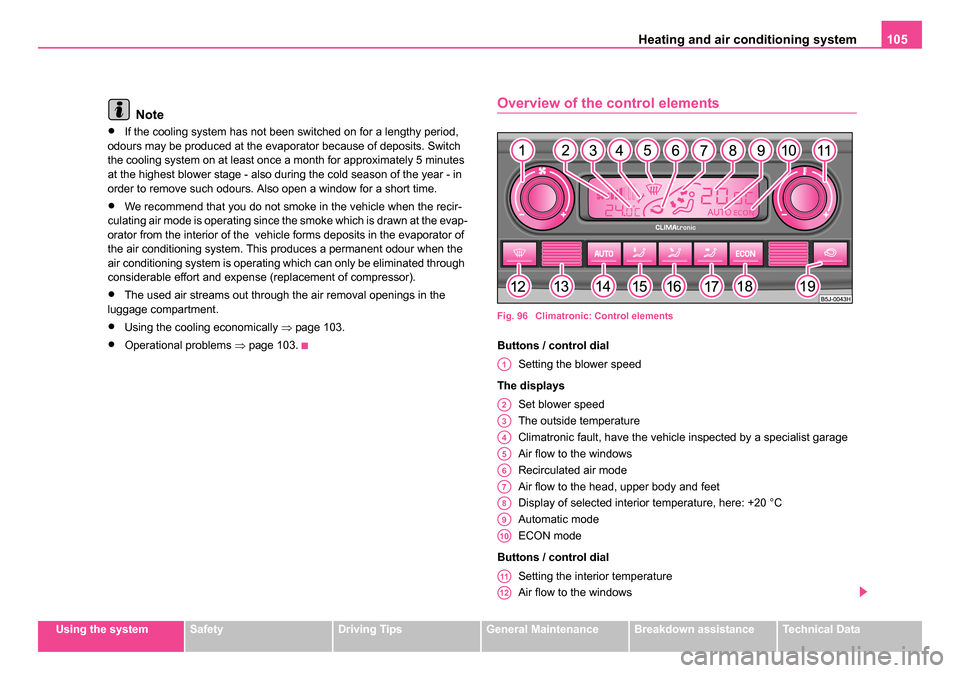
Overview of the control elements
Fig. 96 Climatronic: Control elements
Buttons / control dial
Setting the blower speed
The displays Set blower speed
The outside temperature
Climatronic fault, have the vehicle inspected by a specialist garage
Air flow to the windows
Recirculated air mode
Air flow to the head, upper body and feet
Display of selected interior temperature, here: +20 °C
Automatic mode
ECON mode
Buttons / control dial Setting the interior temperature
Air flow to the windows
A1
A2
A3
A4
A5
A6
A7
A8
A9
A10
A11
A12
NKO 20 A05.book Page 105 Wednesday, June 21, 2006 1:42 PM
Page 107 of 274
Heating and air conditioning system
106
Automatic mode
Air flow in the footwell
Air flow to the upper body
Air flow to head
Button for switching off cooling system
Recirculated air mode
Note
The interior temperature sensor is located in the bottom part of the
device. Do not glue or cover over the sensor, otherwise it could have an
unfavourable effect on the Climatronic.
Automatic mode
The automatic mode is used in order to maintain a
constant temperature and to keep the windows in the inte-
rior of the car dry.
Switching automatic mode on
– Set a temperature between +18 °C and +29 °C.
– Move the air outlet vents 3 and 4 ⇒ page 108, fig. 97 so that
the air flow is directed slightly upwards.
– Press the button , AUTO appears in the display.
The automatic mode is switched off by pressing the button for the air distri-
bution or increasing or decreasing the blower speed. The temperature is
nevertheless regulated.
ECON mode
The cooling system is switched off in the ECON mode -
heating and ventilation are regulated automatically.
Switching ECON mode on
– Press the button , ECON appears in the display.
– Set a temperature between +18 °C and +29 °C.
Recirculated air mode in ECON mode
– Press the button , AUTO appears in the display.
– Press the button , ECON appears in the display.
ECON mode operates only within the control temperature range from +18
°C up to +29 °C.
The ECON mode is switched off when pressing button or .
Please note that, in the ECON mode, the interior temperature cannot be
lower than the outside temperature. The interior is not cooled and the air
is not dehumidified.
Please refer to the information regarding recirculated air mode
⇒page 107.
Defrosting windscreen
Defrosting windscr een - switching on
– Press the button ⇒page 105, fig. 96 .
A14
A15
A15
A17
A18
A19
A13
AUTO
ECON
ECON
NKO 20 A05.book Page 106 Wednesday, June 21, 2006 1:42 PM
Page 108 of 274
Heating and air conditioning system 107
Using the systemSafetyDriving TipsGeneral MaintenanceBreakdown assistanceTechnical Data
Defrosting windscreen - switching off
– Once again press the button or the button .
The temperature control is controlled automatically. More air flows out of
the air outlet vents 1 and 2.
Recirculated air mode
In recirculated air mode air is sucked out of the interior of
the vehicle and then fed back into the interior.
Recirculated air mode prevents polluted air outside the vehicle
from getting into the vehicle, for example when driving through a
tunnel or when standing in a traffic jam.
Switching recirculated air mode on
– Press button , the symbol
appears on the display.
Switching recirculated air mode off
– Once again press the button or the button , the symbol or the logo is no longer shown on the display.
WARNING
You should not leave recirculated air mode on over a longer period
of time, as “stale” air may result in fatigue in the driver and occu-
pants, divert your attention and also cause the windows to mist up.
The risk of having an accident increases. Switch recirculated air
mode off as soon as the windows begin misting up.
Note
If the windscreen mists up, press the button . After the windscreen has
been demisted, press the button .
Setting temperature
– You can set the desired interior temperature after switching on the ignition with the control dial .
You can set the interior temperature between +18°C and +29°C. The inte-
rior temperature is regulated automatically within this range. If you select
a temperature of less than +18 °C, “LO” is shown on the display. If you
select a temperature above +29 °C, “HI” is shown on the display. In both
limit positions the Climatronic operates at maximum cooling or heating
capacity, respectively. The temperature is not controlled in this case.
Lengthy and uneven distribution of the air flow out of the vents (in partic-
ular at the leg area) and large differences in temperature, for example
when getting out of the vehicle, can result in chills in sensitive persons.
Controlling blower
There are a total of seven blower stages available.
The Climatronic system controls the blower stages automatically
in line with the interior temperature. You can also, however, adapt
the blower stages manually to suit your particular needs.
– Turn the control dial ⇒page 105, fig. 96 to the left (reduce
blower speed) or right (increase blower speed).
AUTO
AUTO
AUTO
A11
A1
NKO 20 A05.book Page 107 Wednesday, June 21, 2006 1:42 PM
Page 109 of 274
Heating and air conditioning system
108
Switch off the blowers, the Climatronic is switched off and in the display
shows OFF.
The set blower speed is displayed next to the control dial when the
respective number of warning lights come on.
WARNING
•“Stale air” may result in fatigue in the driver and occupants,
reduce attention levels and also cause the windows to mist up. The
risk of having an accident increases.
•Do not switch the Climatronic system off for longer than neces-
sary.
•Switch the Climatronic system on as soon as the windows mist
up.
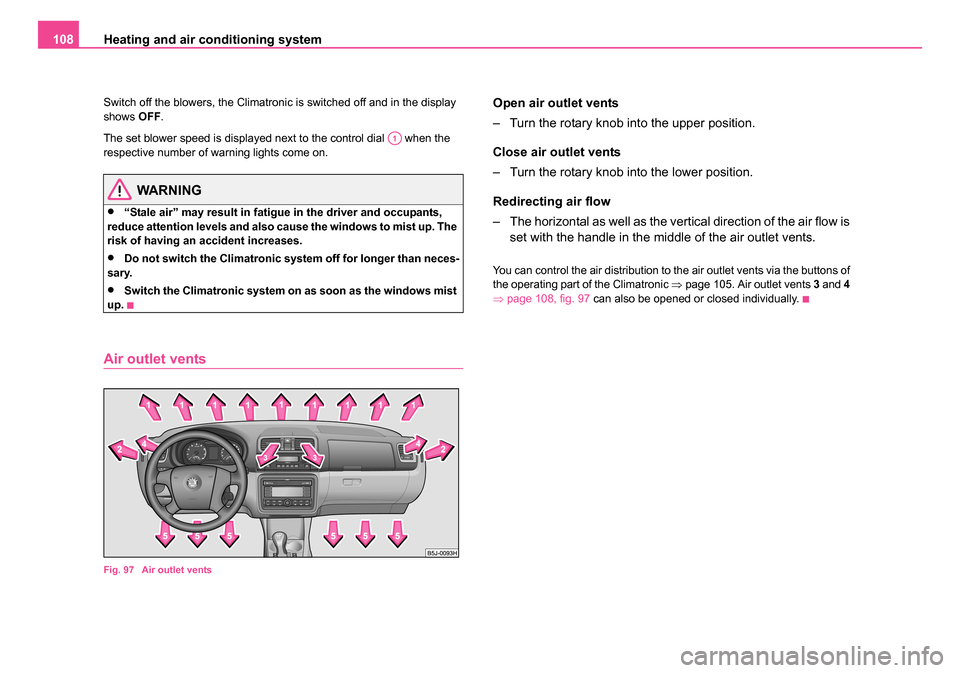
Air outlet vents
Fig. 97 Air outlet vents
Open air outlet vents
– Turn the rotary knob into the upper position.
Close air outlet vents
– Turn the rotary knob into the lower position.
Redirecting air flow
– The horizontal as well as the vertical direction of the air flow is set with the handle in the middle of the air outlet vents.
You can control the air distribution to the air outlet vents via the buttons of
the operating part of the Climatronic ⇒page 105. Air outlet vents 3 and 4
⇒ page 108, fig. 97 can also be opened or closed individually.
A1
NKO 20 A05.book Page 108 Wednesday, June 21, 2006 1:42 PM
Page 112 of 274
Starting-off and Driving111
Using the systemSafetyDriving TipsGeneral MaintenanceBreakdown assistanceTechnical Data
WARNING
•When driving, the ignition key must always be in the position
(ignition switched on) without the en gine running. This position is
indicated by the warning lights coming on. If this is not the case, it
could result in unexpected locking of the steering wheel - risk of
accident!
•Do not withdraw the ignition key from the lock until the car has
come to a stop. The steering lock can engage immediately - risk of
accident!
•Always withdraw the ignition key if you are going to leave the
vehicle, even for a short time. This is particularly important if chil-
dren are left in the vehicle. The children might otherwise start the
engine or operate electrical equi pment (e.g. power windows) - risk
of injury!
Starting the engine
General
You can only start the engine only using an original ignition
key.
•Place the gearshift lever into neutral and put on the handbrake firmly
before starting the engine.
•The clutch pedal should be fully depressed when starting the engine
which means that the starter only has to crank the engine.
•Let go of the key as soon as the engine starts otherwise there may be
damage to the starter. The engine running noises may louder at first be louder for a short time
after starting the cold engine until oil pressure can be built up in the
hydraulic valve clearance compensation. This is quite normal and is not
an operating problem.
If the engine does not start ...
You can use the battery of another vehicle as a jump-start aid
⇒
page 243.
It is only possible to tow-start vehicles fitted with a manual gearbox. The
tow-starting distance must not be more than 50 metres ⇒page 247.
WARNING
•Never run the engine in non ventilated or enclosed areas. The
exhaust gases of the engine contain besides the odorless and
colourless carbon monoxide a poisonous gas - hazard! Carbon
monoxide can cause unconsciousness and death.
•Never leave your vehicle unattended with the engine running.
Caution
•The starter may only be operated (ignition key position ), if the
engine is not running. If the starter is immediately operated after switching
off the engine, the starter or the engine can be damaged.
•Avoid high engine revolutions, full throttle and high engine loads as
long as the engine has not yet reached its normal operating temperature
- risk of damaging the engine!
•Vehicles which are fitted with an exhaust gas catalytic converter
should not be tow-started over a distance of more than 50 metres.
A2
A3
NKO 20 A05.book Page 111 Wednesday, June 21, 2006 1:42 PM
Page 129 of 274
Communication
128
Note
The operation of the mobile phone fitted with multi-functional module* is
only possible on certain models of mobile phone. More detailed informa-
tion is available from your Škoda Service Partner.
Universal telephone preinstallation with
voice control*
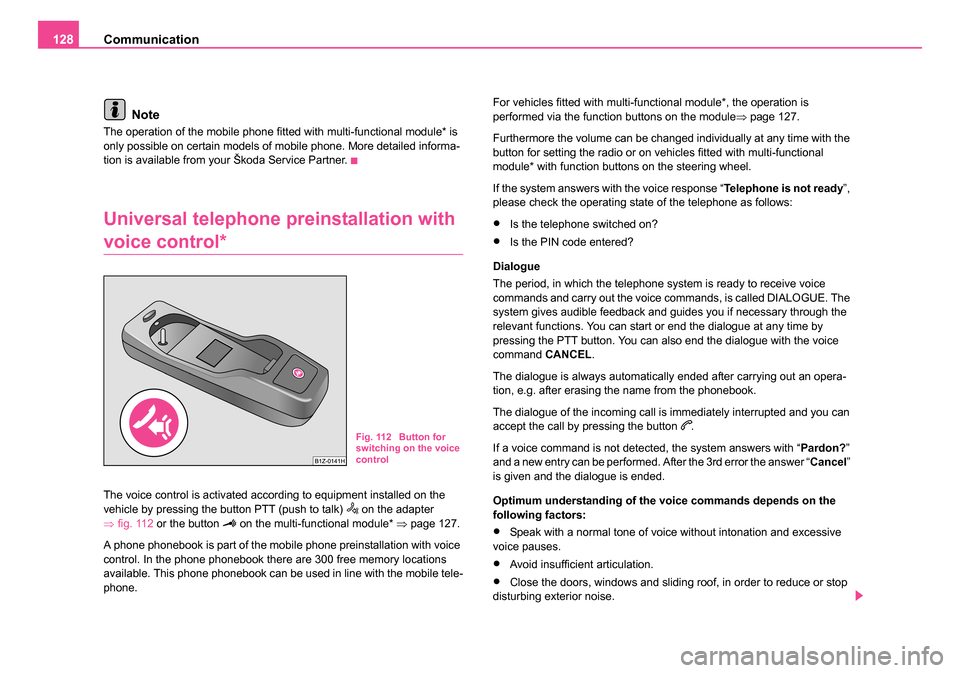
The voice control is activated according to equipment installed on the
vehicle by pressing the button PTT (push to talk) on the adapter
⇒ fig. 112 or the button on the multi-functional module* ⇒page 127.
A phone phonebook is part of the mobile phone preinstallation with voice
control. In the phone phonebook there are 300 free memory locations
available. This phone phonebook can be used in line with the mobile tele-
phone. For vehicles fitted with multi-functional module*, the operation is
performed via the function buttons on the module
⇒page 127.
Furthermore the volume can be changed individually at any time with the
button for setting the radio or on vehicles fitted with multi-functional
module* with function buttons on the steering wheel.
If the system answers with the voice response “ Telephone is not ready”,
please check the operating state of the telephone as follows:
•Is the telephone switched on?
•Is the PIN code entered?
Dialogue
The period, in which the telephone system is ready to receive voice
commands and carry out the voice commands, is called DIALOGUE. The
system gives audible feedback and guides you if necessary through the
relevant functions. You can start or end the dialogue at any time by
pressing the PTT button. You can also end the dialogue with the voice
command CANCEL.
The dialogue is always automatically ended after carrying out an opera-
tion, e.g. after erasing the name from the phonebook.
The dialogue of the incoming call is immediately interrupted and you can
accept the call by pressing the button
.
If a voice command is not detected, the system answers with “ Pardon?”
and a new entry can be performed. After the 3rd error the answer “ Cancel”
is given and the dialogue is ended.
Optimum understanding of the voice commands depends on the
following factors:
•Speak with a normal tone of voice without intonation and excessive
voice pauses.
•Avoid insufficient articulation.
•Close the doors, windows and sliding roof, in order to reduce or stop
disturbing exterior noise.
Fig. 112 Button for
switching on the voice
control
NKO 20 A05.book Page 128 Wednesday, June 21, 2006 1:42 PM
Page 143 of 274
Passive Safety
142
For this reason you will be provided with information on why this equip-
ment is very important, how it protects you and the occupants, what
should be observed when using the equipment and how you and the
people travelling with you can make full use of the existing safety equip-
ment. This Owner's Manual contains important warning notes, which you
and those travelling with you should pay attention to in order to reduce a
risk of injury.
Safety concerns everybody!
Before setting off
The driver is always fully responsible for his occupants
and for the operating safety of the vehicle.
For your own safety and the safety of the people travelling with you,
please pay attention to the following points before setting off.
•Ensure that the lighting and the turn signal system are functioning
properly.
•Inspect the tyre inflation pressure.
•Ensure that all the windows offer a good visibility to the outside.
•Safely attach the items of luggage ⇒page 77, “Loading the luggage
compartment”.
•Ensure that no objects can obstruct the pedal.
•Adjust the mirror, the front seat and the head restraint to match your
body size.
•Point out to your occupants that the head restraints must be adjusted
to match their body size.
•Protect the children in suitable child seats with correctly fastened seat
belts ⇒page 166, “Transporting children safely”.
•Adopt the correct seated position. Also inform your occupants to adopt
the correct seated position.
•Fasten the seat belt correctly. Also inform your occupants to properly
fasten the seat belts ⇒page 150, “How are seat belts correctly
fastened?”.
What influences the driving safety?
The driving safety is primarily determined by the style of
driving and the personal behaviour of all the occupants.
The driver is fully responsible for himself and his occupants. If your driving
safety is effected, you place yourself and the oncoming traffic at risk.
Please refer to the following guidelines.
•Do not get distracted from concentrating on the traffic situation, e.g. by
your occupants or mobile phone calls.
•Never drive when your driving ability is impaired, e.g. through medica-
tion, alcohol, drugs.
•Keep to the traffic regulations and the permissible speed limit.
•Adjust the driving speed at all times to the road condition as well as to
the traffic and weather conditions.
•Take regular breaks on long journeys - at the latest every two hours.
NKO 20 A05.book Page 142 Wednesday, June 21, 2006 1:42 PM
Page 145 of 274
Passive Safety
144
must always be correctly fastened in order to provide an optimal
protection for you and your occupants.
•The driver must maintain a distan ce of at least 25 cm to the
steering wheel ⇒page 143, fig. 116 . Not maintaining this minimum
distance will mean that the airbag system will not be able to prop-
erly protect you - hazard!
•When driving, hold the steering wheel with both hands firmly on
the outer edge in the 9 o'clock and 3 o'clock position. Never hold
the steering wheel firmly in the 12 o'clock position or in another
way (e.g. in the middle of the steering wheel or at the inner steering
wheel edge). In such cases, injuries to the arms, the hands and the
head can occur when the driver airbag is deployed.
•The backrests must not be angled too far back when driving
otherwise this will affect proper operation of the seat belts and of
the airbag system - risk of injury!
•Ensure that there are no objects in the footwell as any objects
may get behind the pedals during a driving or braking manoeuvre.
You would then no longer be able to operate the clutch, to brake or
accelerate.
Correct seated position for the front passenger
The front passenger must maintain a distance of at least
25 cm from the dash panel so that the airbag offers the
greatest possible safety when an airbag is deployed.
For the safety of the front passenger and to reduce the risk of injury in the
event of an accident, we recommend the following setting.
•Adjust the front passenger seat as far as possible to the rear.
•Adjust the head restraint so that the top edge of the head restraint is
at the same level as the upper part of your head ⇒page 143, fig. 117 .
•Fasten the seat belt correctly ⇒page 150, “How are seat belts
correctly fastened?”.
In exceptional cases the front passenger airbag can be deactivated
⇒ page 163, “Deactivating an airbag”.
Adjusting the passenger seat ⇒page 69, “Adjusting the front seats”.
WARNING
•The front seats and the head restraints must always be adjusted
to match the body size of the seat occupant as well as the seat belts
must always be correctly fastened in order to provide an optimal
protection for you and your occupants.
•The front passenger must maintain a distance of at least 25 cm
to the dash panel. Not maintaining this minimum distance will mean
that the airbag system will not be able to properly protect you -
hazard!
•Always keep your feet in the footwell when the car is being
driven - never place your feet on the instrument panel, out of the
window or on the surfaces of the seats. You will be exposed to
increased risk of injury if it becomes necessary to apply the brake
or in the event of an accident. If an airbag is deployed, you may
suffer fatal injuries when adopting an incorrect seated position!
•The backrests must not be angled too far back when driving
otherwise this will affect proper operation of the seat belts and of
the airbag system - risk of injury!
WARNING (continued)
NKO 20 A05.book Page 144 Wednesday, June 21, 2006 1:42 PM
Page 146 of 274
Passive Safety145
Using the systemSafetyDriving TipsGeneral MaintenanceBreakdown assistanceTechnical Data
Correct seated position for th e occupants on the rear
seats
Occupants on the rear seats must sit upright, keep the feet
in the footwell and must have their seat belts correctly
fastened.
To reduce the risk of injury in the event of a sudden braking manoeuvre or
an accident, the occupants on the rear seats must observe the following.
•Adjust the head restraints so that the top edge of the head restraints
are at the same level as the upper part of your head ⇒page 143, fig. 117 .
•Fasten the seat belt correctly ⇒page 150, “How are seat belts
correctly fastened?”.
•If you are transporting ⇒page 166, “Transporting children safely” chil-
dren in the vehicle, please use a suitable child restraint system.
WARNING
•The head restraints must always be adjusted to match the body
size, in order to offer an optimal protection for you and your occu-
pants.
•Always keep your feet in the footwell when the car is being
driven - never put your feet out of the window or on the surfaces of
the seats. You will be exposed to increased risk of injury if it
becomes necessary to apply the brake or in the event of an acci-
dent. If the head airbag* is deployed and when adopting an incor-
rect seated position, you are exposing yourself to an increased risk
of injury and in the event of an accident you may suffer fatal inju-
ries!
•If the occupants on the rear seats are not sitting upright, the risk
of injury is increased due to in correct routing of the seat belt.
•The backrests must not be angled too far back when driving
otherwise this will affect proper operation of the seat belts and of
the airbag system - risk of injury!
Examples of an inco rrect seated position
An incorrect seated position can lead to severe injuries or
death for the occupants.
Seat belts offer their optimum protection only if the webbing of the seat
belts is properly routed. Incorrect seated positions considerably reduce
the protective functions of the seat belts and therefore increase the risk of
injury due to an incorrect routing of the seat belt. The driver is fully respon-
sible for himself and his occupants, in particular for the children. Do not
permit an occupant to adopt an incorrect seated position when the car is
moving.
The following list contains the examples of seated positions which are
dangerous for the occupants. This list is not complete, however we would
like you to get interested in this subject.
Therefore, while the car is moving never:
•stand up in the vehicle,
•stand up on the seats,
•kneel onto the seats,
•tilt the backrest fully to the back,
•lean against the dash panel,
•lie on the rear seats,
•only sit on the front area of the seat,
•sit to the side,
WARNING (continued)
NKO 20 A05.book Page 145 Wednesday, June 21, 2006 1:42 PM
Page 147 of 274
Passive Safety
146
•lean out of the window,
•put the feet out of the window,
•put the feet on the dash panel,
•put the feet on the seat upholstery,
•occupy the footwell,
•have the seat belt not fastened,
•occupy the luggage compartment.
WARNING
•If the occupant adopts an incorrect seated position, he is
exposed to life-threatening injuries, in case he is hit by a deployed
airbag.
•Before setting off, please adopt the correct seated position and
do not change this seated positi on while the car is moving. Also
advise your occupants to adopt the correct seated position and not
to change this seated position while the car is moving.
NKO 20 A05.book Page 146 Wednesday, June 21, 2006 1:42 PM