wheel SKODA ROOMSTER 2007 1.G User Guide
[x] Cancel search | Manufacturer: SKODA, Model Year: 2007, Model line: ROOMSTER, Model: SKODA ROOMSTER 2007 1.GPages: 248, PDF Size: 46.44 MB
Page 65 of 248
Seats and Stowage64
Fixing nets - Net programme*
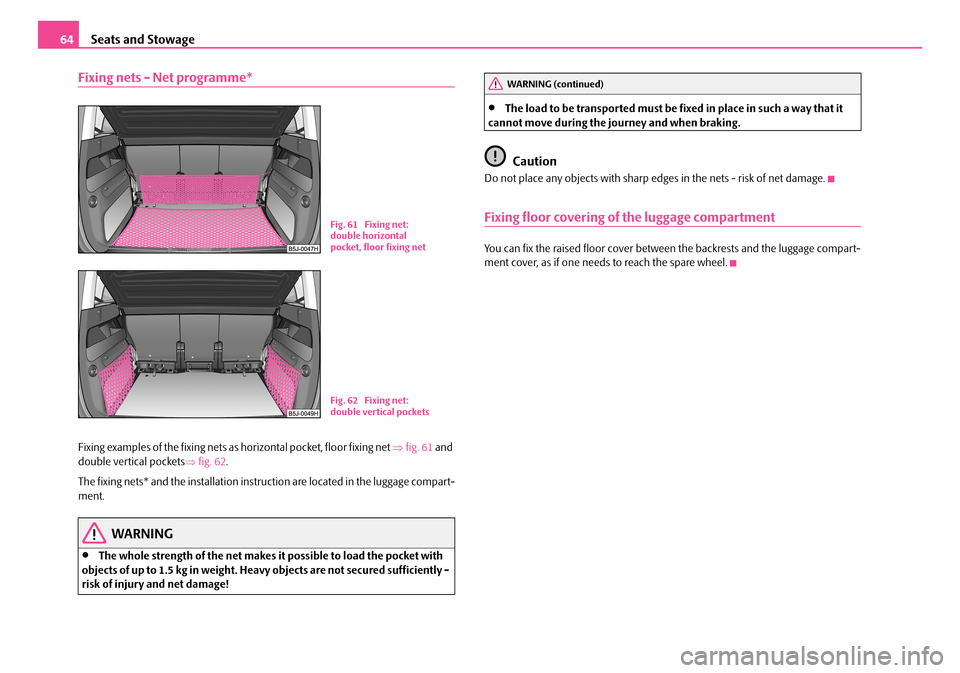
Fixing examples of the fixing nets as horizontal pocket, floor fixing net ⇒fig. 61 and double vertical pockets ⇒fig. 62.
The fixing nets* and the installation inst ruction are located in the luggage compart- ment.
WARNING
•The whole strength of the net makes it possible to load the pocket with objects of up to 1.5 kg in weight. Heavy objects are not secured sufficiently - risk of injury and net damage!
•The load to be transported must be fixed in place in such a way that it cannot move during the journey and when braking.
Caution
Do not place any objects with sharp edges in the nets - risk of net damage.
Fixing floor covering of the luggage compartment
You can fix the raised floor cover between the backrests and the luggage compart-ment cover, as if one needs to reach the spare wheel.
Fig. 61 Fixing net: double horizontal pocket, floor fixing net
Fig. 62 Fixing net: double vertical pockets
WARNING (continued)
NKO A05R 20 MR08.book Page 64 Wednesday, March 28, 2007 9:42 AM
Page 68 of 248
Seats and Stowage67
Using the systemSafetyDriving TipsGeneral MaintenanceBreakdown assistancePraktikTechnical Data
Put bicycle into the bicycle carrier
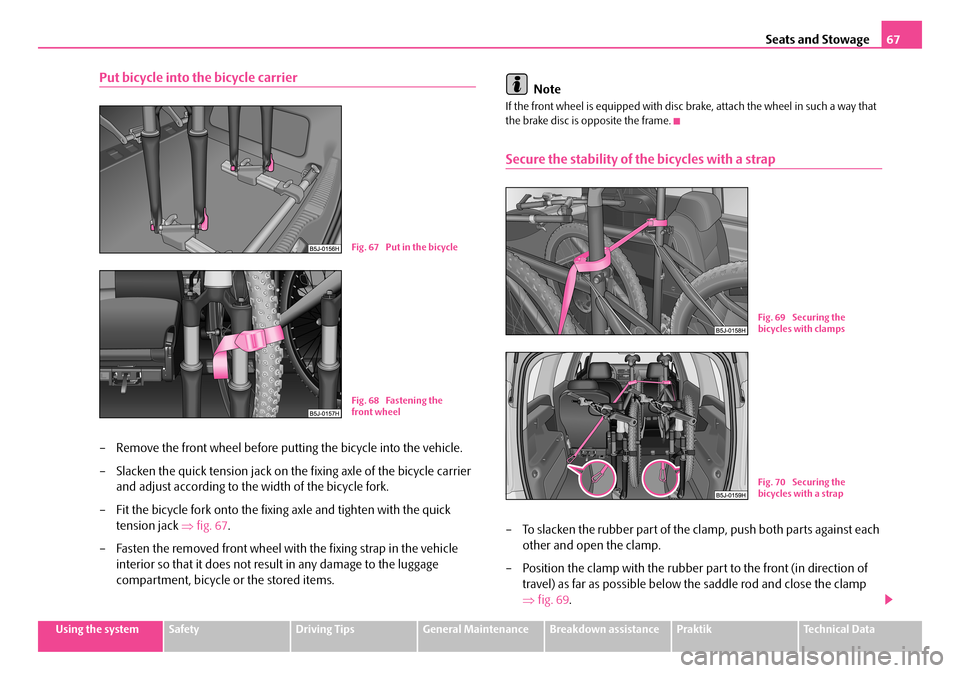
– Remove the front wheel before putting the bicycle into the vehicle.
– Slacken the quick tension jack on th e fixing axle of the bicycle carrier
and adjust according to the width of the bicycle fork.
– Fit the bicycle fork onto the fixing axle and tighten with the quick
tension jack ⇒fig. 67.
– Fasten the removed front wheel with the fixing strap in the vehicle
interior so that it does not resu lt in any damage to the luggage
compartment, bicycle or the stored items.
Note
If the front wheel is equipped with disc brake, attach the wheel in such a way that the brake disc is opposite the frame.
Secure the stability of the bicycles with a strap
– To slacken the rubber part of the cl amp, push both parts against each
other and open the clamp.
– Position the clamp with the rubber part to the front (in direction of
travel) as far as possible below the saddle rod and close the clamp
⇒ fig. 69.
Fig. 67 Put in the bicycle
Fig. 68 Fastening the front wheel
Fig. 69 Securing the bicycles with clamps
Fig. 70 Securing the bicycles with a strap
NKO A05R 20 MR08.book Page 67 Wednesday, March 28, 2007 9:42 AM
Page 74 of 248
Seats and Stowage73
Using the systemSafetyDriving TipsGeneral MaintenanceBreakdown assistancePraktikTechnical Data
WARNING
The storage compartment must always be closed when driving for safety reasons.
Cooling of storage compartment on front passenger side*
The storage compartment can be fitted for vehicles with an air-
conditioning system with a closable inlet for cooled air.
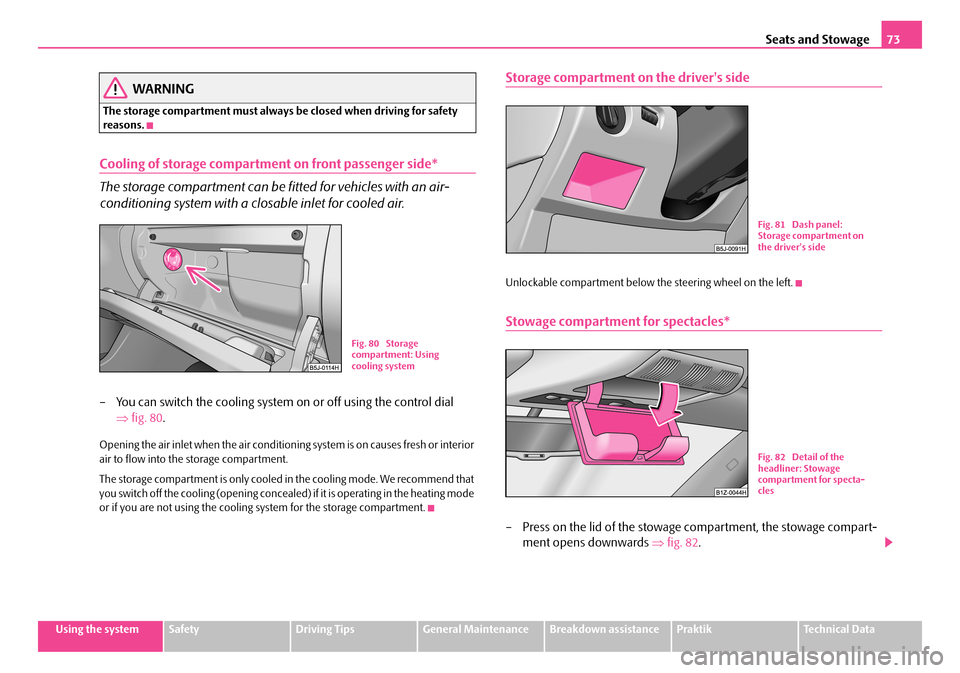
– You can switch the cooling system on or off using the control dial
⇒ fig. 80.
Opening the air inlet when the air conditioning system is on causes fresh or interior air to flow into the storage compartment.
The storage compartment is only cooled in the cooling mode. We recommend that you switch off the cooling (opening concealed) if it is operating in the heating mode or if you are not using the cooling system for the storage compartment.
Storage compartment on the driver's side
Unlockable compartment below the steering wheel on the left.
Stowage compartment for spectacles*
– Press on the lid of the stowage compartment, the stowage compart-
ment opens downwards ⇒fig. 82.
Fig. 80 Storage compartment: Using cooling system
Fig. 81 Dash panel: Storage compartment on the driver's side
Fig. 82 Detail of the headliner: Stowage compartment for specta-cles
NKO A05R 20 MR08.book Page 73 Wednesday, March 28, 2007 9:42 AM
Page 90 of 248
Starting-off and Driving89
Using the systemSafetyDriving TipsGeneral MaintenanceBreakdown assistancePraktikTechnical Data
Starting-off and Driving
Setting steering wheel position*
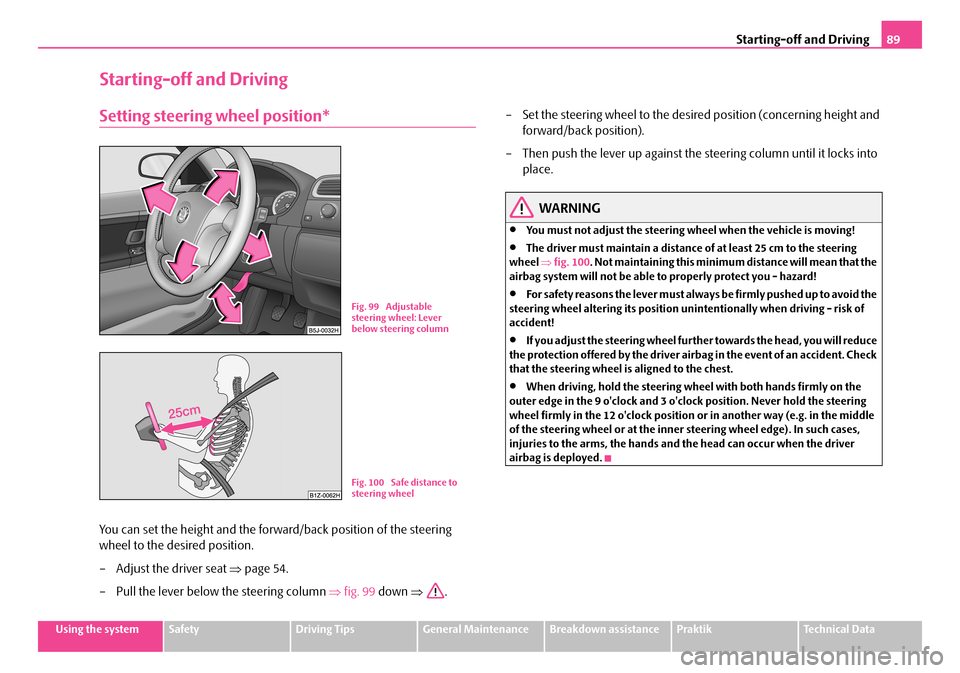
You can set the height and the forward/back position of the steering
wheel to the desired position.
– Adjust the driver seat ⇒page 54.
– Pull the lever below the steering column ⇒fig. 99 down ⇒.
– Set the steering wheel to the desired position (concerning height and
forward/back position).
– Then push the lever up against the steering column until it locks into
place.
WARNING
•You must not adjust the steering wh eel when the vehicle is moving!
•The driver must maintain a distance of at least 25 cm to the steering wheel ⇒fig. 100. Not maintaining this minimum distance will mean that the airbag system will not be able to properly protect you - hazard!
•For s a fe t y re a s ons the le v e r m ust a lwa y s b e fi rm l y pus he d up t o a vo id the steering wheel altering its position unintentionally when driving - risk of accident!
•If you adjust the steering wheel furthe r towards the head, you will reduce the protection offered by the driver airb ag in the event of an accident. Check that the steering wheel is aligned to the chest.
•When driving, hold the steering wheel with both hands firmly on the outer edge in the 9 o'clock and 3 o'clock position. Never hold the steering wheel firmly in the 12 o'clock position or in another way (e.g. in the middle of the steering wheel or at the inner steering wheel edge). In such cases, injuries to the arms, the hands and the head can occur when the driver airbag is deployed.
Fig. 99 Adjustable steering wheel: Lever below steering column
Fig. 100 Safe distance to steering wheel
NKO A05R 20 MR08.book Page 89 Wednesday, March 28, 2007 9:42 AM
Page 91 of 248
Starting-off and Driving90
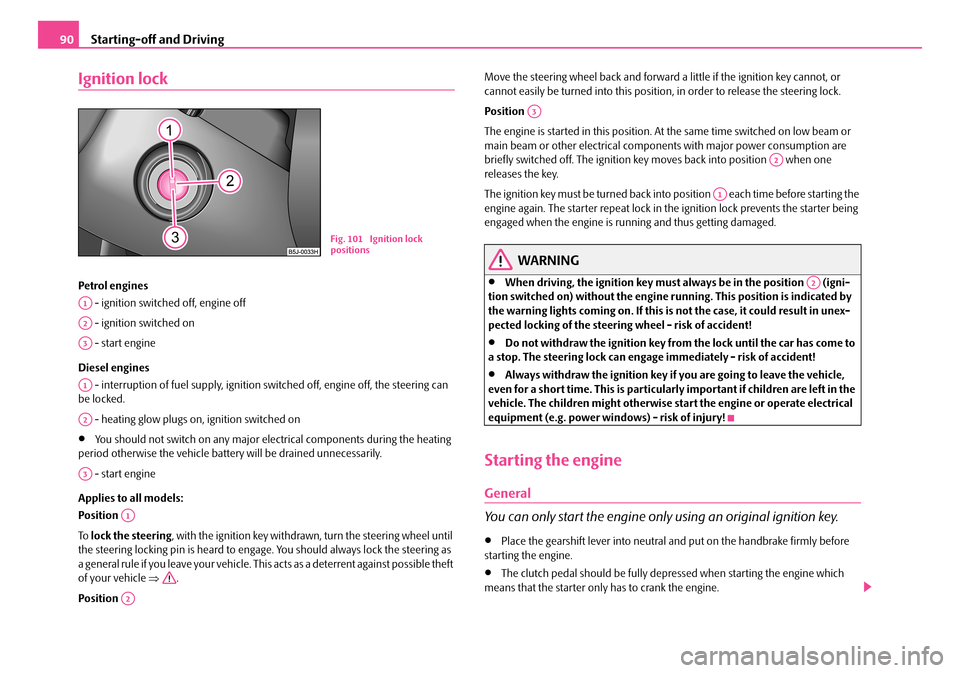
Ignition lock
Petrol engines
- ignition switched off, engine off
- ignition switched on
- start engine
Diesel engines
- interruption of fuel supply, ignition sw itched off, engine off, the steering can be locked.
- heating glow plugs on, ignition switched on
•You should not switch on any major elec trical components during the heating period otherwise the vehicle batt ery will be drained unnecessarily.
- start engine
Applies to all models:
Position
To lock the steering, with the ignition key withdrawn, turn the steering wheel until the steering locking pin is heard to engage. You should always lock the steering as a general rule if you leave your vehicle. This acts as a deterrent against possible theft of your vehicle ⇒.
Position
Move the steering wheel back and forward a little if the ignition key cannot, or cannot easily be turned into this position , in order to release the steering lock.
Position
The engine is started in this position. At the same time switched on low beam or main beam or other electrical compon ents with major power consumption are briefly switched off. The ignition key moves back into position when one releases the key.
The ignition key must be turned back into position each time before starting the engine again. The starter repeat lock in th e ignition lock prevents the starter being engaged when the engine is r unning and thus getting damaged.
WARNING
•When driving, the ignition key must always be in the position (igni- tion switched on) without the engine running. This position is indicated by the warning lights coming on. If this is not the case, it could result in unex- pected locking of the steerin g wheel - risk of accident!
•Do not withdraw the ignition key from the lock until the car has come to a stop. The steering lock can engage immediately - risk of accident!
•Always withdraw the ignition key if you are going to leave the vehicle, even for a short time. This is particularly important if children are left in the vehicle. The children might otherwise st art the engine or operate electrical equipment (e.g. power windows) - risk of injury!
Starting the engine
General
You can only start the engine only using an original ignition key.
•Place the gearshift lever into neutral and put on the handbrake firmly before starting the engine.
•The clutch pedal should be fully depr essed when starting the engine which means that the starter only has to crank the engine.
Fig. 101 Ignition lock positions
A1
A2
A3
A1
A2
A3
A1
A2
A3
A2
A1
A2
NKO A05R 20 MR08.book Page 90 Wednesday, March 28, 2007 9:42 AM
Page 99 of 248
Automatic gearbox98
•When the engine is running and the vehicle is stationary, it is necessary to hold the car with the brake pedal in all the positions of the selector lever (except P and N) since the power transmission is never completely inter- rupted, also not when the engine is idling - the vehicle "creeps".
Selector lever positions
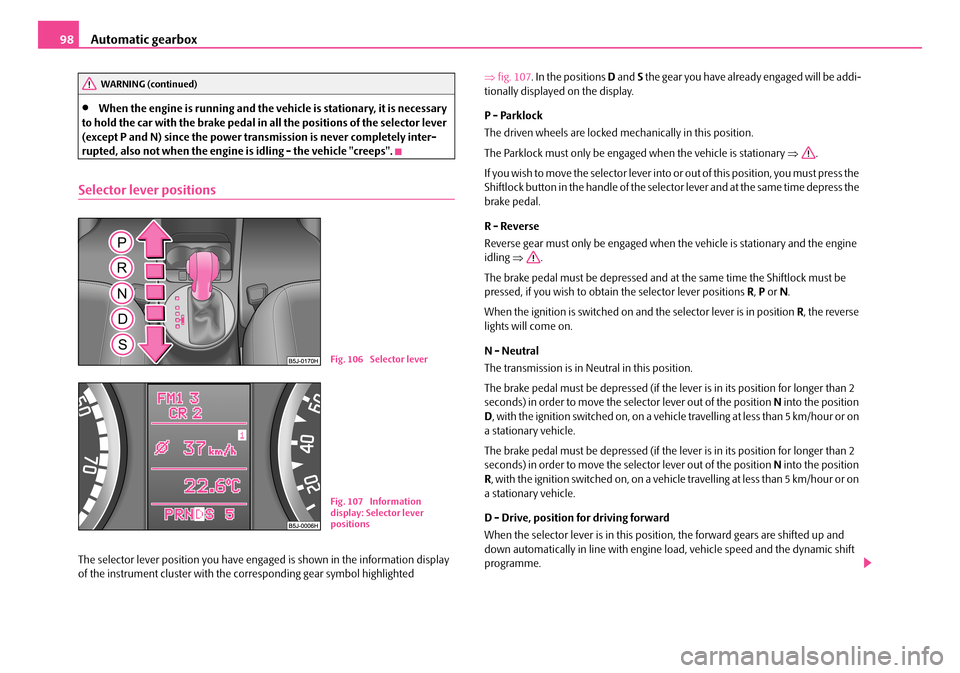
The selector lever position you have engaged is shown in the information display of the instrument cluster with the co rresponding gear symbol highlighted
⇒ fig. 107. In the positions D and S the gear you have already engaged will be addi- tionally displayed on the display.
P - Parklock
The driven wheels are locked mechanically in this position.
The Parklock must only be engage d when the vehicle is stationary ⇒.
I f y o u w i s h t o m o v e t h e s e l e c t o r l e v e r i n to or out of this position, you must press the Shiftlock button in the handle of the selector lever and at the same time depress the brake pedal.
R - Reverse
Reverse gear must only be engaged when the vehicle is stationary and the engine idling ⇒.
The brake pedal must be depressed and at the same time the Shiftlock must be pressed, if you wish to obtain the selector lever positions R, P or N.
When the ignition is switched on and the selector lever is in position R, the reverse lights will come on.
N - Neutral
The transmission is in Neutral in this position.
The brake pedal must be depressed (if the lever is in its position for longer than 2 seconds) in order to move the selector lever out of the position N into the position D , with the ignition switched on, on a vehicle travelling at less than 5 km/hour or on a stationary vehicle.
The brake pedal must be depressed (if the lever is in its position for longer than 2 seconds) in order to move the selector lever out of the position N into the position R , with the ignition switched on, on a vehicle travelling at less than 5 km/hour or on a stationary vehicle.
D - Drive, position for driving forward
When the selector lever is in this position, the forward gears are shifted up and down automatically in line with engine load, vehicle speed and the dynamic shift programme.
WARNING (continued)
Fig. 106 Selector lever
Fig. 107 Information display: Selector lever positions
NKO A05R 20 MR08.book Page 98 Wednesday, March 28, 2007 9:42 AM
Page 101 of 248
Automatic gearbox100
gearbox does not shift up into the highest gear until the engine has reached its maximum revolutions for this gear range.
WARNING
Please note that using the kickdown fu nction can result in the driven wheels spinning on a smooth or slippery road surface - risk of skidding!
Dynamic shift programme
The automatic gearbox of your vehicle is controlled electronically. Shifting up and down through the gears is performed auto matically on the basis of pre-defined driving programmes.
Adopting a moderate style of driving will cause the gearbox to select the most economical driving programme. Shifting up into a higher gear as soon as possible and shifting down as late as possible will have a favourable effect on your fuel consumption.
Adopting a sporty style of driving with rapid movements of the accelerator pedal combined with sharp acceleration and frequent changes in speed, exploiting the top speed of the car or depressing the a ccelerator pedal (kickdown function), will cause the gearbox to switch over to this style of driving and shift down earlier with frequent changes in gears in comparison to the moderate style of driving.
Selecting the most appropriate driving programme for the particular style of driving is a continuous process. Irrespective of this it is, however, possible to switch or shift down into a dynamic shift programme by depressing the accelerator rapidly. The gearbox shifts down into a lower gear matc hing the speed of the car and this allows you to accelerate rapidly (e.g. when ov ertaking) without having to depress the accelerator pedal fully into the kickdown range. The original programme will be reactivated to match your part icular style of driving once the gearbox has shifted up again.
When driving in hilly regions, the gears are selected to match uphill and downhill sections. This avoids the ge arbox frequently shifting up and down when negotiating an uphill stretch. When driving downhill, it is possible to shift down into the Tiptronic position, in order to exploit the engine brake torque.
Tiptronic
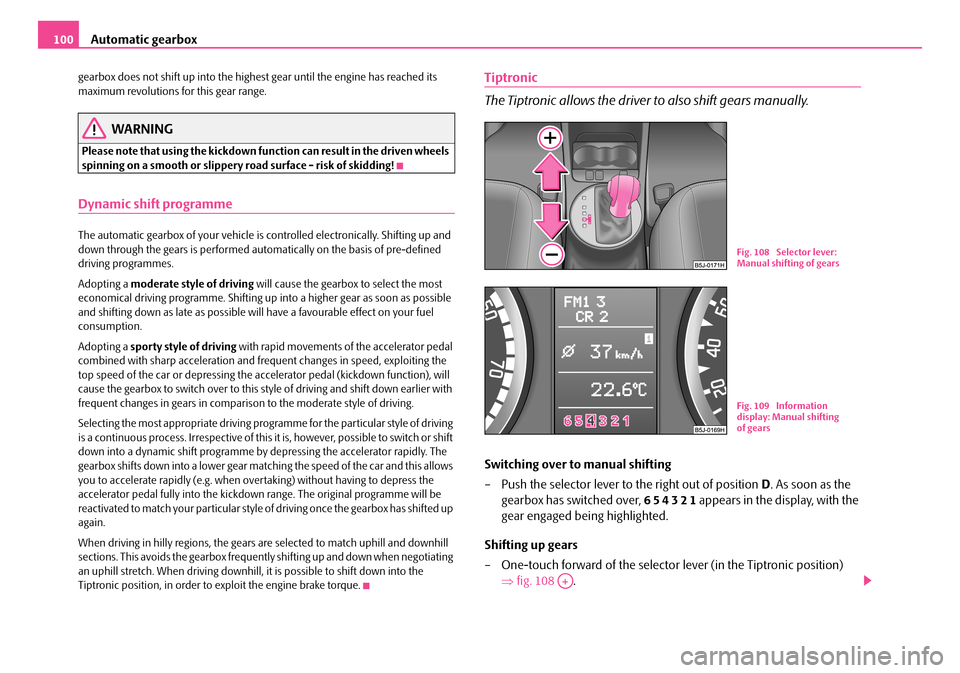
The Tiptronic allows the driver to also shift gears manually.
Switching over to manual shifting
– Push the selector lever to the right out of position D. As soon as the
gearbox has switched over, 6 5 4 3 2 1 appears in the display, with the
gear engaged being highlighted.
Shifting up gears
– One-touch forward of the selector lever (in the Tiptronic position)
⇒ fig. 108 .
Fig. 108 Selector lever: Manual shifting of gears
Fig. 109 Information display: Manual shifting of gears
A+
NKO A05R 20 MR08.book Page 100 Wednesday, March 28, 2007 9:42 AM
Page 103 of 248
Communication102
Communication
Operating the radio
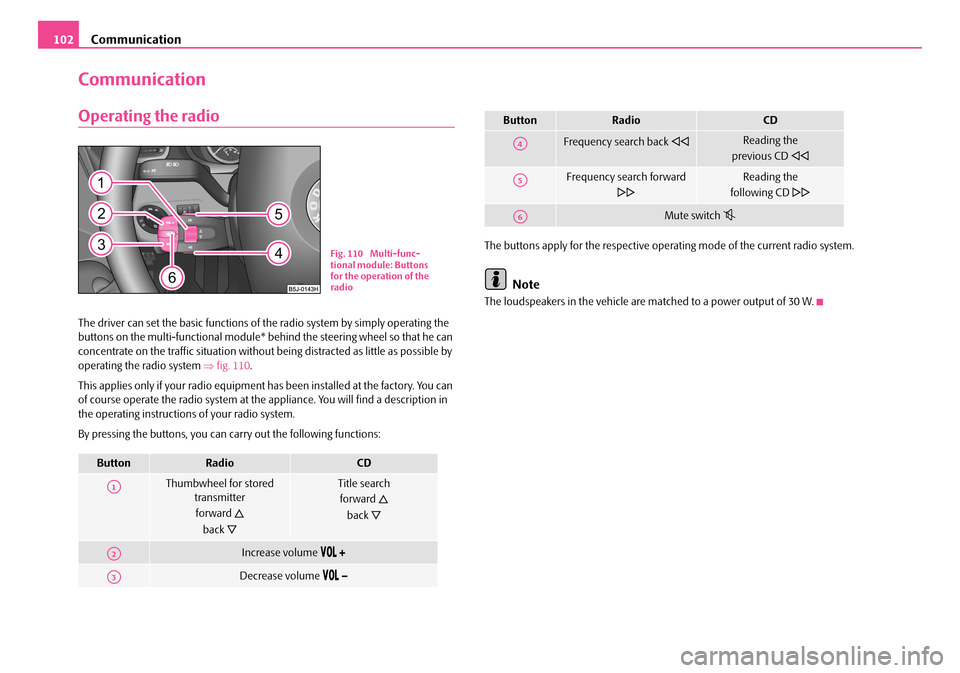
The driver can set the basic functions of the radio system by simply operating the buttons on the multi-functional module* be hind the steering wheel so that he can concentrate on the traffic situation without being distracted as little as possible by operating the radio system ⇒fig. 110.
This applies only if your radio equipment has been installed at the factory. You can of course operate the radio system at the appliance. You will find a description in the operating instructions of your radio system.
By pressing the buttons, you can carry out the following functions:
The buttons apply for the respective operating mode of the current radio system.
Note
The loudspeakers in the vehicle are matched to a power output of 30 W.
ButtonRadioCD
Thumbwheel for stored transmitter
forward
back
Title search
forward
back
Increase volume
Decrease volume
Fig. 110 Multi-func- tional module: Buttons for the operation of the radio
A1
A2
A3
Frequency search back Reading the
previous CD
Frequency search forward
Reading the
following CD
Mute switch
ButtonRadioCD
A4
A5
A6
NKO A05R 20 MR08.book Page 102 Wednesday, March 28, 2007 9:42 AM
Page 104 of 248
Communication103
Using the systemSafetyDriving TipsGeneral MaintenanceBreakdown assistancePraktikTechnical Data
Radio and mobile phone operation
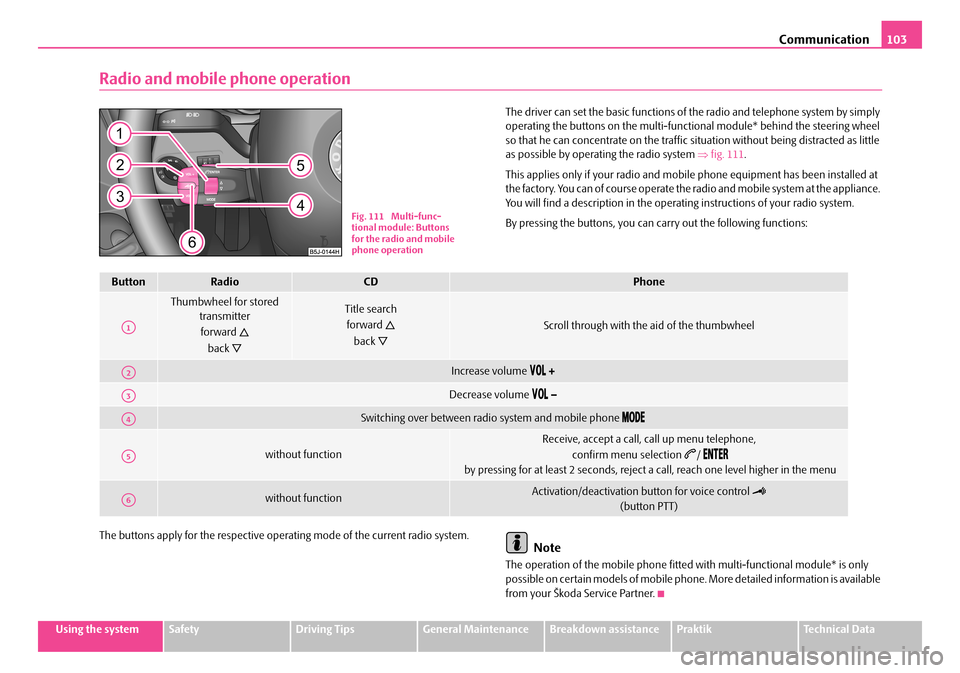
The driver can set the basic functions of the radio and telephone system by simply operating the buttons on the multi-functi onal module* behind the steering wheel so that he can concentrate on the traffic si tuation without being distracted as little as possible by operating the radio system ⇒fig. 111.
This applies only if your radio and mobi le phone equipment has been installed at the factory. You can of course operate the radio and mobile system at the appliance. You will find a description in the operating instructions of your radio system.
By pressing the buttons, you can carry out the following functions:
The buttons apply for the respective operating mode of the current radio system.Note
The operation of the mobile phone fitted with multi-functional module* is only possible on certain models of mobile phone. More detailed information is available from your Škoda Service Partner.
Fig. 111 Multi-func- tional module: Buttons for the radio and mobile phone operation
ButtonRadioCDPhone
Thumbwheel for stored transmitter
forward
back
Title search
forward
back
Scroll through with the aid of the thumbwheel
Increase volume
Decrease volume
Switching over between radio system and mobile phone
without function
Receive, accept a call, call up menu telephone,
confirm menu selection /
by pressing for at least 2 seconds, reject a call, reach one level higher in the menu
without functionActivation/deactivation button for voice control
(button PTT)
A1
A2
A3
A4
A5
A6
NKO A05R 20 MR08.book Page 103 Wednesday, March 28, 2007 9:42 AM
Page 105 of 248
Communication104
Universal telephone preinstallation with voice
control*
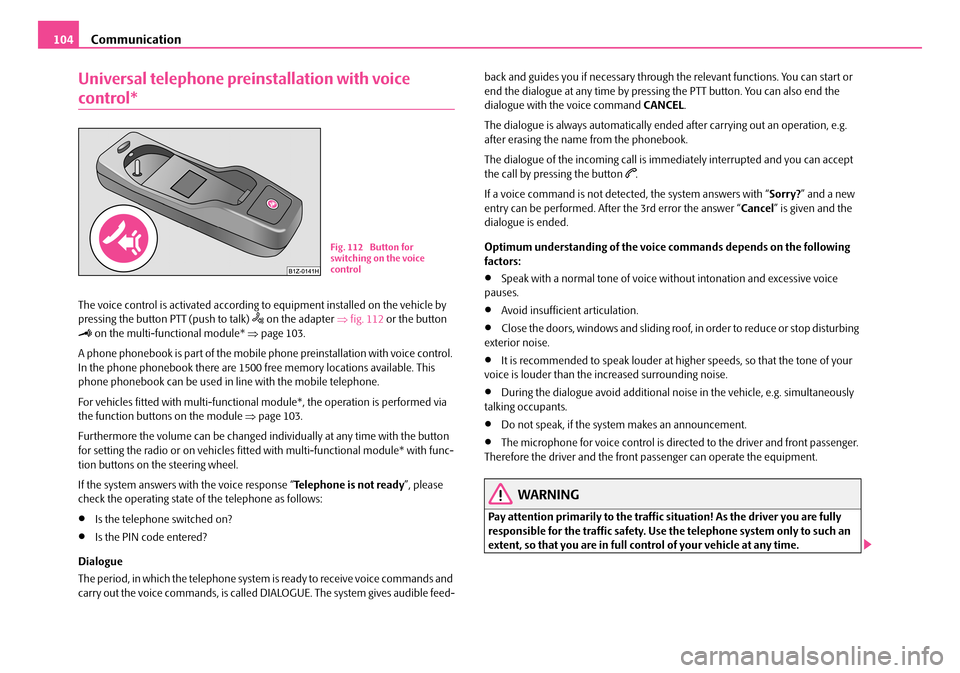
The voice control is activated according to equipment installed on the vehicle by pressing the button PTT (push to talk) on the adapter ⇒fig. 112 or the button on the multi-functional module* ⇒page 103.
A phone phonebook is part of the mobile phone preinstallation with voice control. In the phone phonebook there are 1500 free memory locations available. This phone phonebook can be used in line with the mobile telephone.
For vehicles fitted with multi-functional module*, the operation is performed via the function buttons on the module ⇒page 103.
Furthermore the volume can be changed indi vidually at any time with the button for setting the radio or on vehicles fitted with multi-functional module* with func- tion buttons on the steering wheel.
If the system answers with the voice response “ Telephone is not ready”, please check the operating state of the telephone as follows:
•Is the telephone switched on?
•Is the PIN code entered?
Dialogue
The period, in which the telephone system is ready to receive voice commands and carry out the voice commands, is called DIALOGUE. The system gives audible feed-
back and guides you if necessary through the relevant functions. You can start or end the dialogue at any time by pressi ng the PTT button. You can also end the dialogue with the voice command CANCEL.
The dialogue is always automatically ended after carrying out an operation, e.g. after erasing the name from the phonebook.
The dialogue of the incoming call is i mmediately interrupted and you can accept the call by pressing the button .
If a voice command is not detected, the system answers with “ Sorry?” and a new entry can be performed. After the 3rd error the answer “ Cancel” is given and the dialogue is ended.
Optimum understanding of the voice commands depends on the following factors:
•Speak with a normal tone of voice wi thout intonation and excessive voice pauses.
•Avoid insufficient articulation.
•Close the doors, windows and sliding roof, in order to reduce or stop disturbing exterior noise.
•It is recommended to speak louder at higher speeds, so that the tone of your voice is louder than the increased surrounding noise.
•During the dialogue avoid additional nois e in the vehicle, e.g. simultaneously talking occupants.
•Do not speak, if the system makes an announcement.
•The microphone for voice control is directed to the driver and front passenger. Therefore the driver and the front passenger can operate the equipment.
WARNING
Pay attention primarily to the traffic si tuation! As the driver you are fully responsible for the traffic safety. Use the telephone system only to such an extent, so that you are in full control of your vehicle at any time.
Fig. 112 Button for switching on the voice control
NKO A05R 20 MR08.book Page 104 Wednesday, March 28, 2007 9:42 AM