ignition SKODA ROOMSTER 2008 1.G Owner's Guide
[x] Cancel search | Manufacturer: SKODA, Model Year: 2008, Model line: ROOMSTER, Model: SKODA ROOMSTER 2008 1.GPages: 248, PDF Size: 46.44 MB
Page 34 of 248
Unlocking and locking33
Using the systemSafetyDriving TipsGeneral MaintenanceBreakdown assistancePraktikTechnical Data
Central locking system*
Description
Unlocking or locking the vehicle causes all doors to be unlocked or locked at the same time by the central locking system. The boot lid is unlocked when opening. It can be opened by pressing the ha nd grip above the licence plate.
Operation of the central locking system is possible:
•from the outside using the vehicle key ⇒page 34,
•using the buttons for the central locking system ⇒page 35,
•by using the remote control ⇒page 37.
Indicator light in the driver's door on vehicles without anti-theft alarm system
After the car is locked, the indicator light flashes after 2 seconds.
After the car is locked with the deactivate d safe securing system, the indicator light flashes only after 30 seconds.
Indicator light in the driver's door on vehicles with anti-theft alarm system
After locking the vehicle the indicator light flashes for 2 seconds fast, then more slowly.
If the vehicle is locked and the safe securing system ⇒page 34 is not operating, the indicator light in the driver door flashes for about 2 seconds fast, goes out and starts to flash slowly after about 30 seconds.
If the indicator light first of all flashes fast for about 2 seconds, afterwards lights up for about 30 seconds and then flashes slowly, there is a fault in the system of the central locking or the interior monitor* ⇒page 40. Contact a specialist garage to obtain assistance.
Convenience operation of windows
One can open and close the electrically powered windows when unlocking and locking the vehicle ⇒page 42, “Window convenience operation”.
Opening a single door*
This function allows one to just unlock the driver's door. The other doors remain locked and are only unlocked when the command is repeated. The single door opening function can be first activated by recoding the control unit of the central locking system. This work is undertaken by a Škoda Service Partner can give you more information.
Automatic locking*
All the doors and the boot lid are locked automatically once the car reaches a speed of about 15 km/h.
If the ignition key is withdrawn, the car is then automatically unlocked again. In addition, it is possible for the driver to unlock the car by pressing the central locking button or by pulling the door opening lever.
If you wish, your Škoda Service Partner ca n convert the central locking system of your car to the automatic locking mode.
WARNING
•Locking the doors prevents involuntar y opening in an exceptional situa- tion (an accident). Locked doors prevent unwanted entry into the vehicle from outside, for example at road crossings. Locked doors do, however, make it more difficult for rescuers to get into the vehicle in an emergency - danger to life!
Note
•In the event of an accident in which the airbags are deployed, the locked doors are automatically unlocked in order to enable rescuers to gain access to the vehicle.
•Only the front doors can be unlocked and locked using the key if the central locking system fails. You can op erate the rear door manually.
− Emergency locking of the door ⇒page 36.
NKO A05R 20 MR08.book Page 33 Wednesday, March 28, 2007 9:42 AM
Page 35 of 248
Unlocking and locking34
Safe securing
The central locking system is equipped with a safe securing system. Locking the vehicle from the outside caus es the door locks to be automatically blocked. The indicator light in the driver's door flashes. It is not possible to open the doors with the door handle either from the inside or from the outside. This acts as an effective deterrent for attempts to break into your vehicle.
You can deactivate the safe securing system. This is done by locking the vehicle with the key or radio-operated key twice within 2 seconds.
The safe securing system is again activate d the next time the vehicle is unlocked and locked again.
The doors can be opened from the inside if the vehicle is locked and the safe securing system is deactivated:
•The door is unlocked by actuating the door-opening lever.
•The door opens upon actuating the door-opening lever again.
WARNING
If the vehicle is locked from the outside and the safe securing system is acti- vated, there must not be any person and animals in the vehicle as it is then not possible to open either a door or a window from the inside. The locked doors make it more difficult for rescuers to get into the vehicle in an emer- gency - hazard!
Unlocking the vehicle using the key
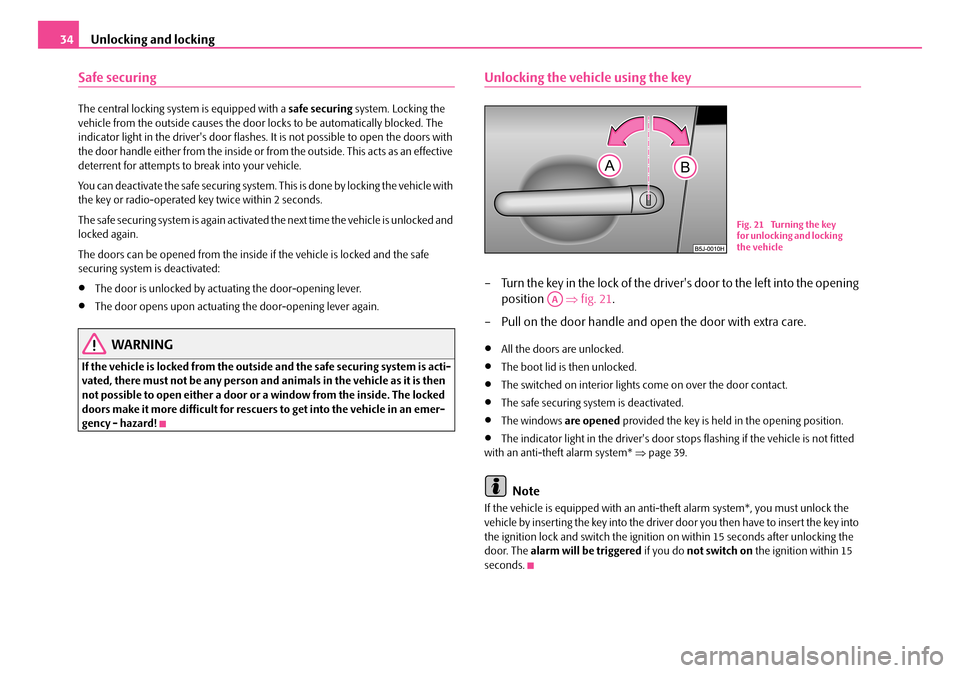
– Turn the key in the lock of the driver's door to the left into the opening
position ⇒fig. 21.
– Pull on the door handle and open the door with extra care.
•All the doors are unlocked.
•The boot lid is then unlocked.
•The switched on interior lights come on over the door contact.
•The safe securing system is deactivated.
•The windows are opened provided the key is held in the opening position.
•The indicator light in the driver's door stops flashing if the vehicle is not fitted with an anti-theft alarm system* ⇒page 39.
Note
If the vehicle is equipped with an anti-theft alarm system*, you must unlock the vehicle by inserting the key into the driver door you then have to insert the key into the ignition lock and switch the ignition on within 15 seconds after unlocking the door. The alarm will be triggered if you do not switch on the ignition within 15 seconds.
Fig. 21 Turning the key for unlocking and locking the vehicle
AA
NKO A05R 20 MR08.book Page 34 Wednesday, March 28, 2007 9:42 AM
Page 36 of 248
Unlocking and locking35
Using the systemSafetyDriving TipsGeneral MaintenanceBreakdown assistancePraktikTechnical Data
Closing the vehicle with the key
– Turn the key in the lock of the driver door to the right into the closing
position ⇒page 34, fig. 21.
•All the doors and the boot lid are locked.
•The switched on interior lights go out over the door contact.
•The windows are closed provided the key is held in the opening position.
•The safe securing system is activated immediately.
•The indicator light in the driver door begins flashing.
Note
The opened front doors cannot be unlocked. It must be locked separately after closing it.
Button for the central locking system*
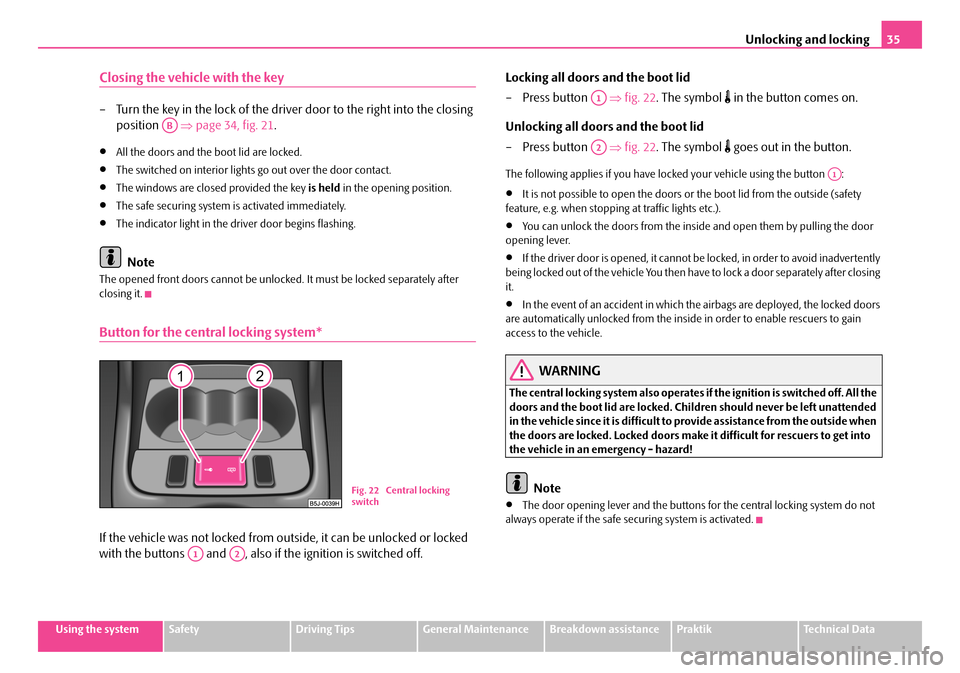
If the vehicle was not locked from outside, it can be unlocked or locked
with the buttons and , also if the ignition is switched off.
Locking all doors and the boot lid
–Press button ⇒fig. 22. The symbol in the button comes on.
Unlocking all doors and the boot lid
–Press button ⇒fig. 22. The symbol goes out in the button.
The following applies if you have locked your vehicle using the button :
•It is not possible to open the doors or the boot lid from the outside (safety feature, e.g. when stopping at traffic lights etc.).
•You can unlock the doors from the inside and open them by pulling the door opening lever.
•If the driver door is opened, it cannot be locked, in order to avoid inadvertently being locked out of the vehicle You then have to lock a door separately after closing it.
•In the event of an accident in which the airbags are deployed, the locked doors are automatically unlocked from the inside in order to enable rescuers to gain access to the vehicle.
WARNING
The central locking system also operates if the ignition is switched off. All the doors and the boot lid are locked. Children should never be left unattended in the vehicle since it is difficult to provide assistance from the outside when the doors are locked. Locked doors make it difficult for rescuers to get into the vehicle in an emergency - hazard!
Note
•The door opening lever and the buttons for the central locking system do not always operate if the safe securing system is activated.
AB
Fig. 22 Central locking switch
A1A2
A1
A2
A1
NKO A05R 20 MR08.book Page 35 Wednesday, March 28, 2007 9:42 AM
Page 38 of 248
Unlocking and locking37
Using the systemSafetyDriving TipsGeneral MaintenanceBreakdown assistancePraktikTechnical Data
•Do not press on the rear window when closing the boot lid, it could crack - risk of injury!
Note
•After closing the boot lid, it is automatically locked within 1 seconds and the anti-theft alarm system* is activated. This applies only if the vehicle was locked before closing the boot lid.
•The function of the hand grip above the licence plate is deactivated when starting off or as of a speed of more than 5 km/hour for vehicles with central locking. The function of the hand grip is activated again when the vehicle has stopped and a door is opened.
•Hold the boot lid when opening.
Emergency unlocking of the boot lid
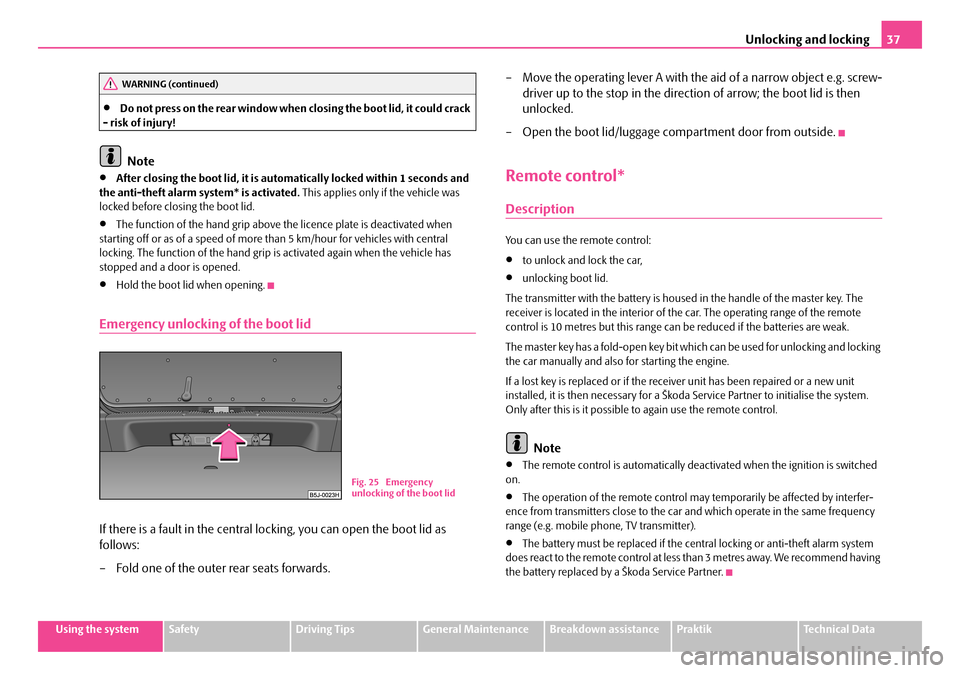
If there is a fault in the central lo cking, you can open the boot lid as
follows:
– Fold one of the outer rear seats forwards.
– Move the operating lever A with the aid of a narrow object e.g. screw-
driver up to the stop in the direction of arrow; the boot lid is then
unlocked.
– Open the boot lid/luggage compartment door from outside.
Remote control*
Description
You can use the remote control:
•to unlock and lock the car,
•unlocking boot lid.
The transmitter with the battery is housed in the handle of the master key. The receiver is located in the interior of th e car. The operating range of the remote control is 10 metres but this range can be reduced if the batteries are weak.
The master key has a fold-open key bit whic h can be used for unlocking and locking the car manually and also for starting the engine.
If a lost key is replaced or if the receiv er unit has been repaired or a new unit installed, it is then necessary for a Škoda Service Partner to initialise the system. Only after this is it possible to again use the remote control.
Note
•The remote control is automatically deactivated when the ignition is switched on.
•The operation of the remote control may temporarily be affected by interfer- ence from transmitters close to the car and which operate in the same frequency range (e.g. mobile phone, TV transmitter).
•The battery must be replaced if the central locking or anti-theft alarm system does react to the remote control at less than 3 metres away. We recommend having the battery replaced by a Škoda Service Partner.
WARNING (continued)
Fig. 25 Emergency unlocking of the boot lid
NKO A05R 20 MR08.book Page 37 Wednesday, March 28, 2007 9:42 AM
Page 39 of 248
Unlocking and locking38
Unlocking and locking car
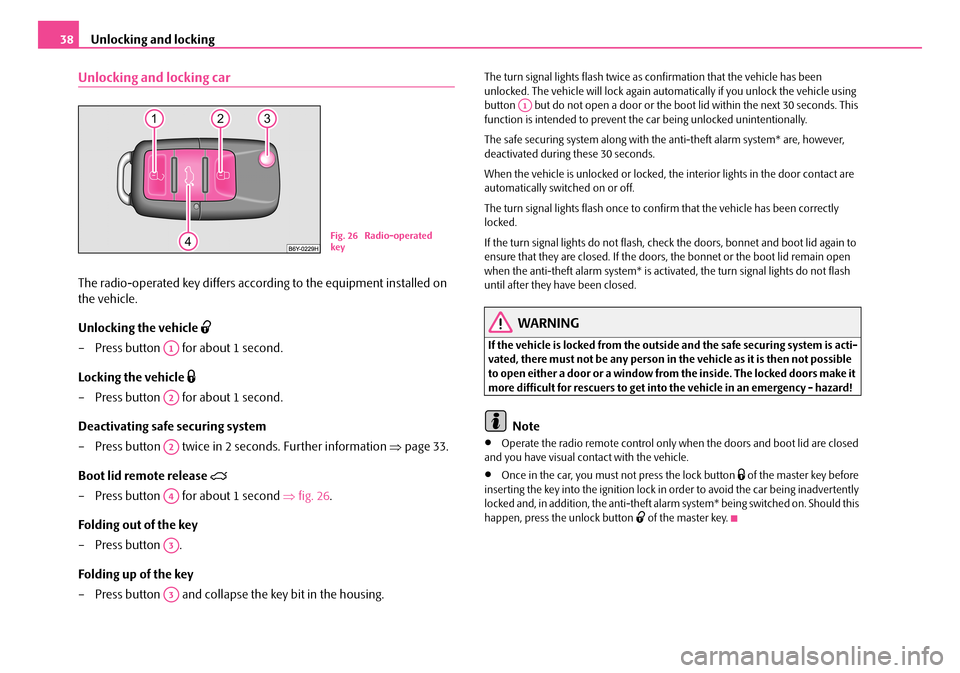
The radio-operated key differs according to the equipment installed on
the vehicle.
Unlocking the vehicle
– Press button for about 1 second.
Locking the vehicle
– Press button for about 1 second.
Deactivating safe securing system
– Press button twice in 2 seconds. Further information ⇒page 33.
Boot lid remote release
– Press button for about 1 second ⇒fig. 26.
Folding out of the key
– Press button .
Folding up of the key
– Press button and collapse the key bit in the housing.
The turn signal lights flash twice as confirmation that the vehicle has been unlocked. The vehicle will lock again auto matically if you unlock the vehicle using button but do not open a door or the b oot lid within the next 30 seconds. This function is intended to prevent th e car being unlocked unintentionally.
The safe securing system along with the anti-theft alarm system* are, however, deactivated during these 30 seconds.
When the vehicle is unlocked or locked, the interior lights in the door contact are automatically switched on or off.
The turn signal lights flash once to co nfirm that the vehicle has been correctly locked.
If the turn signal lights do not flash, ch eck the doors, bonnet and boot lid again to ensure that they are closed. If the doors, the bonnet or the boot lid remain open when the anti-theft alarm system* is activated, the turn signal lights do not flash until after they have been closed.
WARNING
If the vehicle is locked from the outsid e and the safe securing system is acti- vated, there must not be any person in the vehicle as it is then not possible to open either a door or a window from the inside. The locked doors make it more difficult for rescuers to get into the vehicle in an emergency - hazard!
Note
•Operate the radio remote control only when the doors and boot lid are closed and you have visual co ntact with the vehicle.
•Once in the car, you must not press the lock button of the master key before inserting the key into the ignition lock in order to avoid the car being inadvertently locked and, in addition, the anti-theft alarm system* being switched on. Should this happen, press the unlock button of the master key.
Fig. 26 Radio-operated key
A1
A2
A2
A4
A3
A3
A1
NKO A05R 20 MR08.book Page 38 Wednesday, March 28, 2007 9:42 AM
Page 40 of 248
Unlocking and locking39
Using the systemSafetyDriving TipsGeneral MaintenanceBreakdown assistancePraktikTechnical Data
Synchonisation of the remote control
If the vehicle cannot be unlocked by actuating the remote control system then it is possible that the code in the key and the control unit in the vehicle are no longer synchronised. This can occur when the butt ons on the radio-operated key are actu- ated a number of times outside of the operative range of the equipment or the battery on the remote control was replaced.
This means it is necessary to synchronise the code as follows:
•Press any button on the remote control.
•pressing of the button means that the door will unlock with the key within 1 minute.
Anti-theft alarm system*
The anti-theft alarm system increases the le vel of protection against people seeking to break into the vehicle. The system tri ggers audible and visual warning signals if an attempt is made to break into the vehicle.
How is the alarm system switched on?
The anti-theft alarm system is activated automatically when the vehicle is locked with the key on the closed driver's door or by using the remote control. It is acti- vated 30 seconds after closing the door.
How is the alarm system switched off?
The anti-theft alarm system is switched of f if the vehicle is unlocked by only using the remote control. The vehi cle is automatically locked again if the vehicle is not opened within 30 seconds after reactivating the anti-theft alarm system.
Once you unlock the vehicle by inserting the key into the driver door you then have to insert the key into the ignition lock an d switch the ignition on within 15 seconds after unlocking the door in order to deac tivate the anti-theft alarm system. The alarm will be triggered if you do not switch on the ignition within 15 seconds.
When is the alarm triggered?
The following security areas of the locked vehicle are monitored:
•Bonnet,
•Boot lid,
•Doors,
•Ignition lock,
•Vehicle interior* ⇒page 40,
•Angle of the vehicle*,
•A drop in voltage of the on-board power supply.
An alarm is immediately triggered if either of the two battery terminals is discon- nected while the anti-theft alarm system is activated.
How is the alarm switched off?
You switch the alarm off if you unlock the car with the radio remote control in the key or if you switch the ignition on.
Note
•The working life of the alarm siren is 5 years. More detailed information is avail-able from your Škoda Service Partner.
•Before leaving the car, check that all the windows and doors are properly closed in order to ensure that the anti-the ft alarm system is fully operational.
•Coding of the radio remote control and the receptor part precludes the use of the radio remote control from other vehicles.
NKO A05R 20 MR08.book Page 39 Wednesday, March 28, 2007 9:42 AM
Page 41 of 248
Unlocking and locking40
Interior monitor* and Towing protection*
The interior monitor and the towing protection detect movements
inside the vehicle interior and then trigger the alarm.
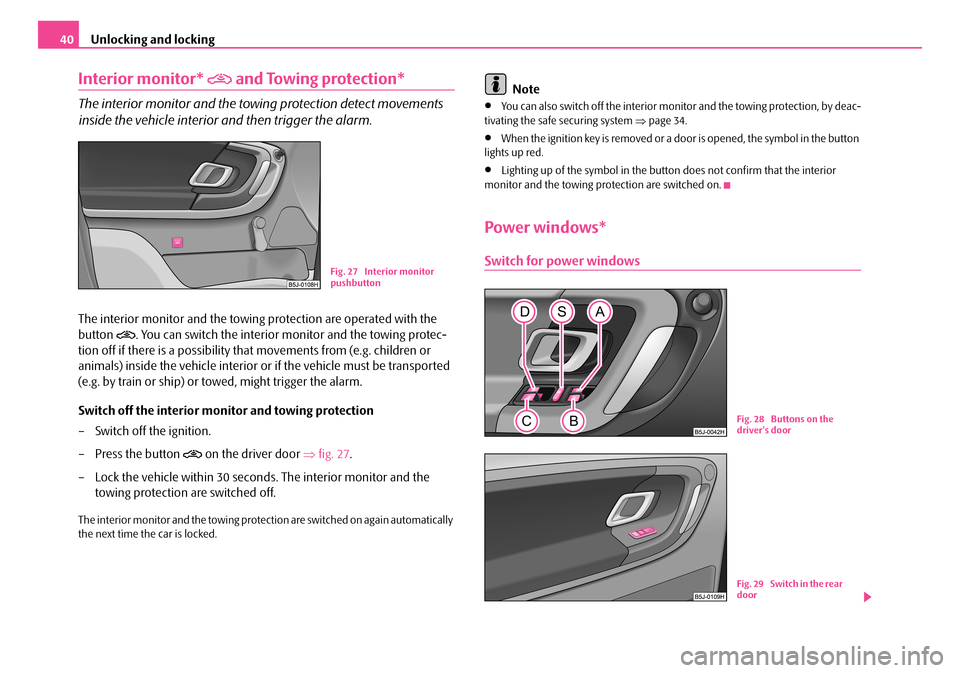
The interior monitor and the towing protection are operated with the
button . You can switch the interior monitor and the towing protec-
tion off if there is a possibility that movements from (e.g. children or
animals) inside the vehicle interior or if the vehicle must be transported
(e.g. by train or ship) or towed, might trigger the alarm.
Switch off the interior monitor and towing protection
– Switch off the ignition.
– Press the button on the driver door ⇒fig. 27.
– Lock the vehicle within 30 seconds. The interior monitor and the
towing protection are switched off.
The interior monitor and the towing protection are switched on again automatically the next time the car is locked.
Note
•You can also switch off the interior moni tor and the towing protection, by deac- tivating the safe securing system ⇒page 34.
•When the ignition key is removed or a door is opened, the symbol in the button lights up red.
•Lighting up of the symbol in the button does not confirm that the interior monitor and the towing protection are switched on.
Power windows*
Switch for power windowsFig. 27 Interior monitor pushbutton
Fig. 28 Buttons on the driver's door
Fig. 29 Switch in the rear door
NKO A05R 20 MR08.book Page 40 Wednesday, March 28, 2007 9:42 AM
Page 42 of 248
Unlocking and locking41
Using the systemSafetyDriving TipsGeneral MaintenanceBreakdown assistancePraktikTechnical Data
The power windows operate only when ignition is switched on.
Opening a window
– A window is opened by pres sing lightly on the respective butto n in the
door. The process stops when one releases the button.
– Additionally you can open the window automatically (fully opened) by
pressing the button up to the stop. Renewed pressing of the button
causes the window to stop immediately.
Closing a window
– A window is closed through pulling lightly on the respective button in
the door. The closing process stop s when one releases the button.
– Additionally you can close the window automatically (fully closed) by
pulling the button up to the stop. Renewed pulling of the button
causes the window to stop immediately.
The switches for the individual windows are located in the operating part in the driver's door ⇒page 40, fig. 28, front passenger door and in the rear doors*.
If the buttons for the rear doors are deactivated, the indicator light in the safety switch lights up.
The switch for the power window in th e operating part in the driver's door
Button for the power window in the driver's door
Button for the power window in the front passenger's door
Button for the power window in the rear door on the right*
Button for the power window in the rear door on the left*
Safety pushbutton*
Safety pushbutton*
You can deactivate the switches for power windows at rear doors by pressing the safety pushbutton ⇒page 40, fig. 28. The buttons for power windows at rear doors are activated again by pressing the safety pushbutton again.
WARNING
•If you lock the vehicle from the outside, do not leave any person in the vehicle since it is no longer possible to open the windows from the inside in an emergency.
•The system is fitted with a force limiter. The closing process will be stop if an obstruction is detected and the window will open again. You should then take particular care when closing the windows! You may otherwise suffer severe injuries as a result of getting an arm, for example, jammed in the window!
•It is recommended to deactivate the electrically operated power windows in the rear doors (safety pushbutton) ⇒page 40, fig. 28 when children are being transported on the rear seats.
•In the event of a freezing up of the wi ndscreen, first of all eliminate the ice ⇒ page 166 and then operate the power windows otherwise the power window mechanism could be damaged.
Note
•After switching the ignition off, it is still possible to open or close the windows for a further 10 minutes. The automatic closing and opening functions will not operate during this time. The power windows are switched off completely once you open the driver or front passenger door.
•When driving always use the existing he ating, air conditioning and ventilation system for ventilating the interior of the vehicle. If the windows are opened, dust as well as other dirt can get into the vehicle an d in addition the wind noise is more at certain speeds.
Force limiter of the power windows
The electrically operated power windows are fitted with a force limiter. It reduces the risk of bruises or injuri es when closing the windows.
If there is an obstacle, the closing process is stopped and the window goes down by several centimeters.
AS
AA
AB
AC
AD
AS
ASAS
AS
NKO A05R 20 MR08.book Page 41 Wednesday, March 28, 2007 9:42 AM
Page 45 of 248
Lights and Visibility44
Lights and Visibility
Lights
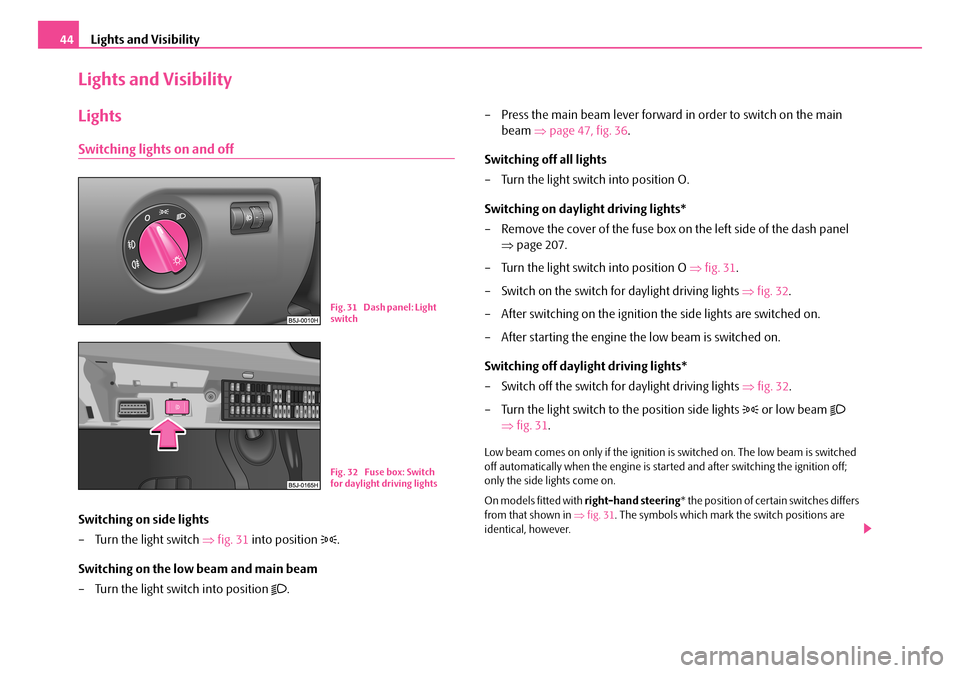
Switching lights on and off
Switching on side lights
– Turn the light switch ⇒fig. 31 into position .
Switching on the low beam and main beam
– Turn the light switch into position .
– Press the main beam lever forward in order to switch on the main
beam ⇒page 47, fig. 36.
Switching off all lights
– Turn the light switch into position O.
Switching on daylight driving lights*
– Remove the cover of the fuse box on the left side of the dash panel
⇒ page 207.
– Turn the light switch into position O ⇒fig. 31.
– Switch on the switch for daylight driving lights ⇒fig. 32.
– After switching on the ignition the side lights are switched on.
– After starting the engine the low beam is switched on.
Switching off daylight driving lights*
– Switch off the switch for daylight driving lights ⇒fig. 32.
– Turn the light switch to the position side lights or low beam
⇒ fig. 31.
Low beam comes on only if the ignition is switched on. The low beam is switched off automatically when the engine is star ted and after switching the ignition off; only the side lights come on.
On models fitted with right-hand steering* the position of certain switches differs from that shown in ⇒fig. 31. The symbols which mark the switch positions are identical, however.
Fi g. 3 1 D ash pan el: Lig ht switch
Fig. 32 Fuse box: Switch for daylight driving lights
NKO A05R 20 MR08.book Page 44 Wednesday, March 28, 2007 9:42 AM
Page 46 of 248
Lights and Visibility45
Using the systemSafetyDriving TipsGeneral MaintenanceBreakdown assistancePraktikTechnical Data
WARNING
Never drive with side lights on - risk of accident! The side lights are not bright enough to light up the road sufficiently in front of you or to be seen by other oncoming traffic. In this case, always switch on the low beam when it is dark or if visibility is poor.
Note
•An audible warning will sound if you wi thdraw the ignition key and open the driver's door when the vehicle lights are still on.
•The acoustic warning signal is switched off over the door contact when the driver's door is closed (ignition off). The vehicle can be parked with the side lights on.
•If you park the car for a lengthy period , we recommend switching off all lights, or leaving only the side lights switched on.
•The switching on of the described lights should only be undertaken in accord- ance with the legal requirements.
•In the event of cool or humid weather co nditions, the headlights can be misted up from inside.
− The temperature difference between interior and external area of the head- light lenses is decisive.
− When the driving lights are switched on, the light outlet surfaces are free from mist after a short period. The headlight lenses can possibly mist up at the border areas.
− It also concerns reverse light and turn signal lights.
− This mist has no influence on the life of the lighting system.
Cornering lights*
For a better cornering illumination the cornering lights are controlled in the optimal position in line with the vehi cle speed and the steering angle.
If the warning light flashes for 1 minute while driving or after switching on the ignition and a warning signal sounds, a fault is confirmed.
WARNING
If there is a fault in the cornering lights, the warning light flashes in the instrument cluster. The cornering li ghts are automatically lowered to the emergency position, which prevents a po ssible dazzling of oncoming traffic. Thus the illuminated length of the road is shortened. Drive carefully and have the car inspected immedi ately by a specialist garage.
Fog lights*
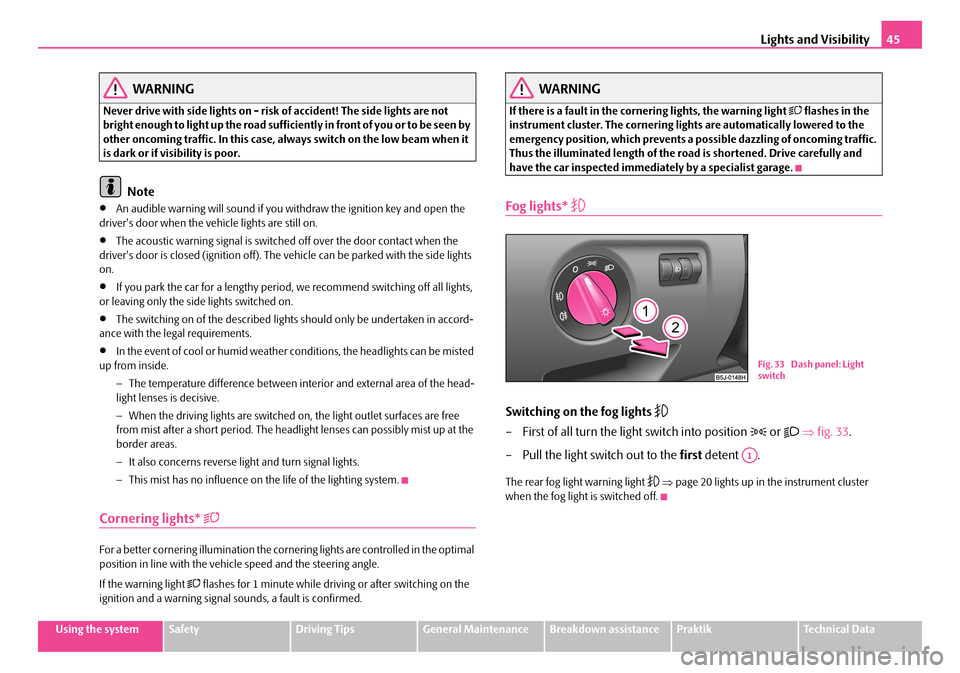
Switching on the fog lights
– First of all turn the light switch into position or ⇒fig. 33.
– Pull the light switch out to the first detent .
The rear fog light warning light ⇒page 20 lights up in the instrument cluster when the fog light is switched off.
Fig. 33 Dash panel: Light switch
A1
NKO A05R 20 MR08.book Page 45 Wednesday, March 28, 2007 9:42 AM