phone SKODA ROOMSTER 2008 1.G Owner's Manual
[x] Cancel search | Manufacturer: SKODA, Model Year: 2008, Model line: ROOMSTER, Model: SKODA ROOMSTER 2008 1.GPages: 248, PDF Size: 46.44 MB
Page 3 of 248
Introduction2
On-board literature
The on-board literature for your vehicle consists of this “ Owner's
Manual ” as well as the brochures “Quick Reference Guide”, “Service
Schedule ” and “Help on the road”. There can also be a variety of other
additional operating manuals and instructions on-board (e.g. an oper-
ating manual for the radio) dependin g on the vehicle model and equip-
ment.
If one of the publications listed above is missing, please contact a Škoda
Service Partner immediately, where one wi ll be glad to assist you in such
matters.
One should note that the details give n in the vehicle's papers always
take precedence over those in the Owner's Manual.
Owner's Manual
This Owner's Manual describes the current scope of equipment.
Certain items of equipment listed ar e only installed later on and only
envisaged for particular markets. The illustrations can differ in minor
details from your vehicle; they are only intended for general information.
In addition to information regarding all the controls and equipment, the
Owner's Manual also contains import ant information regarding care and
operation for your safety and also to retain the value of your vehicle. To
provide you with valuable tips and aids. You can learn how how you can
operate your vehicle safely, economically and in an environmentally
conscious way.
For safety reasons, please also pay attention to the information on
accessories, modifications and replacement of parts ⇒page 193.
The other chapters of the Owner's Manual are also important, however,
for proper treatment of your car - in addition to regular care and mainte-
nance - helps to retain its value and in many cases is also one of the
conditions for possible warranty claims.
The Brief instruction
includes an overview of the most important controls of your vehicle.
The Service schedule
contains:
•Vehicle data,
•Service intervals,
•Overview of the service work,
•Service proof,
•Confirmation of mo bility warranty,
•important information on the warranty.
The confirmations of the carried out service work are one of the condi-
tions for possible warranty claims.
Please always present th e Service schedule when you take your car to a
Škoda Service Partner.
If the Service schedule is missing or worn, please contact your Škoda
Service Partner, where your car is serviced regularly. You will receive a
duplicate, in which the previously carried out service work are confirmed.
Help on the road
contains the addresses and telephone numbers of Škoda Importers.
NKO A05R 20 MR08.book Page 2 Wednesday, March 28, 2007 9:42 AM
Page 4 of 248
Contents3
Contents
Layout of this Owner's Manual
(explanations). . . . . . . . . . . . . . . . . . . . . . . . . .
Using the system. . . . . . . . . . . . . . . . . . . . . .
Cockpit. . . . . . . . . . . . . . . . . . . . . . . . . . . . . . . . . . . . . . . . General view . . . . . . . . . . . . . . . . . . . . . . . . . . . . . . . . .
Instruments and Indicator/Warning Lights. . . General view of the instrument cluster . . . . . . . . . Engine revolutions counter . . . . . . . . . . . . . . . . . . . . Coolant temperature gauge* . . . . . . . . . . . . . . . . . . Fuel gauge* . . . . . . . . . . . . . . . . . . . . . . . . . . . . . . . . . . Counter for distance driven . . . . . . . . . . . . . . . . . . . Service Interval Display . . . . . . . . . . . . . . . . . . . . . . . Digital clock . . . . . . . . . . . . . . . . . . . . . . . . . . . . . . . . . . Multi-functional indicato r (onboard computer)* Information display* . . . . . . . . . . . . . . . . . . . . . . . . . . Auto Check Control . . . . . . . . . . . . . . . . . . . . . . . . . . . Warning lights . . . . . . . . . . . . . . . . . . . . . . . . . . . . . . . .
Unlocking and locking . . . . . . . . . . . . . . . . . . . . . . . . Key . . . . . . . . . . . . . . . . . . . . . . . . . . . . . . . . . . . . . . . . . . Locking . . . . . . . . . . . . . . . . . . . . . . . . . . . . . . . . . . . . . . Child safety lock . . . . . . . . . . . . . . . . . . . . . . . . . . . . . . Central locking system* . . . . . . . . . . . . . . . . . . . . . . . Remote control* . . . . . . . . . . . . . . . . . . . . . . . . . . . . . . Anti-theft alarm system* . . . . . . . . . . . . . . . . . . . . . . Interior monitor* and Towing protection* . . . Power windows* . . . . . . . . . . . . . . . . . . . . . . . . . . . . . Panorama roof* . . . . . . . . . . . . . . . . . . . . . . . . . . . . . .
Lights and Visibility . . . . . . . . . . . . . . . . . . . . . . . . . . . Lights . . . . . . . . . . . . . . . . . . . . . . . . . . . . . . . . . . . . . . . . Interior lighting . . . . . . . . . . . . . . . . . . . . . . . . . . . . . . .
Visibility . . . . . . . . . . . . . . . . . . . . . . . . . . . . . . . . . . . . . Windshield wiper and wash system . . . . . . . . . . . . Rear mirror . . . . . . . . . . . . . . . . . . . . . . . . . . . . . . . . . .
Seats and Stowage. . . . . . . . . . . . . . . . . . . . . . . . . . . . Front seats . . . . . . . . . . . . . . . . . . . . . . . . . . . . . . . . . . . Head restraints . . . . . . . . . . . . . . . . . . . . . . . . . . . . . . . Heating the front seats* . . . . . . . . . . . . . . . . . . . . . . . Rear seats . . . . . . . . . . . . . . . . . . . . . . . . . . . . . . . . . . . . Pedals . . . . . . . . . . . . . . . . . . . . . . . . . . . . . . . . . . . . . . . luggage compartment . . . . . . . . . . . . . . . . . . . . . . . . Bicycle carrier* . . . . . . . . . . . . . . . . . . . . . . . . . . . . . . . The roof luggage rack system* . . . . . . . . . . . . . . . . . Front cup holder . . . . . . . . . . . . . . . . . . . . . . . . . . . . . Rear cup holder* . . . . . . . . . . . . . . . . . . . . . . . . . . . . . Note holder . . . . . . . . . . . . . . . . . . . . . . . . . . . . . . . . . . Ashtray* . . . . . . . . . . . . . . . . . . . . . . . . . . . . . . . . . . . . . Cigarette lighter* and power sockets* . . . . . . . . . . Storage compartments . . . . . . . . . . . . . . . . . . . . . . . .
Heating and air conditioning system. . . . . . . . . Heating . . . . . . . . . . . . . . . . . . . . . . . . . . . . . . . . . . . . . . Climatic (semi-automatic air conditioning system)* . . . . . . . . . . . . . . . . . . . . . . . . . . . . . . . . . . . . . Climatronic (automatic air conditioning)* . . . . . .
Starting-off and Driving. . . . . . . . . . . . . . . . . . . . . . . Setting steering wheel position* . . . . . . . . . . . . . . . Ignition lock . . . . . . . . . . . . . . . . . . . . . . . . . . . . . . . . . . Starting the engine . . . . . . . . . . . . . . . . . . . . . . . . . . . Switching off the engine . . . . . . . . . . . . . . . . . . . . . . . Shifting (manual gearbox) . . . . . . . . . . . . . . . . . . . . . Handbrake . . . . . . . . . . . . . . . . . . . . . . . . . . . . . . . . . . . Parking aid* . . . . . . . . . . . . . . . . . . . . . . . . . . . . . . . . . . Cruise control system (CCS)* . . . . . . . . . . . . . . . . . .
Automatic gearbox . . . . . . . . . . . . . . . . . . . . . . . . . . . 6-speed automatic gearbox* . . . . . . . . . . . . . . . . . .
Communication . . . . . . . . . . . . . . . . . . . . . . . . . . . . . . Operating the radio . . . . . . . . . . . . . . . . . . . . . . . . . . . Radio and mobile phone operation . . . . . . . . . . . . Universal telephone preinstallation with voice control* . . . . . . . . . . . . . . . . . . . . . . . . . . . . . . . . . . . . . Inserting the mobile phone and adapter . . . . . . . Mobile phone operation . . . . . . . . . . . . . . . . . . . . . . Voice commands . . . . . . . . . . . . . . . . . . . . . . . . . . . . . Enter PIN code . . . . . . . . . . . . . . . . . . . . . . . . . . . . . . . Select number . . . . . . . . . . . . . . . . . . . . . . . . . . . . . . . Repeat last call . . . . . . . . . . . . . . . . . . . . . . . . . . . . . . . Phone voice phonebook* . . . . . . . . . . . . . . . . . . . . . Bluetooth™* . . . . . . . . . . . . . . . . . . . . . . . . . . . . . . . . . Mobile phones and two-way radio systems . . . . . Input AUX-IN* . . . . . . . . . . . . . . . . . . . . . . . . . . . . . . . CD changer* . . . . . . . . . . . . . . . . . . . . . . . . . . . . . . . . .
Safety . . . . . . . . . . . . . . . . . . . . . . . . . . . . . . . . . . . . . .
Passive Safety . . . . . . . . . . . . . . . . . . . . . . . . . . . . . . . . . Basic information . . . . . . . . . . . . . . . . . . . . . . . . . . . . Correct seated position . . . . . . . . . . . . . . . . . . . . . . .
Seat belts. . . . . . . . . . . . . . . . . . . . . . . . . . . . . . . . . . . . . . Why seat belts? . . . . . . . . . . . . . . . . . . . . . . . . . . . . . . The physical principle of a frontal collision . . . . . Important safety information regarding the use of seat belts . . . . . . . . . . . . . . . . . . . . . . . . . . . . . . . . . . . . How are seat belts correctly fastened? . . . . . . . . . Belt tensioner . . . . . . . . . . . . . . . . . . . . . . . . . . . . . . . .
6
7
8 8
9 9 9101011111313161820
30 30 3232333739404043
44 44 48
49 5053
54 54 55565762626668696970707172
78 78
80 84
89 89 90909292939394
97 97
102 102 103
104 105105106107108108109111112113113
117
117 117 119
122 122 123
123 124126
NKO A05R 20 MR08.book Page 3 Wednesday, March 28, 2007 9:42 AM
Page 9 of 248
Cockpit8
Cockpit
General view
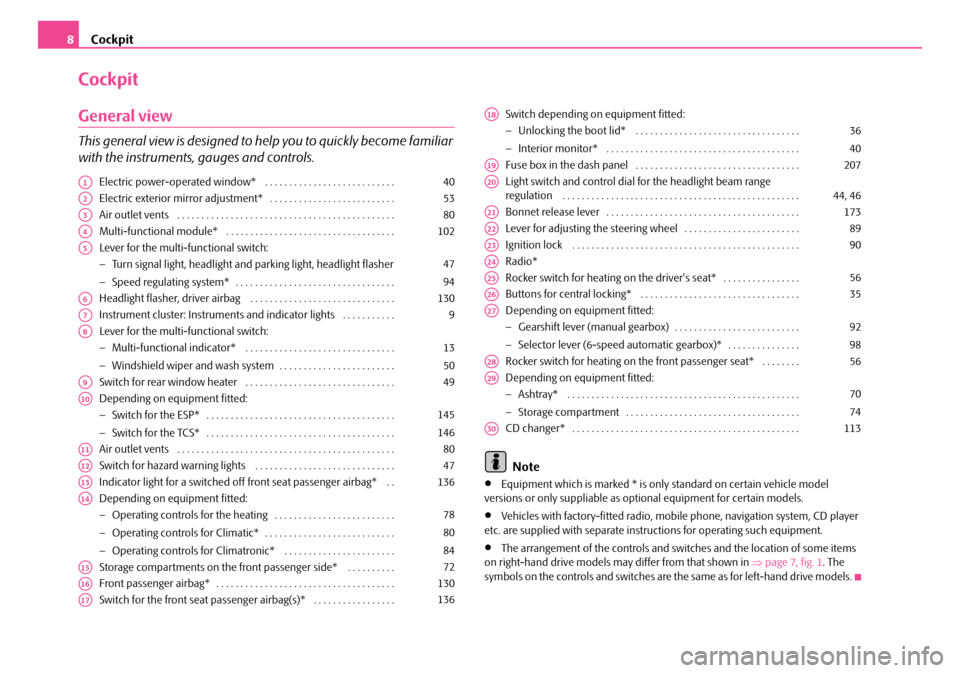
This general view is designed to help you to quickly become familiar
with the instruments, gauges and controls.
Electric power-operated window* . . . . . . . . . . . . . . . . . . . . . . . . . . .
Electric exterior mirror adjustment* . . . . . . . . . . . . . . . . . . . . . . . . . .
Air outlet vents . . . . . . . . . . . . . . . . . . . . . . . . . . . . . . . . . . . . . . . . . . . . .
Multi-functional module* . . . . . . . . . . . . . . . . . . . . . . . . . . . . . . . . . . .
Lever for the multi-functional switch:
− Turn signal light, headlight and parking light, headlight flasher
− Speed regulating system* . . . . . . . . . . . . . . . . . . . . . . . . . . . . . . . . .
Headlight flasher, driver airbag . . . . . . . . . . . . . . . . . . . . . . . . . . . . . .
Instrument cluster: Instruments and in dicator lights . . . . . . . . . . .
Lever for the multi-functional switch:
− Multi-functional indicator* . . . . . . . . . . . . . . . . . . . . . . . . . . . . . . .
− Windshield wiper and wash system . . . . . . . . . . . . . . . . . . . . . . . .
Switch for rear window heater . . . . . . . . . . . . . . . . . . . . . . . . . . . . . . .
Depending on equipment fitted:
− Switch for the ESP* . . . . . . . . . . . . . . . . . . . . . . . . . . . . . . . . . . . . . . .
− Switch for the TCS* . . . . . . . . . . . . . . . . . . . . . . . . . . . . . . . . . . . . . . .
Air outlet vents . . . . . . . . . . . . . . . . . . . . . . . . . . . . . . . . . . . . . . . . . . . . .
Switch for hazard warning lights . . . . . . . . . . . . . . . . . . . . . . . . . . . . .
Indicator light for a switched off front seat passenger airbag* . .
Depending on equipment fitted:
− Operating controls for the heating . . . . . . . . . . . . . . . . . . . . . . . . .
− Operating controls for Climatic* . . . . . . . . . . . . . . . . . . . . . . . . . . .
− Operating controls for Climatronic* . . . . . . . . . . . . . . . . . . . . . . .
Storage compartments on the front passenger side* . . . . . . . . . .
Front passenger airbag* . . . . . . . . . . . . . . . . . . . . . . . . . . . . . . . . . . . . .
Switch for the front seat passenger airbag(s)* . . . . . . . . . . . . . . . . .
Switch depending on equipment fitted:
− Unlocking the boot lid* . . . . . . . . . . . . . . . . . . . . . . . . . . . . . . . . . .
− Interior monitor* . . . . . . . . . . . . . . . . . . . . . . . . . . . . . . . . . . . . . . . .
Fuse box in the dash panel . . . . . . . . . . . . . . . . . . . . . . . . . . . . . . . . . .
Light switch and control dial for the headlight beam range regulation . . . . . . . . . . . . . . . . . . . . . . . . . . . . . . . . . . . . . . . . . . . . . . . . .
Bonnet release lever . . . . . . . . . . . . . . . . . . . . . . . . . . . . . . . . . . . . . . . .
Lever for adjusting the steering wheel . . . . . . . . . . . . . . . . . . . . . . . .
Ignition lock . . . . . . . . . . . . . . . . . . . . . . . . . . . . . . . . . . . . . . . . . . . . . . .
Radio*
Rocker switch for heating on the driver's seat* . . . . . . . . . . . . . . . .
Buttons for central locking* . . . . . . . . . . . . . . . . . . . . . . . . . . . . . . . . .
Depending on equipment fitted:
− Gearshift lever (manual gearbox) . . . . . . . . . . . . . . . . . . . . . . . . . .
− Selector lever (6-speed automatic gearbox)* . . . . . . . . . . . . . . .
Rocker switch for heating on the front passenger seat* . . . . . . . .
Depending on equipment fitted:
− Ashtray* . . . . . . . . . . . . . . . . . . . . . . . . . . . . . . . . . . . . . . . . . . . . . . . .
− Storage compartment . . . . . . . . . . . . . . . . . . . . . . . . . . . . . . . . . . . .
CD changer* . . . . . . . . . . . . . . . . . . . . . . . . . . . . . . . . . . . . . . . . . . . . . . .
Note
•Equipment which is marked * is only standard on certain vehicle model versions or only suppliable as optional equipment for certain models.
•Vehicles with factory-fitted radio, mobi le phone, navigation system, CD player etc. are supplied with separate inst ructions for operating such equipment.
•The arrangement of the controls and switches and the location of some items on right-hand drive models may differ from that shown in ⇒page 7, fig. 1. The symbols on the controls and switches are the same as for left-hand drive models.
A140
A253
A380
A4102
A5
47
94
A6130
A79
A8
13
50
A949
A10
145
146
A1180
A1247
A13136
A14
78
80
84
A1572
A16130
A17136
A18
36
40
A19207
A2044, 46
A21173
A2289
A2390
A24
A2556
A2635
A27
92
98
A2856
A29
70
74
A30113
NKO A05R 20 MR08.book Page 8 Wednesday, March 28, 2007 9:42 AM
Page 18 of 248
Instruments and Indicator/Warning Lights17
Using the systemSafetyDriving TipsGeneral MaintenanceBreakdown assistancePraktikTechnical Data
Menu
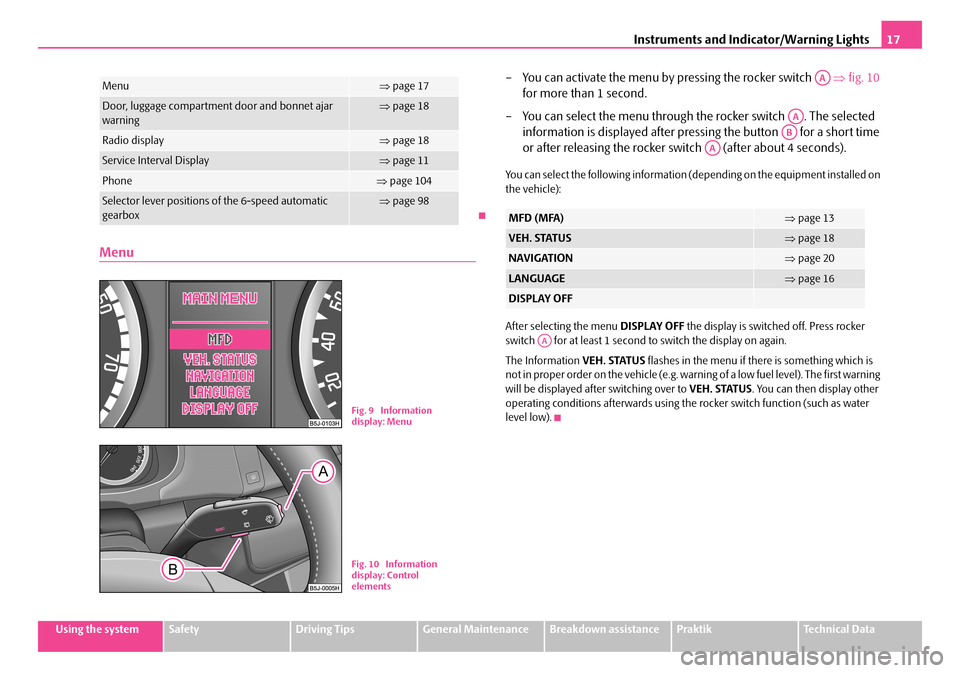
– You can activate the menu by pressing the rocker switch ⇒fig. 10
for more than 1 second.
– You can select the menu through the rocker switch . The selected
information is displayed after pressing the button for a short time
or after releasing the rocker sw itch (after about 4 seconds).
You can select the following information (depending on the equipment installed on the vehicle):
After selecting the menu DISPLAY OFF the display is switched off. Press rocker switch for at least 1 second to switch the display on again.
The Information VEH. STATUS flashes in the menu if there is something which is not in proper order on the vehicle (e.g. warning of a low fuel level). The first warning will be displayed after switching over to VEH. STATUS. You can then display other operating conditions afterwards using the rocker switch function (such as water level low).
Menu⇒ page 17
Door, luggage compartment door and bonnet ajar warning⇒ page 18
Radio display⇒page 18
Service Interval Display⇒page 11
Phone⇒page 104
Selector lever positions of the 6-speed automatic gearbox⇒ page 98
Fig. 9 Information display: Menu
Fig. 10 Information display: Control elements
MFD (MFA)⇒ page 13
VEH. STATUS⇒page 18
NAVIGATION⇒page 20
LANGUAGE⇒page 16
DISPLAY OFF
AA
AA
AB
AA
AA
NKO A05R 20 MR08.book Page 17 Wednesday, March 28, 2007 9:42 AM
Page 38 of 248
Unlocking and locking37
Using the systemSafetyDriving TipsGeneral MaintenanceBreakdown assistancePraktikTechnical Data
•Do not press on the rear window when closing the boot lid, it could crack - risk of injury!
Note
•After closing the boot lid, it is automatically locked within 1 seconds and the anti-theft alarm system* is activated. This applies only if the vehicle was locked before closing the boot lid.
•The function of the hand grip above the licence plate is deactivated when starting off or as of a speed of more than 5 km/hour for vehicles with central locking. The function of the hand grip is activated again when the vehicle has stopped and a door is opened.
•Hold the boot lid when opening.
Emergency unlocking of the boot lid
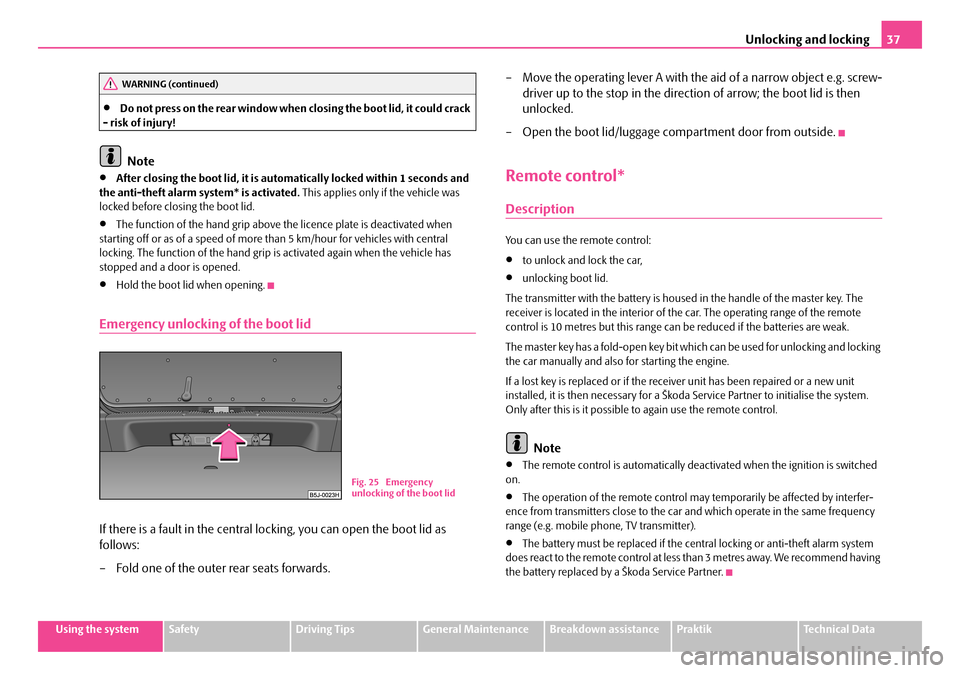
If there is a fault in the central lo cking, you can open the boot lid as
follows:
– Fold one of the outer rear seats forwards.
– Move the operating lever A with the aid of a narrow object e.g. screw-
driver up to the stop in the direction of arrow; the boot lid is then
unlocked.
– Open the boot lid/luggage compartment door from outside.
Remote control*
Description
You can use the remote control:
•to unlock and lock the car,
•unlocking boot lid.
The transmitter with the battery is housed in the handle of the master key. The receiver is located in the interior of th e car. The operating range of the remote control is 10 metres but this range can be reduced if the batteries are weak.
The master key has a fold-open key bit whic h can be used for unlocking and locking the car manually and also for starting the engine.
If a lost key is replaced or if the receiv er unit has been repaired or a new unit installed, it is then necessary for a Škoda Service Partner to initialise the system. Only after this is it possible to again use the remote control.
Note
•The remote control is automatically deactivated when the ignition is switched on.
•The operation of the remote control may temporarily be affected by interfer- ence from transmitters close to the car and which operate in the same frequency range (e.g. mobile phone, TV transmitter).
•The battery must be replaced if the central locking or anti-theft alarm system does react to the remote control at less than 3 metres away. We recommend having the battery replaced by a Škoda Service Partner.
WARNING (continued)
Fig. 25 Emergency unlocking of the boot lid
NKO A05R 20 MR08.book Page 37 Wednesday, March 28, 2007 9:42 AM
Page 104 of 248
Communication103
Using the systemSafetyDriving TipsGeneral MaintenanceBreakdown assistancePraktikTechnical Data
Radio and mobile phone operation
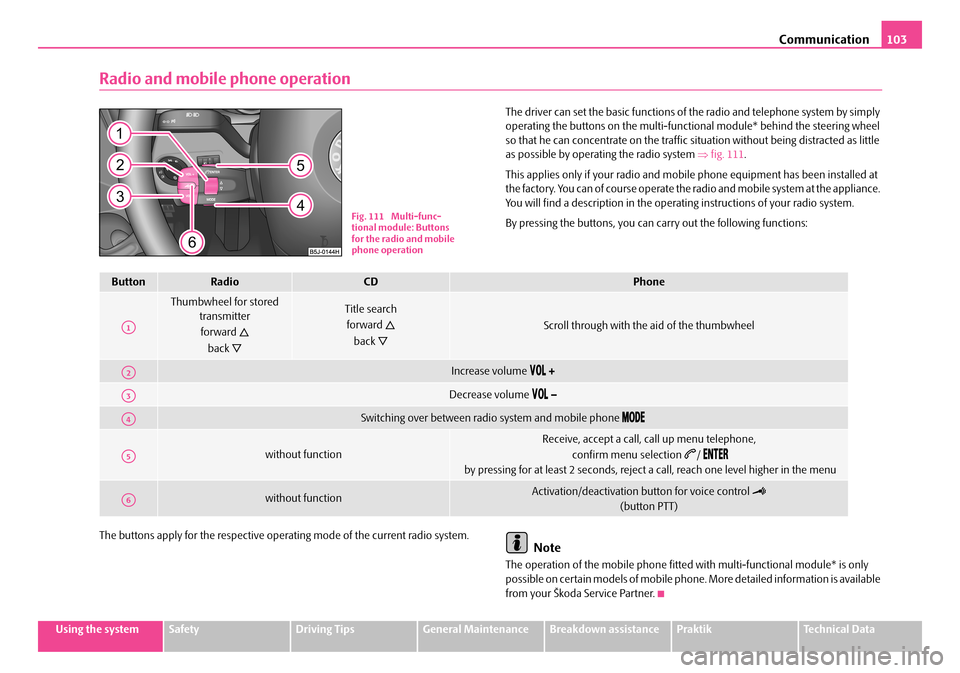
The driver can set the basic functions of the radio and telephone system by simply operating the buttons on the multi-functi onal module* behind the steering wheel so that he can concentrate on the traffic si tuation without being distracted as little as possible by operating the radio system ⇒fig. 111.
This applies only if your radio and mobi le phone equipment has been installed at the factory. You can of course operate the radio and mobile system at the appliance. You will find a description in the operating instructions of your radio system.
By pressing the buttons, you can carry out the following functions:
The buttons apply for the respective operating mode of the current radio system.Note
The operation of the mobile phone fitted with multi-functional module* is only possible on certain models of mobile phone. More detailed information is available from your Škoda Service Partner.
Fig. 111 Multi-func- tional module: Buttons for the radio and mobile phone operation
ButtonRadioCDPhone
Thumbwheel for stored transmitter
forward
back
Title search
forward
back
Scroll through with the aid of the thumbwheel
Increase volume
Decrease volume
Switching over between radio system and mobile phone
without function
Receive, accept a call, call up menu telephone,
confirm menu selection /
by pressing for at least 2 seconds, reject a call, reach one level higher in the menu
without functionActivation/deactivation button for voice control
(button PTT)
A1
A2
A3
A4
A5
A6
NKO A05R 20 MR08.book Page 103 Wednesday, March 28, 2007 9:42 AM
Page 105 of 248

Communication104
Universal telephone preinstallation with voice
control*
The voice control is activated according to equipment installed on the vehicle by pressing the button PTT (push to talk) on the adapter ⇒fig. 112 or the button on the multi-functional module* ⇒page 103.
A phone phonebook is part of the mobile phone preinstallation with voice control. In the phone phonebook there are 1500 free memory locations available. This phone phonebook can be used in line with the mobile telephone.
For vehicles fitted with multi-functional module*, the operation is performed via the function buttons on the module ⇒page 103.
Furthermore the volume can be changed indi vidually at any time with the button for setting the radio or on vehicles fitted with multi-functional module* with func- tion buttons on the steering wheel.
If the system answers with the voice response “ Telephone is not ready”, please check the operating state of the telephone as follows:
•Is the telephone switched on?
•Is the PIN code entered?
Dialogue
The period, in which the telephone system is ready to receive voice commands and carry out the voice commands, is called DIALOGUE. The system gives audible feed-
back and guides you if necessary through the relevant functions. You can start or end the dialogue at any time by pressi ng the PTT button. You can also end the dialogue with the voice command CANCEL.
The dialogue is always automatically ended after carrying out an operation, e.g. after erasing the name from the phonebook.
The dialogue of the incoming call is i mmediately interrupted and you can accept the call by pressing the button .
If a voice command is not detected, the system answers with “ Sorry?” and a new entry can be performed. After the 3rd error the answer “ Cancel” is given and the dialogue is ended.
Optimum understanding of the voice commands depends on the following factors:
•Speak with a normal tone of voice wi thout intonation and excessive voice pauses.
•Avoid insufficient articulation.
•Close the doors, windows and sliding roof, in order to reduce or stop disturbing exterior noise.
•It is recommended to speak louder at higher speeds, so that the tone of your voice is louder than the increased surrounding noise.
•During the dialogue avoid additional nois e in the vehicle, e.g. simultaneously talking occupants.
•Do not speak, if the system makes an announcement.
•The microphone for voice control is directed to the driver and front passenger. Therefore the driver and the front passenger can operate the equipment.
WARNING
Pay attention primarily to the traffic si tuation! As the driver you are fully responsible for the traffic safety. Use the telephone system only to such an extent, so that you are in full control of your vehicle at any time.
Fig. 112 Button for switching on the voice control
NKO A05R 20 MR08.book Page 104 Wednesday, March 28, 2007 9:42 AM
Page 106 of 248
Communication105
Using the systemSafetyDriving TipsGeneral MaintenanceBreakdown assistancePraktikTechnical Data
Caution
Taking the mobile phone out of the adapter during the call can lead to interruption of the connection. When taking out the mobile phone, the connection to the factory-fitted antenna is interrupted, this reduces the quality of the transmitting and receiving signal. This might result additionally in harmful radiation from the mobile phone in the interior of the ve hicle and the charging of the telephone battery is interrupted.
Note
•Please also refer to the additional instructions ⇒page 112, “Mobile phones and two-way radio systems”.
•Please contact your Škoda Service Partner if there are any points which are not clear.
•The voice control of the telephone is only possible for adapters with PTT button. Suitable adapters are available at a Škoda Service Partner.
Inserting the mobile phone and adapter
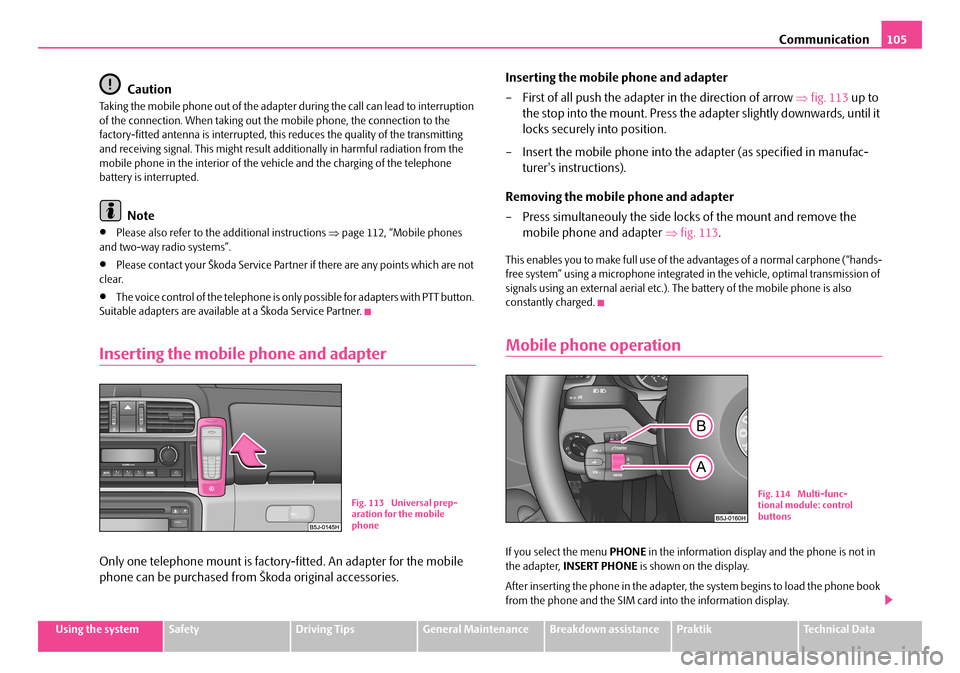
Only one telephone mount is factory-fitted. An adapter for the mobile
phone can be purchased from Škoda original accessories.
Inserting the mobile phone and adapter
– First of all push the adapter in the direction of arrow ⇒fig. 113 up to
the stop into the mount. Press the ad apter slightly downwards, until it
locks securely into position.
– Insert the mobile phone into the adapter (as specified in manufac-
turer's instructions).
Removing the mobile phone and adapter
– Press simultaneouly the side locks of the mount and remove the
mobile phone and adapter ⇒fig. 113.
This enables you to make full use of the advantages of a normal carphone (“hands- free system” using a microphone integrated in the vehicle, optimal transmission of signals using an external aerial etc.). The battery of the mobile phone is also constantly charged.
Mobile phone operation
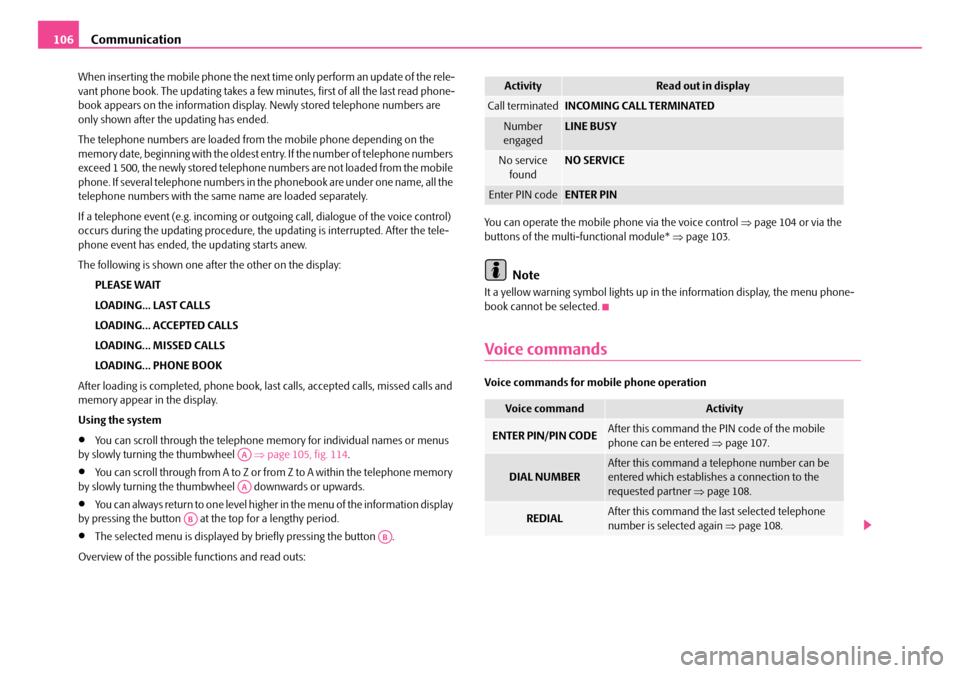
If you select the menu PHONE in the information display and the phone is not in the adapter, INSERT PHONE is shown on the display.
After inserting the phone in the adapter, the system begins to load the phone book from the phone and the SIM card into the information display.
Fig. 113 Universal prep- aration for the mobile phone
Fig. 114 Multi-func-tional module: control buttons
NKO A05R 20 MR08.book Page 105 Wednesday, March 28, 2007 9:42 AM
Page 107 of 248
Communication106
When inserting the mobile phone the next time only perform an update of the rele- vant phone book. The updating takes a few minutes, first of all the last read phone- book appears on the information displa y. Newly stored telephone numbers are only shown after the updating has ended.
The telephone numbers are loaded from the mobile phone depending on the memory date, beginning with the oldest entry. If the number of telephone numbers exceed 1 500, the newly stored telephone numbers are not loaded from the mobile phone. If several telephon e numbers in the phonebook are under one name, all the telephone numbers with the same name are loaded separately.
If a telephone event (e.g. incoming or outg oing call, dialogue of the voice control) occurs during the updating procedure, the updating is interrupted. After the tele- phone event has ended, the updating starts anew.
The following is shown one after the other on the display:
PLEASE WAIT
LOADING... LAST CALLS
LOADING... ACCEPTED CALLS
LOADING... MISSED CALLS
LOADING... PHONE BOOK
After loading is completed, phone book, la st calls, accepted calls, missed calls and memory appear in the display.
Using the system
•You can scroll through the telephone me mory for individual names or menus by slowly turning the thumbwheel ⇒page 105, fig. 114.
•You can scroll through from A to Z or from Z to A within the telephone memory by slowly turning the thumbwheel downwards or upwards.
•You can always return to one level higher in the menu of the information display by pressing the button at the top for a lengthy period.
•The selected menu is displayed by briefly pressing the button .
Overview of the possible functions and read outs:
You can operate the mobile phone via the voice control ⇒page 104 or via the buttons of the multi- functional module* ⇒page 103.
Note
It a yellow warning symbol lights up in the information display, the menu phone- book cannot be selected.
Voice commands
Voice commands for mo bile phone operation
AA
AA
AB
AB
ActivityRead out in display
Call terminatedINCOMING CALL TERMINATED
Number engagedLINE BUSY
No service foundNO SERVICE
Enter PIN codeENTER PIN
Voice commandActivity
ENTER PIN/PIN CODEAfter this command the PIN code of the mobile phone can be entered ⇒page 107.
DIAL NUMBERAfter this command a telephone number can be entered which establishe s a connection to the requested partner ⇒page 108.
REDIALAfter this command the last selected telephone number is selected again ⇒page 108.
NKO A05R 20 MR08.book Page 106 Wednesday, March 28, 2007 9:42 AM
Page 108 of 248
Communication107
Using the systemSafetyDriving TipsGeneral MaintenanceBreakdown assistancePraktikTechnical Data
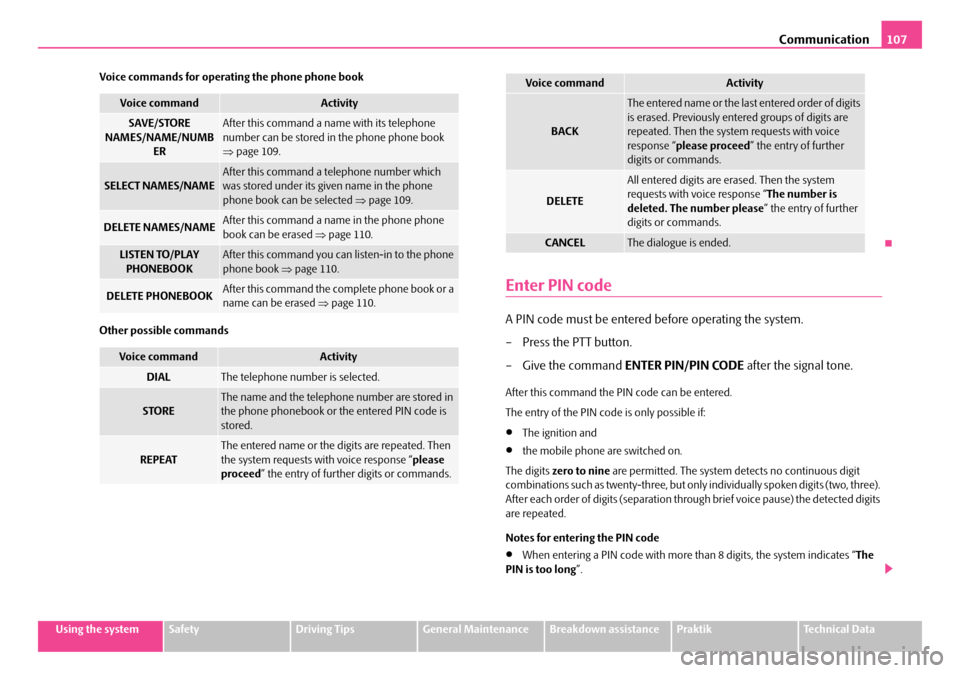
Voice commands for operating the phone phone book
Other possible commands
Enter PIN code
A PIN code must be entered before operating the system.
– Press the PTT button.
– Give the command ENTER PIN/PIN CODE after the signal tone.
After this command the PIN code can be entered.
The entry of the PIN code is only possible if:
•The ignition and
•the mobile phone are switched on.
The digits zero to nine are permitted. The system detects no continuous digit combinations such as twenty-three, but only individually spoken digits (two, three). After each order of digits (separation through brief voice pause) the detected digits are repeated.
Notes for entering the PIN code
•When entering a PIN code with more than 8 digits, the system indicates “ The PIN is too long ”.
Voice commandActivity
SAVE/STORE NAMES/NAME/NUMB ER
After this command a name with its telephone number can be stored in the phone phone book ⇒ page 109.
SELECT NAMES/NAMEAfter this command a telephone number which was stored under its given name in the phone phone book can be selected ⇒page 109.
DELETE NAMES/NAMEAfter this command a name in the phone phone book can be erased ⇒page 110.
LISTEN TO/PLAY PHONEBOOKAfter this command you ca n listen-in to the phone phone book ⇒page 110.
DELETE PHONEBOOKAfter this command the complete phone book or a name can be erased ⇒page 110.
Voice commandActivity
DIALThe telephone number is selected.
STOREThe name and the telephone number are stored in the phone phonebook or the entered PIN code is stored.
REPEATThe entered name or the digits are repeated. Then the system requests with voice response “ please proceed ” the entry of further digits or commands.
BACK
The entered name or the last entered order of digits is erased. Previously entered groups of digits are repeated. Then the system requests with voice response “ please proceed” the entry of further digits or commands.
DELETE
All entered digits are erased. Then the system requests with voice response “ The number is deleted. The number please ” the entry of further digits or commands.
CANCELThe dialogue is ended.
Voice commandActivity
NKO A05R 20 MR08.book Page 107 Wednesday, March 28, 2007 9:42 AM