ESP SKODA ROOMSTER 2009 1.G User Guide
[x] Cancel search | Manufacturer: SKODA, Model Year: 2009, Model line: ROOMSTER, Model: SKODA ROOMSTER 2009 1.GPages: 263, PDF Size: 32.25 MB
Page 95 of 263
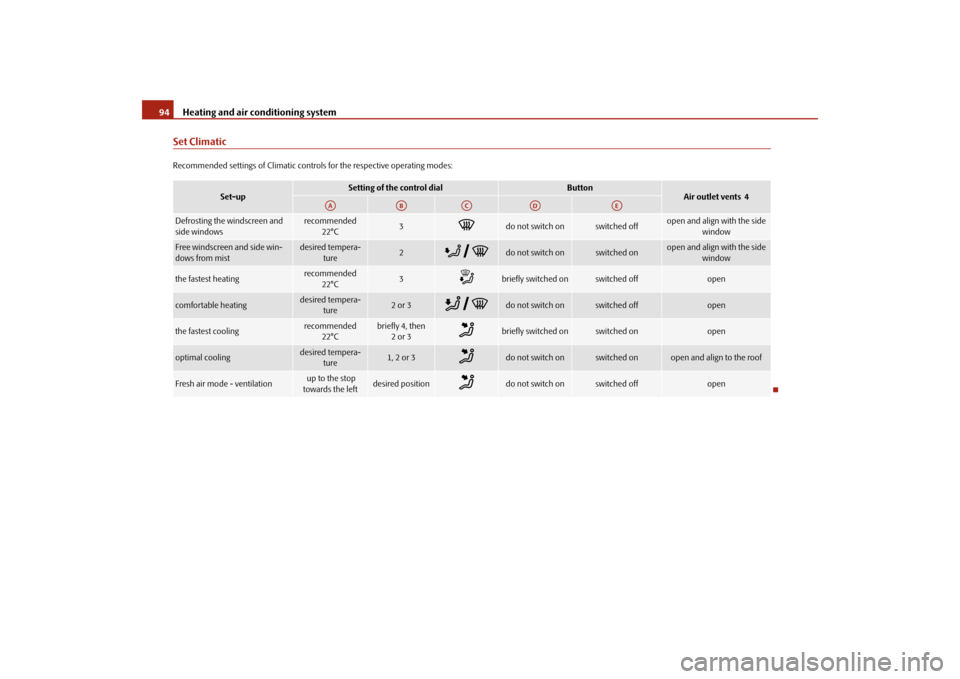
Heating and air conditioning system 94Set ClimaticRecommended settings of Climatic controls for the respective operating modes:
Set-up
Setting of the control dial
Button
Air outlet vents 4
Defrosting the windscreen and
side windows
recommended
22°C
3
do not switch on
switched off
open and align with the side
window
Free windscreen and side win-
dows from mist
desired tempera-
ture
2
do not switch on
switched on
open and align with the side
window
the fastest heating
recommended
22°C
3
briefly switched on
switched off
open
comfortable heating
desired tempera-
ture
2 or 3
do not switch on
switched off
open
the fastest cooling
recommended
22°C
briefly 4, then
2or 3
briefly switched on
switched on
open
optimal cooling
desired tempera-
ture
1, 2 or 3
do not switch on
switched on
open and align to the roof
Fresh air mode - ventilation
up to the stop
towards the left
desired position
do not switch on
switched off
open
AA
AB
AC
AD
AE
s29g.4.book Page 94 Wednesday, June 17, 2009 9:54 AM
Page 99 of 263
Heating and air conditioning system 98Setting temperature– You can set the desired interior temperature after switching on the
ignition with the control dial .You can set the interior temperature between +18°C and +29 °C. The interior
temperature is regulated automatically within this range. If you select a tempera-
ture of less than +18 °C, “LO” is shown on the display. If you select a temperature
above +29 °C, “HI” is shown on the display. In both limit positions the Climatronic
operates at maximum cooling or heating capacity, respectively. The temperature is
not controlled in this case.
Lengthy and uneven distribution of the air flow out of the vents (in particular at the
leg area) and large differences in temperature, for example when getting out of the
vehicle, can result in chills in sensitive persons.Controlling blower
There are a total of seven blower stages available.The Climatronic system controls the blower stages automatically in line
with the interior temperature. You can also, however, adapt the blower
stages manually to suit your particular needs.
– Turn the control dial ⇒page 96, fig. 117 to the left (reduce blower
speed) or right (increase blower speed).If you switch off the blowers, the Climatronic is switched off and OFF is shown in
the display.
The set blower speed is displayed next to the control dial when the respective
number of warning lights come on.
WARNING
•
“Stale air” may result in fatigue in the driver and occupants, reduce
attention levels and also cause the windows to mist up. The risk of having an
accident increases.
•
Do not switch the Climatronic system off for longer than necessary.
•
Switch the Climatronic system on as soon as the windows mist up.
A11
A1
A1
WARNING (continued)
s29g.4.book Page 98 Wednesday, June 17, 2009 9:54 AM
Page 105 of 263
Starting-off and Driving 104Range of sensors
The clearance warning begins at a distance of about 160 cm from the obstacle (area
⇒page 103, fig. 123). The interval between the warning signals becomes
shorter as the clearance is reduced.
A continuous tone sounds from a distance of approx. 30 cm (area ) - danger area.
You should not reverse any further after this signal sounds!
Activating
The parking aid is activated automatically when reverse gear is engaged and the
ignition is turned on. This is confirmed by a brief acknowledgement signal.
Deactivating
The parking aid is deactivated by removing the reverse gear.
WARNING
•
The parking aid is not a substitute for the driver paying proper attention
and it is always the driver's responsibility to take care when parking the
vehicle or carrying out similar manoeuvres.
•
You should therefore satisfy yourself, before reversing, that there is no
small obstacle, such as a rock, thin post, trailer drawbar etc., behind your
vehicle. Such an obstacle might not be within the range detected by the
sensors.Note
•
When operating with a trailer, the parking aid is without function.
•
A system fault is indicated if a warning signal sounds for about 5 seconds after
switching the ignition on and engaging reverse gear and there is no obstacle close
to your vehicle. Have the fault rectified by a specialist workshop.
•
The sensors must be kept clean and free of ice to enable the parking aid to
operate properly.
•
If the parking aid is activated and the selector lever of the automatic gearbox is
in the position , warning signal indicates interruption (vehicle can no longer
move).
Cruise control system (CCS)*IntroductionThe cruise control system (CCS) maintains a constant speed, more than 30 km/h,
once it has been set, without you having to depress the accelerator pedal. This is
only possible within the range which is permitted by the power output and braking
power of the engine. The cruise control system makes it possible - particularly on
long journeys - for you to rest your “accelerator foot”.
WARNING
•
The cruise control system must not, for safety reasons, be used in dense
traffic or on unfavourable road surfaces (such as icy roads, slippery roads or
loose chippings) - risk of accident!
•
In order to prevent unintentional use of the cruise control system, always
switch off the system after use.Note
•
Models fitted with a manual gearbox: Always depress the clutch pedal if you
switch on the cruise control system when the gearbox is in Neutral. Otherwise the
engine can rev up unintentionally.
•
The cruise control system is not able to maintain a constant speed when driving
on steep downhill sections. The weight of the vehicle increases the speed at which
it travels. One should shift down in good time to a lower gear or slow the vehicle
down by applying the foot brake.
•
It is not possible on vehicles fitted with an automatic gearbox to switch on the
cruise control system if the selector lever is in the position P, N or R.
AA
AB
AP
s29g.4.book Page 104 Wednesday, June 17, 2009 9:54 AM
Page 109 of 263
Automatic gearbox 108•
When the engine is running and the vehicle is stationary, it is necessary
to hold the car with the brake pedal in all the positions of the selector lever
(except P and N) since the power transmission is never completely inter-
rupted, also not when the engine is idling - the vehicle creeps.
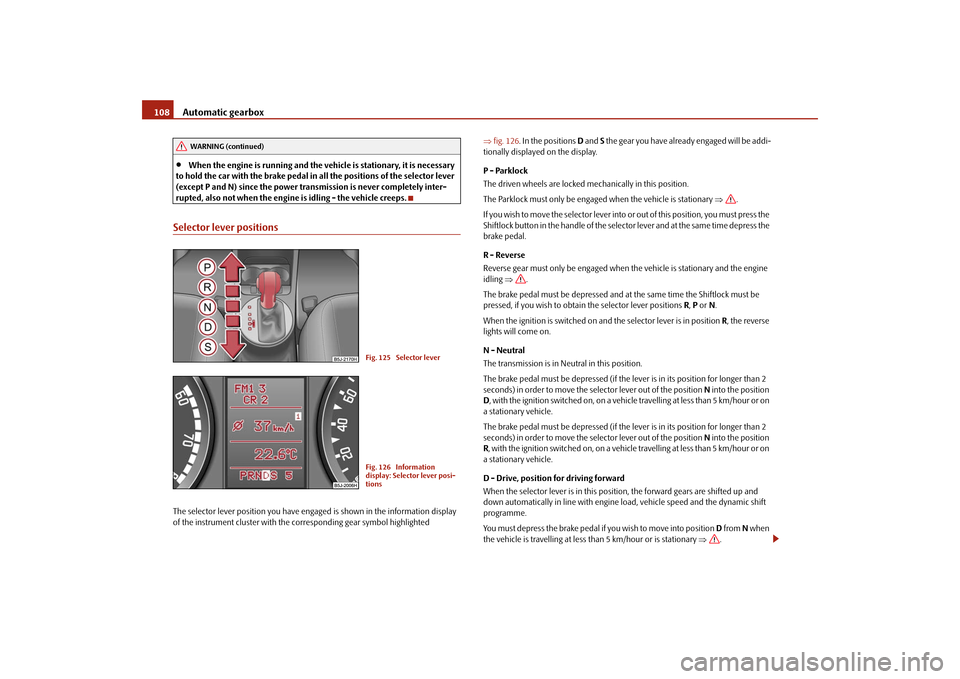
Selector lever positionsThe selector lever position you have engaged is shown in the information display
of the instrument cluster with the corresponding gear symbol highlighted ⇒fig. 126. In the positions D and S the gear you have already engaged will be addi-
tionally displayed on the display.
P - Parklock
The driven wheels are locked mechanically in this position.
The Parklock must only be engaged when the vehicle is stationary ⇒.
I f y o u w i s h t o m o v e t h e s e l e c t o r l e v e r i n to or out of this position, you must press the
Shiftlock button in the handle of the selector lever and at the same time depress the
brake pedal.
R - Reverse
Reverse gear must only be engaged when the vehicle is stationary and the engine
idling ⇒.
The brake pedal must be depressed and at the same time the Shiftlock must be
pressed, if you wish to obtain the selector lever positions R, P or N.
When the ignition is switched on and the selector lever is in position R, the reverse
lights will come on.
N - Neutral
The transmission is in Neutral in this position.
The brake pedal must be depressed (if the lever is in its position for longer than 2
seconds) in order to move the selector lever out of the position N into the position
D, with the ignition switched on, on a vehicle travelling at less than 5 km/hour or on
a stationary vehicle.
The brake pedal must be depressed (if the lever is in its position for longer than 2
seconds) in order to move the selector lever out of the position N into the position
R, with the ignition switched on, on a vehicle travelling at less than 5 km/hour or on
a stationary vehicle.
D - Drive, position for driving forward
When the selector lever is in this position, the forward gears are shifted up and
down automatically in line with engine load, vehicle speed and the dynamic shift
programme.
You must depress the brake pedal if you wish to move into position D from N when
the vehicle is travelling at less than 5 km/hour or is stationary ⇒.
WARNING (continued)
Fig. 125 Selector leverFig. 126 Information
display: Selector lever posi-
tions
s29g.4.book Page 108 Wednesday, June 17, 2009 9:54 AM
Page 111 of 263
Automatic gearbox 110Kickdown function
The kickdown function provides you with maximum acceleration
power.Fully depressing the accelerator pedal allows the kickdown function to be activated
in the desired driving program. This function has precedence over the driving
programme and serves for maximum acceleration of the vehicle when exploiting
the maximum power potential of the engine without taking into account the
current selector lever position (D, S or Tiptronic). The gearbox shifts down to one
or several gears in line with the driving state and the vehicle accelerates. The
gearbox does not shift up into the highest gear until the engine has reached its
maximum revolutions for this gear range.
WARNING
Please note that using the kickdown function can result in the driven wheels
spinning on a smooth or slippery road surface - risk of skidding!Dynamic shift programmeThe automatic gearbox of your vehicle is controlled electronically. Shifting up and
down through the gears is performed automatically on the basis of pre-defined
driving programmes.
Adopting a moderate style of driving will cause the gearbox to select the most
economical driving programme. Shifting up into a higher gear as soon as possible
and shifting down as late as possible will have a favourable effect on your fuel
consumption.
Adopting a sporty style of driving with rapid movements of the accelerator pedal
combined with sharp acceleration and frequent changes in speed, exploiting the
top speed of the car or depressing the accelerator pedal (kickdown function), will
cause the gearbox to switch over to this style of driving and shift down earlier with
frequent changes in gears in comparison to the moderate style of driving.
Selecting the most appropriate driving programme for the particular style of driving
is a continuous process. Irrespective of this it is, however, possible to switch or shift down into a dynamic shift programme by depressing the accelerator rapidly. The
gearbox shifts down into a lower gear matching the speed of the car and this allows
you to accelerate rapidly (e.g. when overtaking) without having to depress the
accelerator pedal fully into the kickdown range. The original programme will be
reactivated to match your particular style of driving once the gearbox has shifted up
again.
When driving in hilly regions, the gears are selected to match uphill and downhill
sections. This avoids the gearbox frequently shifting up and down when negotiating
an uphill stretch. When driving downhill, it is possible to shift down into the
Tiptronic position, in order to exploit the engine brake torque.
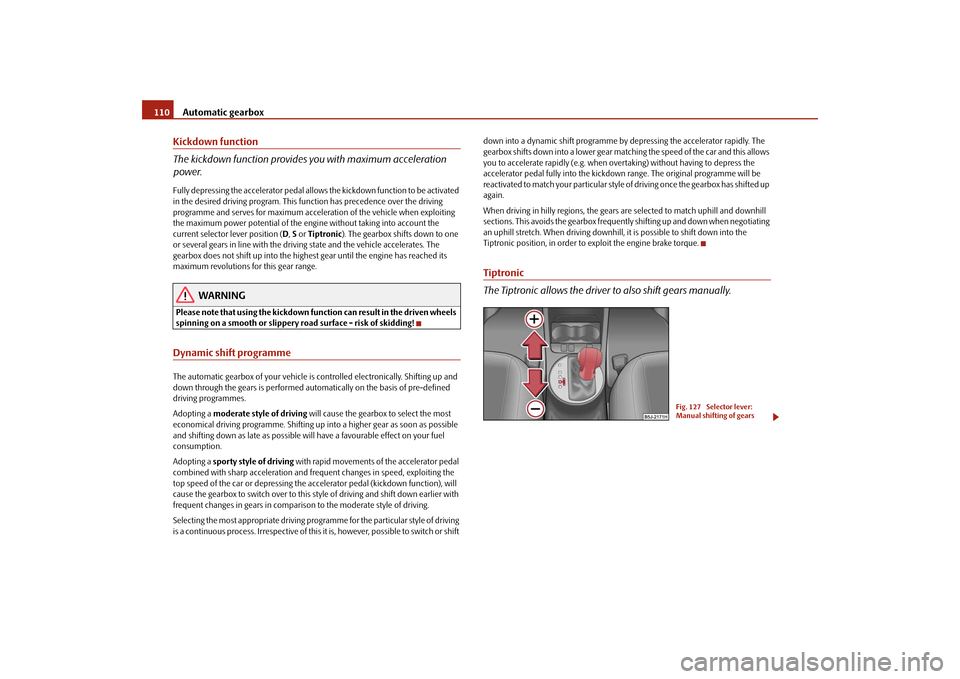
Tiptronic
The Tiptronic allows the driver to also shift gears manually.
Fig. 127 Selector lever:
Manual shifting of gears
s29g.4.book Page 110 Wednesday, June 17, 2009 9:54 AM
Page 112 of 263
Automatic gearbox111
Using the system
Safety
Driving Tips
General Maintenance
Breakdown assistance
Praktik
Technical Data
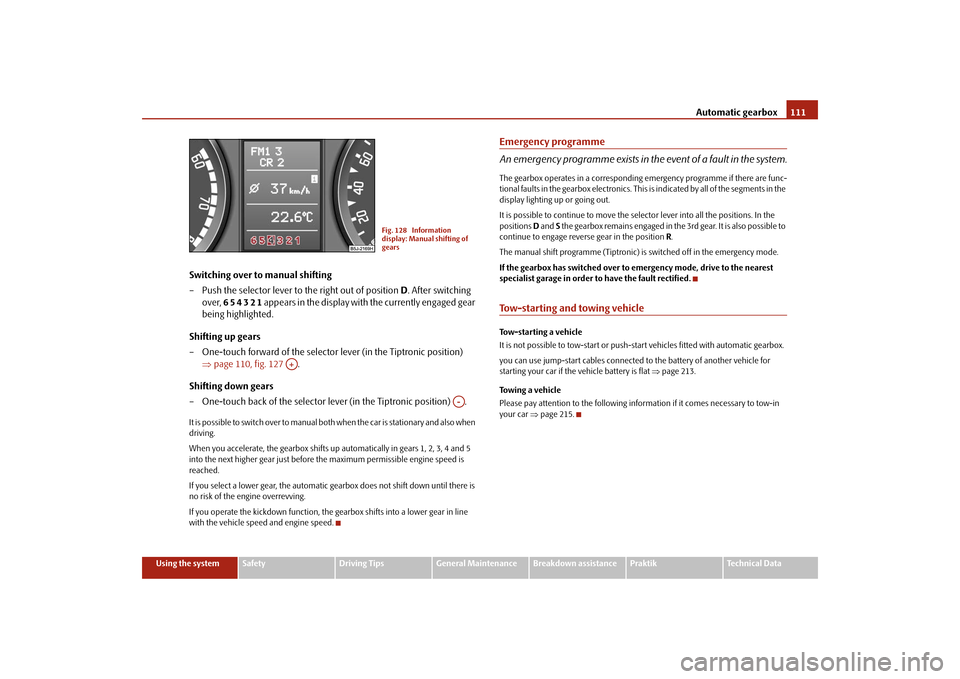
Switching over to manual shifting
– Push the selector lever to the right out of position D. After switching
over, 6 5 4 3 2 1 appears in the display with the currently engaged gear
being highlighted.
Shifting up gears
– One-touch forward of the selector lever (in the Tiptronic position)
⇒page 110, fig. 127 .
Shifting down gears
– One-touch back of the selector lever (in the Tiptronic position) .It is possible to switch over to manual both when the car is stationary and also when
driving.
When you accelerate, the gearbox shifts up automatically in gears 1, 2, 3, 4 and 5
into the next higher gear just before the maximum permissible engine speed is
reached.
If you select a lower gear, the automatic gearbox does not shift down until there is
no risk of the engine overrevving.
If you operate the kickdown function, the gearbox shifts into a lower gear in line
with the vehicle speed and engine speed.
Emergency programme
An emergency programme exists in the event of a fault in the system.The gearbox operates in a corresponding emergency programme if there are func-
tional faults in the gearbox electronics. This is indicated by all of the segments in the
display lighting up or going out.
It is possible to continue to move the selector lever into all the positions. In the
positions D and S the gearbox remains engaged in the 3rd gear. It is also possible to
continue to engage reverse gear in the position R.
The manual shift programme (Tiptronic) is switched off in the emergency mode.
If the gearbox has switched over to emergency mode, drive to the nearest
specialist garage in order to have the fault rectified.Tow-starting and towing vehicle Tow-starting a vehicle
It is not possible to tow-start or push-start vehicles fitted with automatic gearbox.
you can use jump-start cables connected to the battery of another vehicle for
starting your car if the vehicle battery is flat ⇒page 213.
Towing a vehicle
Please pay attention to the following information if it comes necessary to tow-in
your car ⇒page 215.
Fig. 128 Information
display: Manual shifting of
gears
A+
A-
s29g.4.book Page 111 Wednesday, June 17, 2009 9:54 AM
Page 113 of 263
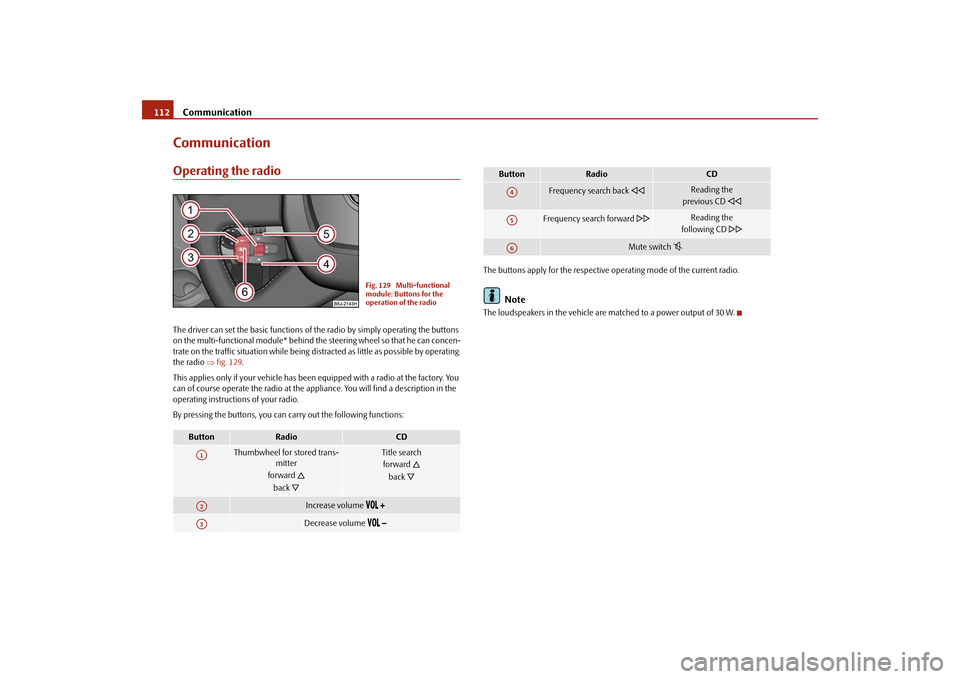
Communication 112CommunicationOperating the radioThe driver can set the basic functions of the radio by simply operating the buttons
on the multi-functional module* behind the steering wheel so that he can concen-
trate on the traffic situation while being distracted as little as possible by operating
the radio ⇒fig. 129.
This applies only if your vehicle has been equipped with a radio at the factory. You
can of course operate the radio at the appliance. You will find a description in the
operating instructions of your radio.
By pressing the buttons, you can carry out the following functions:The buttons apply for the respective operating mode of the current radio.
Note
The loudspeakers in the vehicle are matched to a power output of 30 W.
Button
Radio
CD
Thumbwheel for stored trans-
mitter
forward
back
Title search
forward
back
Increase volume
Decrease volume
Fig. 129 Multi-functional
module: Buttons for the
operation of the radio
A1A2A3
Frequency search back
Reading the
previous CD
Frequency search forward
Reading the
following CD
Mute switch
Button
Radio
CD
A4A5A6
s29g.4.book Page 112 Wednesday, June 17, 2009 9:54 AM
Page 114 of 263
Communication113
Using the system
Safety
Driving Tips
General Maintenance
Breakdown assistance
Praktik
Technical Data
Radio and mobile phone operation
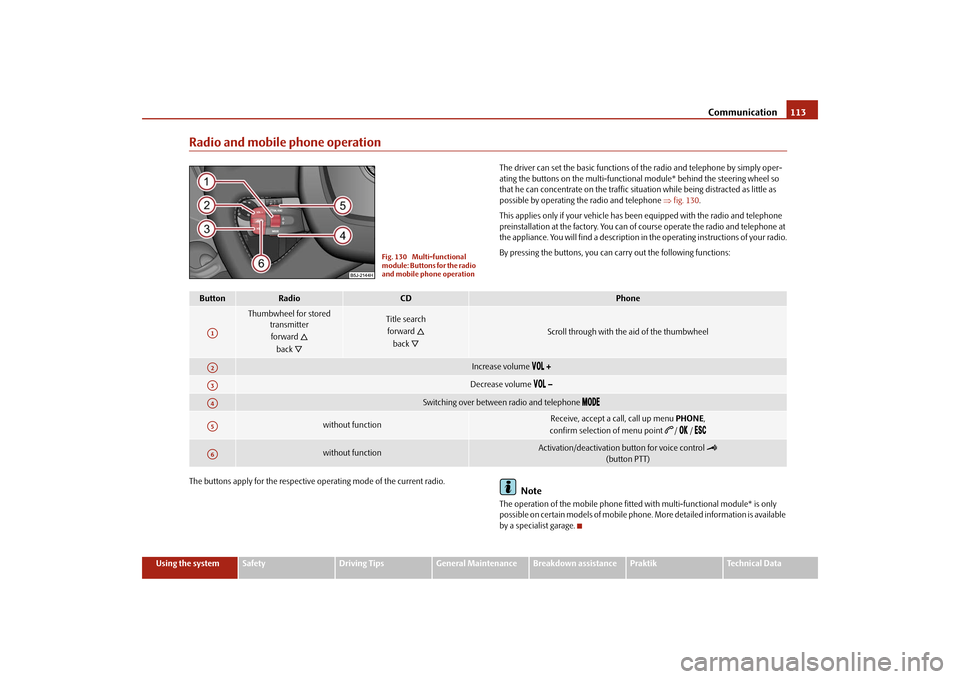
The driver can set the basic functions of the radio and telephone by simply oper-
ating the buttons on the multi-functional module* behind the steering wheel so
that he can concentrate on the traffic situation while being distracted as little as
possible by operating the radio and telephone ⇒fig. 130.
This applies only if your vehicle has been equipped with the radio and telephone
preinstallation at the factory. You can of course operate the radio and telephone at
the appliance. You will find a description in the operating instructions of your radio.
By pressing the buttons, you can carry out the following functions:
The buttons apply for the respective operating mode of the current radio.
Note
The operation of the mobile phone fitted with multi-functional module* is only
possible on certain models of mobile phone. More detailed information is available
by a specialist garage.
Fig. 130 Multi-functional
module: Buttons for the radio
and mobile phone operation
Button
Radio
CD
Phone
Thumbwheel for stored
transmitter
forward
back
Title search
forward
back
Scroll through with the aid of the thumbwheel
Increase volume
Decrease volume
Switching over between radio and telephone
without function
Receive, accept a call, call up menu PHONE,
confirm selection of menu point
/ /
without function
Activation/deactivation button for voice control
(button PTT)
A1A2A3A4A5A6
s29g.4.book Page 113 Wednesday, June 17, 2009 9:54 AM
Page 115 of 263
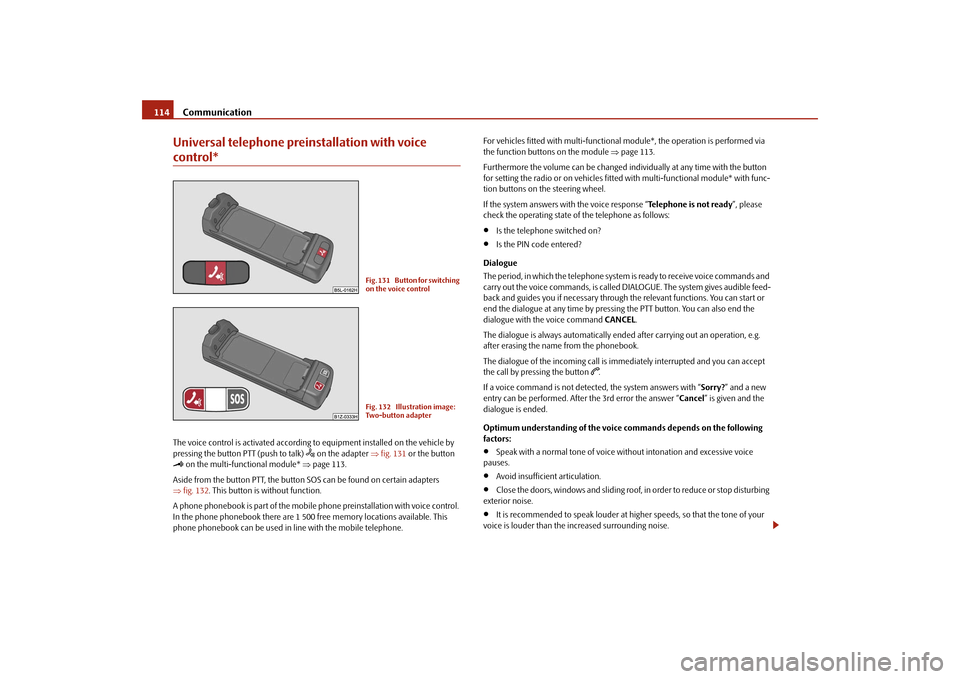
Communication 114Universal telephone preinstallation with voice control*The voice control is activated according to equipment installed on the vehicle by
pressing the button PTT (push to talk)
on the adapter ⇒fig. 131 or the button
on the multi-functional module* ⇒page 113.
Aside from the button PTT, the button SOS can be found on certain adapters
⇒fig. 132. This button is without function.
A phone phonebook is part of the mobile phone preinstallation with voice control.
In the phone phonebook there are 1 500 free memory locations available. This
phone phonebook can be used in line with the mobile telephone.For vehicles fitted with multi-functional module*, the operation is performed via
the function buttons on the module ⇒page 113.
Furthermore the volume can be changed individually at any time with the button
for setting the radio or on vehicles fitted with multi-functional module* with func-
tion buttons on the steering wheel.
If the system answers with the voice response “Telephone is not ready”, please
check the operating state of the telephone as follows:
•
Is the telephone switched on?
•
Is the PIN code entered?
Dialogue
The period, in which the telephone system is ready to receive voice commands and
carry out the voice commands, is called DIALOGUE. The system gives audible feed-
back and guides you if necessary through the relevant functions. You can start or
end the dialogue at any time by pressing the PTT button. You can also end the
dialogue with the voice command CANCEL.
The dialogue is always automatically ended after carrying out an operation, e.g.
after erasing the name from the phonebook.
The dialogue of the incoming call is immediately interrupted and you can accept
the call by pressing the button
.
If a voice command is not detected, the system answers with “Sorry?” and a new
entry can be performed. After the 3rd error the answer “Cancel” is given and the
dialogue is ended.
Optimum understanding of the voice commands depends on the following
factors:
•
Speak with a normal tone of voice without intonation and excessive voice
pauses.
•
Avoid insufficient articulation.
•
Close the doors, windows and sliding roof, in order to reduce or stop disturbing
exterior noise.
•
It is recommended to speak louder at higher speeds, so that the tone of your
voice is louder than the increased surrounding noise.
Fig. 131 Button for switching
on the voice controlFig. 132 Illustration image:
Two-button adapter
s29g.4.book Page 114 Wednesday, June 17, 2009 9:54 AM
Page 116 of 263
Communication115
Using the system
Safety
Driving Tips
General Maintenance
Breakdown assistance
Praktik
Technical Data
•
During the dialogue avoid additional noise in the vehicle, e.g. simultaneously
talking occupants.
•
Do not speak, if the system makes an announcement.
•
The microphone for voice control is directed to the driver and front passenger.
Therefore the driver and the front passenger can operate the equipment.
WARNING
Pay attention primarily to the traffic situation! As the driver you are fully
responsible for road safety. Use the telephone system only to such an extent,
so that you are in full control of your vehicle at any time.
Caution
Taking the mobile phone out of the adapter during the call can lead to interruption
of the connection. When taking out the mobile phone, the connection to the
factory-fitted antenna is interrupted, this reduces the quality of the transmitting
and receiving signal. The charging of the mobile phone battery is also interrupted.
Note
•
Please also refer to the additional instructions ⇒page 122, “Mobile phones
and two-way radio system”.
•
Should you have any questions, please contact a specialist garage.
•
The voice control of the telephone is only possible for adapters with PTT button.
Suitable adapters are available at a specialist garage.
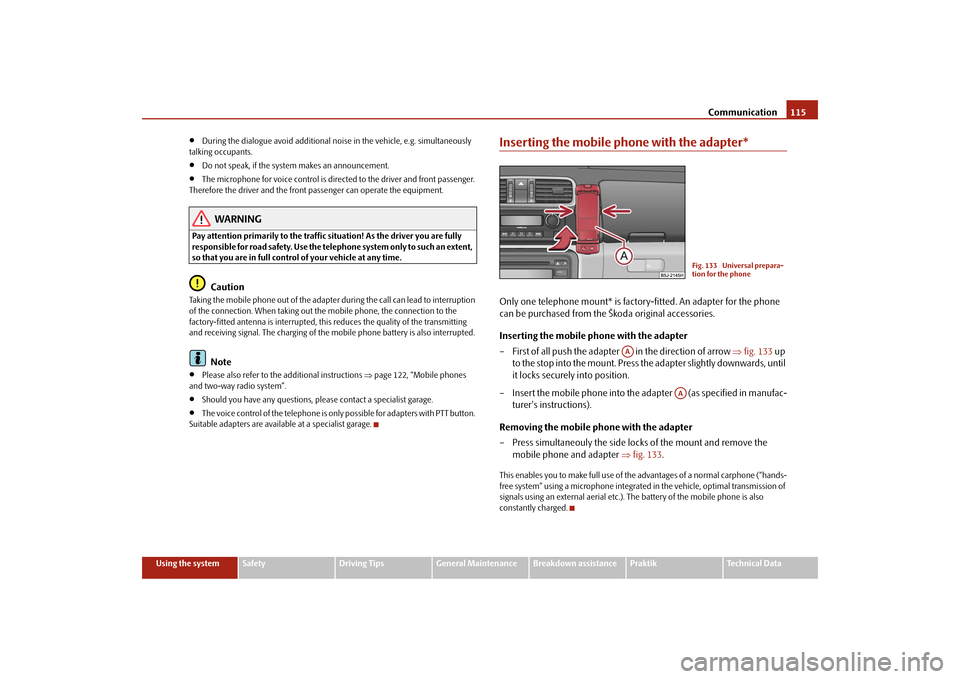
Inserting the mobile phone with the adapter*Only one telephone mount* is factory-fitted. An adapter for the phone
can be purchased from the Škoda original accessories.
Inserting the mobile phone with the adapter
– First of all push the adapter in the direction of arrow ⇒fig. 133 up
to the stop into the mount. Press the adapter slightly downwards, until
it locks securely into position.
– Insert the mobile phone into the adapter (as specified in manufac-
turer's instructions).
Removing the mobile phone with the adapter
– Press simultaneouly the side locks of the mount and remove the
mobile phone and adapter ⇒fig. 133.This enables you to make full use of the advantages of a normal carphone (“hands-
free system” using a microphone integrated in the vehicle, optimal transmission of
signals using an external aerial etc.). The battery of the mobile phone is also
constantly charged.
Fig. 133 Universal prepara-
tion for the phone
AA
AA
s29g.4.book Page 115 Wednesday, June 17, 2009 9:54 AM