warning lights SKODA ROOMSTER 2010 1.G Owner's Guide
[x] Cancel search | Manufacturer: SKODA, Model Year: 2010, Model line: ROOMSTER, Model: SKODA ROOMSTER 2010 1.GPages: 231, PDF Size: 12.91 MB
Page 34 of 231
Instruments and warning lights33
Using the system
Safety
Driving Tips
General Maintenance
Breakdown assistance
Praktik
Technical Data
WARNING
If you do not pay attention to the warning light coming on and the corre-
sponding descriptions and warning notes, this may result in injuries or major
vehicle damage.
Always adjust your speed to suit we ather, road, region and traffic condi-
tions. The route indicated by the warnin g light must not tempt you to disregard
the national regulations for road traffic.Caution
As long as the warning light
lig hts up, one m us t ta ke i nto acco unt an i ncrea se d fue l
consumption and in certain circumstan ces a power reduction of the engine.
Note
Further information about diesel particle filter page 139, “Diesel particle filter*
(diesel engine)”.Seat belt warning light*
The warning light
comes on after the ignition is sw itched on as a reminder for the
driver and front passenger to fasten the seat belt. The warning light only goes out if the
driver or front passenger has fastened his seat belt.
If the seat belt has not been fastened by the driver or front passenger, a permanent
warning signal sounds at vehicle speeds gr eater than 20 km/h and simultaneously the
warning light
flashes.
If the seat belt is not fastened by the dr iver or front passenger during the next 90
seconds, the warning signal is deactivated and the warning light
lights up perma-
nently.
In case of a load on the front passenger se at e.g. a bag (this is not recommended for
safety reasons) the warning light
indicates that the seat belt is not fastened.
Further information on the seat belts page 113, “Why seat belts?”.
s16g.4.book Page 33 Wednesda y, February 10, 2010 3:53 PM
Page 37 of 231
Unlocking and locking
36
Switching child safety lock off
– Use the vehicle key to turn the slit to the right against the direction of the arrow.
So long as the child safety lock is switched on it is not possible to open the door from
the inside with the door opening lever. In this case the door can be opened only from
the outside.Central locking system*DescriptionUnlocking or locking the vehicle causes all doors to be unlocked or locked at the same
time by the central locking system. The boot lid is unlocked when opening. It can be
opened by pressing the hand grip above the licence plate.
Operation of the central locking system is possible:
from the outside using the vehicle key page 37;
using the buttons for the central locking system page 38;
by using the remote control page 40.
Indicator light in the driver's door
After locking the vehicle the indicator light fl ashes for 2 seconds fast, then more slowly.
If the vehicle is locked and the safe securing system page 36 is not operating, the
indicator light in the driver door flashes for about 2 seconds fast, goes out and starts to
flash slowly after about 30 seconds.
If the indicator light first of all flashes fast for about 2 seconds, afterwards lights up for
about 30 seconds and then flashes slowly, there is a fault in the system of the central
locking or the interior monitor* page 42. Visit a specialist garage to obtain assist-
ance.
Convenience operatio n of the windows
One can open and close the electrically powered windows when unlocking and
locking the vehicle page 44, “Window convenience operation”. Opening a single door*
This function makes it possible to only unlock the driver's door. The other doors
remain locked and are only unlocked when the command is repeated. The single door
opening function can be first activated by recoding the control unit of the central
locking system. This work is undertaken by a specialist garage which can give you more
information.
Automatic locking*
All the doors and the boot lid are locked automatically once the car reaches a speed of
about 15 km/h.
If the ignition key is withdrawn, the car is
then automatically unlocked again. The driver
can also unlock the vehicle by pressing the button
of the central locking system.
If you wish, you can have a specialist gara ge activate the automatic locking function.
WARNING
Locking the doors prevents involuntary op ening in an exceptional situation (an
accident). Locked doors prevent unwanted entry into the vehicle from outside,
for example at road crossings. Locked do ors do, however, make it more difficult
for rescuers to get into the vehicle in an emergency - danger to life!
Note
In the event of an accident in which the airbags are deployed, the locked doors are
automatically unlocked in order to enable rescuers to gain access to the vehicle.
Only the front doors can be unlocked and locked using the key if the central locking
system fails. You can operate the rear doors manually.
Emergency locking of the door page 38.
Emergency unlocking of the boot lid page 39.
Safe securingThe central locking system is equipped with a safe securing
5) system. Locking the
vehicle from the outside causes the door lo cks to be automatically blocked. The indi-
5)The equipment is only valid for some countries.
s16g.4.book Page 36 Wednesday, February 10, 2010 3:53 PM
Page 38 of 231
Unlocking and locking37
Using the system
Safety
Driving Tips
General Maintenance
Breakdown assistance
Praktik
Technical Data
cator light in the driver's door flashes. It is
not possible to open the doors with the door
handle ei the r fro m the ins id e or from the outsi de. T hi s a cts as an ef fe cti ve dete rrent for
attempts to break into your vehicle.
You can deactivate the safe securing system by locking twice within 5 seconds.
The safe securing system is again activated the next time the vehicle is unlocked and
locked again.
If the vehicle is locked and the safe securing system is deactivated, you can open the
vehicle from the inside by pulling on the d oor opening lever. The door is unlocked and
opened at the same time.
WARNING
If the vehicle is locked from the outside and the safe securing system is acti-
vated, there must not be any person and animals in the vehicle as it is then not
possible to open either a door or a window from the inside. The locked doors
make it more difficult for rescuers to get into the vehicle in an emergency -
hazard!
Note
The anti-theft alarm system* is also activated with the deactivated safe securing
system when locking the vehicle. The interior monitor* is however not activated.Unlocking the vehicle using the key
– Turn the key in the locking cylinder of the driver's door in the direction of travel
(unlock position) fig. 25 .
– Pull on the door handle and carefully open the door.
All the doors are unlocked.
The boot lid is then unlocked.
The switched on interior lights come on over the door contact.
The safe securing system is deactivated.
The windows open provided the key is held in the unlock position.
The indicator light in the driver's door stops flashing if the vehicle is not fitted with
an anti-theft alarm system* page 41.Note
If the vehicle is equipped with an anti-theft alarm system*, you must insert the key into
the ignition lock and switch the ignition on within 15 seconds after unlocking the door
in order to deactivate the anti-theft alarm system. The alarm will be triggered if you
do not switch on the ignition within 15 seconds.Locking the vehicle with the key– Turn the key in the locking cylinder of the driver's door in the opposite direction of
travel (lock position) fig. 25 .
All the doors and the boot lid are locked.
The switched on interior lights go out over the door contact.
The windows close provided the key is held in the lock position.
The safe securing system is activated immediately.
The indicator light in the dr iver door begins flashing.Note
The opened front doors cannot be unlocked. It must be locked separately after closing
it.
Fig. 25 Turning the key for unlocking
and locking the vehicle
AAAB
s16g.4.book Page 37 Wednesda y, February 10, 2010 3:53 PM
Page 39 of 231
Unlocking and locking
38
Button for the central locking system*If the vehicle was not locked from the outsid e, you can also unlock and lock it with the
rocker switch without th e ignition switched on.Locking all doors and the boot lid– Press button fig. 26 . The symbol
in the button comes on.
Unlocking all doors and the boot lid– Press button fig. 26 . The symbol
goes out in the button.
The following applies if you have locked your vehicle using the button :
It is not possible to open the doors or the boot lid from the outside (safety feature,
e.g. when stopping at traffic lights etc.).
You can unlock the doors individually from the inside and open them by pulling the
door opening lever.
As long as one door is opened, the doors cannot be locked in order to avoid inad-
vertently locking the key in the vehicle.
In the event of an accident in which the airbags are deployed, the locked doors are
automatically unlocked from the inside in orde r to enable rescuers to gain access to
the vehicle.
WARNING
The central locking system al so operates if the ignition is switched off. All the
doors and the boot lid are locked. Children should never be left unattended in
the vehicle since it is difficult to provide assistance from the outside when the
doors are locked. Locked doors make it difficult for rescuers to get into the
vehicle in an emergency - hazard!
Note
The door opening lever and the button for th e central locking system do not operate if
the safe securing system is activated.Emergency locking of the doorsAn emergency locking mechanism is located on the rear side of the doors which have
no locking cylinder; it is only visible after opening the door.Locking– Remove the panel fig. 27 .
– Insert the key into the slot and turn it into the horizontal position in the direc- tion of the arrow (mirror-inverted on the right doors).
– Re-insert the panel.
After closing the door, you can no longer open it from outside. If the child safety lock
is not switched on, it is possible to open the door from the inside by pulling once on
Fig. 26 Button for the central locking
system
A1A2
A1
Fig. 27 Emergency locking of the door
AA
AB
s16g.4.book Page 38 Wednesday, February 10, 2010 3:53 PM
Page 42 of 231
Unlocking and locking41
Using the system
Safety
Driving Tips
General Maintenance
Breakdown assistance
Praktik
Technical Data
The safe securing system along with the anti-theft alarm system* are, however, deac-
tivated during these 30 seconds.
When the vehicle is unlocked or locked, the interior lights in the door contact are auto-
matically switched on or off.
Display of the locking
The turn signal lights flash once to confir
m that the vehicle has been correctly locked.
If the vehicle is locked by pressing the bu tton and some doors or the boot lid are
not closed, the turn signal lights flash only after closing.
WARNING
If the vehicle is locked from the outside and the safe securing system is acti-
vated, there must not be any person in the vehicle as it is then not possible to
open either a door or a window from the inside. The locked doors make it more
difficult for rescuers to get into the vehicle in an emergency - hazard!
Note
Operate the radio remote control only when the doors and boot lid are closed and
you have visual contact with the vehicle.
Once in the vehicle, you must not press the lock button
of the master key before
inserting the key into the ignition lock in order to avoid the vehicle being inadvertently
locked and the anti-theft alarm system* being switched on. Should this happen, press
the unlock button
of the master key.
Synchronisation of the remote controlIf the vehicle cannot be unlocked by actuatin g the remote control system then it is
possible that the code in the key and the co ntrol unit in the vehicle are no longer
synchronised. This can occur when the buttons on the radio-operated key are actuated
a number of times outside of the operative range of the equipment or the battery on
the remote control was replaced.
This means it is necessary to synchronise the code as follows:
press any button on the remote control;
pressing of the button means that the door will unlock with the key within 1
minute.
Anti-theft alarm system*DescriptionThe anti-theft alarm system increases the level of protection against people seeking to
break into the vehicle. The system triggers audible and visual warning signals if an
attempt is made to break into the vehicle.
How is the alarm system activated?
The anti-theft alarm system is activated au tomatically when the unlocked vehicle is
locked with the key inserted in the driver's door or with the remote control key. It is
activated 30 seconds after locking the door.
How is the alarm system deactivated?
The anti-theft alarm system is deactivated if the vehicle is unlocked by only using the
radio remote control. The anti-theft alarm system is reactivated if the vehicle is not
opened within 30 seconds after transmitting the radio signal.
Once you unlock the vehicle by inserting the ke y into the driver door you then have to
insert the key into the ignition lock and sw itch the ignition on within 15 seconds after
opening the door in order to deactivate the anti-theft alarm system. The alarm will be
triggered if you do not switch on the ignition within 15 seconds.
When is the alarm triggered?
The following security areas of the locked vehicle are monitored:
bonnet;
boot lid;
doors;
ignition lock;
vehicle interior* page 42;
Angle of the vehicle* page 42;
Decoupling of the attached trailer;
A3
s16g.4.book Page 41 Wednesda y, February 10, 2010 3:53 PM
Page 44 of 231
Unlocking and locking43
Using the system
Safety
Driving Tips
General Maintenance
Breakdown assistance
Praktik
Technical Data
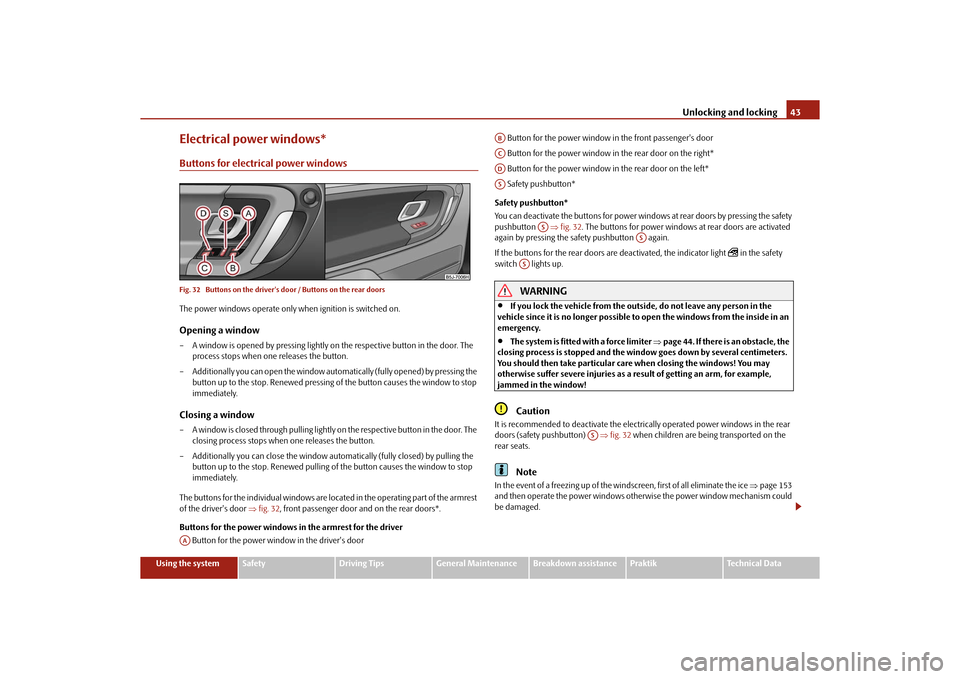
Electrical power windows*Buttons for electrical power windowsFig. 32 Buttons on the driver's door / Buttons on the rear doorsThe power windows operate only when ignition is switched on.Opening a window– A window is opened by pressing lightly on the respective button in the door. The
process stops when one releases the button.
– Additionally you can open the window automatically (fully opened) by pressing the button up to the stop. Renewe d pressing of the button causes the window to stop
immediately.Closing a window– A window is closed through pulling lightly on the respective button in the door. The
closing process stops when one releases the button.
– Additionally you can close the window auto matically (fully closed) by pulling the
button up to the stop. Renewed pulling of the button causes the window to stop
immediately.
The buttons for the individual windows are located in the operating part of the armrest
of the driver's door fig. 32 , front passenger door and on the rear doors*.
Buttons for the power windows in the armrest for the driver Button for the power window in the driver's door Button for the power window in the front passenger's door
Button for the power window in the rear door on the right*
Button for the power window in the rear door on the left*
Safety pushbutton*
Safety pushbutton*
You can deactivate the buttons for power wind ows at rear doors by pressing the safety
pushbutton fig. 32 . The buttons for power windows at rear doors are activated
again by pressing the safety pushbutton again.
If the buttons for the rear doors are deactivated, the indicator light
in the safety
switch lights up.
WARNING
If you lock the vehicle from the outside, do not leave any person in the
vehicle since it is no longer possible to open the windows from the inside in an
emergency.
The system is fitted with a force limiter page 44. If there is an obstacle, the
closing process is stopped and the window goes down by several centimeters.
You should then take particular care when closing the windows! You may
otherwise suffer severe injuries as a re sult of getting an arm, for example,
jammed in the window!Caution
It is recommended to deactivate the electrically operated power windows in the rear
doors (safety pushbutton) fig. 32 when children are being transported on the
rear seats.
Note
In the event of a freezing up of the windscreen, first of all eliminate the ice page 153
and then operate the power windows otherwise the power window mechanism could
be damaged.
AA
ABACADAS
AS
AS
AS
AS
s16g.4.book Page 43 Wednesda y, February 10, 2010 3:53 PM
Page 47 of 231
Lights and Visibility
46
Lights and VisibilityLightsSwitching lights on and off
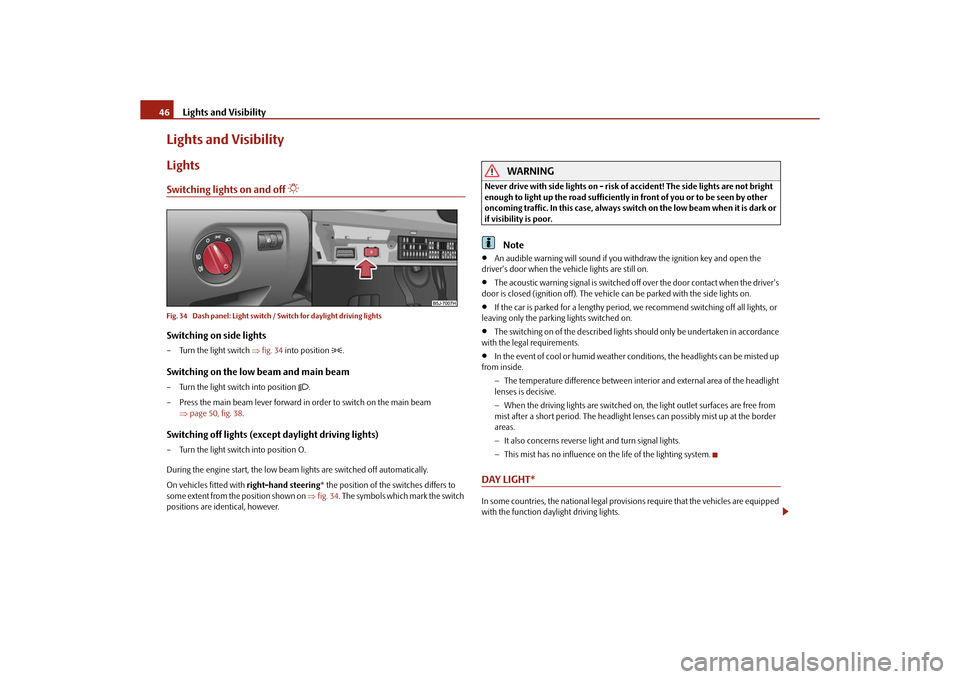
Fig. 34 Dash panel: Light switch / Switch for daylight driving lightsSwitching on side lights– Turn the light switch fig. 34 into position
.
Switching on the low beam and main beam– Turn the light switch into position
.
– Press the main beam lever forward in order to switch on the main beam page 50, fig. 38 .
Switching off lights (except daylight driving lights)– Turn the light switch into position O.
During the engine start, the low beam lights are switched off automatically.
On vehicles fitted with right-hand steering* the position of the switches differs to
some extent from the position shown on fig. 34 . The symbols which mark the switch
positions are identical, however.
WARNING
Never drive with side lights on - risk of accident! The side lights are not bright
enough to light up the road sufficiently in front of you or to be seen by other
oncoming traffic. In this case, always switch on the low beam when it is dark or
if visibility is poor.
Note
An audible warning will sound if you wi thdraw the ignition key and open the
driver's door when the vehicle lights are still on.
The acoustic warning signal is switched off over the door contact when the driver's
door is closed (ignition off). The vehicle can be parked with the side lights on.
If the car is parked for a lengthy period, we recommend switching off all lights, or
leaving only the parking lights switched on.
The switching on of the described lights should only be undertaken in accordance
with the legal requirements.
In the event of cool or humid weather conditions, the headlights can be misted up
from inside.
The temperature difference between interior and external area of the headlight
lenses is decisive.
When the driving lights are switched on, the light outlet surfaces are free from
mist after a short period. The headlight lens es can possibly mist up at the border
areas.
It also concerns reverse light and turn signal lights.
This mist has no influence on th e life of the lighting system.
DAY LIGHT*In some countries, the national legal provisions require that the vehicles are equipped
with the function daylight driving lights.
s16g.4.book Page 46 Wednesda y, February 10, 2010 3:53 PM
Page 48 of 231
Lights and Visibility47
Using the system
Safety
Driving Tips
General Maintenance
Breakdown assistance
Praktik
Technical Data
Switching on daylight driving lights*– Remove the cover of the fuse box on the left side of the dash panel page 191.
– Turn the light switch into position O page 46, fig. 34.
– Switch on the switch for daylight driving lights page 46, fig. 34 .Switching off daylight driving lights*– Switch off the switch for the daylight driving lights page 46, fig. 34 .
– Turn the light switch to the position side lights
or low beam
page 46,
fig. 34 .
When the daylight driving lights are switch ed on, also the low beam shines together
with the side lights (valid for vehicles without fog lights).
On vehicles which are fitted with bulbs for daylight driving lights
6) in the fog lights*,
the side lights and the low beam
7) do not come on when activating the function
daylight driving lights.
Halogen projector headlights with cornering light function*For a better cornering illumination, the ha logen projector headlights with cornering
light function are set in the optimal positi on in line with the vehicle speed and the
steering angle.
If the warning light
comes on while driving or after the ignition is switched on, a
fault is confirmed.
WARNING
If there is a fault in the halogen projec tor headlights with cornering light func-
tion, the warning light
lights up in the instrument cluster. The halogen
projector headlights with cornering light function are automatically lowered to
the emergency position, which prevents a possible dazzling of oncoming traffic.
Thus the illuminated length of the road is shortened. Drive carefully and have
the car inspected immediatel y by a specialist garage.
Tourist light*Halogen projector headlights with cornering light functionThis mode makes it possible to drive in countries with opposing traffic system, driving
on the left/right, without dazzling the oncoming vehicles. When the mode “tourist
light” is active, the side to side swivel of the headlights is deactivated.Activating tourist lightBefore activating the tourist light, the following conditions must be met:
Ignition switched off, light switched off (light switch in the position O), control dial for
the headlamp beam adjustment in the position 0, no gear engaged or selector lever in
the position N (automatic gearbox), tourist light deactivated.
– Switch on the ignition.
Up to 10 seconds after the ignition is switched on:
– Turn the light switch to the position
page 46.
– Engage the reverse gear (manual gearbox) or move the selector lever into the posi- tion R (automatic gearbox).
– Turn the control dial for headlamp beam adjustment from the position 0 to the
position 3 page 49.
Deactivating tourist lightBefore deactivating the tourist light, the following conditions must be met:
Ignition switched off, light switched off (light switch in the position O), control dial for
the headlamp beam adjustment in the position 3, no gear engaged or selector lever in
the position N (automatic gearbox), tourist light activated.
– Switch on the ignition.
Up to 10 seconds after the ignition is switched on:
– Turn the light switch to the position
page 46.
– Engage the reverse gear (manual gearbox) or move the selector lever into the posi- tion R (automatic gearbox).
– Turn the control dial for headlamp beam adjustment from the position 3 to the
position 0 page 49.
6)Valid for vehicles Scout.7)Only valid for some countries.
s16g.4.book Page 47 Wednesda y, February 10, 2010 3:53 PM
Page 49 of 231
Lights and Visibility
48
The adaptation of the halogen projector he adlights must be performed as follows
page 146.Fog lights*
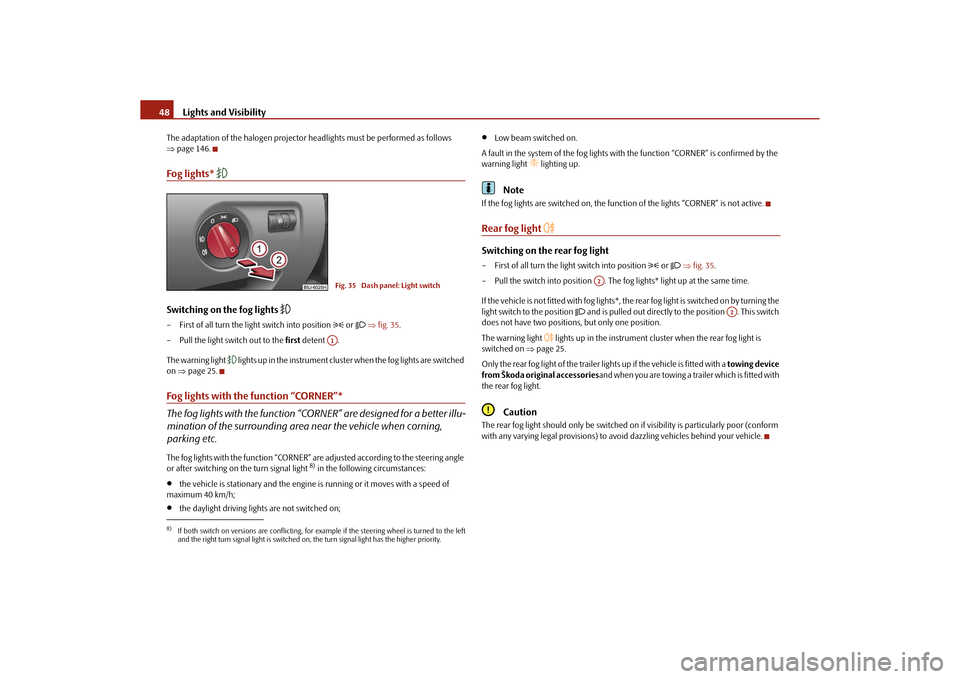
Switching on the fog lights
– First of all turn the light switch into position
or fig. 35 .
– Pull the light switch out to the first detent .
The warning light
l i g h t s u p i n t h e i n s t r u m e n t c l u s t e r when the fog lights are switched
on page 25.
Fog lights with the function “CORNER”*
The fog lights with the function “CORNER” are designed for a better illu-
mination of the surrounding area near the vehicle when corning,
parking etc.The fog lights with the function “CORNER” ar e adjusted according to the steering angle
or after switching on the turn signal light
8) in the following circumstances:
the vehicle is stationary and the engine is running or it moves with a speed of
maximum 40 km/h;
the daylight driving lights are not switched on;
Low beam switched on.
A fault in the system of the fog lights with the function “CORNER” is confirmed by the
warning light
lighting up.
Note
If the fog lights are switched on, the function of the lights “CORNER” is not active.Rear fog light
Switching on the rear fog light– First of all turn the light switch into position
or fig. 35 .
– Pull the switch into position . The fog lights* light up at the same time.
If the vehicle is not fitted with fog lights*, th e rear fog light is switched on by turning the
light switch to the position
and is pulled out directly to the position . This switch
does not have two position s, but only one position.
The warning light
lights up in the instrument cluster when the rear fog light is
switched on page 25.
Only the rear fog light of the trailer lights up if the vehicle is fitted with a towing device
from Škoda original accessories and when you are towing a trailer which is fitted with
the rear fog light.
Caution
The rear fog light should only be switched on if visibility is partic ularly poor (conform
with any varying legal provisions) to avoid dazzling vehicles behind your vehicle.
8)If both switch on versions are conflicting, for example if the steering wheel is turned to the left
and the right turn signal light is switched on, the turn signal light has the higher priority.
Fig. 35 Dash panel: Light switchA1
A2
A2
s16g.4.book Page 48 Wednesda y, February 10, 2010 3:53 PM
Page 50 of 231
Lights and Visibility49
Using the system
Safety
Driving Tips
General Maintenance
Breakdown assistance
Praktik
Technical Data
Headlamp range adjustment
Once the low beam is switched on you can then adapt the range of the
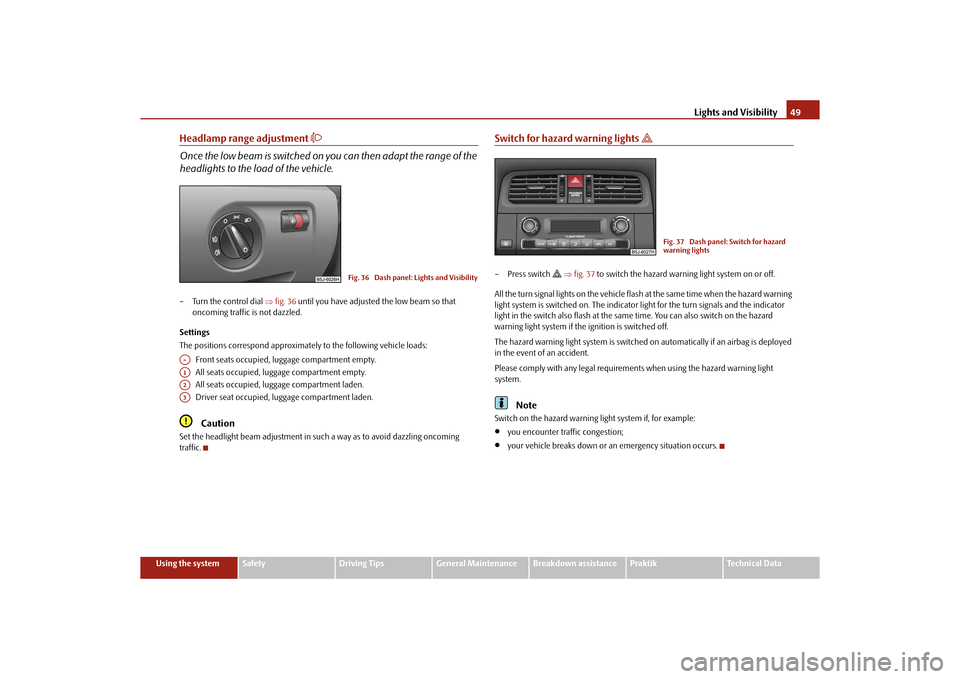
headlights to the lo ad of the vehicle.– Turn the control dial fig. 36 until you have adjusted the low beam so that
oncoming traffic is not dazzled.
Settings
The positions correspond approximately to the following vehicle loads:
Front seats occupied, luggage compartment empty.
All seats occupied, luggage compartment empty.
All seats occupied, luggage compartment laden.
Driver seat occupied, lu ggage compartment laden.
Caution
Set the headlight beam adjustment in su ch a way as to avoid dazzling oncoming
traffic.
Switch for hazard warning lights
– Press switch
fig. 37 to switch the hazard warning light system on or off.
All the turn signal lights on the vehicle flas h at the same time when the hazard warning
light system is switched on. The indicator light for the turn signals and the indicator
light in the switch also flash at the same time. You can also switch on the hazard
warning light system if the ignition is switched off.
The hazard warning light system is switched on automatically if an airbag is deployed
in the event of an accident.
Please comply with any legal requirements when using the hazard warning light
system.
Note
Switch on the hazard warning light system if, for example:
you encounter traffic congestion;
your vehicle breaks down or an emergency situation occurs.
Fig. 36 Dash panel: Lights and Visibility
A-A1A2A3
Fig. 37 Dash panel: Switch for hazard
warning lights
s16g.4.book Page 49 Wednesda y, February 10, 2010 3:53 PM