instrument cluster SKODA SUPERB 2008 Owner´s Manual
[x] Cancel search | Manufacturer: SKODA, Model Year: 2008, Model line: SUPERB, Model: SKODA SUPERB 2008Pages: 252, PDF Size: 16.33 MB
Page 56 of 252
Closing from the inside›Grasp pull handle C and close the door.WARNING■Make sure that the door has closed correctly as it can open suddenly
while the vehicle is being driven – there is a risk of death.■
Only open and close the door when there is no one in the opening/closing
sweep – there is a risk of injury.
■
An opened door can close spontaneously if there is a strong wind or the
vehicle is on a slope – there is a risk of injury.
■
Never drive with the doors open - there is a risk of death!
Unlocking / locking - KESSY
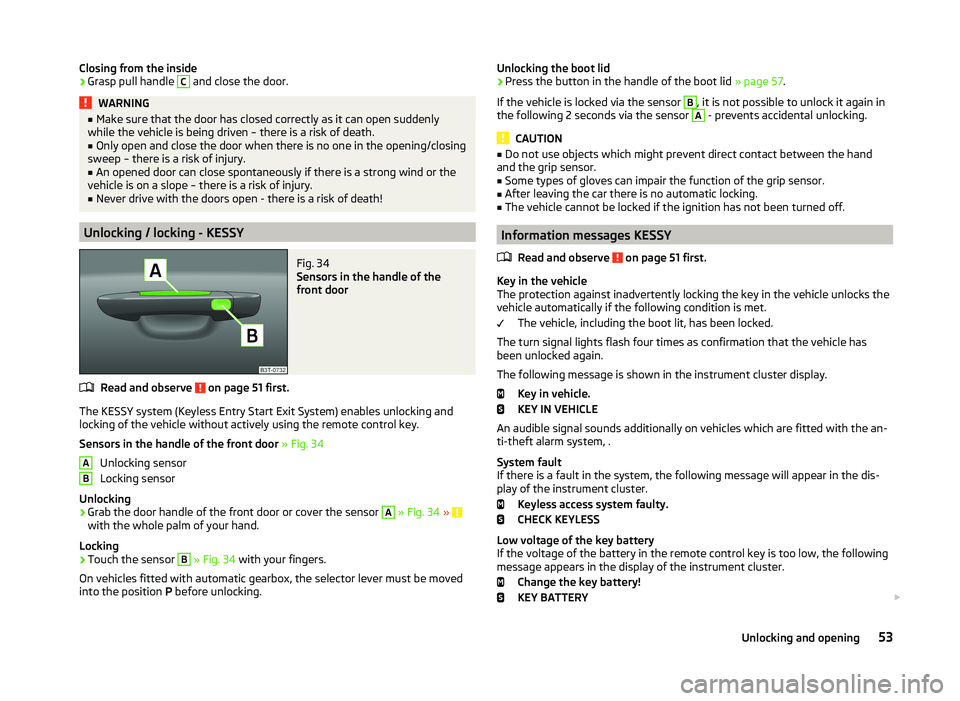
Fig. 34
Sensors in the handle of the
front door
Read and observe on page 51 first.
The KESSY system (Keyless Entry Start Exit System) enables unlocking and
locking of the vehicle without actively using the remote control key.
Sensors in the handle of the front door » Fig. 34
Unlocking sensor
Locking sensor
Unlocking
›
Grab the door handle of the front door or cover the sensor
A
» Fig. 34 » with the whole palm of your hand.
Locking
›
Touch the sensor
B
» Fig. 34 with your fingers.
On vehicles fitted with automatic gearbox, the selector lever must be moved
into the position P before unlocking.
ABUnlocking the boot lid›Press the button in the handle of the boot lid » page 57.
If the vehicle is locked via the sensor B
, it is not possible to unlock it again in
the following 2 seconds via the sensor
A
- prevents accidental unlocking.
CAUTION
■ Do not use objects which might prevent direct contact between the hand
and the grip sensor.■
Some types of gloves can impair the function of the grip sensor.
■
After leaving the car there is no automatic locking.
■
The vehicle cannot be locked if the ignition has not been turned off.
Information messages KESSY
Read and observe
on page 51 first.
Key in the vehicle
The protection against inadvertently locking the key in the vehicle unlocks the
vehicle automatically if the following condition is met.
The vehicle, including the boot lit, has been locked.
The turn signal lights flash four times as confirmation that the vehicle has
been unlocked again.
The following message is shown in the instrument cluster display. Key in vehicle.
KEY IN VEHICLE
An audible signal sounds additionally on vehicles which are fitted with the an-
ti-theft alarm system, .
System fault
If there is a fault in the system, the following message will appear in the dis-
play of the instrument cluster.
Keyless access system faulty.
CHECK KEYLESS
Low voltage of the key battery
If the voltage of the battery in the remote control key is too low, the following
message appears in the display of the instrument cluster.
Change the key battery!
KEY BATTERY
53Unlocking and opening
Page 72 of 252
Daylight running lights (DAY LIGHT)Read and observe
on page 67 first.
The daytime running lights (hereafter only function) provide lighting for the
front of the vehicle.
The lights are switched on automatically if the following conditions are met.
The light switch is in the position
or
» Fig. 49 on page 68 .
The ignition is switched on.
The parking aid is activated.
Deactivating the function
›
Switch off the ignition.
›
Pull the turn signal- and main beam lever ( » Fig. 50 on page 69 ) towards
the steering wheel, push down and hold in this position.
›
Switch on the ignition.
›
Hold the lever in this position for at least 3 seconds after switching on the
ignition.
Activating the function
›
Switch off the ignition.
›
Pull the turning signal and main beam lever towards the steering wheel,
push it up and hold it in this position.
›
Switch on the ignition.
›
Hold the lever in this position for at least 3 seconds after switching on the
ignition.
On vehicles with MAXI DOT display, the function can be enabled or disabled in
the menu item Dayl. dri. light » page 47 .
WARNINGWhen the daytime running light is switched on, the parking lights (neither
at the front nor the rear) and the number plate lights are not lit. Therefore
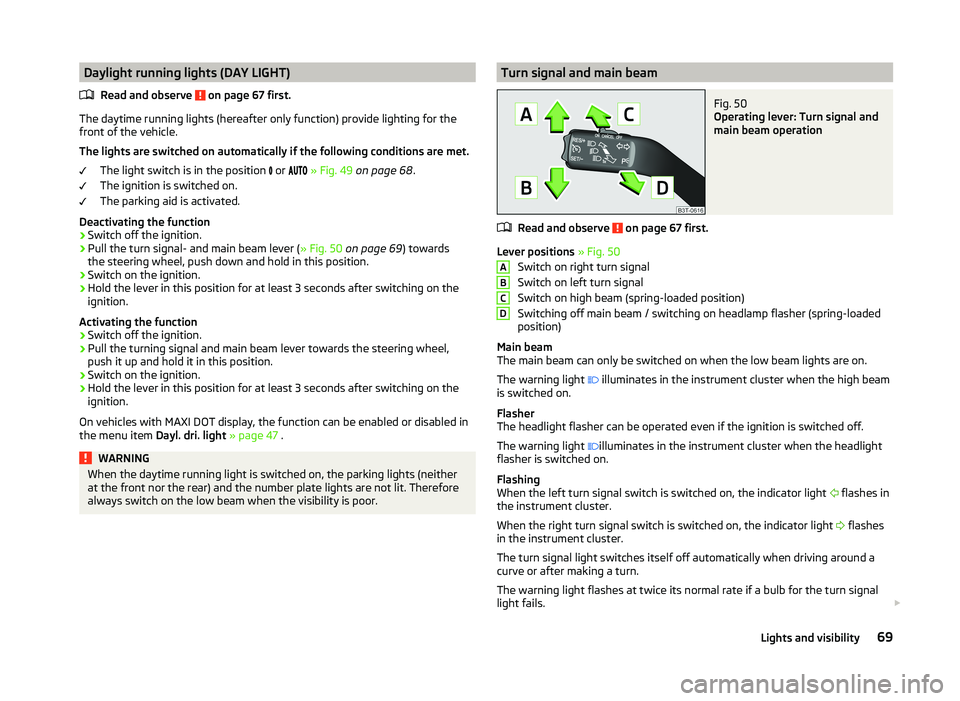
always switch on the low beam when the visibility is poor.Turn signal and main beamFig. 50
Operating lever: Turn signal and
main beam operation
Read and observe on page 67 first.
Lever positions » Fig. 50
Switch on right turn signal
Switch on left turn signal
Switch on high beam (spring-loaded position)
Switching off main beam / switching on headlamp flasher (spring-loaded
position)
Main beam
The main beam can only be switched on when the low beam lights are on.
The warning light illuminates in the instrument cluster when the high beam
is switched on.
Flasher
The headlight flasher can be operated even if the ignition is switched off.
The warning light illuminates in the instrument cluster when the headlight
flasher is switched on.
Flashing
When the left turn signal switch is switched on, the indicator light flashes in
the instrument cluster.
When the right turn signal switch is switched on, the indicator light flashes
in the instrument cluster.
The turn signal light switches itself off automatically when driving around a
curve or after making a turn.
The warning light flashes at twice its normal rate if a bulb for the turn signal
light fails.
ABCD69Lights and visibility
Page 74 of 252
Tourist lights (Travel mode)
This mode makes it possible to drive in countries with opposing traffic system
(driving on the left/right) without dazzling the oncoming vehicles.
When this mode is active, the above mentioned modes and the side swivel of the headlights are deactivated.
This mode can be enabled or disabled via the MAXI DOT display in the Travel
mode » page 48 , Lights and visibility menu option.WARNINGIf the AHL system is defective, the headlights are automatically lowered to
the emergency position, which prevents a possible dazzling of oncoming
traffic. This reduces the cone of light in front of the vehicle. Drive carefully
and visit a specialist garage as soon as possible.
Note
When the “tourist light” mode is active, the warning light flashes for 10 sec-
onds each time the ignition is switched on.
Fog lights
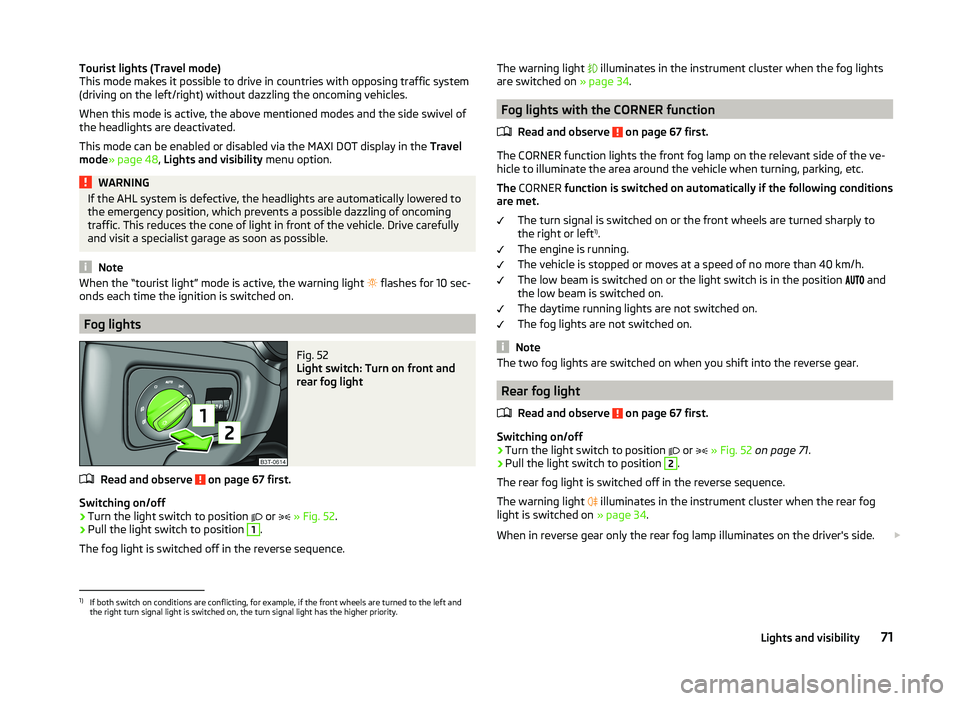
Fig. 52
Light switch: Turn on front and
rear fog light
Read and observe on page 67 first.
Switching on/off
›
Turn the light switch to position or
» Fig. 52 .
›
Pull the light switch to position
1
.
The fog light is switched off in the reverse sequence.
The warning light illuminates in the instrument cluster when the fog lights
are switched on » page 34.
Fog lights with the CORNER function
Read and observe
on page 67 first.
The CORNER function lights the front fog lamp on the relevant side of the ve-
hicle to illuminate the area around the vehicle when turning, parking, etc.
The CORNER function is switched on automatically if the following conditions
are met.
The turn signal is switched on or the front wheels are turned sharply to
the right or left 1)
.
The engine is running.
The vehicle is stopped or moves at a speed of no more than 40 km/h.
The low beam is switched on or the light switch is in the position and
the low beam is switched on.
The daytime running lights are not switched on.
The fog lights are not switched on.
Note
The two fog lights are switched on when you shift into the reverse gear.
Rear fog light
Read and observe
on page 67 first.
Switching on/off
›
Turn the light switch to position or
» Fig. 52 on page 71 .
›
Pull the light switch to position
2
.
The rear fog light is switched off in the reverse sequence.
The warning light illuminates in the instrument cluster when the rear fog
light is switched on » page 34.
When in reverse gear only the rear fog lamp illuminates on the driver's side.
1)
If both switch on conditions are conflicting, for example, if the front wheels are turned to the left and
the right turn signal light is switched on, the turn signal light has the higher priority.
71Lights and visibility
Page 121 of 252

NoteAs soon as the windscreen mists up, press the symbol button . Press the
button once the windscreen has demisted.
Controlling blower
The Climatronic system controls the blower stages automatically in line with
the interior temperature.
However, the blower stages can be manually adapted to suit your particular
needs.
›
Repeatedly pressing the symbol button on the left or right reduces or in-
creases blower speed.
If the blower is switched off, the Climatronic system is switched off.
The set blower speed is displayed above the symbol button when the re-
spective number of warning lights illuminate.
WARNING■ “Stale air” may result in fatigue in the driver and occupants, reduce atten-
tion levels and also cause the windows to mist up. The risk of having an ac-
cident increases.■
Do not switch off the Climatronic system for longer than necessary.
■
Switch on the Climatronic system as soon as the windows mist up.
Defrosting windscreen
Switching on
›
Press the
button » Fig. 126 on page 115 .
›
Press the
button » Fig. 126 on page 115 .
Switching off
›
Press the symbol button
again or press the symbol button
.
›
Press the
button again.
More air flows out of the air outlet vents 1 » Fig. 123 on page 110 . The tempera-
ture control is controlled automatically.
Auxiliary heating (auxiliary heating and ventilation)
Introduction
This chapter contains information on the following subjects:
Switching on/off
119
Radio remote control
120
Functional requirements of the auxiliary heating (auxiliary heating and ventila-
tion)
The charge state of the vehicle battery is sufficient.
The fuel supply is adequate (the warning icon is not lit in the display of
the instrument cluster).
Auxiliary ventilation
The auxiliary ventilation enables fresh air to flow into the vehicle interior by
switching off the engine, whereby the interior temperature is effectively de-
creased (e.g. with the vehicle parked in the sun).
Additional heating (hereinafter only as a aux. heating)
The auxiliary heating can be used when both when stationary, when the en-
gine is switched off, to preheat the vehicle and also while driving (e.g. during
the heating phase of the engine).
The aux. heating functions in connection with the air conditioning system or
Climatronic.
The auxiliary heating also warms up the engine. This is not valid for vehicles
with the 3.6 l/191 kW FSI engine.
The auxiliary heating warms up the coolant by combusting fuel from the vehi-
cle tank. This warms the air flowing into the passenger compartment (if the
blower is turned on).
Depending on the environmental conditions, the automatic on or off of the
heater occurs, which causes the best possible conditions for the engine run-
ning and the interior heating.
For vehicles with petrol engines, the automatic switching on and off of the
heater can be disabled at a specialist workshop.
118Operation
Page 133 of 252

›Switch on the visibility of the hands-free system for other devices in the
Phone - Bluetooth - Visibility menu.›
Use the device that is to be connected to search for available Bluetooth ®
de-
vices.
›
Select the hands-free system (as standard “SKODA_BT”) from the list of found devices.
›
Enter the password on the device being connected and follow any instruc-
tions given on this device or in the MAXI DOTdisplay.
›
Enter the desired Internet address in the Internet browser. The operating system requests the entry of the telephone number for the internet access
(depending on the operator, usually “*99#”).
Wi-Fi
Introduction
This chapter contains information on the following subjects:
Switching Wi-Fi network on/off
130
Connecting an external device to the WLAN network
130
Use WLAN network in MAXI DOT display
131
WLAN (also Wi-Fi) is a wireless network for connecting to the Internet.
Using a mobile phone connected with the universal telephone preparation
GSM III via the rSAP profile, it is possible to establish a Wi-Fi network in the ve-
hicle and to enable passengers with compatible devices to connect to this net-
work.
Switching Wi-Fi network on/off
Switching on
›
Connect the mobile phone with the universal telephone preparation GSM III
via the rSAP profile » page 127.
›
Select the Wi-Fi menu item in the Phone menu.
The display shows the message Switch on Wi-Fi??
›
Select the Yes menu item.
If no access point 1)
is assigned automatically, then this must be entered man-
ually as per the instructions from the mobile network operator, e.g. “Internet”.
If the Wi-Fi network is switched on, the display will show the following mes-
sage, for example: WLAN SK_WLAN 1234 switched on.
The display then shows a password for the Wi-Fi network connection. The
password can subsequently be found in the Phone - Wi-Fi - Password - Show
menu.
If no data connection via WLAN is available, the display will show the message
Data connection not available. . This can be caused by a weak GSM signal, for
example. Try to establish the connection again at a location with stronger sig-
nal reception.
Switching off›
Select the Wi-Fi - Off menu item in the Phone menu.
The display shows the message Switch off Wi-Fi?
›
Select the OK menu item.
The display shows the message Wi-Fi switch off.
Connecting an external device to the WLAN network
Connecting using the Wi-Fi network search
›
Switch on the Wi-Fi network » page 130, Switching Wi-Fi network on/off .
›
On the device to be connected, search for available WLAN networks (Wi-Fi) -
see operating instructions for the device to be connected.
›
Select the appropriate Wi-Fi network connection in the menu of the net-
works found (e.g. Wi-Fi SK_WLAN 1234 ).
If menu item WPA2 is set in the Phone - Wi-Fi - Settings - Encryption menu,
then the password displayed when the Wi-Fi is switched on must be entered
in the device to be connected. The password can be found in the Phone - Wi-Fi
- Password - Show menu.
If menu item Open is set in the Phone - Wi-Fi - Settings - Encryption menu,
the connection is made automatically.
Connecting using WPS (service for easy connection)
›
Switch on the Wi-Fi network » page 130, Switching Wi-Fi network on/off .
›
Open the Phone - Wi-Fi - WPS config. menu in the instrument cluster.
›
In the device to be connected, select the connection using WPS function -
see operating instructions for the device to be connected.
1)
The name of the access point is defined by the mobile operator.
130Operation
Page 134 of 252
If the Pushbutton menu item is selected in the instrument cluster, the Wi-Fi
connection is made automatically.
If the WPS PIN menu item is selected in the instrument cluster, then a PIN
must be entered in the device to be connected and the instrument cluster.
Use WLAN network in MAXI DOT display
When a Wi-Fi network is switched on, the following menu items are displayed
when the Wi-Fi menu item is selected:
■ Off - Switch off the WLAN network (depending on the context)
■ Device list - Display a list of external devices
■ Active device - Display a list of active devices
■ Block - Block device connections
■ Known devices - Display a list of known devices
■ Rename - Rename the device
■ Block - Block device connections
■ Device blocked - Display of a list of blocked devices
■ Unblock - Remove the connection block
■ Delete lists - Delete device lists
■ Known devices - Delete the list of known devices
■ Device blocked - Delete the list of blocked devices
■ Both lists - Delete both device lists
■ Password - Use of password to log on to the WLAN network
■ Show - Display a password to log on to the WLAN network
■ Generate - Generate a new password to log on to the WLAN network
■ Wi-Fi Name - Use of WLAN network name
■ Show - Display the WLAN network name
■ Rename - Rename the WLAN network
■ WPS config. - Wi-Fi network connection using WPS
■ Pushbutton - Automatic connection
■ WPS PIN - PIN entry for the connection
■ Data counter - Display information about the volume of data transferred
■ Current Connection - display of the volume of data transferred for the cur-
rent connection
■ Total - Display of the total volume of data transferred
■ Reset - Resetting of the information about the volume of data transferred
■
Settings - WLAN network settings
■ Access point - Access point settings
■ Settings - Access point management
■ APN - Change the access point name
■ User name - User Name
■ Password - Password
■ Reset - Reset access point factory settings
■ Prioritisation - Set the connection priority
■ Calls - Set the connection priority for calls
■ Data - Set the connection priority for data transfer
■ Encryption - Set the encryption
■ WPA2 - Enable WPA 2 encryption
■ Open - No encryption
■ Visibility - Set the WLAN network visibility
■ Visible - WLAN network is visible to other devices
■ Invisible - WLAN network is not visible to other devices
■ Data roaming - Set the data roaming
■ No roaming - Data roaming is not allowed
■ Allow - Data roaming is allowed
■ Always ask - Question setting for data roaming
■ Wi-Fi Channel - Select WLAN network channels (preferably set to channel
11) ■ Channel 1 ... Channel 11 - Display the WLAN network channels
■ Reset - Reset Wi-Fi network factory settings
Voice control
Introduction
This chapter contains information on the following subjects:
Dialogue
132
Voice commands - GSM II
133
Voice commands - GSM III
133131Communication and multimedia
Page 142 of 252
Electronic immobilizerRead and observe
and on page 138 first.
An electronic chip is integrated in the head of the key. The immobiliser is deac-
tivated with the aid of this chip when the key is inserted in the ignition lock.
The electronic immobiliser is automatically activated when the ignition key is
withdrawn from the lock.
The engine will not start if a non-authorized ignition key is used.
The following message is shown in the instrument cluster display. Immobilizer active.
IMMOBILIZER
Ignition Switch
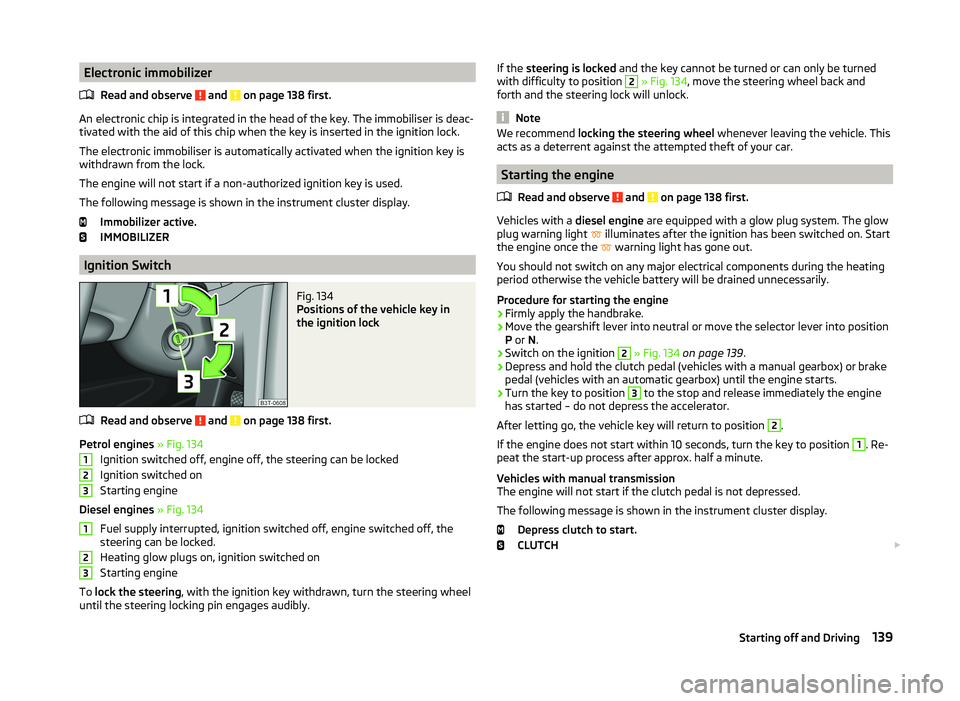
Fig. 134
Positions of the vehicle key in
the ignition lock
Read and observe and on page 138 first.
Petrol engines » Fig. 134
Ignition switched off, engine off, the steering can be locked
Ignition switched on
Starting engine
Diesel engines » Fig. 134
Fuel supply interrupted, ignition switched off, engine switched off, the
steering can be locked.
Heating glow plugs on, ignition switched on
Starting engine
To lock the steering , with the ignition key withdrawn, turn the steering wheel
until the steering locking pin engages audibly.
123123If the steering is locked and the key cannot be turned or can only be turned
with difficulty to position 2 » Fig. 134 , move the steering wheel back and
forth and the steering lock will unlock.
Note
We recommend locking the steering wheel whenever leaving the vehicle. This
acts as a deterrent against the attempted theft of your car.
Starting the engine
Read and observe
and on page 138 first.
Vehicles with a diesel engine are equipped with a glow plug system. The glow
plug warning light illuminates after the ignition has been switched on. Start
the engine once the warning light has gone out.
You should not switch on any major electrical components during the heating
period otherwise the vehicle battery will be drained unnecessarily.
Procedure for starting the engine
›
Firmly apply the handbrake.
›
Move the gearshift lever into neutral or move the selector lever into position
P or N.
›
Switch on the ignition
2
» Fig. 134 on page 139 .
›
Depress and hold the clutch pedal (vehicles with a manual gearbox) or brake
pedal (vehicles with an automatic gearbox) until the engine starts.
›
Turn the key to position
3
to the stop and release immediately the engine
has started – do not depress the accelerator.
After letting go, the vehicle key will return to position
2
.
If the engine does not start within 10 seconds, turn the key to position
1
. Re-
peat the start-up process after approx. half a minute.
Vehicles with manual transmission
The engine will not start if the clutch pedal is not depressed.
The following message is shown in the instrument cluster display. Depress clutch to start.
CLUTCH
139Starting off and Driving
Page 143 of 252
Vehicles with automatic transmission1)
The engine will not start if the brake pedal is not depressed.
The following message is shown in the instrument cluster display. Depress the brake to start.
BRAKE
CAUTION
■ If the engine does not start-up after a second attempt, one of the following
fuses may be defective. ■ Petrol engine - fuse for the electric fuel pump.
■ Diesel engine - fuse for the control unit for glow plugs or glow plug relay
and fuel pump.■
Check the fuse and replace if necessary » page 220, or seek assistance from
a specialist garage.
Stopping the engine
Read and observe
and on page 138 first.
Switch off the engine by turning the ignition key to position
1
» Fig. 134 on
page 139 .
For vehicles with automatic transmission, the ignition key can only be removed
if the selector lever is in position P.
Starting and stopping the engine - KESSY
Introduction
This chapter contains information on the following subjects:
Steering lock / unlock
141
Ignition on/off
141
Starting the engine
142
Switching off the engine
142
Emergency start-up of the engine
142
Emergency ignition shutoff system
143The KESSY system (Keyless Entry Exit System, hereinafter referred to only as
system) allows the switching on or switching off of the ignition and starting or
stopping of the engine without the active use of the key.
A key must be in the vehicle to unlock the steering, switch on the ignition and
start the vehicle. When travelling the key must be in the vehicle.
The engine running noises may louder at first be louder for a short time after starting the cold engine. This is quite normal and is not an operating problem.WARNING■ Never leave the key in the vehicle when you exit the vehicle. Unauthor-
ized persons, such as children, for example, could lock the car, turn on the
ignition or start the engine - there is a danger of injury and accidents!■
Never leave the vehicle unattended with the engine running - there is a
risk of theft etc!
■
Never switch off the engine before the vehicle is stationary – risk of acci-
dent!
WARNING■ Never leave the engine running in unventilated or closed rooms. The en-
gine's exhaust gases also contain the odourless and colourless carbon
monoxide, a poisonous gas – risk of death. ■ Carbon monoxide can cause unconsciousness and death.
CAUTION
■The system can recognize the valid key, even if it has been forgotten, for ex-
ample, in the front of the vehicle roof D » Fig. 34 on page 53 - There is danger
of loss or damage to the key! It is therefore not always necessary to know
where the key is.■
The starter must only be operated when the engine is not running and the
vehicle is at a standstill. The starter or engine may be damaged if the starter is
activated when the engine is running.
■
Do not tow start the engine – there is a risk of damaging the engine and the
catalytic converter. The battery from another vehicle can be used as a jump-
start aid » page 211 , Jump-starting .
1)
Applies to vehicles with START STOP system.
140Driving
Page 144 of 252
CAUTION■Avoid high engine revolutions, full throttle and high engine loads before the
engine has reached its operating temperature – risk of damaging the engine!■
Do not switch the engine off immediately at the end of your journey after the
engine has been operated over a prolonged period at high loads but leave it to
run at an idling speed for about 1 minute. This prevents any possible accumula-
tion of heat when the engine is switched off.
For the sake of the environment
Do not warm up the engine while the vehicle is stationary. If possible, start
your journey as soon as the engine has started. Through this the engine rea-
ches its operating temperature more rapidly and the pollutant emissions are
lower.
Note
■ The system is protected against inadvertently switching off the engine while
driving, this means that the engine can only be switched off in an emergen-
cy » page 143 .■
After switching off the ignition, the radiator fan can intermittently continue
to operate for approx. 10 minutes.
■
Under certain circumstances (e.g. after switching off the ignition and opening
the driver's door), the steering is enabled only when the ignition is switched on
or the engine is started.
Steering lock / unlock
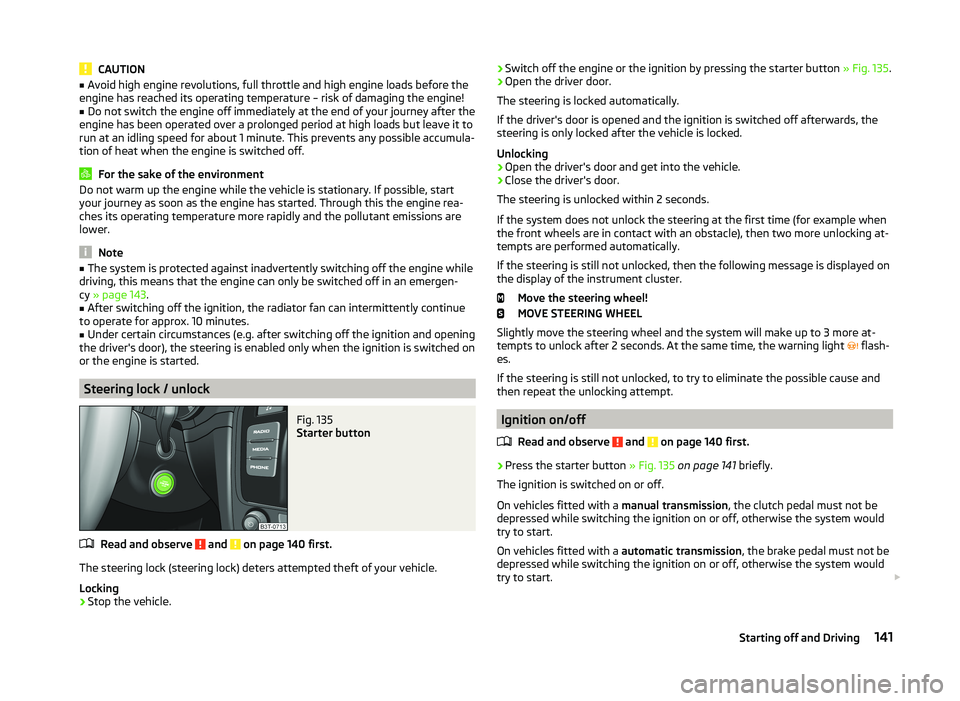
Fig. 135
Starter button
Read and observe and on page 140 first.
The steering lock (steering lock) deters attempted theft of your vehicle.
Locking
›
Stop the vehicle.
› Switch off the engine or the ignition by pressing the starter button
» Fig. 135.›Open the driver door.
The steering is locked automatically.
If the driver's door is opened and the ignition is switched off afterwards, the
steering is only locked after the vehicle is locked.
Unlocking›
Open the driver's door and get into the vehicle.
›
Close the driver's door.
The steering is unlocked within 2 seconds.
If the system does not unlock the steering at the first time (for example when
the front wheels are in contact with an obstacle), then two more unlocking at-
tempts are performed automatically.
If the steering is still not unlocked, then the following message is displayed on the display of the instrument cluster.
Move the steering wheel!
MOVE STEERING WHEEL
Slightly move the steering wheel and the system will make up to 3 more at-
tempts to unlock after 2 seconds. At the same time, the warning light flash-
es.
If the steering is still not unlocked, to try to eliminate the possible cause and
then repeat the unlocking attempt.
Ignition on/off
Read and observe
and on page 140 first.
›
Press the starter button » Fig. 135 on page 141 briefly.
The ignition is switched on or off.
On vehicles fitted with a manual transmission, the clutch pedal must not be
depressed while switching the ignition on or off, otherwise the system would
try to start.
On vehicles fitted with a automatic transmission, the brake pedal must not be
depressed while switching the ignition on or off, otherwise the system would
try to start.
141Starting off and Driving
Page 145 of 252
If the driver's door is opened while the ignition is on, an audible signal sounds
and the following message appears in the instrument cluster display.
Ignition on!
IGNITION SWITCHED ON
When leaving the vehicle always switch off the ignition.
Note
The ignition is switched on when indicated by the illuminating of certain indi-
cator lamps in the instrument cluster.
Starting the engine
Read and observe
and on page 140 first.
Vehicles with a diesel engine are equipped with a glow plug system. The glow
plug warning light illuminates after the ignition has been switched on. Start
the engine once the warning light has gone out.
You should not switch on any major electrical components during the heating
period otherwise the vehicle battery will be drained unnecessarily.
Procedure for starting the engine
›
Firmly apply the handbrake.
›
Move the gearshift lever into neutral or move the selector lever into position
P or N.
›
Depress and hold the clutch pedal (vehicles with a manual gearbox) or brake
pedal (vehicles with an automatic gearbox) until the engine starts.
›
Press and hold » Fig. 135 on page 141 1)
the starter button until the engine
starts.
CAUTION
■ If the engine does not start-up after a second attempt, one of the following
fuses may be defective. ■ Petrol engine - fuse for the electric fuel pump.
■ Diesel engine - fuse for the control unit for glow plugs or glow plug relay
and fuel pump.■
Check the fuse and replace if necessary » page 220, or seek assistance from
a specialist garage.
Switching off the engine
Read and observe
and on page 140 first.
›
Stop the vehicle.
›
Press the starter button » Fig. 135 on page 141 briefly.
The engine and the ignition are switched off simultaneously.
The engine can be switched off up to a speed of 2 km/h.
Emergency start-up of the engine
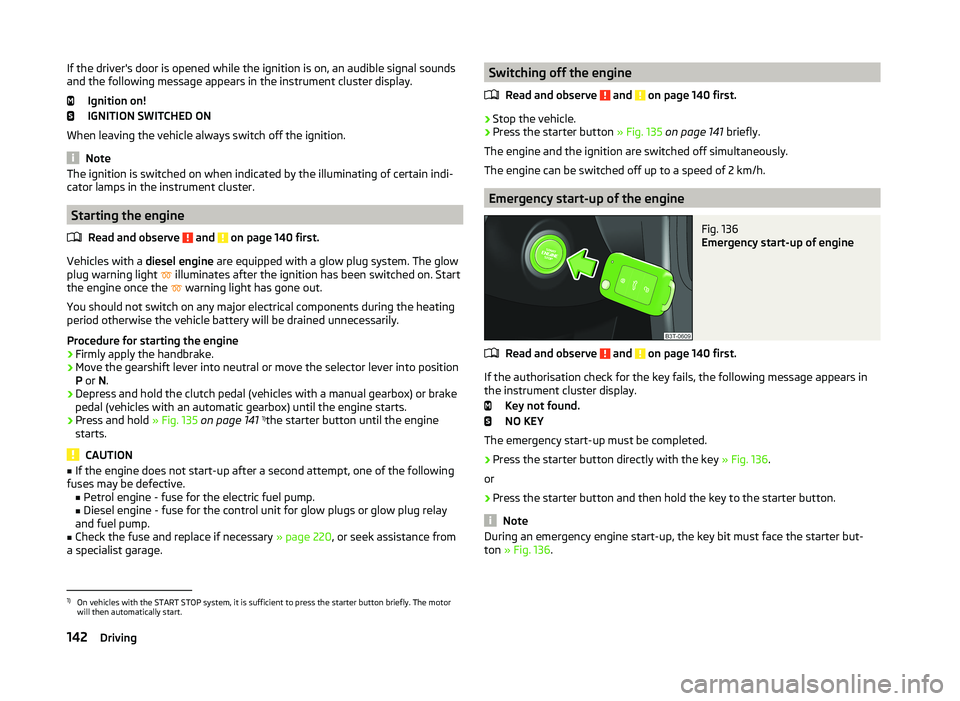
Fig. 136
Emergency start-up of engine
Read and observe and on page 140 first.
If the authorisation check for the key fails, the following message appears in the instrument cluster display.
Key not found.
NO KEY
The emergency start-up must be completed.
› Press the starter button directly with the key
» Fig. 136.
or
› Press the starter button and then hold the key to the starter button.
Note
During an emergency engine start-up, the key bit must face the starter but-
ton » Fig. 136 .1)
On vehicles with the START STOP system, it is sufficient to press the starter button briefly. The motor
will then automatically start.
142Driving