battery SKODA SUPERB 2011 Owner´s Manual
[x] Cancel search | Manufacturer: SKODA, Model Year: 2011, Model line: SUPERB, Model: SKODA SUPERB 2011Pages: 252, PDF Size: 16.33 MB
Page 56 of 252
Closing from the inside›Grasp pull handle C and close the door.WARNING■Make sure that the door has closed correctly as it can open suddenly
while the vehicle is being driven – there is a risk of death.■
Only open and close the door when there is no one in the opening/closing
sweep – there is a risk of injury.
■
An opened door can close spontaneously if there is a strong wind or the
vehicle is on a slope – there is a risk of injury.
■
Never drive with the doors open - there is a risk of death!
Unlocking / locking - KESSY
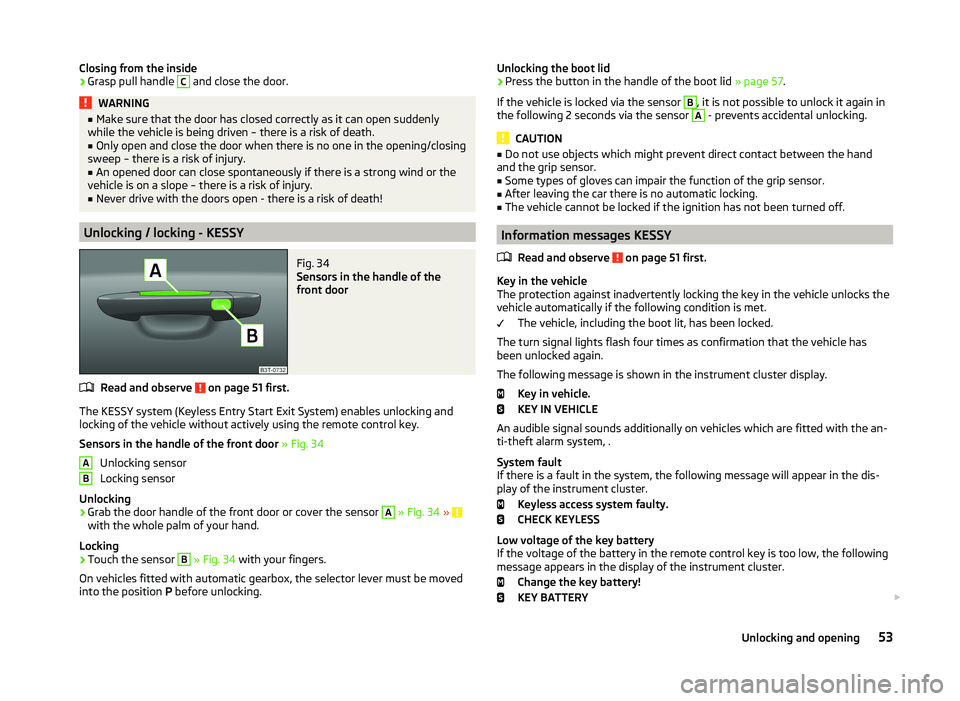
Fig. 34
Sensors in the handle of the
front door
Read and observe on page 51 first.
The KESSY system (Keyless Entry Start Exit System) enables unlocking and
locking of the vehicle without actively using the remote control key.
Sensors in the handle of the front door » Fig. 34
Unlocking sensor
Locking sensor
Unlocking
›
Grab the door handle of the front door or cover the sensor
A
» Fig. 34 » with the whole palm of your hand.
Locking
›
Touch the sensor
B
» Fig. 34 with your fingers.
On vehicles fitted with automatic gearbox, the selector lever must be moved
into the position P before unlocking.
ABUnlocking the boot lid›Press the button in the handle of the boot lid » page 57.
If the vehicle is locked via the sensor B
, it is not possible to unlock it again in
the following 2 seconds via the sensor
A
- prevents accidental unlocking.
CAUTION
■ Do not use objects which might prevent direct contact between the hand
and the grip sensor.■
Some types of gloves can impair the function of the grip sensor.
■
After leaving the car there is no automatic locking.
■
The vehicle cannot be locked if the ignition has not been turned off.
Information messages KESSY
Read and observe
on page 51 first.
Key in the vehicle
The protection against inadvertently locking the key in the vehicle unlocks the
vehicle automatically if the following condition is met.
The vehicle, including the boot lit, has been locked.
The turn signal lights flash four times as confirmation that the vehicle has
been unlocked again.
The following message is shown in the instrument cluster display. Key in vehicle.
KEY IN VEHICLE
An audible signal sounds additionally on vehicles which are fitted with the an-
ti-theft alarm system, .
System fault
If there is a fault in the system, the following message will appear in the dis-
play of the instrument cluster.
Keyless access system faulty.
CHECK KEYLESS
Low voltage of the key battery
If the voltage of the battery in the remote control key is too low, the following
message appears in the display of the instrument cluster.
Change the key battery!
KEY BATTERY
53Unlocking and opening
Page 57 of 252
Change the key battery » page 215!
Safe securing
Read and observe
on page 51 first.
The door locks are blocked automatically if the vehicle is locked from the out-side. The vehicle cannot now be opened from the inside.
This fact is pointed out by the following message on the display of the instru- ment cluster after switching off the ignition.
Check SAFELOCK! Owner's manual!
CHECK DEADLOCK
Switching off
The safe lock can be switched off in one of the following ways.
›
By locking twice within 2 seconds.
›
By disabling the interior monitoring » page 56, Interior monitor and towing
protection .
If the vehicle is locked and the SafeLock system is switched off, the door can be opened separately from the inside by a single pull on the opening lever.
Switching on
The safelock switches on automatically the next time the vehicle is locked and
unlocked.
Switch on display
The warning light flashes for around 2 seconds in quick succession, afterwards
it begins to flash evenly at longer intervals.
Switch off display
The warning light in the driver door flashes fast for about 2 seconds, goes out
and starts to flash regularly at longer intervals after about 30 seconds.
WARNINGIf the car is locked and the SafeLock system activated, no one may remain
in the car as it will then not be possible to either unlock a door or open a
window from the inside. The locked doors make it more difficult for rescu-
ers to get into the vehicle in an emergency – risk to life!NoteThis function applies only to vehicles with specific equipment or for some
countries.
Individual settings
Read and observe
on page 51 first.
The following central locking functions can be set via the MAXI DOT dis-
play » page 47 , Settings .
Opening a single door
This function makes it possible to only unlock the driver's door. The other
doors and the boot lid remain locked and are only unlocked after being opened
again.
Unlocking a vehicle side door
This function enables you to unlock both doors on the driver's side. The other
doors and the boot lid remain locked and are only unlocked after being opened
again.
Automatic locking/unlocking
All doors are locked from a speed of around 15 km/h. The button in the handle
of the boot lid is deactivated.
If the ignition key is withdrawn, the car is then automatically unlocked again.
In addition, it is possible for the driver or front passenger to unlock the car by
pressing the central locking button .
Locked doors prevent unwanted entry into the vehicle.
The vehicle doors can be unlocked and opened at any time by pulling once on
the door opening lever.
54Operation
Page 62 of 252
Electric boot lid (Superb Combi)
Introduction
This chapter contains information on the following subjects:
Operating description
59
Acoustic signals
61
Adjusting/deleting the top lid position
61
Malfunctions
61
Force limiter
The electric luggage compartment lid (hereinafter referred to only as a lid) is
equipped with a force limiter. If the lid hits an obstacle when closing, it stops
and an audible signal sounds.
If you rapidly enter the vehicle during the opening or closing process of the
boot lid, the whole vehicle may jerk and as a result the movement of the lid
can be interrupted.
Manual operation
Manually opening and closing the lid is only possible in exceptional cases. It
must be completed slowly and without sudden movements as close to the
centre of the lid as possible »
.
WARNING■
Ensure that the lock is properly engaged after closing the lid. Otherwise,
the lid might open suddenly while the vehicle is moving, even if the lid was
locked – risk of accident!■
Never drive with the lid open or unlatched, as otherwise exhaust gases
may get into the interior of the vehicle – risk of poisoning!
CAUTION
■ The movement of the lid can be stopped by applying an abrupt and quick
force against the lid.■
Do not attempt to close the door manually during electrical closing process -
there is a risk of damaging the system of an electric valve operation.
■
If the lid is closed manually, it must be ensured that when moving the lid into
the lock, pressure is applied to the centre edge of the lid above the ŠKODA
logo. Handling the sides of the lid can damage the electric lid.
CAUTION■ Before opening or closing the lid, check if there are any objects in the open-
ing or closing range which could obstruct the movement (e.g. a load on the
roof rack or on the trailer, etc.) – risk of causing damage to the lid!■
Ensure that there is at least 10 cm of clearance above the opened lid (e.g. dis-
tance from the garage ceiling). Otherwise, it may happen that the clearance
above the opened lid is no longer sufficient after relieving the vehicle of a load
(e.g. after unloading) – risk of causing damage to the lid.
■
In certain circumstances, if the lid is loaded (e.g. by a thick layer of snow), the
opening process of the lid can be interrupted. Remove the load on the lid to re-
enable the electrical operation.
■
If the lid closes automatically (e.g. under load of snow), you will hear an inter-
mittent beep.
■
The flap is always to be close before disconnecting the battery.
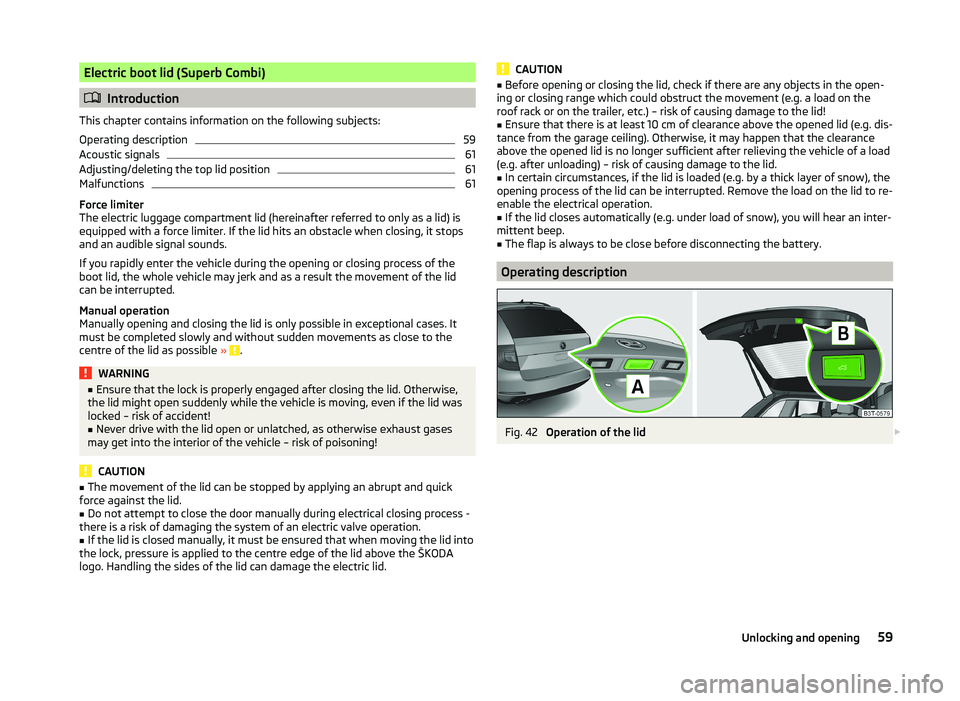
Operating description
Fig. 42
Operation of the lid
59Unlocking and opening
Page 64 of 252
Acoustic signalsRead and observe
and on page 59 first.
The acoustic signals serve as a safety function and provide information about
the success of a performed action.
SignalsMeaning
Interrupted tone
Open (using the button on the remote control key
or the button C
» Fig. 43 on page 60 )
Automatic closing of the lid » page 59,
in section In-
troduction
1 continuous toneForce limiter3 rising tonesConfirmation of the storage of the lid position3 identical tonesfault
Adjusting/deleting the top lid position
Read and observe
and on page 59 first.
Adjusting
›
Stop the lid in the desired position (electrically or manually).
›
Press and hold the button
B
» Fig. 42 on page 59 for longer than 3 seconds.
Storing the new position is confirmed with an audible signal.
Delete
›
Carefully lift up the lid manually to the maximum opening position.
›
Press and hold the button
B
» Fig. 42 on page 59 for longer than 3 seconds.
An audible signal sounds and the height which was originally set is deleted
from the memory, while the basic position of the top lid position is again set.
The top lid position is adjusted, for example, in the following situations.
› When the space for opening the lid is limited (e.g. garage height).
› For a more convenient operation, such as by a person's height.
The top position which is reached when the lid opens automatically, is always
lower than the maximum top position which can be reached when the lid is
opened manually.
The lid always opens to the height which was last stored.
Malfunctions
Read and observe
and on page 59 first.
If the battery is disconnected and reconnected while the lid is open, it is nec-
essary to activate the system of the electric boot lid.
Activation means closing the lid by hand. Thus, the end position of the lid is stored under fully closed in secured lock.
Examples of operational malfunctions
Description of the malfunc-
tionPossible solutionsThe lid cannot be lifted out
of the lockEmergency unlocking of the lid » page 217The lid does not react to an
opening signalRemoving a possible obstacle (e.g. snow), re-
opening the lid » page 59
Press handle A
and pull the lid upwards
The lid remains in the top
positionManual closing of the lid
Electrical power windows
Introduction
This chapter contains information on the following subjects:
Opening/closing the window from the driver seat
62
Opening the windows in the front passenger door and in the rear doors
63
Force limit
63
Window convenience operation
63
Operational faults
64
61Unlocking and opening
Page 67 of 252

Opening›Press and hold the symbol button on the remote control key.›
Hold the key in the driver's lock in the unlock position.
›
Press and hold the upper part of the central locking button in the driver's
door » page 55 .
›
Hold button
A
» Fig. 44 on page 62 in the opening position.
Closing
›
Press and hold the symbol button
on the remote control key.
›
Hold the key in the driver's lock in the lock position.
›
Press and hold the lower part of the central locking button » page 55 in the
driver's door.
›
Hold button
A
» Fig. 44 on page 62 in the closing position.
›
In the KESSY system, hold a finger on the sensor
B
» Fig. 34 on page 53 .
The speed limit for winter tyres can be set in the MAXI DOT display in the
menu item Window op. . » page 47 .
The prerequisite for ensuring that the convenience operating feature correctly
is the automatic opening/closing of all windows is operational.
Convenience opening or closing the window using the key in the driver's lock
is only possible within 45 seconds after locking the vehicle.
The movement of the window is stopped immediately when the key or the re-
spective button is released.
Operational faults
Read and observe
and on page 62 first.
The automatic power windows do not work if the vehicle battery has been dis-
connected and connected again while a window was open. The system must
be activated.
Activation sequence:
›
Switch on the ignition.
›
Pull the top edge of the button and close the window.
›
Release the button.
›
Drag and drop the button upwards again and hold for about 1 s.
Electric sliding/tilting roof
Introduction
This chapter contains information on the following subjects:
Operation
64
Convenience operation of sliding / tilting roof
65
Electric sliding/tilting roof with solar cells
65
The electric sliding/tilting roof (abbreviated in the following as 'sliding/tilting
roof') can only be operated when the ignition is turned on and when the out-
door temperature is higher than -20 °C.
The sliding/tilting roof can still be operated for approx. 10 minutes after
switching the ignition off. However, as soon as the driver or front passenger's
door is opened it is no longer possible to operate the sliding/tilting roof.
CAUTION
■ Always close the sliding/tilting roof before disconnecting the battery.■If the battery has been disconnected and reconnected, it is possible that the
sliding/tilting roof does not operate correctly. In this case, turn the rotary
switch to the switch position A
» Fig. 46 on page 64 and push forward for
about 10 seconds.
Operation
Fig. 46
Control dial for the sliding/tilting
roof
Read and observe on page 64 first.
Comfort position
›
Turn the switch to position
C
» Fig. 46 .
When the sliding/tilting roof is in the comfort position, the intensity of the
wind noise is reduced.
64Operation
Page 68 of 252

Open partially›Simply turn the knob to a point between A and C.
Open fully
›
Turn the switch to position
B
and hold it in this position (spring-tensioned
position).
Tilting roof
›
Turn the switch to position
D
.
Closing
›
Turn the switch to position
A
.
Sun screen
The sun screen is also opened automatically when the tilt/slide sunroof slides
open. When the tilt/slide sunroof is closed the sun screen can be manually op-
erated »
.
Force limiter
The sliding/tilting roof is fitted with a force limiter. If an obstacle (e.g. ice) pre-
vents closing, the sliding/tilting roof stops and opens completely. The sliding/
tilting roof can be closed completely without the force limiter by pushing the
switch in position
A
» Fig. 46 forwards until the sliding/tilting roof is com-
pletely closed.
WARNINGWhen operating the tilt/slide sunroof and the sunshade, proceed with cau-
tion to avoid causing crushing injuries – risk of injury!
CAUTION
During the winter it may be necessary to remove any ice and snow in the vicin-
ity of the sliding/tilting roof before opening it to prevent any damage to the
opening mechanism.
Convenience operation of sliding / tilting roof
Read and observe
on page 64 first.
The sliding/tilting roof can be operated by locking/unlocking using the key or
using the KESSY system with the aid of the sensor
B
» Fig. 34 on page 53 .
›
Press and hold the symbol button
on the remote control key.
›
In the KESSY system, hold a finger on the sensor
B
» Fig. 34 on page 53 .
By releasing the lock or lifting your finger off the sensor B when using the
KESSY system, the closing process is immediately interrupted.WARNINGClose the sliding/tilting roof carefully – risk of injury. The force limiter does
not operate with the convenience closing.
Electric sliding/tilting roof with solar cells
Read and observe
on page 64 first.
If there is sufficient bright sunlight, the solar cells in the sliding/tilting roof de-liver the electrical power for the fresh air blower. Further informa-
tion » page 115 , Climatronic (automatic air conditioning system) .
The operation of the sliding/tilting roof with solar cells is the same as of a nor-
mal sliding/tilting roof.
Panoramic sliding/tilting roof (Superb Estate)
Introduction
This chapter contains information on the following subjects:
Operation
66
Opening/closing the sun screen
66
Convenience operation of sliding / tilting roof
67
The panoramic sliding/tilting roof (abbreviated in the following as 'sliding/tilt-
ing roof') can only be operated when the ignition is turned on and when the
outdoor temperature is higher than -20 °C.
The sliding/tilting roof can still be operated for approx. 10 minutes after
switching the ignition off. However, as soon as the driver or front passenger's
door is opened it is no longer possible to operate the sliding/tilting roof.
CAUTION
■ Always close the sliding/tilting roof before disconnecting the battery.■If, for example, the battery has been disconnected and reconnected, it is pos-
sible that the sliding/tilting roof does not operate correctly. Next, move the ro-
tary switch into position A
» Fig. 47 on page 66 , pull the recess firmly
65Unlocking and opening
Page 69 of 252

downwards and hold forwards firmly. The sliding/tilting roof opens and closes
again after around 10 seconds. Do not release the control dial until it has done
so.■
If, for example, the battery has been disconnected and reconnected, it is pos-
sible that the sun screen does not operate correctly. Then turn the switch to
position
A
» Fig. 47 on page 66 and press and hold the button
G
» Fig. 48 on
page 66 . The sun screen opens and closes again after around 10 seconds. Do
not release the control dial until it has done so.
Operation
Fig. 47
Control dial for the sliding/tilting
roof
Read and observe on page 65 first.
Comfort position
›
Turn the switch to position
C
» Fig. 47 .
When the sliding/tilting roof is in the comfort position, the intensity of the
wind noise is reduced.
Open partially
›
Turn the switch to a position in area
D
.
Open fully
›
Turn the switch to position
B
and hold it in this position (spring-tensioned
position).
Tilting roof
›
Turn the switch to position
A
.
›
Press the switch in the region
E
towards the roof.
Closing
›
Turn the switch to position
A
.
›
Press the switch on the recess
E
down and pull forwards.
Force limiter
The sliding/tilting roof is fitted with a force limiter. The sliding/tilting roof
stops and moves back several centimetres when it cannot be closed because
there is something in the way (e.g. ice). The sliding/tilting roof can be fully
closed without a force limiter by pressing the switch on the recess E
down
and then pushing it forward until the sliding/tilting roof is fully closed » .
WARNINGWhen operating the sliding/tilting roof, proceed with caution to avoid caus-
ing crushing injuries – risk of injury!
CAUTION
During the winter it may be necessary to remove any ice and snow in the vicin-
ity of the sliding/tilting roof before opening it to prevent any damage to the
opening mechanism.
Opening/closing the sun screen
Fig. 48
Buttons for sun screen
Read and observe on page 65 first.
The sun screen can be closed or opened using the buttons » Fig. 48.
Opening
›
Briefly press the button
F
» Fig. 48 to open fully.
›
Press and hold the button
F
to open to the desired position.
The opening process stops when one releases the button.
Closing
›
Briefly press the button
G
» Fig. 48 to close fully.
›
Press and hold the button
G
to close in the desired position.
The closing process stops when one releases the button.
66Operation
Page 75 of 252
Only the rear fog light on the trailer illuminates if the vehicle has a factory fit-
ted towing device or a towing device from ŠKODA original accessories and it is
driven with a trailer.
COMING HOME / LEAVING HOME
Read and observe
on page 67 first.
COMING HOME (hereinafter referred to only as function) switches the light au-
tomatically for a short time after leaving the vehicle.
LEAVING HOME (hereinafter referred to only as function) switches the light au-
tomatically for a short time when approaching the vehicle.
The lights are switched on automatically if the following conditions are met. The light switch is in position
» Fig. 51 on page 70 .
The visibility in the vehicle environment is reduced.
The ignition is switched off.
The parking aid is activated.
The function is switched on (the driver's door is opened / the car is un-
locked with the remote control).
The function switches on the following light, depending on the equipment
fitted.
› Parking lights
› Low beam
› Entry lighting in the exterior mirrors
› Licence plate light
Poorer visibility is evaluated by sensor mounted in the holder of the interior
mirror.
COMING HOME
The light turns on automatically when you open the driver's door on (within 60
seconds of turning off the ignition).
The light turns off 10 seconds after closing all the doors and the boot lid or af-
ter the pre-set time has expired.
If a door or the boot lid remains open, the light goes out after 60 seconds.
LEAVING HOME
The light turns on automatically after the vehicle is unlocked with the remote
control.
The light turns off after 10 seconds or after a pre-set time or after the vehicle
is locked.
Activate/deactivate the function
The functions and settings of the illumination time can be activated/deactiva-
ted via the MAXI DOT display in the menu items Coming Home or Leaving
Home » page 47 .
CAUTION
■
Do not attach any stickers or similar objects in front of the light sensor on
the windscreen. This can impair its function or reliability.■
If this function is activated constantly, the battery will be heavily discharged
particularly in short-haul travel.
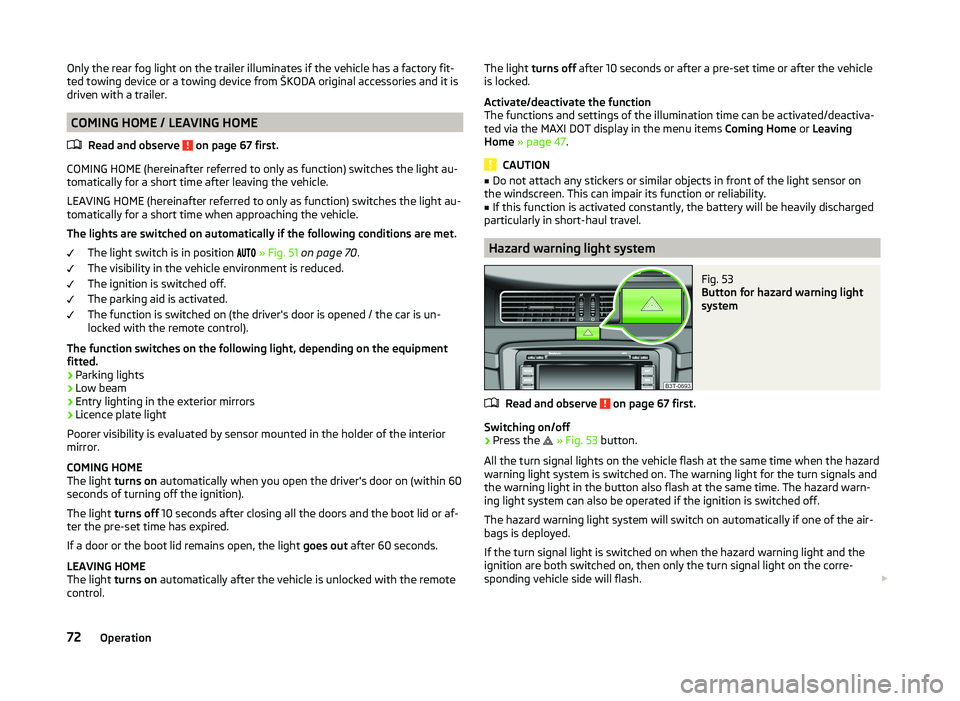
Hazard warning light system
Fig. 53
Button for hazard warning light
system
Read and observe on page 67 first.
Switching on/off
›
Press the
» Fig. 53 button.
All the turn signal lights on the vehicle flash at the same time when the hazard
warning light system is switched on. The warning light for the turn signals and
the warning light in the button also flash at the same time. The hazard warn-
ing light system can also be operated if the ignition is switched off.
The hazard warning light system will switch on automatically if one of the air-
bags is deployed.
If the turn signal light is switched on when the hazard warning light and the
ignition are both switched on, then only the turn signal light on the corre-
sponding vehicle side will flash.
72Operation
Page 76 of 252
WARNINGSwitch on the hazard warning light system if, for example, the following oc-
curs.■
You encounter a traffic jam.
■
The vehicle has broken down.
Parking lights
Read and observe
on page 67 first.
The parking light is designed for temporary lighting of the parked vehicle.
Switching on the parking light
›
Switch off the ignition.
›
Place the control lever into position
A
or
B
as far as it can go » Fig. 50 on
page 69 - the parking light on the right/left-hand side of the vehicle is
switched on.
If the right or left turn signal light has been switched on and the ignition is
switched off, the parking light is not automatically switched on.
Switching on the side lights on both sides
›
Switch off the ignition.
›
Turn the light switch
A
to position
» Fig. 49 on page 68 and lock the ve-
hicle.
After pulling out the ignition key and opening the driver's door, an audible
warning sounds. After a few seconds or after closing the driver's door, the au-
dible alarm is turned off, but the parking lights will remain switched on.
CAUTION
Turning on the parking light means the battery is heavily loaded, especially
over short distances.
Interior lights
Introduction
This chapter contains information on the following subjects:
Front interior light
73
Rear interior light - Variant 1
74
Rear interior light - Variant 2
74Front door warning light74Entry lighting75
Note
With the ignition off, the light turns off automatically after about 10 minutes.
Front interior light
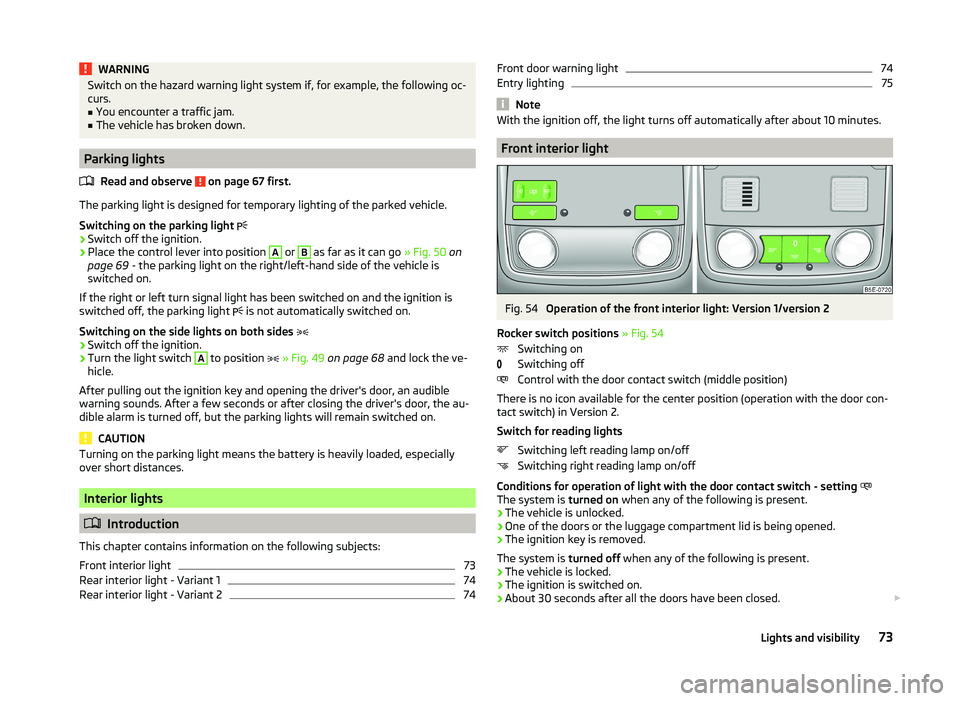
Fig. 54
Operation of the front interior light: Version 1/version 2
Rocker switch positions » Fig. 54
Switching on
Switching off
Control with the door contact switch (middle position)
There is no icon available for the center position (operation with the door con-
tact switch) in Version 2.
Switch for reading lights Switching left reading lamp on/off
Switching right reading lamp on/off
Conditions for operation of light with the door contact switch - setting
The system is turned on when any of the following is present.
› The vehicle is unlocked.
› One of the doors or the luggage compartment lid is being opened.
› The ignition key is removed.
The system is turned off when any of the following is present.
› The vehicle is locked.
› The ignition is switched on.
› About 30 seconds after all the doors have been closed.
73Lights and visibility
Page 78 of 252
NoteIf the door is open and the ignition switched off, the light extinguishes auto-
matically after around 20 minutes.
Entry lighting
The lighting is positioned on the bottom edge of the exterior mirror and illumi-
nates the entry area of the front door.
The light illuminates after the vehicle has been unlocked or on opening the
front door. The lighting goes out about 30 seconds after the doors are closed
or if the ignition is switched on.
WARNINGIf the entry light is on, do not touch its cover – risk of burns!
Note
If the door is open and the ignition switched off, the light will extinguish auto-
matically after around 1 minute.
Visibility
Introduction
This chapter contains information on the following subjects:
Windscreen and rear window heater
75
Sun visors
76
Sun screen
76
Sun screen in the rear doors
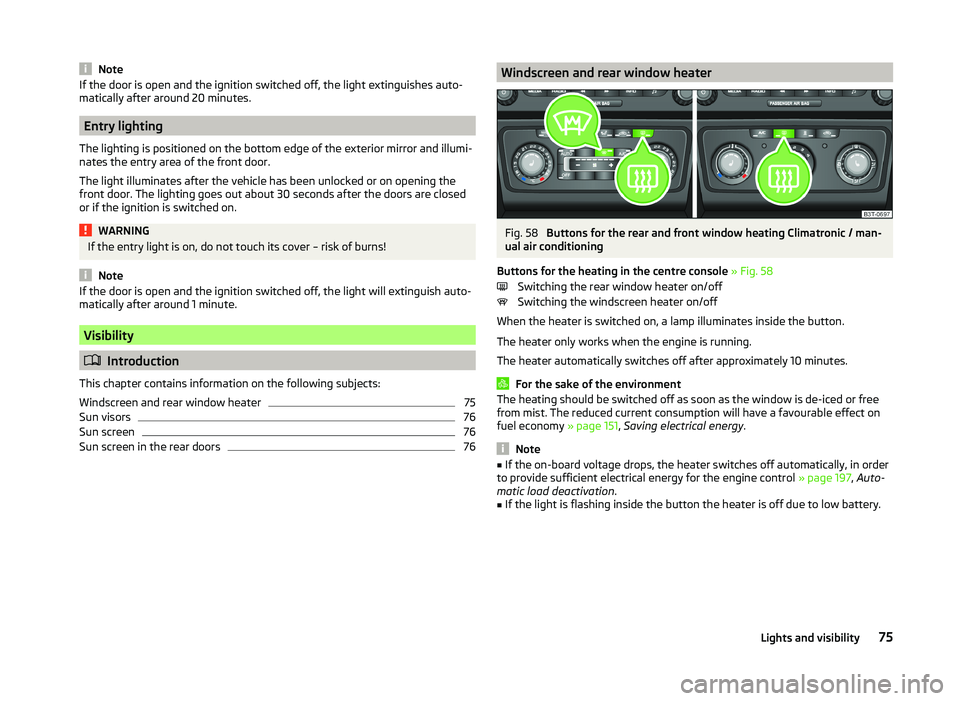
76Windscreen and rear window heaterFig. 58
Buttons for the rear and front window heating Climatronic / man-
ual air conditioning
Buttons for the heating in the centre console » Fig. 58
Switching the rear window heater on/off
Switching the windscreen heater on/off
When the heater is switched on, a lamp illuminates inside the button.
The heater only works when the engine is running.
The heater automatically switches off after approximately 10 minutes.
For the sake of the environment
The heating should be switched off as soon as the window is de-iced or free
from mist. The reduced current consumption will have a favourable effect on
fuel economy » page 151, Saving electrical energy .
Note
■
If the on-board voltage drops, the heater switches off automatically, in order
to provide sufficient electrical energy for the engine control » page 197, Auto-
matic load deactivation .■
If the light is flashing inside the button the heater is off due to low battery.
75Lights and visibility