ignition SKODA SUPERB 2011 Owner´s Manual
[x] Cancel search | Manufacturer: SKODA, Model Year: 2011, Model line: SUPERB, Model: SKODA SUPERB 2011Pages: 252, PDF Size: 16.33 MB
Page 56 of 252
Closing from the inside›Grasp pull handle C and close the door.WARNING■Make sure that the door has closed correctly as it can open suddenly
while the vehicle is being driven – there is a risk of death.■
Only open and close the door when there is no one in the opening/closing
sweep – there is a risk of injury.
■
An opened door can close spontaneously if there is a strong wind or the
vehicle is on a slope – there is a risk of injury.
■
Never drive with the doors open - there is a risk of death!
Unlocking / locking - KESSY
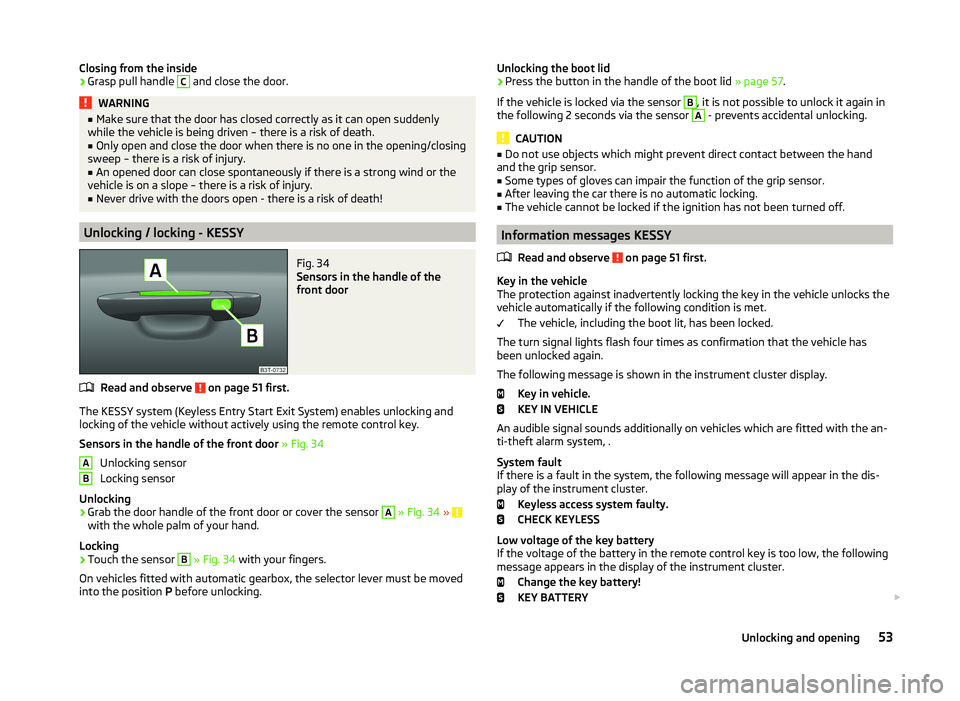
Fig. 34
Sensors in the handle of the
front door
Read and observe on page 51 first.
The KESSY system (Keyless Entry Start Exit System) enables unlocking and
locking of the vehicle without actively using the remote control key.
Sensors in the handle of the front door » Fig. 34
Unlocking sensor
Locking sensor
Unlocking
›
Grab the door handle of the front door or cover the sensor
A
» Fig. 34 » with the whole palm of your hand.
Locking
›
Touch the sensor
B
» Fig. 34 with your fingers.
On vehicles fitted with automatic gearbox, the selector lever must be moved
into the position P before unlocking.
ABUnlocking the boot lid›Press the button in the handle of the boot lid » page 57.
If the vehicle is locked via the sensor B
, it is not possible to unlock it again in
the following 2 seconds via the sensor
A
- prevents accidental unlocking.
CAUTION
■ Do not use objects which might prevent direct contact between the hand
and the grip sensor.■
Some types of gloves can impair the function of the grip sensor.
■
After leaving the car there is no automatic locking.
■
The vehicle cannot be locked if the ignition has not been turned off.
Information messages KESSY
Read and observe
on page 51 first.
Key in the vehicle
The protection against inadvertently locking the key in the vehicle unlocks the
vehicle automatically if the following condition is met.
The vehicle, including the boot lit, has been locked.
The turn signal lights flash four times as confirmation that the vehicle has
been unlocked again.
The following message is shown in the instrument cluster display. Key in vehicle.
KEY IN VEHICLE
An audible signal sounds additionally on vehicles which are fitted with the an-
ti-theft alarm system, .
System fault
If there is a fault in the system, the following message will appear in the dis-
play of the instrument cluster.
Keyless access system faulty.
CHECK KEYLESS
Low voltage of the key battery
If the voltage of the battery in the remote control key is too low, the following
message appears in the display of the instrument cluster.
Change the key battery!
KEY BATTERY
53Unlocking and opening
Page 57 of 252
Change the key battery » page 215!
Safe securing
Read and observe
on page 51 first.
The door locks are blocked automatically if the vehicle is locked from the out-side. The vehicle cannot now be opened from the inside.
This fact is pointed out by the following message on the display of the instru- ment cluster after switching off the ignition.
Check SAFELOCK! Owner's manual!
CHECK DEADLOCK
Switching off
The safe lock can be switched off in one of the following ways.
›
By locking twice within 2 seconds.
›
By disabling the interior monitoring » page 56, Interior monitor and towing
protection .
If the vehicle is locked and the SafeLock system is switched off, the door can be opened separately from the inside by a single pull on the opening lever.
Switching on
The safelock switches on automatically the next time the vehicle is locked and
unlocked.
Switch on display
The warning light flashes for around 2 seconds in quick succession, afterwards
it begins to flash evenly at longer intervals.
Switch off display
The warning light in the driver door flashes fast for about 2 seconds, goes out
and starts to flash regularly at longer intervals after about 30 seconds.
WARNINGIf the car is locked and the SafeLock system activated, no one may remain
in the car as it will then not be possible to either unlock a door or open a
window from the inside. The locked doors make it more difficult for rescu-
ers to get into the vehicle in an emergency – risk to life!NoteThis function applies only to vehicles with specific equipment or for some
countries.
Individual settings
Read and observe
on page 51 first.
The following central locking functions can be set via the MAXI DOT dis-
play » page 47 , Settings .
Opening a single door
This function makes it possible to only unlock the driver's door. The other
doors and the boot lid remain locked and are only unlocked after being opened
again.
Unlocking a vehicle side door
This function enables you to unlock both doors on the driver's side. The other
doors and the boot lid remain locked and are only unlocked after being opened
again.
Automatic locking/unlocking
All doors are locked from a speed of around 15 km/h. The button in the handle
of the boot lid is deactivated.
If the ignition key is withdrawn, the car is then automatically unlocked again.
In addition, it is possible for the driver or front passenger to unlock the car by
pressing the central locking button .
Locked doors prevent unwanted entry into the vehicle.
The vehicle doors can be unlocked and opened at any time by pulling once on
the door opening lever.
54Operation
Page 58 of 252
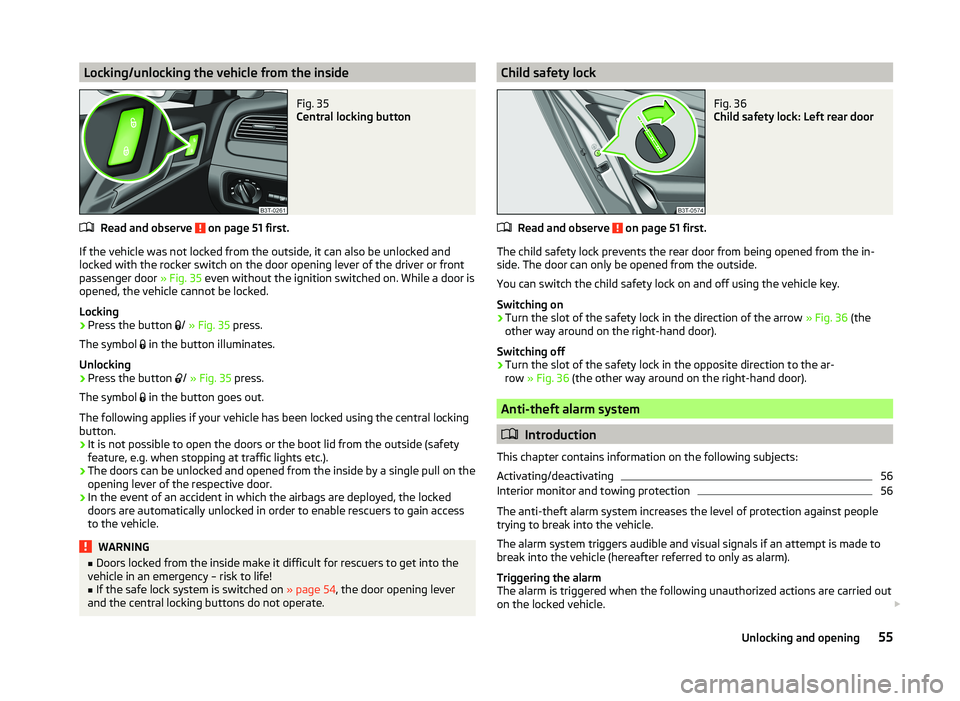
Locking/unlocking the vehicle from the insideFig. 35
Central locking button
Read and observe on page 51 first.
If the vehicle was not locked from the outside, it can also be unlocked and
locked with the rocker switch on the door opening lever of the driver or front
passenger door » Fig. 35 even without the ignition switched on. While a door is
opened, the vehicle cannot be locked.
Locking
›
Press the button /
» Fig. 35 press.
The symbol in the button illuminates.
Unlocking
›
Press the button /
» Fig. 35 press.
The symbol in the button goes out.
The following applies if your vehicle has been locked using the central locking
button.
› It is not possible to open the doors or the boot lid from the outside (safety
feature, e.g. when stopping at traffic lights etc.).
› The doors can be unlocked and opened from the inside by a single pull on the
opening lever of the respective door.
› In the event of an accident in which the airbags are deployed, the locked
doors are automatically unlocked in order to enable rescuers to gain access
to the vehicle.
WARNING■ Doors locked from the inside make it difficult for rescuers to get into the
vehicle in an emergency – risk to life!■
If the safe lock system is switched on » page 54, the door opening lever
and the central locking buttons do not operate.
Child safety lockFig. 36
Child safety lock: Left rear door
Read and observe on page 51 first.
The child safety lock prevents the rear door from being opened from the in- side. The door can only be opened from the outside.
You can switch the child safety lock on and off using the vehicle key.
Switching on
›
Turn the slot of the safety lock in the direction of the arrow » Fig. 36 (the
other way around on the right-hand door).
Switching off
›
Turn the slot of the safety lock in the opposite direction to the ar-
row » Fig. 36 (the other way around on the right-hand door).
Anti-theft alarm system
Introduction
This chapter contains information on the following subjects:
Activating/deactivating
56
Interior monitor and towing protection
56
The anti-theft alarm system increases the level of protection against people
trying to break into the vehicle.
The alarm system triggers audible and visual signals if an attempt is made to
break into the vehicle (hereafter referred to only as alarm).
Triggering the alarm
The alarm is triggered when the following unauthorized actions are carried out
on the locked vehicle.
55Unlocking and opening
Page 59 of 252
›Opening the bonnet.
› Opening the boot lid.
› Opening the doors.
› Manipulation of the ignition lock.
› Towing the vehicle
» page 56.
› Movement in the vehicle
» page 56.
› Sudden and significant voltage drop of the electrical system.
› Uncoupling the trailer
» page 170, Attaching and detaching trailers .
If the driver's door of a vehicle with a remote control is unlocked and opened
by the lock cylinder, then the alarm is triggered.
Switching off the alarm
The alarm is turned off by pressing the button on the radio remote control
key or switching on the ignition.
CAUTION
Before leaving the vehicle, it must be checked that all of the windows, doors
and the sliding/tilting roof are locked in order to ensure the full functionality of
the anti-theft alarm system.
Note
The working life of the alarm siren is 5 years.
Activating/deactivating
Read and observe
on page 56 first.
Activating
The anti-theft alarm system is activated automatically approximately 30 sec-
onds after the vehicle is locked.
If the vehicle is unlocked and a door or the boot lid not opened within the next
30 seconds, the vehicle will lock again automatically and the SafeLock system
or anti-theft alarm system will be switched back on. This function is intended
to prevent the car being unlocked unintentionally.
Deactivating
The anti-theft alarm system is deactivated automatically after the vehicle is
unlocked. If the vehicle is not opened within 30 seconds, the anti-theft alarm
system is automatically activated again.
The alarm system is also deactivated if you unlock the driver door using the
key within 45 seconds of locking the vehicle.
Note■ If the car is unlocked with the key in the driver door, insert the key into the
ignition and switch the ignition to deactivate the alarm system.■
You can switch the audible signalling of the activation of the warning system
on and off in the MAXI DOT display in the menu item ATA confirm » page 47 .
Interior monitor and towing protection
Fig. 37
Button for interior monitor and
towing protection
Read and observe on page 56 first.
The interior monitor detects movements inside the car and then triggers the alarm.
The tow-away protection triggers the alarm if a vehicle is registered as being
on an inclination.
Activating
The interior monitor and the towing protection are activated automatically af-
ter the vehicle is locked.
Deactivating
›
Switch off the ignition.
›
Open the driver door.
›
Press the symbol button
» Fig. 37 on the B-column on the driver's side.
The symbol lighting in the button changes
from red to orange.
›
Lock the vehicle within 30 seconds.
Deactivate the interior monitor and the towing protection if there is a possibili-
ty of the alarm being triggered by movements (e.g. by children or animals)
within the vehicle interior or if the vehicle has to be transported (e.g. by train
or ship) or towed.
56Operation
Page 63 of 252
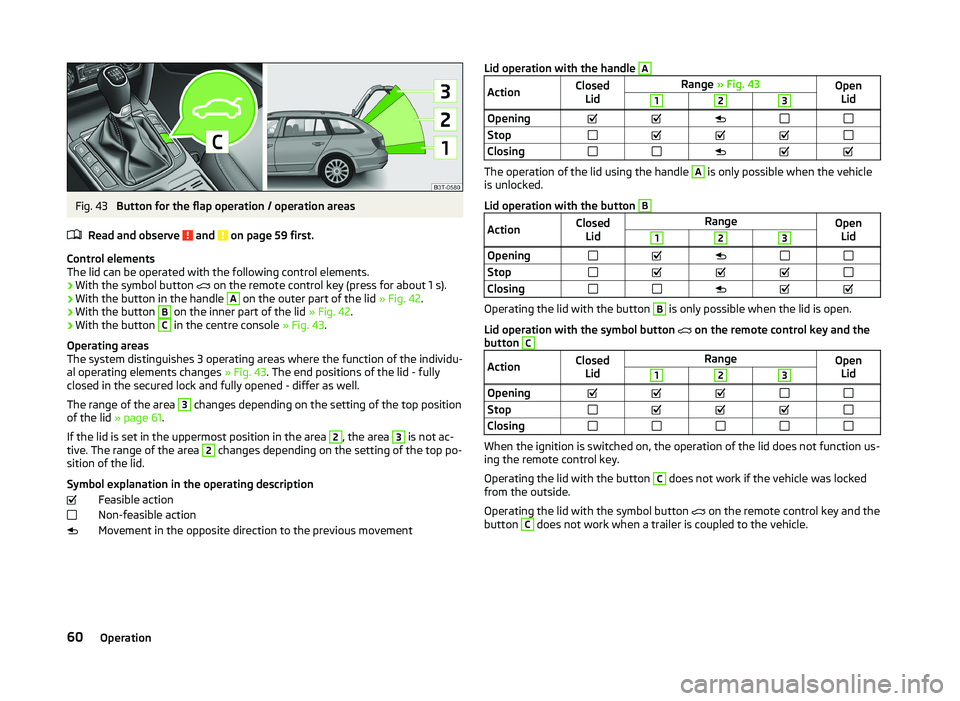
Fig. 43
Button for the flap operation / operation areas
Read and observe
and on page 59 first.
Control elements
The lid can be operated with the following control elements.
› With the symbol button
on the remote control key (press for about 1 s).
› With the button in the handle
A
on the outer part of the lid
» Fig. 42.
› With the button
B
on the inner part of the lid
» Fig. 42.
› With the button
C
in the centre console
» Fig. 43.
Operating areas
The system distinguishes 3 operating areas where the function of the individu-
al operating elements changes » Fig. 43. The end positions of the lid - fully
closed in the secured lock and fully opened - differ as well.
The range of the area
3
changes depending on the setting of the top position
of the lid » page 61 .
If the lid is set in the uppermost position in the area
2
, the area
3
is not ac-
tive. The range of the area
2
changes depending on the setting of the top po-
sition of the lid.
Symbol explanation in the operating description Feasible action
Non-feasible action
Movement in the opposite direction to the previous movement
Lid operation with the handle AActionClosed LidRange » Fig. 43Open
Lid123OpeningStopClosing
The operation of the lid using the handle
A
is only possible when the vehicle
is unlocked.
Lid operation with the button
BActionClosed LidRangeOpenLid123OpeningStopClosing
Operating the lid with the button
B
is only possible when the lid is open.
Lid operation with the symbol button on the remote control key and the
button
CActionClosed LidRangeOpenLid123OpeningStopClosing
When the ignition is switched on, the operation of the lid does not function us-
ing the remote control key.
Operating the lid with the button
C
does not work if the vehicle was locked
from the outside.
Operating the lid with the symbol button on the remote control key and the
button
C
does not work when a trailer is coupled to the vehicle.
60Operation
Page 65 of 252
WARNING■Ensure that no persons are still left in the vehicle when locking the vehi-
cle. In an emergency, the windows will no longer be able to be opened from
the inside.■
The system is fitted with a force limiter » page 63. If there is an obsta-
cle, the closing process is stopped and the window goes down by several
centimetres. The windows should nevertheless be closed carefully – risk of
injury.
■
Deactivating the electrically operated power windows in the rear doors is
recommended (safety push button)
S
when children are being transported
in the rear seats » Fig. 44 on page 62 .
CAUTION
■
Keep the windows clean to ensure the correct functionality of the electric
windows.■
In the event that the windows are frozen, first of all eliminate the
ice » page 179 , Windows and exterior mirrors and only then operate the elec-
trical power windows. Otherwise, the window sealing and the electrical power
window mechanism could be damaged.
■
In the winter, ice accumulating on the surface of the window may cause
there to be more resistance when closing the window. The window will stop
and move back several centimetres.
■
It is necessary to deactivate the force limiter to close the win-
dow » page 63 .
■
Always make sure that the windows are closed when you leave the locked
vehicle.
For the sake of the environment
At high speeds, you should keep the windows closed to prevent unnecessarily high fuel consumption.Note■ After switching the ignition off, it is still possible to open or close the win-
dows for approx. 10 minutes. After the driver's or front passenger's door has
been opened, the windows can only be operated by using button A
» Fig. 44
on page 62 .
■
When driving always use the existing heating, air conditioning and ventila-
tion system for ventilating the interior of the vehicle. If the windows are
opened, dust as well as other dirt can get into the vehicle and in addition the
wind noise is more at certain speeds.
■
The window lift system is equipped with protection against overheating. Re-
peated opening and closing of the window can cause this mechanism to over-
heat. If this happens, it will not be possible to operate the window for a short
time. You will be able to operate the window again as soon as the overheating
protection has cooled down.
Opening/closing the window from the driver seat
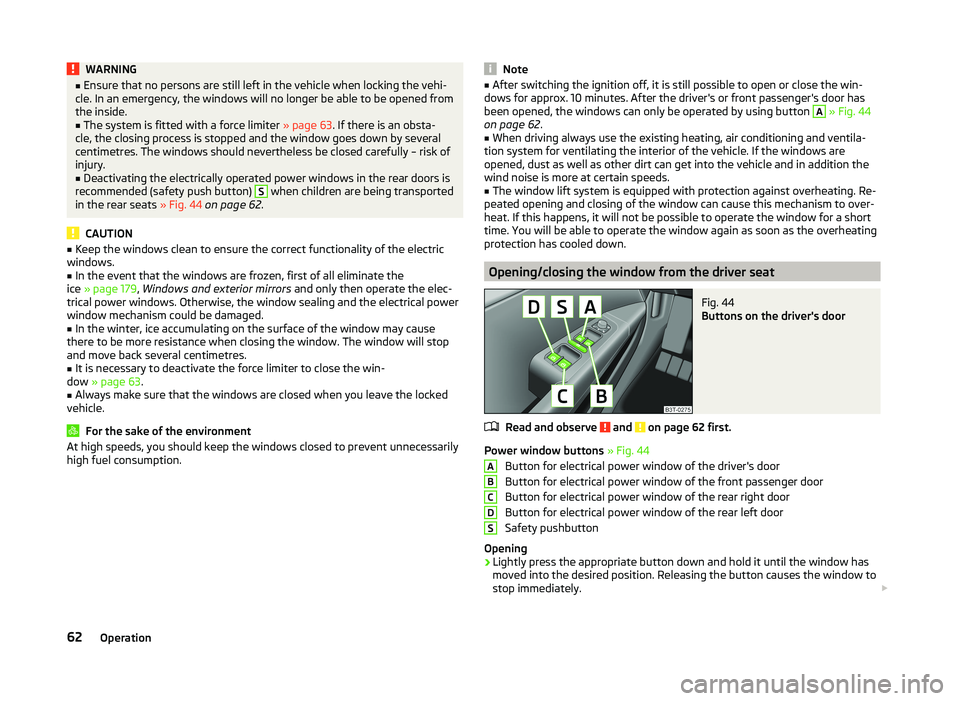
Fig. 44
Buttons on the driver's door
Read and observe and on page 62 first.
Power window buttons » Fig. 44
Button for electrical power window of the driver's door
Button for electrical power window of the front passenger door
Button for electrical power window of the rear right door
Button for electrical power window of the rear left door
Safety pushbutton
Opening
›
Lightly press the appropriate button down and hold it until the window has
moved into the desired position. Releasing the button causes the window to
stop immediately.
ABCDS62Operation
Page 67 of 252

Opening›Press and hold the symbol button on the remote control key.›
Hold the key in the driver's lock in the unlock position.
›
Press and hold the upper part of the central locking button in the driver's
door » page 55 .
›
Hold button
A
» Fig. 44 on page 62 in the opening position.
Closing
›
Press and hold the symbol button
on the remote control key.
›
Hold the key in the driver's lock in the lock position.
›
Press and hold the lower part of the central locking button » page 55 in the
driver's door.
›
Hold button
A
» Fig. 44 on page 62 in the closing position.
›
In the KESSY system, hold a finger on the sensor
B
» Fig. 34 on page 53 .
The speed limit for winter tyres can be set in the MAXI DOT display in the
menu item Window op. . » page 47 .
The prerequisite for ensuring that the convenience operating feature correctly
is the automatic opening/closing of all windows is operational.
Convenience opening or closing the window using the key in the driver's lock
is only possible within 45 seconds after locking the vehicle.
The movement of the window is stopped immediately when the key or the re-
spective button is released.
Operational faults
Read and observe
and on page 62 first.
The automatic power windows do not work if the vehicle battery has been dis-
connected and connected again while a window was open. The system must
be activated.
Activation sequence:
›
Switch on the ignition.
›
Pull the top edge of the button and close the window.
›
Release the button.
›
Drag and drop the button upwards again and hold for about 1 s.
Electric sliding/tilting roof
Introduction
This chapter contains information on the following subjects:
Operation
64
Convenience operation of sliding / tilting roof
65
Electric sliding/tilting roof with solar cells
65
The electric sliding/tilting roof (abbreviated in the following as 'sliding/tilting
roof') can only be operated when the ignition is turned on and when the out-
door temperature is higher than -20 °C.
The sliding/tilting roof can still be operated for approx. 10 minutes after
switching the ignition off. However, as soon as the driver or front passenger's
door is opened it is no longer possible to operate the sliding/tilting roof.
CAUTION
■ Always close the sliding/tilting roof before disconnecting the battery.■If the battery has been disconnected and reconnected, it is possible that the
sliding/tilting roof does not operate correctly. In this case, turn the rotary
switch to the switch position A
» Fig. 46 on page 64 and push forward for
about 10 seconds.
Operation
Fig. 46
Control dial for the sliding/tilting
roof
Read and observe on page 64 first.
Comfort position
›
Turn the switch to position
C
» Fig. 46 .
When the sliding/tilting roof is in the comfort position, the intensity of the
wind noise is reduced.
64Operation
Page 68 of 252

Open partially›Simply turn the knob to a point between A and C.
Open fully
›
Turn the switch to position
B
and hold it in this position (spring-tensioned
position).
Tilting roof
›
Turn the switch to position
D
.
Closing
›
Turn the switch to position
A
.
Sun screen
The sun screen is also opened automatically when the tilt/slide sunroof slides
open. When the tilt/slide sunroof is closed the sun screen can be manually op-
erated »
.
Force limiter
The sliding/tilting roof is fitted with a force limiter. If an obstacle (e.g. ice) pre-
vents closing, the sliding/tilting roof stops and opens completely. The sliding/
tilting roof can be closed completely without the force limiter by pushing the
switch in position
A
» Fig. 46 forwards until the sliding/tilting roof is com-
pletely closed.
WARNINGWhen operating the tilt/slide sunroof and the sunshade, proceed with cau-
tion to avoid causing crushing injuries – risk of injury!
CAUTION
During the winter it may be necessary to remove any ice and snow in the vicin-
ity of the sliding/tilting roof before opening it to prevent any damage to the
opening mechanism.
Convenience operation of sliding / tilting roof
Read and observe
on page 64 first.
The sliding/tilting roof can be operated by locking/unlocking using the key or
using the KESSY system with the aid of the sensor
B
» Fig. 34 on page 53 .
›
Press and hold the symbol button
on the remote control key.
›
In the KESSY system, hold a finger on the sensor
B
» Fig. 34 on page 53 .
By releasing the lock or lifting your finger off the sensor B when using the
KESSY system, the closing process is immediately interrupted.WARNINGClose the sliding/tilting roof carefully – risk of injury. The force limiter does
not operate with the convenience closing.
Electric sliding/tilting roof with solar cells
Read and observe
on page 64 first.
If there is sufficient bright sunlight, the solar cells in the sliding/tilting roof de-liver the electrical power for the fresh air blower. Further informa-
tion » page 115 , Climatronic (automatic air conditioning system) .
The operation of the sliding/tilting roof with solar cells is the same as of a nor-
mal sliding/tilting roof.
Panoramic sliding/tilting roof (Superb Estate)
Introduction
This chapter contains information on the following subjects:
Operation
66
Opening/closing the sun screen
66
Convenience operation of sliding / tilting roof
67
The panoramic sliding/tilting roof (abbreviated in the following as 'sliding/tilt-
ing roof') can only be operated when the ignition is turned on and when the
outdoor temperature is higher than -20 °C.
The sliding/tilting roof can still be operated for approx. 10 minutes after
switching the ignition off. However, as soon as the driver or front passenger's
door is opened it is no longer possible to operate the sliding/tilting roof.
CAUTION
■ Always close the sliding/tilting roof before disconnecting the battery.■If, for example, the battery has been disconnected and reconnected, it is pos-
sible that the sliding/tilting roof does not operate correctly. Next, move the ro-
tary switch into position A
» Fig. 47 on page 66 , pull the recess firmly
65Unlocking and opening
Page 70 of 252
WARNINGWhen operating the sunshade, proceed with caution to avoid causing
crushing injuries – risk of injury!
Convenience operation of sliding / tilting roof
Read and observe
on page 65 first.
The sliding / tilting roof can be operated by locking or unlocking using the keyor using the KESSY system with the aid of the sensor
A
or
B
» Fig. 34 on
page 53 .
Closing
›
Press and hold the symbol button on the key or hold the key in the locking
cylinder of the driver's door in the lock position, or for the KESSY system,
keep your finger on the sensor
B
» Fig. 34 on page 53 » .
By releasing the lock or lifting your finger off the sensor
B
when using the
KESSY system, the closing process is immediately interrupted.
Tilting roof
›
Press and hold the symbol button on the remote control key.
WARNINGClose the sliding/tilting roof carefully – risk of injury. The force limiter does
not operate with the convenience closing.Lights and visibility
Lights
Introduction
This chapter contains information on the following subjects:
Operating the lights and the instrument illumination
68
Daylight running lights (DAY LIGHT)
69
Turn signal and main beam
69
Automatic driving lamp control
70
Adaptive headlights (AHL)
70
Fog lights
71
Fog lights with the CORNER function
71
Rear fog light
71
COMING HOME / LEAVING HOME
72
Hazard warning light system
72
Parking lights
73
Unless otherwise stated, the lights only work when the ignition is on.
The arrangement of the controls right-hand drive models may differ from the layout shown in » Fig. 49 on page 68 . The symbols which mark the positions
of the controls are identical.
Keep the headlights lenses clean. The following guidelines must be ob-
served » page 179 , Headlight lenses .
WARNING■
The activation of the lights should only be undertaken in accordance with
national legal requirements.■
The driver is always responsible for the correct settings and use of the
lights.
67Lights and visibility
Page 71 of 252
WARNING (Continued)■The automatic driving lamp control only operates as a support and
does not release the driver from his responsibility to check the lights and, if
necessary, to switch on the light depending on the prevailing light condi-
tions. The light sensor cannot, for example, detect rain or snow. Under
these conditions we recommend switching on the low beam or fog lights!■
Never drive with only the side lights on! The side lights are not bright
enough to light up the road sufficiently in front of you or to be seen by oth-
er oncoming traffic. Therefore always switch on the low beam when it is
dark or if visibility is poor.
Note
The headlights may mist up temporarily. When the driving lights are switched
on, the light outlet areas are free from condensation after a short time, al-
though the headlight lenses may still be misted up around the edge. This mist
has no influence on the life of the lighting system.
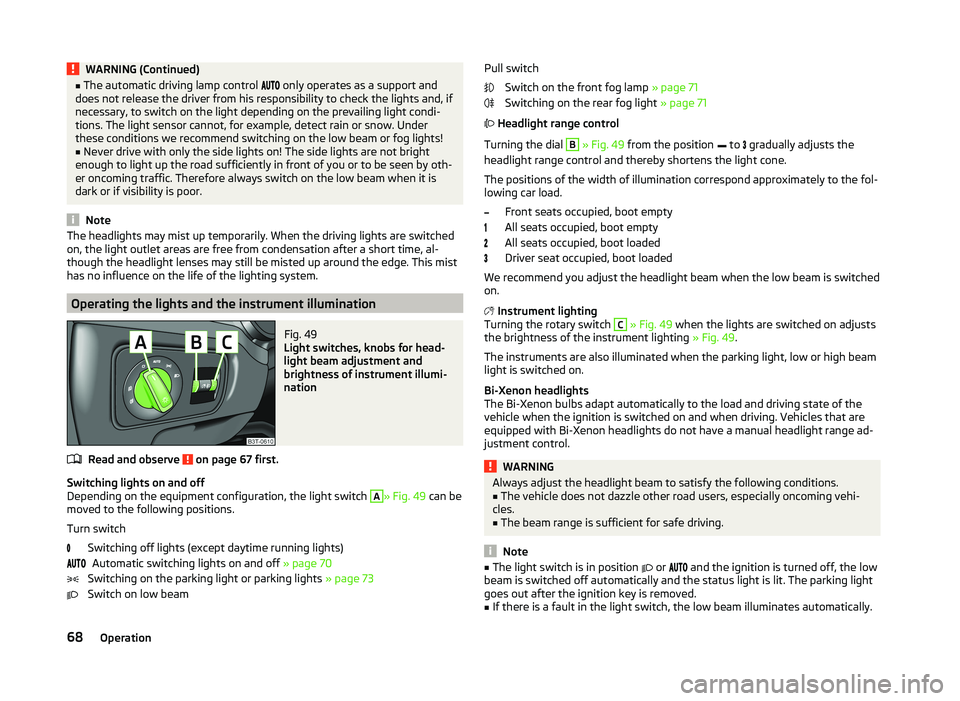
Operating the lights and the instrument illumination
Fig. 49
Light switches, knobs for head-
light beam adjustment and
brightness of instrument illumi-
nation
Read and observe on page 67 first.
Switching lights on and off
Depending on the equipment configuration, the light switch
A
» Fig. 49 can be
moved to the following positions.
Turn switch Switching off lights (except daytime running lights)Automatic switching lights on and off » page 70
Switching on the parking light or parking lights » page 73
Switch on low beam
Pull switch
Switch on the front fog lamp » page 71
Switching on the rear fog light » page 71
Headlight range control
Turning the dial B
» Fig. 49 from the position
to
gradually adjusts the
headlight range control and thereby shortens the light cone.
The positions of the width of illumination correspond approximately to the fol-
lowing car load.
Front seats occupied, boot empty
All seats occupied, boot empty
All seats occupied, boot loaded
Driver seat occupied, boot loaded
We recommend you adjust the headlight beam when the low beam is switched
on.
Instrument lighting
Turning the rotary switch
C
» Fig. 49 when the lights are switched on adjusts
the brightness of the instrument lighting » Fig. 49.
The instruments are also illuminated when the parking light, low or high beam light is switched on.
Bi-Xenon headlights
The Bi-Xenon bulbs adapt automatically to the load and driving state of the vehicle when the ignition is switched on and when driving. Vehicles that are
equipped with Bi-Xenon headlights do not have a manual headlight range ad-
justment control.
WARNINGAlways adjust the headlight beam to satisfy the following conditions.■The vehicle does not dazzle other road users, especially oncoming vehi-
cles.■
The beam range is sufficient for safe driving.
Note
■ The light switch is in position or and the ignition is turned off, the low
beam is switched off automatically and the status light is lit. The parking light
goes out after the ignition key is removed.■
If there is a fault in the light switch, the low beam illuminates automatically.
68Operation