phone SKODA SUPERB 2011 Owner´s Manual
[x] Cancel search | Manufacturer: SKODA, Model Year: 2011, Model line: SUPERB, Model: SKODA SUPERB 2011Pages: 252, PDF Size: 16.33 MB
Page 137 of 252
Multimedia
Introduction
This chapter contains information on the following subjects:
Music playback via Bluetooth ®
134
Operating the radio and navigation system on the multifunction steering
wheel
134
AUX- and MDIinputs
135
CD changer
136
DVD-preinstallation
136
Music playback via Bluetooth ®
The universal telephone preinstallation makes it possible to play back music
via Bluetooth ®
from devices such as MP3 players, mobile phones or notebooks.
To ensure the music can be played back via Bluetooth ®
, you must first pair the
device with the hands-free system in the Phone - Bluetooth - Media player
menu.
The music playback process is performed on the connected device.
The universal telephone preinstallation GSM II ensures that the music played
back via the hands-free system can be controlled with the remote con-
trol » page 133 , Voice commands - GSM II .
Note
The device being connected must support the Bluetooth ®
A2DP profile; refer
to the operating instructions for the relevant device being connected.
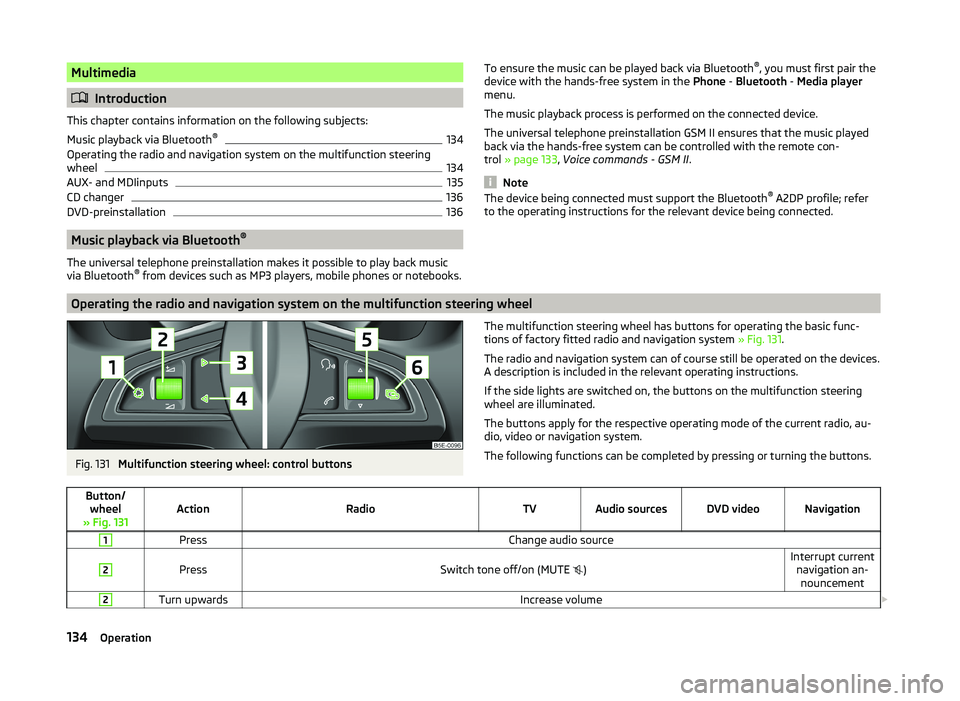
Operating the radio and navigation system on the multifunction steering wheel
Fig. 131
Multifunction steering wheel: control buttons
The multifunction steering wheel has buttons for operating the basic func-
tions of factory fitted radio and navigation system » Fig. 131.
The radio and navigation system can of course still be operated on the devices. A description is included in the relevant operating instructions.
If the side lights are switched on, the buttons on the multifunction steering wheel are illuminated.
The buttons apply for the respective operating mode of the current radio, au-
dio, video or navigation system.
The following functions can be completed by pressing or turning the buttons.Button/ wheel
» Fig. 131ActionRadioTVAudio sourcesDVD videoNavigation
1PressChange audio source2
PressSwitch tone off/on (MUTE
)Interrupt current
navigation an-nouncement2Turn upwardsIncrease volume 134Operation
Page 224 of 252
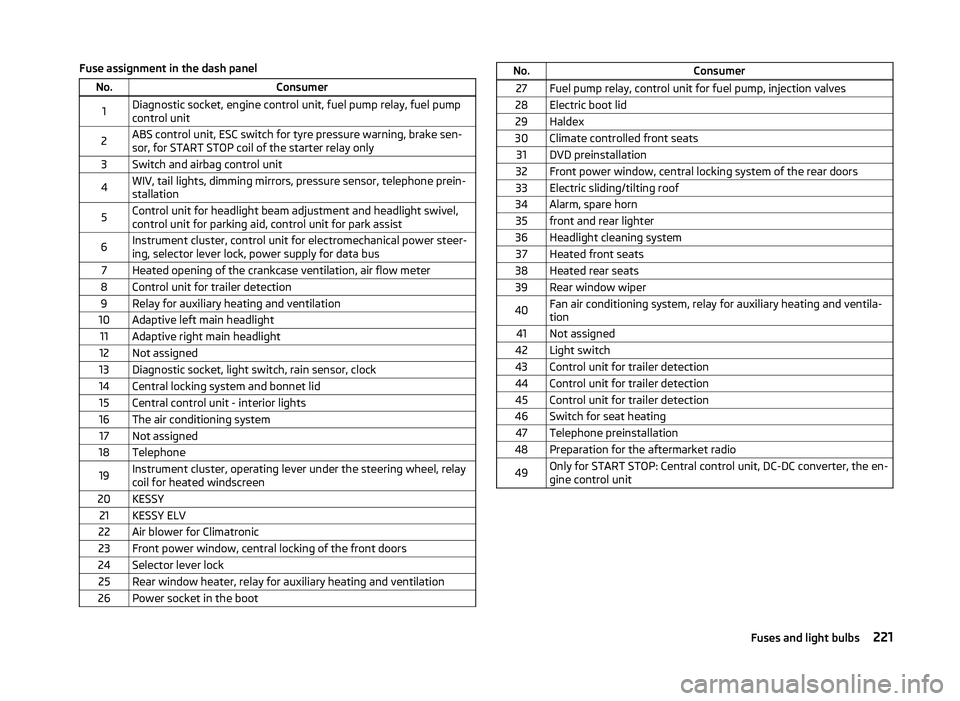
Fuse assignment in the dash panelNo.Consumer1Diagnostic socket, engine control unit, fuel pump relay, fuel pump
control unit2ABS control unit, ESC switch for tyre pressure warning, brake sen-
sor, for START STOP coil of the starter relay only3Switch and airbag control unit4WIV, tail lights, dimming mirrors, pressure sensor, telephone prein-
stallation5Control unit for headlight beam adjustment and headlight swivel,
control unit for parking aid, control unit for park assist6Instrument cluster, control unit for electromechanical power steer-
ing, selector lever lock, power supply for data bus7Heated opening of the crankcase ventilation, air flow meter8Control unit for trailer detection9Relay for auxiliary heating and ventilation10Adaptive left main headlight11Adaptive right main headlight12Not assigned13Diagnostic socket, light switch, rain sensor, clock14Central locking system and bonnet lid15Central control unit - interior lights16The air conditioning system17Not assigned18Telephone19Instrument cluster, operating lever under the steering wheel, relay
coil for heated windscreen20KESSY21KESSY ELV22Air blower for Climatronic23Front power window, central locking of the front doors24Selector lever lock25Rear window heater, relay for auxiliary heating and ventilation26Power socket in the bootNo.Consumer27Fuel pump relay, control unit for fuel pump, injection valves28Electric boot lid29Haldex30Climate controlled front seats31DVD preinstallation32Front power window, central locking system of the rear doors33Electric sliding/tilting roof34Alarm, spare horn35front and rear lighter36Headlight cleaning system37Heated front seats38Heated rear seats39Rear window wiper40Fan air conditioning system, relay for auxiliary heating and ventila-
tion41Not assigned42Light switch43Control unit for trailer detection44Control unit for trailer detection45Control unit for trailer detection46Switch for seat heating47Telephone preinstallation48Preparation for the aftermarket radio49Only for START STOP: Central control unit, DC-DC converter, the en-
gine control unit221Fuses and light bulbs
Page 244 of 252
LockingIndividual settings54
KESSY53
Remote control52
Locking and unlocking the vehicle from the in- side
55
Locking the door without a locking cylinder Emergency
217
Long cargo channel96
Low beam68
Warning light41
Low tyre pressure warning refer to the tyre pressure monitoring
165
Luggage compartment97
Class N1 vehicles98
Cover100
Emergency unlocking217
Fastening elements99
Fix floor covering100
Fixing nets99
Lighting97
Luggage net100
see boot lid57
Side pockets101
Unlocking the boot lid217
Variable loading floor104
Luggage compartment cover100
Luggage compartment lid57
Luggage net100
M
Main beam
69
Warning light41
Maintenance151
Decorative films179
Manual air conditioning adjusting
114
Recirculated air mode114
Manual gear changing see gear changing
144
Manually setting air conditioningControl elements112
MAXI DOT See MAXI DOT display
46
MAXI DOT display46
Main menu47
Operation42
Settings47
maximum allowable weights
228
MDI Installation in the storage compartment
92
Media see radio / navigation system
4
MFD See multifunction display
44
Mirror Exterior mirrors
80
Mirrors Interior mirror
79
Vanity76
Mobile phone121, 124, 126
Connecting to the hands-free system124, 127
Modifications173
Modifications and technical alterations Airbags
175
Service174
Spoiler175
Multifunction display Functions
44
Information45
Memory44
Operation42
Multimedia134
AUX135
MDI135
N
N1
98
nameplate228
Navigation system4
Net partition107
Behind the front seats108
Behind the rear seats107
Removing and refitting the housing108
Nets99
Non-closable side pocket (Superb Combi)102
Notes for driving with tyre repaired211
O
Oil Note messages
36
See Engine oil190
Oil pressure Note messages
36
On-board computer See multifunction display
44
Operating the sun screen
66
Operating weight229
Operation in winter Diesel fuel
185
Vehicle battery195
Original accessories174
Outside temperature45
Overview Engine compartment
188
Warning lights34
P
Paintwork See Paintwork care
178
Paintwork care178
Park assist157
Departing from a parallel parking space160
Finding a parking space158
Information messages160
Parking159
241Index
Page 247 of 252
Switch off ignitionRefer to KESSY141
Switch on ignition Refer to KESSY
141
Synchronous adjustment of the rear-view mir- ror
80
Synthetic leather182
T
Tailgate TwinDoor
58
Taking care of the vehicle Natural leather
181
Seat belts183
Taking care of your vehicle Automatic car wash system
177
Cavity protection180
Chrome parts178
Cleaning the wheels180
Decorative films179
Door lock cylinders179
Headlight lenses179
High-pressure cleaner177
Plastic parts178
Polishing the paintwork178
Rubber seals178
Taking care of the interior181
Taking care of your vehicle exterior177
Washing by hand176
Wash system177
Wax treatment178
Taking care of your vehicles Fabric covers
182
Technical data228
Telephone124, 126
Temporary spare wheel200
Tilting roof see Electric sliding/tilting roof
64
Tiptronic146
Tools205
TOP TETHER27
Towing213
Towing a trailer171
Towing device Description
167
Operation and maintenance180
Towing eye Front
214
Rear214
Towing protection56
Traction Control System (ASR)155
Trailer170
13-pin socket170
connection and disconnection170
Loading171
Safety eye170
Towing a trailer171
Trailer operation166
Trailer stabilisation172
Transport Luggage compartment
97
Roof rack108
Transporting children safely22
Triangle204
TSA172
Turn signal69
Turn signal system Warning light
41
Twindoor see boot lid
57
Two-way radio systems121
Tyre Explanation of the labelling
201
see wheels201
Tyre inflation pressure Warning light
40
Tyre load bearing capacity Refer to Wheels
201
Tyre pressure monitoring165
Save tyre pressure values166
Tyre repair Preparations
210
Pressure test211
Sealing and inflating the tyre210
Tyres197
Inflation pressure198
Sizes198
Tyre wear indicator198
Tyre size201
see wheels201
U
Umbrella Tray
95
Underbody protection180
Unleaded petrol153
Unlock Vehicle key
51
Unlocking Individual settings
54
KESSY53
Remote control52
Unlocking and locking50
Using the information system42
Using the selector lever145
V
Variable loading floor
104
Dividing the luggage compartment104
Remove104
slides off on aluminium rails105
Vehicle battery Automatic load deactivation
197
Charging196
Checking the battery electrolyte level195
Cover195
Disconnecting and reconnecting196
244Index