warning SKODA SUPERB 2011 Owner´s Manual
[x] Cancel search | Manufacturer: SKODA, Model Year: 2011, Model line: SUPERB, Model: SKODA SUPERB 2011Pages: 252, PDF Size: 16.33 MB
Page 105 of 252
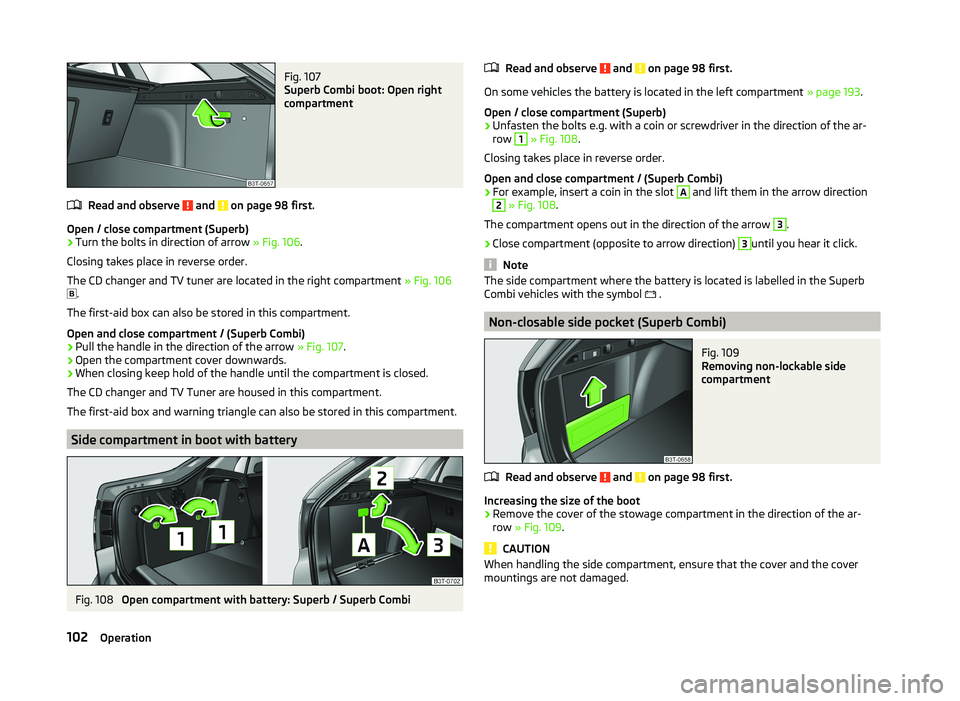
Fig. 107
Superb Combi boot: Open right
compartment
Read and observe and on page 98 first.
Open / close compartment (Superb)
›
Turn the bolts in direction of arrow » Fig. 106.
Closing takes place in reverse order.
The CD changer and TV tuner are located in the right compartment » Fig. 106
.
The first-aid box can also be stored in this compartment.
Open and close compartment / (Superb Combi)
›
Pull the handle in the direction of the arrow » Fig. 107.
›
Open the compartment cover downwards.
›
When closing keep hold of the handle until the compartment is closed.
The CD changer and TV Tuner are housed in this compartment.
The first-aid box and warning triangle can also be stored in this compartment.
Side compartment in boot with battery
Fig. 108
Open compartment with battery: Superb / Superb Combi
Read and observe and on page 98 first.
On some vehicles the battery is located in the left compartment » page 193.
Open / close compartment (Superb)
›
Unfasten the bolts e.g. with a coin or screwdriver in the direction of the ar-
row
1
» Fig. 108 .
Closing takes place in reverse order.
Open and close compartment / (Superb Combi)
›
For example, insert a coin in the slot
A
and lift them in the arrow direction
2
» Fig. 108 .
The compartment opens out in the direction of the arrow
3
.
›
Close compartment (opposite to arrow direction)
3
until you hear it click.
Note
The side compartment where the battery is located is labelled in the Superb
Combi vehicles with the symbol .
Non-closable side pocket (Superb Combi)
Fig. 109
Removing non-lockable side
compartment
Read and observe and on page 98 first.
Increasing the size of the boot
›
Remove the cover of the stowage compartment in the direction of the ar-
row » Fig. 109 .
CAUTION
When handling the side compartment, ensure that the cover and the cover
mountings are not damaged.102Operation
Page 108 of 252
WARNINGEnsure that the carrier rails and variable loading floor are correctly fastened
when installing the variable loading floor. If this is not the case, there is a
risk of injury for the occupants.
Extending variable loading floor with integrated aluminium rails
and fastening elements (Superb Combi)
Introduction
This chapter contains information on the following subjects:
Partial extension of variable load floor
105
Divide boot
105
Fit and remove variable loading floor
106
Fixing set
106
Movable lashing eyes
107
The variable loading floor makes handling of bulky items of luggage easier.
CAUTION
The maximum permissible load of the variable loading floor is 75 kg.
Note
The space below the variable loading floor can be used for stowing objects, for
example the fastening elements, removed foldable boot cover, etc.
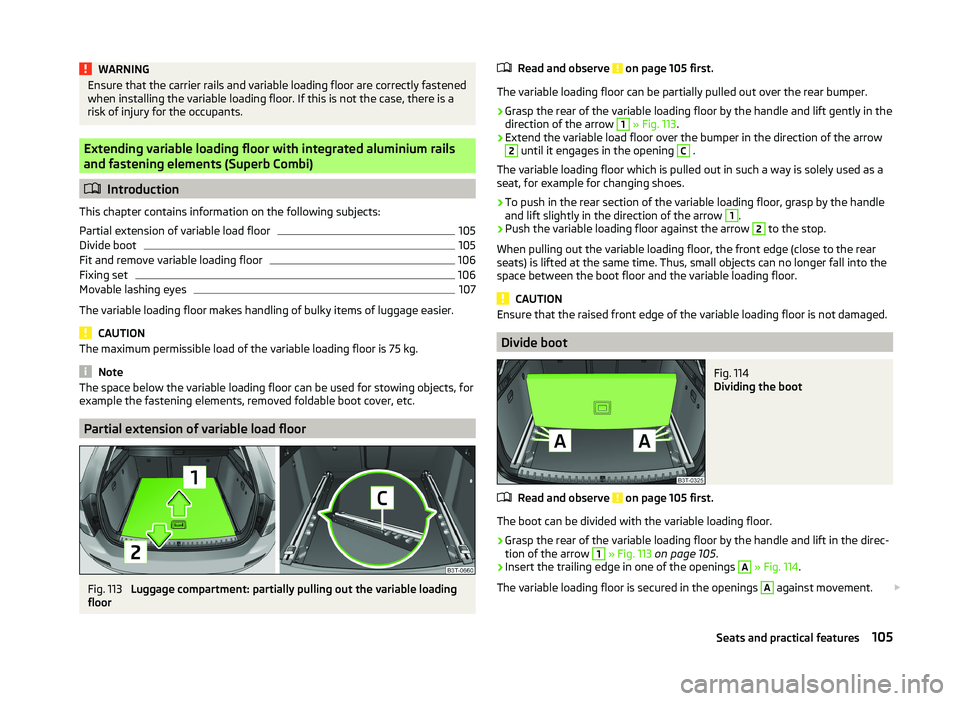
Partial extension of variable load floor
Fig. 113
Luggage compartment: partially pulling out the variable loading
floor
Read and observe on page 105 first.
The variable loading floor can be partially pulled out over the rear bumper.
›
Grasp the rear of the variable loading floor by the handle and lift gently in the
direction of the arrow
1
» Fig. 113 .
›
Extend the variable load floor over the bumper in the direction of the arrow
2
until it engages in the opening
C
.
The variable loading floor which is pulled out in such a way is solely used as a
seat, for example for changing shoes.
›
To push in the rear section of the variable loading floor, grasp by the handle
and lift slightly in the direction of the arrow
1
.
›
Push the variable loading floor against the arrow
2
to the stop.
When pulling out the variable loading floor, the front edge (close to the rear
seats) is lifted at the same time. Thus, small objects can no longer fall into the
space between the boot floor and the variable loading floor.
CAUTION
Ensure that the raised front edge of the variable loading floor is not damaged.
Divide boot
Fig. 114
Dividing the boot
Read and observe on page 105 first.
The boot can be divided with the variable loading floor.
›
Grasp the rear of the variable loading floor by the handle and lift in the direc-
tion of the arrow
1
» Fig. 113 on page 105 .
›
Insert the trailing edge in one of the openings
A
» Fig. 114 .
The variable loading floor is secured in the openings
A
against movement.
105Seats and practical features
Page 109 of 252

The variable loading floor can be pulled out a little more before dividing the
boot with the variable loading floor » page 105. This enlarges the space be-
tween the rear seats and the separation.
CAUTION
Ensure that the raised front edge of the variable loading floor is not damaged.
Fit and remove variable loading floor
Fig. 115
Luggage compartment: fold up variable loading floor
Fig. 116
Luggage compartment: variable loading floor
Read and observe
on page 105 first.
The variable loading floor can be removed and reinstalled, if necessary.
Removing
›
Grasp the rear part of the floor by the handle, raise it slightly in the direction
of the arrow
1
» Fig. 115 and pull it out over the bumper in the direction of
the arrow
2
until it engages in the opening
C
» Fig. 116 .
›Fold up the loading floor by moving it in the direction of the arrow3» Fig. 115
.›
Press the safety buttons
A
» Fig. 116 and remove the floor.
Fitting
›
Fold up the floor and place it on the carrier rails.
›
Push the floor forwards until it engages in the openings
B
in the carrier
rails » Fig. 116 .
›
Carefully press in the vicinity of the openings
C
on the floor until it clicks in-
to place, if necessary press the safety buttons
A
.
WARNINGEnsure the variable loading floor is attached correctly during installation. If
this is not the case, there is a risk of injury for the occupants.
Fixing set
Fig. 117
Telescopic pole and tensioning strap
Read and observe
on page 105 first.
The fixing set can be used for dividing the boot or for securing the objects
which are being transported.
Telescopic pole
›
Insert the holders for the telescopic pole into the left and right openings of
the carrier rails.
›
Press the top part of the holder in the direction of the arrow
1
» Fig. 117 and
simultaneously push in the desired position in the direction of the arrow
2
.
›
Ensure that the holder is correctly locked in place.
106Operation
Page 110 of 252
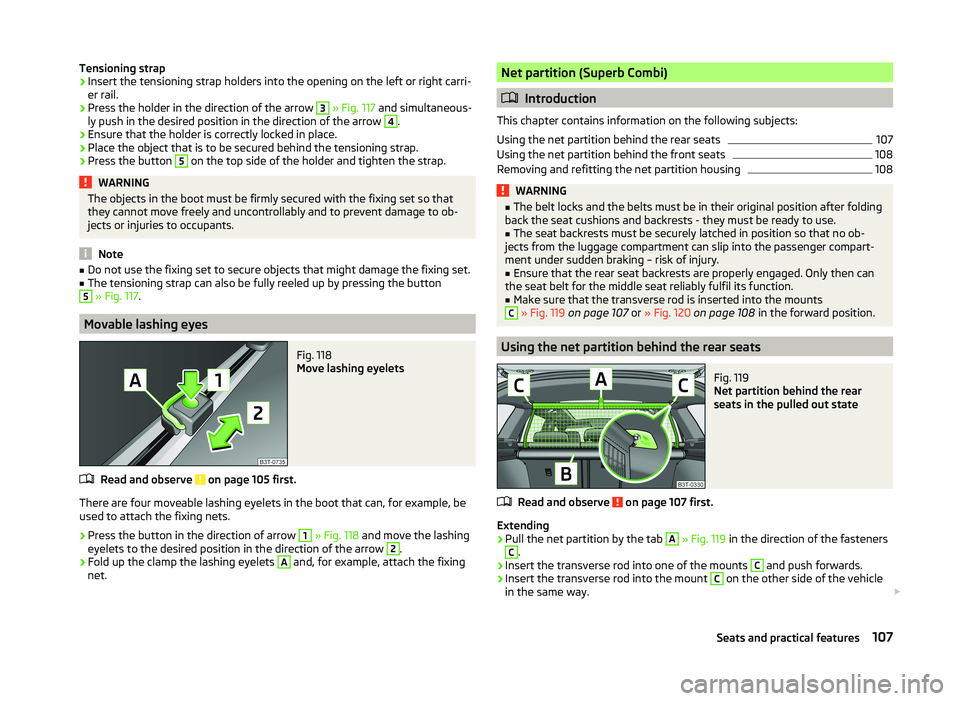
Tensioning strap›Insert the tensioning strap holders into the opening on the left or right carri-
er rail.›
Press the holder in the direction of the arrow
3
» Fig. 117 and simultaneous-
ly push in the desired position in the direction of the arrow
4
.
›
Ensure that the holder is correctly locked in place.
›
Place the object that is to be secured behind the tensioning strap.
›
Press the button
5
on the top side of the holder and tighten the strap.
WARNINGThe objects in the boot must be firmly secured with the fixing set so that
they cannot move freely and uncontrollably and to prevent damage to ob-
jects or injuries to occupants.
Note
■ Do not use the fixing set to secure objects that might damage the fixing set.■The tensioning strap can also be fully reeled up by pressing the button5
» Fig. 117 .
Movable lashing eyes
Fig. 118
Move lashing eyelets
Read and observe on page 105 first.
There are four moveable lashing eyelets in the boot that can, for example, be
used to attach the fixing nets.
›
Press the button in the direction of arrow
1
» Fig. 118 and move the lashing
eyelets to the desired position in the direction of the arrow
2
.
›
Fold up the clamp the lashing eyelets
A
and, for example, attach the fixing
net.
Net partition (Superb Combi)
Introduction
This chapter contains information on the following subjects:
Using the net partition behind the rear seats
107
Using the net partition behind the front seats
108
Removing and refitting the net partition housing
108WARNING■ The belt locks and the belts must be in their original position after folding
back the seat cushions and backrests - they must be ready to use.■
The seat backrests must be securely latched in position so that no ob-
jects from the luggage compartment can slip into the passenger compart-
ment under sudden braking – risk of injury.
■
Ensure that the rear seat backrests are properly engaged. Only then can
the seat belt for the middle seat reliably fulfil its function.
■
Make sure that the transverse rod is inserted into the mounts
C
» Fig. 119 on page 107 or » Fig. 120 on page 108 in the forward position.
Using the net partition behind the rear seats
Fig. 119
Net partition behind the rear
seats in the pulled out state
Read and observe on page 107 first.
Extending
›
Pull the net partition by the tab
A
» Fig. 119 in the direction of the fasteners
C
.
›
Insert the transverse rod into one of the mounts
C
and push forwards.
›
Insert the transverse rod into the mount
C
on the other side of the vehicle
in the same way.
107Seats and practical features
Page 111 of 252
Retracting›Pull the transverse rod back slightly first on one side and then on the other
and remove it from the mounts C
» Fig. 119 .
›
Hold the cross rod in such a way that the net partition can slowly roll up into
the housing
B
without being damaged.
Note
If you wish to use the entire luggage compartment, the roll up luggage com-
partment cover can be removed » page 101.
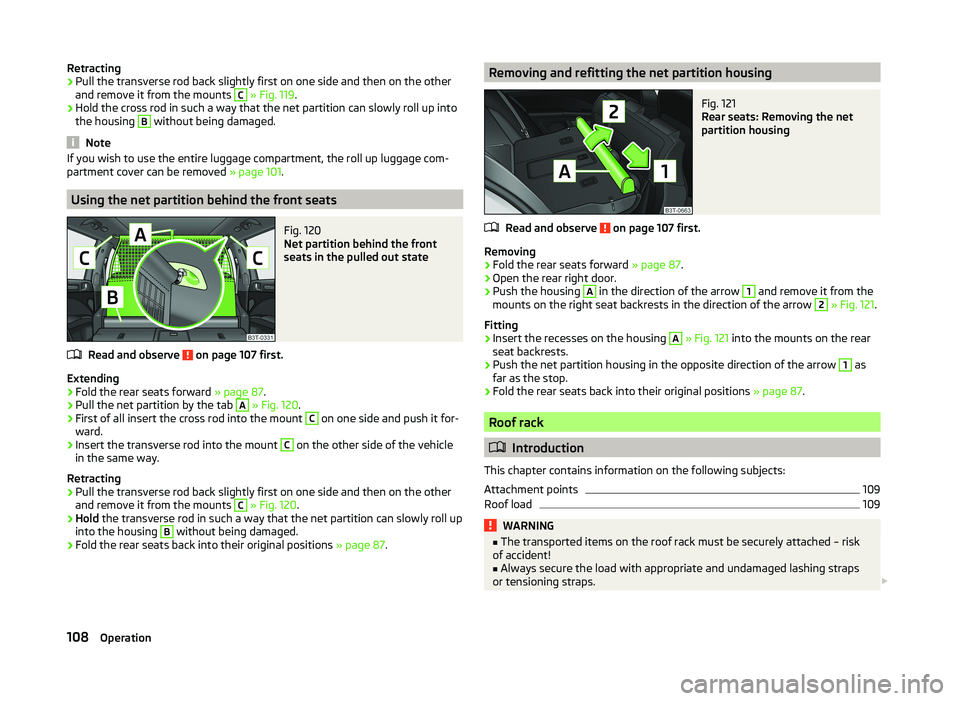
Using the net partition behind the front seats
Fig. 120
Net partition behind the front
seats in the pulled out state
Read and observe on page 107 first.
Extending
›
Fold the rear seats forward » page 87.
›
Pull the net partition by the tab
A
» Fig. 120 .
›
First of all insert the cross rod into the mount
C
on one side and push it for-
ward.
›
Insert the transverse rod into the mount
C
on the other side of the vehicle
in the same way.
Retracting
›
Pull the transverse rod back slightly first on one side and then on the other
and remove it from the mounts
C
» Fig. 120 .
›
Hold the transverse rod in such a way that the net partition can slowly roll up
into the housing
B
without being damaged.
›
Fold the rear seats back into their original positions » page 87.
Removing and refitting the net partition housingFig. 121
Rear seats: Removing the net
partition housing
Read and observe on page 107 first.
Removing
›
Fold the rear seats forward » page 87.
›
Open the rear right door.
›
Push the housing
A
in the direction of the arrow
1
and remove it from the
mounts on the right seat backrests in the direction of the arrow
2
» Fig. 121 .
Fitting
›
Insert the recesses on the housing
A
» Fig. 121 into the mounts on the rear
seat backrests.
›
Push the net partition housing in the opposite direction of the arrow
1
as
far as the stop.
›
Fold the rear seats back into their original positions » page 87.
Roof rack
Introduction
This chapter contains information on the following subjects:
Attachment points
109
Roof load
109WARNING■ The transported items on the roof rack must be securely attached – risk
of accident!■
Always secure the load with appropriate and undamaged lashing straps
or tensioning straps.
108Operation
Page 112 of 252
WARNING (Continued)■Distribute the load evenly over the roof rack system.■When transporting heavy objects or objects which take up a large area on
the roof rack system, handling of the car may change as a result of the dis-
placement of the centre of gravity. The style of driving and speed must
therefore be adapted to the current circumstances.■
Avoid abrupt and sudden driving/braking manoeuvres.
■
Adjust the speed and driving style to the visibility, weather, road and traf-
fic conditions.
■
The permissible roof load, permissible axle loads and permissible total ve-
hicle weight must not be exceeded under any circumstances – risk of acci-
dent!
CAUTION
■ Only roof racks from the ŠKODA Original Accessories range should be used.■The fitting instructions supplied with the roof luggage rack system must be
observed when handling roof racks.■
On models fitted with a power sliding/tilting roof or a panoramic sliding roof,
ensure that the opened sliding/tilting roof or the panoramic sliding roof does
not strike any items of luggage transported on the roof.
■
Ensure that the boot lid does not hit the roof load when opened.
■
The height of the vehicle changes after mounting a roof luggage rack system
and the load that is secured to it. Compare the vehicle height with available
clearances, such as underpasses and garage doors.
■
Always remove the roof luggage rack system before entering an automated
car wash.
■
Ensure the roof aerial is not impaired by the secured load.
For the sake of the environment
The increased aerodynamic drag results in higher fuel consumption.Attachment points
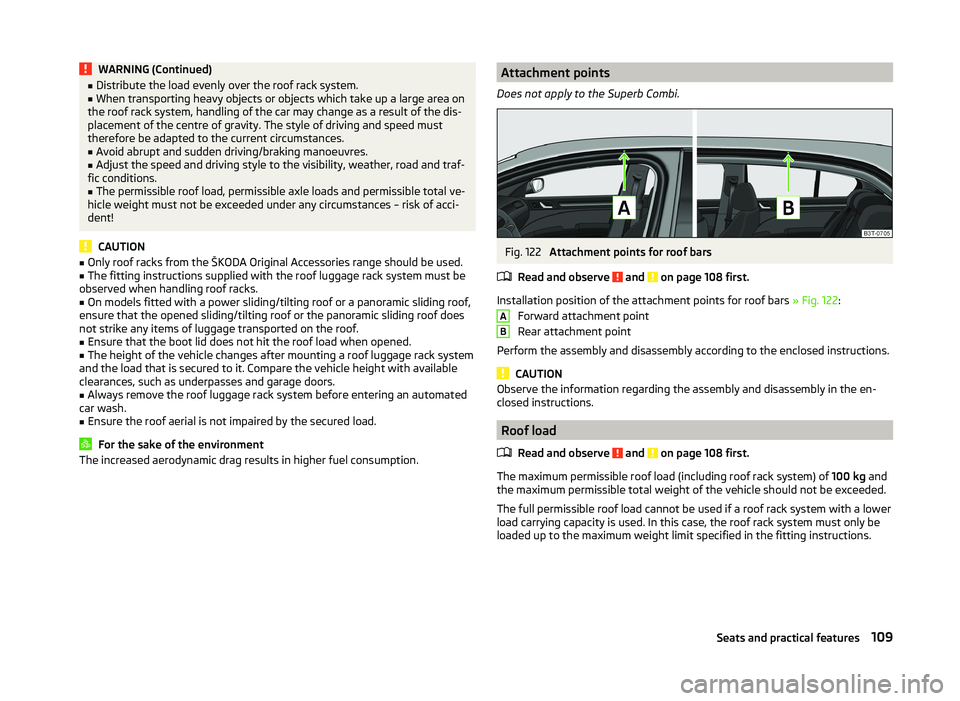
Does not apply to the Superb Combi.Fig. 122
Attachment points for roof bars
Read and observe
and on page 108 first.
Installation position of the attachment points for roof bars » Fig. 122:
Forward attachment point
Rear attachment point
Perform the assembly and disassembly according to the enclosed instructions.
CAUTION
Observe the information regarding the assembly and disassembly in the en-
closed instructions.
Roof load
Read and observe
and on page 108 first.
The maximum permissible roof load (including roof rack system) of 100 kg and
the maximum permissible total weight of the vehicle should not be exceeded.
The full permissible roof load cannot be used if a roof rack system with a lower
load carrying capacity is used. In this case, the roof rack system must only be
loaded up to the maximum weight limit specified in the fitting instructions.
AB109Seats and practical features
Page 113 of 252

Air conditioning system
Heating, ventilation, cooling
Introduction
This chapter contains information on the following subjects:
Air outlets
110
Using the air conditioning system economically
111
Operational problems
112
The heating effect is dependent upon the coolant temperature, thus full heat
output only occurs when the engine has reached its operating temperature.
If the cooling system is switched on, the temperature and air humidity drops in
the vehicle. The cooling system prevents the windows from misting up during
winter months.
It is possible to briefly activate recirculated air mode to enhance the cooling
effect.
Please refer to the information regarding recirculated air mode for the air con-
ditioning system » page 114 or for Climatronic » page 117.
WARNING■
For your own safety and that of other road users, ensure that all the win-
dows are free of ice, snow and misting. Please familiarize yourself about
how to correctly operate the heating and ventilation systems, how to de-
mist and defrost the windows, as well as with the cooling mode.■
To reduce health risks (e.g. common colds), the following instructions for
the use of the cooling system are to be observed. ■The difference between the indoor temperature and the outdoor air
temperature should not be greater than about 5 ° C.
■ The cooling system is to be turned off about 10 minutes before the end
of the journey.
■ Once a year, a disinfection of the air conditioner or the Climatronic is to
be carried out by a specialist company.
CAUTION■ The air inlet in front of the windscreen must be free (e.g. of ice, snow or
leaves) to ensure that the heating and cooling system operates properly.■
After switching on the cooling Condensation from the evaporator of the air
conditioning may drip down and form a puddle below the vehicle. This is not a
leak.
Note
■ The exhaust air streams out through vents at the rear of the luggage com-
partment.■
We recommend that you do not smoke in the vehicle when the recirculating
air mode is operating since the smoke which is drawn at the evaporator from
the interior of the vehicle forms deposits in the evaporator of the air condition-
ing system. This produces a permanent odour when the air conditioning sys-
tem is operating which can only be eliminated through considerable effort and
expense (replacement of compressor).
Air outlets
Fig. 123
Air vents at the front
110Operation
Page 116 of 252
NoteThe warning light in the symbol button illuminates after activation, even if
not all of the conditions for the function of the cooling system are
met » page 112 . The operational readiness of the cooling system is indicated by
the warning light in the button illuminating.113Air conditioning system
Page 117 of 252
adjustingRead and observe
on page 112 first.
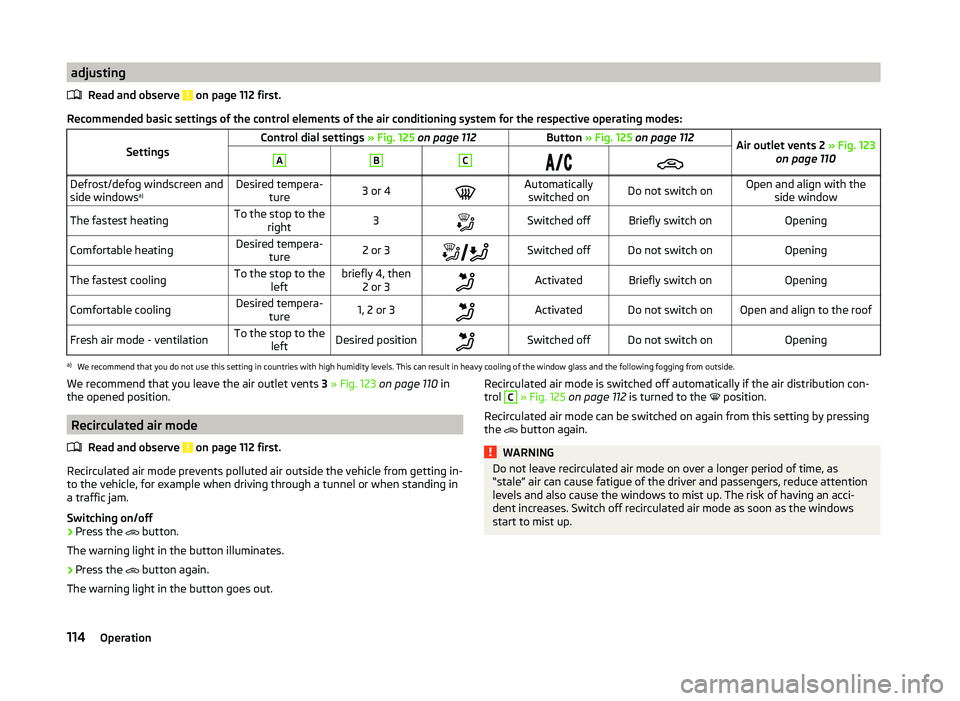
Recommended basic settings of the control elements of the air conditioning system for the respective operating modes:
SettingsControl dial settings » Fig. 125 on page 112Button » Fig. 125 on page 112Air outlet vents 2 » Fig. 123
on page 110ABCDefrost/defog windscreen and
side windows a)Desired tempera-
ture3 or 4Automaticallyswitched onDo not switch onOpen and align with the side windowThe fastest heatingTo the stop to the right3Switched offBriefly switch onOpeningComfortable heatingDesired tempera-ture2 or 3Switched offDo not switch onOpeningThe fastest coolingTo the stop to the
leftbriefly 4, then2 or 3ActivatedBriefly switch onOpeningComfortable coolingDesired tempera- ture1, 2 or 3ActivatedDo not switch onOpen and align to the roofFresh air mode - ventilationTo the stop to the leftDesired positionSwitched offDo not switch onOpeninga)
We recommend that you do not use this setting in countries with high humidity levels. This can result in heavy cooling of the window glass and the following fogging from outside.
We recommend that you leave the air outlet vents 3 » Fig. 123 on page 110 in
the opened position.
Recirculated air mode
Read and observe
on page 112 first.
Recirculated air mode prevents polluted air outside the vehicle from getting in-to the vehicle, for example when driving through a tunnel or when standing in
a traffic jam.
Switching on/off
›
Press the button.
The warning light in the button illuminates.
›
Press the button again.
The warning light in the button goes out.
Recirculated air mode is switched off automatically if the air distribution con- trol C » Fig. 125 on page 112 is turned to the position.
Recirculated air mode can be switched on again from this setting by pressing the
button again.WARNINGDo not leave recirculated air mode on over a longer period of time, as
“stale” air can cause fatigue of the driver and passengers, reduce attention
levels and also cause the windows to mist up. The risk of having an acci-
dent increases. Switch off recirculated air mode as soon as the windows
start to mist up.114Operation
Page 119 of 252
Switch the intensive windscreen heater on/off
Air flow to the windows
Air flow to the upper body
Air flow in the footwell
Switching the rear window heater on/off » page 75
Control the seat heater on the front left seat » page 85
Switching automatic mode on » page 116
Switching Climatronic system off
Switch the cooling system on/off » page 116
Switch the temperature setting in Dual mode on/off » page 116
Control the seat heater on the front right seat » page 85
Note
Do not stick anything on or cover the interior temperature sensor E, other-
wise it could have an unfavourable effect on the Climatronic.
automatic mode
The automatic mode is used in order to maintain a constant temperature and
to demist the windows in the interior of the car.
Recommended setting for all periods of the year
›
Set the required temperature between +18 °C and +26 °C: we recommend 22
°C.
›
Press the button
» Fig. 126 on page 115 .
›
Set the air outlet vents 2 and 3 » Fig. 123 on page 110 so that the air flow is
directed slightly upwards.
After pressing, a warning light in the top right or left corner of the button
illuminates, depending on which mode was last selected.
If the warning light in the top right corner of the button illuminates, the
Climatronic operates in “HIGH”-mode.
The “HIGH” mode is the standard setting of the Climatronic.
Upon pressing the button again, the Climatronic switches to “LOW”-mode
and the warning light in the top left corner illuminates. The Climatronic uses
only in this mode the lower blower speed. However taking into account the
noise level, this is more comfortable, yet be aware that the effectiveness of
the air conditioning system is reduced particularly if the vehicle is fully occu-
pied.
By pressing the button
again, it is changed to “HIGH”-mode.
Automatic mode can be switched off by pressing any of the air distribution
buttons or by increasing/decreasing the blower speed.
Switching the cooling system on/off
›
Press the button
.
The warning light in the button illuminates.
›
Press button
once more.
The warning light in the button goes out.
After the cooling system is switched off, only the ventilation and heating func-
tion remains active whereby the minimum temperature that can be reached is
the outside temperature.
Setting the temperature
The interior temperature for the left and right side can be set separately or to-
gether.
For both sides
›
Turn the control dial
A
» Fig. 126 on page 115 to the left or right to increase
or decrease the temperature.
The warning light in the button does not illuminate.
For the right side
›
Turn the control dial
D
» Fig. 126 on page 115 to the left or right to increase
or decrease the temperature.
The warning light in the button illuminates.
If the warning light in the symbol button is lit, the temperature for both
sides cannot be set with the control dial
A
. This function can be restored by
pressing the symbol button . The warning light in the button goes out.
The interior temperature can be set between +18 ℃ and +26 ℃. The interior
temperature is regulated automatically within this range.
If a temperature lower than +18 °C is selected, a blue symbol illuminates at the start of the numerical scale.
If a temperature higher than +26 °C is selected, a red symbol illuminates at the
start of the numerical scale.
116Operation