Time SKODA SUPERB 2014 2.G / (B6/3T) Columbus Infotainment Navigation System Manual
[x] Cancel search | Manufacturer: SKODA, Model Year: 2014, Model line: SUPERB, Model: SKODA SUPERB 2014 2.G / (B6/3T)Pages: 45, PDF Size: 2.91 MB
Page 4 of 45
General information
Operating instructions
Please read this Columbus navigation system (from here on referred to only as device) Owner's Manual carefully, because operation in accordance with these
instructions is a prerequisite for proper use of the unit.
These operating instructions describe all possible equipment variants without
identifying them as special equipment, model variants or market-dependent
equipment.
Consequently, this vehicle does not need to contain all of the equipment compo-
nents described in these operating instructions.
The level of equipment of your vehicle refers to your purchase contract of the ve- hicle. More information is available from the ŠKODA Partner 1)
where you bought
the vehicle.
Please note that these instructions are meant only as an addendum to the infor-
mation presented in the Vehicle Manual for your vehicle. Therefore, they can be
used only in conjunction with the latest manual for this vehicle. For a detailed de-
scription of some functions listed in these instructions, see the Vehicle Manual
for your vehicle.
If you have any questions about your unit, please contact a ŠKODA Partner. The illustrations can differ in minor details from your device; they are only inten-
ded for general information.
Important information
Safety instructions
The device should only be used when traffic conditions permit safe use.
WARNING■ Concentrate fully at all times on your driving! As the driver you are fully re-
sponsible for the operation of your vehicle.■
Only use the device so that you are in full control of your vehicle in every
traffic situation – there is the risk of accidents!
■
Adjust the volume to ensure that acoustic signals from outside the vehicle,
e.g. sirens from vehicles to give way to, such as the police, ambulance and fire
brigade, can be heard at all times.
■
High volumes can cause hearing damage.
Screen
CAUTION
■ Do not use solvents such as benzine or turpentine, which may damage the
screen surface.■
Treat the screen with care, as finger pressure or contact with sharp objects may
cause dents and scratches on the surface.
Note
The screen can be cleaned with a soft cloth and alcohol if necessary.
Signal receipt
Car parks, tunnels, tall buildings or mountains can disrupt the radio and GPS sig-
nal even causing it to fail completely.
Anti-theft protection
The anti-theft coding of your device prevents operation of the system after a voltage interruption, e.g. during a vehicle repair or following theft. After discon-
necting the battery, disconnecting the radio navigation system from the on-board voltage of the vehicle or after a fuse failure, the code must be entered before the
1)
Explanation of terms
» Owner's Manual , chapter Foreword .
2General information
Page 5 of 45
system can be used again. The code number can only be called up “online” via the
ŠKODA system, as this guarantees even more effective anti-theft protection. If
necessary, visit a ŠKODA Partner 1)
.
Enter code
If a keypad appears after switching on with the command to enter the code, the
unit must be unlocked by entering the correct four-digit code.›
Enter the four-digit code using the function keys 0 to 9. The digit is accepted
in the entry line.
After a four-digit order has been entered, the group of digits will turn grey (inac- tive) and no further digits can be accepted in the entry line.
›
To delete the digits in the entry line from right to left, press the function key on the screen.
›
When the correct code is displayed in the entry line, press the function key
OK.
Incorrect code number
If an incorrect code is confirmed after entry of the code, the procedure can be re- peated once again . The number of attempts is shown in the bottom screen line.
If the code is entered incorrectly a second time, the unit will be blocked for ap- prox. one hour. It is possible to enter again the safety code after one hour has ex-
pired, when the unit and the ignition have been switched on.
If two invalid attempts are then made again, the radio navigation system will beblocked again for one hour.
Note
The code is normally saved in the instrument cluster memory. This ensures that
the device is automatically decoded (convenience decoding). Manual input of the
code is normally not necessary.
Screen display
The screen of the unit displays information such as information from the Clima-
tronic, the vehicle distance to an obstacle if the “parking aid” has been activated, etc.
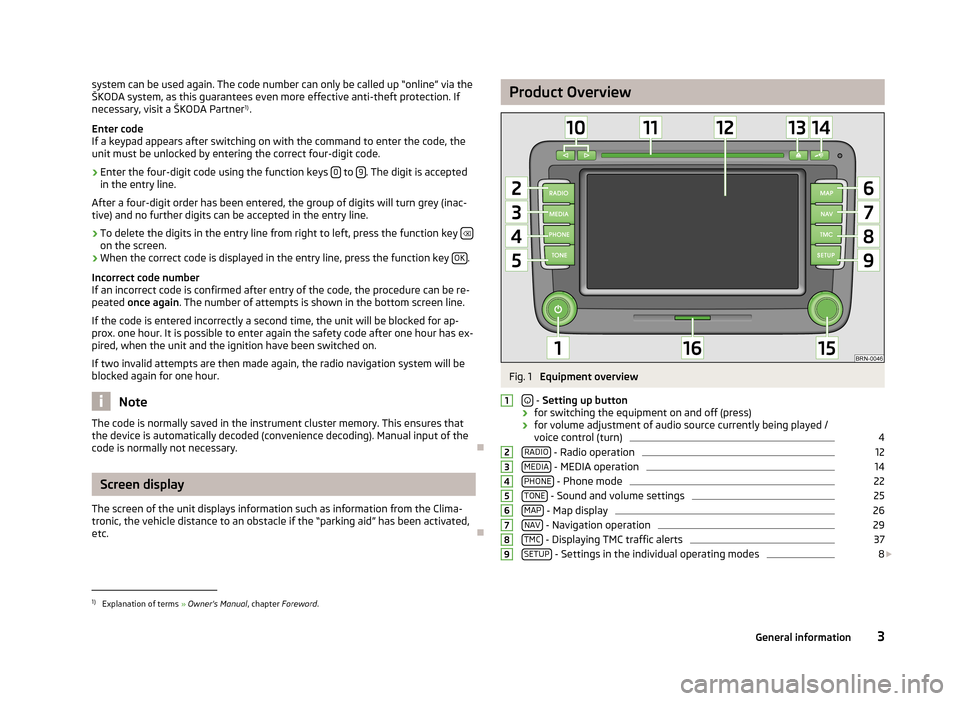
Product OverviewFig. 1
Equipment overview
- Setting up button
› for switching the equipment on and off (press)
› for volume adjustment of audio source currently being played /
voice control (turn)
4
RADIO - Radio operation
12
MEDIA - MEDIA operation
14
PHONE - Phone mode
22
TONE - Sound and volume settings
25
MAP - Map display
26
NAV - Navigation operation
29
TMC - Displaying TMC traffic alerts
37
SETUP - Settings in the individual operating modes
8
1234567891)
Explanation of terms » Owner's Manual , chapter Foreword .
3General information
Page 7 of 45
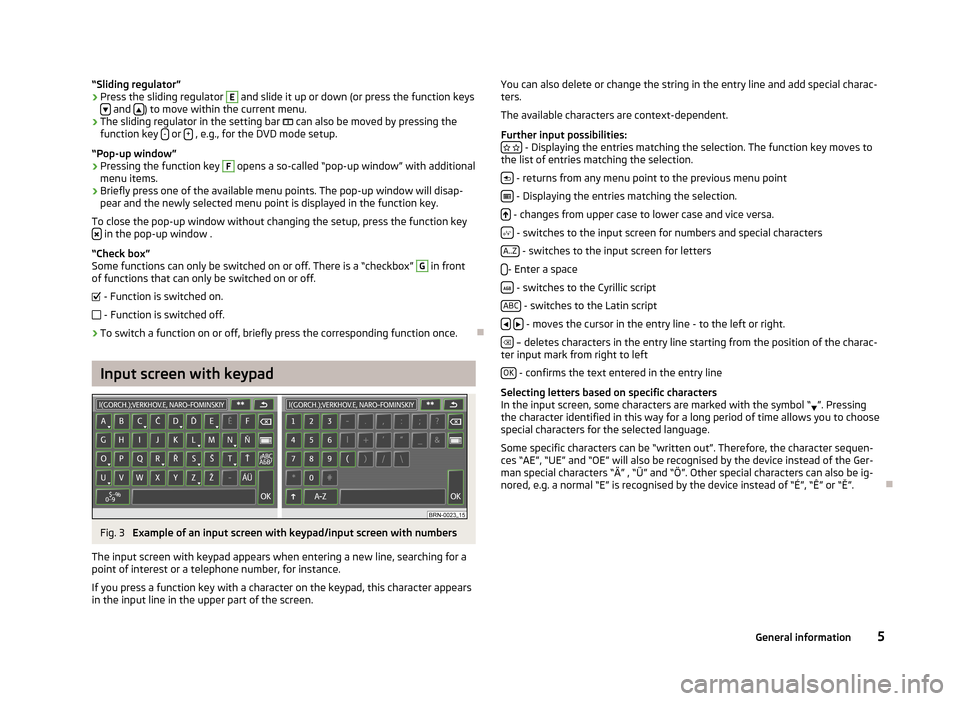
“Sliding regulator”›Press the sliding regulator E and slide it up or down (or press the function keys
and ) to move within the current menu.
›
The sliding regulator in the setting bar
can also be moved by pressing the
function key - or + , e.g., for the DVD mode setup.
“Pop-up window”
›
Pressing the function key
F
opens a so-called “pop-up window” with additional
menu items.
›
Briefly press one of the available menu points. The pop-up window will disap-
pear and the newly selected menu point is displayed in the function key.
To close the pop-up window without changing the setup, press the function key
in the pop-up window .
“Check box”
Some functions can only be switched on or off. There is a “checkbox”
G
in front
of functions that can only be switched on or off.
- Function is switched on.
- Function is switched off.
›
To switch a function on or off, briefly press the corresponding function once.
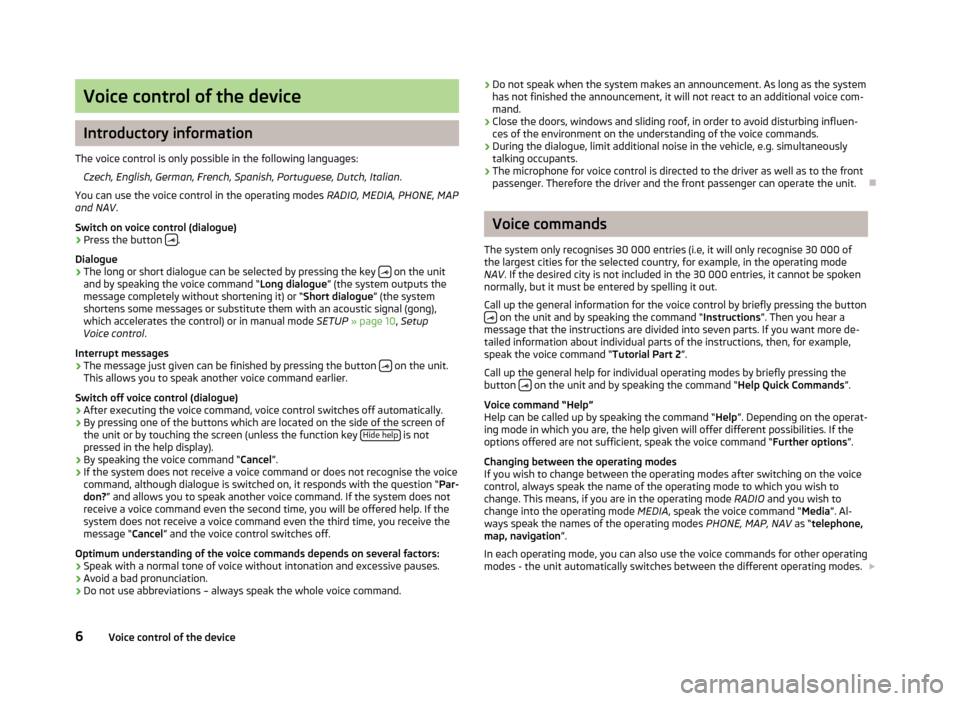
Input screen with keypad
Fig. 3
Example of an input screen with keypad/input screen with numbers
The input screen with keypad appears when entering a new line, searching for a
point of interest or a telephone number, for instance.
If you press a function key with a character on the keypad, this character appears
in the input line in the upper part of the screen.
You can also delete or change the string in the entry line and add special charac- ters.
The available characters are context-dependent.
Further input possibilities:
- Displaying the entries matching the selection. The function key moves to
the list of entries matching the selection.
- returns from any menu point to the previous menu point
- Displaying the entries matching the selection.
- changes from upper case to lower case and vice versa.
- switches to the input screen for numbers and special characters
A..Z
- switches to the input screen for letters
- Enter a space
- switches to the Cyrillic script
ABC
- switches to the Latin script
- moves the cursor in the entry line - to the left or right.
– deletes characters in the entry line starting from the position of the charac-
ter input mark from right to left
OK
- confirms the text entered in the entry line
Selecting letters based on specific characters
In the input screen, some characters are marked with the symbol “ ”. Pressing
the character identified in this way for a long period of time allows you to choose
special characters for the selected language.
Some specific characters can be “written out”. Therefore, the character sequen-ces “AE”, “UE” and “OE” will also be recognised by the device instead of the Ger-
man special characters “Ä” , “Ü” and “Ö”. Other special characters can also be ig-
nored, e.g. a normal “E” is recognised by the device instead of “É”, “Ê” or “Ě”.
5General information
Page 8 of 45
Voice control of the device
Introductory information
The voice control is only possible in the following languages: Czech, English, German, French, Spanish, Portuguese, Dutch, Italian .
You can use the voice control in the operating modes RADIO, MEDIA, PHONE, MAP
and NAV .
Switch on voice control (dialogue)
› Press the button
.
Dialogue
› The long or short dialogue can be selected by pressing the key
on the unit
and by speaking the voice command “ Long dialogue” (the system outputs the
message completely without shortening it) or “ Short dialogue” (the system
shortens some messages or substitute them with an acoustic signal (gong),
which accelerates the control) or in manual mode SETUP » page 10 , Setup
Voice control .
Interrupt messages
› The message just given can be finished by pressing the button
on the unit.
This allows you to speak another voice command earlier.
Switch off voice control (dialogue)
› After executing the voice command, voice control switches off automatically.
› By pressing one of the buttons which are located on the side of the screen of
the unit or by touching the screen (unless the function key Hide help
is not
pressed in the help display).
› By speaking the voice command “
Cancel”.
› If the system does not receive a voice command or does not recognise the voice
command, although dialogue is switched on, it responds with the question “ Par-
don? ” and allows you to speak another voice command. If the system does not
receive a voice command even the second time, you will be offered help. If the
system does not receive a voice command even the third time, you receive the
message “ Cancel” and the voice control switches off.
Optimum understanding of the voice commands depends on several factors:
› Speak with a normal tone of voice without intonation and excessive pauses.
› Avoid a bad pronunciation.
› Do not use abbreviations – always speak the whole voice command.
›
Do not speak when the system makes an announcement. As long as the system
has not finished the announcement, it will not react to an additional voice com-
mand.
› Close the doors, windows and sliding roof, in order to avoid disturbing influen-
ces of the environment on the understanding of the voice commands.
› During the dialogue, limit additional noise in the vehicle, e.g. simultaneously
talking occupants.
› The microphone for voice control is directed to the driver as well as to the front
passenger. Therefore the driver and the front passenger can operate the unit.
Voice commands
The system only recognises 30 000 entries (i.e, it will only recognise 30 000 of the largest cities for the selected country, for example, in the operating mode
NAV . If the desired city is not included in the 30 000 entries, it cannot be spoken
normally, but it must be entered by spelling it out.
Call up the general information for the voice control by briefly pressing the button
on the unit and by speaking the command “ Instructions”. Then you hear a
message that the instructions are divided into seven parts. If you want more de-
tailed information about individual parts of the instructions, then, for example,
speak the voice command “ Tutorial Part 2”.
Call up the general help for individual operating modes by briefly pressing the
button
on the unit and by speaking the command “
Help Quick Commands”.
Voice command “Help”
Help can be called up by speaking the command “ Help”. Depending on the operat-
ing mode in which you are, the help given will offer different possibilities. If the
options offered are not sufficient, speak the voice command “ Further options”.
Changing between the operating modes
If you wish to change between the operating modes after switching on the voice
control, always speak the name of the operating mode to which you wish to
change. This means, if you are in the operating mode RADIO and you wish to
change into the operating mode MEDIA, speak the voice command “ Media”. Al-
ways speak the names of the operating modes PHONE, MAP, NAV as “telephone,
map, navigation ”.
In each operating mode, you can also use the voice commands for other operating modes - the unit automatically switches between the different operating modes.
6Voice control of the device
Page 11 of 45
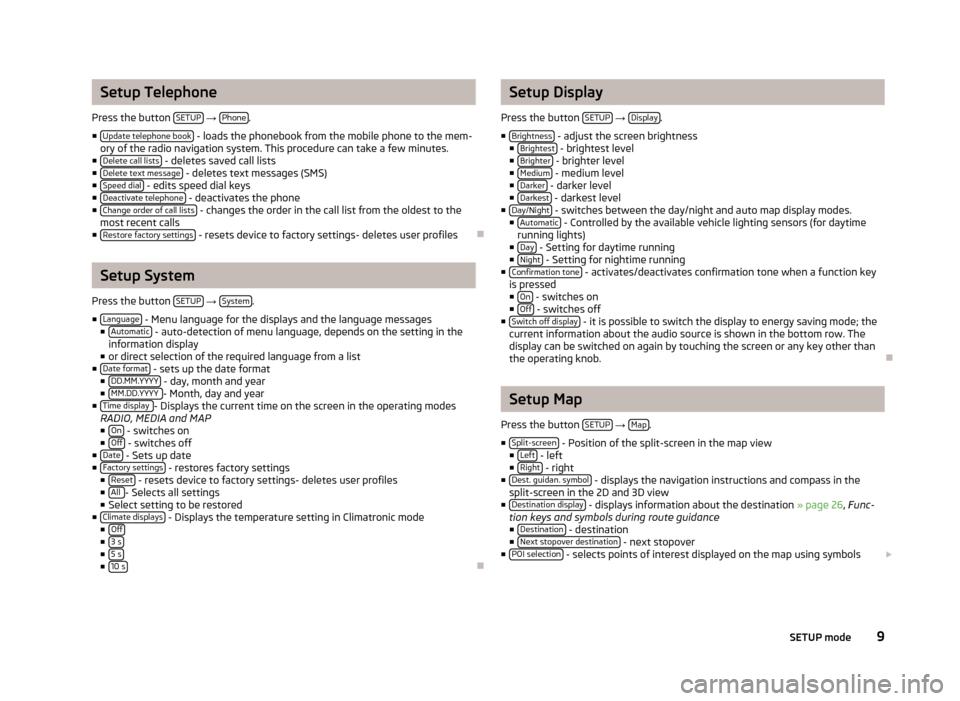
Setup Telephone
Press the button SETUP
→ Phone.
■ Update telephone book
- loads the phonebook from the mobile phone to the mem-
ory of the radio navigation system. This procedure can take a few minutes.
■ Delete call lists
- deletes saved call lists
■ Delete text message - deletes text messages (SMS)
■ Speed dial - edits speed dial keys
■ Deactivate telephone - deactivates the phone
■ Change order of call lists - changes the order in the call list from the oldest to the
most recent calls
■ Restore factory settings
- resets device to factory settings- deletes user profiles
Setup System
Press the button SETUP
→ System.
■ Language
- Menu language for the displays and the language messages
■ Automatic - auto-detection of menu language, depends on the setting in the
information display
■ or direct selection of the required language from a list
■ Date format
- sets up the date format
■ DD.MM.YYYY - day, month and year
■ MM.DD.YYYY - Month, day and year
■ Time display - Displays the current time on the screen in the operating modes
RADIO, MEDIA and MAP
■ On
- switches on
■ Off - switches off
■ Date - Sets up date
■ Factory settings - restores factory settings
■ Reset - resets device to factory settings- deletes user profiles
■ All - Selects all settings
■ Select setting to be restored
■ Climate displays
- Displays the temperature setting in Climatronic mode
■ Off
■3 s■5 s■10 s
Setup Display
Press the button SETUP
→ Display.
■ Brightness
- adjust the screen brightness
■ Brightest - brightest level
■ Brighter - brighter level
■ Medium - medium level
■ Darker - darker level
■ Darkest - darkest level
■ Day/Night - switches between the day/night and auto map display modes.
■ Automatic - Controlled by the available vehicle lighting sensors (for daytime
running lights)
■ Day
- Setting for daytime running
■ Night - Setting for nightime running
■ Confirmation tone - activates/deactivates confirmation tone when a function key
is pressed ■ On
- switches on
■ Off - switches off
■ Switch off display - it is possible to switch the display to energy saving mode; the
current information about the audio source is shown in the bottom row. The
display can be switched on again by touching the screen or any key other than
the operating knob.
Setup Map
Press the button SETUP
→ Map.
■ Split-screen
- Position of the split-screen in the map view
■ Left - left
■ Right - right
■ Dest. guidan. symbol - displays the navigation instructions and compass in the
split-screen in the 2D and 3D view
■ Destination display
- displays information about the destination » page 26, Func-
tion keys and symbols during route guidance ■ Destination
- destination
■ Next stopover destination - next stopover
■ POI selection - selects points of interest displayed on the map using symbols
9SETUP mode
Page 12 of 45
■ Show VIP destination symbols - displays destinations saved as favourites in the
map with the symbol from the selected favourite category
■ Show speed limitation
- the current speed limitation for the current road section
is displayed in the screen
Setup Navigation
Press the button SETUP
→ Navigation.
■ Suggest 3 alternative routes
- suggests 3 alternative routes for the destina-
tion » page 31 , Function key “Options”
■ Nav. announcements
- sets up navigation announcements
■ Off - switches off
■ Dynamic - spoken driving recommendations are only provided when you have
left the calculated route, for example, on the basis of announced traffic dis-
ruptions.
■ On
- switches on
■ Time display - setup the time display in the lower part of the map
■ Time of arrival - display time of arrival at the destination
■ Remaining time - displays remaining driving time
■ My points of interest (personal POI) Importing your own POIs from the SD memory
card -
■ Define home address
- edit “Home address” » page 32, Function key “
Home
address”
■ Destination entry
- show screen to enter the destination » page 31, Function
key “
Address”
■ Current position
- saves the current position as a home address
■ Delete - Delete numbers
■ Edit - edits home address
■ Set current position - saves the current position as a home address
■ Advanced navigation settings - advanced navigation settings
■ Demo mode - start a virtual route guidance
■ Enter start location - enter start location for the demo mode
■ Av. speed for time calc. - the time of arrival or the journey time is calculated in the
demo mode based on the configured average speed ■ Fast
- high speed
■ Medium - medium speed
■ Low - low speed
Traffic information
Press the button SETUP
→ Traffic information.
■ Favourite TMC station
- set your preferred TMC station
■ Automatic - automatic TMC station finding
■ select favourite TMC station from a list
■ TMC filter
- setup display of the traffic reports
■ All - displays all current traffic reports
■ On Route - only display traffic annoncements which relate to the route being
driven
■ Traffic program (TP)
- switches traffic program on/off » page 13, Traffic Pro-
gramme TP
Setup Voice control
Press the button SETUP
→ Voice control.
■ Dialogue style
- sets up dialogue style
■ Long - the system outputs the complete message without shortening it
■ Short - the system shortens some message or substitutes them with an
acoustic signal (gong); this accelerated the control
■ Visual voice command help
- visual voice command help displays an overview of the
major commands in a pop-up window. The “visual voice command help” can be set separately for each operating mode in the system (this means, if you onlyset the help display for the operating mode MAP, it is only displayed in this op-
erating mode).
■ Delete voice tags
- deletes your voice entries
■ Delete - deletes the selected voice entries
■ All - deletes all stored entries
■ Telephone book - Phonebook
■ Radio memory - radio memory
■ Navigation memory - navigation memory
Setup Video
Press the button SETUP
→ Video.
■ Audio language
- sets up the language of the voice output
■ Menu language - sets the language for the DVD menu
■ Subtitles - subtitles
10SETUP mode
Page 16 of 45
MEDIA mode
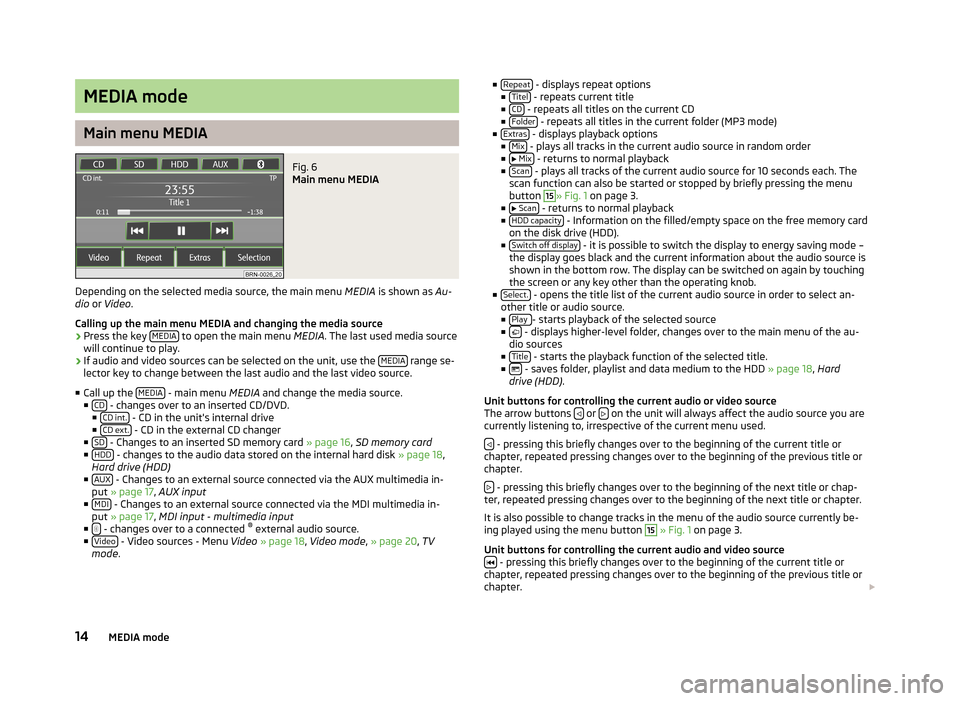
Main menu MEDIA
Fig. 6
Main menu MEDIA
Depending on the selected media source, the main menu MEDIA is shown as Au-
dio or Video .
Calling up the main menu MEDIA and changing the media source
›
Press the key MEDIA to open the main menu
MEDIA. The last used media source
will continue to play.
›
If audio and video sources can be selected on the unit, use the MEDIA range se-
lector key to change between the last audio and the last video source.
■ Call up the MEDIA
- main menu
MEDIA and change the media source.
■ CD - changes over to an inserted CD/DVD.
■ CD int. - CD in the unit's internal drive
■ CD ext. - CD in the external CD changer
■ SD - Changes to an inserted SD memory card » page 16, SD memory card
■ HDD - changes to the audio data stored on the internal hard disk » page 18,
Hard drive (HDD)
■ AUX
- Changes to an external source connected via the AUX multimedia in-
put » page 17 , AUX input
■ MDI
- Changes to an external source connected via the MDI multimedia in-
put » page 17 , MDI input - multimedia input
■
- changes over to a connected ®
external audio source.
■ Video - Video sources - Menu Video » page 18 , Video mode , » page 20 , TV
mode .
■
Repeat - displays repeat options
■ Titel - repeats current title
■ CD - repeats all titles on the current CD
■ Folder - repeats all titles in the current folder (MP3 mode)
■ Extras - displays playback options
■ Mix - plays all tracks in the current audio source in random order
■ Mix - returns to normal playback
■ Scan - plays all tracks of the current audio source for 10 seconds each. The
scan function can also be started or stopped by briefly pressing the menu
button
15
» Fig. 1 on page 3.
■ Scan - returns to normal playback
■ HDD capacity - Information on the filled/empty space on the free memory card
on the disk drive (HDD).
■ Switch off display
- it is possible to switch the display to energy saving mode –
the display goes black and the current information about the audio source is
shown in the bottom row. The display can be switched on again by touching
the screen or any key other than the operating knob.
■ Select.
- opens the title list of the current audio source in order to select an-
other title or audio source.
■ Play
- starts playback of the selected source
■ - displays higher-level folder, changes over to the main menu of the au-
dio sources
■ Title
- starts the playback function of the selected title.
■ - saves folder, playlist and data medium to the HDD » page 18, Hard
drive (HDD) .
Unit buttons for controlling the current audio or video source
The arrow buttons
or on the unit will always affect the audio source you are
currently listening to, irrespective of the current menu used.
- pressing this briefly changes over to the beginning of the current title or
chapter, repeated pressing changes over to the beginning of the previous title or
chapter.
- pressing this briefly changes over to the beginning of the next title or chap-
ter, repeated pressing changes over to the beginning of the next title or chapter.
It is also possible to change tracks in the menu of the audio source currently be-
ing played using the menu button
15
» Fig. 1 on page 3.
Unit buttons for controlling the current audio and video source
- pressing this briefly changes over to the beginning of the current title or
chapter, repeated pressing changes over to the beginning of the previous title or chapter.
14MEDIA mode
Page 17 of 45
- pressing this briefly changes over to the next title or chapter.
- Pause: the play function is stopped in the current position and the symbol
changes to - after pressing, the play function will continue in this position.
Note
If the volume is reduced to 0 during playback from a CD, the hard drive or another
audio source, the symbol changes to and playback is interrupted.
Introductory information about CD/DVD mode
Insert CD/DVD
›
With the labelled side facing up, insert a CD/DVD into slot
11
» Fig. 1 on page 3
until it is automatically drawn in. The play function will start automatically.
Removing the CD/DVD
›
Press the button – die CD/DVD is ejected.
If the ejected CD /DVD is not taken out within 10 seconds, it will be retracted again for safety reasons.
CD not legible
If you insert a CD/DVD which cannot be read by the unit, a pop-up window is dis- played with a note. The CD/DVD is moved to the eject position again after a few
seconds.
If the CD/DVD is not taken out within 10 seconds, it is drawn in again for safety
reasons.
MP3 and WMA Data (Windows Media Audio) Playable MP3 and WMA data can also be stored on the hard disk of the
unit » page 18 , Hard drive (HDD) .
The copyright of audio data compressed by Windows Media Audio, can also be
protected by the DRM procedure ( Digital Rights Management). Such WMA data is
not supported by the unit.
WARNINGThe CD player is a laser product. On the manufacturing date, this device was
classified as a class 1 laser product in accordance with the national/interna-
tional standards DIN EN 60825-1: 2008-05 and DHHS Rules 21 CFR,
subchapter J The laser used in this class 1 laser product is so weak that there is no risk of danger when operated correctly. This product is designed so that
the laser is restricted to the inside of the unit. However, the installed laser
could be classified in a higher class were the housing to be removed. For this
reason, never remove the housing of the unit.
CAUTION
■ Audio CDs (CD-A) and audio DVDs, MP3 CDs and MP3 DVDs as well as video
DVDs can be played in the internal CD/DVD drive.■
Never insert CDs with the designation “Do not insert in drives without a drawer”
into the internal drive or use EcoDiscs in the internal drive.
■
After pressing the button , there is a delay of a few seconds before the CD/
DVD is ejected. During this time, the lock in front of the CD/DVD slot is open.
■
Be sure to wait until the CD/DVD has been fully ejected before you try to insert
a new CD/DVD. Otherwise you can damage the drive inside the unit.
■
A dirty, mechanically damaged, unreadable or incorrectly inserted CD/DVD can
cause playback problems. For this reason, the CD/DVD may not be playable or may
cause the CD to jump. Check the CD/DVD and insert it properly into the unit.
Should problems persist, try using another CD/DVD and visit a ŠKODA Partner if
necessary.
■
If the CD/DVD drive has a mechanical fault or if a CD/DVD has been inserted in-
correctly or not fully, the following is initially displayed: “ CD/DVD fault CD/DVD.
Please check CD. ” and then the “DVD drive fault” indicated on the touch-screen.
Check the CD/DVD check and insert it again correctly and completely into the
drive. If “ CD/DVD drive errors ” is displayed again, visit a ŠKODA Partner.
■
If the inside temperature of the unit is too high, no CD/DVDs will be accepted.
The unit switches into the last active operating mode.
■
Never use liquids such as benzine, paint thinner or record cleaner, otherwise
the surface of the CD/DVD may be damaged!
■
Never expose the CD/DVD to direct sunlight!
■
Only write on the CD/DVD with the appropriate writing tools.
■
Do not affix anything to the CD/DVD!
15MEDIA mode
Page 18 of 45
Note■Uneven road surfaces and strong vibrations may cause the CD to jump.■In cold weather or after rain showers, moisture (condensate) may deposit in the
unit. This can effect the CD jump or impair the play function. In that case, wait un-
til the moisture has dissipated.■
Should a CD/DVD be dirty, never clean it in a circular motion, but instead work
from the inside out. Use a soft, lint-free cloth. For heavy stains, we recommend that you clean the CD/DVD with a commercially available CD/DVD cleaner and al-
low it to dry.
■
If the function key CD is inactive, no new Audio CD/DVD has been inserted or an
inserted Audio CD/DVD is not readable.
■
Copy-protected CD/DVDs and CD-R, CD-RW and non-original DVD-RW do not
play or play only in certain circumstances.
■
WMA (Windows Media Audio) audio files can also be replayed by the unit and
stored on the hard disk (HDD) providing this has not been protected by the DRM
(Digital Rights Management) copyright procedure. The operation and behaviour of
the unit complies with MP3 compressed audio files and will not be described here
further.
■
Please also note the additional information for MP3 mode » page 16, Introduc-
tory information about the MP3 mode .
■
The national copyright laws that apply in your country must be observed.
■
The CD/DVD player contains no parts that need servicing or that can be re-
paired. In the case of a defective CD player, visit a specialist garage.
■
If the ejected CD/DVD is not taken out, it will be retracted again for safety rea-
sons.
■
If a TP station was set before changing to CD/DVD mode, CD/DVD playback will
be interrupted during the traffic news and the device switches to radio mode.
Once the traffic news has ended, CD/DVD playback will resume.
■
The DVD drive installed in this unit uses a Dolby Digital ®
audio coding system
and MLP Lossless ®
for the best reproduction quality even with standard audio
DVDs. “Dolby ®
”, “MLP Lossless ®
” and the Double-D-Symbol are trademarks of Dol-
by Laboratories ®
.
■
“DTS ®
” and “DTS 2.0 ®
” transforms the Surround Sound of a DVD and replays it in
best stereo quality. “DTS ®
” and “DTS 2.0 ®
” are registered trademarks of DTS, Inc.
Introductory information about the MP3 mode
Requirements for the MP3 data and data carrier
› CD-ROM, CD-R, CD-RW with a capacity of 650 MB and 700 MB.
› 4.7 GB DVDs and up to 8.5 GB Double Layer DVDs.
›
The CDs/DVDs must correspond to the ISO 9660 Level 2 standard as well as the
Joliet data system (single and multi-session).
› Data names must be no longer than 64 characters.
› The list structure is restricted to a depth of 8 list levels.
› The name of the artist, the album and the title of the played MP3 file can be dis-
played if such information is available as ID3 tags, as they are known. The list and data name will be displayed if there is no ID3 tag.
› WMA (
Windows Media Audio) files can also be played if they are not additionally
protected by the DRM ( Digital Rights Management) copyright procedure. Such
WMA data is not supported by the unit.
› The operation and behaviour of playable WMA files conform to those of the MP3
files and will not be described here further.
Bit rate (data flow per time unit)
› The system supports MP3 data with bit rates of 32 to 320 KB/s as well as MP3
data with variable bit rates.
› The indicated playing time data with variable bit rates is not reliable.
SD memory card
Inserting the SD memory card
›
Push the SD memory card into the memory card slot
16
» Fig. 1 on page 3 with
the slanted edge facing first and upwards until it “locks into place”. The play
function will start automatically.
Removing the SD memory card
›
Press the inserted SD memory card. The SD memory card “jumps” into the eject position.
SD memory card empty or data not readable
If an SD memory card is inserted and no data or no legible data has been stored
on the card, the unit will not be switched to the SD memory card mode after the
loading procedure.
Requirements of the SD memory card › SD memory cards measuring 32 mm x 24 mm x 2.1 mm or 1.4 mm can be inserted
into the SD memory card slot.
› SD (Secure Digital Memory Cards) and MMC (Multimedia Cards) SD memory cards
with a capacity up to 4 GB.
16MEDIA mode
Page 19 of 45
›SDHC (Secure Digital High-Capacity Memory Cards) SD memory cards with a ca-
pacity up to 32 GB.
› It is possible that some of the files on the SD memory cards cannot be played or
their playback is restricted. Due to differing quality requirements from different
card manufacturers, it is not possible to guarantee the playback of SD memory
cards under all circumstances.
Note
■ Only MP3 files and unprotected WMA files can be read from the SD memory
card. All other data is ignored.■
Playable MP3 and WMA data can also be stored on the hard disk of the
unit » page 18 , Hard drive (HDD) .
External sources
AUX and MDI input
AUX input
Press the button MEDIA
→ AUX.
External audio sources connected to the AUX input cannot be operated from the
device. Only the volume can be controlled from the device.
Use the standard 3.5 mm jack plug for the AUX input. If the external audio source
does not have this jack plug, you must use an adapter .
MDI input - multimedia input
Press the button MEDIA
→ MDI.
Audio files in MP3, WMA, OGG Vorbis and AAC format from external data carriers
connected to the multimedia input can be played via the device .
External audio sources connected to the MDI input can be controlled from the de-
vice.
A different audio source can be selected on the device at any time. As long as the
external audio source is not switched off, it remains always active in the back-
ground.
See the owner's manual of the specific manufacturer for operating the external
audio source.
To connect external audio sources via the MDI input, a special adapter is to be
used.
iPod
If an iPod is connected to the MDI input, a menu opens in which you can select
the folders of the iPod (playlists, artists, albums, titles, etc.).
Adjust the play volume of the external audio source The play volume of the external audio source can be adjusted via the volume con-trol on the device 1
» Fig. 1 on page 3.
Depending on the connected audio source, the output volume on the external au-
dio source can be changed.
You can also change the input sensitivity of the external audio source, in order to
adapt the play volume of the external audio source to that of the other audio
sources or to avoid distortions » page 8, Media Set-Up .
Conditions for a successful connection
› Only USB devices with the specification 2.0 can be connected.
› The version of the file allocation table FAT (File Allocation Table) of the connec-
ted device must be FAT16 ( <2 GB) or FAT32 (> 2 GB).
› In order to replay from a unit with a hard disk (HDD) which includes a large data
volume, it can lead to a time delay when reading in the overview of the music data.
› In order to replay from a unit, which includes a complicated folder structure, it
can lead to a time delay when scanning the audio files.
› The folder structure in the connected unit must not exceed a depth of 8 levels.
One folder must not contain more than 1000°data.
› A USB extension cable or USB distributor (HUB) must not be used to connect
the unit.
WARNING■ Never place external sources on the dashboard. These could be thrown into
the passenger compartment during sudden driving manoeuvres, injuring the
occupants.■
Never place external sources close to the airbags. These could be thrown in-
to the passenger compartment when the airbags are deployed, injuring the
occupants.
■
Never hold external sources in your hand or on your knees while driving.
These could be thrown into the passenger compartment during sudden driv- ing manoeuvres, injuring the occupants.
■
Always route the connection cable of the external source so that it does not
restrict you when driving.
17MEDIA mode