interior lights SKODA SUPERB 2015 3.G / (B8/3V) User Guide
[x] Cancel search | Manufacturer: SKODA, Model Year: 2015, Model line: SUPERB, Model: SKODA SUPERB 2015 3.G / (B8/3V)Pages: 276, PDF Size: 42.14 MB
Page 81 of 276

To ensure the correct functioning of the system, even in winter, this needs to
be regularly cleared of snow and ice, e.g. free with a de-icing spray.
Rear mirror
Introduction
This chapter contains information on the following subjects:
Interior mirror dimming
79
Exterior mirrors
80WARNING■ Convex (curved outward) or aspheric exterior mirrors increase the field of
vision. They do, however, make objects appear smaller in the mirror. These
mirrors are therefore only of limited use for estimating distances to the fol-
lowing vehicles.■
Whenever possible use the interior mirror for estimating the distances to
the following vehicles.
WARNINGThe mirrors with automatic dimming contain an electrolyte liquid which can
escape if mirror glass is broken.■
The leaking electrolytic fluid can irritate the skin, eyes and breath appara-
tus.
■
If your eyes or skin come into contact with the electrolytic fluid, immedi-
ately wash the affected area for a few minutes long with a lot of water. If
necessary get medical assistance.
Interior mirror dimmingFig. 70
Interior mirror: manual dimming/auto-darkening
Read and observe
on page 79 first.
Mirrors with manual dimming » Fig. 70 -
Basic position of the mirror
Mirror blackout
Mirror with automatic dimming
After starting the engine, the mirror darkens » Fig. 70 -
automatically.
The mirror dimming is controlled by the light incident on the sensors on the
front and back of the mirror.
When the interior lights are switched on or the reverse gear is engaged, the
mirror moves back into the basic position (not dimmed).
Do not attach external devices (e.g. navigation systems) on to the windscreen or in the vicinity of the interior mirror »
.
WARNING■
The illuminated display of an external navigation device can lead to op-
erational faults to the automatic dimming interior mirror – risk of accident.■
The automatic dimming mirror only functions smoothly if the light falling
on the sensors is not impaired, e.g. by the rear sun roller blind.
1279Lights and visibility
Page 94 of 276

Storage compartment in the front centre consoleFig. 92
Storage compartment: open/close
Fig. 93
Phone box
Read and observe on page 90 first.
The storage compartment contains an induction panel that is connected to theGSM antenna - the Phonebox » Fig. 93.
The storage compartment is equipped with an interior light which illuminates
when the parking or dipped head lights are on.
Opening
›
Press on the fuel filler flap in the direction of the arrow » Fig. 92 -
.
Closing
›
Press on the fuel filler flap in the direction of the arrow » Fig. 92 -
.
The lid closes automatically in the opposite direction of the arrow.
Phone box
When the telephone is inserted into the Phone box, the telephone signal in-
creases in strength by about 20%. This reduces the level of phone battery dis-
charge and the electromagnetic radiation inside the vehicle.›
Place the telephone in the storage compartment B with its back on the in-
duction panel » Fig. 93.
WARNING■
The storage compartment is not a substitute for the ashtray and must al-
so not be used for such purposes – risk of fire!■
The storage compartment must always be closed when driving for safety
reasons.
CAUTION
■ The Phone box cannot be used as an alternative to connecting the tele-
phone with the Infotainment.■
Protective cases or cases around the telephone placed in the storage com-
partment may interfere with the telephone signal strength.
■
Metallic objects such as coins or keys under the telephone can affect the tel-
ephone signal strength.
Cup holders
Fig. 94
Front centre console: Open cup holder / cup holder
92Using the system
Page 96 of 276

Closing takes place in reverse order.
Replace bags›
Remove the waste container from the slot.
›
Press the two locking lugs on the frame in the direction of arrow
4
» Fig. 97 .
›
Pull the bag together with the frame down in the direction of arrow
5
.
›
Remove the bag from the frame.
›
Pull the new bag through the frame and pull it over the frame in the direction
of arrow
6
.
›
Place the bag containing the frame in the direction of arrow
7
into the con-
tainer body, so that the two lugs engage audibly to the frame.
WARNINGNever use the waste container as an ashtray - risk of fire!
Note
We recommend that you use 20x30 cm bags.
Storage compartment under the front arm rest
Fig. 98
Open tray / control air supply
Fig. 99
Open storage compartment for
the tablet
Read and observe on page 90 first.
The storage compartment is equipped with an interior light which illuminates when the parking or dipped head lights are on.
Opening the storage compartment
›
Raise the armrest in the direction of the arrow
1
» Fig. 98 .
Closing storage compartment
›
Raise the armrest in the direction of the arrow
1
until it stops » Fig. 98.
›
Fold the armrest in the opposite direction of the arrow
1
.
Storage compartment for the tablet
›
Pull on the loop
A
in the direction of the arrow » Fig. 99.
›
Place the tablet in the storage compartment, directed with the cord upwards
or sideways.
Air supply operation
The air supply can be operated by turning the rotary switch in the direction of
arrow
2
as far as the stop » Fig. 98.
Opening
Closing
When the air inlet is opened, and the air-conditioning system is switched on
the air flows in the storage compartment corresponding to the control dial set-
tings on the air conditioning, depending on the outer climate conditions.
Opening the air inlet when the air conditioning system is on causes fresh or in-
terior air to flow into the storage compartment.
Note
If not using the air supply in the storage compartment we recommend that you
leave the air supply closed.94Using the system
Page 100 of 276

Storage compartment in the rear centre consoleFig. 107
Open storage compartment,
open lockable storage compart-
ments
Read and observe on page 90 first.
In the rear centre console there is an equipment-dependent open storage
compartment
A
and a lockable storage compartment
B
» Fig. 107 .
The compartment
B
is equipped with an interior light which illuminates when
the parking or dipped head lights are on.
Compartment
B
open / close
›
Pull the handle on the upper section of the recess and open out the com-
partment in the direction of the arrow » Fig. 107.
Closing takes place in reverse order.
WARNINGNever use the storage compartment as an ashtray - risk of fire!
Storage compartment in the rear armrest
Fig. 108
Open storage compartment / interior of the compartment
Read and observe on page 90 first.
In the storage compartment there is a cup holder
B
, storage compartment for
the multimedia holder
C
as well as a pen holder
D
» Fig. 108 .
Open/close
›
Grasp the lid to the recess
A
» Fig. 108 .
›
Unfold the cover to the stop in the direction of arrow.
Closing takes place in reverse order.
Removable through-loading bag
Fig. 109
Tighten ribbon / secure through-loading bag
Read and observe
on page 90 first.
The removable through-loading bag (hereinafter referred to as a through-load-
ing bag) is used exclusively for transporting skis.
Stowing through-loading bag and skis
›
Open the tailgate.
›
Fold the rear armrest and the cover in the seat backrest downwards
» page 86 .
›
Place the empty through-loading bag in such a way that the end of the bag
with the zip is in the boot.
›
Push the skis into the through-loading bag from the boot » .
›
Close the through-loading bag.
Securing through-loading bag and skis
›
Tighten the strap
A
on the free end around the skis in front of the bindings
» Fig. 109 .
›
Fold the seat backrest a little forward.
98Using the system
Page 105 of 276
NoteThe cigarette lighter socket can also be used as a 12 volt socket.
Ashtrays
Introduction
This chapter contains information on the following subjects:
Ashtray
103
Removable ashtray
104
The ashtray can be used for discarding ash, cigarettes, cigars and the like » .
WARNINGNever place hot or flammable objects in the ashtray – risk of fire!
Ashtray
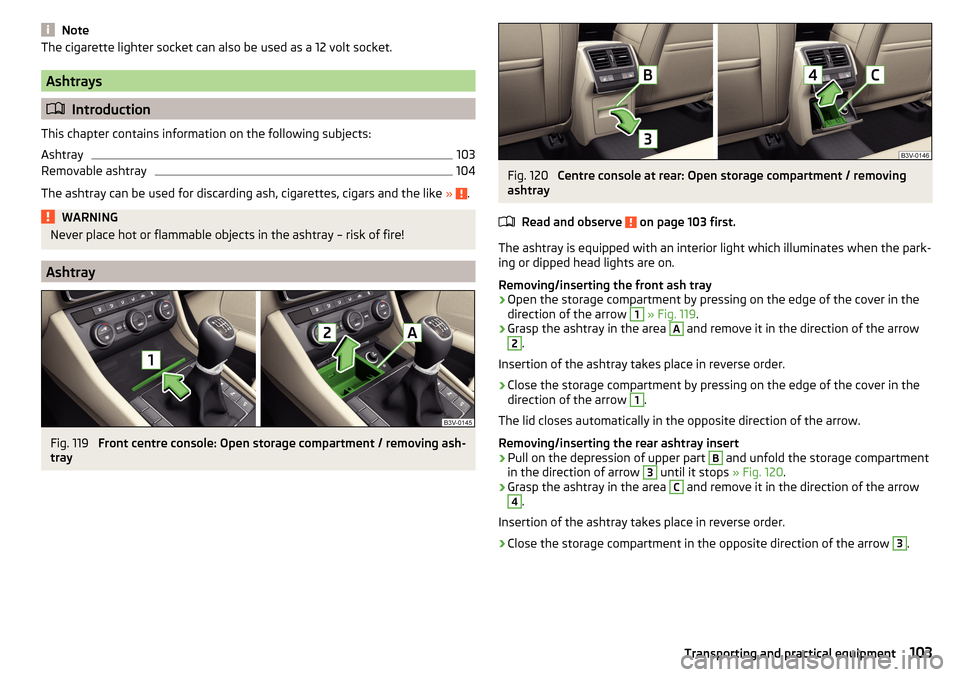
Fig. 119
Front centre console: Open storage compartment / removing ash-
tray
Fig. 120
Centre console at rear: Open storage compartment / removing
ashtray
Read and observe
on page 103 first.
The ashtray is equipped with an interior light which illuminates when the park-ing or dipped head lights are on.
Removing/inserting the front ash tray
›
Open the storage compartment by pressing on the edge of the cover in the
direction of the arrow
1
» Fig. 119 .
›
Grasp the ashtray in the area
A
and remove it in the direction of the arrow
2
.
Insertion of the ashtray takes place in reverse order.
›
Close the storage compartment by pressing on the edge of the cover in the
direction of the arrow
1
.
The lid closes automatically in the opposite direction of the arrow.
Removing/inserting the rear ashtray insert
›
Pull on the depression of upper part
B
and unfold the storage compartment
in the direction of arrow
3
until it stops » Fig. 120.
›
Grasp the ashtray in the area
C
and remove it in the direction of the arrow
4
.
Insertion of the ashtray takes place in reverse order.
›
Close the storage compartment in the opposite direction of the arrow
3
.
103Transporting and practical equipment
Page 122 of 276

Information on the cooling system
The cooling system operates only if the following conditions are met
» page 118 .
The warning light below the button
» Fig. 154 illuminates after activation,
even if not all of the conditions for the function of the cooling system have
been met. The lighting up of the indicator light in the button signals the opera-
tional readiness of the cooling system.
When the air distribution control is turned to position
the cooling system is
activated.
Note
During operation of the manual air conditioning, an increase in engine idle
speed may occur under certain circumstances in order to ensure sufficient
heating comfort.
Climatronic (automatic air conditioning)
Fig. 155
Front operating elements
Fig. 156
Rear operating elements
Read and observe and on page 119 first.
The Climatronic in automatic mode ensures the best-possible setting of the
temperature of the out-flowing air, the blower stage and air distribution.
Individual functions can be set and switched on by turning the rotary switch or
by pressing the button in question. When the function is switched on, an indi-
cator lamp lights up inside or below the button.
Some functions can also be operated in the infotainment » Owner´s Manual
Infotainment , chapter Adjustment of the heating and cooling system .
Functions of the individual controls » Fig. 155 and » Fig. 156
Adjust the temperature for the left side (if applicable for the entire vehicle
interior) 1)
▶ Lower the temperature
▶ Increase the temperature
Interior temperature sensor
Adjust fan speed (the setting is indicated by the number of illuminated
control lamps shown in the knob)
▶ Turn to the left: Reduce speed up to turning off the Climatronic
▶ Turn to the right: Increase speed
Set the temperature for the right-hand side (if necessary set for the entire
vehicle interior) 2)
▶ Lower the temperature
▶ Increase the temperature
Display the temperature setting for the left side
Display the temperature setting for the right side
ABCDEF1)
Applies to left-hand drive vehicles.
2)
Applies to right-hand drive vehicles.
120Using the system
Page 124 of 276

NoteClimatronic is set to the medium setting at the factory.
Air distribution controlRead and observe
and on page 119 first.
The recirculation mode prevents contaminated outside air getting into the In-
terior of the vehicle.
In recirculated air mode air is sucked out of the interior of the vehicle and then
fed back into the interior.
Switching on and off
›
Press the button.
When the recirculation mode is activated, the warning light below the button
lights up.
Heating and manual air conditioning system
If the air distribution control is set to position when the recirculation modes
is switched on, the recirculated-air mode is switched off. Recirculated air mode
can be switched on again from this position by repeatedly pressing the symbol
key .
When the is switched on and the temperature regulator is turned to the
left, the recirculated-air mode is switched on.
Climatronic
Climatronic may have an air quality sensor for the detection of the pollutant
concentration in the sucked-in air.
If a considerable increase in concentration of pollutants is recognised by the
air quality sensor, recirculated air mode will temporarily be switched on.
When the pollutant concentration decreases to the normal level, the recircula-
ted air mode is automatically switched off.
This automatic on/off switching of the recirculated-air mode can be activated
or deactivated in the Infotainment » Owner´s Manual Infotainment , chap-
ter Setting the heating and the cooling system .
If the button is pressed when the recirculation modes is switched on, the
recirculated-air mode is switched off.
Depending on the moisture conditions in the vehicle interior the air recircula- tion may also shut-down automatically.
WARNINGThe recirculation system cannot be switched on for a longer period of time,
because there is no supply of fresh air from the outside. “Stale air” may re-
sult in fatigue in the driver and occupants, reduce attention levels and also
cause the windows to mist up. The risk of having an accident increases.
Switch off recirculated air mode as soon as the windows start to mist up.
CAUTION
We recommend not smoking in the vehicle when the recirculating air operation
is switched on. The smoke sucked from inside the vehicle is deposited on the
evaporator of the air conditioner. This produces a permanent odour when the
air conditioning system is operating which can only be eliminated through con-
siderable effort and expense (replacement of compressor).
Note
The automatic activation/deactivation of the air recirculation with Climatronic
only works if the outside temperature is higher than approx. 2 °C.
Air outlet vents
Fig. 157
Air vents at the front
122Using the system
Page 127 of 276
Programming the auxiliary heating in the Infotainment
For vehicles with Climatronic: on the front panel of the Climatronic button
→
Press
For vehicles with manual air conditioning: button in the Infotainment fea-
ture
→
Press
When automatic switching on is activated, the indicator light in the symbol key
lights up » Fig. 159 for about 10 seconds after the ignition is turned off.
CAUTION
The automatic switching on and off the heating for rapid heating of the vehicle
interior can be disabled in the Infotainment » Owner´s Manual Infotainment ,
chapter Setting the heating and the cooling system .
Radio remote control
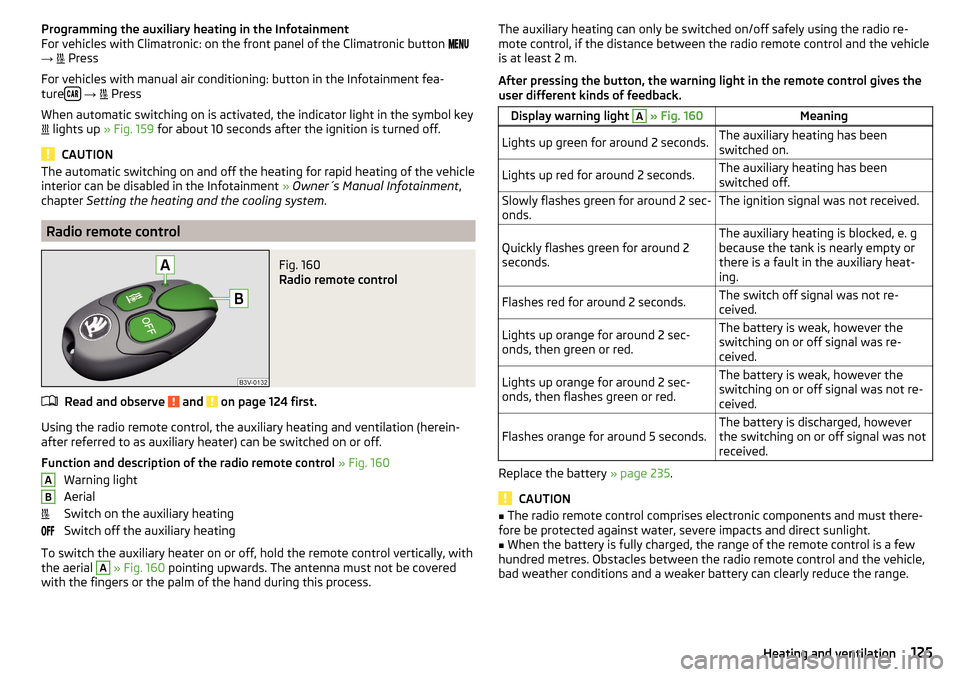
Fig. 160
Radio remote control
Read and observe and on page 124 first.
Using the radio remote control, the auxiliary heating and ventilation (herein-
after referred to as auxiliary heater) can be switched on or off.
Function and description of the radio remote control » Fig. 160
Warning light
Aerial
Switch on the auxiliary heating
Switch off the auxiliary heating
To switch the auxiliary heater on or off, hold the remote control vertically, with
the aerial
A
» Fig. 160 pointing upwards. The antenna must not be covered
with the fingers or the palm of the hand during this process.
ABThe auxiliary heating can only be switched on/off safely using the radio re-
mote control, if the distance between the radio remote control and the vehicle
is at least 2 m.
After pressing the button, the warning light in the remote control gives the
user different kinds of feedback.Display warning light A » Fig. 160MeaningLights up green for around 2 seconds.The auxiliary heating has been
switched on.Lights up red for around 2 seconds.The auxiliary heating has been
switched off.Slowly flashes green for around 2 sec-
onds.The ignition signal was not received.Quickly flashes green for around 2
seconds.The auxiliary heating is blocked, e. g
because the tank is nearly empty or
there is a fault in the auxiliary heat-
ing.Flashes red for around 2 seconds.The switch off signal was not re-
ceived.Lights up orange for around 2 sec-
onds, then green or red.The battery is weak, however the
switching on or off signal was re-
ceived.Lights up orange for around 2 sec-
onds, then flashes green or red.The battery is weak, however the
switching on or off signal was not re-
ceived.Flashes orange for around 5 seconds.The battery is discharged, however
the switching on or off signal was not
received.
Replace the battery » page 235.
CAUTION
■
The radio remote control comprises electronic components and must there-
fore be protected against water, severe impacts and direct sunlight.■
When the battery is fully charged, the range of the remote control is a few
hundred metres. Obstacles between the radio remote control and the vehicle,
bad weather conditions and a weaker battery can clearly reduce the range.
125Heating and ventilation
Page 260 of 276

TOP TETHER25
Use of child safety seats i-Size25
Use of ISOFIX child seats24
Chrome parts Refer to vehicle maintenance
196
Cigarette lighter102
Clean Anodized parts
196
Chrome parts196
Cleaning Alcantara
199
and maintaining belts200
artificial leather199
headlight glasses197
materials199
natural leather199
plastic parts196
seats covers of the electrically heated seats200
wheels197
Cleaning safety belt
200
Cleaning seat covers
200
Cleaning the interior artificial leather
199
Seat covers200
Cleaning the vehicle exterior Camera lens
197
Cavity protection197
Decorative films195
Door locking cylinder197
Headlight glasses197
Protective films195
Under-body protection198
wheels197
Windows and external mirrors196
Cleaning vehicle193
Cleaning vehicle exterior194
Anodized parts196
Chrome parts196
Plastic parts196
Rubber seals196
Vehicle paint work195
Wiper blades198
Clean interior Safety belt
200
Climatronic air distribution control
122
Automatic operation121
Operating elements120
Clothes hook96
Cockpit 12 volt power outlet
100
Ashtray103
Cigarette lighter102
General view27
Lighting74
storage compartments90
useful equipment90
Comfort operation Window
63
COMING HOME71
compartments90
Component protection192
Components of the puncture repair kits228
Computer see multifunction display
42
Convenience operation sliding / tilting roof
65
convenience turn signal68
Coolant210
Checking211
Information messages38
Replenishing212
Temperature gauge30
Warning light38
CORNER see Headlights with CORNER function
71
Correct routing of seat belt
12
Correct seated position8
Front passenger10
Rear seats10
Correct seat position Driver
9
Counter for distance driven31
Crew Protect Assist173
cruise control operation
160
operation description161
Cruise Control System160
Cup holders92
D
DAY LIGHT see Daylight running lights
68
Daylight running lights68
DCC171
Warning light41
De-icing windows
196
De-icing the windscreen and rear window75
Deactivating an airbag19
Decorative films195
Delayed locking of the boot lid see boot lid
59
Diesel refer to Fuel
203
Diesel fuel Operation in winter
203
Diesel particulate filter39
information messages39
Digital Clock31
Dipstick210
Disconnecting and reconnecting vehicle battery
215
Display29
Compass points48
Coolant temperature30
258Index
Page 262 of 276
Footmats135
see footmats135
Force limit Electric boot lid
59
Power windows63
Sliding/tilting roof64
Front airbag15
Front Assist168
Disable/enable170
Distance warning169
Information messages171
Operation169
Radar sensor143
Warning and automatic braking169
Warning light40, 41
Front door warning light75
Front seats81
fuel lead-free petrol
202
Fuel201
Diesel203
Fuel gauge30
refer to Fuel201
Refuelling201
Warning light36
Fuel consumption248
Fuel filter Warning messages
40
Fuel reserve Warning light
36
Fuses Assignment
238
Assignment of fuses in the dash panel240
Colour coding238
Fuse assignment in the engine compartment241
Plastic clip241
Replacing238
G
Gear change Gear recommendation
42
Information on the selected gear42
Gear changing Gear stick
135
General view Cockpit
27
Genuine parts191
Glasses compartment95
Glow plug system Warning light
34
H
Hazard warning light system
71
HBA145
Head airbag18
Headlamp assistant Warning icon
40
Headlamp Assistant72
Headlight cleaning system Headlight cleaning system
78
Headlights Bulb arrangement
243
Driving abroad72
Headlight cleaning system78
Headlights with CORNER function71
Headrest removing and installing
87
Headrests87
Height adjustment87
Heater Windscreen and rear window
75
Heating118
Air distribution control122
Controls119
Exterior mirrors80
Seats88
HHC145
Hill Start Assist (HHC)145
Hitch184
Drawback load184
Hook107
Horn27
I
i-Size
25
Ice scrapers196
Ignition lock127
Immobilizer126
Individual settings Locking
56
Unlocking56
Inertia reel13
Information system41
Compass point display48
Door warning41
Eco-tips49
Gear recommendation42
MAXI DOT display45
Multifunction display42
operation43
Service interval display49
Information system operation43
Infotainment4
Instrument cluster28
Auto-check control41
Counter for distance driven31
Display29
Fuel gauge30
Overview29
Revolutions counter29
Temperature gauge30
Warning lights31
Interior care198
Natural leather199
260Index