sport mode SKODA SUPERB 2015 3.G / (B8/3V) Owner's Manual
[x] Cancel search | Manufacturer: SKODA, Model Year: 2015, Model line: SUPERB, Model: SKODA SUPERB 2015 3.G / (B8/3V)Pages: 276, PDF Size: 42.14 MB
Page 4 of 276
Table of Contents
On-board literature4
Notes
5
Structure and more information about the
Owner's Manual
6
Abbreviations
Safety
Passive Safety
8
General information
8
Correct and safe seated position
8
Seat belts
11
Using seat belts
11
Belt retractors and belt tensioners, reversible
seat belts
13
Airbag system
14
Description of the airbag system
14
Airbag overview
15
Deactivating airbags
19
Transporting children safely
20
Child seat
20
Fastening systems
23
Using the system
Cockpit
27
Overview
26
Instruments and warning lights
28
Instrument cluster
28
Warning lights
31
Information system
41
Driver information system
41
Driving data (Multifunction display)
42MAXI DOT display45Service interval display49
SmartGate
50
Unlocking and opening
52
Unlocking and locking
52
Anti-theft alarm system
57
Luggage compartment lid
58
Electric boot lid
59
Window operation
61
Panorama sliding/tilting roof
64
Lights and visibility
67
Lights
67
Headlamp Assistant (Light Assist / Dynamic
Light Assist)
72
Interior lights
74
Visibility
75
Windscreen wipers and washers
77
Rear mirror
79
Seats and head restraints
81
Front seats
81
Rear seats
85
Head restraints
87
Seat heating and ventilation
88
Transporting and practical equipment
90
Useful equipment
90
Electrical sockets and cigarette lighter
99
Ashtrays
103
Tablet holder
104
Luggage compartment and transport of
cargo
105
Variable loading floor in the luggage
compartment (Estate)
115Net partition116Roof rack117
Heating and ventilation
118
Heating, manual air conditioning system,
Climatronic
118
Auxiliary heating (auxiliary heating and
ventilation)
123
Driving
Starting-off and Driving
126
Starting and stopping the engine using the
key
126
Starting and stopping the engine at the push
of the button
128
START-STOPsystem
130
Brakes and parking
132
Manual gear changing and pedals
135
Automatic transmission
135
Running-in and economical driving
138
Avoiding damage to your vehicle
141
Assist systems
142
General information
142
Braking and stabilisation systems
143
Parking aid (ParkPilot)
147
Rear Traffic Alert
149
Rear View Camera
151
Park Assist
155
Cruise Control System
160
Speed Limiter
162
Adaptive Cruise Control (ACC)
163
Front Assist
168
Selection of the driving mode(Driving Mode
Selection)
171
Proactive passenger protection (Crew Protect
Assist)
173
Lane Departure Warning (Lane Assist)
174
Assistant for “blind spot monitoring”
1772Table of Contents
Page 27 of 276

GroupSize class of
the child seat a)Front passenger seat
b)Rear seats outsideRear seat middle2
15-25 kg-XILX3
22-36 kg-XILXa)
The size category is shown on the label attached to the child seat.
b)
If the front passenger seat is fitted with system attachment points, it is suitable for the installation of an child seat with “Semi-Universal” approval.
ILThe seat is suitable for installation of a child seat with the “Semi-Universal” approval. The “Semi-Universal” category means that the child seat
with the
system is approved for your vehicle. Observe the list of vehicles that comes with the child seat.IUFThe seat is suitable for the use of approved forward-facing child seats in the “Universal” weight group category.XThe seat is not fitted with system attachment points.Use of child safety seats with the - system
Overview of the usefulness of child seats fastened with the
system on
each of the seats.Front passenger seatRear seats outsideRear seat middleXi-UX
The seat is suitable for forward and backward facing
child seats of
the category “Universal”.
The seat is not suitable for the
child seat of the category “Universal”.
Attachment points of the system
Fig. 20
Attachment points of the
-system
i-UX
is a fastening system, which restricts the movement of the upper part
of the child seat.
The attachment points for attaching the belt for a child seat with the
system are located on the rear side of the outer rear seat backrests » Fig. 20 -
.
Some country-specific models may also feature an attachment point on the
back of the middle rear seat backrest » Fig. 20 -
.WARNING■
Always refer to the instructions from the manufacturer of the child seat
when installing and removing a child seat with the system.■
Only use child seats with the
system on the seats with the at-
tachment points.
■
Only ever attach one belt from the child seat to a locking eye.
25Transporting children safely
Page 103 of 276

12 volt socket in luggage compartmentFig. 115
Cover of the 12 volt power outlet
Read and observe and on page 99 first.
Use
›
Open the socket cover » Fig. 115.
›
Connect the plug for the electrical appliance to the socket.
230-volt socket
Fig. 116
Open the cover of the 230 volt outlet / 230 volt outlet
Read and observe
and on page 99 first.
The 230-volt socket (hereinafter referred to as a socket) is provided for the
connection of approved electrical accessories with a two-pin 230-volt plug and
a total power consumption of up to 150 watts.
The socket is located in the rear centre console » Fig. 116.
Use
›
Open the cover in the direction of the arrow » Fig. 116.
›
Connect the plug for the electrical appliance to the socket.
When plugging in the connector the child safety lock is unlocked and the out-
let is activated.
The outlet works in the following cases ▶ The engine is running.
▶ In STOP mode with vehicles that have the START-STOP system.
▶ After about 10 minutes after stopping the engine, unless a consumer was
connected to the outlet before stopping the engine.
Warning lightDisplay indicator lightMeaningIlluminates greenThe power socket is activated.Flashes greenThe socket remains activated for about 10 mi-
nutes after the engine has stopped.Flashes redThe power socket is temporarily deactivated.
An automatic deactivation of the socket can take place, for example, for the
following reasons. ▶ Excessive current.
▶ Low state of charge of the battery.
▶ High outlet temperature.
If disabling reasons no longer exist, the automatic activation of the socket can
be done. Then re-activate connected devices which are switched on »
.
Should no automatic activation take place, the connected devices must be dis-
connected from the power outlet and reconnect after a short time.
WARNING■ Improper use can lead to serious injury or fire. When leaving the vehicle,
never leave persons who are not completely independent, such as children,
unattended in the vehicle.■
Do not pour liquids into the power socket – risk of death! If fluid does
manage to get into the power socket, completely dry out the socket before
reuse.
■
The child lock on the power socket is unlocked when using adapters and
extension cables which carry volts – risk of injury!
■
Do no insert any conductive objects into the contacts of the power sock-
et, e.g. knitting needs – risk of death!
101Transporting and practical equipment
Page 119 of 276

›Fold back part of the roll-up luggage compartment cover A in the opposite
direction of the arrow » Fig. 149.
Using the net partition behind the rear seats›
Fold out part of the roll-up luggage compartment cover
A
in the direction of
the arrow » Fig. 149.
›
Pull the transverse rod back slightly first on one side and then on the other
and remove it from the mounts
E
» Fig. 150 .
›
Hold the crossbar
C
in such a way that the net partition can slowly roll up
into the housing
D
without being damaged.
›
Fold back part of the roll-up luggage compartment cover
A
in the opposite
direction of the arrow » Fig. 149.
CAUTION
If the net partition blocks when pulling it out of the housing, push the release
lever B in the direction of the arrow » Fig. 149.
Removing and refitting the net partition housing
Fig. 151
Removing the net partition
housing
Removing
›
Fold the rear seat backrests forward » page 85.
›
Open the rear right door » page 56.
›
Push the net partition housing
A
in the direction of the arrow
1
and re-
move it from the mounts on the right seat backrests in the direction of the
arrow
2
» Fig. 151 .
Fitting
›
Insert the recesses on the net partition housing into the mounts on the rear
seat backrests.
›
Push the net partition housing in the opposite direction of the arrow
1
» Fig. 151 as far as the stop.
›
Fold the rear seats back into their original positions » page 85.
Roof rack
Introduction
This chapter contains information on the following subjects:
fixing points for base support
118
Roof load
118WARNINGWhen transporting cargo the following the instructions must be adhered
to.■
The transported items on the roof rack must always be securely attached
– risk of accident!
■
Always secure the load with appropriate and undamaged lashing straps
or tensioning straps.
■
Distribute the load evenly over the roof rack system.
■
When transporting heavy objects or objects which take up a large area on
the roof rack system, the handling of the car may change as a result of the
displacement of the centre of gravity. The style of driving and speed must
therefore be adapted to the current circumstances.
■
Avoid abrupt and sudden driving/braking manoeuvres.
■
The permissible roof load, permissible axle loads and permissible total ve-
hicle weight must not be exceeded under any circumstances – risk of acci-
dent!
CAUTION
■ On models fitted with a sliding/tilting roof, ensure that the sliding/tilting roof
does not strike any items of luggage transported on the roof when tilting.■
Ensure that the boot lid does not hit the roof load when opened.
■
The height of the vehicle changes after mounting a roof luggage rack system
including the load that is being transported. Compare the vehicle height with
available clearances, such as underpasses and garage doors.
■
Ensure the roof aerial is not impaired by the load being transported.
Note
We recommend that you use a roof rack from ŠKODA Original Accessories.117Transporting and practical equipment
Page 134 of 276
Manually deactivating/activating the systemFig. 165
Button for the START-STOP sys-
tem
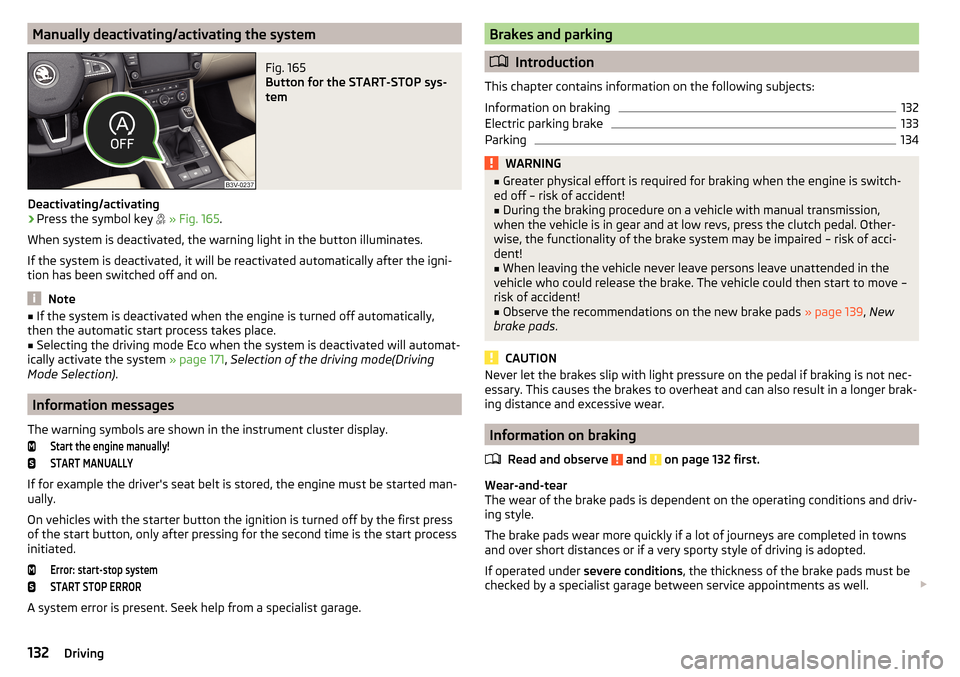
Deactivating/activating
›
Press the symbol key
» Fig. 165 .
When system is deactivated, the warning light in the button illuminates.
If the system is deactivated, it will be reactivated automatically after the igni-
tion has been switched off and on.
Note
■ If the system is deactivated when the engine is turned off automatically,
then the automatic start process takes place.■
Selecting the driving mode Eco when the system is deactivated will automat-
ically activate the system » page 171, Selection of the driving mode(Driving
Mode Selection) .
Information messages
The warning symbols are shown in the instrument cluster display.
Start the engine manually!START MANUALLY
If for example the driver's seat belt is stored, the engine must be started man-
ually.
On vehicles with the starter button the ignition is turned off by the first press
of the start button, only after pressing for the second time is the start process
initiated.
Error: start-stop systemSTART STOP ERROR
A system error is present. Seek help from a specialist garage.
Brakes and parking
Introduction
This chapter contains information on the following subjects:
Information on braking
132
Electric parking brake
133
Parking
134WARNING■ Greater physical effort is required for braking when the engine is switch-
ed off – risk of accident!■
During the braking procedure on a vehicle with manual transmission,
when the vehicle is in gear and at low revs, press the clutch pedal. Other-
wise, the functionality of the brake system may be impaired – risk of acci-
dent!
■
When leaving the vehicle never leave persons leave unattended in the
vehicle who could release the brake. The vehicle could then start to move –
risk of accident!
■
Observe the recommendations on the new brake pads » page 139, New
brake pads .
CAUTION
Never let the brakes slip with light pressure on the pedal if braking is not nec-
essary. This causes the brakes to overheat and can also result in a longer brak-
ing distance and excessive wear.
Information on braking
Read and observe
and on page 132 first.
Wear-and-tear
The wear of the brake pads is dependent on the operating conditions and driv-
ing style.
The brake pads wear more quickly if a lot of journeys are completed in towns
and over short distances or if a very sporty style of driving is adopted.
If operated under severe conditions , the thickness of the brake pads must be
checked by a specialist garage between service appointments as well.
132Driving
Page 138 of 276

WARNING (Continued)■If the vehicle is in the D, S , R or Tiptronic mode and comes to a standstill
while at idle the engine stops, then prevent the vehicle from rolling away
with the brake pedal, the parking brake of the auto-hold function. Even
when the engine is idling, the power transmission is never completely in-
terrupted – the vehicle creeps.■
When leaving the vehicle, the selector lever is always to put in the P
mode. Otherwise, the vehicle could start to move - risk of accident.
CAUTION
■ If the selector lever is moved to mode N while driving, the accelerator pedal
must be released and you will need to wait until the engine has reached its
idling speed before moving the selector lever to a forward driving mode again.■
When the outdoor temperature is below -10 ° C, the selector lever when
starting must always be in P mode.
■
When stopping on a slope, never try to hold the vehicle using the accelerator
pedal – this may lead to gear damage.
Note
After the ignition is switched off, the ignition key can only be withdrawn if the
selector lever is in the position P.
Modes and use of selector lever
Fig. 169
Selector lever/display
Read and observe and on page 135 first.
When the ignition is switched on, the gearbox mode and the currently selected
gear are indicated in the display » Fig. 169.
The following modes can be selected with the selector lever » Fig. 169.
P – Parking mode
The driven wheels are locked mechanically in this mode.
The parking mode must only be selected when the vehicle is stationary.R
- Reverse gear
Reverse gear can only be engaged when the vehicle is stationary and the en-
gine is at idling speed.
N
- Neutral
The power transmission to the drive wheels is interrupted in this mode.
D
/
S
- mode for driving forward (Normal program) / mode for driving
forward (Sport program)
The system switches from one mode to the other by moving the selector lever
into the spring-loaded position
» Fig. 169 .
In mode D or S, the forward gears are shifted automatically depending on the
engine load, the operation of the accelerator pedal, the vehicle speed, and the
selected driving mode .
In mode S , the forward gears are shifted automatically up and down at high-
er engine speeds than in mode D.
If the Sport driving mode is selected with the engine running » page 171, Se-
lection of the driving mode(Driving Mode Selection) , the transmission is auto-
matically set in the S mode.
E – Economical driving mode
If the driving mode Eco or Individual (engine - Eco) » page 171 is selected and
the selection lever is in the setting D/S, the transmission is automatically set
to mode E. This mode cannot be selected with the selector lever.
In mode E , the forward gears are shifted automatically up and down at lower
engine speeds than in mode D.
136Driving
Page 173 of 276
f the distance-warning function was deactivated before the ignition was
switched off, it remains deactivated after the ignition is switched on again.WARNINGIn the following situations, Front Assist should be switched off for safety
reasons.■
When the vehicle is being towed away.
■
When the vehicle is on a rolling test bench.
■
If an unfounded warning or a system action was taken.
■
When on a truck, or a car ferry service or similar.
Information messages
Read and observe
and on page 169 first.
The warning symbols are shown in the instrument cluster display.
Front Assist: no sensor view.FRONT ASSIST NO SENSOR VIEW
The sensor cover or the sensor is covered or dirty.
Stop the car, switch off the engine and clean the sensor cover or remove the
obstacle » Fig. 174 on page 143 .
If this message appears in winter, the cause can be snow covering the sensor.
The system is functional again after the snow melts away from the sensor.
Front Assist not available.FRONT ASSIST NOT AVAILABLE
The system is not available for an unknown reason.
Stop the vehicle, switch off the engine and then start it again.
If after engine start the message persists, then the help of a professional or- ganisation is required.
Selection of the driving mode(Driving Mode Selection)
Introduction
This chapter contains information on the following subjects:
Adaptive Chassis Control (DCC)
171
Mode
Comfort171Normal172Sport
mode172Eco
mode
172Individual
mode
172
Mode selection and Infotainment display
173
Mode settings
Individual173
By selecting the driving mode, the driving behaviour can be adapted to the de-
sired mode of operation.
The following modes are available
Comfort
,
Normal
,
Sport
,
Eco
and
Individual
.
The mode
Comfort
is only available on vehicles with adaptive chassis control
(DCC).
WARNINGPlease take note of the general points relating to the use of assistance
systems » page 142, in section Introduction .
Note
The set driving mode remains stored even after switching the ignition on and
off.
Adaptive Chassis Control (DCC)
Read and observe
on page 171 first.
The adaptive chassis control (following known as DCC) provides the ability toadjust the shock characteristics for the sporty, normal or comfortable driving
when the corresponding control mode is selected.
The DCC evaluates steering response and road conditions while driving contin-
uously and adjusts the suspension behaviour within the selected driving mode
accordingly.
Mode
Comfort
Read and observe on page 171 first.
This mode is suitable for driving on roads with poorer surface or for long mo- torway journeys.
171Assist systems
Page 174 of 276

Normal
Read and observe on page 171 first.
This mode is suitable for a conventional driving.
Sport
mode
Read and observe
on page 171 first.
This mode is suitable for a sporty driving.
Selecting this mode primarily affects the function of the following systems.
DCC
The DCC adjusts the chassis for the sporty driving style.
Steering
The power steering is reduced slightly, i.e., the driver needs to exert more
force for steering .
Engine / drive
The vehicle acceleration is more dynamic than in
Normal
mode.
Adaptive Cruise Control (ACC)
The acceleration is quicker than in
Normal
mode with distance control
» page 163 .
Xenon headlight
The headlamps adapt to the driving style more dynamically than in mode
Nor-mal
» page 69 .
ProActive passenger protection
The first level of protection is deactivated » page 173.
Eco
mode
Read and observe
on page 171 first.
This mode is suitable for a relaxed style of driving and helps to save fuel.
Selecting this mode primarily affects the function of the following systems.
Engine / drive
Vehicle acceleration is more relaxed than in
Normal
mode.
The recommended gear is controlled such to achieve the lowest possible fuel
consumption » page 42.
When the START-STOP system was deactivated manually » page 130, it is au-
tomatically activated.
The automatic gearbox is set automatically to mode E » page 135 .
Adaptive Cruise Control (ACC)
Acceleration occurs more relaxed than in Normal
» page 163 mode with distance
control.
Xenon headlight
The system is in economic mode » page 69. The headlamps are in basic setting
and do not adapt to the direction of travel.
Air conditioning (Climatronic)
The air conditioning is controlled so as to save energy. For this reason, for ex-
ample, it may take longer to reach the desired interior temperature in mode
Normal
.
Note
■ The mode Eco is not available when towing a trailer or when another acces-
sory is connected to the trailer socket. If the vehicle is in drive mode Eco
and a
trailer is hitched up or another accessory is connected, the vehicle is automati-
cally set to the driving mode
Normal
.
■
The maximum vehicle acceleration (kick down function) is possible also in
driving mode
Eco
.
Individual
mode
Read and observe
on page 171 first.
In the mode
Individual
each system can be set independently » page 173, Mode
settings
Individual
.
172Driving
Page 175 of 276
Mode selection and Infotainment displayFig. 210
Button for selecting the driving mode / Display in Infotainment
display
Read and observe
on page 171 first.
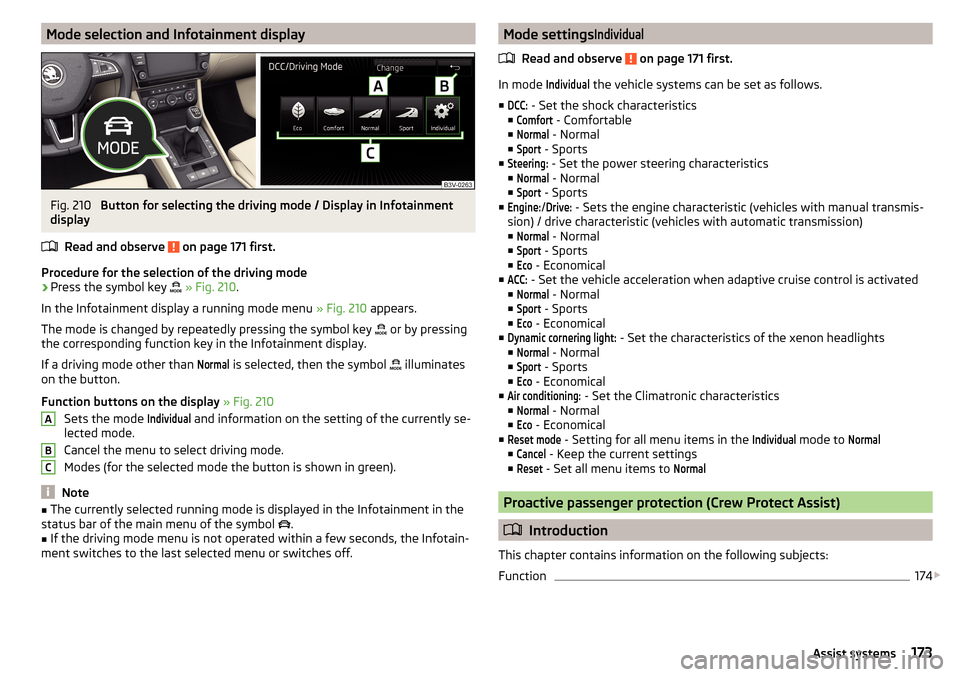
Procedure for the selection of the driving mode
›
Press the symbol key
» Fig. 210 .
In the Infotainment display a running mode menu » Fig. 210 appears.
The mode is changed by repeatedly pressing the symbol key or by pressing
the corresponding function key in the Infotainment display.
If a driving mode other than
Normal
is selected, then the symbol illuminates
on the button.
Function buttons on the display » Fig. 210
Sets the mode
Individual
and information on the setting of the currently se-
lected mode.
Cancel the menu to select driving mode.
Modes (for the selected mode the button is shown in green).
Note
■ The currently selected running mode is displayed in the Infotainment in the
status bar of the main menu of the symbol .■
If the driving mode menu is not operated within a few seconds, the Infotain-
ment switches to the last selected menu or switches off.
ABCMode settingsIndividual
Read and observe on page 171 first.
In mode
Individual
the vehicle systems can be set as follows.
■
DCC:
- Set the shock characteristics
■
Comfort
- Comfortable
■
Normal
- Normal
■
Sport
- Sports
■
Steering:
- Set the power steering characteristics
■
Normal
- Normal
■
Sport
- Sports
■
Engine:
/
Drive:
- Sets the engine characteristic (vehicles with manual transmis-
sion) / drive characteristic (vehicles with automatic transmission)
■
Normal
- Normal
■
Sport
- Sports
■
Eco
- Economical
■
ACC:
- Set the vehicle acceleration when adaptive cruise control is activated
■
Normal
- Normal
■
Sport
- Sports
■
Eco
- Economical
■
Dynamic cornering light:
- Set the characteristics of the xenon headlights
■
Normal
- Normal
■
Sport
- Sports
■
Eco
- Economical
■
Air conditioning:
- Set the Climatronic characteristics
■
Normal
- Normal
■
Eco
- Economical
■
Reset mode
- Setting for all menu items in the
Individual
mode to
Normal
■
Cancel
- Keep the current settings
■
Reset
- Set all menu items to
Normal
Proactive passenger protection (Crew Protect Assist)
Introduction
This chapter contains information on the following subjects:
Function
174
173Assist systems
Page 176 of 276
ProActive passenger protection (following known as system) increases pas-
senger protection in the front seats in situations that could lead to vehicle im-
pact or overturning.WARNINGPlease take note of the general points relating to the use of assistance
systems » page 142, in section Introduction .
Note
The system component service life is monitored electronically. Further infor-
mation » page 35 , Safety systems .
Function
Read and observe
on page 174 first.
In critical driving situations (e.g. during emergency braking or a sudden change
in direction), the following steps can be taken separately or combined in order
to reduce the risk of serious injury.
▶ The front passenger's and driver's seatbelts, if worn, are automatically ten-
sioned closely over the body.
▶ The windows in the side doors (if open) are automatically closed up to a gap
of about 5 cm from the edge.
▶ The sliding/tilting roof is closed.
Once the critical driving situation has passed, the tension on the seatbelts will
be released again.
The system operates at two levels of protection.
The first level of protection
The system already intervenes in situations that may occur during dynamic
driving. As a result, this primarily helps to keep the driver and the passenger in
the correct seated position.
The first protection level can be deactivated in one of the following ways.
▶ The system deactivation in the Infotainment » Owner´s Manual Infotain-
ment , chapter CAR - vehicle settings .
▶ Deactivation of TCS » page 143, Braking and stabilisation systems .
▶ Selecting the driving mode
Sport
» page 171 .
Provided that the driving mode
Sport
is not selected, the system is activated
over the two levels of protection after switching the ignition off and on again.
The second level of protection
The system intervenes only if the situation is evaluated as critical, such as in
panic braking at high speeds.
This level of protection cannot be deactivated.
Vehicles with the Front Assist system
On vehicles with Front Assist the system has been expanded to include infor-
mation from the radar sensor » page 143. Using this information a system in-
tervention may also occur when there is the danger of a collision with an ob-
stacle detected in front of the vehicle.
A system intervention can only take place on the basis of the information col-
lected by the radar sensor, if the radar sensor is fully functional.
Note
If the front passenger front airbag is deactivated » page 19 the belt tensioning
function for the front passenger seat is switched off.
Lane Departure Warning (Lane Assist)
Introduction
Fig. 211
Camera viewing window for Lane
Assist
This chapter contains information on the following subjects:
Operation
175
Activation / deactivation
176
Information messages
176
The lane departure warning (following known as system) helps to keep the ve-
hicle between the boundary lines of a lane.
The system detects the boundary lines of a lane using the camera » Fig. 211.
174Driving