ECO mode SKODA YETI 2012 1.G / 5L Owner's Manual
[x] Cancel search | Manufacturer: SKODA, Model Year: 2012, Model line: YETI, Model: SKODA YETI 2012 1.G / 5LPages: 225, PDF Size: 5.47 MB
Page 4 of 225
The on-board literature
The on-board literature for your vehicle consists of this
“Owner's Manual” as well
as a “Service schedule” and the “Help on the road” brochure.
Depending on the vehicle model and equipment, other additional operating man-
uals and instructions may be provided (e.g. an operating manual for the radio).
If one of the publications listed above is missing, please contact a ŠKODA Service
Partner.
The Owner's Manual
These operating instructions describe all possible equipment variants without
identifying them as special equipment, model variants or market-dependent
equipment.
Consequently, this vehicle does not need to contain all of the equipment compo-
nents described in this Owner's manual.
The level of equipment of your vehicle refers to your purchase contract of the ve-
hicle. For more information, contact your local ŠKODA retailer.
The illustrations can differ in minor details from your vehicle; they are only inten-
ded for general information.
The Service Plan:
› includes vehicle data including information on service work performed;
› is a record of services provided;
› is provided for entries relating to the mobility warranty (valid only for some
countries);
› serves as warranty certificate of the ŠKODA dealer.
The service records are one of the conditions for warranty claims.
Please always present the Service schedule when you take your car to a ŠKODA
specialist garage.
If the Service Schedule is missing or worn, please contact the ŠKODA specialist
garage that regularly services your car. You will receive a duplicate, in which the
previously carried out service work is confirmed by the ŠKODA specialist garage.
The Help on the Road brochure
The brochure contains the important emergency telephone numbers as well as
telephone numbers and contact addresses of ŠKODA Service Partners in different
countries.
Page 5 of 225
Table of Contents
Abbreviations
Using the system
Cockpit 7
Overview 6
Instruments and Indicator Lights 8
Instrument Cluster 8
Multifunction display (onboard computer) 12
MAXI DOT (information display) 15
Indicator lights 18
Unlocking and locking 26
Vehicle key 26
Child safety lock 27
Central locking system 27
Remote control 30
Anti-theft alarm system 31
Boot lid 33
Electric power windows 34
Panoramic sliding roof 36
Lights and visibility 39
Lights 39
Interior light 46
Visibility 47
Windscreen wipers and washers 48
Rear window 52
Seats and Stowage 55
Front seats 55
Head restraints 59
Rear seats 60
Boot 62
Variable loading floor in the boot 66Variable loading floor with spare wheel 68
Roof rack system 68
Cup holder 69
Ashtray 70
Cigarette lighter, 12-volt power socket 71
Storage compartments 72
Through-loading bag 78
Clothes hooks 78
Parking ticket holder 79
Heating and air conditioning system 80
Heating and air conditioning system 80
Air outlet vents 81
Heating 82
Air conditioning system (manual air conditioning
system) 83
Climatronic (automatic air conditioning
system) 86
Auxiliary heating (auxiliary heating and
ventilation) 88
Starting-off and Driving 92
Starting and stopping the engine 92
Brakes and brake assist systems 94
OFF ROAD mode 98
Shifting (manual gearbox) 100
Pedals 100
Parking aid 100
Park assist 101
Cruise control system (CCS) 104
START/STOP 106
Fatigue detection system (break
recommendation) 107
Automatic gearbox 109
Automatic gearbox 109
Communication 114
Mobile phones and two-way radio systems 114
Operating the phone on the multifunction
steering wheel 115Symbols in the information display 116
Phone Phonebook 116
Universal telephone preinstallation GSM II 116
Universal telephone preinstallation GSM IIl 119
Voice control 123
Multimedia 125
Safety
Passive Safety 128
General information 128
Correct seated position 129
Seat belts 132
Seat belts 132
Airbag system 137
Description of the airbag system 137
Front airbags 138
Driver’s knee airbag 139
Side airbags 140
Head airbags 141
Deactivating airbags 141
Transporting children safely 143
Child seat 143
Driving Tips
Driving and the Environment 146
The first 1 500 km 146
Catalytic converter 146
Economical and environmentally friendly
driving 147
Environmental compatibility 149
Driving abroad 150
Avoiding damage to your vehicle 150
3
Table of Contents
Page 10 of 225
Instruments and Indicator Lights
Instrument Cluster
ä
Introduction
This chapter contains information on the following subjects:
Overview 8
Engine revolutions counter 9
Speedometer 9
Coolant temperature gauge 9
Fuel gauge 9
Counter for distance driven 10
Service Interval Display 10
Digital clock 11
Recommended gear 11
WARNING
■ Concentrate fully at all times on your driving! As the driver you are fully re-
sponsible for the operation of your vehicle.
■ Never operate the controls in the instrument cluster while driving, only
when the vehicle is stationary! Ð Overview
Fig. 2
Instrument cluster
First read and observe the introductory information and safety warn-
ings on page 8.
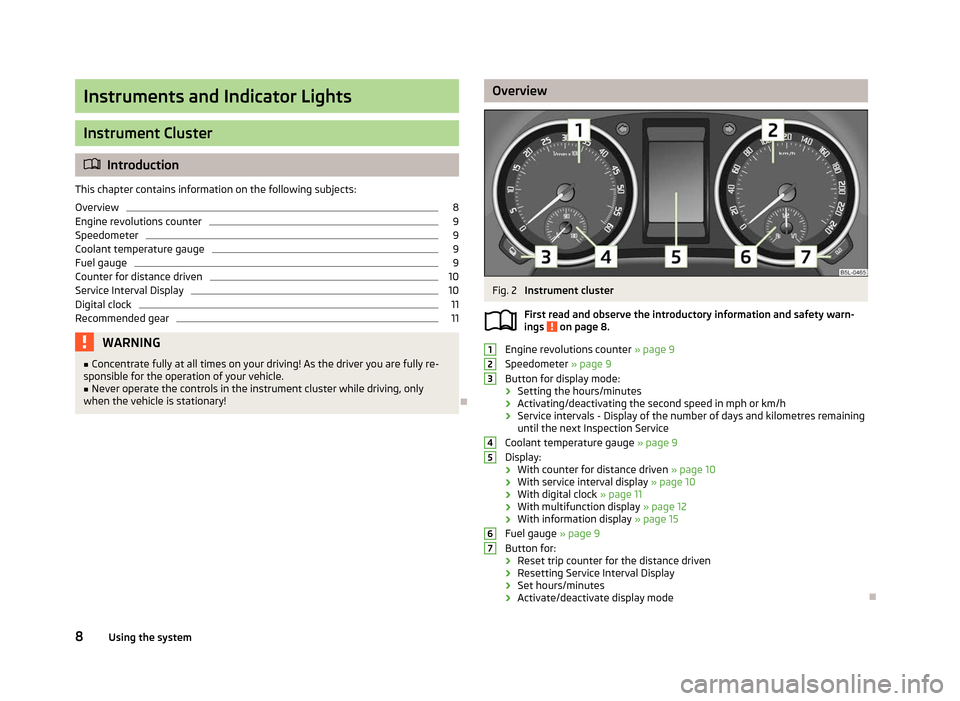
Engine revolutions counter
» page 9
Speedometer » page 9
Button for display mode:
› Setting the hours/minutes
› Activating/deactivating the second speed in mph or km/h
› Service intervals - Display of the number of days and kilometres remaining
until the next Inspection Service
Coolant temperature gauge » page 9
Display:
› With counter for distance driven
» page 10
› With service interval display
» page 10
› With digital clock
» page 11
› With multifunction display
» page 12
› With information display » page 15
Fuel gauge » page 9
Button for:
› Reset trip counter for the distance driven
› Resetting Service Interval Display
› Set hours/minutes
› Activate/deactivate display mode Ð
ä 1
2
3
4
5
6
7
8
Using the system
Page 16 of 225
Current fuel consumption
The current fuel consumption level is shown in the display in litres/100 km
1)
. You
can use this information to adapt your driving style to the desired fuel consump-
tion.
The display appears in litres/hour if the vehicle is stationary or driving at a low
speed 2)
.
Average fuel consumption
The average fuel consumption since the memory was last erased is shown in the
display in litres/100
km1 )
» page 12.
To determine the average fuel consumption over a certain period of time, set the
memory at the start of the new measurement to zero using button B
»
Fig. 6
on
page 13 or with the adjustment wheel D
. Dashes appears in the display for the
first 100 m you drive after erasing the memory.
The display is updated regularly while you are driving.
Range
The estimated range in kilometres is shown on the display. It indicates the dis-
tance you can still drive with your vehicle based on the level of fuel in the tank
and the same style of driving.
The display is shown in steps of 10
km. Once the fuel gauge pointer reaches the
reserve marking, the range is displayed in 5 km.
The fuel consumption over the last 50 km is used to calculate the range. The
range will increase if you drive in a more economical manner.
If the memory is set to zero (after disconnecting the battery), the fuel consump-
tion of 10 ltr./100 km is calculated for the range; afterwards the value is adapted
accordingly to the style of driving.
Distance travelled
The distance driven since the memory was last erased appears in the dis-
play » page 12. If you wish to measure the distance travelled from a particular
point in time, you need to set the memory to zero at this point in time by pressing
the button B
» Fig. 6 on page 13 or the adjustment wheel D
.
The maximum distance indicated in both memories is 1
999 km or 9 999 km on
vehicles with an information display. The indicator is set back to zero if this period
is exceeded. Average speed
The average speed since the memory was last erased is shown in the display in
km/hour
» page 12 . If you wish to determine the average speed over a certain pe-
riod of time, you need to set the memory to zero at the start of the measurement
using the button B
» Fig. 6 on page 13 or the adjustment wheel D
.
A zero appears in the display for the first approx. 300 m you drive after erasing
the memory.
The display is updated regularly while you are driving.
Current speed
The current speed which is identical to the display of the speedometer 2
»
Fig. 2
on page 8 is indicated on the display.
Oil temperature
If the oil temperature is lower than 50 °C or if a fault in the system for checking
the oil temperature is present, only - -.- is displayed instead of the oil tempera-
ture. Ð Warning against excessive speeds
First read and observe the introductory information and safety warn-
ings on page 12.
Adjust the speed limit while the vehicle is stationary
›
With the button A
» Fig. 6
on page
13 or the adjustment wheel D
, select the
menu item Warning against excessive speeds .
› Press the button B
» Fig. 6 on page 13 or the adjustment wheel D
to activate
the ability to set the speed limit (value flashes).
› Set the desired speed limit, e.g. 50 km/h, with the button A
or the adjustment
wheel D
.
› Use the button B
or the adjustment wheel D
to confirm the set speed limit, or
wait approx. 5 seconds and the setting is saved automatically (the value stops
flashing).
This allows you to set the speed in 5 km/h intervals. £
ä
1)
On some models in certain countries, the display appears in kilometres/litre.
2) On some models in certain countries, the display appears in --,- kilometres/litres if the vehicle is sta-
tionary.
14 Using the system
Page 17 of 225
Adjusting the speed limit while the vehicle is moving
›
With the button A
» Fig. 6
on page 13 or the adjustment wheel D
, select the
menu item Warning against excessive speeds .
› Drive at the desired speed, e.g. 50 km/h.
› Press the button B
or the adjustment wheel D
to accept the current speed as
the speed limit (the value flashes).
If you wish to change the set speed limit, it is changed in 5
km/h intervals (e.g. the
accepted speed of 47 km/h increases to 50 km/h or decreases to 45 km/h).
› Press again the button B
or the adjustment wheel D
to confirm the speed
limit, or wait approx. 5 seconds and the setting is saved automatically (the value
stops flashing).
Change or delete speed limit
› With the button A
» Fig. 6
on page
13 or the adjustment wheel D
, select the
menu item Warning against excessive speeds .
› Pressing the button B
or the adjustment wheel D
deletes the speed limit.
› Pressing the button B
or the adjustment wheel D
again activates change
mode for the speed limit.
If the set speed limit is exceeded, an audible signal will sound as a warning. At
the same time the message Warning against excessive speeds appears on the
display with the set limit value.
The set speed limit value remains stored even after switching off the ignition. ÐMAXI DOT (information display)
ä
Introduction
This chapter contains information on the following subjects:
Main menu 15
Settings 16
Door, boot lid and bonnet warning 17
Auto Check Control 17
The information display provides you with information on the current operating
state of your vehicle . The information system also provides you with data (de-
pending on the equipment installed in the vehicle) relating to the radio, mobile
phone, multi-functional indicator, navigation system, the unit connected to the
MDI input and the automatic gearbox » page 109. WARNING
Concentrate fully at all times on your driving! As the driver you are fully re-
sponsible for the operation of your vehicle. CAUTION
Pull out the ignition key if coming in contact with the display (e.g. when cleaning)
to prevent any possible damage. Ð Main menu
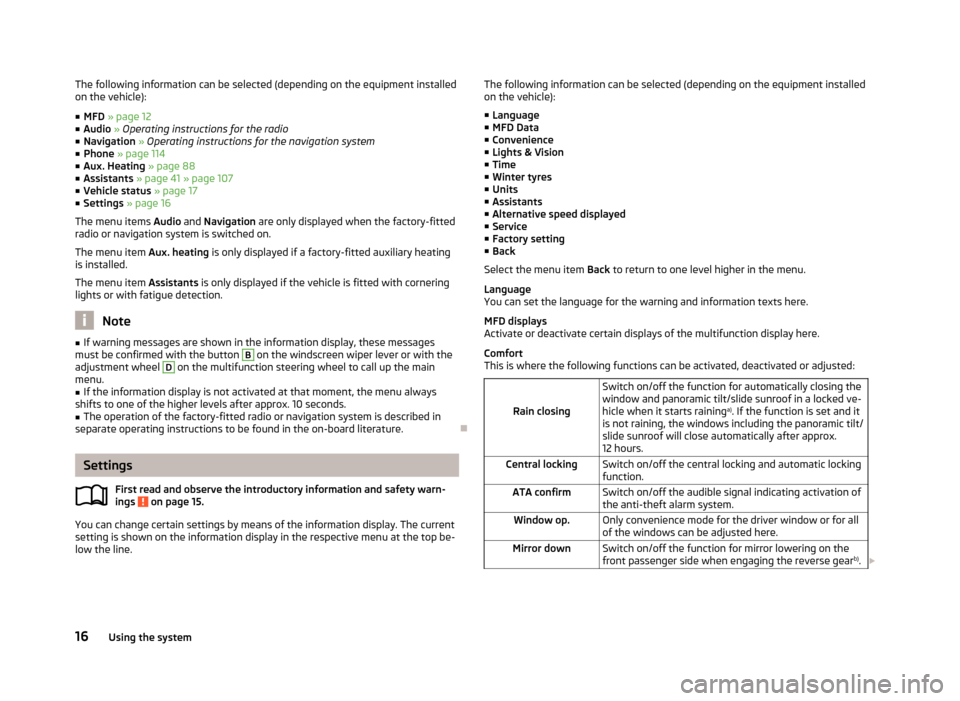
Fig. 7
Information display: Control elements on the windscreen wiper lever/
control elements on the multifunction steering wheel
First read and observe the introductory information and safety warn-
ings on page 15.
Operating with the buttons on the windscreen wiper lever
›
Activate the Main menu
by pressing the rocker switch A
» Fig. 7 for longer.
› Individual menu items can be selected by means of the rocker switch A
. When
the pushbutton B
is briefly pressed, the information you have selected is dis-
played.
Operating with the buttons on the multifunction steering wheel
› Activate the Main menu
by pressing and holding the button C
» Fig. 7
for a
short while.
› By briefly pressing the C
button you will reach one level higher.
› The individual menus can be selected by pressing the adjustment wheel D
.
The selected menu is displayed after briefly pressing the adjustment wheel D
.
£
ä
15
Instruments and Indicator Lights
Page 18 of 225
The following information can be selected (depending on the equipment installed
on the vehicle):
■ MFD » page 12
■ Audio » Operating instructions for the radio
■ Navigation » Operating instructions for the navigation system
■ Phone »
page 114
■ Aux. Heating » page 88
■ Assistants » page 41 » page 107
■ Vehicle status » page 17
■ Settings » page 16
The menu items Audio and Navigation are only displayed when the factory-fitted
radio or navigation system is switched on.
The menu item Aux. heating is only displayed if a factory-fitted auxiliary heating
is installed.
The menu item Assistants is only displayed if the vehicle is fitted with cornering
lights or with fatigue detection. Note
■ If warning messages are shown in the information display, these messages
must be confirmed with the button B
on the windscreen wiper lever or with the
adjustment wheel D
on the multifunction steering wheel to call up the main
menu.
■ If the information display is not activated at that moment, the menu always
shifts to one of the higher levels after approx. 10
seconds.
■ The operation of the factory-fitted radio or navigation system is described in
separate operating instructions to be found in the on-board literature. ÐSettings
First read and observe the introductory information and safety warn-
ings on page 15.
You can change certain settings by means of the information display. The current
setting is shown on the information display in the respective menu at the top be-
low the line.
ä The following information can be selected (depending on the equipment installed
on the vehicle):
■ Language
■ MFD Data
■ Convenience
■ Lights & Vision
■ Time
■ Winter tyres
■ Units
■ Assistants
■ Alternative speed displayed
■ Service
■ Factory setting
■ Back
Select the menu item Back to return to one level higher in the menu.
Language
You can set the language for the warning and information texts here.
MFD displays
Activate or deactivate certain displays of the multifunction display here.
Comfort
This is where the following functions can be activated, deactivated or adjusted:
Rain closing Switch on/off the function for automatically closing the
window and panoramic tilt/slide sunroof in a locked ve-
hicle when it starts raining
a)
. If the function is set and it
is not raining, the windows including the panoramic tilt/
slide sunroof will close automatically after approx.
12 hours.
Central locking Switch on/off the central locking and automatic locking
function.
ATA confirm Switch on/off the audible signal indicating activation of
the anti-theft alarm system.
Window op. Only convenience mode for the driver window or for all
of the windows can be adjusted here.
Mirror down Switch on/off the function for mirror lowering on the
front passenger side when engaging the reverse gear b)
. £ 16
Using the system
Page 19 of 225
Mirror adjust.
Switch on/off the function for left and right exterior
mirror setting simultaneously.
Factory setting Restore the Convenience factory setting.a)
This function is only available on vehicles with a rain sensor.
b) This function is only available on vehicles with an electrically adjustable driver seat.
Lights and visibility
This is where the following functions can be activated, deactivated or adjusted:
Coming Home Switch on/off and adjust the light duration of the Com-
ing Home function.
Leaving Home Switch on/off and adjust the light duration of the Com-
ing Home function.
Dayl. dri. light Switch on/off the “DAY LIGHT” function.
Rear wiper Switch on/off the function for automatic rear window
wiping.
Lane ch. flash Switch on/off the convenience flashing function.
Travel mode Switch on/off the travel model function.
Factory setting Restore the factory setting for the lighting.Time
The time, time format (12 or 24 hour indicator) and the changeover between sum-
mer/winter time can be set here.
Winter tyres
Here, you can set the speed at which an audible signal should sound. This func-
tion is, for example, used for winter tyres where the maximum permissible speed
is lower than the maximum speed of the vehicle.
When exceeding the speed, the following is shown on the information display:
Winter tyres:
max. speed ... km/h
Units of measurement
The units for the temperature, consumption and distance driven can be set here.
Assistants
The tones of the audible signals for the parking aid can be adjusted here. Second speed
The display of the second speed in mph or in km/h can be switched on here.
Service
Here you can have the remaining kilometres and days until the next service inter-
val displayed, and reset the Service Interval Display.
Factory setting
After selecting the menu Factory setting
the factory setting of the information
display is restored. Ð Door, boot lid and bonnet warning
First read and observe the introductory information and safety warn-
ings on page 15.
If at least one door is open, or the boot or bonnet is open, the information display
indicates the relevant
open door or boot/bonnet.
An audible signal also sounds if the vehicle is travelling at more than 6
km/h.Ð Auto Check Control
First read and observe the introductory information and safety warn-
ings on page 15.
Vehicle condition
Certain functions and conditions of individual vehicle systems are checked contin-
uously when the ignition is switched on and also while driving.
Some error messages and other information are displayed in the information dis-
play. The messages are displayed at the same time as the symbols in the informa-
tion display or the indicator lights in the instrument cluster » page 18.
If there is at least one error message, the menu item Vehicle status is displayed
in the menu. After selecting this menu the first of the error messages is dis-
played. Several error messages are shown on the display under the message e.g.
1/3. This indicates that the first of a total of three error messages is being dis-
played. £
ä
ä
17
Instruments and Indicator Lights
Page 25 of 225
WARNING
■ If you have to stop for technical reasons, then park the vehicle at a safe dis-
tance from the traffic, switch off the engine and activate the hazard warning
light system » page 44.
■ If the indicator light » page 19 is displayed simultaneously with indicator
light , do not continue your journey!
Seek help from a ŠKODA specialist
garage.
■ A fault to the ABS system or the braking system can increase the vehicle's
braking distance - risk of accident! ÐThe rear fog light
The warning light comes on when the rear fog lights are operating » page 43.ÐBulb failure
The indicator light comes on if a bulb is faulty:
› within 2 seconds of the ignition being switched on;
› when switching on the defective light bulb.
The following is displayed in the information display: Check front-right dipped beam! ÐExhaust inspection system
If the indicator light lights up, there is a fault in the exhaust inspection system.
The engine control unit allows the vehicle to run in emergency mode.
Seek help from a
ŠKODA specialist garage. ÐGlow plug system
(diesel engine)
The indicator light comes on after the ignition has been switched on. The en-
gine can be started immediately after the pre-glow indicator light goes out.
There is a fault in the glow plug system if the indicator light does not come on
at all or lights up continuously . If the indicator light
begins to flash while driving, a fault exists in the engine
control. The engine control unit allows the vehicle to run in emergency mode.
Seek help from a
ŠKODA specialist garage. Ð EPC
fault light (petrol engine)
If the indicator light lights up, there is a fault in the engine control. The engine
control unit allows the vehicle to run in emergency mode.
Seek help from a
ŠKODA specialist garage. Ð Diesel particulate filter
(diesel engine)
The diesel particulate filter separates the soot particles from the exhaust. The
soot particles collect in the diesel particulate filter where they are burnt on a reg-
ular basis.
If the indicator light
lights up, soot has accumulated in the diesel particulate
filter.
To clean the diesel particle filter, the vehicle should be driven at an even speed of
at least 60 km/h » at engine speeds of 1 800 - 2 500 rpm for at least 15 mi-
nutes or until the indicator light goes out with the 4th or 5th
gear engaged (auto-
matic gearbox: position S) when the traffic situation permits it.
The indicator light only goes out after the diesel particulate filter has been
successfully cleaned.
If the filter is not properly cleaned, the indicator light does not go out and the
indicator light begins to flash.
The following is displayed in the information display: Diesel particulate filter Owner's manual!
The engine control unit allows the vehicle to run in emergency mode. After
switching the ignition off and on again the indicator light, the indicator light
also lights up.
Seek help from a ŠKODA specialist garage. £
23
Instruments and Indicator Lights
Page 27 of 225
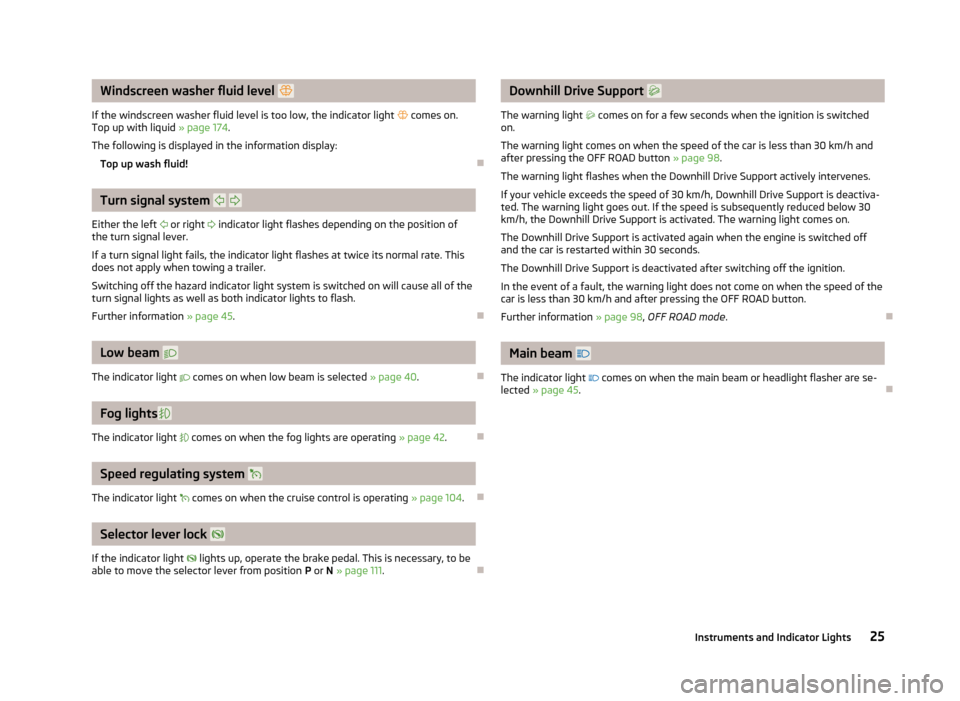
Windscreen washer fluid level
If the windscreen washer fluid level is too low, the indicator light comes on.
Top up with liquid » page 174.
The following is displayed in the information display: Top up wash fluid! ÐTurn signal system
Either the left or right indicator light flashes depending on the position of
the turn signal lever.
If a turn signal light fails, the indicator light flashes at twice its normal rate. This
does not apply when towing a trailer.
Switching off the hazard indicator light system is switched on will cause all of the
turn signal lights as well as both indicator lights to flash.
Further information » page 45. ÐLow beam
The indicator light comes on when low beam is selected » page 40.ÐFog lights
The indicator light comes on when the fog lights are operating » page 42.ÐSpeed regulating system
The indicator light comes on when the cruise control is operating » page 104.ÐSelector lever lock
If the indicator light lights up, operate the brake pedal. This is necessary, to be
able to move the selector lever from position P or N » page 111.Ð Downhill Drive Support
The warning light comes on for a few seconds when the ignition is switched
on.
The warning light comes on when the speed of the car is less than 30 km/h and
after pressing the
OFF ROAD button » page 98 .
The warning light flashes when the Downhill Drive Support actively intervenes.
If your vehicle exceeds the speed of 30 km/h, Downhill Drive Support is deactiva-
ted. The warning light goes out. If the speed is subsequently reduced below 30
km/h, the Downhill Drive Support is activated. The warning light comes on.
The Downhill Drive Support is activated again when the engine is switched off
and the car is restarted within 30 seconds.
The Downhill Drive Support is deactivated after switching off the ignition.
In the event of a fault, the warning light does not come on when the speed of the
car is less than 30 km/h and after pressing the OFF ROAD button.
Further information » page 98, OFF ROAD mode . Ð Main beam
The indicator light comes on when the main beam or headlight flasher are se-
lected » page 45. Ð 25
Instruments and Indicator Lights
Page 41 of 225
Lights and visibility
Lights
ä
Introduction
This chapter contains information on the following subjects:
Switching lights on and off 40
DAY LIGHT function (daytime running lights) 40
Automatic driving lamp control 40
Cornering lights 41
Parking light 41
COMING HOME/LEAVING HOME function 41
Tourist light 42
Fog lights 42
Fog lights with the function CORNER 42
Rear fog light 43
Instrument lighting 43
Headlight beam adjustment 44
Switches for the hazard warning light system 44
Turn signal and main beam lever 45
On models fitted with right-hand steering the position of certain switches differs
from that shown in » Fig. 23 on page 40
. The symbols which mark the switch
positions are identical, however.
The low beam continues to shine while the ignition is switched on and the light
switch is in the position or . After switching off the ignition, the low beam
is switched off automatically and only the side lights come on. The side lights also
go out after the ignition key is removed. WARNING
■ Never drive with only the side lights on! The side lights are not bright
enough to light up the road sufficiently in front of you or to be seen by other
oncoming traffic. Therefore always switch on the low beam when it is dark or
if visibility is poor.
■ The automatic driving lamp control
only operates as a support and does
not release the driver from his responsibility to check the light and, if necessa-
ry, to switch on the light depending on the light conditions. The light sensor
cannot, for example, detect rain or snow. Under these conditions we recom-
mend switching on the low beam or fog lights! CAUTION
■ The activation of the lights should only be undertaken in accordance with na-
tional legal requirements.
■ The driver is always responsible for the correct settings and use of the lights. Note
■ If the light switch is in the position , the ignition key is removed and the driv-
er's door is open, an audible warning signal will sound. The audible warning signal
is switched off by means of the door contact when the driver's door is closed (ig-
nition off), however, the side lights remain on to illuminate the parked vehicle if
necessary. ■ If there is a fault in the light switch, the low beam comes on automatically.
■ In the event of cool or humid weather conditions, the headlights can be misted
up from inside. The temperature difference between interior and external area of
the headlight lenses is decisive. When the driving lights are switched on, the light
outlet surfaces are free from mist after a short period, although the headlight
lenses may still be misted up in the peripheral areas. It also concerns reverse light
and turn signal lights. This mist has no influence on the life of the lighting system. Ð
39
Lights and visibility