towing SKODA YETI 2012 1.G / 5L Owner's Manual
[x] Cancel search | Manufacturer: SKODA, Model Year: 2012, Model line: YETI, Model: SKODA YETI 2012 1.G / 5LPages: 225, PDF Size: 5.47 MB
Page 6 of 225
Driving through water on the street 151
Off-road driving 151
Towing a trailer 157
Towing a trailer 157
General Maintenance
Taking care of and cleaning the vehicle 160
Taking care of your vehicle 160
Inspecting and replenishing 167
Fuel 167
Engine compartment 169
Vehicle battery 176
Wheels and Tyres 181
Tyres 181
Accessories, changes and replacement of parts 189
Introductory information 189
Changes and impairments of the airbag
system 189
Do-it-yourself
Do-it-yourself 190
First-aid kit and warning triangle 190
Fire extinguisher 190
Vehicle tool kit 190
Changing a wheel 191
Breakdown kit 194
Jump-starting 197
Towing the vehicle 198
Fuses and light bulbs 201
Fuses 201
Bulbs 204 Technical data
Technical data 208
Introductory information 208
Data on the vehicle data sticker and the type
plate 208
Dimensions 209
Specifications and engine oil capacity 210
Vehicle-specific details per engine type 211
Multi-purpose vehicles (AF) 214
Index
4 Table of Contents
Page 27 of 225
Windscreen washer fluid level
If the windscreen washer fluid level is too low, the indicator light comes on.
Top up with liquid » page 174.
The following is displayed in the information display: Top up wash fluid! ÐTurn signal system
Either the left or right indicator light flashes depending on the position of
the turn signal lever.
If a turn signal light fails, the indicator light flashes at twice its normal rate. This
does not apply when towing a trailer.
Switching off the hazard indicator light system is switched on will cause all of the
turn signal lights as well as both indicator lights to flash.
Further information » page 45. ÐLow beam
The indicator light comes on when low beam is selected » page 40.ÐFog lights
The indicator light comes on when the fog lights are operating » page 42.ÐSpeed regulating system
The indicator light comes on when the cruise control is operating » page 104.ÐSelector lever lock
If the indicator light lights up, operate the brake pedal. This is necessary, to be
able to move the selector lever from position P or N » page 111.Ð Downhill Drive Support
The warning light comes on for a few seconds when the ignition is switched
on.
The warning light comes on when the speed of the car is less than 30 km/h and
after pressing the
OFF ROAD button » page 98 .
The warning light flashes when the Downhill Drive Support actively intervenes.
If your vehicle exceeds the speed of 30 km/h, Downhill Drive Support is deactiva-
ted. The warning light goes out. If the speed is subsequently reduced below 30
km/h, the Downhill Drive Support is activated. The warning light comes on.
The Downhill Drive Support is activated again when the engine is switched off
and the car is restarted within 30 seconds.
The Downhill Drive Support is deactivated after switching off the ignition.
In the event of a fault, the warning light does not come on when the speed of the
car is less than 30 km/h and after pressing the OFF ROAD button.
Further information » page 98, OFF ROAD mode . Ð Main beam
The indicator light comes on when the main beam or headlight flasher are se-
lected » page 45. Ð 25
Instruments and Indicator Lights
Page 29 of 225
CAUTION
■ Pay attention to the correct polarity when changing the battery.
■ The replacement battery must have the same specification as the original bat-
tery. For the sake of the environment
Dispose of the used battery in accordance with national legal provisions. Note
■ Please approach a ŠKODA Service Partner if you lose a key as they can obtain a
new one for you. ■ The system has to be synchronised, if the vehicle cannot be unlocked or locked
with the remote control key after replacing the battery » page 31. ÐChild safety lock
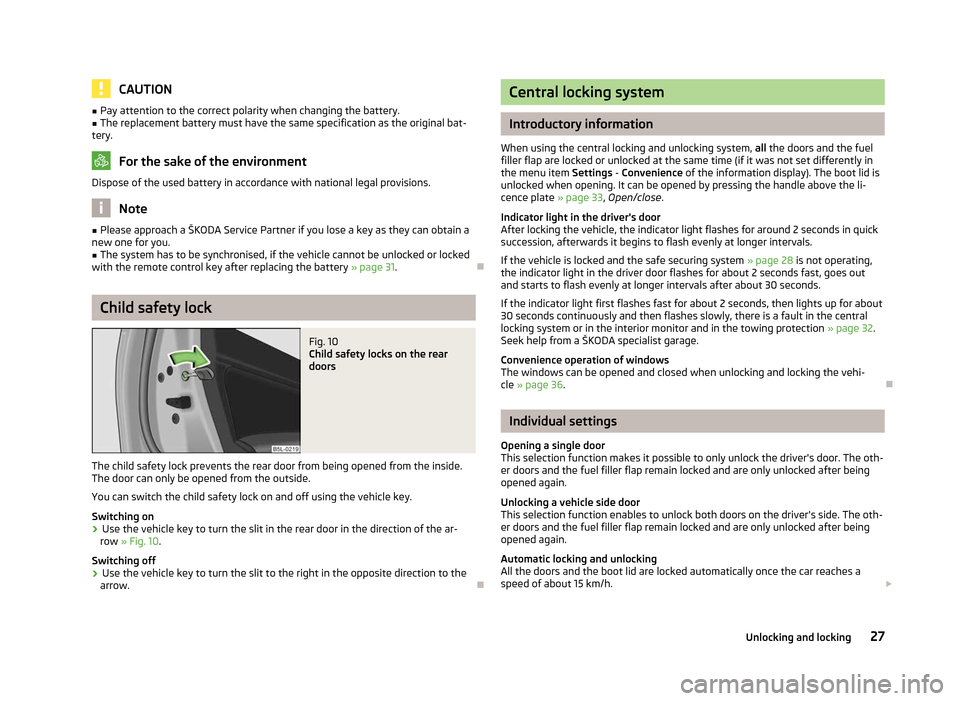
Fig. 10
Child safety locks on the rear
doors
The child safety lock prevents the rear door from being opened from the inside.
The door can only be opened from the outside.
You can switch the child safety lock on and off using the vehicle key.
Switching on
› Use the vehicle key to turn the slit in the rear door in the direction of the ar-
row » Fig. 10.
Switching off
› Use the vehicle key to turn the slit to the right in the opposite direction to the
arrow. Ð Central locking system
Introductory information
When using the central locking and unlocking system, all the doors and the fuel
filler flap are locked or unlocked at the same time (if it was not set differently in
the menu item Settings - Convenience
of the information display). The boot lid is
unlocked when opening. It can be opened by pressing the handle above the li-
cence plate » page 33, Open/close.
Indicator light in the driver's door
After locking the vehicle, the indicator light flashes for around 2 seconds in quick
succession, afterwards it begins to flash evenly at longer intervals.
If the vehicle is locked and the safe securing system » page 28 is not operating,
the indicator light in the driver door flashes for about 2 seconds fast, goes out
and starts to flash evenly at longer intervals after about 30 seconds.
If the indicator light first flashes fast for about 2 seconds, then lights up for about
30 seconds continuously and then flashes slowly, there is a fault in the central
locking system or in the interior monitor and in the towing protection » page 32.
Seek help from a ŠKODA specialist garage.
Convenience operation of windows
The windows can be opened and closed when unlocking and locking the vehi-
cle » page 36. Ð Individual settings
Opening a single door
This selection function makes it possible to only unlock the driver's door. The oth-
er doors and the fuel filler flap remain locked and are only unlocked after being
opened again.
Unlocking a vehicle side door
This selection function enables to unlock both doors on the driver's side. The oth-
er doors and the fuel filler flap remain locked and are only unlocked after being
opened again.
Automatic locking and unlocking
All the doors and the boot lid are locked automatically once the car reaches a
speed of about 15 km/h. £
27
Unlocking and locking
Page 33 of 225
Locking
The turn signal lights flash once to confirm that the vehicle has been correctly
locked.
If the doors or the boot lid remain open after the vehicle has been locked, the
turn signal lights do not flash until they have been closed.
WARNING
If the car is locked from the outside and the safe securing system is activated,
there must not be any person in the car as it is then not possible to open ei-
ther a door or a window from the inside. The locked doors make it more diffi-
cult for rescuers to get into the vehicle in an emergency - hazard! Note
■ Only operate the remote control when the doors and boot lid are closed and the
vehicle is in your line of sight. ■ To avoid the car being locked inadvertently once in the car, the lock button of the remote control must not be pressed before the key is inserted into the ig-
nition lock. Should this happen, press the unlock button
of the remote control.
ÐSynchronisation
If the vehicle cannot be unlocked by actuating the remote control system then it
is possible that the code in the key and the control unit in the vehicle are no lon-
ger synchronised. This can occur when the buttons on the radio-operated key are
actuated a number of times outside of the operative range of the equipment or
the battery on the remote control was replaced.
This means it is necessary to synchronise the code as follows:
› press any button on the remote control key;
› pressing of the button means that the door will unlock with the key within 1 mi-
nute. Ð Anti-theft alarm system
Introductory information
The anti-theft alarm system increases the level of protection against people
seeking to break into the vehicle. The system triggers audible and visual warning
signals if an attempt is made to break into the vehicle.
How is the alarm system activated?
The anti-theft alarm system is activated when the vehicle is locked with the radio
remote control or the key in the driver's door . It is activated 30 seconds after
locking the door.
How is the alarm system deactivated?
The alarm system is deactivated by pressing the unlock button on the radio re-
mote control. The anti-theft alarm system is reactivated if the vehicle is not
opened within 30 seconds after transmitting the radio signal.
The alarm system is also deactivated if you unlock the driver door using the key
within 45 seconds of locking the vehicle.
If the vehicle is unlocked by inserting the key into the driver door, the key must
be inserted into the ignition lock and the ignition switched on within 15
seconds
of unlocking the door to deactivate the alarm system. The alarm is triggered if
the ignition is not switched on within 15 seconds.
When is the alarm triggered?
The following security areas of the locked vehicle are monitored: › bonnet;
› boot lid;
› doors;
› ignition lock;
› Vehicle inclination
» page 32;
› Interior of the vehicle
» page 32;
› A drop in voltage of the on-board power supply;
› Socket of the factory-fitted towing device.
An alarm is immediately triggered if either of the two battery terminals is discon-
nected while the anti-theft alarm system is activated.
How is the alarm switched off?
The alarm is switched off by unlocking the vehicle with the radio remote control
or switching on the ignition. £
31
Unlocking and locking
Page 34 of 225
Note
■ The working life of the alarm siren is 5 years.
■ Before leaving the vehicle, check that all the windows, doors and the panoramic
sliding roof are closed in order to ensure that the anti-theft alarm system is fully
operational. ■ Coding of the radio remote control and the receiver unit precludes the use of
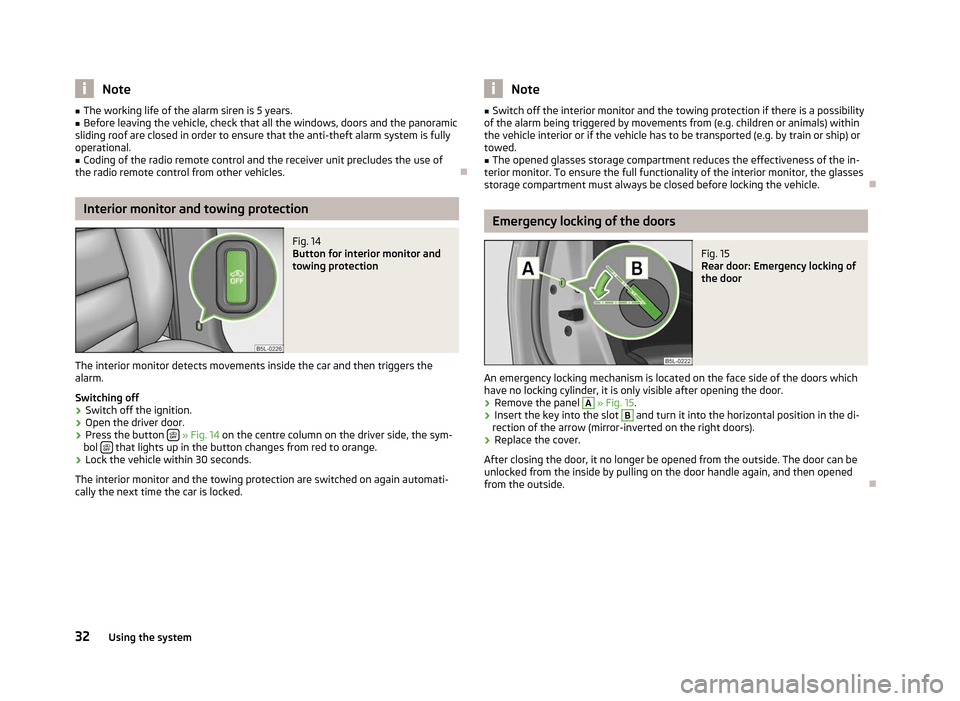
the radio remote control from other vehicles. ÐInterior monitor and towing protection
Fig. 14
Button for interior monitor and
towing protection
The interior monitor detects movements inside the car and then triggers the
alarm.
Switching off
› Switch off the ignition.
› Open the driver door.
› Press the button
» Fig. 14 on the centre column on the driver side, the sym-
bol that lights up in the button changes from red to orange.
› Lock the vehicle within 30 seconds.
The interior monitor and the towing protection are switched on again automati-
cally the next time the car is locked. Note
■ Switch off the interior monitor and the towing protection if there is a possibility
of the alarm being triggered by movements from (e.g. children or animals) within
the vehicle interior or if the vehicle has to be transported (e.g. by train or ship) or
towed. ■ The opened glasses storage compartment reduces the effectiveness of the in-
terior monitor. To ensure the full functionality of the interior monitor, the glasses
storage compartment must always be closed before locking the vehicle. Ð Emergency locking of the doors
Fig. 15
Rear door: Emergency locking of
the door
An emergency locking mechanism is located on the face side of the doors which
have no locking cylinder, it is only visible after opening the door. › Remove the panel A
» Fig. 15.
› Insert the key into the slot B
and turn it into the horizontal position in the di-
rection of the arrow (mirror-inverted on the right doors).
› Replace the cover.
After closing the door, it no longer be opened from the outside. The door can be
unlocked from the inside by pulling on the door handle again, and then opened
from the outside. Ð
32 Using the system
Page 45 of 225
The fog lights with the function CORNER are adjusted according to the steering
angle or after switching on the turn signal light
1)
in the following circumstances:
› the vehicle is stationary and the engine is running or it moves with a speed of
maximum 40 km/h;
› the daytime running lights are not switched on;
› the low beam is switched on or the light switch is in the position
and the
intensity of the ambient light causes the low beam to be switched on;
› the fog lights are not switched on;
› no reverse gear is engaged. Note
If the reverse gear is engaged during the active function CORNER, both fog lights
illuminate. ÐRear fog light
First read and observe the introductory information and safety warn-
ings on page 39.
Switching on
› First of all, turn the light switch
» Fig. 25 on page 42 to position or .
› Pull the light switch to position 2
.
The warning light
lights up in the instrument cluster when the rear fog light is
switched on » page 18.
Only the rear fog light on the trailer lights up if the vehicle has a factory-fitted
towing device or a towing device from ŠKODA original accessories and it is driven
with a trailer and the rear fog light switched on.
The rear fog light is located in the rear light array on the driver's side. Ð
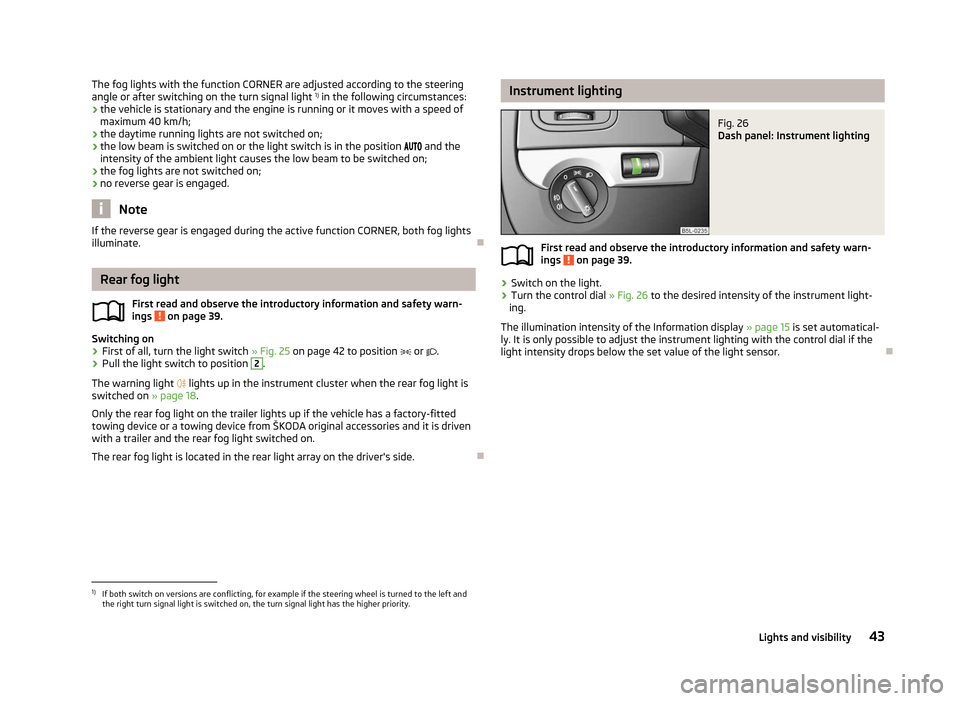
ä Instrument lighting
Fig. 26
Dash panel: Instrument lighting
First read and observe the introductory information and safety warn-
ings on page 39.
›
Switch on the light.
› Turn the control dial
» Fig. 26 to the desired intensity of the instrument light-
ing.
The illumination intensity of the Information display »
page 15 is set automatical-
ly. It is only possible to adjust the instrument lighting with the control dial if the
light intensity drops below the set value of the light sensor. Ð
ä
1)
If both switch on versions are conflicting, for example if the steering wheel is turned to the left and
the right turn signal light is switched on, the turn signal light has the higher priority.
43
Lights and visibility
Page 70 of 225
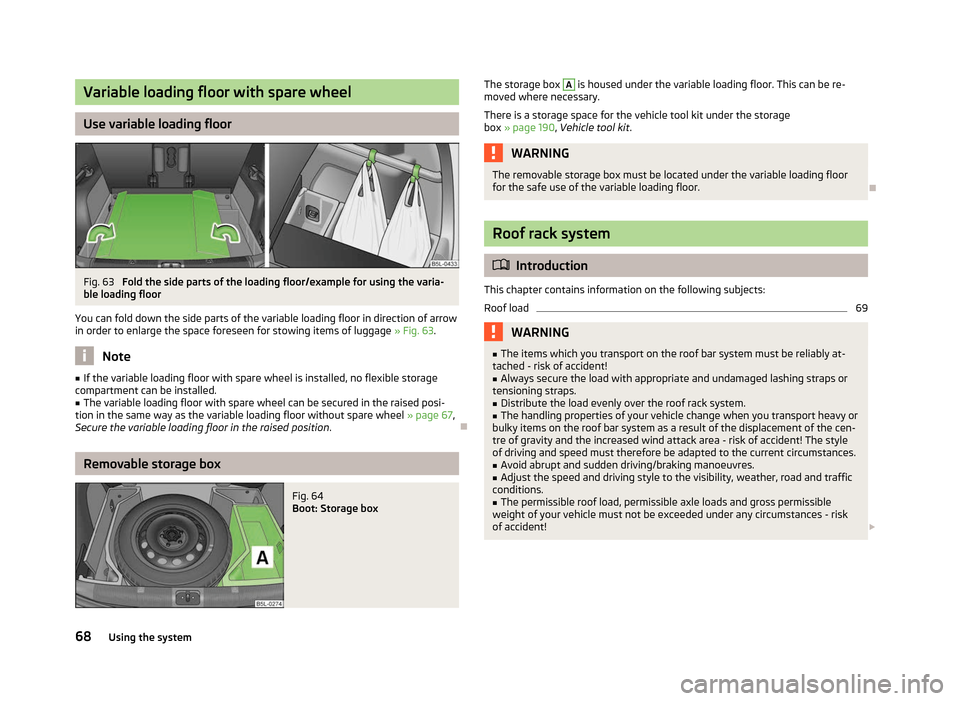
Variable loading floor with spare wheel
Use variable loading floor
Fig. 63
Fold the side parts of the loading floor/example for using the varia-
ble loading floor
You can fold down the side parts of the variable loading floor in direction of arrow
in order to enlarge the space foreseen for stowing items of luggage » Fig. 63. Note
■ If the variable loading floor with spare wheel is installed, no flexible storage
compartment can be installed. ■ The variable loading floor with spare wheel can be secured in the raised posi-
tion in the same way as the variable loading floor without spare wheel »
page 67,
Secure the variable loading floor in the raised position .ÐRemovable storage box
Fig. 64
Boot: Storage box The storage box A
is housed under the variable loading floor. This can be re-
moved where necessary.
There is a storage space for the vehicle tool kit under the storage
box » page 190 , Vehicle tool kit . WARNING
The removable storage box must be located under the variable loading floor
for the safe use of the variable loading floor. Ð Roof rack system
ä
Introduction
This chapter contains information on the following subjects:
Roof load 69
WARNING
■ The items which you transport on the roof bar system must be reliably at-
tached - risk of accident!
■ Always secure the load with appropriate and undamaged lashing straps or
tensioning straps. ■ Distribute the load evenly over the roof rack system.
■ The handling properties of your vehicle change when you transport heavy or
bulky items on the roof bar system as a result of the displacement of the cen-
tre of gravity and the increased wind attack area - risk of accident! The style
of driving and speed must therefore be adapted to the current circumstances. ■ Avoid abrupt and sudden driving/braking manoeuvres.
■ Adjust the speed and driving style to the visibility, weather, road and traffic
conditions. ■ The permissible roof load, permissible axle loads and gross permissible
weight of your vehicle must not be exceeded under any circumstances - risk
of accident! £
68 Using the system
Page 79 of 225
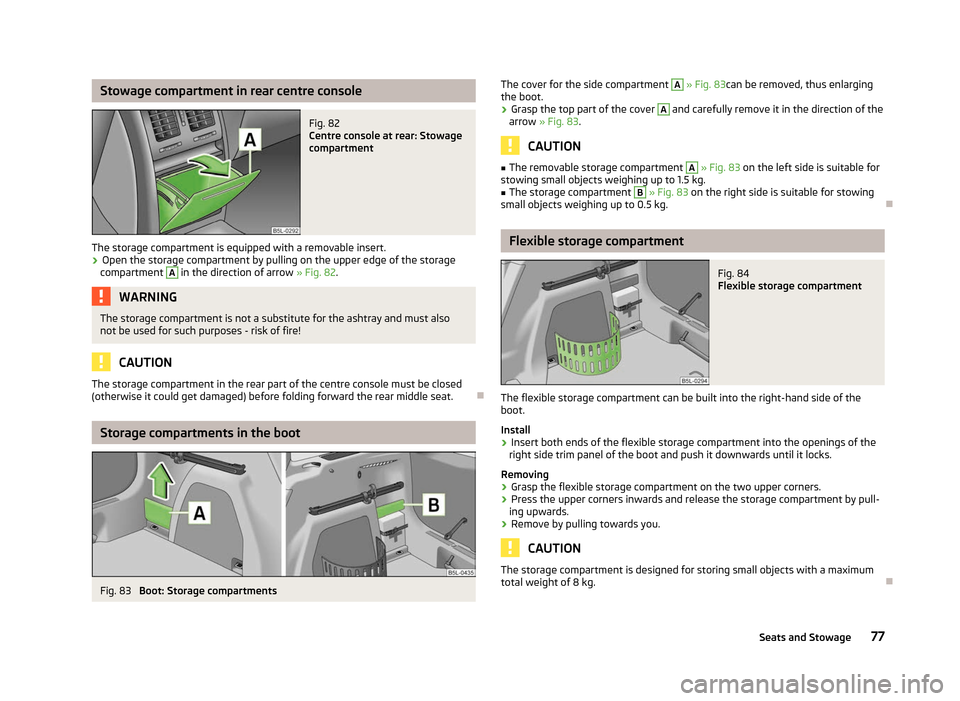
Stowage compartment in rear centre console
Fig. 82
Centre console at rear: Stowage
compartment
The storage compartment is equipped with a removable insert. › Open the storage compartment by pulling on the upper edge of the storage
compartment A
in the direction of arrow
» Fig. 82. WARNING
The storage compartment is not a substitute for the ashtray and must also
not be used for such purposes - risk of fire! CAUTION
The storage compartment in the rear part of the centre console must be closed
(otherwise it could get damaged) before folding forward the rear middle seat. ÐStorage compartments in the boot
Fig. 83
Boot: Storage compartments The cover for the side compartment A
» Fig. 83can be removed, thus enlarging
the boot.
› Grasp the top part of the cover A
and carefully remove it in the direction of the
arrow » Fig. 83. CAUTION
■ The removable storage compartment A
» Fig. 83 on the left side is suitable for
stowing small objects weighing up to 1.5 kg.
■ The storage compartment B
» Fig. 83 on the right side is suitable for stowing
small objects weighing up to 0.5 kg. Ð Flexible storage compartment
Fig. 84
Flexible storage compartment
The flexible storage compartment can be built into the right-hand side of the
boot.
Install
› Insert both ends of the flexible storage compartment into the openings of the
right side trim panel of the boot and push it downwards until it locks.
Removing
› Grasp the flexible storage compartment on the two upper corners.
› Press the upper corners inwards and release the storage compartment by pull-
ing upwards.
› Remove by pulling towards you. CAUTION
The storage compartment is designed for storing small objects with a maximum
total weight of 8 kg. Ð
77
Seats and Stowage
Page 103 of 225
On vehicles with a factory-fitted towing device, the border of the danger area
starts (continuous tone) 5
cm further away from the vehicle. The length of the ve-
hicle can be increased with an installed detachable towing device.
On vehicles with a factory-fitted towing device, the rear sensors are deactivated
when towing a trailer.
Activating/deactivating the rear parking aid
The parking aid is activated automatically when reverse gear is engaged and the
ignition is turned on. This is confirmed by a brief audible signal.
The parking aid is deactivated by removing the reverse gear.
Activating/deactivating the front and rear parking aid
The parking aid is activated when the ignition is turned on and reverse gear is en-
gaged and or by pressing the button » Fig. 101 - the symbol
lights up in the
button. This is confirmed by a brief audible signal.
The parking aid is deactivated by pressing the button or at a speed of more
than 10 km/h – the symbol in the button is no longer illuminated. WARNING
■ The parking aid is not a substitute for the driver paying proper attention and
it is always the driver's responsibility to take care when reversing the vehicle
or carrying out similar manoeuvres. Pay particular attention to small children
and animals as they are not recognised by the parking aid sensors.
■ Before reversing or parking, check that there is no small obstacle, such as a
rock, thin post, trailer drawbar etc., in front of or behind the vehicle. Such ob-
stacles may not be recognised by the parking aid sensors.
■ Under certain circumstances, surfaces of certain objects and types of cloth-
ing cannot reflect the signals from the parking aid. Thus, these objects or peo-
ple who wear such clothing are not recognised by the parking aid sensors.
■ External sound sources can have a detrimental effect on the parking aid.
Under unfavourable conditions, objects or people may not be recognised. Note
■ If a warning signal sounds for about 3
seconds after activating the system and
there is no obstacle close to your car, this indicates a system fault. The fault is
confirmed additionally when the symbol flashes in the button . Have the
fault rectified by a
ŠKODA specialist garage.
■ The sensors must be kept clean (free of ice, etc.) to enable the parking aid to
operate properly.
■ If the parking aid is activated and the selector lever of the automatic gearbox is
in the position P, the warning signal is interrupted (the vehicle cannot move). Ð Park assist
ä
Introduction
This chapter contains information on the following subjects:
Park assist display on the information display 102
Parking with the help of the park assist system and completing the parking
procedure 103
Messages in the information display 104
The parking aid is part of the park assist system, therefore the information and
safety guidelines » page 100, Parking aid must be read and observed.
The park assist system helps you to park in a suitable parallel parking space be-
tween two vehicles or behind a vehicle.
After switching on the ignition and when driving at a speed of up to 30
km/h, the
park assist system automatically searches for suitable parking spaces on the driv-
er's and passenger's side of the vehicle.
During the parking procedure the park assist only takes over the steering move-
ments, the pedals continue to be operated by the driver.
If the park assist system is switched on, a yellow indicator light illuminates up in
the button » Fig. 102 on page 102.
The function of the system is based on:
› the measurement and evaluation of the size of parking spaces when driving,
› the determination of the correct position of the vehicle for parking,
› the calculation of the line on which the vehicle drives backwards into the park-
ing space,
› the automatic turning of the front wheels when parking.
£
101
Starting-off and Driving
Page 104 of 225

WARNING
■ The park assist does not take away the responsibility from the driver when
parking.
■ External sound sources can have a detrimental effect on the park assist sys-
tem and parking aid. Under unfavourable conditions, objects or people may
not be recognised. CAUTION
■ If other vehicles are parked behind or on the kerb, the park assist guides your
vehicle beyond the kerb or onto it. Ensure that the wheels or the wheel rims of
your vehicle are not damaged and if necessary intervene in time.
■ Under certain circumstances, surfaces or structures of certain objects, such as
wire mesh fences, powder snow etc., cannot be recognised by the system.
■ The evaluation of the parking space and the parking procedure depends on the
circumference of the wheels. The system only works correctly if the vehicle is fit-
ted with the wheel size approved by the manufacturer. If wheels other than
those approved by the manufacturer are mounted, the resulting position of the
vehicle in the parking space can differ slightly. This can be avoided by readjusting
the system at a ŠKODA
specialist garage. Under certain circumstances, the sys-
tem may not function correctly, for example, if the vehicle is fitted with snow
chains or a temporary spare wheel. Note
■ The traction control system (TCS) must always be switched on when parking.
■ Only the front parking aid operates if you are towing a trailer (applies only to ve-
hicles with a factory-fitted towing device). This is why it is not possible to reverse
into a parking space with the help of the park assist system when towing a trailer.
■ If the sensors find a suitable parking space, they store its parameters until an-
other suitable parking space has been found or until a distance of 10
m had been
driven after finding the parking space. This is why it is possible to switch on the
park assist after driving past the parking space and the information on whether
this parking space is suitable for parking appears in the information display. Ð Park assist display on the information display
Fig. 102
Switch on display of the park assist in the information display/in-
formation display: Finding a suitable parking space
First read and observe the introductory information and safety warn-
ings on page 101.
Switching on
›
Press the button
» Fig. 102.
› Drive past the parking space at up to maximum 30 km/h and a distance of
0.5
– 1.5 m » Fig. 102.
The search area for the parking space on the driver's side is automatically indica-
ted on the information display.
Activate the turn signal on the driver's side if you wish to park on this side of the
road. In the information display the search area for the parking space is indicated
on the driver's side.
If the button is pressed at a speed greater than 30 km/h and less than 50 km/h,
the message indicating that the speed for detecting the space has been excee-
ded will be shown on the display of the instrument cluster. If the speed drops be-
low 30 km/h, the condition of the park assist system is automatically displayed in
the display of the instrument cluster. When exceeding a speed of 50 km/h, it is
necessary to activate the display again by pressing the button » Fig. 102.Ð
ä
102 Using the system