battery SKODA YETI 2017 Owner´s Manual
[x] Cancel search | Manufacturer: SKODA, Model Year: 2017, Model line: YETI, Model: SKODA YETI 2017Pages: 200, PDF Size: 28.93 MB
Page 55 of 200

Opening / closing the boot lidFig. 36
Opening / closing tailgate
Read and observe
on page 52 first.
›
To open the lid, press
--
--
» Fig. 36 button A in the direction of arrow 1.
›
Raise the lid in the direction of the arrow
2
.
›
To close , grab the mount
B
and pull in the direction of arrow
3
.
Note
Button A » Fig. 36 is disabled when starting off or driving at a speed of over 5
km/h. The button is reactivated when the vehicle has stopped and a door is
opened.
Delayed locking of the boot lid
Read and observe
on page 52 first.
If the boot lid is unlocked with the button on the key, then the boot lid is
automatically locked after closing.
The period after which the boot lid is locked automatically can be extended by
a specialist garage.
CAUTION
There is a risk of unwanted entry into the vehicle before the boot lid is locked
automatically.Window operation
Introduction
This chapter contains information on the following subjects:
Mechanical windows
54
Electric window
54
Opening the windows in the front passenger door and in the rear doors
54
Force limiter
55
Window convenience operation
55
Operational faults
55
The windows can be operated mechanically by the winder attached to the re-
spective door panel.
The windows can be operated electrically from the following locations; all win-
dows from the driver's seat and also via the buttons for the windows in the
passenger door or the rear doors.
WARNING■ Always close the window carefully and in a controlled manner. Otherwise
these could cause severe crushing injuries.■
The system is fitted with a force limiter » page 55. If there is an obsta-
cle, the closing process is stopped and the window goes down by several
centimetres. However, the windows should be closed carefully – risk of in-
jury.
CAUTION
■ Keep the windows clean (free of ice and similar) to ensure the correct func-
tionality of the electric windows.■
Always close the electric windows before disconnecting the battery.
Note
If the windows are opened, dust as well as other dirt can get into the vehicle
and in addition the wind noise is more at certain speeds.53Unlocking and opening
Page 57 of 200

›or:
press the button underneath to the stop, the window automatically opens
fully. Renewed pressing of the button causes the window to stop.›
To open , lightly press the button above and hold it until the window has
moved into the desired position.
›
or: press the button above to the stop, the window automatically opens fully.
Renewed pressing of the button causes the window to stop.
Force limiter
Read and observe
and on page 53 first.
The electric windows are fitted with a force limiter.
If there is an obstacle, the closing process is stopped and the window goes
down by several centimetres.
If the obstacle prevents the window from being closed during the next 10 sec-
onds, the closing process is interrupted once again and the window goes down
by several centimetres.
If you attempt to close the window again within 10 seconds of the window be-
ing moved down for the second time, even though the obstacle was not yet
been removed, the closing process is only stopped. During this time it is not
possible to automatically close the window. The force limiter is still switched
on.
The force limiter is only not operational if you attempt to close the window
again within the next 10 seconds – the window will now close with full force!
If you wait longer than 10 seconds, the force limiter is switched on again.
Window convenience operation
Read and observe
and on page 53 first.
The convenience operation for the window offers the option to open/close all
the windows at once (or only the window in the driver's door). The setting, ac-
tivation and deactivation for the window convenience operation is in the MAXI
DOT display in the
Window op.
menu item. » page 43.
Opening
›
Press and hold the button on the key.
›
Or
Hold the key in the unlock position in the driver's door lock.
›
Or: Hold the central locking button in the area of the symbol
» Fig. 32 on
page 49 .
›Or
Switch off the ignition, open the driver's door and hold the key A until it
stops in the open position » Fig. 38 on page 54 .
Closing›
Press and hold the
button on the key.
›
Or Hold the key in the lock position in the driver's door lock.
›
Or: Hold the central locking button in the area of the symbol
» Fig. 32 on
page 49 .
›
Or Switch off the ignition, open the driver's door and hold the key
A
until it
stops in the closed position » Fig. 38 on page 54 .
›
In the KESSY system, hold your finger on the sensor on the outside of the
door handle of the front door » Fig. 31 on page 49 .
The convenience operation will only function correctly if all the windows auto- matically open/close properly.
Convenience opening or closing the window using the key in the driver's door
locking cylinder is only possible within 45 seconds of locking the vehicle.
The movement of the window is stopped immediately when the respective
button is released.
Operational faults
Read and observe
and on page 53 first.
Repeatedly opening and closing the window can cause the window mecha-
nism to overheat and become temporarily blocked. You will be able to operate
the window again as soon as the operating mechanism has cooled down.
The electric windows are deactivated after the vehicle battery has been dis-
connected. After connecting the vehicle battery, the system is activated as fol-
lows.
Window in the driver's door
›
Switch on the ignition.
›
Pull the top edge of the button and close the window.
›
Release the button.
›
Pull up the respective button and hold for 1 second.
Windows in the other doors
›
Switch on the ignition.
›
Press the respective key above and close the window.
›
Release the button.
›
Pull up the respective button above and hold for 1 second.
55Unlocking and opening
Page 58 of 200
Panorama sliding/tilting roof
Introduction
This chapter contains information on the following subjects:
Operation
56
Force limiter
56
Convenience operation of sliding / tilting roof
57
Activate operation of the tilt / slide sunroof
57
Sunshade with electric operation
57
Activating operation of the sunshade
57
The panoramic tilt / slide sunroof (hereinafter referred to as tilt / slide sunroof)
can only be operated when the ignition is turned on and when the outdoor
temperature is above -20 °C.
The sliding/tilting roof can still be operated for approx. 10 minutes after
switching the ignition off. After opening the driver or front passenger door, it
is no longer possible to operate the sliding/tilting roof.
WARNINGWhen operating the tilt/slide sunroof and the sunshade, proceed with cau-
tion to avoid causing crushing injuries – There is a risk of injury!
CAUTION
■ During the winter it may be necessary to remove any ice and snow in the vi-
cinity of the sliding/tilting roof before opening it to prevent any damage to the
opening mechanism.■
Always close the sliding/tilting roof before disconnecting the battery.
OperationFig. 40
Operation of the sliding/tilting roof
Read and observe
and on page 56 first.
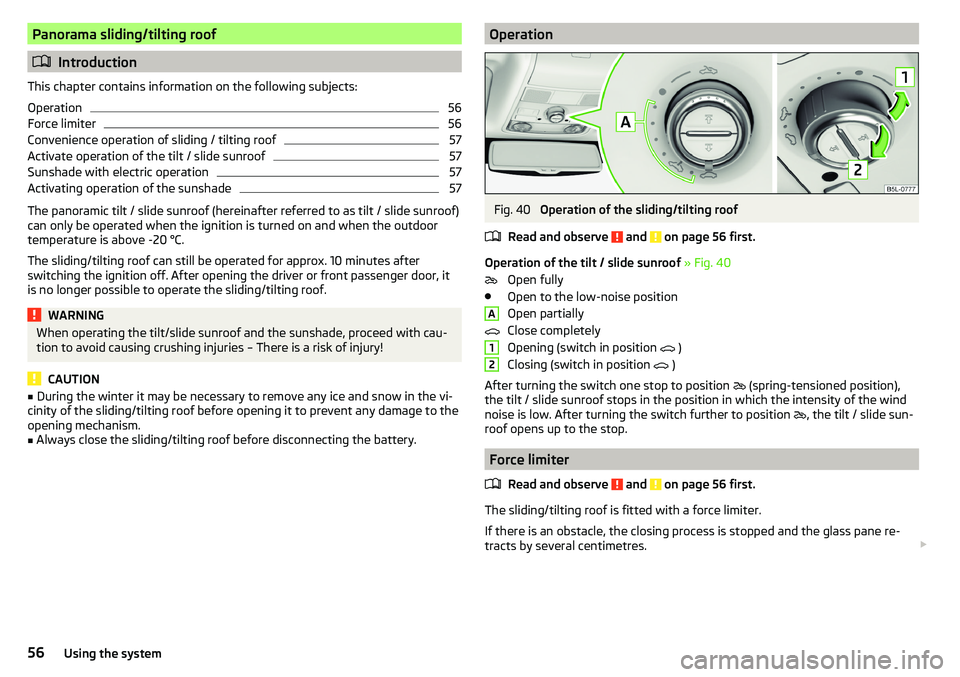
Operation of the tilt / slide sunroof » Fig. 40
Open fully
Open to the low-noise position
Open partially
Close completely
Opening (switch in position )
Closing (switch in position )
After turning the switch one stop to position (spring-tensioned position),
the tilt / slide sunroof stops in the position in which the intensity of the wind
noise is low. After turning the switch further to position , the tilt / slide sun-
roof opens up to the stop.
Force limiter
Read and observe
and on page 56 first.
The sliding/tilting roof is fitted with a force limiter.
If there is an obstacle, the closing process is stopped and the glass pane re-
tracts by several centimetres.
A1256Using the system
Page 59 of 200
WARNINGIf the tilt / slide sunroof is closed, by pulling on the recess of the switch in
the direction of arrow 2, » Fig. 40 on page 56 and the closing process is
hindered by an obstacle, then at the third attempt at closing, the force limi-
tation will cease to function (if less than 5 s passes between the individual
attempts to close). The tilt / slide sunroof closes with full force - There is a
risk of injury.
Convenience operation of sliding / tilting roof
Read and observe
and on page 56 first.
The convenience operation makes it possible to open or close the sliding/tilt-ing roof using the key or the KESSY system via the sensor in the door handle of
the front door.
›
To open out , press and hold the
button on the key.
›
Or
Hold the key in the unlock position in the driver's door lock.
›
To close , press and hold the
button on the key. In the KESSY system, hold
your finger on the sensor on the outside of the front door handle » Fig. 31 on
page 49 .
›
Or Hold the key in the lock position in the driver's door lock.
By interrupting the locking process, the closing operation is interrupted.
Activate operation of the tilt / slide sunroof
Read and observe
and on page 56 first.
If the tilt / slide sunroof stops working (e.g. after disconnecting and connecting
the battery), then the operation must be reactivated.
›
Turn on the ignition and set the switch to position
» Fig. 40 on page 56 .
›
Press the switch on the recess E down and pull forwards.
The tilt / slide sunroof opens and closes again after around 10 seconds.
›
Release the lever.
Sunshade with electric operationFig. 41
Button for operating the sun-
shade
Read and observe and on page 56 first.
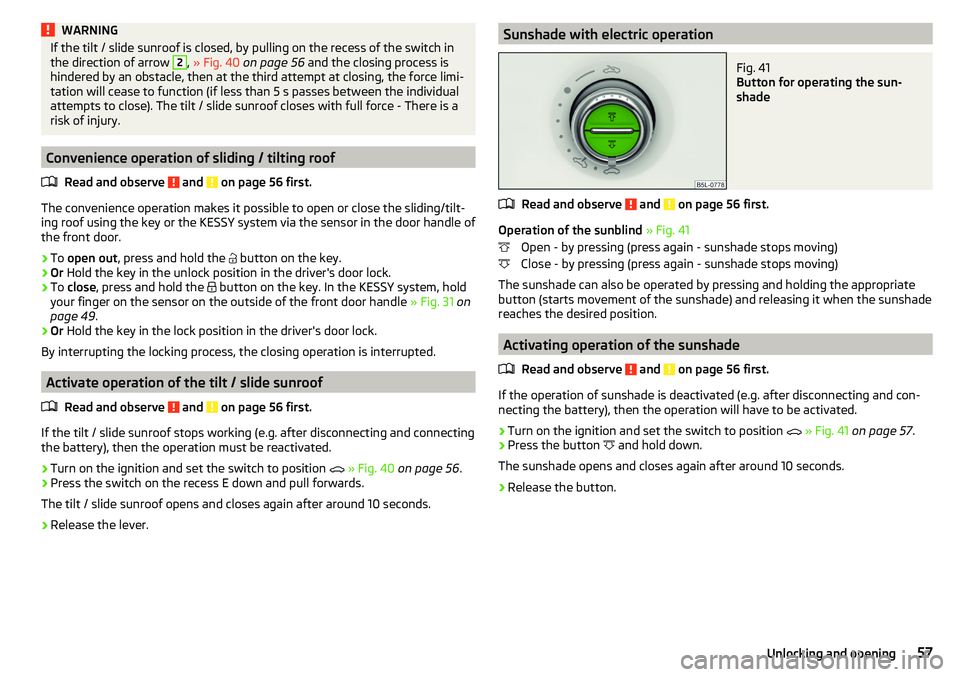
Operation of the sunblind » Fig. 41
Open - by pressing (press again - sunshade stops moving)
Close - by pressing (press again - sunshade stops moving)
The sunshade can also be operated by pressing and holding the appropriate
button (starts movement of the sunshade) and releasing it when the sunshade
reaches the desired position.
Activating operation of the sunshade
Read and observe
and on page 56 first.
If the operation of sunshade is deactivated (e.g. after disconnecting and con-necting the battery), then the operation will have to be activated.
›
Turn on the ignition and set the switch to position
» Fig. 41 on page 57 .
›
Press the button
and hold down.
The sunshade opens and closes again after around 10 seconds.
›
Release the button.
57Unlocking and opening
Page 63 of 200
Fog lights with the CORNER functionRead and observe
on page 58 first.
The CORNER function automatically switches on the fog lights on the respec-tive side of the vehicle (e.g. when cornering), if the following conditions are ful-
filled.
The turn signal is switched on or the front wheels are turned sharply 1)
.
The vehicle speed is below 40 km/h.
The low beam is switched on.
The fog lights are not switched on.
The two fog lights are switched on when you shift into the reverse gear.
COMING HOME / LEAVING HOME
Read and observe
on page 58 first.
The function COMING HOME ensures that the vehicle's environment is illumi-
nated after switching off the ignition and opening the driver's door.
The function LEAVING HOME ensures that the vehicle's environment is illumi-
nated after unlocking the vehicle with the radio remote control unit.
The function switches the light on only if there is poorer visibility and the light
switch is in the position .
The functions and settings of the illumination time can be via the MAXI DOT
display in the menu items
Coming Home
or
Leaving Home
activated / deactivated
and set up » page 43, Menu item
Settings
.
CAUTION
■
Poorer visibility is evaluated by a sensor mounted below the windscreen in
the holder of the rear-view mirror. Do not cover the sensor - the system func-
tion can be disrupted.■
If this option is always enabled, then the battery is heavily loaded.
Hazard warning light systemFig. 46
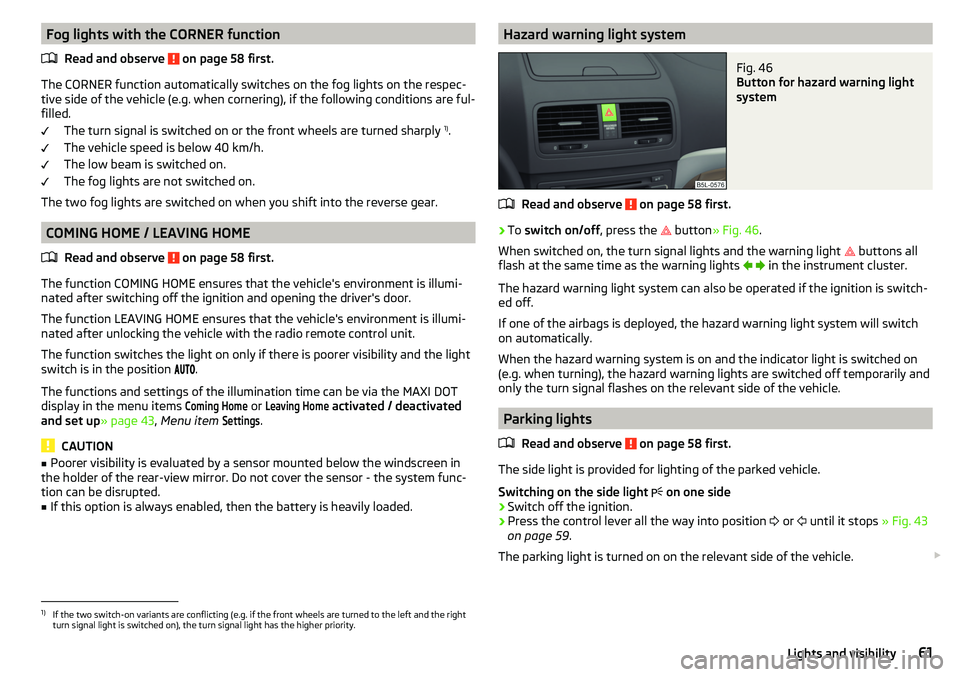
Button for hazard warning light
system
Read and observe on page 58 first.
›
To switch on/off , press the
button
» Fig. 46 .
When switched on, the turn signal lights and the warning light buttons all
flash at the same time as the warning lights
in the instrument cluster.
The hazard warning light system can also be operated if the ignition is switch-
ed off.
If one of the airbags is deployed, the hazard warning light system will switch
on automatically.
When the hazard warning system is on and the indicator light is switched on
(e.g. when turning), the hazard warning lights are switched off temporarily and
only the turn signal flashes on the relevant side of the vehicle.
Parking lights
Read and observe
on page 58 first.
The side light is provided for lighting of the parked vehicle.
Switching on the side light on one side
›
Switch off the ignition.
›
Press the control lever all the way into position
or
until it stops
» Fig. 43
on page 59 .
The parking light is turned on on the relevant side of the vehicle.
1)
If the two switch-on variants are conflicting (e.g. if the front wheels are turned to the left and the right
turn signal light is switched on), the turn signal light has the higher priority.
61Lights and visibility
Page 64 of 200
Switching on the side light on both sides ›Switch on the ignition and turn the light switch to position » page 58 , the
parking lights are turned on.›
Switch off the ignition and lock the car.
After pulling out the ignition key and opening the driver's door, an audible
warning sounds. After a few seconds or after closing the driver's door, the au-
dible warning is turned off.
CAUTION
■ Turning on the parking light means the battery is heavily loaded.■The parking lights may switch off automatically due to a low battery charge.
If the two-sided parking lights are switched on when the ignition is off, the
parking lights will not switch on automatically!
Driving abroad
Read and observe
on page 58 first.
When driving in countries with opposing traffic system (traffic on the
left/right), your headlights may dazzle oncoming traffic. Therefore, it is neces-
sary to have the headlights adapted by a specialist garage.
You can adjust the settings of the Xenon headlights for a reverse traffic sys-
tem in the menu of the MAXI DOT display under the
Travel mode
menu
item » page 43 , Menu item
Settings
. In this mode, no automatic beam adjust-
ment is made ahead of the vehicle. When switching on the ignition the warn-
ing light flashes for 10 seconds.
Interior lighting
Introduction
This chapter contains information on the following subjects:
Front interior light
62
Interior lighting, rear
63
The inner lighting also works if the ignition is switched off. With the ignition
switched off, the lights will automatically switch off after approximately after
10 minutes.
Front interior lightFig. 47
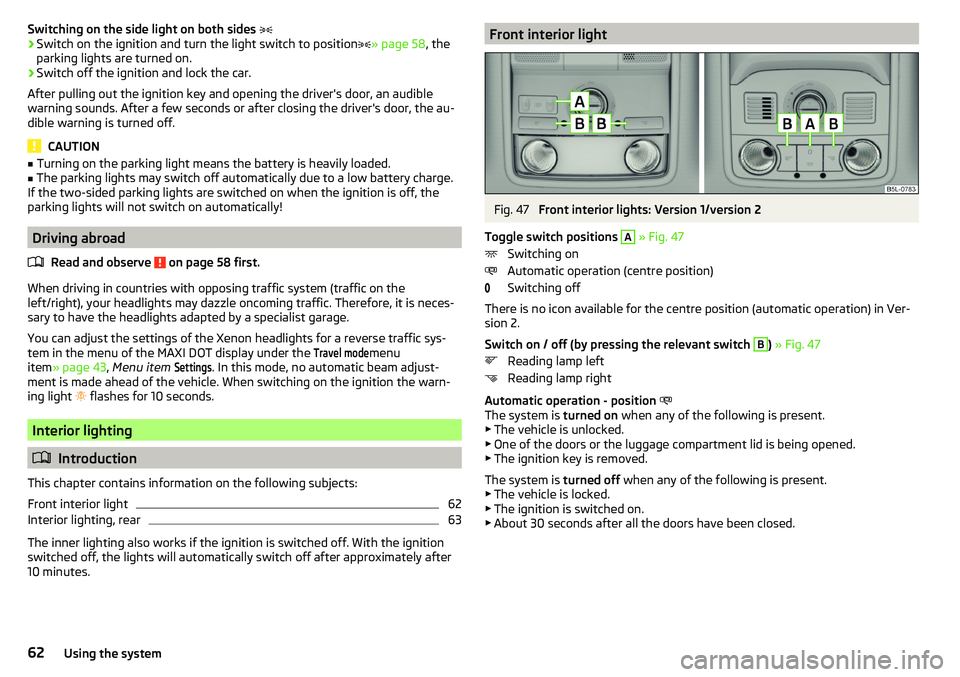
Front interior lights: Version 1/version 2
Toggle switch positions
A
» Fig. 47
Switching on
Automatic operation (centre position)
Switching off
There is no icon available for the centre position (automatic operation) in Ver-
sion 2.
Switch on / off (by pressing the relevant switch
B
) » Fig. 47
Reading lamp left
Reading lamp right
Automatic operation - position
The system is turned on when any of the following is present.
▶ The vehicle is unlocked.
▶ One of the doors or the luggage compartment lid is being opened.
▶ The ignition key is removed.
The system is turned off when any of the following is present.
▶ The vehicle is locked.
▶ The ignition is switched on.
▶ About 30 seconds after all the doors have been closed.
62Using the system
Page 65 of 200
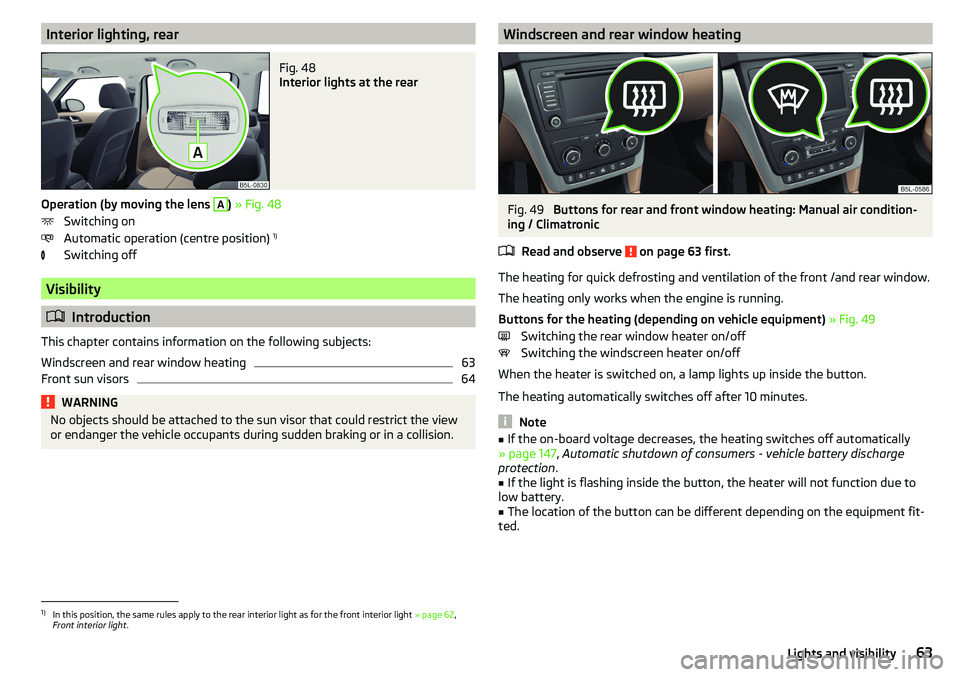
Interior lighting, rearFig. 48
Interior lights at the rear
Operation (by moving the lens
A
) » Fig. 48
Switching on
Automatic operation (centre position) 1)
Switching off
Visibility
Introduction
This chapter contains information on the following subjects:
Windscreen and rear window heating
63
Front sun visors
64WARNINGNo objects should be attached to the sun visor that could restrict the view
or endanger the vehicle occupants during sudden braking or in a collision.Windscreen and rear window heatingFig. 49
Buttons for rear and front window heating: Manual air condition-
ing / Climatronic
Read and observe
on page 63 first.
The heating for quick defrosting and ventilation of the front /and rear window.
The heating only works when the engine is running.
Buttons for the heating (depending on vehicle equipment) » Fig. 49
Switching the rear window heater on/off Switching the windscreen heater on/off
When the heater is switched on, a lamp lights up inside the button.
The heating automatically switches off after 10 minutes.
Note
■ If the on-board voltage decreases, the heating switches off automatically
» page 147 , Automatic shutdown of consumers - vehicle battery discharge
protection .■
If the light is flashing inside the button, the heater will not function due to
low battery.
■
The location of the button can be different depending on the equipment fit-
ted.
1)
In this position, the same rules apply to the rear interior light as for the front interior light » page 62,
Front interior light .
63Lights and visibility
Page 76 of 200

Removing/installingFig. 68
Removing/installing the headrest
›
To remove the headrest, pull it out of the seat backrest up to the latch.
›
Press locking button
A
in the direction of arrow
1,
and pull out the head re-
straint in the direction of arrow
2
» Fig. 68 .
›
To insert the headrest, push the headrest into the seat backrest in the direc-
tion of arrow
3
until the locking button clicks into place.
Front seat heating
Fig. 69
Buttons for heating the front
seats
The seat backrests and seats can be heated electrically.
Seat heating buttons » Fig. 69
Left seat heating
Right seat heating
›
To turn on the heating with maximum heat , press the key
or
button.
By repeatedly pressing the button, the heat is turned down until it is com-
pletely switched off . The level of the seat heating is indicated by the number
of illuminated warning lights in the switch.
The seat heating only operates when the engine is running.WARNINGIf you are sensitive to pain and/or temperature, e.g. through medication,
paralysis or because of chronic illness (e.g. diabetes), we recommend not to
use the seat heating. If the seat heating is used, we recommend to make
regular breaks in your journey when driving long distances, so that the
body can recuperate from the stress of the journey. Please consult your
doctor, who can evaluate your specific condition.
CAUTION
The following instructions should be observed to avoid damage to the seats.■Do not kneel on the seats or otherwise apply concentrated pressure to them.■
Do not switch on the heating for unoccupied seats.
■
Do not switch on the heating for seats which have objects on them (e.g. a
child seat, bag or similar).
■
Do not switch on the heating for seats which have seat covers or protective
covers on them.
Note
If the on-board voltage decreases, the seat heating switches off automatically
» page 147 , Automatic shutdown of consumers - vehicle battery discharge
protection .74Using the system
Page 81 of 200
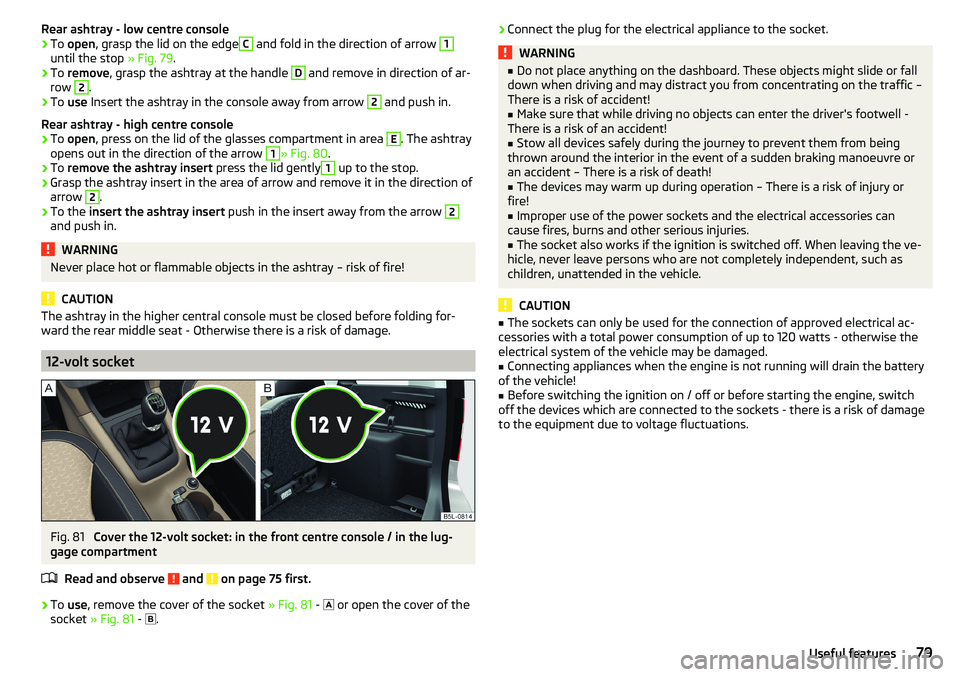
Rear ashtray - low centre console›To open , grasp the lid on the edgeC and fold in the direction of arrow 1
until the stop » Fig. 79.
›
To remove , grasp the ashtray at the handle
D
and remove in direction of ar-
row
2
.
›
To use Insert the ashtray in the console away from arrow
2
and push in.
Rear ashtray - high centre console
›
To open , press on the lid of the glasses compartment in area
E
. The ashtray
opens out in the direction of the arrow
1
» Fig. 80 .
›
To remove the ashtray insert press the lid gently
1
up to the stop.
›
Grasp the ashtray insert in the area of arrow and remove it in the direction of
arrow
2
.
›
To the insert the ashtray insert push in the insert away from the arrow
2
and push in.
WARNINGNever place hot or flammable objects in the ashtray – risk of fire!
CAUTION
The ashtray in the higher central console must be closed before folding for-
ward the rear middle seat - Otherwise there is a risk of damage.
12-volt socket
Fig. 81
Cover the 12-volt socket: in the front centre console / in the lug-
gage compartment
Read and observe
and on page 75 first.
›
To use , remove the cover of the socket » Fig. 81 -
or open the cover of the
socket » Fig. 81 -
.
›Connect the plug for the electrical appliance to the socket.WARNING■
Do not place anything on the dashboard. These objects might slide or fall
down when driving and may distract you from concentrating on the traffic –
There is a risk of accident!■
Make sure that while driving no objects can enter the driver's footwell -
There is a risk of an accident!
■
Stow all devices safely during the journey to prevent them from being
thrown around the interior in the event of a sudden braking manoeuvre or
an accident – There is a risk of death!
■
The devices may warm up during operation – There is a risk of injury or
fire!
■
Improper use of the power sockets and the electrical accessories can
cause fires, burns and other serious injuries.
■
The socket also works if the ignition is switched off. When leaving the ve-
hicle, never leave persons who are not completely independent, such as
children, unattended in the vehicle.
CAUTION
■ The sockets can only be used for the connection of approved electrical ac-
cessories with a total power consumption of up to 120 watts - otherwise the
electrical system of the vehicle may be damaged.■
Connecting appliances when the engine is not running will drain the battery
of the vehicle!
■
Before switching the ignition on / off or before starting the engine, switch
off the devices which are connected to the sockets - there is a risk of damage
to the equipment due to voltage fluctuations.
79Useful features
Page 93 of 200
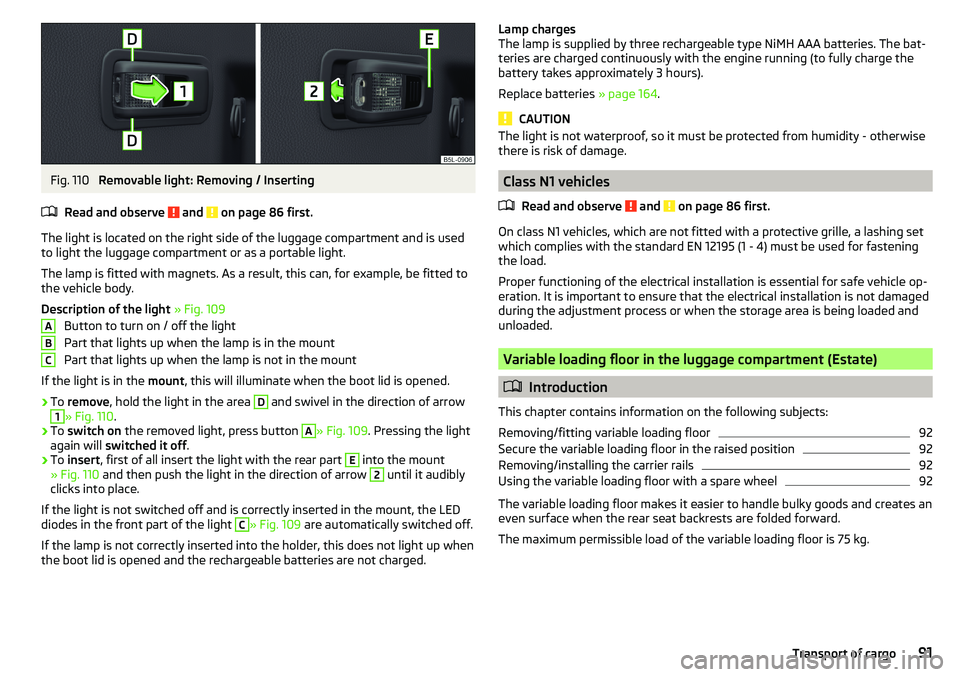
Fig. 110
Removable light: Removing / Inserting
Read and observe
and on page 86 first.
The light is located on the right side of the luggage compartment and is used
to light the luggage compartment or as a portable light.
The lamp is fitted with magnets. As a result, this can, for example, be fitted to
the vehicle body.
Description of the light » Fig. 109
Button to turn on / off the light
Part that lights up when the lamp is in the mount
Part that lights up when the lamp is not in the mount
If the light is in the mount, this will illuminate when the boot lid is opened.
›
To remove , hold the light in the area
D
and swivel in the direction of arrow
1
» Fig. 110 .
›
To switch on the removed light, press button
A
» Fig. 109. Pressing the light
again will switched it off .
›
To insert , first of all insert the light with the rear part
E
into the mount
» Fig. 110 and then push the light in the direction of arrow
2
until it audibly
clicks into place.
If the light is not switched off and is correctly inserted in the mount, the LED diodes in the front part of the light
C
» Fig. 109 are automatically switched off.
If the lamp is not correctly inserted into the holder, this does not light up when
the boot lid is opened and the rechargeable batteries are not charged.
ABCLamp charges
The lamp is supplied by three rechargeable type NiMH AAA batteries. The bat-
teries are charged continuously with the engine running (to fully charge the
battery takes approximately 3 hours).
Replace batteries » page 164.
CAUTION
The light is not waterproof, so it must be protected from humidity - otherwise
there is risk of damage.
Class N1 vehicles
Read and observe
and on page 86 first.
On class N1 vehicles, which are not fitted with a protective grille, a lashing set
which complies with the standard EN 12195 (1 - 4) must be used for fastening
the load.
Proper functioning of the electrical installation is essential for safe vehicle op-
eration. It is important to ensure that the electrical installation is not damaged
during the adjustment process or when the storage area is being loaded and
unloaded.
Variable loading floor in the luggage compartment (Estate)
Introduction
This chapter contains information on the following subjects:
Removing/fitting variable loading floor
92
Secure the variable loading floor in the raised position
92
Removing/installing the carrier rails
92
Using the variable loading floor with a spare wheel
92
The variable loading floor makes it easier to handle bulky goods and creates an
even surface when the rear seat backrests are folded forward.
The maximum permissible load of the variable loading floor is 75 kg.
91Transport of cargo