lights SKODA YETI 2017 Owner´s Manual
[x] Cancel search | Manufacturer: SKODA, Model Year: 2017, Model line: YETI, Model: SKODA YETI 2017Pages: 200, PDF Size: 28.93 MB
Page 35 of 200
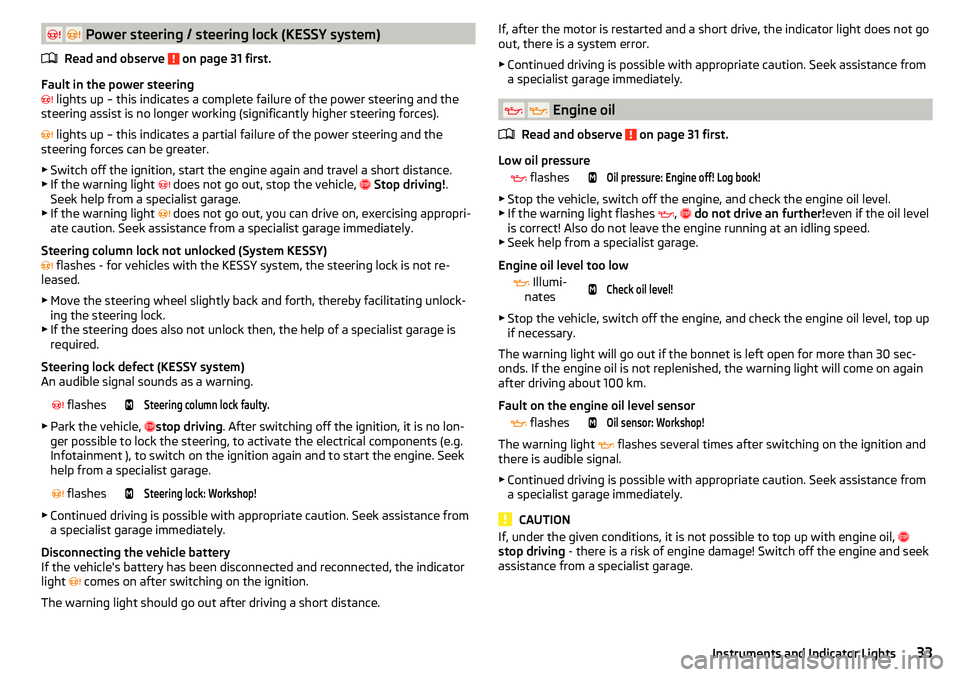
Power steering / steering lock (KESSY system)
Read and observe
on page 31 first.
Fault in the power steering
lights up – this indicates a complete failure of the power steering and the
steering assist is no longer working (significantly higher steering forces).
lights up – this indicates a partial failure of the power steering and the
steering forces can be greater.
▶ Switch off the ignition, start the engine again and travel a short distance.
▶ If the warning light
does not go out, stop the vehicle,
Stop driving! .
Seek help from a specialist garage.
▶ If the warning light does not go out, you can drive on, exercising appropri-
ate caution. Seek assistance from a specialist garage immediately.
Steering column lock not unlocked (System KESSY)
flashes - for vehicles with the KESSY system, the steering lock is not re-
leased.
▶ Move the steering wheel slightly back and forth, thereby facilitating unlock-
ing the steering lock.
▶ If the steering does also not unlock then, the help of a specialist garage is
required.
Steering lock defect (KESSY system)
An audible signal sounds as a warning.
flashesSteering column lock faulty.
▶
Park the vehicle, stop driving
. After switching off the ignition, it is no lon-
ger possible to lock the steering, to activate the electrical components (e.g.
Infotainment ), to switch on the ignition again and to start the engine. Seek
help from a specialist garage.
flashesSteering lock: Workshop!
▶
Continued driving is possible with appropriate caution. Seek assistance from
a specialist garage immediately.
Disconnecting the vehicle battery
If the vehicle's battery has been disconnected and reconnected, the indicator
light comes on after switching on the ignition.
The warning light should go out after driving a short distance.
If, after the motor is restarted and a short drive, the indicator light does not go
out, there is a system error.
▶ Continued driving is possible with appropriate caution. Seek assistance from
a specialist garage immediately.
Engine oil
Read and observe
on page 31 first.
Low oil pressure
flashesOil pressure: Engine off! Log book!
▶
Stop the vehicle, switch off the engine, and check the engine oil level.
▶ If the warning light flashes ,
do not drive an further! even if the oil level
is correct! Also do not leave the engine running at an idling speed.
▶ Seek help from a specialist garage.
Engine oil level too low
Illumi-
nates
Check oil level!
▶ Stop the vehicle, switch off the engine, and check the engine oil level, top up
if necessary.
The warning light will go out if the bonnet is left open for more than 30 sec-
onds. If the engine oil is not replenished, the warning light will come on again
after driving about 100 km.
Fault on the engine oil level sensor
flashesOil sensor: Workshop!
The warning light
flashes several times after switching on the ignition and
there is audible signal.
▶ Continued driving is possible with appropriate caution. Seek assistance from
a specialist garage immediately.
CAUTION
If, under the given conditions, it is not possible to top up with engine oil,
stop driving - there is a risk of engine damage! Switch off the engine and seek
assistance from a specialist garage.33Instruments and Indicator Lights
Page 36 of 200
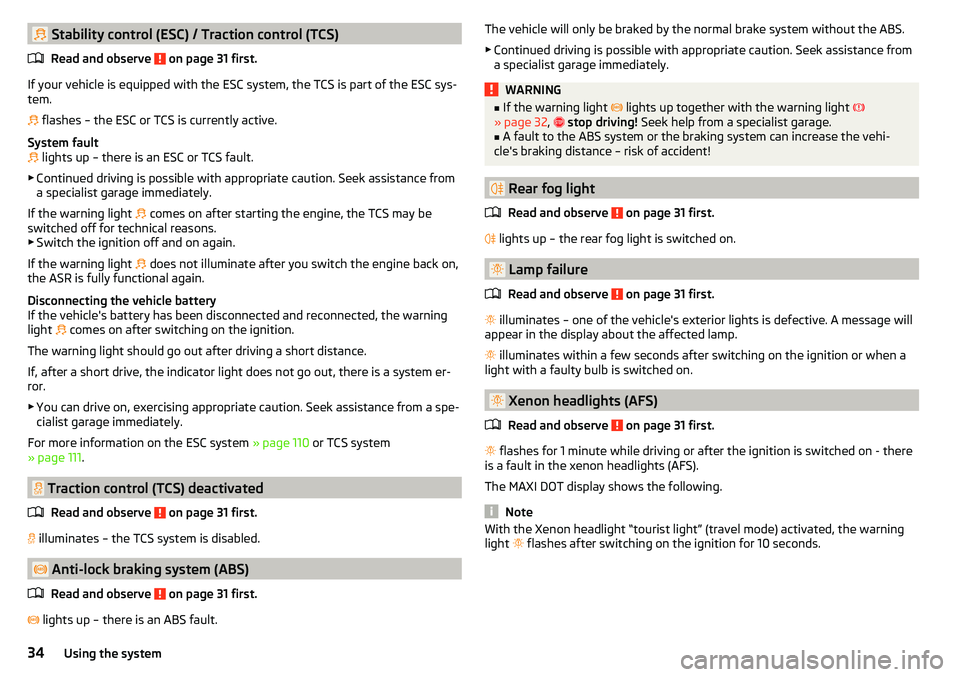
Stability control (ESC) / Traction control (TCS)Read and observe
on page 31 first.
If your vehicle is equipped with the ESC system, the TCS is part of the ESC sys-
tem.
flashes – the ESC or TCS is currently active.
System fault
lights up – there is an ESC or TCS fault.
▶ Continued driving is possible with appropriate caution. Seek assistance from
a specialist garage immediately.
If the warning light comes on after starting the engine, the TCS may be
switched off for technical reasons. ▶ Switch the ignition off and on again.
If the warning light does not illuminate after you switch the engine back on,
the ASR is fully functional again.
Disconnecting the vehicle battery
If the vehicle's battery has been disconnected and reconnected, the warning light comes on after switching on the ignition.
The warning light should go out after driving a short distance.
If, after a short drive, the indicator light does not go out, there is a system er- ror.
▶ You can drive on, exercising appropriate caution. Seek assistance from a spe-
cialist garage immediately.
For more information on the ESC system » page 110 or TCS system
» page 111 .
Traction control (TCS) deactivated
Read and observe
on page 31 first.
illuminates – the TCS system is disabled.
Anti-lock braking system (ABS)
Read and observe
on page 31 first.
lights up – there is an ABS fault.
The vehicle will only be braked by the normal brake system without the ABS.
▶ Continued driving is possible with appropriate caution. Seek assistance from
a specialist garage immediately.WARNING■ If the warning light lights up together with the warning light
» page 32 , stop driving! Seek help from a specialist garage.■
A fault to the ABS system or the braking system can increase the vehi-
cle's braking distance – risk of accident!
Rear fog light
Read and observe
on page 31 first.
lights up – the rear fog light is switched on.
Lamp failure
Read and observe
on page 31 first.
illuminates – one of the vehicle's exterior lights is defective. A message will
appear in the display about the affected lamp.
illuminates within a few seconds after switching on the ignition or when a
light with a faulty bulb is switched on.
Xenon headlights (AFS)
Read and observe
on page 31 first.
flashes for 1 minute while driving or after the ignition is switched on - there
is a fault in the xenon headlights (AFS).
The MAXI DOT display shows the following.
Note
With the Xenon headlight “tourist light” (travel mode) activated, the warning
light flashes after switching on the ignition for 10 seconds.34Using the system
Page 37 of 200
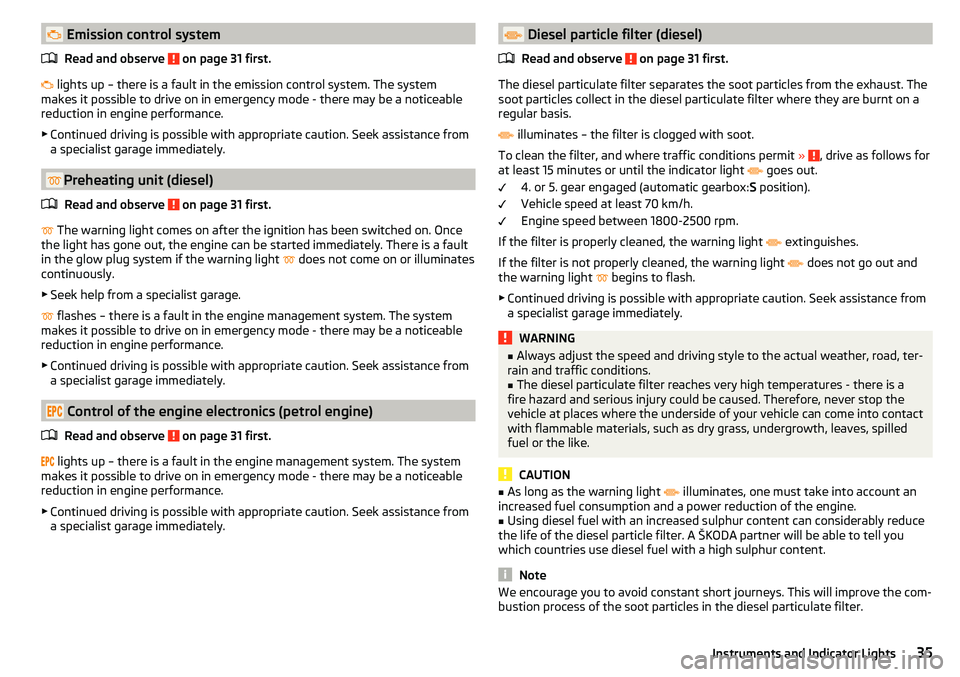
Emission control systemRead and observe
on page 31 first.
lights up – there is a fault in the emission control system. The system
makes it possible to drive on in emergency mode - there may be a noticeable
reduction in engine performance.
▶ Continued driving is possible with appropriate caution. Seek assistance from
a specialist garage immediately.
Preheating unit (diesel)
Read and observe
on page 31 first.
The warning light comes on after the ignition has been switched on. Once
the light has gone out, the engine can be started immediately. There is a fault
in the glow plug system if the warning light does not come on or illuminates
continuously.
▶ Seek help from a specialist garage.
flashes – there is a fault in the engine management system. The system
makes it possible to drive on in emergency mode - there may be a noticeable
reduction in engine performance.
▶ Continued driving is possible with appropriate caution. Seek assistance from
a specialist garage immediately.
Control of the engine electronics (petrol engine)
Read and observe
on page 31 first.
lights up – there is a fault in the engine management system. The system
makes it possible to drive on in emergency mode - there may be a noticeable
reduction in engine performance.
▶ Continued driving is possible with appropriate caution. Seek assistance from
a specialist garage immediately.
Diesel particle filter (diesel)
Read and observe
on page 31 first.
The diesel particulate filter separates the soot particles from the exhaust. The
soot particles collect in the diesel particulate filter where they are burnt on a
regular basis.
illuminates – the filter is clogged with soot.
To clean the filter, and where traffic conditions permit »
, drive as follows for
at least 15 minutes or until the indicator light
goes out.
4. or 5. gear engaged (automatic gearbox: S position).
Vehicle speed at least 70 km/h.
Engine speed between 1800-2500 rpm.
If the filter is properly cleaned, the warning light extinguishes.
If the filter is not properly cleaned, the warning light does not go out and
the warning light begins to flash.
▶ Continued driving is possible with appropriate caution. Seek assistance from
a specialist garage immediately.
WARNING■ Always adjust the speed and driving style to the actual weather, road, ter-
rain and traffic conditions.■
The diesel particulate filter reaches very high temperatures - there is a
fire hazard and serious injury could be caused. Therefore, never stop the
vehicle at places where the underside of your vehicle can come into contact
with flammable materials, such as dry grass, undergrowth, leaves, spilled
fuel or the like.
CAUTION
■ As long as the warning light illuminates, one must take into account an
increased fuel consumption and a power reduction of the engine.■
Using diesel fuel with an increased sulphur content can considerably reduce
the life of the diesel particle filter. A ŠKODA partner will be able to tell you
which countries use diesel fuel with a high sulphur content.
Note
We encourage you to avoid constant short journeys. This will improve the com-
bustion process of the soot particles in the diesel particulate filter.35Instruments and Indicator Lights
Page 38 of 200
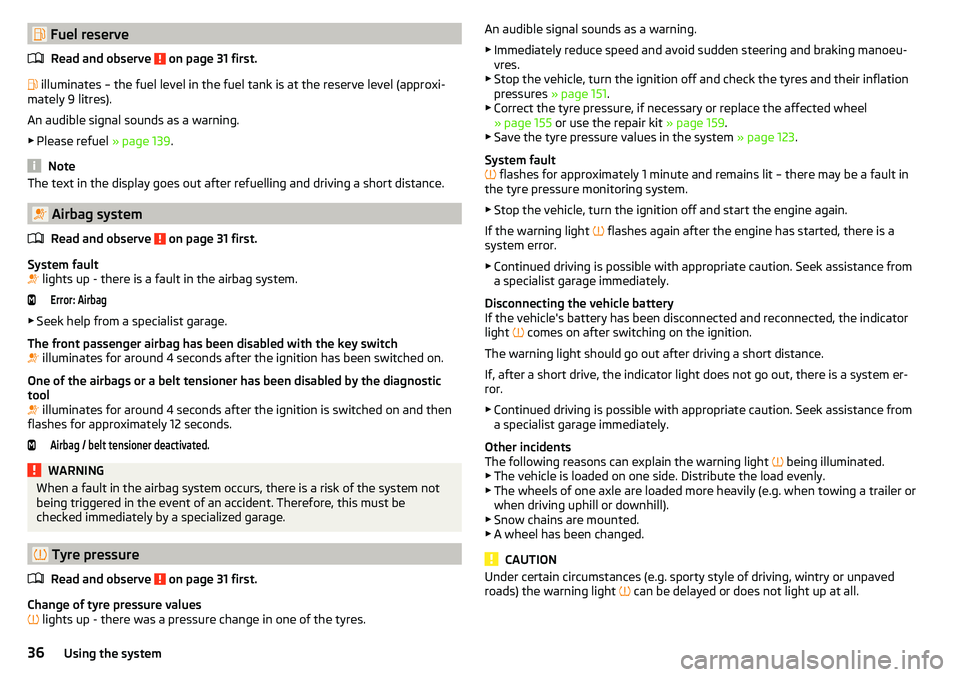
Fuel reserveRead and observe
on page 31 first.
illuminates – the fuel level in the fuel tank is at the reserve level (approxi-
mately 9 litres).
An audible signal sounds as a warning. ▶ Please refuel » page 139.
Note
The text in the display goes out after refuelling and driving a short distance.
Airbag system
Read and observe
on page 31 first.
System fault
lights up - there is a fault in the airbag system.
Error: Airbag
▶
Seek help from a specialist garage.
The front passenger airbag has been disabled with the key switch
illuminates for around 4 seconds after the ignition has been switched on.
One of the airbags or a belt tensioner has been disabled by the diagnostic
tool
illuminates for around 4 seconds after the ignition is switched on and then
flashes for approximately 12 seconds.
Airbag / belt tensioner deactivated.WARNINGWhen a fault in the airbag system occurs, there is a risk of the system not
being triggered in the event of an accident. Therefore, this must be
checked immediately by a specialized garage.
Tyre pressure
Read and observe
on page 31 first.
Change of tyre pressure values
lights up - there was a pressure change in one of the tyres.
An audible signal sounds as a warning.
▶ Immediately reduce speed and avoid sudden steering and braking manoeu-
vres.
▶ Stop the vehicle, turn the ignition off and check the tyres and their inflation
pressures » page 151.
▶ Correct the tyre pressure, if necessary or replace the affected wheel
» page 155 or use the repair kit » page 159.
▶ Save the tyre pressure values in the system » page 123.
System fault
flashes for approximately 1 minute and remains lit – there may be a fault in
the tyre pressure monitoring system.
▶ Stop the vehicle, turn the ignition off and start the engine again.
If the warning light flashes again after the engine has started, there is a
system error.
▶ Continued driving is possible with appropriate caution. Seek assistance from
a specialist garage immediately.
Disconnecting the vehicle battery
If the vehicle's battery has been disconnected and reconnected, the indicator
light comes on after switching on the ignition.
The warning light should go out after driving a short distance.
If, after a short drive, the indicator light does not go out, there is a system er-
ror.
▶ Continued driving is possible with appropriate caution. Seek assistance from
a specialist garage immediately.
Other incidents
The following reasons can explain the warning light being illuminated.
▶ The vehicle is loaded on one side. Distribute the load evenly.
▶ The wheels of one axle are loaded more heavily (e.g. when towing a trailer or
when driving uphill or downhill).
▶ Snow chains are mounted.
▶ A wheel has been changed.
CAUTION
Under certain circumstances (e.g. sporty style of driving, wintry or unpaved
roads) the warning light can be delayed or does not light up at all.36Using the system
Page 39 of 200
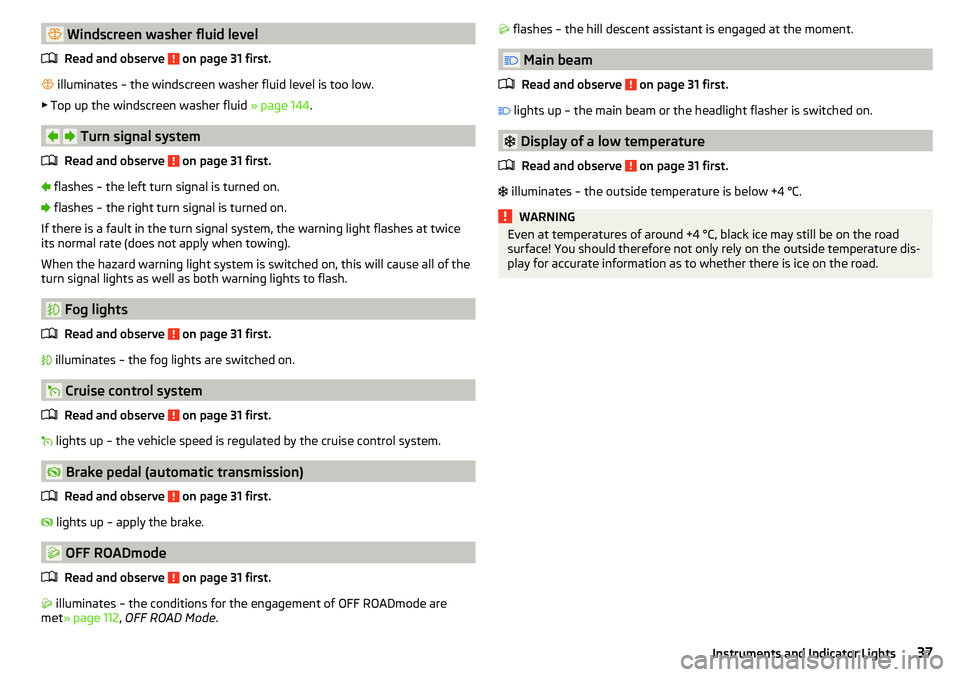
Windscreen washer fluid levelRead and observe
on page 31 first.
illuminates – the windscreen washer fluid level is too low.
▶ Top up the windscreen washer fluid » page 144.
Turn signal system
Read and observe
on page 31 first.
flashes – the left turn signal is turned on.
flashes – the right turn signal is turned on.
If there is a fault in the turn signal system, the warning light flashes at twice
its normal rate (does not apply when towing).
When the hazard warning light system is switched on, this will cause all of the turn signal lights as well as both warning lights to flash.
Fog lights
Read and observe
on page 31 first.
illuminates – the fog lights are switched on.
Cruise control system
Read and observe
on page 31 first.
lights up – the vehicle speed is regulated by the cruise control system.
Brake pedal (automatic transmission)
Read and observe
on page 31 first.
lights up – apply the brake.
OFF ROADmode
Read and observe
on page 31 first.
illuminates – the conditions for the engagement of OFF ROADmode are
met » page 112 , OFF ROAD Mode .
flashes – the hill descent assistant is engaged at the moment.
Main beam
Read and observe
on page 31 first.
lights up – the main beam or the headlight flasher is switched on.
Display of a low temperature
Read and observe
on page 31 first.
illuminates – the outside temperature is below +4 °C.
WARNINGEven at temperatures of around +4 °C, black ice may still be on the road
surface! You should therefore not only rely on the outside temperature dis-
play for accurate information as to whether there is ice on the road.37Instruments and Indicator Lights
Page 40 of 200
Information system
Driver information system
Introduction
This chapter contains information on the following subjects:
Display in the instrument cluster
38
Setting the time
39
Display of the second speedometer
39
Display of AdBlue range
39
Gear recommendation
39
Display in the instrument cluster
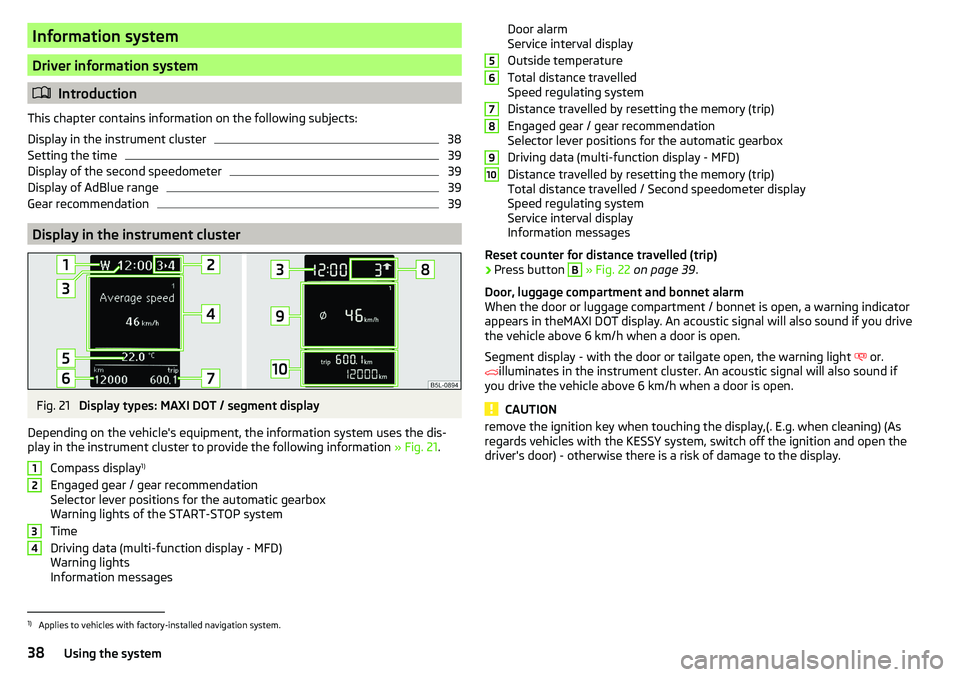
Fig. 21
Display types: MAXI DOT / segment display
Depending on the vehicle's equipment, the information system uses the dis- play in the instrument cluster to provide the following information » Fig. 21.
Compass display 1)
Engaged gear / gear recommendation
Selector lever positions for the automatic gearbox
Warning lights of the START-STOP system
Time
Driving data (multi-function display - MFD)
Warning lights
Information messages
1234Door alarm
Service interval display
Outside temperature
Total distance travelled
Speed regulating system
Distance travelled by resetting the memory (trip)
Engaged gear / gear recommendation
Selector lever positions for the automatic gearbox
Driving data (multi-function display - MFD)
Distance travelled by resetting the memory (trip)
Total distance travelled / Second speedometer display
Speed regulating system
Service interval display
Information messages
Reset counter for distance travelled (trip)›
Press button
B
» Fig. 22 on page 39 .
Door, luggage compartment and bonnet alarm
When the door or luggage compartment / bonnet is open, a warning indicator appears in theMAXI DOT display. An acoustic signal will also sound if you drive
the vehicle above 6 km/h when a door is open.
Segment display - with the door or tailgate open, the warning light or.
illuminates in the instrument cluster. An acoustic signal will also sound if
you drive the vehicle above 6 km/h when a door is open.
CAUTION
remove the ignition key when touching the display,(. E.g. when cleaning) (As
regards vehicles with the KESSY system, switch off the ignition and open the
driver's door) - otherwise there is a risk of damage to the display.56789101)
Applies to vehicles with factory-installed navigation system.
38Using the system
Page 45 of 200

Menu itemAudio
The following information is displayed in the
Audio
menu item.
Radio
▶ Currently playing station (name/frequency).
▶ The selected frequency range (e.g. FM) optionally with the number of the sta-
tion button (e.g. FM 3), if the station is stored in the memory list.
▶ List of available stations (if more than 5 stations can be received).
▶ TP traffic announcements.
Media
▶ Name of the track being played, if necessary, further information regarding
title (e.g. artist, album name), if this information is stored as a so called ID3
tag on the audio source.
Menu item
Phone
The call list with the following symbols is displayed in the
Telephone
menu item.
Incoming call
Outgoing call
Missed call
Symbols in the display Charge status of the telephone battery 1)
Signal strength 1)
A telephone is connected to the unit
Missed calls (if there are several missed calls, the number of calls is shown
next to the symbol)
Menu item
Assistants
In the
Assistants
menu item, the fatigue detection can be enabled/disabled
» page 122 .
Menu item
Settings
There is an option to change certain settings using the display. The following
information can be selected (depending on the equipment installed in the ve-
hicle).
Language Setting the language for the texts shown on the display.MFD data
Switching on/off certain information of the multifunction display.
Comfort
-Turn on / off or adjust the following functions.
ATA confirmSwitch on/off the audible signal indicating activation
of the anti-theft alarm system » page 51, Anti-theft
alarm system .Central lockingSwitch on/off the central locking and automatic lock-
ing function » page 50, Individual settings .Window op.Setting the comfort controls for the driver window or
for all windows » page 55, Window convenience op-
eration .Mirror downActivate/deactivate the function for lowering the mir-
ror on the front passenger side when in reverse
gear » page 67 , Tilting the mirror area of the front
passenger mirror (vehicles with electrically adjustable
driver's seat) .Mirror adjust.Activation / deactivation of the synchronous exterior
mirror function settings » page 67, Setting the mir-
ror surfaces synchronously .Factory setting.Resetting the Comfort menu to the factory setting.Lights & Vision
- Turn on / off or adjust the following functions.
Coming HomeActivate/deactivate and adjust the light duration of
the COMING HOME function » page 61.Leaving HomeSwitch on/off and adjust the light duration of the
LEAVING HOME function » page 61.Dayt. r. lightActivate/deactivate the daylight driving
light » page 59 , Daylight running lights (DAY LIGHT) .Rear wiperActivate/deactivate the function of the automatic
rear window wiping » page 65, Automatic rear wip-
er .Lane ch. flashActivate/deactivate the Comfort Indicating func-
tion » page 59 , Comfort signalling . 1)
This function is only supported by some mobile phones.
43Information system
Page 46 of 200
Travel modeActivate/deactivate the travel mode fea-
ture » page 62 .Factory setting.Resetting Lights & Visionmenu item to the factory set-
ting.Coasting
-Enable / disable the idle position (coasting) for vehicles with automat-
ic transmission » page 108, Driving in neutral (“coasting”) .
Time
- Setting the time, the time format (24 or 12 hour) and the change-over to
summer/winter time.
Winter tyres
- Setting the speed and the switching on and off of the acoustic sig-
nals when exceeding this speed. This function is, for example, used for winter
tyres where the maximum permissible speed is lower than the maximum
speed of the vehicle » page 150, Wheels and tyres . If the set speed is excee-
ded, an audible signal sounds and the following message appears in the infor-
mation display.
Units
- Setting the units for temperature, consumption and distance travelled.
Assistants
- Adjustment of the sound in Park Assist » page 114, Parking aid
(ParkPilot) .
Alt. speed dis.
Turn on / off the display of the second speedometer in
mph 1)
» page 39 , Display of the second speedometer .
Service
Display the distance travelled and the days until the next service
date » page 44 , Service interval display .
Factory setting.
- Resetting the display functions to factory settings.
Service interval display
Introduction
This chapter contains information on the following subjects:
Prompt in the MAXI DOT display
44
Prompt in the segment display
44
Resetting the service interval display
45
The service interval display shows the kilometres or days until the next service
event.
Information regarding the service intervals » page 133.
Prompt in the MAXI DOT display
Messages before reaching the scheduled service date
Before the next service date has been reached, the symbol as well as a mes-
sage about the mileage or days until the next service event appears in the dis-
play after switching on the ignition.
Messages upon reaching scheduled service date
Once the service appointment is reached, a message appears in the display af-
ter switching on the ignition.
Displaying the distance and days until the next service interval
Messages about the remaining kilometres and days until the next service date can be displayed at any time when the ignition is switched on by going to the
Service
menu item » page 43, Menu item
Settings
or from the
Vehicle status
in the
main menu of the Maxi DOTdisplay. » page 42.
Prompt in the segment display
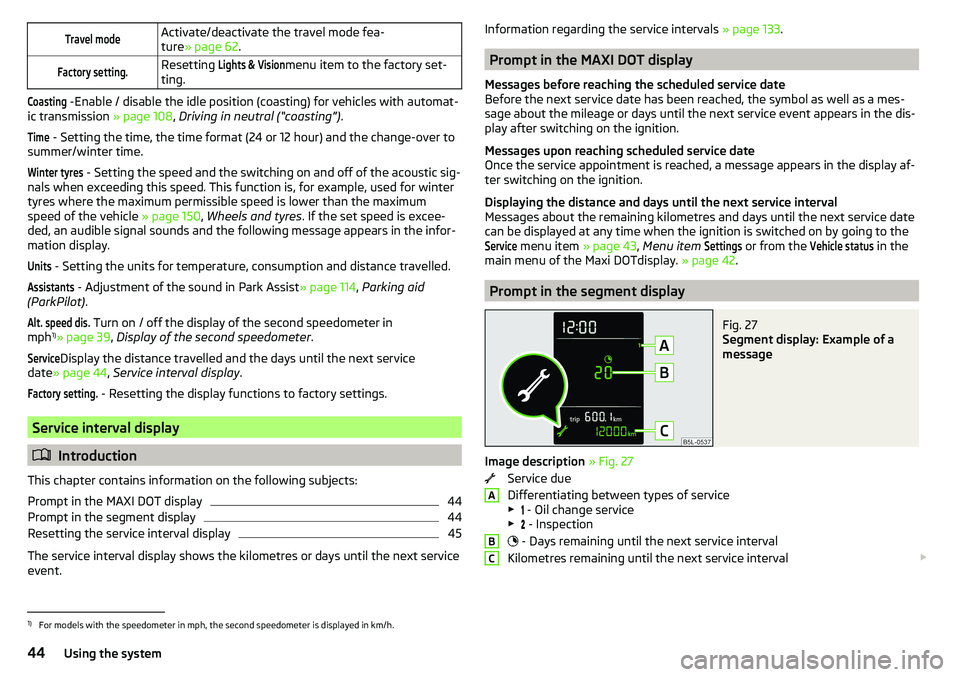
Fig. 27
Segment display: Example of a
message
Image description » Fig. 27
Service due
Differentiating between types of service
▶ - Oil change service
▶ - Inspection
- Days remaining until the next service interval
Kilometres remaining until the next service interval
ABC1)
For models with the speedometer in mph, the second speedometer is displayed in km/h.
44Using the system
Page 49 of 200
SmartGate web interface
SmartGate parameters can be set in the SmartGate web interface.
The following address must be entered in the web browser of the external de-
vice that is connected with SmartGate.
HTTP://192.168.123.1
The setting changes are only effective after tapping the buttons “Save” →
“Reboot”.
Password/PIN code
The password for the Wi-Fi connection preset by the factory is the complete
vehicle identification number (entered in upper case); the PIN code for the Wi-
Fi direct connection is the last 6 digits of the vehicle identification number.
After changing the password/PIN, the connection to SmartGate must be re-es-
tablished on the external device to be connected using the new password or
new PIN code.
Changing the password for the Wi-Fi connection
›
Open the SmartGate web interface » page 47, SmartGate web interface .
›
In the “WPA / WPA2 key”menu item: Enter the new password (8 to 63 alpha-
numeric characters and special characters, small and capital letters).
›
Confirm the password change by tapping on the “Save” interface.
›
Restart SmartGate by tapping on the “Reboot” 1)
interface.
Changing the PIN code for the Wi-Fi Direct connection
›
Open the SmartGate web interface » page 47, SmartGate web interface .
›
In the “WiFi Direct PIN”menu item: Enter the new PIN code (6 digits).
›
Confirm the PIN code change by tapping on the “Save” interface.
›
Restart SmartGate by tapping on the “Reboot” 1)
interface.
Note
If you have forgotten your password for the connection to SmartGate,
SmartGate must be reset to factory settings in a specialised workshop.Unlocking and opening
Unlocking and locking
Introduction
This chapter contains information on the following subjects:
Unlock / lock using key and lock
48
Unlocking/locking with the remote control key
48
Unlocking/locking - KESSY
49
Vehicle locking / unlocking with the central locking button
49
SafeLock
50
Individual settings
50
Opening/closing a door
50
Child safety lock
51
Malfunctions
51
The vehicle is equipped with a central locking system which makes it possible
to unlock / lock all the doors, the fuel filler flap and boot lid simultaneously.
The door unlocking can be adjusted individually » page 50.
The unlocking of the vehicle is displayed by the turn signal lights flashing
twice.
If you unlock the vehicle and do not open a door or the boot lid within the next
30 seconds, the vehicle will lock again automatically.
The locking of the vehicle is displayed by the turn signal lights flashing once.
If the driver's door has been opened, the vehicle cannot be locked.
If the doors or the boot lid remain open after the vehicle has been locked, the turn signal lights do not flash until they have been closed.
1)
If the “Reboot” interface is not displayed, you must manually restore the web browser display.
47Unlocking and opening
Page 51 of 200

Unlocking/locking - KESSYFig. 31
Vehicle unlocking / vehicle locking
Read and observe
and on page 48 first.
The KESSY system (Keyless Entry Start Exit System) enables unlocking and
locking of the vehicle without actively using the remote control key.
›
Grip the door handle to unlock » Fig. 31 -
the vehicle.
›
Touch the sensor on the door handle with your finger to
lock » Fig. 31 -
the
vehicle.
When unlocking/locking the vehicle, the key must be at a maximum distance
of approximately 1.5 m from the front door handle.
Information on locking
On vehicles fitted with automatic gearbox, the selector lever must be moved
into the position P before unlocking.
The vehicle cannot be locked from the outside if the ignition has not been
turned off.
After locking the vehicle, it is not possible to unlock it within the next 2 sec-
onds by touching the door handle. This can be used to check whether the vehi-
cle is locked.
Protection against inadvertently locking the key in the vehicle
If one of the doors is closed after locking the vehicle and the key with which
the vehicle was locked remains in the passenger compartment, the vehicle is
automatically unlocked. After automatically unlocking, the turn signal lights
will flash four times. If no door is opened within 45 seconds, the vehicle is au-
tomatically locked again.
If the boot lid is closed after locking the vehicle and the key with which the vehicle was locked remains in the luggage compartment, the lid is automatical-
ly unlatched (partially opened). After automatically unlocking, the turn signal
lights will flash four times. The boot lid remains unlatched (partially opened);
the other doors remain locked.
CAUTION
Some types of gloves can affect the unlocking or locking device via the sen-
sors in the door handle.
Vehicle locking / unlocking with the central locking button
Fig. 32
Central locking button
Read and observe and on page 48 first.
Conditions for the locking/unlocking using the central locking button.
The vehicle is not locked from the outside.
None of the doors are open.
›
To lock , press the
button in the area » Fig. 32.
Locking is displayed in the button by the illumination of the
symbol.
›
To unlock , press the button in the area
.
The following applies after locking. ▶ Opening the doors and the boot lid from the outside is not possible.
▶ The doors can be unlocked and opened from the inside by a single pull on the
opening lever of the respective door.
WARNINGDoors locked from the inside make it difficult for rescuers to get into the
vehicle in an emergency – risk to life!49Unlocking and opening