park assist SKODA YETI 2017 Owner´s Manual
[x] Cancel search | Manufacturer: SKODA, Model Year: 2017, Model line: YETI, Model: SKODA YETI 2017Pages: 200, PDF Size: 28.93 MB
Page 121 of 200
▶The display shows instructions and information before the start and during
the parking.
▶ Based on the calculated road surface, the front wheels will be automatically
rotated during the parking.
Conditions for the system function
The system can look for a parking space only if the following basic conditions
are met.
The system is activated.
The vehicle is travelling at less than 40 km/h.
The vehicle is travelling at less than 20 km/h.
The distance to a number of parked vehicles is approximately 0.5-1.5 m.
TCS is activated » page 111.
The system can only carry out the parking procedure if the following basic con- ditions are met.
The vehicle is travelling at less than 7 km/h.
The parking procedure takes less than 6 minutes.
There is no driver intervention in the automatic steering operation.
TCS is activated » page 111.
The TCS does not engage.
No trailer or other accessory is connected to the trailer socket.
Activation/deactivation
The system can be activated/deactivated by pressing the button
» Fig. 139
on page 119 -
.
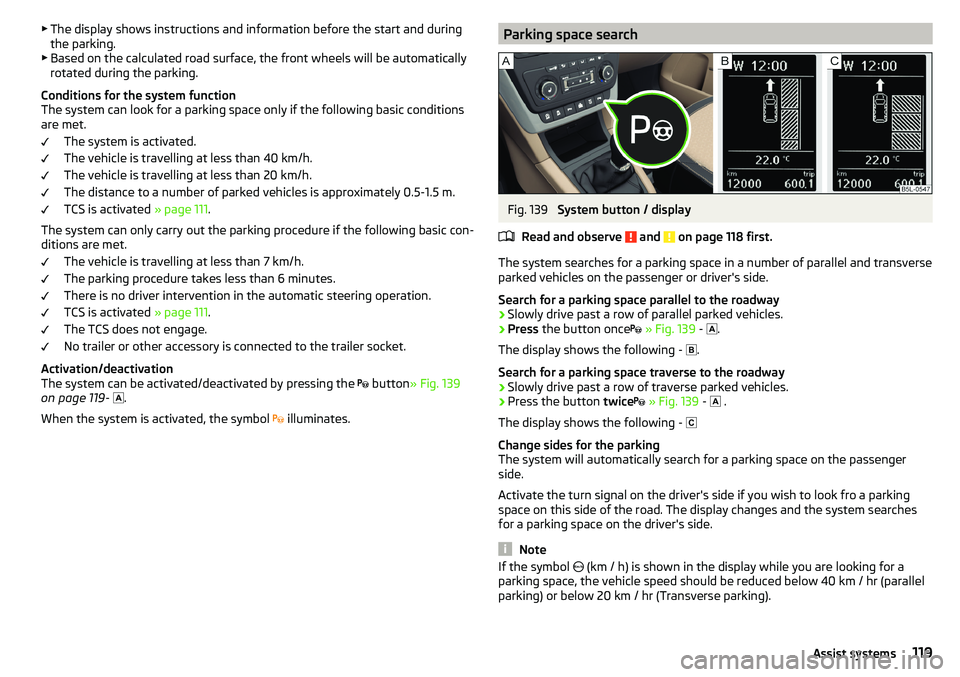
When the system is activated, the symbol illuminates.Parking space searchFig. 139
System button / display
Read and observe
and on page 118 first.
The system searches for a parking space in a number of parallel and transverse
parked vehicles on the passenger or driver's side.
Search for a parking space parallel to the roadway
›
Slowly drive past a row of parallel parked vehicles.
›
Press the button once
» Fig. 139 -
.
The display shows the following - .
Search for a parking space traverse to the roadway
›
Slowly drive past a row of traverse parked vehicles.
›
Press the button twice
» Fig. 139 -
.
The display shows the following -
Change sides for the parking
The system will automatically search for a parking space on the passenger
side.
Activate the turn signal on the driver's side if you wish to look fro a parking
space on this side of the road. The display changes and the system searches
for a parking space on the driver's side.
Note
If the symbol (km / h) is shown in the display while you are looking for a
parking space, the vehicle speed should be reduced below 40 km / hr (parallel parking) or below 20 km / hr (Transverse parking).119Assist systems
Page 122 of 200
ParkingFig. 140
Display
Read and observe
and on page 118 first.
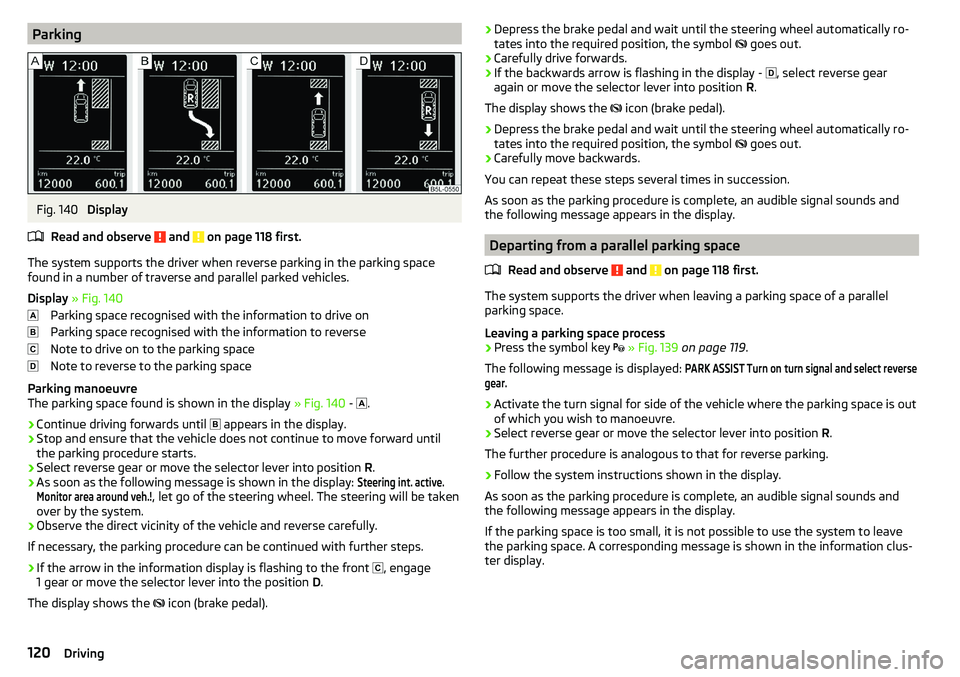
The system supports the driver when reverse parking in the parking space
found in a number of traverse and parallel parked vehicles.
Display » Fig. 140
Parking space recognised with the information to drive on
Parking space recognised with the information to reverse
Note to drive on to the parking space
Note to reverse to the parking space
Parking manoeuvre
The parking space found is shown in the display » Fig. 140 -
.
›
Continue driving forwards until
appears in the display.
›
Stop and ensure that the vehicle does not continue to move forward until
the parking procedure starts.
›
Select reverse gear or move the selector lever into position R.
›
As soon as the following message is shown in the display:
Steering int. active.Monitor area around veh.!
, let go of the steering wheel. The steering will be taken
over by the system.
›
Observe the direct vicinity of the vehicle and reverse carefully.
If necessary, the parking procedure can be continued with further steps.
›
If the arrow in the information display is flashing to the front , engage
1 gear or move the selector lever into the position D.
The display shows the icon (brake pedal).
›Depress the brake pedal and wait until the steering wheel automatically ro-
tates into the required position, the symbol goes out.›
Carefully drive forwards.
›
If the backwards arrow is flashing in the display -
, select reverse gear
again or move the selector lever into position R.
The display shows the
icon (brake pedal).
›
Depress the brake pedal and wait until the steering wheel automatically ro-
tates into the required position, the symbol
goes out.
›
Carefully move backwards.
You can repeat these steps several times in succession.
As soon as the parking procedure is complete, an audible signal sounds and the following message appears in the display.
Departing from a parallel parking space
Read and observe
and on page 118 first.
The system supports the driver when leaving a parking space of a parallel
parking space.
Leaving a parking space process
›
Press the symbol key
» Fig. 139 on page 119 .
The following message is displayed:
PARK ASSIST Turn on turn signal and select reversegear.›
Activate the turn signal for side of the vehicle where the parking space is out
of which you wish to manoeuvre.
›
Select reverse gear or move the selector lever into position R.
The further procedure is analogous to that for reverse parking.
›
Follow the system instructions shown in the display.
As soon as the parking procedure is complete, an audible signal sounds and
the following message appears in the display.
If the parking space is too small, it is not possible to use the system to leave
the parking space. A corresponding message is shown in the information clus-
ter display.
120Driving
Page 123 of 200
Automatic brake assistRead and observe
and on page 118 first.
Automatic brake assist when speeding
If a velocity of 7 km / h is exceeded during the parking manoeuvre for the first
time, the speed will be automatically reduced by the system to less than 7 km /
h. This prevents the parking manoeuvre from aborting.
Automatic emergency braking
If the system detects a risk of collision during parking, automatic emergency
braking takes place to prevent a collision.
The parking is terminated by the emergency braking.
CAUTION
The automatic emergency braking is not triggered by the system when the
parking process stops due to the speed of 7 km / hr being exceeded!
Malfunctions
Read and observe
and on page 118 first.
If, for some unknown reason, the system is not available, an appropriate mes-
sage appears in the display of the instrument cluster.
System unavailable
If the system is not available because the vehicle has a fault, a message ap-
pears concerning the unavailability. Seek help from a specialist garage.
System fault
In the case of a system fault, an error message appears. Seek help from a spe-
cialist garage.
Cruise Control System
Introduction
This chapter contains information on the following subjects:
Operation
121
Operation description
122The Cruise Control System (CCS) maintains a set speed without you having to
actuate the accelerator pedal. The state where the CCS maintains the speed is
referred to hereinafter as the control.WARNINGThe general information relating to the use of assistance systems must be
observed » page 110, in section General information .
Operation
Read and observe
on page 121 first.
Basic requirements for start of control The CCS is activated.
On vehicles with a manual transmission , the second gear or higher is en-
gaged.
On vehicles with an automatic transmission , the selector lever is in the
D/S position or in the Tiptronic position.
The current speed is higher than 20 km/h.
This, however, is only possible to the extent permitted by the engine output
and braking power of the vehicle.
WARNINGIf the engine output or engine braking effect is insufficient to maintain the
set speed, the driver must assume control of the accelerator and brake
pedals!121Assist systems
Page 150 of 200
Warning symbols on the vehicle batterySymbolMeaningAlways wear eye protection.Battery acid is severely caustic. Always wear gloves and eye pro-
tection.Keep fire, sparks, open flames and lit cigarettes well clear of the
vehicle battery.When charging the vehicle battery, a highly explosive gas mixture
is produced.Keep children away from the vehicle battery.WARNINGBattery acid is highly corrosive - There is a risk of injury, chemical burns or
poisoning! Corrosive vapours in the air irritate and damage the respiratory
tract and the eyes. The following guidelines must be observed.■
Always wear protective gloves, eye and skin protection when handling
the vehicle battery.
■
If your eyes or skin come into contact with the electrolytic fluid, immedi-
ately wash the affected area for a few minutes long with a lot of water.
Seek medical assistance without delay.
■
Keep the vehicle battery away from people who are not completely inde-
pendent (e.g. children).
■
Do not tilt the battery otherwise battery electrolyte may flow out of the
battery vent openings.
WARNINGWorking on the car battery may cause an explosion, fire, injury or chemical
burns! The following guidelines must be observed.■
Do not smoke, use open flames or light or transmitting devices.
■
A discharged vehicle battery may freeze slightly. Never charge up a fro-
zen or thawed vehicle battery. Replace a frozen vehicle battery.
■
Never use a damaged vehicle battery.
■
Do not connect the battery terminals, bridging the two poles will cause a
short circuit.
CAUTIONEnsure that battery acid does not come into contact with the bodywork –
There is a risk of damage to the paintwork.
Note
■ We recommend having all work on the vehicle battery carried out by a spe-
cialist garage.■
You should replace batteries older than 5 years.
Check condition
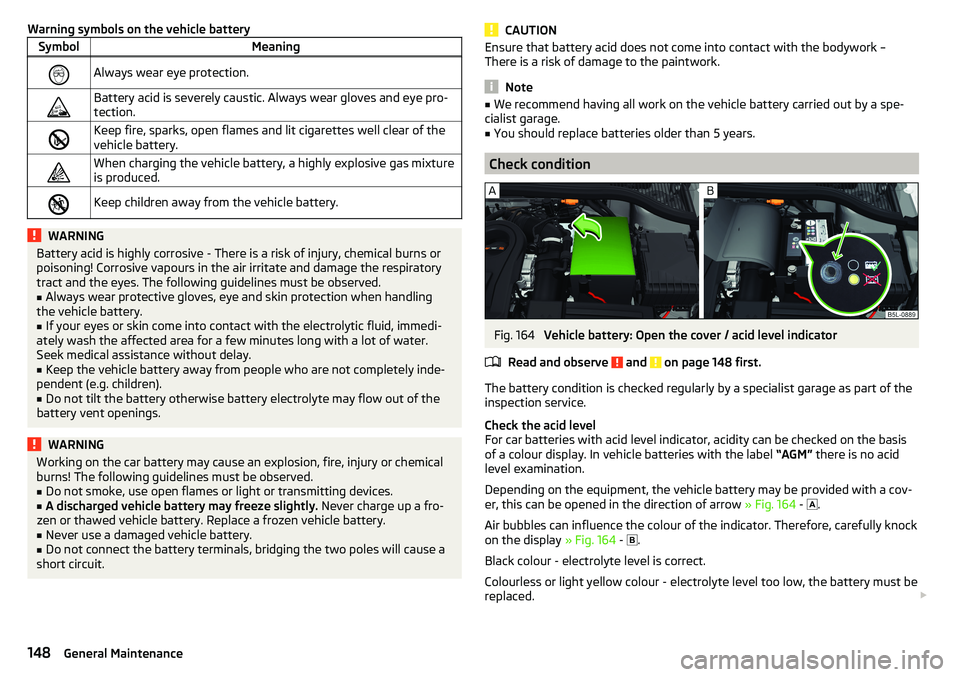
Fig. 164
Vehicle battery: Open the cover / acid level indicator
Read and observe
and on page 148 first.
The battery condition is checked regularly by a specialist garage as part of the
inspection service.
Check the acid level
For car batteries with acid level indicator, acidity can be checked on the basis
of a colour display. In vehicle batteries with the label “AGM” there is no acid
level examination.
Depending on the equipment, the vehicle battery may be provided with a cov-
er, this can be opened in the direction of arrow » Fig. 164 -
.
Air bubbles can influence the colour of the indicator. Therefore, carefully knock
on the display » Fig. 164 -
.
Black colour - electrolyte level is correct.
Colourless or light yellow colour - electrolyte level too low, the battery must be replaced.
148General Maintenance
Page 172 of 200

No.Consumer18Music amplifier19Windscreen wipers20Control valve for fuel pressure, high pressure pump21Lambda probe22Clutch pedal switch, brake pedal switch23Coolant pump, loading pressure control valve, switchover valve for
radiator, fuel pump24Active charcoal filter, exhaust gas recirculation valve, radiator fan25ABS26Left front headlight, left taillight27Glow plug system28Windscreen heater29Power to the internal fuse carrier (fuses no. 24,27,31,32), electrically
adjustable seats30Terminal X a)a)
In order not to drain the battery unnecessarily when starting the engine, the electrical components of
this terminal are automatically switched off.
Bulbs
Introduction
This chapter contains information on the following subjects:
Bulb arrangement in the front headlights
171
Changing bulbs for low and main beam (Halogen headlights)
171
Remove protective guard for foglights
171
Protective grille for removing fog lights- plug for Park Assist sensor
172
Changing light bulbs for fog lights
172
Changing the bulb for the licence plate light
173
Removing/installing taillights
173
Replacing the bulbs in the taillight assembly
174
We recommend having bulbs replaced by a specialist garage or seeking other
expert help in the event of any uncertainties.
▶ Switch off the ignition and all of the lights before replacing a bulb.
▶ Faulty bulbs must only be replaced with the same type of bulbs. The designa-
tion is located on the light socket or the glass bulb.
We recommend having the headlight settings checked by a specialist garage after replacing a bulb in the low, high or fog beam.
In the case of failure of a Xenon gas discharge bulb or an LED diode, visit a
specialist garage.WARNING■ Always read and observe the warnings before completing any work in the
engine compartment » page 142.■
Accidents can be caused if the road in front of the vehicle is not suffi-
ciently illuminated and the vehicle cannot or can only be seen with difficul-
ty by other road users.
■
Bulbs H7 and H4 are pressurised and may burst when changed - there is a
risk of injury. We therefore recommended wearing gloves and safety
glasses when changing a bulb.
■
Do not carry out any work on the Xenon gas discharge lamps - risk of
death!
CAUTION
Do not take hold of the glass bulb with naked fingers (even the smallest
amount of dirt reduces the working life of the light bulb). Use a clean cloth,
napkin, or similar.
Note
■ This Owner's Manual only describes the replacement of bulbs where it is pos-
sible to replace the bulbs on your own without any complications arising. Other
bulbs must be replaced by a specialist garage.■
We recommend that a box of replacement bulbs always be carried in the ve-
hicle.
170Do-it-yourself
Page 174 of 200

Protective grille for removing fog lights- plug for Park AssistsensorFig. 200
Guard: Version 1/version 2
Fig. 201
Remove the plug
Read and observe
and on page 170 first.
›
Remove the plastic cover for the guard in the arrow direction » Fig. 200 using
the bow to pull the full wheel covers.
›
Remove the remaining part of the grille.
›
Pull the latch out of the connector in the direction of arrow
1
» Fig. 201 .
›
Undo the latch on the connector in the direction of arrow
2
.
›
Remove the key in the direction of the arrow
3
.
Insertion of the ashtray takes place in reverse order.
Changing light bulbs for fog lightsFig. 202
Remove the number plate light / replace the bulb
Read and observe
and on page 170 first.
First remove the grille for the fog lights and before changing bulbs » Fig. 199
on page 171 and / or » Fig. 200 on page 172 .
Removing the headlight
›
Unscrew the screws
A
» Fig. 202 with the screwdriver from the tool kit.
›
Remove the headlight in the direction of arrow
1
.
›
Remove the headlight in the direction of arrow
2
.
Replacing the light bulb
›
Pull the plug on the lamp base.
›
Turn the socket with the bulb to the stop in the direction of the arrow
3
» Fig. 202 .
›
Insert the new bulb into the headlight and turn counter to the direction of
arrow
3
as far as the stop.
›
Attach the connector on the lamp base.
Refit the headlight and grille
›
Replace the fog light by inserting it in the opposite direction of the arrow
2
» Fig. 202 and tighten.
›
Attach the connector on guard carefully » Fig. 201 on page 172 1)
.
›
Insert the protective grille and press it in.
›
Replace the plastic cover and press into the guard » Fig. 200 on page 172 1 )
.
The protective grille must engage firmly.
1)
Applies to vehicles with parking assistance system.
172Do-it-yourself
Page 175 of 200
CAUTIONFor vehicles with parking assistance, we recommend that after changing the
light bulb in the fog lights, the system is checked by a specialist.
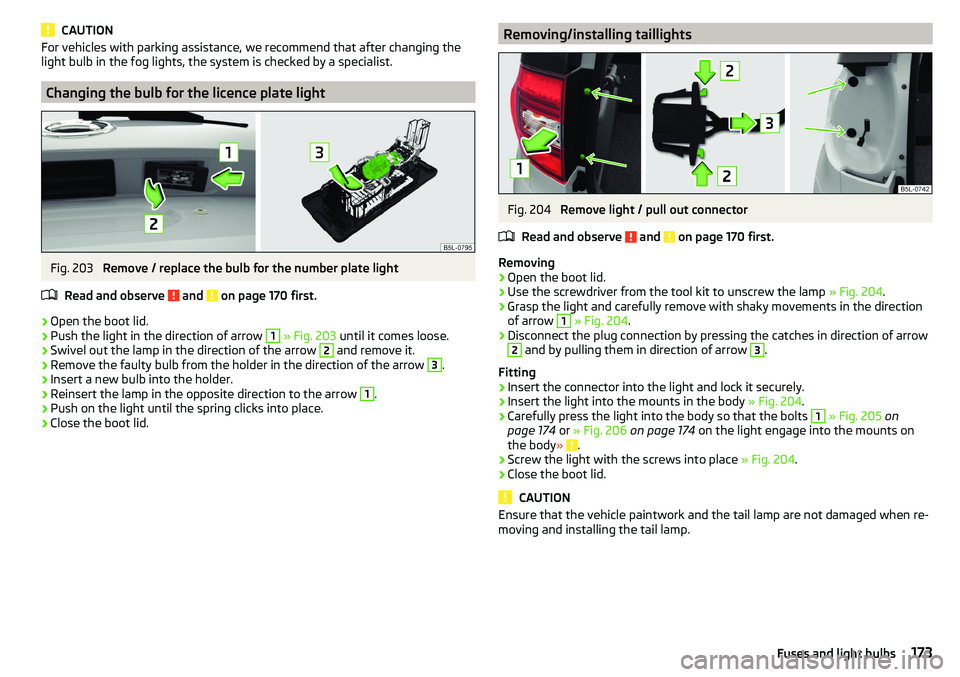
Changing the bulb for the licence plate light
Fig. 203
Remove / replace the bulb for the number plate light
Read and observe
and on page 170 first.
›
Open the boot lid.
›
Push the light in the direction of arrow
1
» Fig. 203 until it comes loose.
›
Swivel out the lamp in the direction of the arrow
2
and remove it.
›
Remove the faulty bulb from the holder in the direction of the arrow
3
.
›
Insert a new bulb into the holder.
›
Reinsert the lamp in the opposite direction to the arrow
1
.
›
Push on the light until the spring clicks into place.
›
Close the boot lid.
Removing/installing taillightsFig. 204
Remove light / pull out connector
Read and observe
and on page 170 first.
Removing
›
Open the boot lid.
›
Use the screwdriver from the tool kit to unscrew the lamp » Fig. 204.
›
Grasp the light and carefully remove with shaky movements in the direction
of arrow
1
» Fig. 204 .
›
Disconnect the plug connection by pressing the catches in direction of arrow
2
and by pulling them in direction of arrow
3
.
Fitting
›
Insert the connector into the light and lock it securely.
›
Insert the light into the mounts in the body » Fig. 204.
›
Carefully press the light into the body so that the bolts
1
» Fig. 205 on
page 174 or » Fig. 206 on page 174 on the light engage into the mounts on
the body »
.
›
Screw the light with the screws into place » Fig. 204.
›
Close the boot lid.
CAUTION
Ensure that the vehicle paintwork and the tail lamp are not damaged when re-
moving and installing the tail lamp.173Fuses and light bulbs
Page 189 of 200
G
Gear change Gear recommendation
39
Information on the selected gear39
Gear changing Gear stick
105
Genuine parts132
Glasses compartment81
GPS See Owner's Manual Infotainment
6
gradeability179
H
Handbrake
104
Warning light32
Hazard warning light system61
HBA111
Headrests73
Heating93
Air distribution control96
Controls94
Mirrors67
Seats74
Windscreen and rear window63
Help in an emergency8
HHC111
Hill Start Assist (HHC)111
Hitch124
Horn27
I
Ignition lock
101
Images See Owner's Manual Infotainment
6
Immobiliser100
In an emergency Changing a wheel
155
incline179
Inertia reel15
Information about the towing process162
Information system38
Door alarm38
Gear recommendation39
MAXI DOT display42
Multifunction display41
Service interval display44
Infotainment6
Instrument cluster28
Auto Check Control30
Display of the second speedometer39
see instrument cluster28
Warning lights31
instrument lighting29
interior light62
Interior lighting63
Interior monitor52
iPad holder84
ISOFIX24
J
Jack
155
- fit158
Jump-starting161
K
KESSY Unlocking/locking
49
key Switch on/off ignition
101
Key Changing battery
164
Lock48
Starting / stopping the engine101
Unlock48
L
Lamp failure Warning light
34
Lamps Warning light
34
LEAVING HOME61
lever Turn signal/main beam
59
Lever Cruise control
122
Operation of the information system40
Windscreen wipers65
light Flash
59
instruments29
Light Automatic driving light control
60
COMING HOME / LEAVING HOME61
Driving abroad62
Fog lights/rear fog light60
Fog lights with the CORNER function61
Headlight cleaning system66
Replacing bulbs170
Turn signal/main beam59
Xenon headlight60
lighting Luggage Storage
90
Lighting Interior lighting
62
Lights58
Cockpit62
Daylight running59
Dipped beam58
Hazard warning light system61
Headlight range control58
Parking lights58, 61
Switching on and off58
Warning lights31
Load176
187Index
Page 190 of 200
LockIndividual settings50
Key48
Locking Central locking button
49
in case of emergency165
KESSY49
Remote control48
Lock steering lock100
Low tyre pressure warning refer to the tyre pressure monitoring
123
Luggage compartment Cover
89
Fastening elements87
Fastening with sliding hook88
Fixing nets87
Flexible storage compartment88
Floor covering on both sides88
Net partition89
Side compartments90
unlock manually165
Unlock the boot lid165
Variable loading floor91
Luggage compartment cover89
Luggage compartment lid52
Luggage Storage86
lighting90
removable lamp90
M
Main beam
59
Warning light37
Manual air conditioning Air distribution control
96
Controls94
Manual gear changing see gear changing
105
Materials defect liability4
MAXI DOT See MAXI DOT display
42
MAXI DOT displayMain menu42
Menu item assist systems43
Menu item Audio43
Menu item navigation42
Menu item phone43
Operation40
Settings43
Mechanical window Open and close
54
Media AUX
77
See Owner's Manual Infotainment6
USB77
Memory42
Memory Function for the seat69
MFD See multifunction display
41
Mirror66
Vanity64
mobility warranty5
Modes of the automatic transmission106
Modifications and technical alterations131
MSR110
Multifunction display Functions
41
Information41
Memory42
Multifunction pocket87
Multifunction steering wheel40
Multimedia holder80
N
N1
91
Nameplate175
Navigation See Owner's Manual Infotainment
6
Net partition89
Nets87
O
OFF ROAD
112
ABS113
EDS113
hill descent assistant113
operation112
Start-Off Assistant114
TCS113
OFF ROAD mode warning light
37
OFF ROAD Mode112
oil See engine oil
145
Oil Information messages
33
Oil changing Engine oil
144
Oil pressure Information messages
33
On-board computer See multifunction display
41
Operating weight176
Original accessories132
Overview Cockpit
27
Engine compartment144
Fuses167
Warning lights31
P
Park assist Departing from a parallel parking space
120
Parking120
Park Assist118
Automatic brake assist121
Malfunctions121
Operation118
Parking space search119
188Index
Page 191 of 200
Parking105
Park Assist118
Parking aid114
Reversing camera116
Parking aid114
Function114
Parking assistance Activation / deactivation
116
Display in the Infotainment display115
Parking lights58
Parking the vehicle See Parking
105
ParkPilot114
Parts replacement131
Passive safety Before setting off
10
Driving safety10
Passive Safety10
Pedals106
Footmats106
Petrol140
Phone See Owner's Manual Infotainment
6
Pocket in the luggage compartment87
Pockets83
Power limit Tilt / slide sunroof
56
Power steering33
Power windows Button in the front passenger door
54
Practical equipment storage net in the front centre console
81
Practical features Pockets
83
Storage compartment for umbrella82
Waste container80
Preheating unit35
R
Radio See Owner's Manual Infotainment/Radio
6
Raising the vehicle158
Rear fog light60
Warning light34
Rear seats71
Rear view camera Function keys
117
Orientation lines117
Rear View Camera Operation
117
Rear view mirror66
Rear window - heating63
refilling AdBlue
142
Refilling Coolant
146
Engine oil145
Windscreen washer fluid144
Reflective vest154
Refuelling139
Fuel139
Regulation Headlight beam
58
Remote Synchronization process
51
Remote control Aux. heating (aux. heating and ventilation)
99
Changing battery164
Unlocking/locking the vehicle48
Removable lamp90
Removable light Changing batteries
164
Removable through-loading bag84
Repairs and technical alterations131
Replace Battery
164
Replacing Bulbs170
Fuses167
Windscreen wiper blades166
Rev counter28
Reversing camera116
Rims150
Roof Load
93
Roof rack93
Running in Brake pads
103
Engine108
Tyres150
S
SafeLock
50
Safety10
Airbag16
Child safety21
Child safety seats21
Correct seated position10
Headrests73
ISOFIX24
TOP TETHER25
Safety belts rear middle seat
15
SAFE, SAFELOCK See SafeLock
50
Saving electrical energy108
Saving fuel108
SD-Card See Owner's Manual Infotainment
6
Seat belt height adjustment
14
Seat belts13
Belt tensioners15
fastening and unfastening14
189Index