wheel SKODA YETI 2017 Owner´s Manual
[x] Cancel search | Manufacturer: SKODA, Model Year: 2017, Model line: YETI, Model: SKODA YETI 2017Pages: 200, PDF Size: 28.93 MB
Page 42 of 200
- Recommends that you change down to a lower gear
▶ On vehicles with a manual gearbox, the recommended gear and an ar-
row symbol is displayed (e.g.
means that it is advantageous to
change up from a lower gear to 4. gear).
▶ On vehicles with an automatic gearbox in manual shifting mode (Tip-
tronic), gear currently engaged and an arrow symbol is displayed, (e.g.
means that it is advantageous to change up from 4 to a higher gear).WARNINGThe driver is always responsible for selecting the correct gear in different
driving situations (e.g. when overtaking).
Operation of the information system
Operation via the operating lever
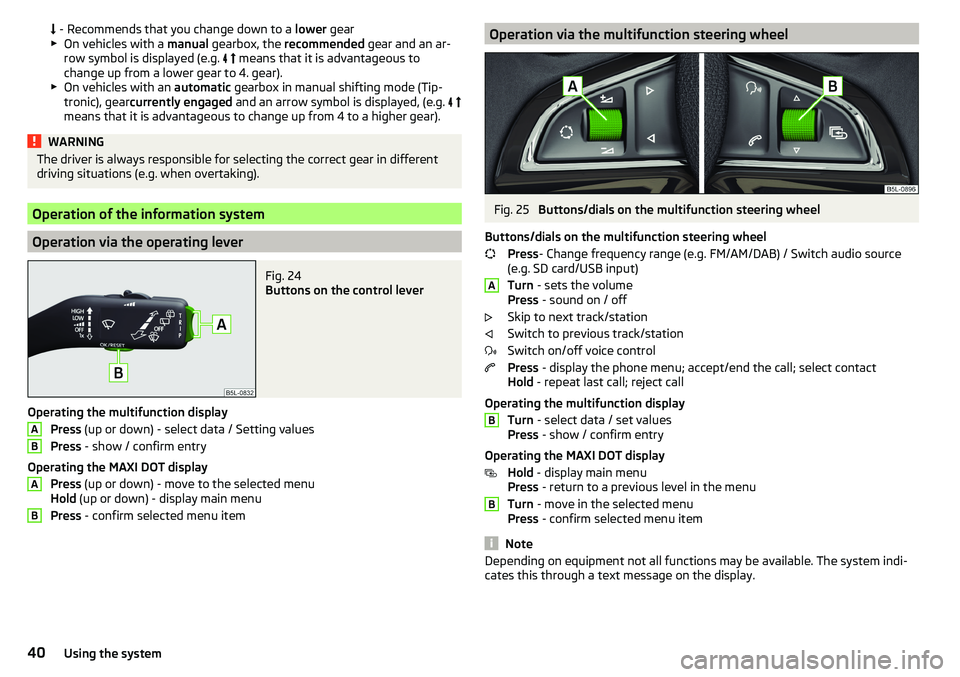
Fig. 24
Buttons on the control lever
Operating the multifunction display
Press (up or down) - select data / Setting values
Press - show / confirm entry
Operating the MAXI DOT display Press (up or down) - move to the selected menu
Hold (up or down) - display main menu
Press - confirm selected menu item
ABABOperation via the multifunction steering wheelFig. 25
Buttons/dials on the multifunction steering wheel
Buttons/dials on the multifunction steering wheel Press - Change frequency range (e.g. FM/AM/DAB) / Switch audio source
(e.g. SD card/USB input)
Turn - sets the volume
Press - sound on / off
Skip to next track/station
Switch to previous track/station
Switch on/off voice control
Press - display the phone menu; accept/end the call; select contact
Hold - repeat last call; reject call
Operating the multifunction display Turn - select data / set values
Press - show / confirm entry
Operating the MAXI DOT display Hold - display main menu
Press - return to a previous level in the menu
Turn - move in the selected menu
Press - confirm selected menu item
Note
Depending on equipment not all functions may be available. The system indi-
cates this through a text message on the display.ABB40Using the system
Page 44 of 200
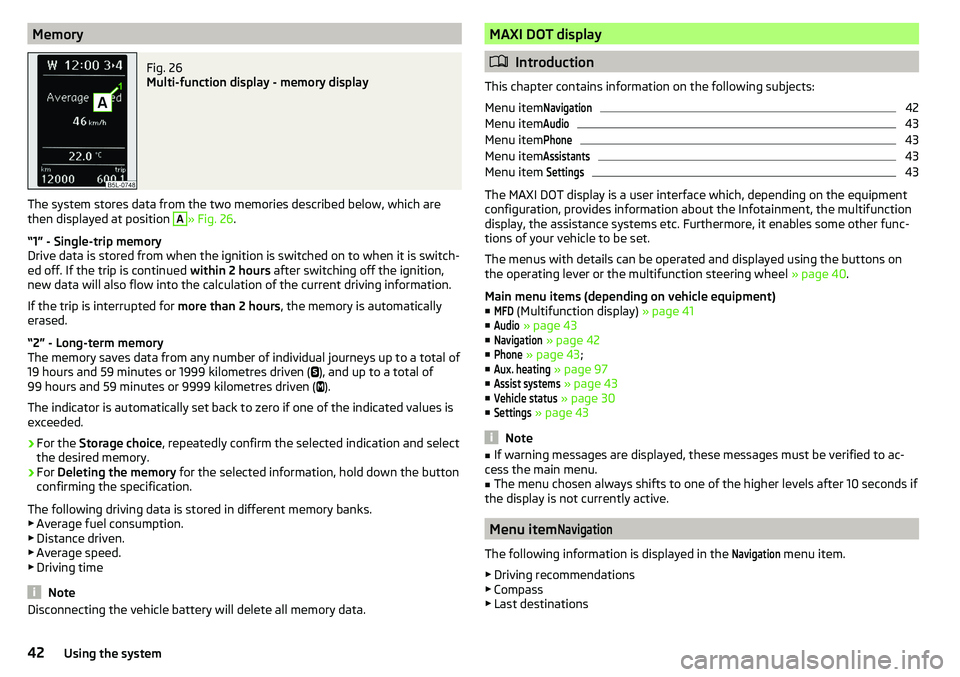
MemoryFig. 26
Multi-function display - memory display
The system stores data from the two memories described below, which are
then displayed at position
A
» Fig. 26 .
“1” - Single-trip memory
Drive data is stored from when the ignition is switched on to when it is switch-
ed off. If the trip is continued within 2 hours after switching off the ignition,
new data will also flow into the calculation of the current driving information.
If the trip is interrupted for more than 2 hours, the memory is automatically
erased.
“2” - Long-term memory
The memory saves data from any number of individual journeys up to a total of
19 hours and 59 minutes or 1999 kilometres driven ( ), and up to a total of
99 hours and 59 minutes or 9999 kilometres driven ( ).
The indicator is automatically set back to zero if one of the indicated values is
exceeded.
›
For the Storage choice , repeatedly confirm the selected indication and select
the desired memory.
›
For Deleting the memory for the selected information, hold down the button
confirming the specification.
The following driving data is stored in different memory banks.
▶ Average fuel consumption.
▶ Distance driven.
▶ Average speed.
▶ Driving time
Note
Disconnecting the vehicle battery will delete all memory data.MAXI DOT display
Introduction
This chapter contains information on the following subjects:
Menu item
Navigation42
Menu item
Audio43
Menu item
Phone43
Menu item
Assistants43
Menu item
Settings43
The MAXI DOT display is a user interface which, depending on the equipment
configuration, provides information about the Infotainment, the multifunction
display, the assistance systems etc. Furthermore, it enables some other func-
tions of your vehicle to be set.
The menus with details can be operated and displayed using the buttons on
the operating lever or the multifunction steering wheel » page 40.
Main menu items (depending on vehicle equipment) ■
MFD
(Multifunction display) » page 41
■
Audio
» page 43
■
Navigation
» page 42
■
Phone
» page 43 ;
■
Aux. heating
» page 97
■
Assist systems
» page 43
■
Vehicle status
» page 30
■
Settings
» page 43
Note
■
If warning messages are displayed, these messages must be verified to ac-
cess the main menu.■
The menu chosen always shifts to one of the higher levels after 10 seconds if
the display is not currently active.
Menu item
Navigation
The following information is displayed in the
Navigation
menu item.
▶ Driving recommendations
▶ Compass
▶ Last destinations
42Using the system
Page 46 of 200
Travel modeActivate/deactivate the travel mode fea-
ture » page 62 .Factory setting.Resetting Lights & Visionmenu item to the factory set-
ting.Coasting
-Enable / disable the idle position (coasting) for vehicles with automat-
ic transmission » page 108, Driving in neutral (“coasting”) .
Time
- Setting the time, the time format (24 or 12 hour) and the change-over to
summer/winter time.
Winter tyres
- Setting the speed and the switching on and off of the acoustic sig-
nals when exceeding this speed. This function is, for example, used for winter
tyres where the maximum permissible speed is lower than the maximum
speed of the vehicle » page 150, Wheels and tyres . If the set speed is excee-
ded, an audible signal sounds and the following message appears in the infor-
mation display.
Units
- Setting the units for temperature, consumption and distance travelled.
Assistants
- Adjustment of the sound in Park Assist » page 114, Parking aid
(ParkPilot) .
Alt. speed dis.
Turn on / off the display of the second speedometer in
mph 1)
» page 39 , Display of the second speedometer .
Service
Display the distance travelled and the days until the next service
date » page 44 , Service interval display .
Factory setting.
- Resetting the display functions to factory settings.
Service interval display
Introduction
This chapter contains information on the following subjects:
Prompt in the MAXI DOT display
44
Prompt in the segment display
44
Resetting the service interval display
45
The service interval display shows the kilometres or days until the next service
event.
Information regarding the service intervals » page 133.
Prompt in the MAXI DOT display
Messages before reaching the scheduled service date
Before the next service date has been reached, the symbol as well as a mes-
sage about the mileage or days until the next service event appears in the dis-
play after switching on the ignition.
Messages upon reaching scheduled service date
Once the service appointment is reached, a message appears in the display af-
ter switching on the ignition.
Displaying the distance and days until the next service interval
Messages about the remaining kilometres and days until the next service date can be displayed at any time when the ignition is switched on by going to the
Service
menu item » page 43, Menu item
Settings
or from the
Vehicle status
in the
main menu of the Maxi DOTdisplay. » page 42.
Prompt in the segment display
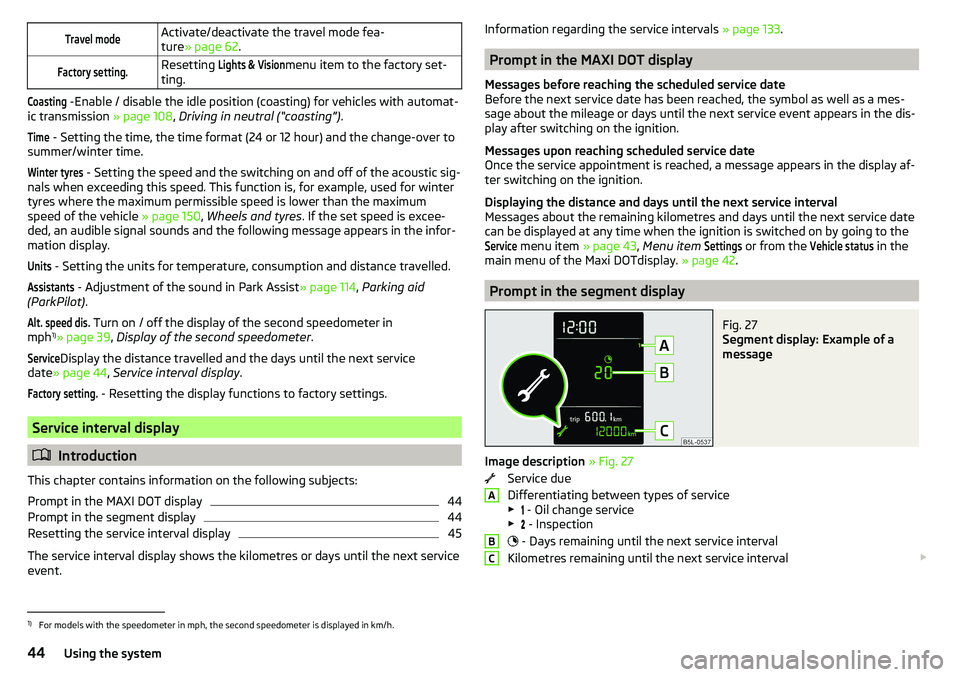
Fig. 27
Segment display: Example of a
message
Image description » Fig. 27
Service due
Differentiating between types of service
▶ - Oil change service
▶ - Inspection
- Days remaining until the next service interval
Kilometres remaining until the next service interval
ABC1)
For models with the speedometer in mph, the second speedometer is displayed in km/h.
44Using the system
Page 61 of 200
Note■If, with a low beam, the ignition is turned off, then the dipped beam will au-
tomatically switch off 1)
and the parking lights illuminate. The parking lights are
switched off when the ignition key is removed (for vehicles with the KESSY
system, after opening the driver's door).■
If there is a fault in the light switch, the low beam comes on automatically.
Daylight running lights (DAY LIGHT)
Read and observe
on page 58 first.
The daytime running light (hereinafter referred to as "function") lights the
front and rear vehicle area (only valid for some countries).
The daytime running lights are switched on automatically if the following
conditions are met.
The light switch is in the position or
.
The ignition is switched on.
The function is activated.
Function for vehicles with MAXI DOT display disable / enable
The function menu item
Daytime driving light
can be deactivated / activated
» page 43 , Menu item
Settings
.
Disable function for vehicles with segment display
›
Pull the indicator / main beam lever towards the steering wheel, push down
and hold in this position.
›
Switch on the ignition and hold the lever in the above position until you hear
a signal (about 3 s).
Enable function for vehicles with segment display
›
Pull the indicator / main beam lever towards the steering wheel, push up and
hold in this position.
›
Switch on the ignition and hold the lever in the above position until you hear
a signal (about 3 s).
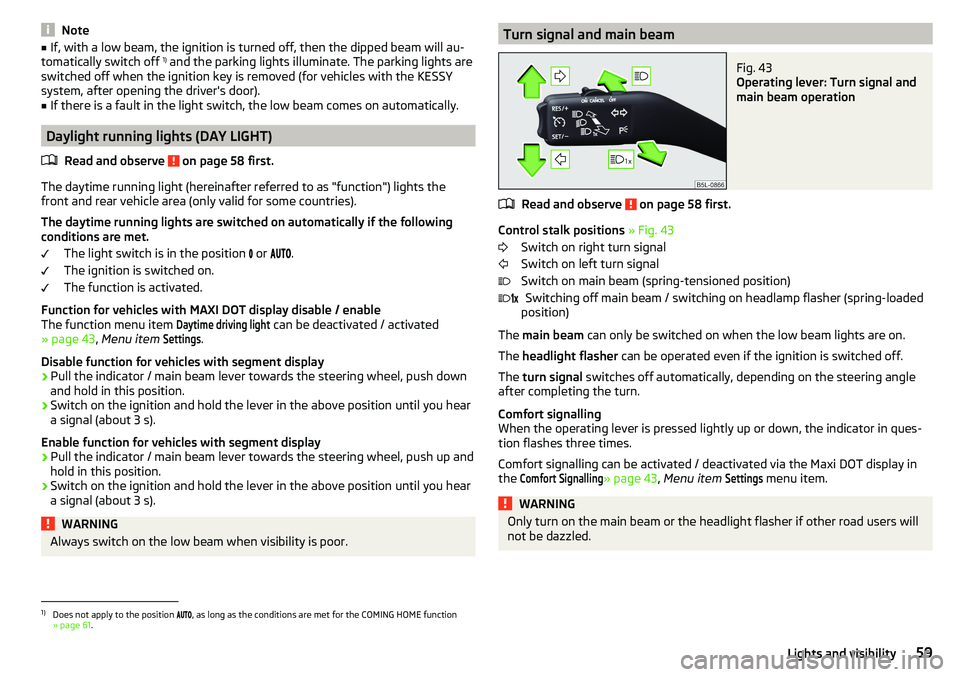
WARNINGAlways switch on the low beam when visibility is poor.Turn signal and main beamFig. 43
Operating lever: Turn signal and
main beam operation
Read and observe on page 58 first.
Control stalk positions » Fig. 43
Switch on right turn signal
Switch on left turn signal
Switch on main beam (spring-tensioned position) Switching off main beam / switching on headlamp flasher (spring-loaded
position)
The main beam can only be switched on when the low beam lights are on.
The headlight flasher can be operated even if the ignition is switched off.
The turn signal switches off automatically, depending on the steering angle
after completing the turn.
Comfort signalling
When the operating lever is pressed lightly up or down, the indicator in ques-
tion flashes three times.
Comfort signalling can be activated / deactivated via the Maxi DOT display in
the
Comfort Signalling
» page 43 , Menu item
Settings
menu item.
WARNINGOnly turn on the main beam or the headlight flasher if other road users will
not be dazzled. 1)
Does not apply to the position , as long as the conditions are met for the COMING HOME function
» page 61 .
59Lights and visibility
Page 63 of 200
Fog lights with the CORNER functionRead and observe
on page 58 first.
The CORNER function automatically switches on the fog lights on the respec-tive side of the vehicle (e.g. when cornering), if the following conditions are ful-
filled.
The turn signal is switched on or the front wheels are turned sharply 1)
.
The vehicle speed is below 40 km/h.
The low beam is switched on.
The fog lights are not switched on.
The two fog lights are switched on when you shift into the reverse gear.
COMING HOME / LEAVING HOME
Read and observe
on page 58 first.
The function COMING HOME ensures that the vehicle's environment is illumi-
nated after switching off the ignition and opening the driver's door.
The function LEAVING HOME ensures that the vehicle's environment is illumi-
nated after unlocking the vehicle with the radio remote control unit.
The function switches the light on only if there is poorer visibility and the light
switch is in the position .
The functions and settings of the illumination time can be via the MAXI DOT
display in the menu items
Coming Home
or
Leaving Home
activated / deactivated
and set up » page 43, Menu item
Settings
.
CAUTION
■
Poorer visibility is evaluated by a sensor mounted below the windscreen in
the holder of the rear-view mirror. Do not cover the sensor - the system func-
tion can be disrupted.■
If this option is always enabled, then the battery is heavily loaded.
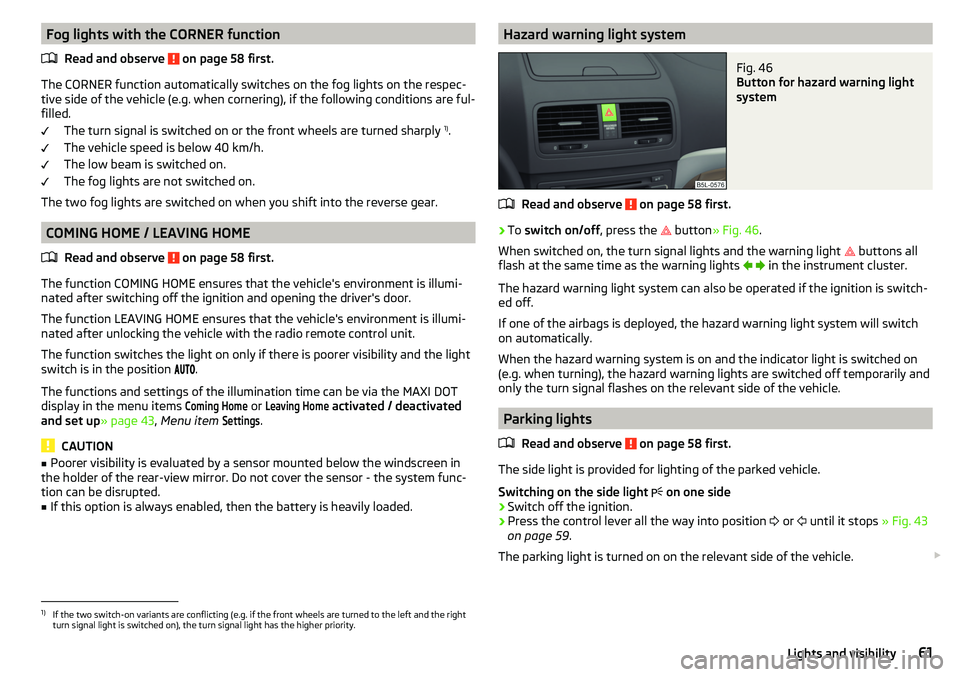
Hazard warning light systemFig. 46
Button for hazard warning light
system
Read and observe on page 58 first.
›
To switch on/off , press the
button
» Fig. 46 .
When switched on, the turn signal lights and the warning light buttons all
flash at the same time as the warning lights
in the instrument cluster.
The hazard warning light system can also be operated if the ignition is switch-
ed off.
If one of the airbags is deployed, the hazard warning light system will switch
on automatically.
When the hazard warning system is on and the indicator light is switched on
(e.g. when turning), the hazard warning lights are switched off temporarily and
only the turn signal flashes on the relevant side of the vehicle.
Parking lights
Read and observe
on page 58 first.
The side light is provided for lighting of the parked vehicle.
Switching on the side light on one side
›
Switch off the ignition.
›
Press the control lever all the way into position
or
until it stops
» Fig. 43
on page 59 .
The parking light is turned on on the relevant side of the vehicle.
1)
If the two switch-on variants are conflicting (e.g. if the front wheels are turned to the left and the right
turn signal light is switched on), the turn signal light has the higher priority.
61Lights and visibility
Page 93 of 200
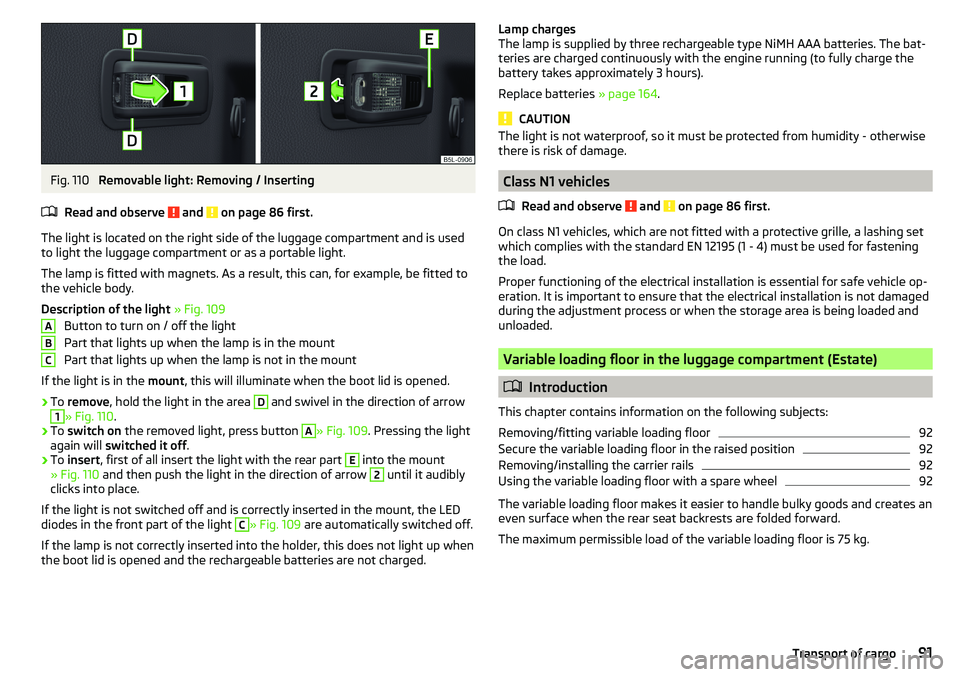
Fig. 110
Removable light: Removing / Inserting
Read and observe
and on page 86 first.
The light is located on the right side of the luggage compartment and is used
to light the luggage compartment or as a portable light.
The lamp is fitted with magnets. As a result, this can, for example, be fitted to
the vehicle body.
Description of the light » Fig. 109
Button to turn on / off the light
Part that lights up when the lamp is in the mount
Part that lights up when the lamp is not in the mount
If the light is in the mount, this will illuminate when the boot lid is opened.
›
To remove , hold the light in the area
D
and swivel in the direction of arrow
1
» Fig. 110 .
›
To switch on the removed light, press button
A
» Fig. 109. Pressing the light
again will switched it off .
›
To insert , first of all insert the light with the rear part
E
into the mount
» Fig. 110 and then push the light in the direction of arrow
2
until it audibly
clicks into place.
If the light is not switched off and is correctly inserted in the mount, the LED diodes in the front part of the light
C
» Fig. 109 are automatically switched off.
If the lamp is not correctly inserted into the holder, this does not light up when
the boot lid is opened and the rechargeable batteries are not charged.
ABCLamp charges
The lamp is supplied by three rechargeable type NiMH AAA batteries. The bat-
teries are charged continuously with the engine running (to fully charge the
battery takes approximately 3 hours).
Replace batteries » page 164.
CAUTION
The light is not waterproof, so it must be protected from humidity - otherwise
there is risk of damage.
Class N1 vehicles
Read and observe
and on page 86 first.
On class N1 vehicles, which are not fitted with a protective grille, a lashing set
which complies with the standard EN 12195 (1 - 4) must be used for fastening
the load.
Proper functioning of the electrical installation is essential for safe vehicle op-
eration. It is important to ensure that the electrical installation is not damaged
during the adjustment process or when the storage area is being loaded and
unloaded.
Variable loading floor in the luggage compartment (Estate)
Introduction
This chapter contains information on the following subjects:
Removing/fitting variable loading floor
92
Secure the variable loading floor in the raised position
92
Removing/installing the carrier rails
92
Using the variable loading floor with a spare wheel
92
The variable loading floor makes it easier to handle bulky goods and creates an
even surface when the rear seat backrests are folded forward.
The maximum permissible load of the variable loading floor is 75 kg.
91Transport of cargo
Page 94 of 200
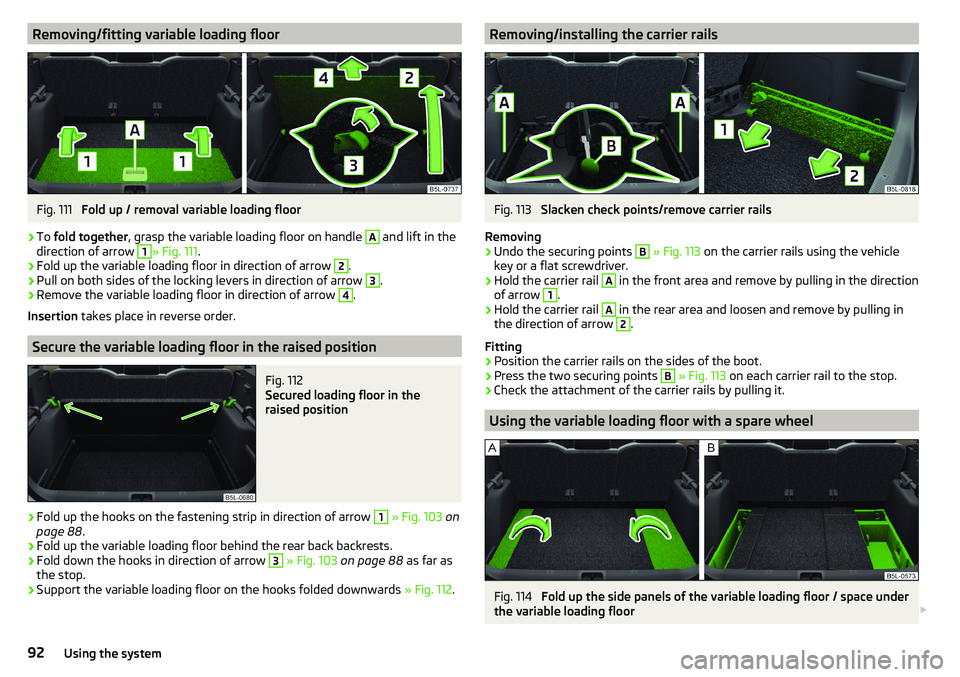
Removing/fitting variable loading floorFig. 111
Fold up / removal variable loading floor
›
To fold together , grasp the variable loading floor on handle
A
and lift in the
direction of arrow
1
» Fig. 111 .
›
Fold up the variable loading floor in direction of arrow
2
.
›
Pull on both sides of the locking levers in direction of arrow
3
.
›
Remove the variable loading floor in direction of arrow
4
.
Insertion takes place in reverse order.
Secure the variable loading floor in the raised position
Fig. 112
Secured loading floor in the
raised position
›
Fold up the hooks on the fastening strip in direction of arrow
1
» Fig. 103 on
page 88 .
›
Fold up the variable loading floor behind the rear back backrests.
›
Fold down the hooks in direction of arrow
3
» Fig. 103 on page 88 as far as
the stop.
›
Support the variable loading floor on the hooks folded downwards » Fig. 112.
Removing/installing the carrier railsFig. 113
Slacken check points/remove carrier rails
Removing
›
Undo the securing points
B
» Fig. 113 on the carrier rails using the vehicle
key or a flat screwdriver.
›
Hold the carrier rail
A
in the front area and remove by pulling in the direction
of arrow
1
.
›
Hold the carrier rail
A
in the rear area and loosen and remove by pulling in
the direction of arrow
2
.
Fitting
›
Position the carrier rails on the sides of the boot.
›
Press the two securing points
B
» Fig. 113 on each carrier rail to the stop.
›
Check the attachment of the carrier rails by pulling it.
Using the variable loading floor with a spare wheel
Fig. 114
Fold up the side panels of the variable loading floor / space under
the variable loading floor
92Using the system
Page 102 of 200
Driving
Starting-off and Driving
Starting and stopping the engine
Introduction
This chapter contains information on the following subjects:
Electronic immobiliser and steering lock
100
Switch on/off ignition
101
Starting / stopping the engine
101
Problems with the engine start - vehicles with starter button
102
Depending on equipment fitted, it is possible to switch the ignition on/off and
start/stop the engine with the key in the ignition or using the starter button .
WARNING■
Never switch off the engine before the vehicle is stationary – There is a
risk of accident!■
While driving with the engine stopped the ignition must always be
switched on. Otherwise, the steering may lock - There is a risk of an acci-
dent!
■
Do not withdraw the ignition key from the ignition lock until the vehicle
has come to a stop » page 105, Parking . Otherwise, the steering may lock -
danger of an accident!
■
Never leave the vehicle unattended with the engine running - there is a
risk of theft etc!
■
Never (e.g. in garages) run the engine in a closed place - there is a risk of
poisoning and death!
CAUTION
■ Only start the engine when the engine and the vehicle are stationary - there
is a risk of starter and engine damage!■
Do not push-start the engine – There is a risk of damaging the engine and
the catalytic converter! The battery from another vehicle can be used as a
jump-start aid.
■
On vehicles with the starter button, pay attention to where the key is loca-
ted. The system can recognize the valid key, even if it has been accidentally
left on the vehicle roof - there is danger of loss or damage to the key!
NoteDo not warm up the engine while the vehicle is stationary. If possible, start
your journey as soon as the engine has started. Through this, the engine rea-
ches its operating temperature faster.
Electronic immobiliser and steering lock
Read and observe
and on page 100 first.
The electronic immobilizer (hereafter referred to as immobilizer) makes the
theft or unauthorised use of your vehicle more difficult.
Immobilizer
The immobilizer allows the engine to start provided an original vehicle key only
is used.
Malfunction of the immobilizer
If a component in the immobiliser key fails, it is not possible to start the en-
gine. A corresponding message appears in the display of the instrument clus-
ter to explain the immobiliser is active.
To start, use the other vehicle key or seek help from a specialist garage.
Steering lock - lock
›
On vehicles with ignition lock, remove the key and turn the steering wheel
until the steering lock engages.
›
On vehicles with a starter button, switch off the ignition and open the driv-
er's door. If the driver's door is opened and the ignition is switched off after-
wards, the steering is only locked automatically after the vehicle has been
locked.
Steering lock - unlock
›
On vehicles with ignition lock, insert the key into the ignition and turn on the
ignition. If this is not possible, then move the steering wheel slightly back
and forth, as a result of which the steering lock should unlock.
›
On vehicles with starter button, get into the car and close the driver's door.
Under certain circumstances, the steering lock can be unlocked only when
the ignition is switched on or the engine is started.
WARNINGNever let the vehicle roll with locked steering lock - there is a risk of acci-
dent!100Driving
Page 106 of 200
The wear and tear on the brake pads is dependent on the operating condi-
tions and driving style. In difficult conditions (e.g. urban, sporty driving), the
condition of the brakes should be checked between services by a specialist ga-
rage.
Brake response can be slower if the brakes are covered in moisture or, in win-
ter, have a layer of ice or salt on them . The brakes should be cleaned and
dried by applying the brakes many times over »
.
Corrosion on the brake discs and dirt on the brake pads can occur if the vehicle
has been parked for a long period and if you do not make much use of the
braking system. The brakes are cleaned by applying the brakes several times
over »
.
Before negotiating a long or steep gradient , reduce speed and shift down a
gear. As a result, the braking effect of the engine will be used, reducing the
load on the brakes. If, nevertheless, there is a need for additional braking, it
should be carried out at intervals.
Emergency braking warning - if it is necessary to brake hard, the system may
cause the brake lights to automatically flash, to alert the traffic behind.
New brake pads must first be “run in” because these do not initially have the
best possible braking effect. Drive especially carefully for the first 200 km or
so.
If the brake fluid level is too low, it can cause faults in the braking system ;
the warning light will light up in the instrument cluster
» page 32,
Braking
system . If the warning light does not light up, yet the stopping distance is per-
ceived to be longer than before, the driving style should be adapted in view of
the unknown cause of the problem, and braking kept to a minimum - seek the
help of a specialist garage without delay.
The brake booster increases the pressure generated with the brake pedal. The
brake booster only operates when the engine is running.
WARNING■ Greater physical effort is required for braking when the engine is switch-
ed off – risk of accident!■
During the braking procedure on a vehicle with manual transmission,
when the vehicle is in gear and at low revs, press the clutch pedal. Other-
wise, the functionality of the brake system may be impaired – risk of acci-
dent!
WARNING (Continued)■ Do not depress the brake pedal if there is no requirement to slow down.
This causes the brakes to overheat and can also result in a longer braking
distance and excessive wear - There is a risk of an accident!■
Only brake for the purpose of drying and cleaning the brake discs if the
traffic conditions permit this. Do not place any other road users in jeopardy.
■
Recommendations for new brake pads should be followed.
■
When stopping and parking, the parking brake should always be applied
firmly, otherwise the vehicle could move off - There is risk of an accident!
■
If a front spoiler, full wheel trim, etc. is mounted retrospectively, it must
be ensured that the air supply to the front wheel brakes is not reduced.
Otherwise, the front brakes could be in danger of overheating – There is
risk of an accident!
Handbrake
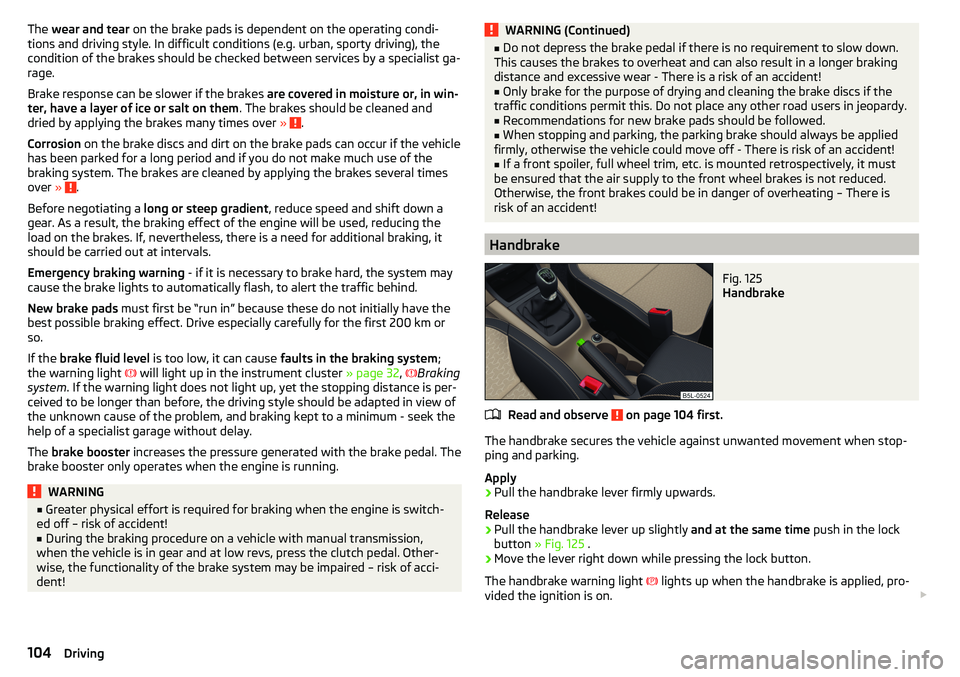
Fig. 125
Handbrake
Read and observe on page 104 first.
The handbrake secures the vehicle against unwanted movement when stop-
ping and parking.
Apply
›
Pull the handbrake lever firmly upwards.
Release
›
Pull the handbrake lever up slightly and at the same time push in the lock
button » Fig. 125 .
›
Move the lever right down while pressing the lock button.
The handbrake warning light
lights up when the handbrake is applied, pro-
vided the ignition is on.
104Driving
Page 108 of 200
CAUTIONIf not in the process of changing gear, do not leave your hand on the gearshift
lever while driving. The pressure from the hand can cause the gearshift mech-
anism to wear excessively.
Pedals
The operation of the pedals must not be hindered under any circumstances!
Only a floor mat (ex-factory or from the ŠKODA Original Accessories range)
which can be secured to the attachment points should be used in the driver's
footwell.
WARNINGThere should be no objects in the driver's footwell, otherwise the pedal op-
eration can be impeded -There is a risk of an accident!
Automatic transmission
Introduction
This chapter contains information on the following subjects:
Select selector lever position
106
Selector lever lock
107
Manual shifting (Tiptronic)
107
Starting-off and driving
108
The automatic transmission performs an automatic gear change irrespective of
the engine load, the operation of the accelerator, the vehicle speed and the
selected driving mode.
The modes of the automatic transmission can be adjusted by the driver by
means of the selector lever.
WARNING■ Do not accelerate when selecting drive mode prior to moving off - There
is a risk of an accident!■
Never move the selector lever to mode R or P when driving – There is a
risk of an accident!
WARNING (Continued)■ If the vehicle stalls, with engine running, in the D, S , R or Tiptronic mode,
the vehicle must be prevented from rolling away by means of the brake
pedal or the parking brake. Even when the engine is idling, the power
transmission is never completely interrupted – the vehicle creeps.■
When leaving the vehicle, the selector lever must always be set to P. Oth-
erwise, the vehicle could be set in motion - risk of accident!
CAUTION
If you want to move the selector lever from position N to position D / S whilst
driving, the engine must be running at idling speed.
Select selector lever position
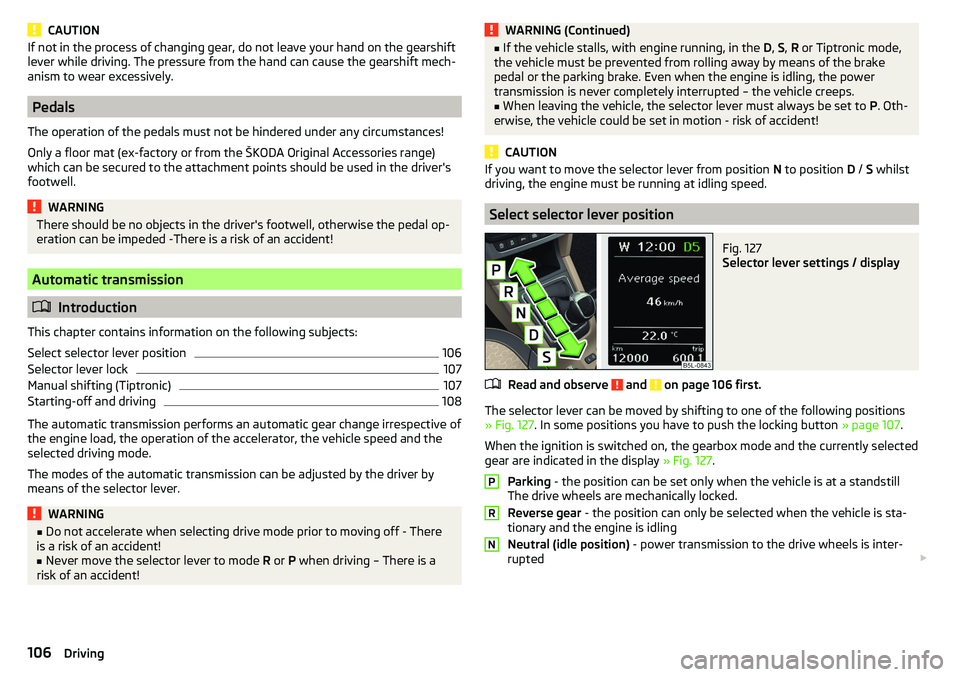
Fig. 127
Selector lever settings / display
Read and observe and on page 106 first.
The selector lever can be moved by shifting to one of the following positions » Fig. 127 . In some positions you have to push the locking button » page 107.
When the ignition is switched on, the gearbox mode and the currently selected
gear are indicated in the display » Fig. 127.
Parking - the position can be set only when the vehicle is at a standstill
The drive wheels are mechanically locked.
Reverse gear - the position can only be selected when the vehicle is sta-
tionary and the engine is idling
Neutral (idle position) - power transmission to the drive wheels is inter-
rupted
PRN106Driving