stop start SKODA YETI 2017 Owner´s Manual
[x] Cancel search | Manufacturer: SKODA, Model Year: 2017, Model line: YETI, Model: SKODA YETI 2017Pages: 200, PDF Size: 28.93 MB
Page 111 of 200
Avoiding damage to your vehicle
Introduction
This chapter contains information on the following subjects:
Driving Tips
109
Driving through water
109
Driving Tips
Only drive on roads and terrain that are appropriate to the vehicle parameters
» page 175 , Technical data .
The driver is always responsible for deciding whether the vehicle can cope
with the conditions and the terrain.
When travelling off paved roads, we recommend activating the OFF ROAD
mode » page 112 .
WARNING■
Adjust the speed and driving style to the current visibility, weather, road
and traffic conditions. Too high a speed or an erroneous manoeuvre may
cause serious injury and damage to the vehicle.■
Combustible objects such as dry leaves or twigs caught under the base of
the vehicle could ignite on hot vehicle parts - risk of fire!
CAUTION
■ Pay attention to the ground clearance of the vehicle! When driving over ob-
jects which are larger than the ground clearance, the vehicle can get damaged.■
Any objects that get trapped under the vehicle floor must be removed as
soon as possible. These items can cause damage to the vehicle (e.g. to parts of
the fuel or brake system).
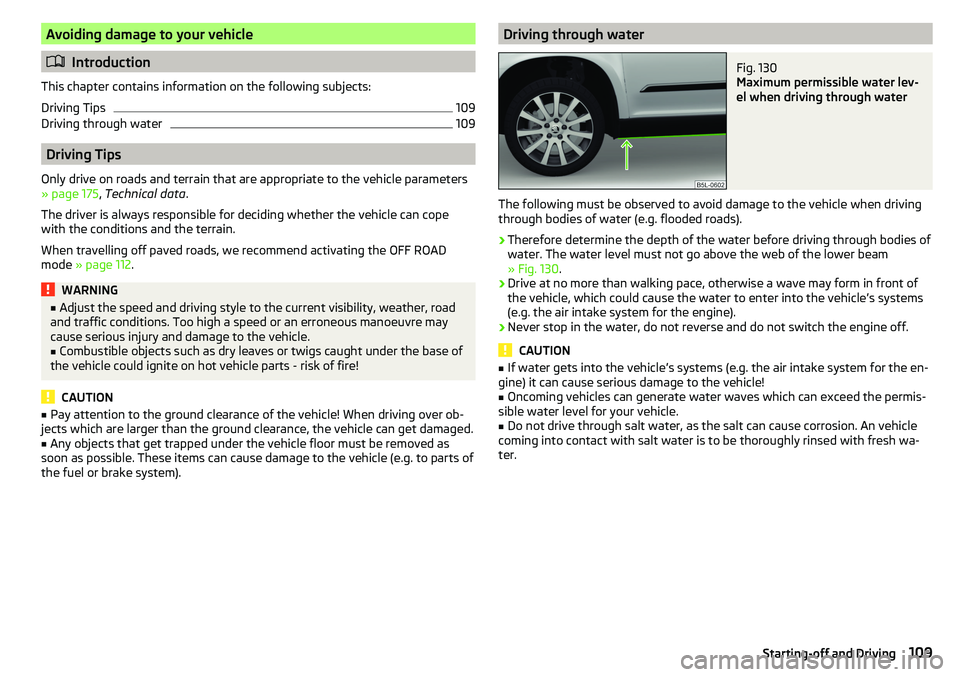
Driving through waterFig. 130
Maximum permissible water lev-
el when driving through water
The following must be observed to avoid damage to the vehicle when driving
through bodies of water (e.g. flooded roads).
›
Therefore determine the depth of the water before driving through bodies of
water. The water level must not go above the web of the lower beam
» Fig. 130 .
›
Drive at no more than walking pace, otherwise a wave may form in front of
the vehicle, which could cause the water to enter into the vehicle’s systems
(e.g. the air intake system for the engine).
›
Never stop in the water, do not reverse and do not switch the engine off.
CAUTION
■ If water gets into the vehicle’s systems (e.g. the air intake system for the en-
gine) it can cause serious damage to the vehicle!■
Oncoming vehicles can generate water waves which can exceed the permis-
sible water level for your vehicle.
■
Do not drive through salt water, as the salt can cause corrosion. An vehicle
coming into contact with salt water is to be thoroughly rinsed with fresh wa-
ter.
109Starting-off and Driving
Page 117 of 200

Fig. 134
Sampled areas and range of the
sensors
Read and observe and on page 114 first.
The system uses ultrasound waves to calculate the distance between the
bumper and an obstacle. The ultrasonic sensors are, depending on vehicle
equipment, located in the back or in the front bumper » Fig. 133.
Depending on the equipment, the following system variants are possible
» Fig. 134 .
▶ Variant 1: warns of obstacles in the areas
C
,
D
.
▶ Variant 2: warns of obstacles in the areas
A
,
B
,
C
,
D
.
▶ Variant 3: warns of obstacles in the areas
A
,
B
,
C
,
D
,
E
.
Approximate range of sensors (in cm)
Area » Fig. 134Variant 1
(4 sensors)Variant 2
(8 sensors)Variant 3
(12 sensors)A-120120B-6060C160160160D606060E--60
Audible signals
The interval between the acoustic signals becomes shorter as the clearance is
reduced. At a distance of approx. 30 cm, a continuous tone starts to sound -
danger zone. From this moment do not continue to move towards the obsta-
cle!
Towing a trailer
When towing, or when another accessory is connected to the trailer socket on-
ly the areas
A
and
B
» Fig. 134 are active in the system.
Note■
If with Version 3 vehicles not all fields around the vehicle are active after ac-
tivation the vehicle should be moved forwards or backwards.■
The signal tones for front obstacle recognition are factory-set to be higher
than for rear obstacle recognition.
■
The sound of the park-assist can be adjusted via the MAXI DOT display in the
Assistants
menu option » page 43.
Display in the Infotainment display
Fig. 135
Display
Read and observe and on page 114 first.
Functional interfaces and obstacle warning » Fig. 135
Change to rear-view camera display .
Switching off park assistant display. Switching audible parking signals on/off.
Message:
Look! Safe to move?
An area without detected obstacles is shown as a transparent segment.
An obstacle which is currently outside of the collision area is shown by the
yellow segment.
An obstacle in the collision zone is shown as an orange-coloured segment.
Stop moving in the direction of the obstacle!
ABC115Assist systems
Page 122 of 200
ParkingFig. 140
Display
Read and observe
and on page 118 first.
The system supports the driver when reverse parking in the parking space
found in a number of traverse and parallel parked vehicles.
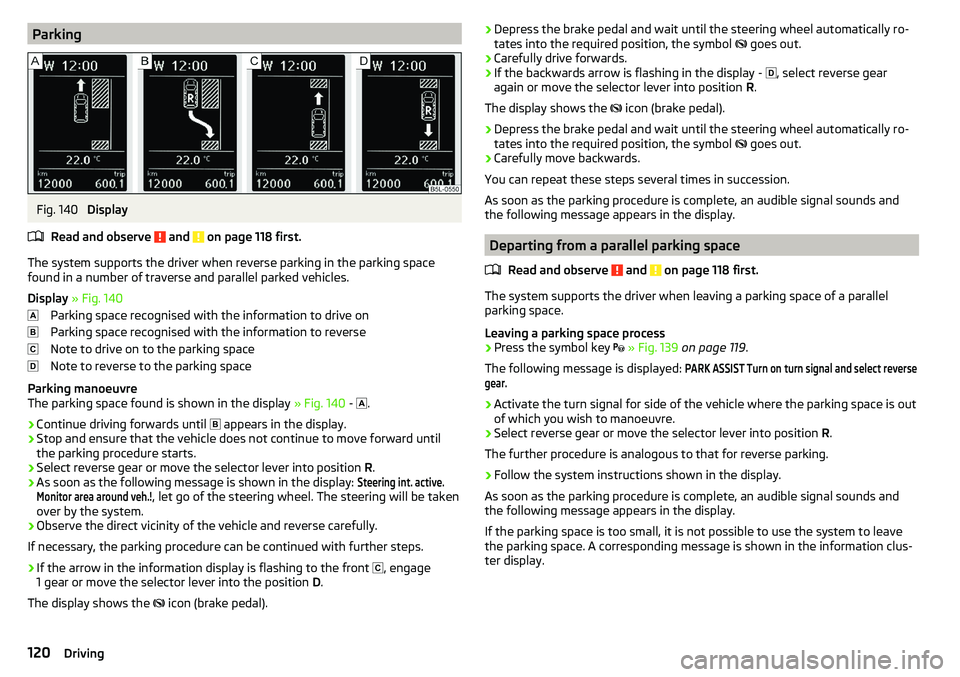
Display » Fig. 140
Parking space recognised with the information to drive on
Parking space recognised with the information to reverse
Note to drive on to the parking space
Note to reverse to the parking space
Parking manoeuvre
The parking space found is shown in the display » Fig. 140 -
.
›
Continue driving forwards until
appears in the display.
›
Stop and ensure that the vehicle does not continue to move forward until
the parking procedure starts.
›
Select reverse gear or move the selector lever into position R.
›
As soon as the following message is shown in the display:
Steering int. active.Monitor area around veh.!
, let go of the steering wheel. The steering will be taken
over by the system.
›
Observe the direct vicinity of the vehicle and reverse carefully.
If necessary, the parking procedure can be continued with further steps.
›
If the arrow in the information display is flashing to the front , engage
1 gear or move the selector lever into the position D.
The display shows the icon (brake pedal).
›Depress the brake pedal and wait until the steering wheel automatically ro-
tates into the required position, the symbol goes out.›
Carefully drive forwards.
›
If the backwards arrow is flashing in the display -
, select reverse gear
again or move the selector lever into position R.
The display shows the
icon (brake pedal).
›
Depress the brake pedal and wait until the steering wheel automatically ro-
tates into the required position, the symbol
goes out.
›
Carefully move backwards.
You can repeat these steps several times in succession.
As soon as the parking procedure is complete, an audible signal sounds and the following message appears in the display.
Departing from a parallel parking space
Read and observe
and on page 118 first.
The system supports the driver when leaving a parking space of a parallel
parking space.
Leaving a parking space process
›
Press the symbol key
» Fig. 139 on page 119 .
The following message is displayed:
PARK ASSIST Turn on turn signal and select reversegear.›
Activate the turn signal for side of the vehicle where the parking space is out
of which you wish to manoeuvre.
›
Select reverse gear or move the selector lever into position R.
The further procedure is analogous to that for reverse parking.
›
Follow the system instructions shown in the display.
As soon as the parking procedure is complete, an audible signal sounds and
the following message appears in the display.
If the parking space is too small, it is not possible to use the system to leave
the parking space. A corresponding message is shown in the information clus-
ter display.
120Driving
Page 123 of 200
Automatic brake assistRead and observe
and on page 118 first.
Automatic brake assist when speeding
If a velocity of 7 km / h is exceeded during the parking manoeuvre for the first
time, the speed will be automatically reduced by the system to less than 7 km /
h. This prevents the parking manoeuvre from aborting.
Automatic emergency braking
If the system detects a risk of collision during parking, automatic emergency
braking takes place to prevent a collision.
The parking is terminated by the emergency braking.
CAUTION
The automatic emergency braking is not triggered by the system when the
parking process stops due to the speed of 7 km / hr being exceeded!
Malfunctions
Read and observe
and on page 118 first.
If, for some unknown reason, the system is not available, an appropriate mes-
sage appears in the display of the instrument cluster.
System unavailable
If the system is not available because the vehicle has a fault, a message ap-
pears concerning the unavailability. Seek help from a specialist garage.
System fault
In the case of a system fault, an error message appears. Seek help from a spe-
cialist garage.
Cruise Control System
Introduction
This chapter contains information on the following subjects:
Operation
121
Operation description
122The Cruise Control System (CCS) maintains a set speed without you having to
actuate the accelerator pedal. The state where the CCS maintains the speed is
referred to hereinafter as the control.WARNINGThe general information relating to the use of assistance systems must be
observed » page 110, in section General information .
Operation
Read and observe
on page 121 first.
Basic requirements for start of control The CCS is activated.
On vehicles with a manual transmission , the second gear or higher is en-
gaged.
On vehicles with an automatic transmission , the selector lever is in the
D/S position or in the Tiptronic position.
The current speed is higher than 20 km/h.
This, however, is only possible to the extent permitted by the engine output
and braking power of the vehicle.
WARNINGIf the engine output or engine braking effect is insufficient to maintain the
set speed, the driver must assume control of the accelerator and brake
pedals!121Assist systems
Page 124 of 200
Operation descriptionFig. 141
Cruise control system controls
Read and observe on page 121 first.
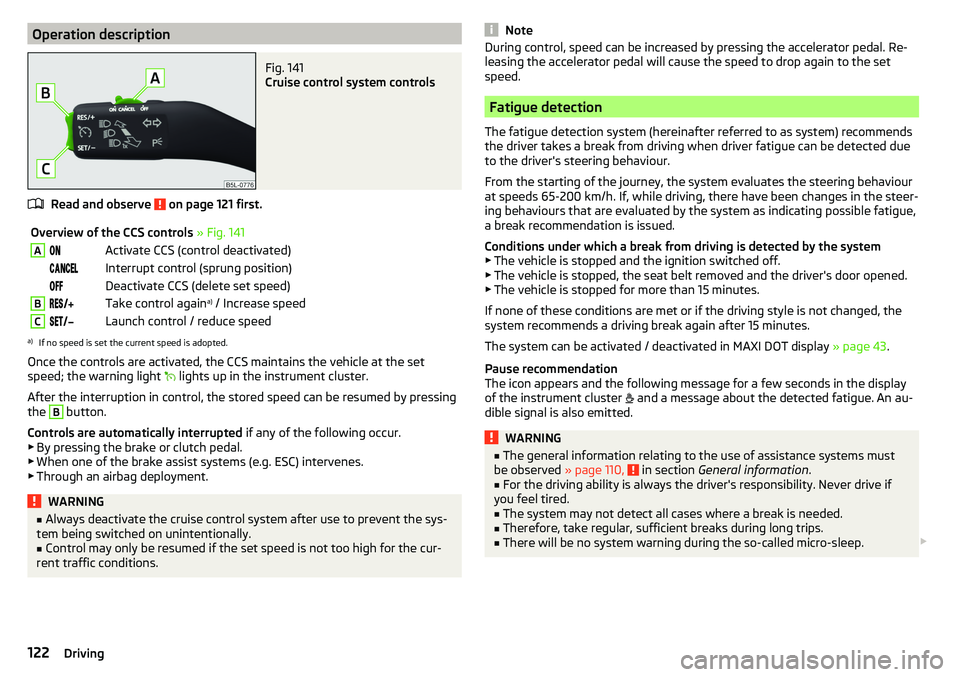
Overview of the CCS controls » Fig. 141AActivate CCS (control deactivated) Interrupt control (sprung position) Deactivate CCS (delete set speed)BTake control again a)
/ Increase speedCLaunch control / reduce speeda)
If no speed is set the current speed is adopted.
Once the controls are activated, the CCS maintains the vehicle at the set
speed; the warning light lights up in the instrument cluster.
After the interruption in control, the stored speed can be resumed by pressing
the
B
button.
Controls are automatically interrupted if any of the following occur.
▶ By pressing the brake or clutch pedal.
▶ When one of the brake assist systems (e.g. ESC) intervenes.
▶ Through an airbag deployment.
WARNING■ Always deactivate the cruise control system after use to prevent the sys-
tem being switched on unintentionally.■
Control may only be resumed if the set speed is not too high for the cur-
rent traffic conditions.
NoteDuring control, speed can be increased by pressing the accelerator pedal. Re-
leasing the accelerator pedal will cause the speed to drop again to the set
speed.
Fatigue detection
The fatigue detection system (hereinafter referred to as system) recommends
the driver takes a break from driving when driver fatigue can be detected due
to the driver's steering behaviour.
From the starting of the journey, the system evaluates the steering behaviour
at speeds 65-200 km/h. If, while driving, there have been changes in the steer-
ing behaviours that are evaluated by the system as indicating possible fatigue,
a break recommendation is issued.
Conditions under which a break from driving is detected by the system ▶ The vehicle is stopped and the ignition switched off.
▶ The vehicle is stopped, the seat belt removed and the driver's door opened.
▶ The vehicle is stopped for more than 15 minutes.
If none of these conditions are met or if the driving style is not changed, the
system recommends a driving break again after 15 minutes.
The system can be activated / deactivated in MAXI DOT display » page 43.
Pause recommendation
The icon appears and the following message for a few seconds in the display
of the instrument cluster and a message about the detected fatigue. An au-
dible signal is also emitted.
WARNING■ The general information relating to the use of assistance systems must
be observed » page 110, in section General information .■
For the driving ability is always the driver's responsibility. Never drive if
you feel tired.
■
The system may not detect all cases where a break is needed.
■
Therefore, take regular, sufficient breaks during long trips.
■
There will be no system warning during the so-called micro-sleep.
122Driving
Page 144 of 200
AdBlue®
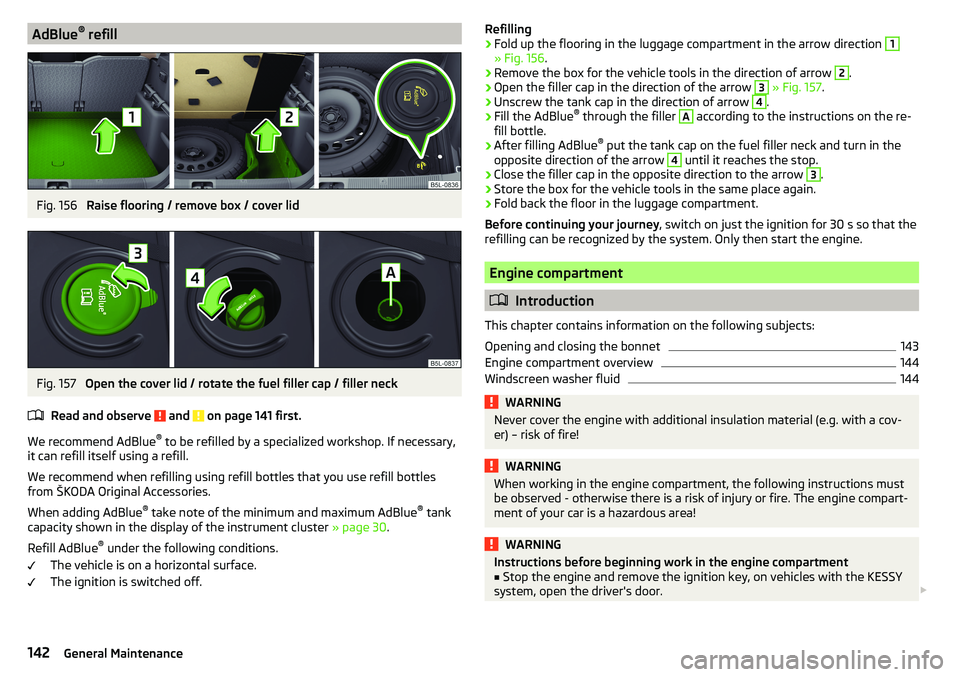
refillFig. 156
Raise flooring / remove box / cover lid
Fig. 157
Open the cover lid / rotate the fuel filler cap / filler neck
Read and observe
and on page 141 first.
We recommend AdBlue ®
to be refilled by a specialized workshop. If necessary,
it can refill itself using a refill.
We recommend when refilling using refill bottles that you use refill bottles
from ŠKODA Original Accessories.
When adding AdBlue ®
take note of the minimum and maximum AdBlue ®
tank
capacity shown in the display of the instrument cluster » page 30.
Refill AdBlue ®
under the following conditions.
The vehicle is on a horizontal surface.
The ignition is switched off.
Refilling›Fold up the flooring in the luggage compartment in the arrow direction 1
» Fig. 156 .
›
Remove the box for the vehicle tools in the direction of arrow
2
.
›
Open the filler cap in the direction of the arrow
3
» Fig. 157 .
›
Unscrew the tank cap in the direction of arrow
4
.
›
Fill the AdBlue ®
through the filler
A
according to the instructions on the re-
fill bottle.
›
After filling AdBlue ®
put the tank cap on the fuel filler neck and turn in the
opposite direction of the arrow
4
until it reaches the stop.
›
Close the filler cap in the opposite direction to the arrow
3
.
›
Store the box for the vehicle tools in the same place again.
›
Fold back the floor in the luggage compartment.
Before continuing your journey , switch on just the ignition for 30 s so that the
refilling can be recognized by the system. Only then start the engine.
Engine compartment
Introduction
This chapter contains information on the following subjects:
Opening and closing the bonnet
143
Engine compartment overview
144
Windscreen washer fluid
144WARNINGNever cover the engine with additional insulation material (e.g. with a cov-
er) – risk of fire!WARNINGWhen working in the engine compartment, the following instructions must
be observed - otherwise there is a risk of injury or fire. The engine compart-
ment of your car is a hazardous area!WARNINGInstructions before beginning work in the engine compartment■Stop the engine and remove the ignition key, on vehicles with the KESSY
system, open the driver's door. 142General Maintenance
Page 149 of 200
CAUTION■If the expansion tank is empty, do not top up with coolant. The system could
aerate - There is a risk of engine damage! Stop driving! Switch off the en-
gine and seek assistance from a specialist garage.■
Do not fill the coolant above the mark
A
» Fig. 162 . The coolant could, when
heated, be expelled from the cooling system - There is a risk of damage to the
engine parts.
■
If it is not possible to add coolant,
stop driving! Switch off the engine and
seek assistance from a specialist garage.
■
A coolant additive which does not correspond to the correct specification can
reduce the anti-corrosion effect of the cooling system - risk of damage to the
cooling system and the engine.
■
If non-distilled (non-demineralised) water has been used to top up, the cool-
ant should be replaced by a specialist garage - There is a risk of engine dam-
age.
■
A loss of coolant indicates leaks in the cooling system -There is a risk of en-
gine damage. Top up with coolant and then seek assistance from a specialist
garage.
Note
Too low coolant level is indicated in the instrument cluster by the warning
light and shown by the message » page 32. We still recommend inspecting
the coolant level directly at the reservoir from time to time.
Brake fluid
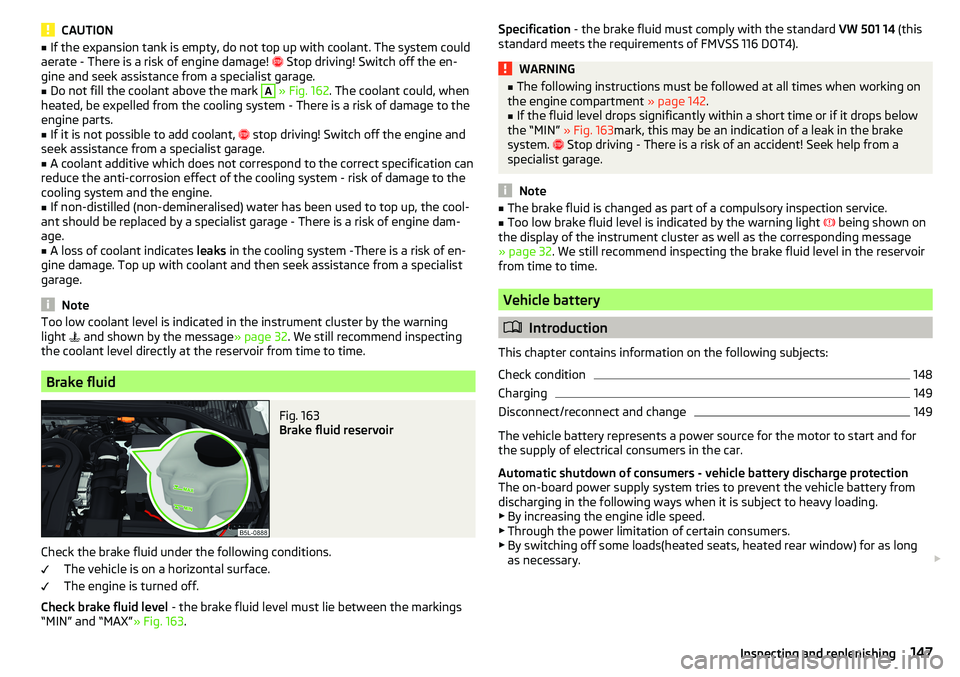
Fig. 163
Brake fluid reservoir
Check the brake fluid under the following conditions.
The vehicle is on a horizontal surface.
The engine is turned off.
Check brake fluid level - the brake fluid level must lie between the markings
“MIN” and “MAX” » Fig. 163.
Specification - the brake fluid must comply with the standard VW 501 14 (this
standard meets the requirements of FMVSS 116 DOT4).WARNING■ The following instructions must be followed at all times when working on
the engine compartment » page 142.■
If the fluid level drops significantly within a short time or if it drops below
the “MIN” » Fig. 163mark, this may be an indication of a leak in the brake
system.
Stop driving - There is a risk of an accident! Seek help from a
specialist garage.
Note
■ The brake fluid is changed as part of a compulsory inspection service.■Too low brake fluid level is indicated by the warning light being shown on
the display of the instrument cluster as well as the corresponding message
» page 32 . We still recommend inspecting the brake fluid level in the reservoir
from time to time.
Vehicle battery
Introduction
This chapter contains information on the following subjects:
Check condition
148
Charging
149
Disconnect/reconnect and change
149
The vehicle battery represents a power source for the motor to start and for the supply of electrical consumers in the car.
Automatic shutdown of consumers - vehicle battery discharge protection
The on-board power supply system tries to prevent the vehicle battery from
discharging in the following ways when it is subject to heavy loading. ▶ By increasing the engine idle speed.
▶ Through the power limitation of certain consumers.
▶ By switching off some loads(heated seats, heated rear window) for as long
as necessary.
147Inspecting and replenishing
Page 151 of 200
Battery discharge
If frequent short journeys are made, the vehicle battery does not recharge suf-
ficiently.
The battery capacity decreases at low temperatures.
If the vehicle is not used for longer than 3 to 4 weeks, disconnect the negative
terminal
of the battery or charge the battery completely with a very low
charging current.
Charging
Read and observe
and on page 148 first.
Only charge the battery when the ignition and all consumers are switched off.
Refer to the instructions of the charger manufacturer.
Charging
›
For vehicles withthe START-STOPsystem or aux. heating, connect the
ter-
minal of the charger on the battery’s pole, the
terminal of the charger to
the earth point of the engine » page 161.
›
For vehicles without the START-STOPsystem or aux. heating, connect the
charger terminals to the corresponding battery poles ( to
,
to
).
›
Plug the mains cable of the charger into the power socket and switch on the
device.
›
After charging has been successful: Switch off the charger and remove the
mains cable from the power socket.
›
Disconnect the terminals of the charger from the vehicle battery.
A charging current of 0.1 multiple of the total vehicle battery capacity (or low-
er) must be used until full charging is achieved.
WARNING■ When charging the vehicle battery, hydrogen is released - risk of explo-
sion. An explosion can be caused through sparking while unclamping or
loosening the cable plug.■
So-called“quick-charging” of the vehicle battery is dangerous and re-
quires a special charger and specialist knowledge. Therefore, have“Quick
loading” carried out by a specialist garage.
Disconnect/reconnect and change
Read and observe
and on page 148 first.
The new vehicle battery must have the same capacity, voltage, current and the
same size as the original Battery.
We recommend you have the battery replaced by a specialist garage.
›
To disconnect , switch off the ignition and disconnect the negative terminal
first
, then disconnect the positive terminal
.
›
When reconnecting the battery, reconnect the positive terminal
first, then
connect the negative terminal
.
After disconnecting and re-connecting the vehicle battery, the following func- tions or devices are partially or completely inoperative.
Function / deviceOperating measureWindows» page 55Panorama sliding/tilting roof» page 57Sun screen» page 57Time settings» page 39
CAUTION
■ Disconnect the battery only with the ignition and consumers turned off -
There is a risk of damaging the electrical system of the vehicle.■
Before disconnecting the battery, always close the electric windows and the
tilt/slide sunroof - otherwise the fitting units for these may malfunction.
■
Under no circumstances mix up the charging cables – There is a risk of fire.
Note
After disconnecting and reconnecting the vehicle battery, we recommend hav-
ing the vehicle checked by a specialist to ensure that the full functionality of
the vehicle is guaranteed.149Inspecting and replenishing
Page 160 of 200
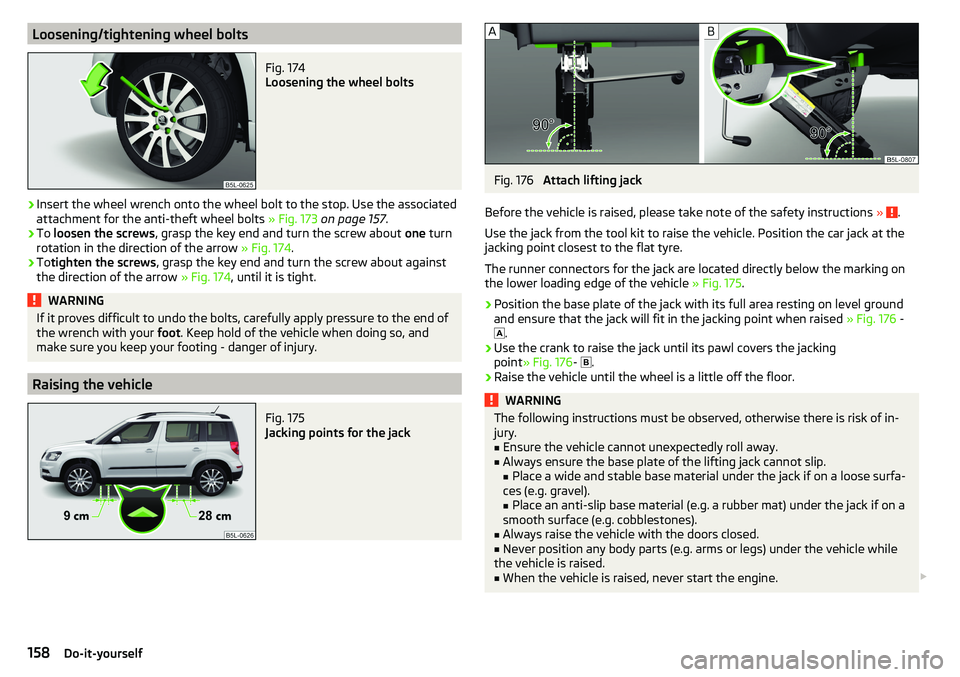
Loosening/tightening wheel boltsFig. 174
Loosening the wheel bolts
›
Insert the wheel wrench onto the wheel bolt to the stop. Use the associated
attachment for the anti-theft wheel bolts » Fig. 173 on page 157 .
›
To loosen the screws , grasp the key end and turn the screw about one turn
rotation in the direction of the arrow » Fig. 174.
›
Totighten the screws , grasp the key end and turn the screw about against
the direction of the arrow » Fig. 174, until it is tight.
WARNINGIf it proves difficult to undo the bolts, carefully apply pressure to the end of
the wrench with your foot. Keep hold of the vehicle when doing so, and
make sure you keep your footing - danger of injury.
Raising the vehicle
Fig. 175
Jacking points for the jack
Fig. 176
Attach lifting jack
Before the vehicle is raised, please take note of the safety instructions »
.
Use the jack from the tool kit to raise the vehicle. Position the car jack at the
jacking point closest to the flat tyre.
The runner connectors for the jack are located directly below the marking on
the lower loading edge of the vehicle » Fig. 175.
›
Position the base plate of the jack with its full area resting on level ground
and ensure that the jack will fit in the jacking point when raised » Fig. 176 -
.
›
Use the crank to raise the jack until its pawl covers the jacking
point » Fig. 176 -
.
›
Raise the vehicle until the wheel is a little off the floor.
WARNINGThe following instructions must be observed, otherwise there is risk of in-
jury.■
Ensure the vehicle cannot unexpectedly roll away.
■
Always ensure the base plate of the lifting jack cannot slip.
■ Place a wide and stable base material under the jack if on a loose surfa-
ces (e.g. gravel).
■ Place an anti-slip base material (e.g. a rubber mat) under the jack if on a
smooth surface (e.g. cobblestones).
■
Always raise the vehicle with the doors closed.
■
Never position any body parts (e.g. arms or legs) under the vehicle while
the vehicle is raised.
■
When the vehicle is raised, never start the engine.
158Do-it-yourself
Page 162 of 200
Preparing to use the breakdown kitRead and observe
on page 159 first.
For safety's sake, the following instructions must be observed before
undertaking a wheel repair on a road.
›
Park the vehicle as far as possible away from the traffic flow - choose a place
with a flat and firm surface.
›
Switch off the engine.
›
For vehicles with manual transmission , select 1. gear.
›
For vehicles with automatic transmission , place the selector lever in the P
position.
›
Firmly apply the handbrake.
›
Switch on the hazard warning lights and set up the warning triangle at the
prescribed distance.
›
Have all the occupants get out . While the repair is being carried out, the pas-
sengers should not stand on the road (instead they should remain behind a
crash barrier, for instance).
›
Uncouple any trailers.
Sealing and inflating tyres
Read and observe
on page 159 first.
Sealing
›
Unscrew the valve cap from the damaged tyre.
›
Insert the valve remover
2
» Fig. 177 on page 159 on the valve insert, so that
the valve insert fits into the slot of the valve remover.
›
Unscrew the valve insert and place it on a clean base (rag, paper etc.).
›
Forcefully shake bottle
10
» Fig. 177 on page 159 several times.
›
Firmly screw the inflation hose
3
onto the tyre inflater bottle
10
. The film on
the bottle cap is pierced.
›
Remove the plug from the inflation hose
3
and insert the bottle onto the
tyre valve.
›
Hold the bottle
10
with the bottom facing upwards and fill all of the sealing
agent from the tyre inflator bottle into the tyre.
›
Remove the filler plug from the tyre valve.
›
Screw in the valve insert with the valve remover
2
.
Inflating
›
Screw the tyre inflation hose
8
» Fig. 177 on page 159 firmly onto the tyre
valve.
› For vehicles with
manual transmission , set the lever in the neutral position.›On vehicles with automatic transmission , place the selector lever in the P
position.›
Check that the screw for the tire pressure reduction
6
is closed.
›
Start the engine.
›
Plug the connector
4
into 12 volt socket » page 79.
›
Switch on the air compressor with the ON and OFF switch
9
.
›
Once tyre inflation pressure of 2.0-2.5 bar has been reached, turn off the air
compressor. Maximum run time of 6 minutes » .
›
If you cannot reach an air pressure of 2.0 - 2.5 bar, unscrew the tyre inflation
hose
8
from the tyre valve.
›
Drive the vehicle 10 metres forwards or backwards to allow the sealing agent
to “distribute” in the tyre.
›
Firmly screw the tyre inflation hose
8
back onto the tyre valve and repeat
the inflation process.
›
Stick the sticker
1
» Fig. 177 on page 159 on the dashboard in the driver's
field of view.
At a tyre inflation pressure of 2.0–2.5 bar, the journey can be continued at a
maximum speed of 80 km/h or 50 mph.
WARNING■ If the tire does not inflate at least. 2.0 bar, the damage is too great. The
sealing agent cannot be used to seal the tyre. Stop driving! Seek help
from a specialist garage.■
The tyre inflation hose and air compressor may get hot as the tyre is be-
ing inflated – risk of burning.
CAUTION
Switch off the air compressor if it has been running for as much as 6 minutes –
There is a risk of damage to the compressor! Allow the air compressor to cool a
few minutes before switching it on again.
Information on driving with repaired tyres
Read and observe
on page 159 first.
The inflation pressure of the repaired tyre must be checked after driving for 10
minutes.
If the tyre inflation pressure is 1.3 bar or less
›
The tyre cannot be properly sealed with the breakdown kit.
Stop driving!
Seek help from a specialist garage.
160Do-it-yourself