oil SMART FORTWO 2016 User Guide
[x] Cancel search | Manufacturer: SMART, Model Year: 2016, Model line: FORTWO, Model: SMART FORTWO 2016Pages: 214, PDF Size: 4.93 MB
Page 140 of 214
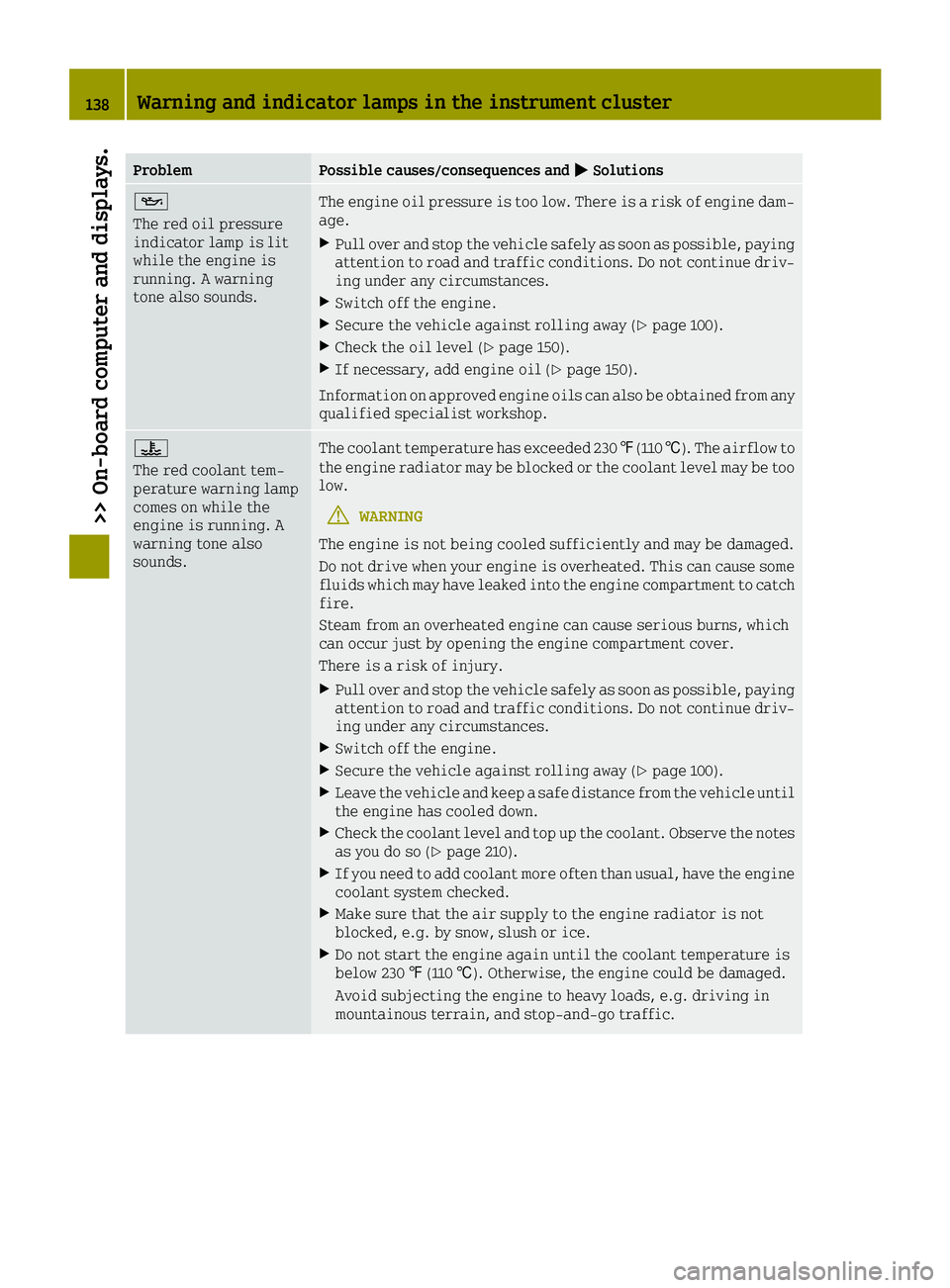
ProblemPossible causes/consequences and0050Solutions
00B3
The red oil pressure
indicator lamp is lit
while the engine is
running. A warning
tone also sounds.The engine oil pressure is too low. There is a risk of engine dam-
age.
XPull over and stop the vehicle safely as soon as possible, paying
attention to road and traffic conditions. Do not continue driv-
ing under any circumstances.
XSwitch off the engine.
XSecure the vehicle against rolling away (Ypage 100).
XCheck the oil level (Ypage 150).
XIf necessary, add engine oil (Ypage 150).
Information on approved engine oils can also be obtained from any
qualified specialist workshop.
00AC
The red coolant tem-
perature warning lamp
comes on while the
engine is running. A
warning tone also
sounds.The coolant temperature has exceeded 230 ‡(110 †). The airflow to
the engine radiator may be blocked or the coolant level may be too
low.
GWARNING
The engine is not being cooled sufficiently and may be damaged.
Do not drive when your engine is overheated. This can cause some
fluids which may have leaked into the engine compartment to catch
fire.
Steam from an overheated engine can cause serious burns, which
can occur just by opening the engine compartment cover.
There is a risk of injury.
XPull over and stop the vehicle safely as soon as possible, paying attention to road and traffic conditions. Do not continue driv-
ing under any circumstances.
XSwitch off the engine.
XSecure the vehicle against rolling away (Ypage 100).
XLeave the vehicle and keep a safe distance from the vehicle until
the engine has cooled down.
XCheck the coolant level and top up the coolant. Observe the notes
as you do so (Ypage 210).
XIf you need to add coolant more often than usual, have the engine
coolant system checked.
XMake sure that the air supply to the engine radiator is not
blocked, e.g. by snow, slush or ice.
XDo not start the engine again until the coolant temperature is
below 230 ‡(110 †). Otherwise, the engine could be damaged.
Avoid subjecting the engine to heavy loads, e.g. driving in
mountainous terrain, and stop-and-go traffic.
138Warning and indicator lamps in the instrument cluster
>> On-board computer and displays.
Page 151 of 214
Useful information
i
This Operator's Manual describes all
models and all standard and optional
equipment of your vehicle available at the
time of publication of the Operator's Man- ual. Country-specific differences are pos-
sible. Bear in mind that your vehicle may
not feature all functions described here.
This also applies to safety-relevant sys-
tems and functions.
iRead the information on qualified spe-
cialist workshops: (Ypage 20).
Checking service products
Engine compartment (rear)
Engine compartment cover
GWARNING
The engine compartment cover may become
very hot. If you remove the cover to do work on the engine compartment, there is a risk
of injury!
Allow the engine to cool down and then
remove the engine compartment cover after
cooling has taken place.
GWARNING
Combustion engines emit poisonous
exhaust gases such as carbon monoxide. If
the engine compartment cover has not been installed correctly, when the engine is
running, particularly if the vehicle is
moving, exhaust fumes could enter the
passenger compartment. There is a risk of
poisoning.
Always switch off the engine before remov-
ing the engine compartment cover. Make
sure that the engine compartment cover has
been installed correctly.
XTo open: apply the parking brake.
XSelect a gear.
XSwitch the ignition off.
XRemove the SmartKey from the ignition
lock.
XOpen the upper and lower tailgate
(Ypage 57).
XFor vehicles with the subwoofer: remove the
subwoofer (Ypage 149).
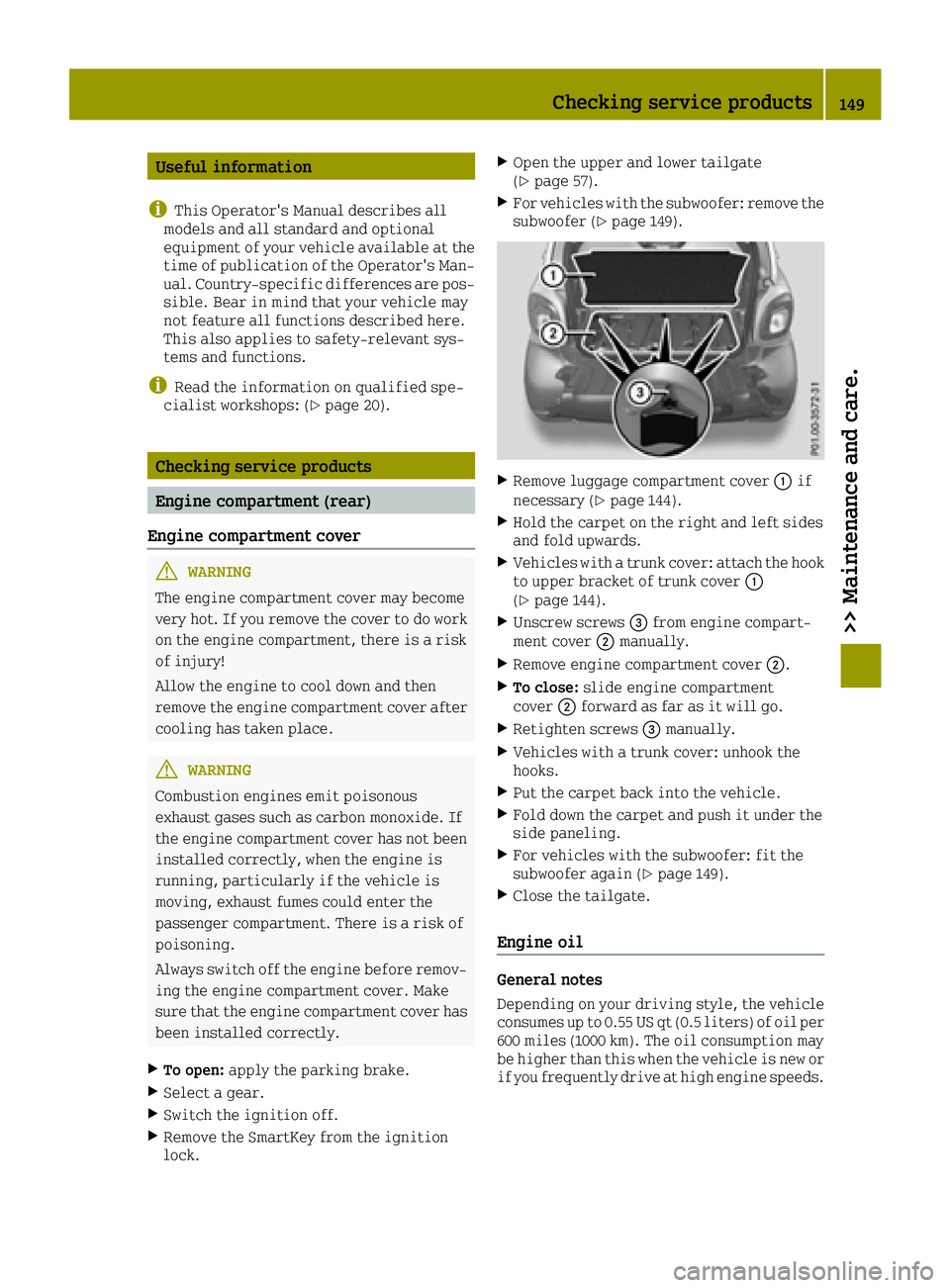
XRemove luggage compartment cover 0043if
necessary (Ypage 144).
XHold the carpet on the right and left sides
and fold upwards.
XVehicles with a trunk cover: attach the hook to upper bracket of trunk cover 0043
(
Ypage 144).
XUnscrew screws 0087from engine compart-
ment cover 0044manually.
XRemove engine compartment cover 0044.
XTo close:slide engine compartment
cover 0044forward as far as it will go.
XRetighten screws 0087manually.
XVehicles with a trunk cover: unhook the
hooks.
XPut the carpet back into the vehicle.
XFold down the carpet and push it under the
side paneling.
XFor vehicles with the subwoofer: fit the
subwoofer again (Ypage 149).
XClose the tailgate.
Engine oil
General notes
Depending on your driving style, the vehicle
consumes up to 0.55 US qt (0.5 liters) of oil per
600 miles (1000 km). The oil consumption may
be higher than this when the vehicle is new or
if you frequently drive at high engine speeds.
Checking service products149
>> Maintenance and care.
Z
Page 152 of 214
When checking the oil level:
Rpark the vehicle on a level surface.
Rthe engine should be switched off for
approximately 5 minutes if the engine is at
normal operating temperature
Rif the engine is not at normal operating
temperature, e.g. if the engine was only
started briefly, wait approximately
30 minutes before carrying out the meas-
urement
Checking the oil level using the oil dip-
stick
GWARNING
Certain components in the engine compart- ment, such as the engine, radiator and parts
of the exhaust system, can become very hot.
Working in the engine compartment poses a risk of injury.
Where possible, let the engine cool down
and touch only the components described in
the following.
GWARNING
Opening the hood when the engine is over-
heated or when there is a fire in the engine
compartment could expose you to hot gases
or other service products. There is a risk of injury.
Let an overheated engine cool down before
opening the hood. If there is a fire in the
engine compartment, keep the hood closed
and contact the fire department.
GWARNING
The engine compartment contains moving
components. Certain components, such as
the radiator fan, may continue to run or
start again suddenly when the ignition is
off. There is a risk of injury.
If you need to do any work inside the engine compartment:
Rswitch off the ignition
Rnever reach into the area where there is a
risk of danger from moving components,
such as the fan rotation area
Rremove jewelry and watches
Rkeep items of clothing and hair, for
example, away from moving parts
XOpen the engine compartment cover
(Ypage 149).
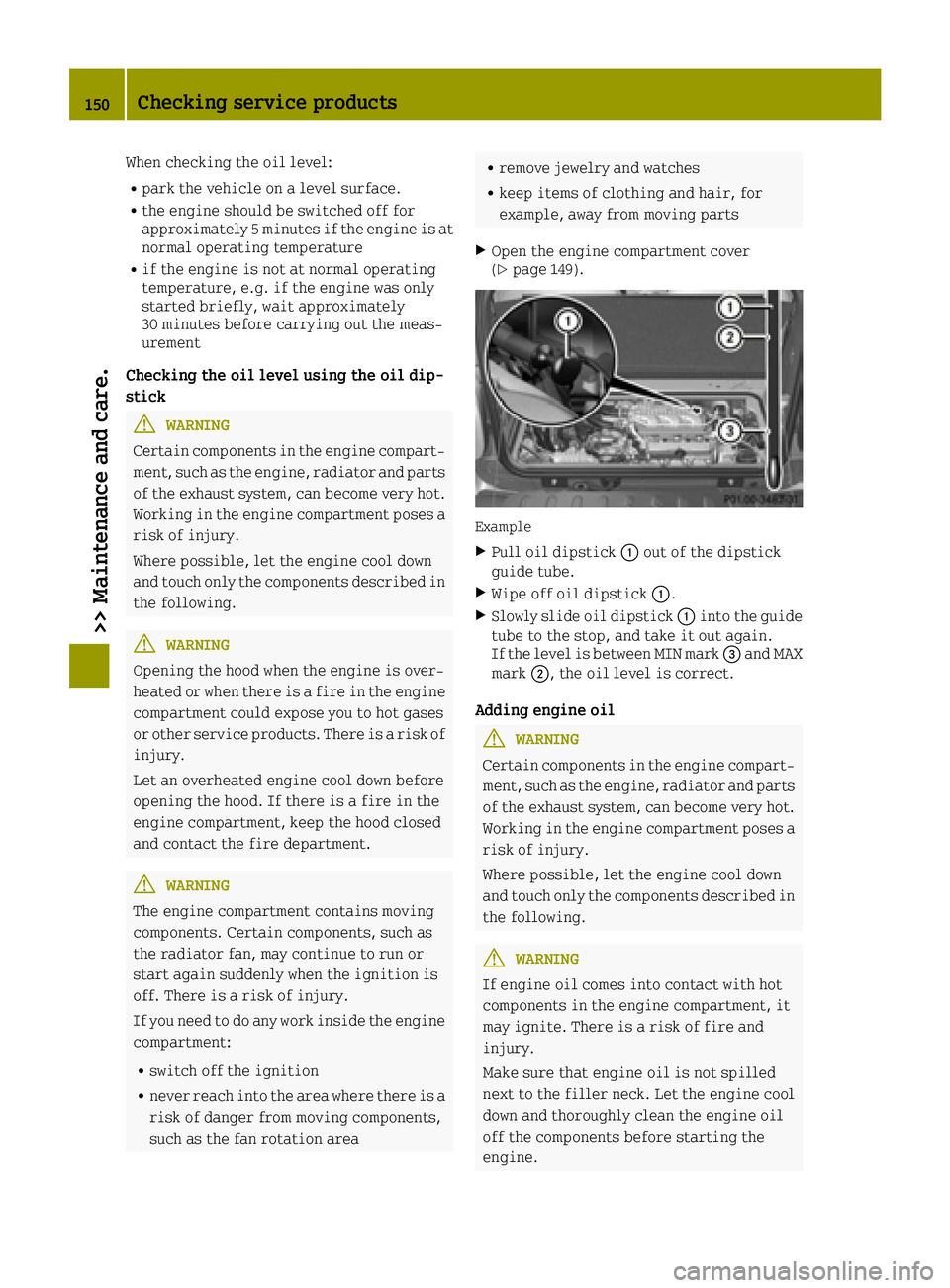
Example
XPull oil dipstick 0043out of the dipstick
guide tube.
XWipe off oil dipstick 0043.
XSlowly slide oil dipstick 0043into the guide
tube to the stop, and take it out again.
If the level is between MIN mark 0087and MAX
mark 0044, the oil level is correct.
Adding engine oil
GWARNING
Certain components in the engine compart- ment, such as the engine, radiator and parts
of the exhaust system, can become very hot.
Working in the engine compartment poses a risk of injury.
Where possible, let the engine cool down
and touch only the components described in
the following.
GWARNING
If engine oil comes into contact with hot
components in the engine compartment, it
may ignite. There is a risk of fire and
injury.
Make sure that engine oil is not spilled
next to the filler neck. Let the engine cool down and thoroughly clean the engine oil
off the components before starting the
engine.
150Checking service products
>> Maintenance and care.
Page 153 of 214
HEnvironmental note
When adding oil, take care not to spill any.
If oil enters the soil or waterways, it is
harmful to the environment.
!Do not add too much oil. adding too much
engine oil can result in damage to the
engine or to the catalytic converter. Have
excess engine oil siphoned off.
You will find further information on engine
oils you can use in the "Technical data" sec-
tion (
Ypage 209).
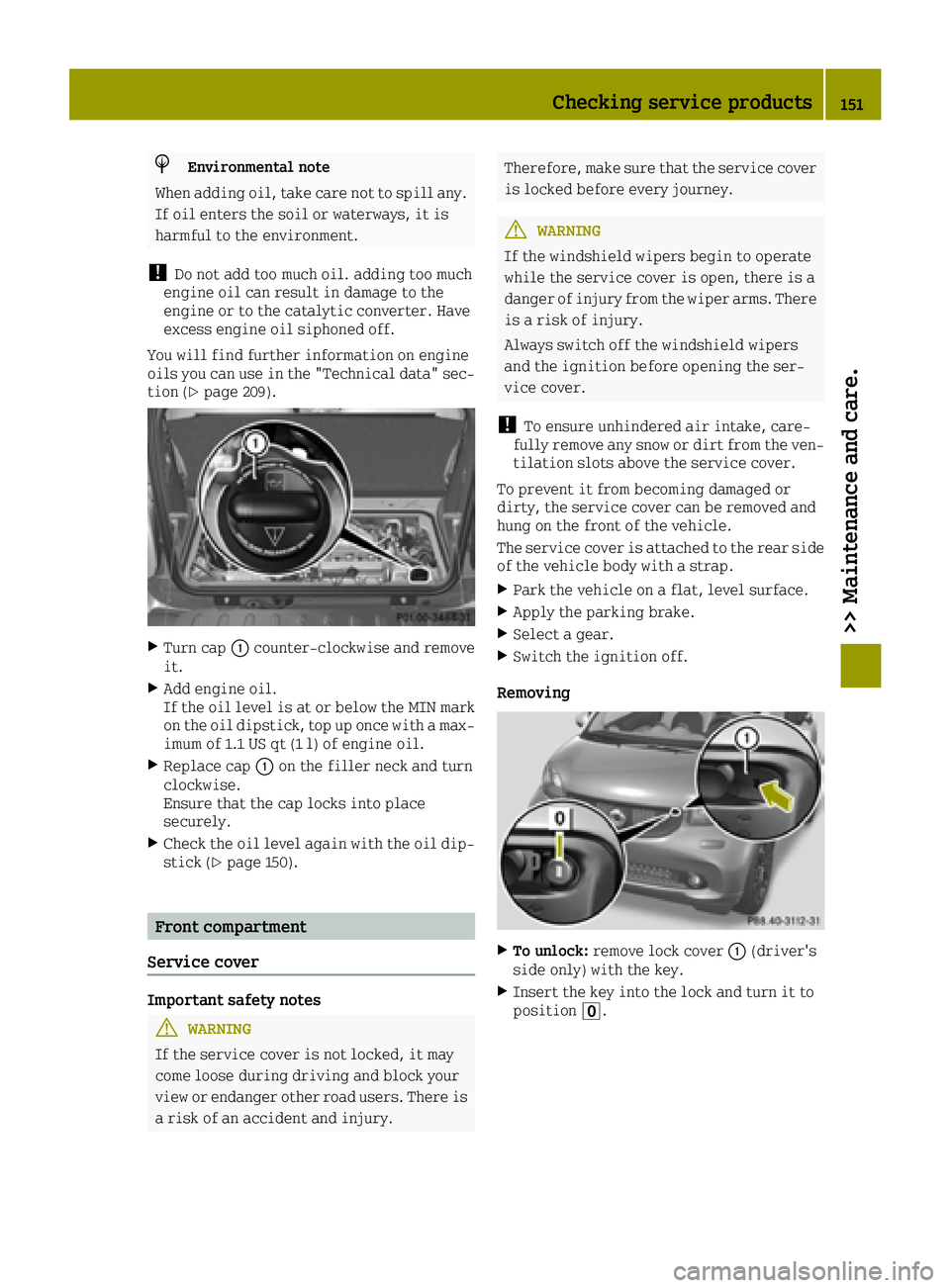
XTurn cap 0043counter-clockwise and remove
it.
XAdd engine oil.
If the oil level is at or below the MIN mark on the oil dipstick, top up once with a max-
imum of 1.1 US qt (1 l) of engine oil.
XReplace cap 0043on the filler neck and turn
clockwise.
Ensure that the cap locks into place
securely.
XCheck the oil level again with the oil dip- stick (Ypage 150).
Front compartment
Service cover
Important safety notes
GWARNING
If the service cover is not locked, it may
come loose during driving and block your
view or endanger other road users. There is
a risk of an accident and injury.
Therefore, make sure that the service cover
is locked before every journey.
GWARNING
If the windshield wipers begin to operate
while the service cover is open, there is a
danger of injury from the wiper arms. There
is a risk of injury.
Always switch off the windshield wipers
and the ignition before opening the ser-
vice cover.
!To ensure unhindered air intake, care-
fully remove any snow or dirt from the ven- tilation slots above the service cover.
To prevent it from becoming damaged or
dirty, the service cover can be removed and
hung on the front of the vehicle.
The service cover is attached to the rear side
of the vehicle body with a strap.
XPark the vehicle on a flat, level surface.
XApply the parking brake.
XSelect a gear.
XSwitch the ignition off.
Removing
XTo unlock: remove lock cover 0043(driver's
side only) with the key.
XInsert the key into the lock and turn it to
position 0092.
Checking service products151
>> Maintenance and care.
Z
Page 156 of 214
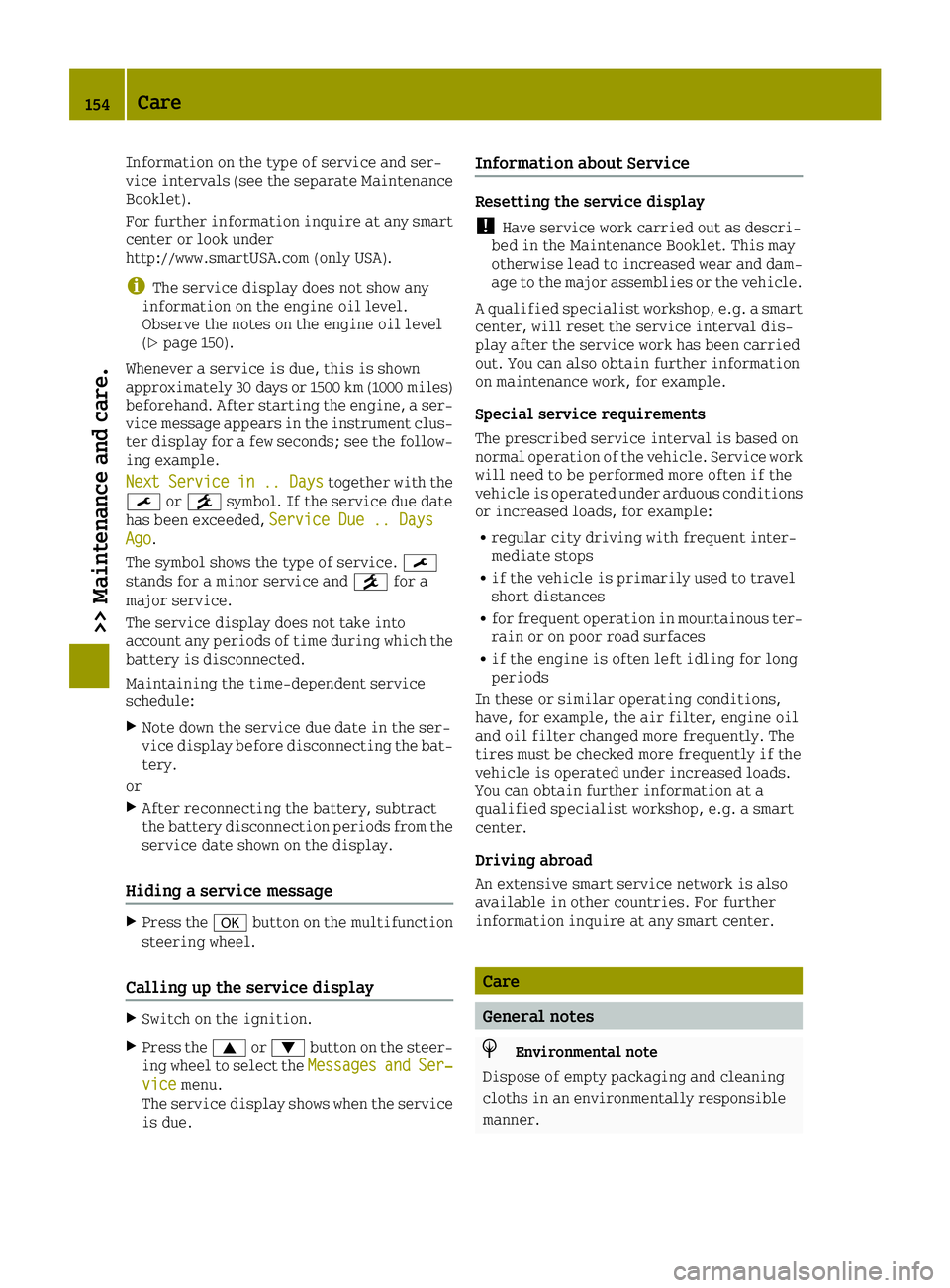
Information on the type of service and ser-
vice intervals (see the separate Maintenance
Booklet).
For further information inquire at any smart
center or look under
http://www.smartUSA.com (only USA).
iThe service display does not show any
information on the engine oil level.
Observe the notes on the engine oil level
(
Ypage 150).
Whenever a service is due, this is shown
approximately 30 days or 1500 km (1000 miles)
beforehand. After starting the engine, a ser-
vice message appears in the instrument clus-
ter display for a few seconds; see the follow-
ing example.
Next
Servicein.. Daystogether with the
0099 or009A symbol. If the service due date
has been exceeded, Service Due .. Days
Ago.
The symbol shows the type of service. 0099
stands for a minor service and 009Afor a
major service.
The service display does not take into
account any periods of time during which the
battery is disconnected.
Maintaining the time-dependent service
schedule:
XNote down the service due date in the ser-
vice display before disconnecting the bat-
tery.
or
XAfter reconnecting the battery, subtract
the battery disconnection periods from the
service date shown on the display.
Hiding a service message
XPress the 0076button on the multifunction
steering wheel.
Calling up the service display
XSwitch on the ignition.
XPress the 0063or0064 button on the steer-
ing wheel to select the MessagesandSer‐vicemenu.
The service display shows when the service
is due.
Information about Service
Resetting the service display
!Have service work carried out as descri-
bed in the Maintenance Booklet. This may
otherwise lead to increased wear and dam-
age to the major assemblies or the vehicle.
A qualified specialist workshop, e.g. a smart center, will reset the service interval dis-
play after the service work has been carried
out. You can also obtain further information
on maintenance work, for example.
Special service requirements
The prescribed service interval is based on
normal operation of the vehicle. Service work
will need to be performed more often if the
vehicle is operated under arduous conditions
or increased loads, for example:
Rregular city driving with frequent inter-
mediate stops
Rif the vehicle is primarily used to travel
short distances
Rfor frequent operation in mountainous ter-
rain or on poor road surfaces
Rif the engine is often left idling for long
periods
In these or similar operating conditions,
have, for example, the air filter, engine oil
and oil filter changed more frequently. The
tires must be checked more frequently if the
vehicle is operated under increased loads.
You can obtain further information at a
qualified specialist workshop, e.g. a smart
center.
Driving abroad
An extensive smart service network is also
available in other countries. For further
information inquire at any smart center.
Care
General notes
HEnvironmental note
Dispose of empty packaging and cleaning
cloths in an environmentally responsible
manner.
154Care
>> Maintenance and care.
Page 158 of 214
Do not use power washers with circular jet
nozzles to clean the vehicle. Have damaged
tires or chassis components replaced
immediately.
!Always maintain a distance of at least
11.8 in (30 cm) between the vehicle and the
power washer nozzle. Information about the
correct distance is available from the
equipment manufacturer.
Move the power washer nozzle around when
cleaning your vehicle.
Do not aim directly at any of the following:
Rtires
Rdoor gaps, roof gaps, joints, etc.
Relectrical components
Rbattery
Rconnectors
Rlights
Rseals
Rtrim
Rventilation slots
Damaged seals or electrical components
can lead to leaks or failures.
Cleaning the paintwork
!Do not affix:
Rstickers
Rfilms
Rmagnetic plates or similar items
to painted surfaces. You could otherwise
damage the paintwork.
XRemove dirt immediately, where possible,
while avoiding rubbing too hard.
XSoak insect remains with insect remover
and rinse off the treated areas afterwards.
XSoak bird droppings with water and rinse
off the treated areas afterwards.
XRemove coolant, brake fluid, tree resin,
oils, fuels and greases by rubbing gently
with a cloth soaked in petroleum ether or
lighter fluid.
XUse tar remover to remove tar stains.
XUse silicone remover to remove wax.
XUse a suitable touch-up stick, e.g. MB
Touch-Up Stick, to repair slight damage to
the paintwork quickly and provisionally. The following cannot always be completely
repaired:
Rscratches
Rcorrosive deposits
Rareas affected by corrosion
Rdamage caused by inadequate care
In such cases, visit a qualified specialist
workshop.
When water no longer forms beads on the paint surface, use the care product Paint Care,
which has been approved by smart. This is the
case approximately every three to five
months, depending on the climate conditions
and the care product used.
If the dirt has penetrated the paint surface or
if the paintwork has become dull, then the
paintwork should be cleaned. Use the care
product Paint Care, which has been approved
by smart to clean the paintwork.
Do not use these care products in the sun or on
the hood while the hood is hot.
Matte finish care
!Never polish the vehicle or the light alloy
wheels. Polishing causes the finish to
shine.
!The following may cause the paint to
become shiny and thus reduce the matte
effect:
Rstrong rubbing of the paintwork with
unsuitable materials
Rfrequent use of automatic car washes
Rwashing the vehicle in direct sunlight
!Never use paint cleaner, buffing or pol-
ishing products, or gloss preserver, e.g.
wax. These products are only suitable for
high-gloss surfaces. Their use on vehicles
with matte finish leads to considerable
surface damage (shiny, mottled areas).
Always have paintwork repairs carried out
at a qualified specialist workshop.
!Do not use wash programs with a hot wax
treatment under any circumstances.
Observe these notes if your vehicle has a
clear matte finish. This will help you to avoid
damage to the paintwork due to incorrect
treatment.
These notes also apply to light alloy wheels
with a clear matte finish.
156Care
>> Maintenance and care.
Page 161 of 214
!Do not affix the following to plastic sur-
faces:
Rstickers
Rfilms
Rscented oil bottles or similar items
You can otherwise damage the plastic.
!Do not allow cosmetics, insect repellent
or sunscreen to come into contact with the
plastic trim. This maintains the high-
quality look of the surfaces.
XWipe the plastic trim with a damp, lint-
free cloth, e.g. a microfiber cloth.
XHeavy soiling: use care products and clean-
ing agents recommended and approved by
smart.
The surface may change color temporarily.
Wait until the surface is dry again.
Cleaning the steering wheel and gear or
selector lever
XThoroughly wipe with a damp cloth or use
leather care agents that have been recom-
mended and approved by smart.
Cleaning the seat covers
General notes
!Do not use a microfiber cloth to clean
covers made out of real leather, artificial leather or DINAMICA. If used often, these
can damage the cover.
iNote that regular care is essential to
ensure that the appearance and comfort of
the covers is retained over time.
Genuine leather seat covers
Leather is a natural product.
It exhibits natural surface characteristics,
for example:
RDifferences in the texture
Rmarks caused by growth and injury
RSlight nuances of color
These are characteristics of leather and not
material defects.
!To retain the natural appearance of the
leather, observe the following cleaning
instructions:
RClean genuine leather covers carefully
with a damp cloth and then wipe the cov-
ers down with a dry cloth.
RMake sure that the leather does not
become soaked. It may otherwise become
rough and cracked.
ROnly use leather care agents that have
been recommended by smart. You can
obtain these from a qualified specialist
workshop.
Seat covers of other materials
!Observe the following when cleaning:
Rclean artificial leather covers with a
cloth moistened with a solution contain-
ing 1% detergent (e.g. dish washing liq-
uid).
Rclean cloth covers with a microfiber
cloth moistened with a solution contain-
ing 1% detergent (e.g. dish washing liq-
uid). Rub carefully and always wipe
entire seat sections to avoid leaving
visible lines. Leave the seat to dry
afterwards. Cleaning results depend on
the type of dirt and how long it has been
there.
Rclean DINAMICA covers with a damp cloth.
Make sure that you wipe entire seat sec-
tions to avoid leaving visible lines.
Cleaning the seat belts
GWARNING
Seat belts can become severely weakened if bleached or dyed. This could cause the seat
belts to tear or fail, for instance, in the
event of an accident. This poses an
increased risk of injury or fatal injury.
Never bleach or dye the seat belts.
!Do not clean the seat belts using chemical
cleaning agents. Do not dry the seat belts by
heating at temperatures above 176 ‡(80 †)
or in direct sunlight.
XUse clean, lukewarm water and soap solu-
tion.
Care159
>> Maintenance and care.
Z
Page 165 of 214
XTurn the key to position1in the ignition
lock (Ypage 87).
XPress on/off switch 0084on tire inflation
compressor 0044toI.
The tire inflation compressor is switched
on. The tire is inflated.
iFirst, tire sealant is pumped into the
tire. The pressure can briefly rise to
approximately 600 kPa (6.0 bar/86 psi).
Do not switch off the tire inflation com-
pressor during this phase.
XLet the tire inflation compressor run for a
maximum of 15 minutes. The tire should then
have attained a pressure of at least 180 kPa
(1.8 bar/26 psi).
If a tire pressure of 180 kPa (1.8 bar/26 psi) is
achieved after a maximum of 15 minutes, see
"Tire pressure is achieved" (
Ypage 163).
If a tire pressure of 180 kPa (1.8 bar/26 psi)
has not been achieved after a maximum of
15 minutes, see "Tire pressure is not ach-
ieved" (
Ypage 163).
iIf tire sealant leaks out, allow it to dry. It
can then be removed like a layer of film.
If your clothes are soiled with tire sealant,
have them cleaned with perchloroethylene
at a dry cleaner as soon as possible.
Tire pressure not reached
If a tire pressure of 180 kPa (1.8 bar/26 psi)
has not been achieved after a maximum of
10 minutes:
XSwitch off the tire inflation compressor.
XUnscrew the filler hose from the valve of
the faulty tire.
XVery slowly drive forwards or reverse
approximately 30 ft (10 m).
XPump up the tire again.
After a maximum of 10 minutes, the tire
pressure must be at least 180 kPa (1.8 bar/
26 psi).
GWARNING
If the required tire pressure is not reached after the specified time, the tire is too
badly damaged. The tire sealant cannot
repair the tire in this instance. Damaged
tires and a tire pressure that is too low can
significantly impair the vehicle's braking
and driving characteristics. There is a
risk of accident.
Do not continue driving. Contact a quali-
fied specialist workshop.
Tire pressure reached
GWARNING
A tire temporarily sealed with tire sealant impairs the driving characteristics and is
not suitable for higher speeds. There is a
risk of accident.
You should therefore adapt your driving
style accordingly and drive carefully. Do
not exceed the specified maximum speed
with a tire that has been repaired using
tire sealant.
The maximum speed for a tire sealed with tire
sealant is 50 mph (80 km/h). The 50 mph
(80 km/h) maximum speed sticker must be
affixed to the instrument cluster within the
driver's field of vision.
!After use, excess tire sealant may run out
of the filler hose. This could cause stains.
Therefore, place the filler hose in the
plastic bag that contained the TIREFIT kit.
HEnvironmental note
Have the used tire sealant bottle disposed
of professionally, e.g. at a qualified spe-
cialist workshop.
If a tire pressure of 180 kPa (1.8 bar/26 psi)
has been achieved after 10 minutes:
XSwitch off the tire inflation compressor.
XUnscrew the filler hose from the valve of
the faulty tire.
XStow the tire sealant bottle and the tire
inflation compressor.
XPull away immediately.
XStop after driving for approximately
2 miles (3 km) and check the tire pressure
with the tire inflation compressor.
The tire pressure must now be at least
130 kPa (1.3 bar/19 psi).
Flat tire163
>> Breakdown assistance.
Z
Page 197 of 214
Rim
This is the part of the wheel on which the tire
is mounted.
GAWR (Gross Axle Weight Rating)
The GAWR is the maximum gross axle weight
rating. The actual load on an axle must never
exceed the gross axle weight rating. The
gross axle weight rating can be found on the
vehicle identification plate on the B-pillar
on the driver's side.
Speed rating
The speed rating is part of the tire identi-
fication. It specifies the speed range for
which the tire is approved.
GVW (Gross Vehicle Weight)
The gross vehicle weight includes the weight
of the vehicle including fuel, tools, the spare
wheel, accessories installed, occupants, lug-
gage and the drawbar noseweight, if appli-
cable. The gross vehicle weight must not
exceed the gross vehicle weight rating GVWR
as specified on the vehicle identification
plate on the B-pillar on the driver's side.
GVWR (Gross Vehicle Weight Rating)
The GVWR is the maximum permissible gross
weight of a fully loaded vehicle (the weight of
the vehicle including all accessories, occu-
pants, fuel, luggage and the drawbar nose-
weight, if applicable). The gross vehicle
weight rating is specified on the vehicle
identification plate on the B-pillar on the
driver's side.
Maximum loaded vehicle weight
The maximum weight is the sum of:
Rthe curb weight of the vehicle
Rthe weight of the accessories
Rthe load limit
Rthe weight of the factory installed optional
equipment
Kilopascal (kPa)
Metric unit for tire pressure. 6.9 kPa corre-
sponds to 1 psi. Another unit for tire pressure
is bar. 100 kilopascals (kPa) are the equiva-
lent of 1 bar.
Load index
In addition to the load-bearing index, the
load index may also be imprinted on the side-
wall of the tire. This specifies the load-
bearing capacity more precisely.
Curb weight
The weight of a vehicle with standard equip-
ment including the maximum capacity of fuel,
oil and coolant. It also includes the air-con-
ditioning system and optional equipment if
these are installed in the vehicle, but does
not include passengers or luggage.
Maximum load rating
The maximum load rating is the maximum per-
missible weight in kilograms or pounds for
which a tire is approved.
Maximum permissible tire pressure
Maximum permissible tire pressure for one
tire.
Maximum load on one tire
Maximum load on one tire. This is calculated by dividing the maximum axle load of one axle
by two.
PSI (pounds per square inch)
A standard unit of measure for tire pressure.
Aspect ratio
Relationship between tire height and tire
width in percent.
Tire pressure
This is pressure inside the tire applying an
outward force to each square inch of the tire'ssurface. The tire pressure is specified in
pounds per square inch (psi), in kilopascal
(kPa) or in bar. The tire pressure should only
be corrected when the tires are cold.
Cold tire pressure
The tires are cold:
Rif the vehicle has been parked with the
tires out of direct sunlight for at least
three hours and
Rif the vehicle has not been driven further
than 1 mile (1.6 km)
All about wheels and tires195
>> Wheels and tires.
Z
Page 199 of 214
Direction of rotation
Tires with a specified direction of rotation
have additional benefits, e.g. if there is a
risk of hydroplaning. These advantages can
only be gained if the tires are fitted corre-
sponding to the direction of rotation.
An arrow on the sidewall of the tire indicates
its correct direction of rotation.
Storing wheels
Store wheels that are not being used in a cool,
dry and preferably dark place. Protect the
tires from oil, grease, gasoline and diesel.
Mounting a wheel
Preparing the vehicle
XMake sure that you have the appropriate
tire-changing tools. For further informa-
tion inquire at any smart center.
XStop the vehicle on solid, non-slippery and
level ground.
XApply the parking brake (Ypage 101).
XBring the front wheels into the straight-
ahead position.
XVehicles with automatic transmission:
shift the transmission to position P.
XVehicles with manual transmission:
depress the clutch pedal fully and engage
first or reverse gear.
XSwitch off the engine.
XRemove the SmartKey from the ignition
lock.
XAlso secure the vehicle against rolling
away.
Securing the vehicle to prevent it from
rolling away
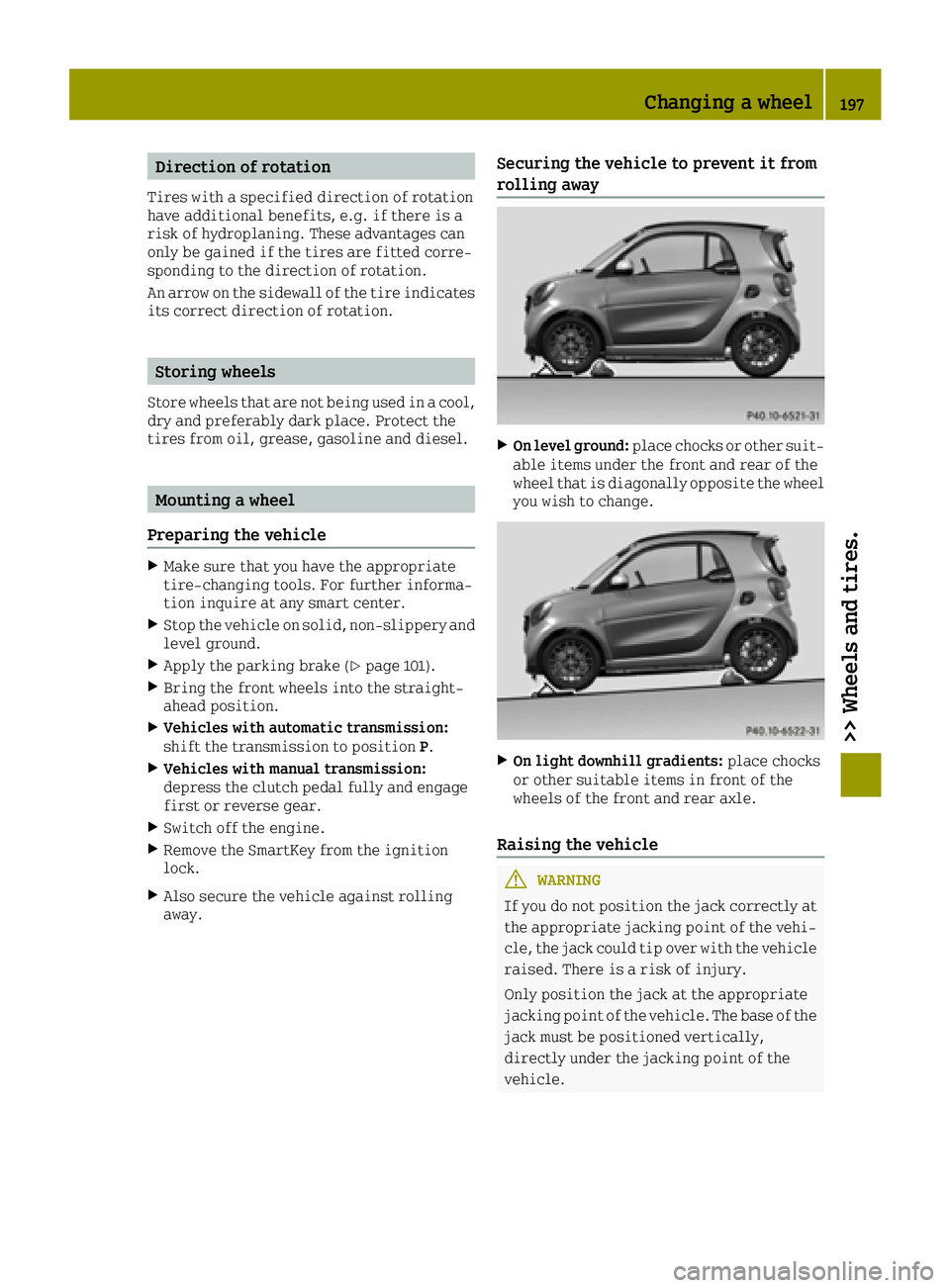
XOn level ground:place chocks or other suit-
able items under the front and rear of the
wheel that is diagonally opposite the wheel
you wish to change.
XOn light downhill gradients: place chocks
or other suitable items in front of the
wheels of the front and rear axle.
Raising the vehicle
GWARNING
If you do not position the jack correctly at
the appropriate jacking point of the vehi- cle, the jack could tip over with the vehicle
raised. There is a risk of injury.
Only position the jack at the appropriate
jacking point of the vehicle. The base of the jack must be positioned vertically,
directly under the jacking point of the
vehicle.
Changing a wheel197
>> Wheels and tires.
Z