windshield wipers SMART FORTWO 2016 User Guide
[x] Cancel search | Manufacturer: SMART, Model Year: 2016, Model line: FORTWO, Model: SMART FORTWO 2016Pages: 214, PDF Size: 4.93 MB
Page 76 of 214
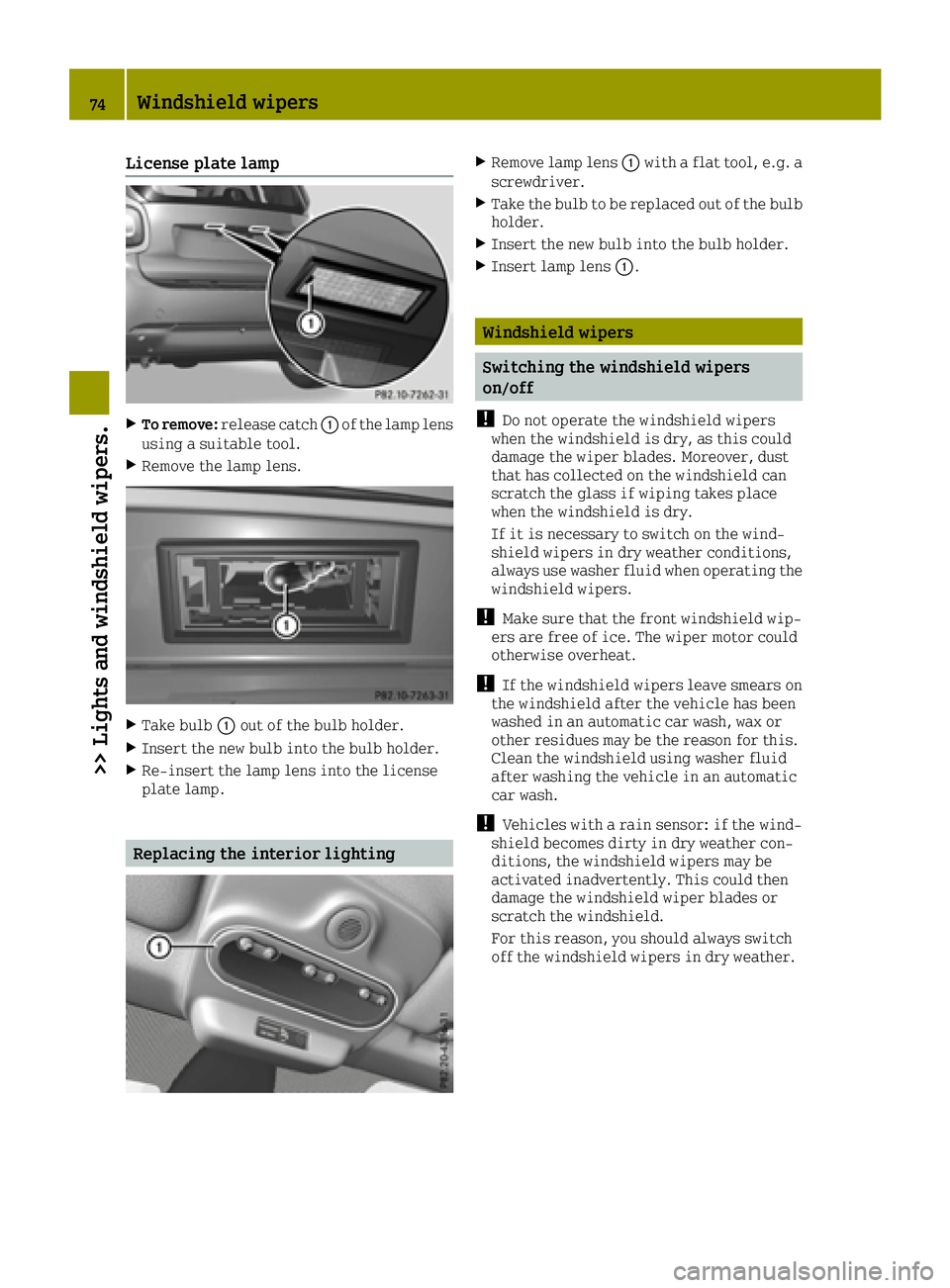
License plate lamp
XTo remove:release catch 0043of the lamp lens
using a suitable tool.
XRemove the lamp lens.
XTake bulb 0043out of the bulb holder.
XInsert the new bulb into the bulb holder.
XRe-insert the lamp lens into the license
plate lamp.
Replacing the interior lighting
XRemove lamp lens 0043with a flat tool, e.g. a
screwdriver.
XTake the bulb to be replaced out of the bulb
holder.
XInsert the new bulb into the bulb holder.
XInsert lamp lens 0043.
Windshield wipers
Switching the windshield wipers
on/off
!
Do not operate the windshield wipers
when the windshield is dry, as this could
damage the wiper blades. Moreover, dust
that has collected on the windshield can
scratch the glass if wiping takes place
when the windshield is dry.
If it is necessary to switch on the wind-
shield wipers in dry weather conditions,
always use washer fluid when operating the
windshield wipers.
!Make sure that the front windshield wip-
ers are free of ice. The wiper motor could
otherwise overheat.
!If the windshield wipers leave smears on
the windshield after the vehicle has been
washed in an automatic car wash, wax or
other residues may be the reason for this.
Clean the windshield using washer fluid
after washing the vehicle in an automatic
car wash.
!Vehicles with a rain sensor: if the wind-
shield becomes dirty in dry weather con-
ditions, the windshield wipers may be
activated inadvertently. This could then
damage the windshield wiper blades or
scratch the windshield.
For this reason, you should always switch
off the windshield wipers in dry weather.
74Windshield wipers
>> Lights and windshield wipers.
Page 77 of 214
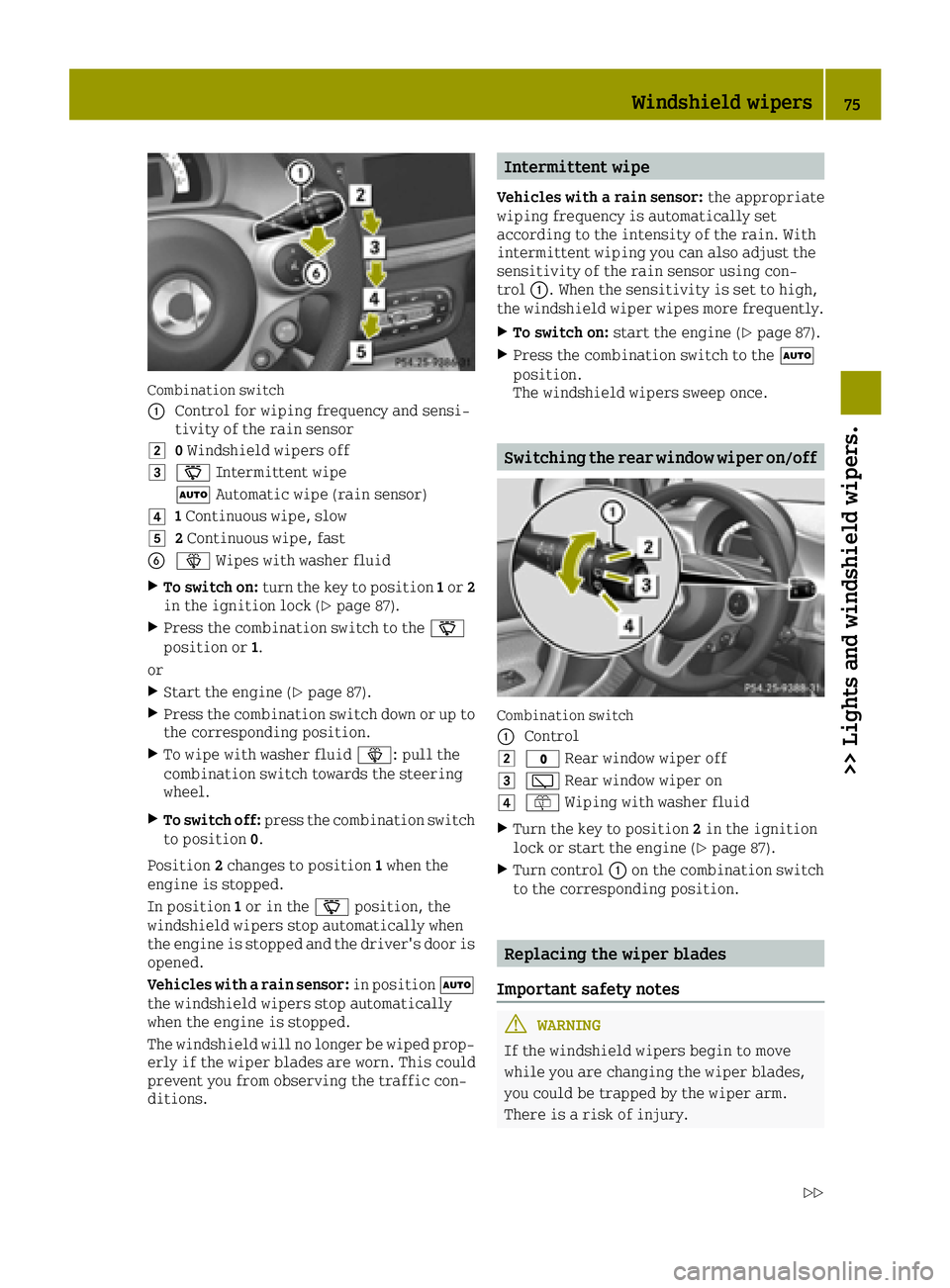
Combination switch
0043
Control for wiping frequency and sensi-
tivity of the rain sensor
00480Windshield wipers off
004900AE Intermittent wipe
0058 Automatic wipe (rain sensor)
004A1Continuous wipe, slow
004B2 Continuous wipe, fast
008400D4 Wipes with washer fluid
XTo switch on: turn the key to position 1or 2
in the ignition lock (Ypage 87).
XPress the combination switch to the 00AE
position or 1.
or
XStart the engine (Ypage 87).
XPress the combination switch down or up to
the corresponding position.
XTo wipe with washer fluid 00D4: pull the
combination switch towards the steering
wheel.
XTo switch off: press the combination switch
to position 0.
Position 2changes to position 1when the
engine is stopped.
In position 1or in the 00AEposition, the
windshield wipers stop automatically when
the engine is stopped and the driver's door is
opened.
Vehicles with a rain sensor: in position0058
the windshield wipers stop automatically
when the engine is stopped.
The windshield will no longer be wiped prop- erly if the wiper blades are worn. This could
prevent you from observing the traffic con-
ditions.
Intermittent wipe
Vehicles with a rain sensor: the appropriate
wiping frequency is automatically set
according to the intensity of the rain. With
intermittent wiping you can also adjust the
sensitivity of the rain sensor using con-
trol 0043. When the sensitivity is set to high,
the windshield wiper wipes more frequently.
XTo switch on: start the engine (Ypage 87).
XPress the combination switch to the 0058
position.
The windshield wipers sweep once.
Switching the rear window wiper on/off
Combination switch
0043
Control
0048003F Rear window wiper off
004900C5Rear window wiper on
004A00E2Wiping with washer fluid
XTurn the key to position 2in the ignition
lock or start the engine (Ypage 87).
XTurn control 0043on the combination switch
to the corresponding position.
Replacing the wiper blades
Important safety notes
GWARNING
If the windshield wipers begin to move
while you are changing the wiper blades,
you could be trapped by the wiper arm.
There is a risk of injury.
Windshield wipers75
>> Lights and windshield wipers.
Z
Page 78 of 214
Always switch off the windshield wipers
and ignition before changing the wiper
blades.
!To avoid damaging the wiper blades, make
sure that you touch only the wiper arm of the
wiper.
!Never open the service cover/tailgate if a
windshield wiper arm has been folded away
from the windshield/rear window.
Never fold a windshield wiper arm without
a wiper blade back onto the windshield/
rear window.
Hold the windshield wiper arm firmly when
you change the wiper blade. If you release
the wiper arm without a wiper blade and it
falls onto the windshield/rear window, the
windshield/rear window may be damaged by
the force of the impact.
smart recommends that you have the wiper
blades changed at a qualified specialist
workshop.
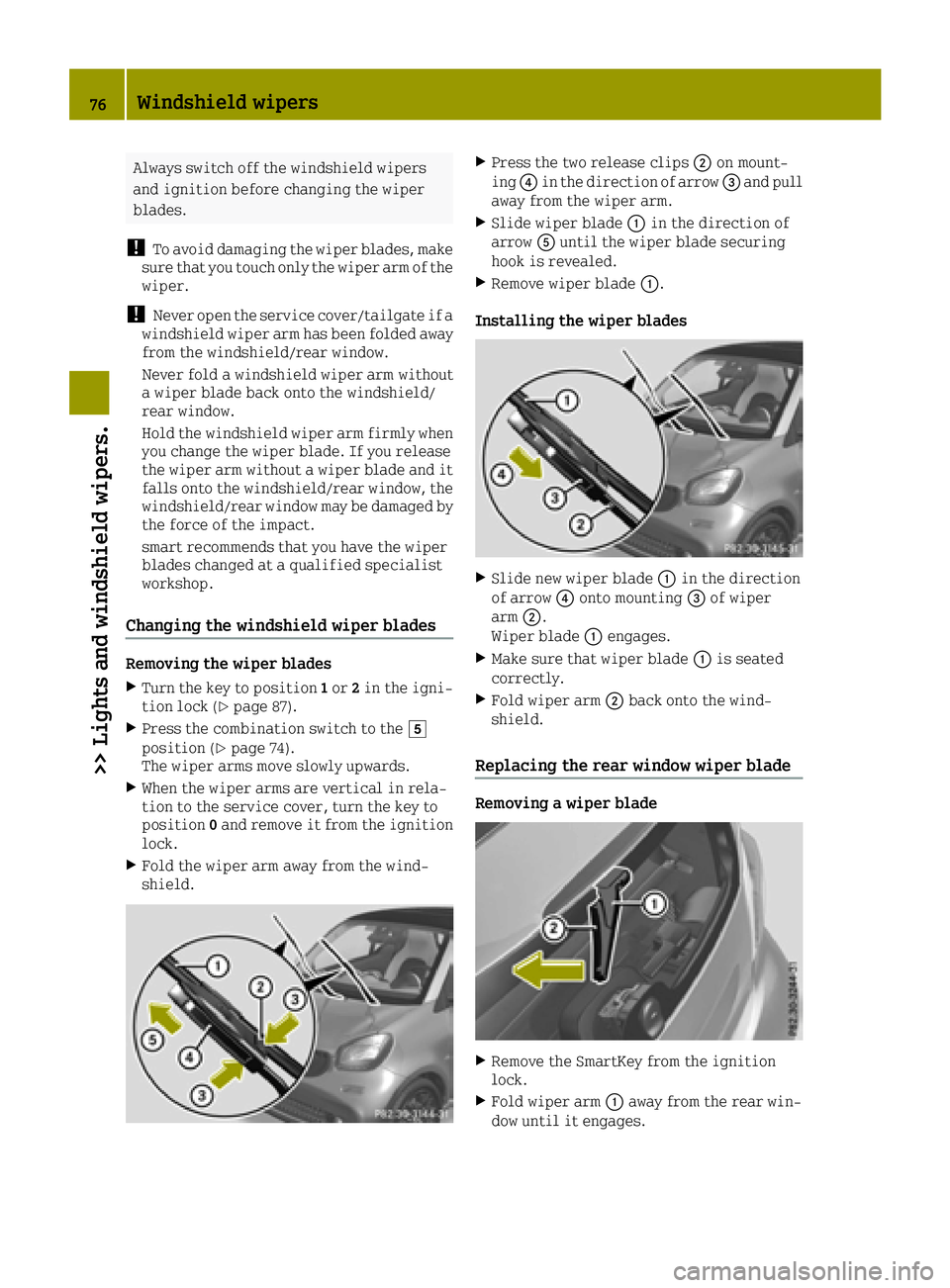
Changing the windshield wiper blades
Removing the wiper blades
XTurn the key to position 1or 2in the igni-
tion lock (Ypage 87).
XPress the combination switch to the 004B
position (Ypage 74).
The wiper arms move slowly upwards.
XWhen the wiper arms are vertical in rela-
tion to the service cover, turn the key to
position 0and remove it from the ignition
lock.
XFold the wiper arm away from the wind-
shield.
XPress the two release clips 0044on mount-
ing 0085in the direction of arrow 0087and pull
away from the wiper arm.
XSlide wiper blade 0043in the direction of
arrow 0083until the wiper blade securing
hook is revealed.
XRemove wiper blade 0043.
Installing the wiper blades
XSlide new wiper blade 0043in the direction
of arrow 0085onto mounting 0087of wiper
arm 0044.
Wiper blade 0043engages.
XMake sure that wiper blade 0043is seated
correctly.
XFold wiper arm 0044back onto the wind-
shield.
Replacing the rear window wiper blade
Removing a wiper blade
XRemove the SmartKey from the ignition
lock.
XFold wiper arm 0043away from the rear win-
dow until it engages.
76Windshield wipers
>> Lights and windshield wipers.
Page 79 of 214
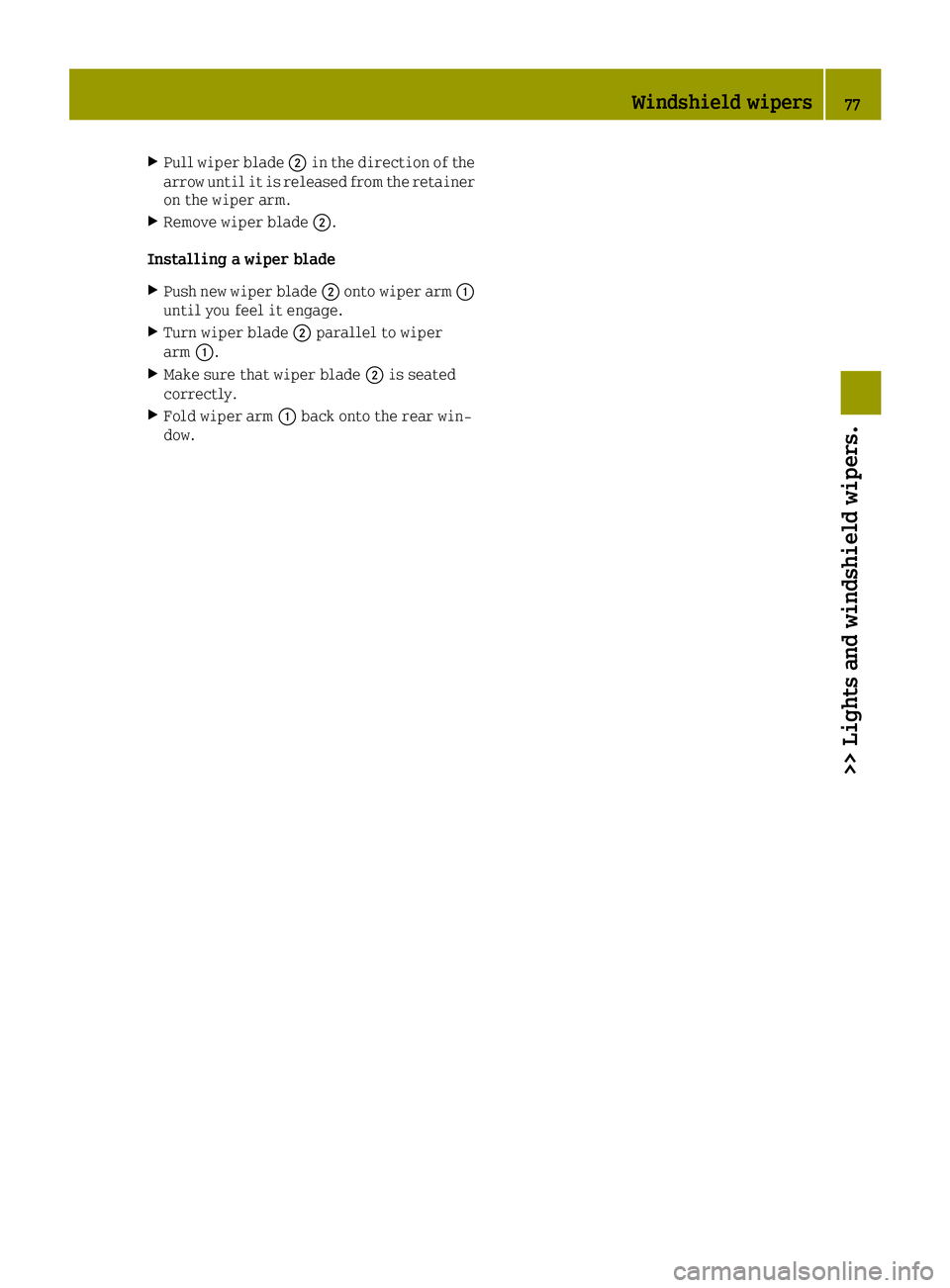
XPull wiper blade0044in the direction of the
arrow until it is released from the retainer
on the wiper arm.
XRemove wiper blade 0044.
Installing a wiper blade
XPush new wiper blade 0044onto wiper arm 0043
until you feel it engage.
XTurn wiper blade 0044parallel to wiper
arm 0043.
XMake sure that wiper blade 0044is seated
correctly.
XFold wiper arm 0043back onto the rear win-
dow.
Windshield wipers77
>> Lights and windshield wipers.
Z
Page 80 of 214
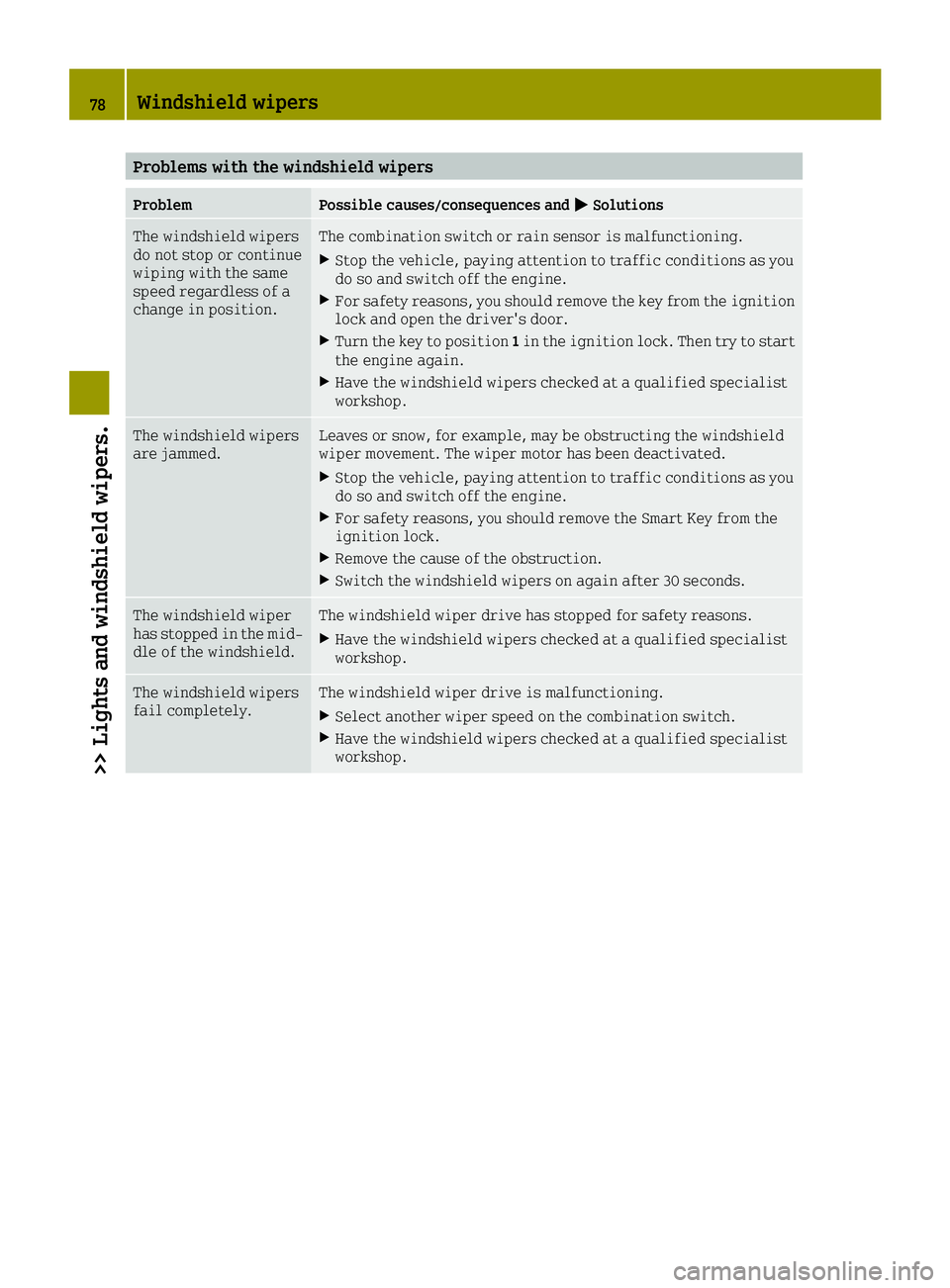
Problems with the windshield wipers
ProblemPossible causes/consequences and0050Solutions
The windshield wipers
do not stop or continue
wiping with the same
speed regardless of a
change in position.The combination switch or rain sensor is malfunctioning.
XStop the vehicle, paying attention to traffic conditions as you
do so and switch off the engine.
XFor safety reasons, you should remove the key from the ignition
lock and open the driver's door.
XTurn the key to position1in the ignition lock. Then try to start
the engine again.
XHave the windshield wipers checked at a qualified specialist
workshop.
The windshield wipers
are jammed.Leaves or snow, for example, may be obstructing the windshield
wiper movement. The wiper motor has been deactivated.
XStop the vehicle, paying attention to traffic conditions as you
do so and switch off the engine.
XFor safety reasons, you should remove the Smart Key from the
ignition lock.
XRemove the cause of the obstruction.
XSwitch the windshield wipers on again after 30 seconds.
The windshield wiper
has stopped in the mid-
dle of the windshield.The windshield wiper drive has stopped for safety reasons.
XHave the windshield wipers checked at a qualified specialist
workshop.
The windshield wipers
fail completely.The windshield wiper drive is malfunctioning.
XSelect another wiper speed on the combination switch.
XHave the windshield wipers checked at a qualified specialist
workshop.
78Windshield wipers
>> Lights and windshield wipers.
Page 84 of 214
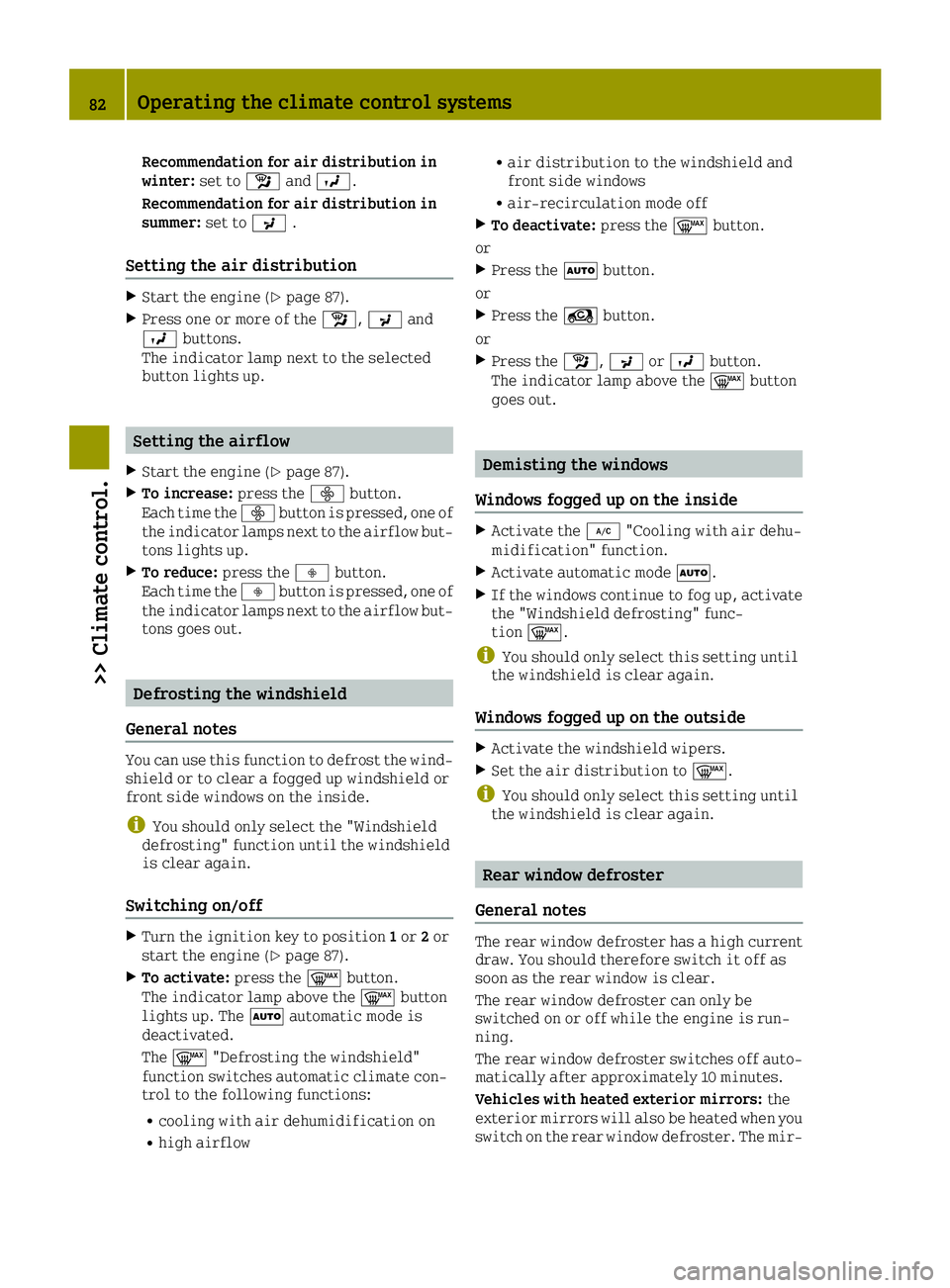
Recommendation for air distribution in
winter:set toÁand009B.
Recommendation for air distribution in
summer: set to009C.
Setting the air distribution
XStart the engine (Ypage 87).
XPress one or more of the Á,009Cand
009B buttons.
The indicator lamp next to the selected
button lights up.
Setting the airflow
XStart the engine (Ypage 87).
XTo increase: press the00F2button.
Each time the 00F2button is pressed, one of
the indicator lamps next to the airflow but-
tons lights up.
XTo reduce: press the00F3button.
Each time the 00F3button is pressed, one of
the indicator lamps next to the airflow but-
tons goes out.
Defrosting the windshield
General notes
You can use this function to defrost the wind-
shield or to clear a fogged up windshield or
front side windows on the inside.
iYou should only select the "Windshield
defrosting" function until the windshield
is clear again.
Switching on/off
XTurn the ignition key to position 1or 2or
start the engine (Ypage 87).
XTo activate: press the0064button.
The indicator lamp above the 0064button
lights up. The 0058automatic mode is
deactivated.
The 0064 "Defrosting the windshield"
function switches automatic climate con-
trol to the following functions:
Rcooling with air dehumidification on
Rhigh airflow
Rair distribution to the windshield and
front side windows
Rair-recirculation mode off
XTo deactivate: press the0064button.
or
XPress the 0058button.
or
XPress the Àbutton.
or
XPress the Á,009Cor009B button.
The indicator lamp above the 0064button
goes out.
Demisting the windows
Windows fogged up on the inside
XActivate the 005A"Cooling with air dehu-
midification" function.
XActivate automatic mode 0058.
XIf the windows continue to fog up, activate
the "Windshield defrosting" func-
tion 0064.
iYou should only select this setting until
the windshield is clear again.
Windows fogged up on the outside
XActivate the windshield wipers.
XSet the air distribution to 0064.
iYou should only select this setting until
the windshield is clear again.
Rear window defroster
General notes
The rear window defroster has a high current
draw. You should therefore switch it off as
soon as the rear window is clear.
The rear window defroster can only be
switched on or off while the engine is run-
ning.
The rear window defroster switches off auto-
matically after approximately 10 minutes.
Vehicles with heated exterior mirrors: the
exterior mirrors will also be heated when you
switch on the rear window defroster. The mir-
82Operating the climate control systems
>> Climate control.
Page 89 of 214
steering and the brake boosting effect. Youwill require considerably more effort to
steer and brake. There is a risk of an acci-
dent.
Do not switch off the ignition while driv-
ing.
GWARNING
If the parking brake has not been fully
released when driving, the parking brake
can:
Roverheat and cause a fire
Rlose its hold function.
There is a risk of fire and an accident.
Release the parking brake fully before
driving off.
!Do not warm up the engine with the vehicle
stationary. Drive off immediately. Avoid
high engine speeds and driving at full
throttle until the engine has reached its
operating temperature.
Only shift the automatic transmission to
the desired drive position when the vehi-
cle is stationary.
Where possible, avoid spinning the drive
wheels when pulling away on slippery
roads. You could otherwise damage the
drive train.
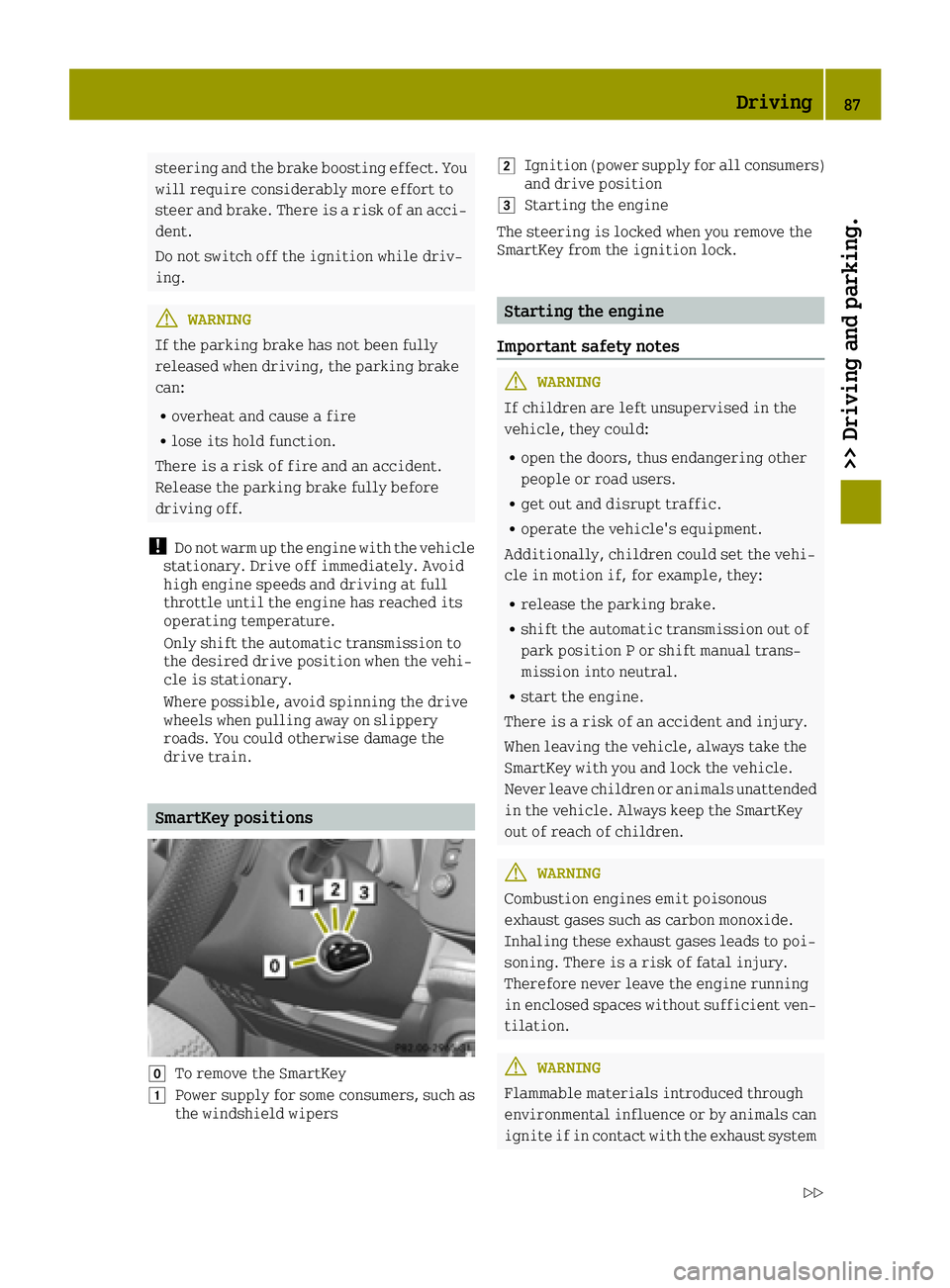
SmartKey positions
005ATo remove the SmartKey
0047Power supply for some consumers, such as
the windshield wipers
0048Ignition (power supply for all consumers)
and drive position
0049Starting the engine
The steering is locked when you remove the
SmartKey from the ignition lock.
Starting the engine
Important safety notes
GWARNING
If children are left unsupervised in the
vehicle, they could:
Ropen the doors, thus endangering other
people or road users.
Rget out and disrupt traffic.
Roperate the vehicle's equipment.
Additionally, children could set the vehi-
cle in motion if, for example, they:
Rrelease the parking brake.
Rshift the automatic transmission out of
park position P or shift manual trans-
mission into neutral.
Rstart the engine.
There is a risk of an accident and injury.
When leaving the vehicle, always take the
SmartKey with you and lock the vehicle.
Never leave children or animals unattended
in the vehicle. Always keep the SmartKey
out of reach of children.
GWARNING
Combustion engines emit poisonous
exhaust gases such as carbon monoxide.
Inhaling these exhaust gases leads to poi-
soning. There is a risk of fatal injury.
Therefore never leave the engine running
in enclosed spaces without sufficient ven- tilation.
GWARNING
Flammable materials introduced through
environmental influence or by animals can
ignite if in contact with the exhaust system
Driving87
>> Driving and parking.
Z
Page 132 of 214
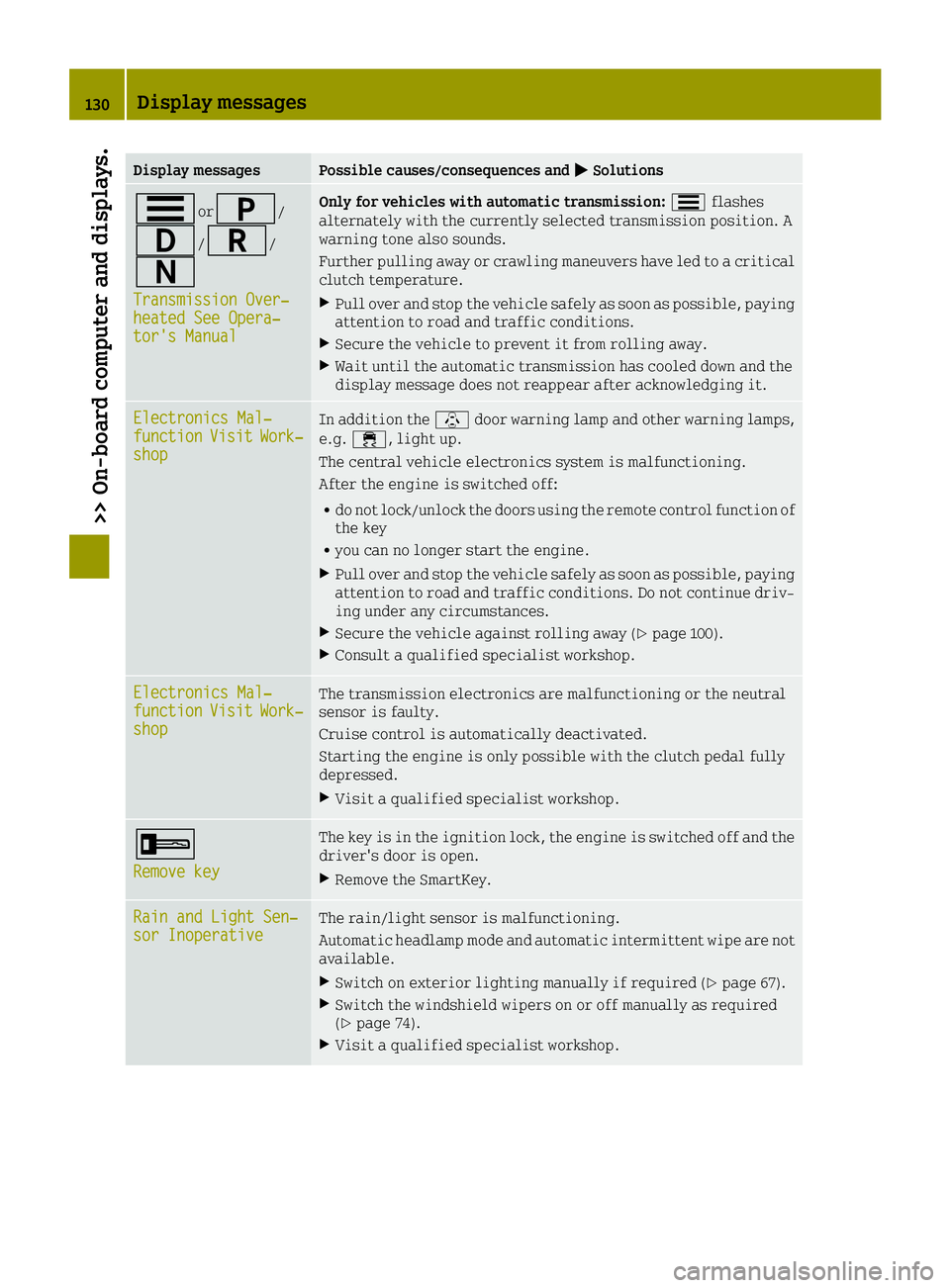
Display messagesPossible causes/consequences and0050Solutions
0079or0045/
003A/0046/
0044
Transmission Over‐heated See Opera‐tor's Manual
Only for vehicles with automatic transmission: 0079flashes
alternately with the currently selected transmission position. A
warning tone also sounds.
Further pulling away or crawling maneuvers have led to a critical
clutch temperature.
XPull over and stop the vehicle safely as soon as possible, paying
attention to road and traffic conditions.
XSecure the vehicle to prevent it from rolling away.
XWait until the automatic transmission has cooled down and the
display message does not reappear after acknowledging it.
Electronics Mal‐functionVisitWork‐shop
In addition the \door warning lamp and other warning lamps,
e.g. 00E5, light up.
The central vehicle electronics system is malfunctioning.
After the engine is switched off:
Rdo not lock/unlock the doors using the remote control function of
the key
Ryou can no longer start the engine.
XPull over and stop the vehicle safely as soon as possible, paying
attention to road and traffic conditions. Do not continue driv-
ing under any circumstances.
XSecure the vehicle against rolling away (Ypage 100).
XConsult a qualified specialist workshop.
Electronics Mal‐functionVisitWork‐shop
The transmission electronics are malfunctioning or the neutral
sensor is faulty.
Cruise control is automatically deactivated.
Starting the engine is only possible with the clutch pedal fully
depressed.
XVisit a qualified specialist workshop.
0039
Remove key
The key is in the ignition lock, the engine is switched off and the
driver's door is open.
XRemove the SmartKey.
Rain and Light Sen‐sor InoperativeThe rain/light sensor is malfunctioning.
Automatic headlamp mode and automatic intermittent wipe are not
available.
XSwitch on exterior lighting manually if required (Ypage 67).
XSwitch the windshield wipers on or off manually as required
(Ypage 74).
XVisit a qualified specialist workshop.
130Display messages
>> On-board computer and displays.
Page 153 of 214
HEnvironmental note
When adding oil, take care not to spill any.
If oil enters the soil or waterways, it is
harmful to the environment.
!Do not add too much oil. adding too much
engine oil can result in damage to the
engine or to the catalytic converter. Have
excess engine oil siphoned off.
You will find further information on engine
oils you can use in the "Technical data" sec-
tion (
Ypage 209).
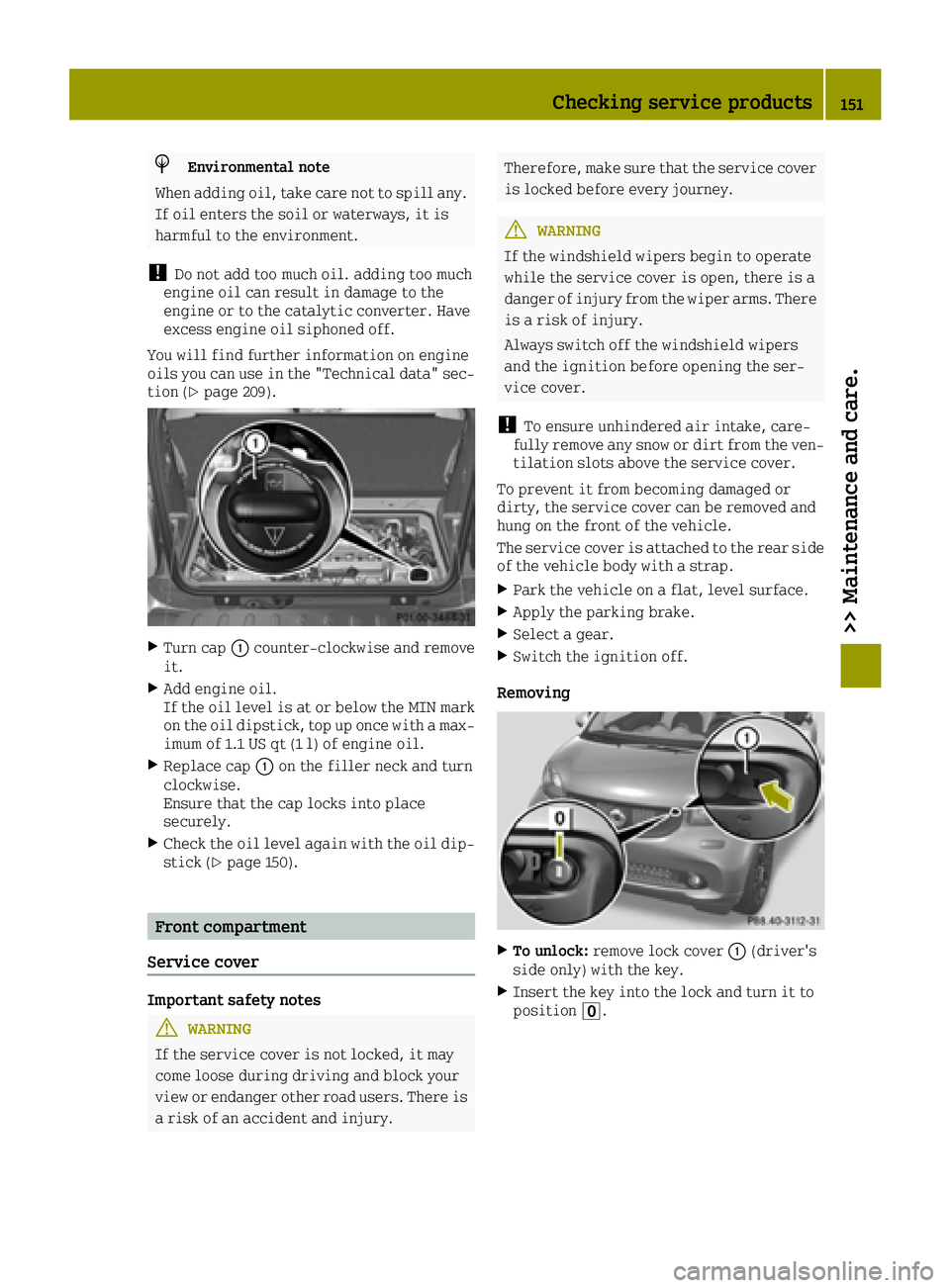
XTurn cap 0043counter-clockwise and remove
it.
XAdd engine oil.
If the oil level is at or below the MIN mark on the oil dipstick, top up once with a max-
imum of 1.1 US qt (1 l) of engine oil.
XReplace cap 0043on the filler neck and turn
clockwise.
Ensure that the cap locks into place
securely.
XCheck the oil level again with the oil dip- stick (Ypage 150).
Front compartment
Service cover
Important safety notes
GWARNING
If the service cover is not locked, it may
come loose during driving and block your
view or endanger other road users. There is
a risk of an accident and injury.
Therefore, make sure that the service cover
is locked before every journey.
GWARNING
If the windshield wipers begin to operate
while the service cover is open, there is a
danger of injury from the wiper arms. There
is a risk of injury.
Always switch off the windshield wipers
and the ignition before opening the ser-
vice cover.
!To ensure unhindered air intake, care-
fully remove any snow or dirt from the ven- tilation slots above the service cover.
To prevent it from becoming damaged or
dirty, the service cover can be removed and
hung on the front of the vehicle.
The service cover is attached to the rear side
of the vehicle body with a strap.
XPark the vehicle on a flat, level surface.
XApply the parking brake.
XSelect a gear.
XSwitch the ignition off.
Removing
XTo unlock: remove lock cover 0043(driver's
side only) with the key.
XInsert the key into the lock and turn it to
position 0092.
Checking service products151
>> Maintenance and care.
Z
Page 159 of 214
iThe vehicle should preferably be washed
by hand using a soft sponge, car shampoo
and plenty of water.
iUse only insect remover and car shampoo
from the range of approved smart care
products.
Cleaning the panoramic roof
!Only use cleaning agents or cleaning
cloths which are suitable for plastic light
lenses. Unsuitable cleaning agents or
cleaning cloths could scratch or damage
the plastic windows of the panoramic roof.
Do not use cleaning agents which contain
solvents.
XClean the plastic panes of the panoramic
roof using a wet sponge and a mild cleaning
agent, e.g. smart car shampoo, a commer-
cially available glass cleaner or cleaning
cloths.
Cleaning the wheels
GWARNING
The water jet from a circular jet nozzle
(dirt blasters) can cause invisible exte-
rior damage to the tires or chassis compo- nents. Components damaged in this way may
fail unexpectedly. There is a risk of an
accident.
Do not use power washers with circular jet
nozzles to clean the vehicle. Have damaged
tires or chassis components replaced
immediately.
!Do not use acidic wheel cleaning products
to remove brake dust. This could damage
wheel bolts and brake components.
!Do not park the vehicle for an extended
period straight after cleaning it, partic-
ularly after having cleaned the wheels with
wheel cleaner. Wheel cleaners could cause
increased corrosion of the brake discs and
brake pads/linings. For this reason, you
should drive for a few minutes after clean-
ing. Braking heats the brake discs and the
brake pads/linings, thus drying them. The
vehicle can then be parked.
Cleaning the windows
GWARNING
You could become trapped by the wind-
shield wipers if they start moving while
cleaning the windshield or wiper blades.
There is a risk of injury.
Always switch off the windshield wipers
and the ignition before cleaning the wind-
shield or wiper blades.
!Do not use dry cloths, abrasive products,
solvents or cleaning agents containing
solvents to clean the inside of the windows.
Do not touch the insides of the windows with
hard objects, e.g. an ice scraper or ring.
There is otherwise a risk of damaging the
windows.
!Clean the water drainage channels of the
windshield and the rear window at regular
intervals. Deposits such as leaves, petals
and pollen may under certain circumstan-
ces prevent water from draining away. This
can lead to corrosion damage and damage to
electronic components.
XClean the inside and outside of the windows
with a damp cloth and a cleaning agent that
is recommended and approved by smart.
Cleaning wiper blades
GWARNING
You could become trapped by the wind-
shield wipers if they start moving while
cleaning the windshield or wiper blades.
There is a risk of injury.
Always switch off the windshield wipers
and the ignition before cleaning the wind-
shield or wiper blades.
!Do not pull the wiper blade. Otherwise,
the wiper blade could be damaged.
!Do not clean wiper blades too often and do
not rub them too hard. Otherwise, the
graphite coating could be damaged. This
could cause wiper noise.
Care157
>> Maintenance and care.
Z