transmission SMART FORTWO 2016 Owner's Manual
[x] Cancel search | Manufacturer: SMART, Model Year: 2016, Model line: FORTWO, Model: SMART FORTWO 2016Pages: 214, PDF Size: 4.93 MB
Page 97 of 214
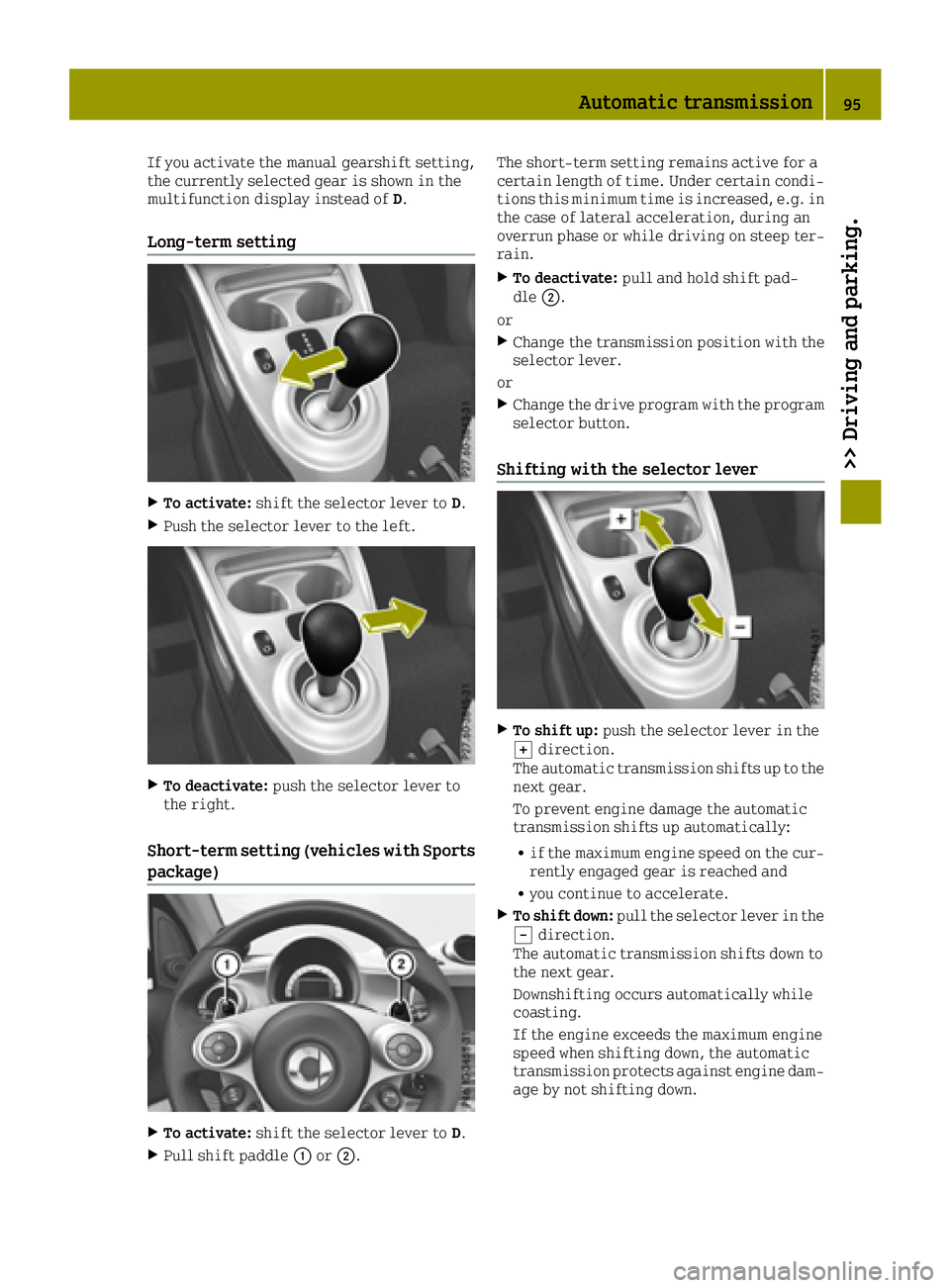
If you activate the manual gearshift setting,
the currently selected gear is shown in the
multifunction display instead ofD.
Long-term setting
XTo activate:shift the selector lever to D.
XPush the selector lever to the left.
XTo deactivate:push the selector lever to
the right.
Short-term setting (vehicles with Sports
package)
XTo activate: shift the selector lever to D.
XPull shift paddle0043or0044. The short-term setting remains active for a
certain length of time. Under certain condi-
tions this minimum time is increased, e.g. in
the case of lateral acceleration, during an
overrun phase or while driving on steep ter-
rain.
XTo deactivate:
pull and hold shift pad-
dle 0044.
or
XChange the transmission position with the
selector lever.
or
XChange the drive program with the program
selector button.
Shifting with the selector lever
XTo shift up: push the selector lever in the
0064 direction.
The automatic transmission shifts up to the
next gear.
To prevent engine damage the automatic
transmission shifts up automatically:
Rif the maximum engine speed on the cur-
rently engaged gear is reached and
Ryou continue to accelerate.
XTo shift down: pull the selector lever in the
0058 direction.
The automatic transmission shifts down to
the next gear.
Downshifting occurs automatically while
coasting.
If the engine exceeds the maximum engine
speed when shifting down, the automatic
transmission protects against engine dam-
age by not shifting down.
Automatic transmission95
>> Driving and parking.
Z
Page 98 of 214
Shifting with shift paddles (vehicles
with Sports package)
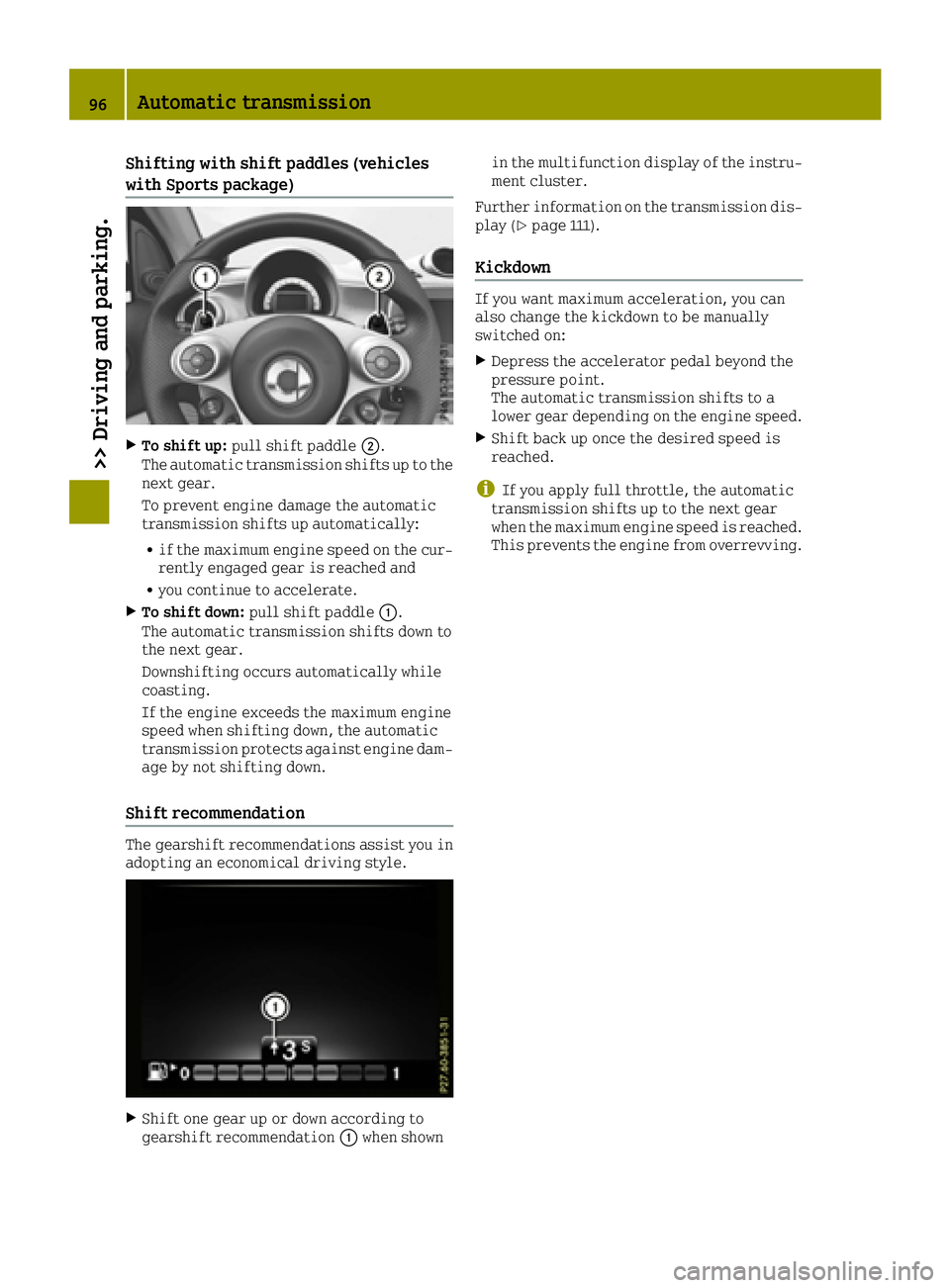
XTo shift up:pull shift paddle 0044.
The automatic transmission shifts up to the
next gear.
To prevent engine damage the automatic
transmission shifts up automatically:
Rif the maximum engine speed on the cur-
rently engaged gear is reached and
Ryou continue to accelerate.
XTo shift down: pull shift paddle 0043.
The automatic transmission shifts down to
the next gear.
Downshifting occurs automatically while
coasting.
If the engine exceeds the maximum engine
speed when shifting down, the automatic
transmission protects against engine dam-
age by not shifting down.
Shift recommendation
The gearshift recommendations assist you in
adopting an economical driving style.
XShift one gear up or down according to
gearshift recommendation 0043when shown in the multifunction display of the instru-
ment cluster.
Further information on the transmission dis-
play (
Ypage 111).
Kickdown
If you want maximum acceleration, you can
also change the kickdown to be manually
switched on:
XDepress the accelerator pedal beyond the
pressure point.
The automatic transmission shifts to a
lower gear depending on the engine speed.
XShift back up once the desired speed is
reached.
iIf you apply full throttle, the automatic
transmission shifts up to the next gear
when the maximum engine speed is reached.
This prevents the engine from overrevving.
96Automatic transmission
>> Driving and parking.
Page 99 of 214
Problems with the transmission
ProblemPossible causes/consequences and0050Solutions
The transmission has
problems shifting
gear.The transmission is losing oil.
XHave the transmission checked at a qualified specialist work-
shop immediately.
The acceleration abil-
ity is deteriorating.
The transmission no
longer shifts into all of
the gears.
Reverse gear can no
longer be engaged.The transmission is in emergency mode.
XStop the vehicle.
XShift the transmission to position P.
XSwitch off the engine.
XWait at least ten seconds before restarting the engine.
XShift the transmission to positionD.
XHave the transmission checked at a qualified specialist work-
shop immediately.
Manually releasing the selector lever
lock
You can manually release the selector level
lock in the event of an electrical malfunc-
tion. This is the case, for example, when you
want to release the parking brake while tow-
ing away the vehicle and then apply it again.
!Do not use any sharp-edged objects to
prise out the cover from the center console.
Otherwise, the cover or the center console
could be damaged.
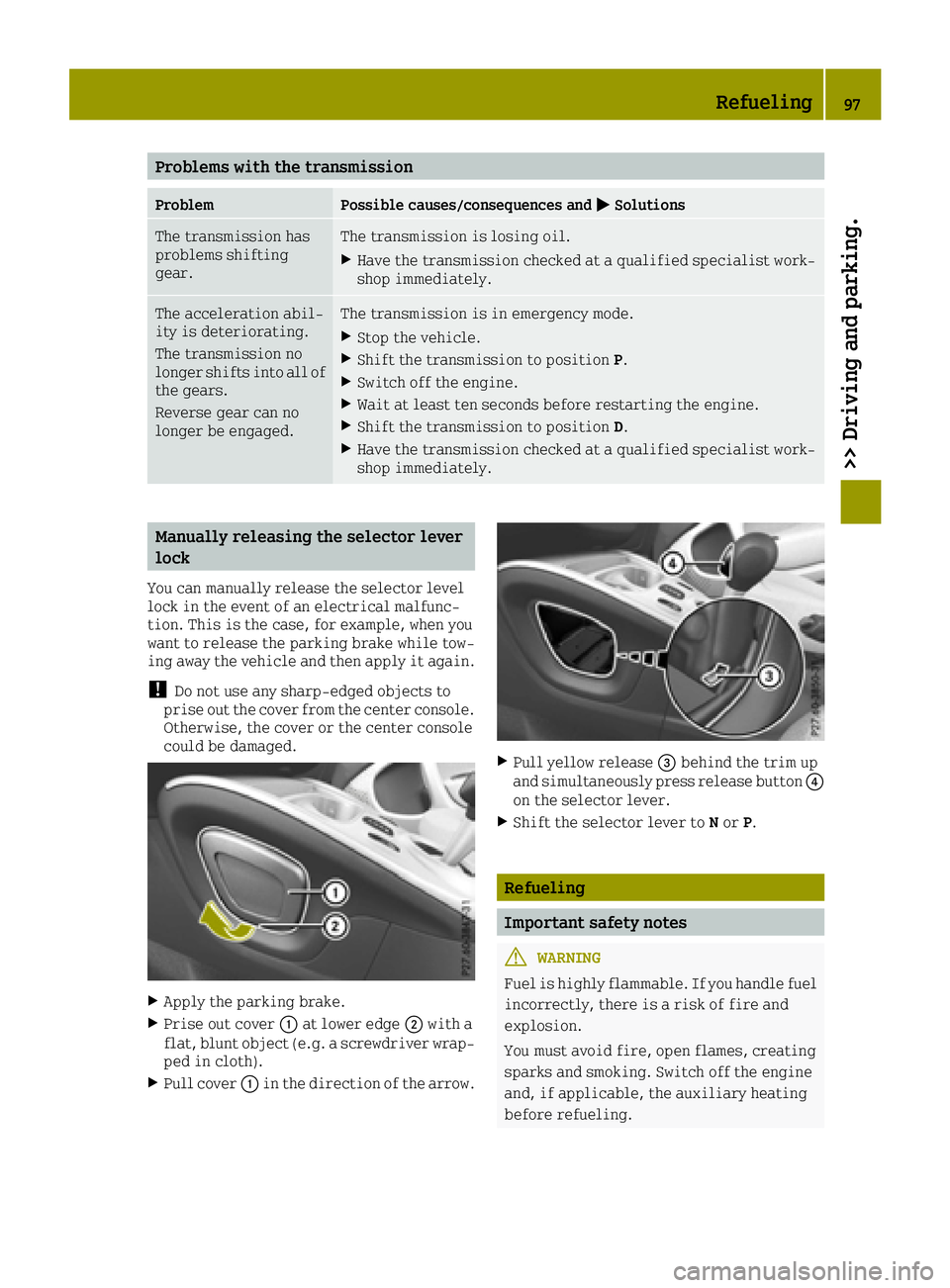
XApply the parking brake.
XPrise out cover 0043at lower edge 0044with a
flat, blunt object (e.g. a screwdriver wrap-
ped in cloth).
XPull cover 0043in the direction of the arrow.
XPull yellow release 0087behind the trim up
and simultaneously press release button 0085
on the selector lever.
XShift the selector lever to Nor P.
Refueling
Important safety notes
GWARNING
Fuel is highly flammable. If you handle fuel
incorrectly, there is a risk of fire and
explosion.
You must avoid fire, open flames, creating
sparks and smoking. Switch off the engine
and, if applicable, the auxiliary heating
before refueling.
Refueling97
>> Driving and parking.
Z
Page 102 of 214
Problems with fuel and fuel tank
ProblemPossible causes/consequences and0050Solutions
Fuel is leaking from the
vehicle.The fuel line or the fuel tank is faulty.
GWARNING
Risk of explosion or fire.
XTurn the key to position 0in the ignition lock and remove it
immediately (Ypage 87).
XDo not restart the engine under any circumstances.
XConsult a qualified specialist workshop.
The fuel filler flap
cannot be opened.The fuel filler flap is not unlocked.
XUnlock the vehicle (Ypage 51).
The SmartKey battery is discharged or nearly discharged.
XUnlock the vehicle using the key element in the emergency lock
(Ypage 55).
The fuel filler flap is unlocked, but the opening mechanism is
jammed.
XConsult a qualified specialist workshop.
Parking
Important safety notes
GWARNING
Flammable material such as leaves, grass or
twigs may ignite if they come into contact
with hot parts of the exhaust system or
exhaust gas flow. There is a risk of fire.
Park the vehicle so that no flammable mate- rials come into contact with parts of the
vehicle which are hot. Take particular care
not to park on dry grassland or harvested
grain fields.
GWARNING
If you leave children unsupervised in the
vehicle, they could set it in motion by, for example:
Rrelease the parking brake.
Rshift the automatic transmission out of
park position Por shift manual trans-
mission into neutral.
Rstart the engine.
In addition, they may operate vehicle
equipment and become trapped. There is a
risk of an accident and injury.
When leaving the vehicle, always take the
SmartKey with you and lock the vehicle.
Never leave children unsupervised in the
vehicle.
!Always secure the vehicle correctly
against rolling away. Otherwise, the vehi-
cle or its drivetrain could be damaged.
100Parking
>> Driving and parking.
Page 103 of 214
To ensure that the vehicle is secured against
rolling away unintentionally:
Rthe parking brake must be applied.
Ra gear must be engaged on vehicles with
manual transmission.
Rthe selector lever must be in positionPon
vehicles with automatic transmission.
Rthe SmartKey must be removed from the
ignition lock.
Ron uphill or downhill gradients, the front
wheels must be turned towards the curb.
Switching off the engine
Important safety notes
GWARNING
The automatic transmission switches to
neutral position Nwhen you switch off the
engine. The vehicle may roll away. There is a risk of an accident.
After switching off the engine, always
switch to parking position P. Prevent the
parked vehicle from rolling away by apply-
ing the parking brake.
Vehicles with manual transmission
XSelect a gear.
XTurn the key to position 0in the ignition
lock and remove it.
The immobilizer is activated.
XApply the parking brake.
Vehicles with automatic transmission
XApply the parking brake.
XShift the transmission to position P.
XTurn the key to position0in the ignition
lock and remove it.
The immobilizer is activated.
The key can only be removed if the trans-
mission is in position P.
Parking brake
General notes
GWARNING
If you must brake the vehicle with the park-
ing brake, the braking distance is consid-
erably longer and the wheels could lock.
There is an increased danger of skidding
and accidents.
Only use the parking brake to brake the
vehicle when the service brake is faulty. Do
not apply the parking brake too firmly. If
the wheels lock, release the parking brake
until the wheels begin turning again.
GWARNING
If you leave children unsupervised in the
vehicle, they could set it in motion by, for example:
Rrelease the parking brake.
Rshift the automatic transmission out of
park position Por shift manual trans-
mission into neutral.
Rstart the engine.
In addition, they may operate vehicle
equipment and become trapped. There is a
risk of an accident and injury.
When leaving the vehicle, always take the
SmartKey with you and lock the vehicle.
Never leave children unsupervised in the
vehicle.
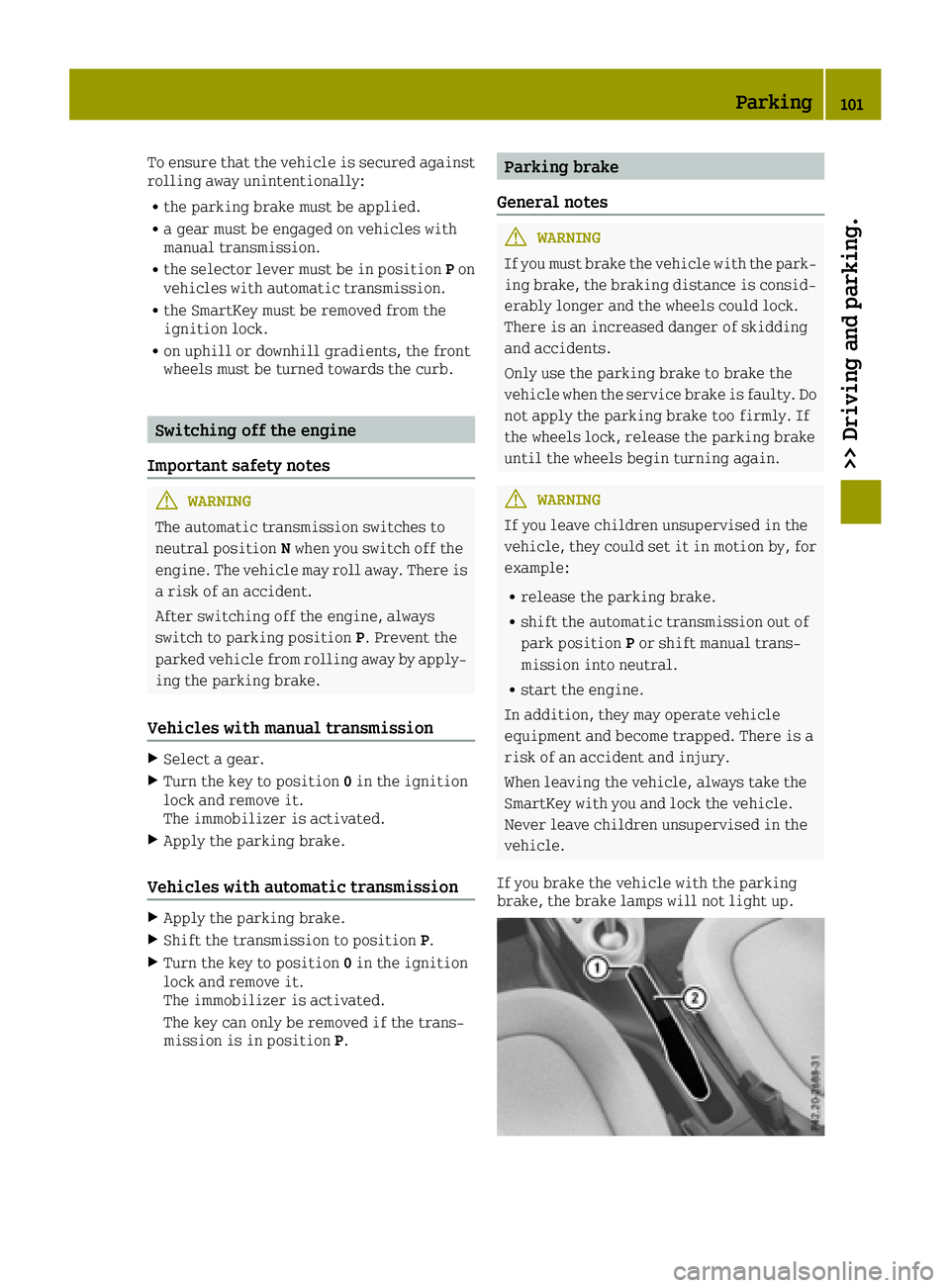
If you brake the vehicle with the parking
brake, the brake lamps will not light up.
Parking101
>> Driving and parking.
Z
Page 106 of 214
more quickly and protecting them against
corrosion.
Limited braking performance on salt-
treated roads
If you drive on salted roads, a layer of salt
residue may form on the brake discs and brake
pads. This can result in a significantly lon-
ger braking distance.
RBrake occasionally to remove any possible
salt residue. Make sure that you do not
endanger other road users when doing so.
RCarefully depress the brake pedal and the
beginning and end of a journey.
RMaintain a greater distance to the vehicle
ahead.
Servicing the brakes
!The brake fluid level may be too low, if:
Rif the red brake warning lamp lights up
in the instrument cluster and
Ryou hear a warning tone while the engine
is running
Observe additional warning messages in
the multifunction display.
The brake fluid level may be too low due to
brake pad wear or leaking brake lines.
Have the brake system checked immedi-
ately. Consult a qualified specialist work-
shop to arrange this.
!A function or performance test should
only be carried out on a 2-axle dynamome-
ter. If you wish to operate the vehicle on
such a dynamometer, please consult a
qualified specialist workshop in advance.
You could otherwise damage the drive train
or the brake system.
!As the ESP®system operates automati-
cally, the engine and the ignition must be
switched off (the SmartKey must be in posi-
tion 0or 1in the ignition lock) if:
Rthe parking brake is tested using a brake
dynamometer (maximum 10 seconds).
Rthe vehicle is towed with the front axle
raised.
Braking triggered automatically by ESP
®
may seriously damage the brake system. All checks and maintenance work on the brake
system must be carried out at a qualified
specialist workshop.
Have brake pads installed and brake fluid
replaced at a qualified specialist workshop.
If the brake system has only been subject to
moderate loads, you should test the function-
ality of your brakes at regular intervals.
When having brake pads/linings fitted, smart
recommends that you only use those which are
approved for smart vehicles or are of an
equivalent quality standard. Brake pads/
linings which have not been approved for
smart vehicles or which are not of an equiv-
alent quality could affect your vehicle's
operating safety.
smart recommends that you only use brake
fluid which is approved for smart vehicles or
is of an equivalent quality standard. Brake
fluid which has not been approved for smart
vehicles or which
is not of an equivalent
quality could affect your vehicle's operating
safety.
Driving on wet roads
Hydroplaning
If water has accumulated to a certain depth on the road surface, there is a danger of hydro-
planing occurring, even if:
Ryou drive at low speeds.
Rthe tires have adequate tread depth.
For this reason, in the event of heavy rain or in conditions in which hydroplaning may
occur, you must drive in the following man-
ner:
Rlower your speed.
Ravoid ruts.
Ravoid sudden steering movements
Rbrake carefully.
Driving on flooded roads
!Bear in mind that vehicles traveling in
front or in the opposite direction create
waves. This may cause the maximum per-
missible water depth to be exceeded.
Failure to observe these notes may result in damage to the engine, electrical systems
and transmission.
104Driving tips
>> Driving and parking.
Page 107 of 214
Prevent water from entering the vehicle inte-
rior or the engine compartment. If you must
drive through standing water, bear in mind
that:
Rthe water level should not exceed the lower
edge of the vehicle body in still water
Ryou should drive no faster than at walking
pace.
Winter driving
GWARNING
If you shift down on a slippery road surface
in an attempt to increase the engine's
braking effect, the drive wheels could lose
their grip. There is an increased danger of
skidding and accidents.
Do not shift down for additional engine
braking on a slippery road surface.
GDANGER
If the exhaust pipe is blocked or adequate
ventilation is not possible, poisonous
gases such as carbon monoxide (CO) may
enter the vehicle. This is the case, e.g. if
the vehicle becomes trapped in snow. There
is a risk of fatal injury.
If you have to leave the engine running,
keep the exhaust pipe and the area around
the vehicle free of snow. To ensure an ade- quate supply of fresh air, open a window on
the side of the vehicle that is not facing
into the wind.
Have your vehicle winterproofed at a quali-
fied specialist workshop at the onset of win-
ter.
Drive particularly carefully on slippery road
surfaces. Avoid sudden acceleration, steer-
ing and braking maneuvers. Do not use cruise
control.
If the vehicle threatens to skid or cannot be
stopped when moving at low speed:
XTry to bring the vehicle under control
using corrective steering.
XVehicles with automatic transmission:
shift the transmission to position N.The outside temperature indicator is not
designed to serve as an ice-warning device
and is therefore unsuitable for that purpose.
Changes in the outside temperature are dis-
played after a short delay.
Indicated temperatures just above the freez-
ing point do not guarantee that the road sur-
face is free of ice. The road may still be icy,
especially in wooded areas or on bridges.
You should pay special attention to road con-
ditions when temperatures are around freez-
ing point.
For more information on driving with snow
chains, see (
Ypage 179).
For more information on driving with summer
tires, see (
Ypage 179).
Observe the notes in the "Winter operation"
section (
Ypage 179).
Driving systems
Cruise control
General notes
Cruise control maintains a constant road
speed for you. Cruise control does not brake
the vehicle automatically. Only the engine's
braking effect is available. In order to
reduce speed and maintain distance to other
road users, you need to brake yourself. This
interrupts cruise control.
Use cruise control only if road and traffic
conditions make it appropriate to maintain a steady speed for a prolonged period. You can
use cruise control at speeds above 20 mph
(30 km/h).
Important safety notes
If you fail to adapt your driving style, cruise
control can neither reduce the risk of an
accident nor override the laws of physics.
Cruise control cannot take into account road,
weather or traffic conditions. Cruise control
is only an aid. You are responsible for the
distance to the vehicle in front, for vehicle
speed, for braking in good time and for stay-ing in lane.
Driving systems105
>> Driving and parking.
Z
Page 113 of 214
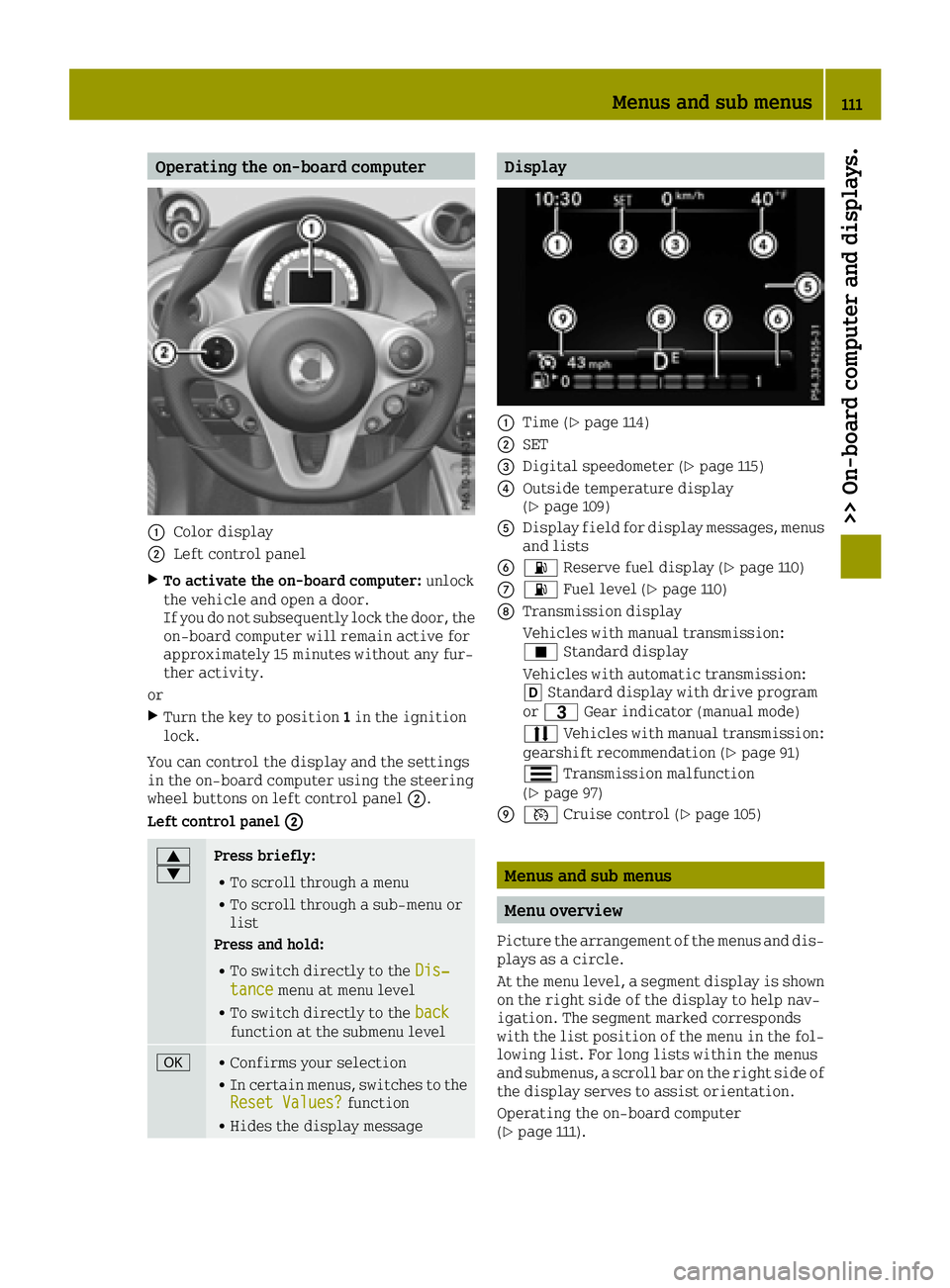
Operating the on-board computer
0043Color display
0044Left control panel
XTo activate the on-board computer:unlock
the vehicle and open a door.
If you do not subsequently lock the door, the
on-board computer will remain active for
approximately 15 minutes without any fur-
ther activity.
or
XTurn the key to position 1in the ignition
lock.
You can control the display and the settings
in the on-board computer using the steering
wheel buttons on left control panel 0044.
Left control panel 0044
0063
0064Press briefly:
RTo scroll through a menu
RTo scroll through a sub-menu or
list
Press and hold:
RTo switch directly to the Dis‐tancemenu at menu level
RTo switch directly to the backfunction at the submenu level
0076RConfirms your selection
RIn certain menus, switches to the
Reset Values?function
RHides the display message
Display
0043Time (Ypage 114)
0044SET
0087Digital speedometer (Ypage 115)
0085Outside temperature display
(Ypage 109)
0083Display field for display messages, menus
and lists
008400B4 Reserve fuel display (Ypage 110)
006B00B4Fuel level (Ypage 110)
006CTransmission display
Vehicles with manual transmission:
¿Standard display
Vehicles with automatic transmission:
005B Standard display with drive program
or 0040 Gear indicator (manual mode)
0078 Vehicles with manual transmission:
gearshift recommendation (
Ypage 91)
0079 Transmission malfunction
(
Ypage 97)
006D0085 Cruise control (Ypage 105)
Menus and sub menus
Menu overview
Picture the arrangement of the menus and dis-
plays as a circle.
At the menu level, a segment display is shown
on the right side of the display to help nav-
igation. The segment marked corresponds
with the list position of the menu in the fol-
lowing list. For long lists within the menus
and submenus, a scroll bar on the right side of
the display serves to assist orientation.
Operating the on-board computer
(
Ypage 111).
Menus and sub menus111
>> On-board computer and displays.
Z
Page 130 of 214
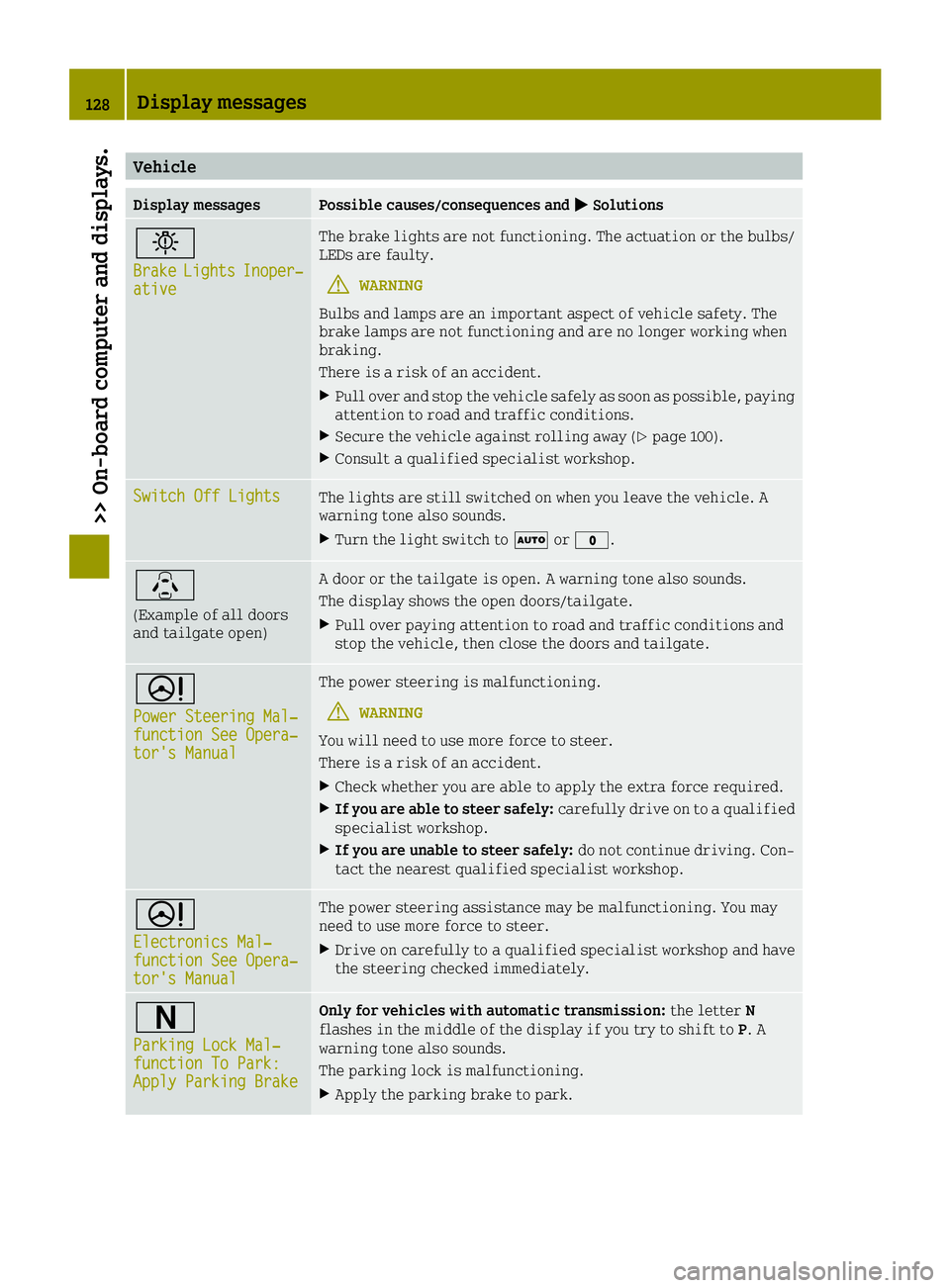
Vehicle
Display messagesPossible causes/consequences and0050Solutions
0049
BrakeLightsInoper‐ative
The brake lights are not functioning. The actuation or the bulbs/
LEDs are faulty.
GWARNING
Bulbs and lamps are an important aspect of vehicle safety. The
brake lamps are not functioning and are no longer working when
braking.
There is a risk of an accident.
XPull over and stop the vehicle safely as soon as possible, paying
attention to road and traffic conditions.
XSecure the vehicle against rolling away (Ypage 100).
XConsult a qualified specialist workshop.
Switch Off LightsThe lights are still switched on when you leave the vehicle. A
warning tone also sounds.
XTurn the light switch to 0058or003F.
\
(Example of all doors
and tailgate open)
A door or the tailgate is open. A warning tone also sounds.
The display shows the open doors/tailgate.
XPull over paying attention to road and traffic conditions and
stop the vehicle, then close the doors and tailgate.
0052
Power Steering Mal‐function See Opera‐tor's Manual
The power steering is malfunctioning.
GWARNING
You will need to use more force to steer.
There is a risk of an accident.
XCheck whether you are able to apply the extra force required.
XIf you are able to steer safely: carefully drive on to a qualified
specialist workshop.
XIf you are unable to steer safely: do not continue driving. Con-
tact the nearest qualified specialist workshop.
0052
Electronics Mal‐function See Opera‐tor's Manual
The power steering assistance may be malfunctioning. You may
need to use more force to steer.
XDrive on carefully to a qualified specialist workshop and have
the steering checked immediately.
0044
Parking Lock Mal‐function To Park:Apply Parking Brake
Only for vehicles with automatic transmission: the letterN
flashes in the middle of the display if you try to shift to P. A
warning tone also sounds.
The parking lock is malfunctioning.
XApply the parking brake to park.
128Display messages
>> On-board computer and displays.
Page 131 of 214
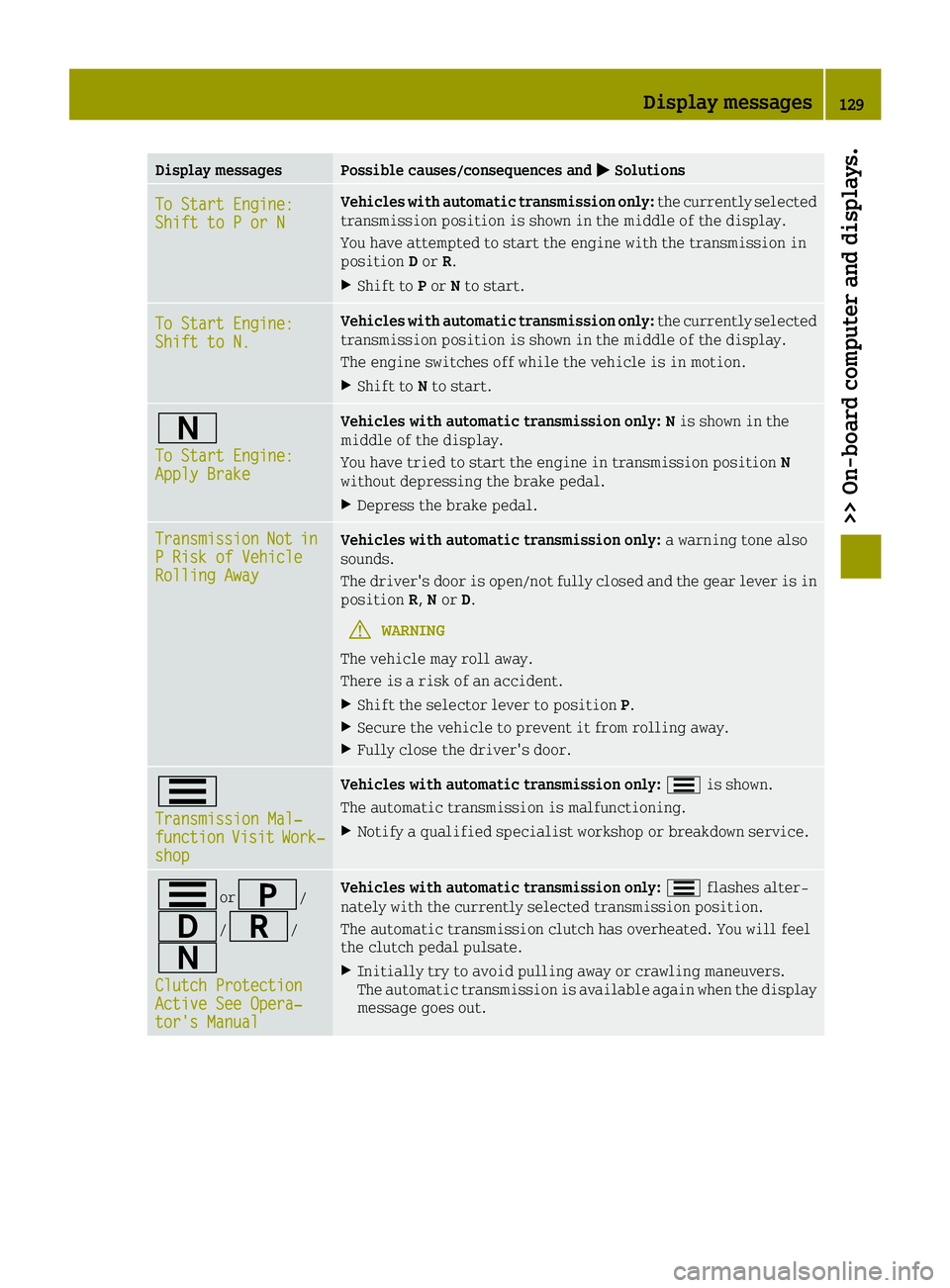
Display messagesPossible causes/consequences and0050Solutions
To Start Engine:Shift to P or N
Vehicles with automatic transmission only: the currently selected
transmission position is shown in the middle of the display.
You have attempted to start the engine with the transmission in
position Dor R.
XShift to Por Nto start.
To Start Engine:Shift to N.
Vehicles with automatic transmission only: the currently selected
transmission position is shown in the middle of the display.
The engine switches off while the vehicle is in motion.
XShift to Nto start.
0044
To Start Engine:Apply Brake
Vehicles with automatic transmission only: N is shown in the
middle of the display.
You have tried to start the engine in transmission position N
without depressing the brake pedal.
XDepress the brake pedal.
TransmissionNotinP Risk of VehicleRolling Away
Vehicles with automatic transmission only: a warning tone also
sounds.
The driver's door is open/not fully closed and the gear lever is in
position R,Nor D.
GWARNING
The vehicle may roll away.
There is a risk of an accident.
XShift the selector lever to position P.
XSecure the vehicle to prevent it from rolling away.
XFully close the driver's door.
0079
Transmission Mal‐functionVisitWork‐shop
Vehicles with automatic transmission only: 0079is shown.
The automatic transmission is malfunctioning.
XNotify a qualified specialist workshop or breakdown service.
0079or0045/
003A/0046/
0044
Clutch ProtectionActive See Opera‐tor's Manual
Vehicles with automatic transmission only: 0079flashes alter-
nately with the currently selected transmission position.
The automatic transmission clutch has overheated. You will feel
the clutch pedal pulsate.
XInitially try to avoid pulling away or crawling maneuvers.
The automatic transmission is available again when the display
message goes out.
Display messages129
>> On-board computer and displays.
Z