check oil SMART FORTWO 2016 Owners Manual
[x] Cancel search | Manufacturer: SMART, Model Year: 2016, Model line: FORTWO, Model: SMART FORTWO 2016Pages: 214, PDF Size: 4.93 MB
Page 9 of 214
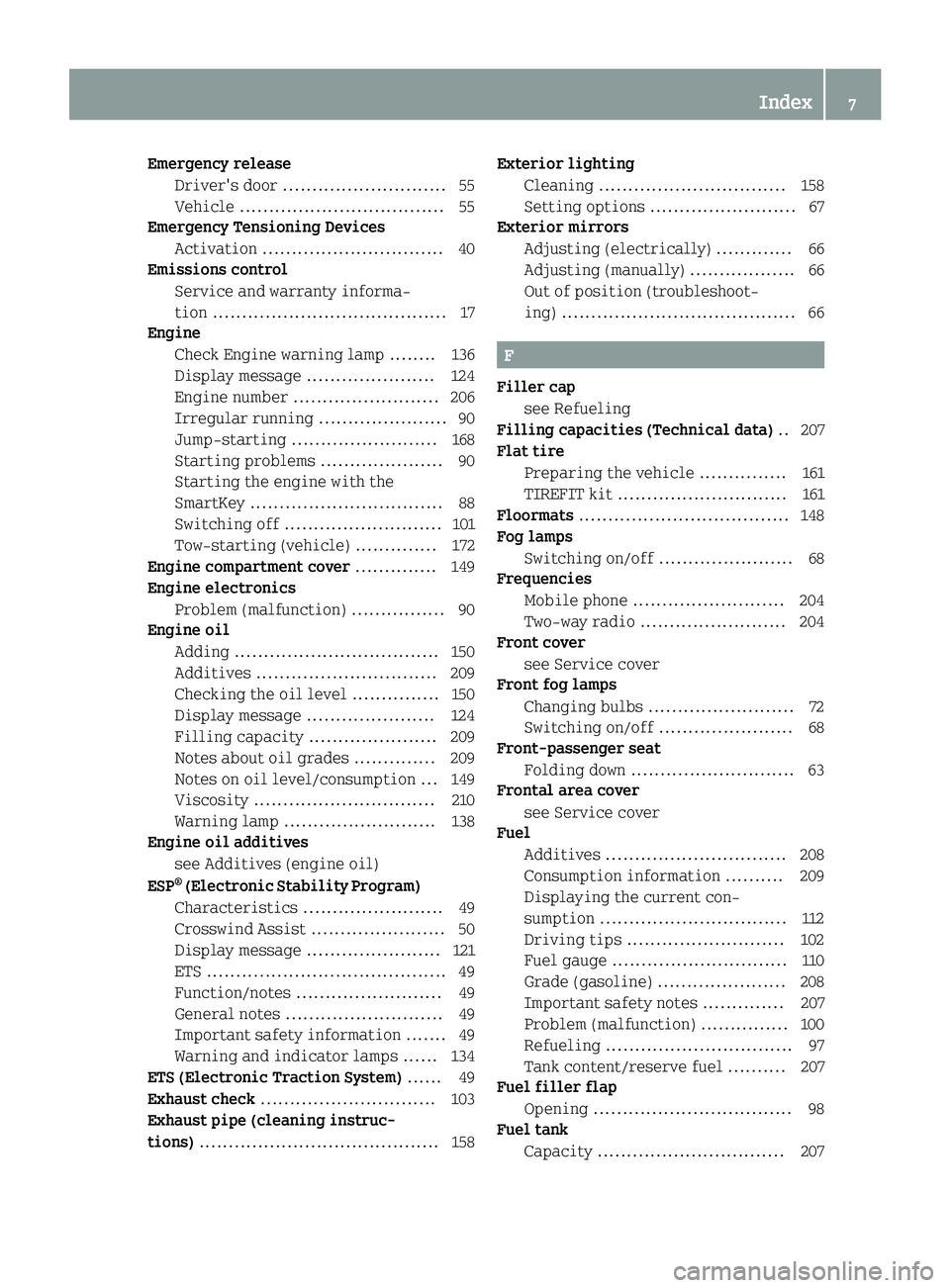
Emergency releaseDriver's door ........................... .55
Vehicle ................................... 55
Emergency Tensioning Devices
Activation ............................... 40
Emissions control
Service and warranty informa-
tion ........................................ 17
Engine
Check Engine warning lamp ........1 36
Display message ...................... 124
Engine number ......................... 206
Irregular running ...................... 90
Jump-starting ......................... 168
Starting problems ..................... 90
Starting the engine with the
SmartKey ................................. 88
Switching off ........................... 101
Tow-starting (vehicle) .............. 172
Engine compartment cover .............. 149
Engine electronics
Problem (malfunction) ................ 90
Engine oil
Adding ................................... 150
Additives ............................... 209
Checking the oil level ............... 150
Display message ...................... 124
Filling capacity ...................... 209
Notes about oil grades .............. 209
Notes on oil level/consumption ... 149
Viscosity ............................... 210
Warning lamp .......................... 138
Engine oil additives
see Additives (engine oil)
ESP
®(Electronic Stability Program)
Characteristics ........................4 9
Crosswind Assist ....................... 50
Display message ....................... 121
ETS .........................................4 9
Function/notes ......................... 49
General notes ........................... 49
Important safety information ....... 49
Warning and indicator lamps ...... 134
ETS (Electronic Traction System) ...... 49
Exhaust check .............................. 103
Exhaust pipe (cleaning instruc-
tions) ......................................... 158 Exterior lighting
Cleaning ................................ 158
Setting options ......................... 67
Exterior mirrors
Adjusting (electrically) ............. 66
Adjusting (manually) .................. 66
Out of position (troubleshoot-
ing) ........................................ 66
F
Filler capsee Refueling
Filling capacities (Technical data) .. 207
Flat tire
Preparing the vehicle ............... 161
TIREFIT kit ............................. 161
Floormats .................................... 148
Fog lamps
Switching on/off ....................... 68
Frequencies
Mobile phone .......................... 204
Two-way radio ......................... 204
Front cover
see Service cover
Front fog lamps
Changing bulbs ......................... 72
Switching on/off ....................... 68
Front-passenger seat
Folding down ............................ 63
Frontal area cover
see Service cover
Fuel
Additives ............................... 208
Consumption information .......... 209
Displaying the current con-
sumption ................................ 112
Driving tips ........................... 102
Fuel gauge .............................. 110
Grade (gasoline) ...................... 208
Important safety notes .............. 207
Problem (malfunction) ............... 100
Refueling ................................ 97
Tank content/reserve fuel .......... 207
Fuel filler flap
Opening .................................. 98
Fuel tank
Capacity ................................ 207
Index7
Page 17 of 214
Vehicle dimensions....................... 212
Vehicle emergency locking .............. 55
Vehicle identification number
see VIN
Vehicle identification plate .......... 205
Vehicle key
see SmartKey
Vehicle tool kit ............................ 161
Ventilation
see Climate control
VIN ............................................ 205
W
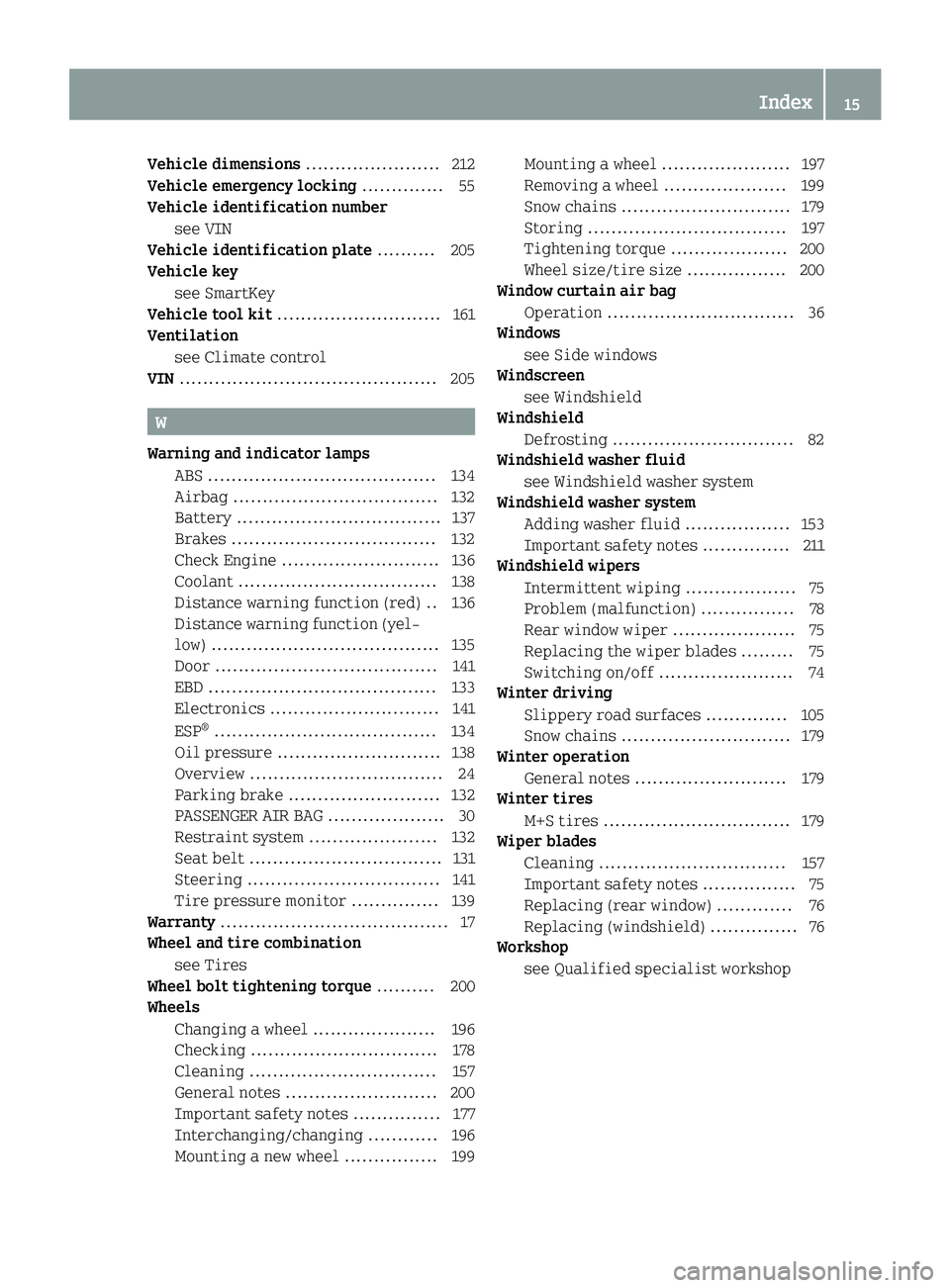
Warning and indicator lamps
ABS ....................................... 134
Airbag ................................... 132
Battery ................................... 137
Brakes ................................... 132
Check Engine ........................... 136
Coolant .................................. 138
Distance warning function (red) .. 136
Distance warning function (yel-
low) ....................................... 135
Door ...................................... 141
EBD ....................................... 133
Electronics .............................1 41
ESP
®...................................... 134
Oil pressure ............................ 138
Overview ................................. 24
Parking brake .......................... 132
PASSENGER AIR BAG .................... 30
Restraint system ......................1 32
Seat belt ................................. 131
Steering ................................. 141
Tire pressure monitor ............... 139
Warranty ....................................... 17
Wheel and tire combination
see Tires
Wheel bolt tightening torque .......... 200
Wheels
Changing a wheel ..................... 196
Checking ................................ 178
Cleaning ................................ 157
General notes .......................... 200
Important safety notes ............... 177
Interchanging/changing ............ 196
Mounting a new wheel ................ 199 Mounting a wheel ...................... 197
Removing a wheel ..................... 199
Snow chains ............................. 179
Storing .................................. 197
Tightening torque .................... 200
Wheel size/tire size ................. 200
Window curtain air bag
Operation ................................ 36
Windows
see Side windows
Windscreen
see Windshield
Windshield
Defrosting ............................... 82
Windshield washer fluid
see Windshield washer system
Windshield washer system
Adding washer fluid .................. 153
Important safety notes ............... 211
Windshield wipers
Intermittent wiping ................... 75
Problem (malfunction) ................ 78
Rear window wiper ..................... 75
Replacing the wiper blades ......... 75
Switching on/off ....................... 74
Winter driving
Slippery road surfaces .............. 105
Snow chains ............................. 179
Winter operation
General notes .......................... 179
Winter tires
M+S tires ................................ 179
Wiper blades
Cleaning ................................ 157
Important safety notes ................ 75
Replacing (rear window) ............. 76
Replacing (windshield) ............... 76
Workshop
see Qualified specialist workshop
Index15
Page 26 of 214
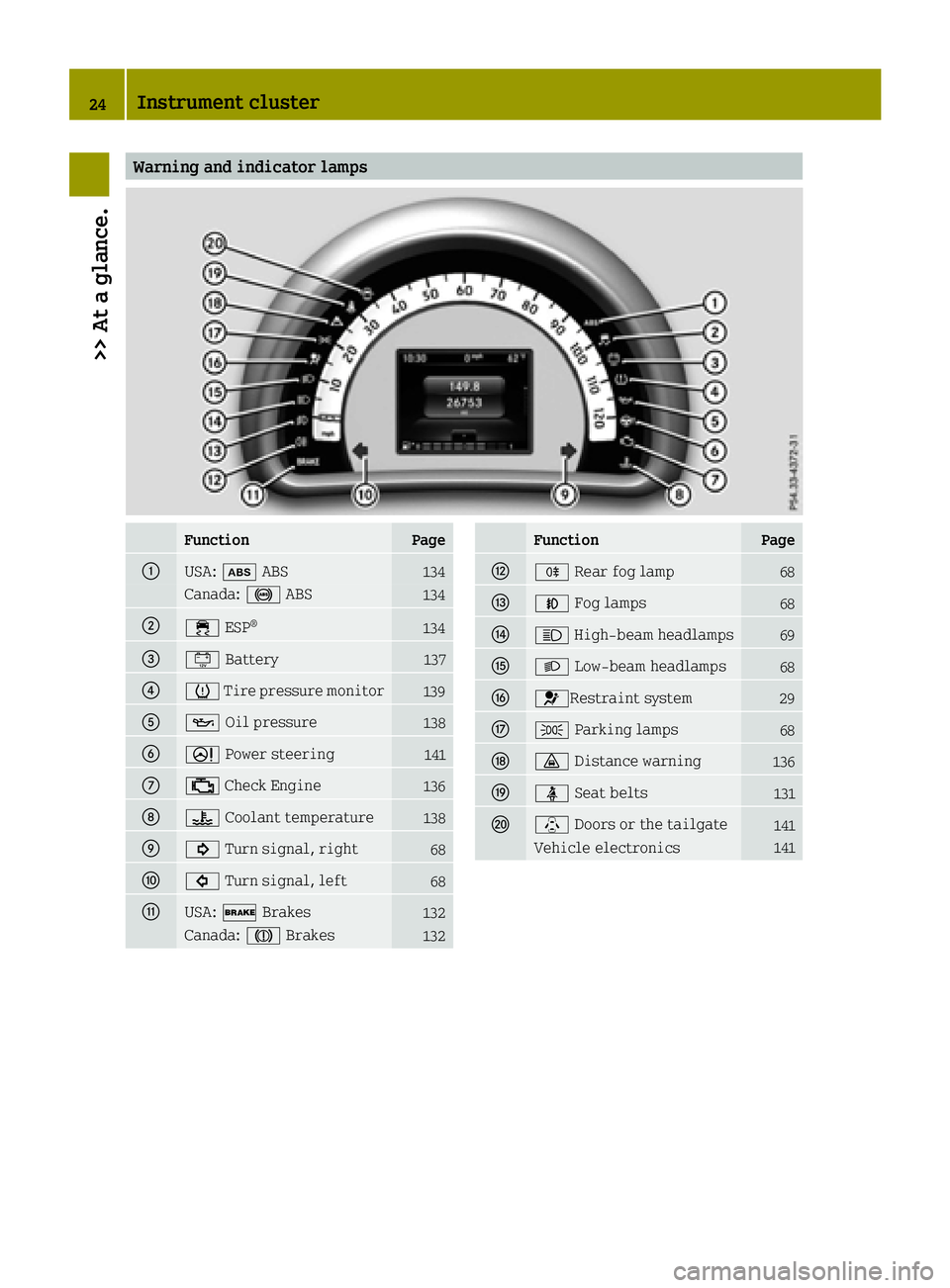
Warning and indicator lamps
FunctionPage
0043USA:00DF ABS134
Canada: 0025ABS134
004400E5ESP®134
008700EFBattery137
00850077Tire pressure monitor139
008300B3 Oil pressure138
00840052Power steering141
006B00B9Check Engine136
006C00AC Coolant temperature138
006D003DTurn signal, right68
006E003ETurn signal, left68
006FUSA:0027 Brakes132
Canada: 004DBrakes132
FunctionPage
0070005ERear fog lamp68
0071005AFog lamps68
00720057High-beam headlamps69
00730058 Low-beam headlamps68
00740075Restraint system29
00750060Parking lamps68
007600BADistance warning136
007700E9Seat belts131
0078\Doors or the tailgate141
Vehicle electronics141
24Instrument cluster
>> At a glance.
Page 99 of 214
Problems with the transmission
ProblemPossible causes/consequences and0050Solutions
The transmission has
problems shifting
gear.The transmission is losing oil.
XHave the transmission checked at a qualified specialist work-
shop immediately.
The acceleration abil-
ity is deteriorating.
The transmission no
longer shifts into all of
the gears.
Reverse gear can no
longer be engaged.The transmission is in emergency mode.
XStop the vehicle.
XShift the transmission to position P.
XSwitch off the engine.
XWait at least ten seconds before restarting the engine.
XShift the transmission to positionD.
XHave the transmission checked at a qualified specialist work-
shop immediately.
Manually releasing the selector lever
lock
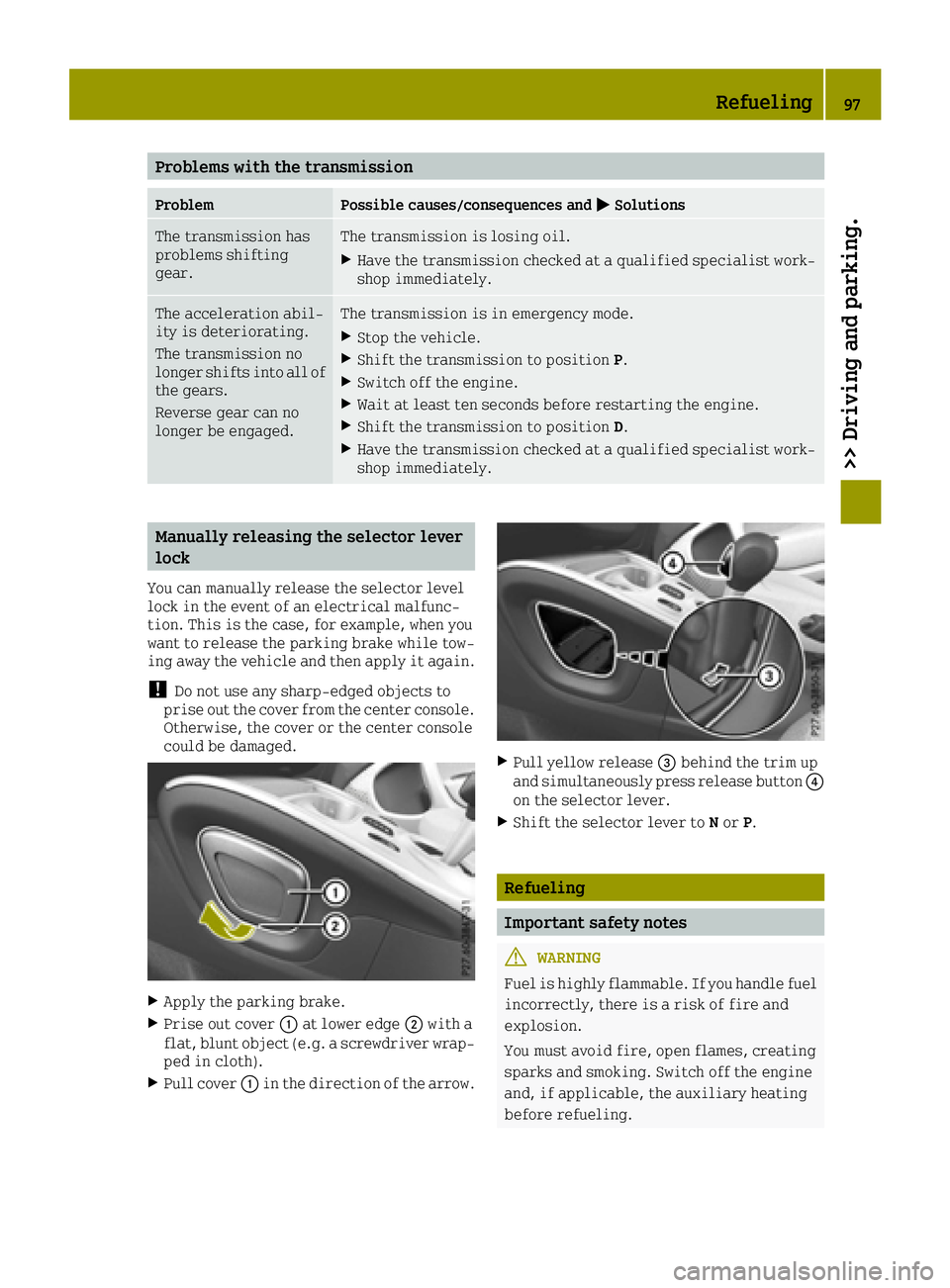
You can manually release the selector level
lock in the event of an electrical malfunc-
tion. This is the case, for example, when you
want to release the parking brake while tow-
ing away the vehicle and then apply it again.
!Do not use any sharp-edged objects to
prise out the cover from the center console.
Otherwise, the cover or the center console
could be damaged.
XApply the parking brake.
XPrise out cover 0043at lower edge 0044with a
flat, blunt object (e.g. a screwdriver wrap-
ped in cloth).
XPull cover 0043in the direction of the arrow.
XPull yellow release 0087behind the trim up
and simultaneously press release button 0085
on the selector lever.
XShift the selector lever to Nor P.
Refueling
Important safety notes
GWARNING
Fuel is highly flammable. If you handle fuel
incorrectly, there is a risk of fire and
explosion.
You must avoid fire, open flames, creating
sparks and smoking. Switch off the engine
and, if applicable, the auxiliary heating
before refueling.
Refueling97
>> Driving and parking.
Z
Page 126 of 214
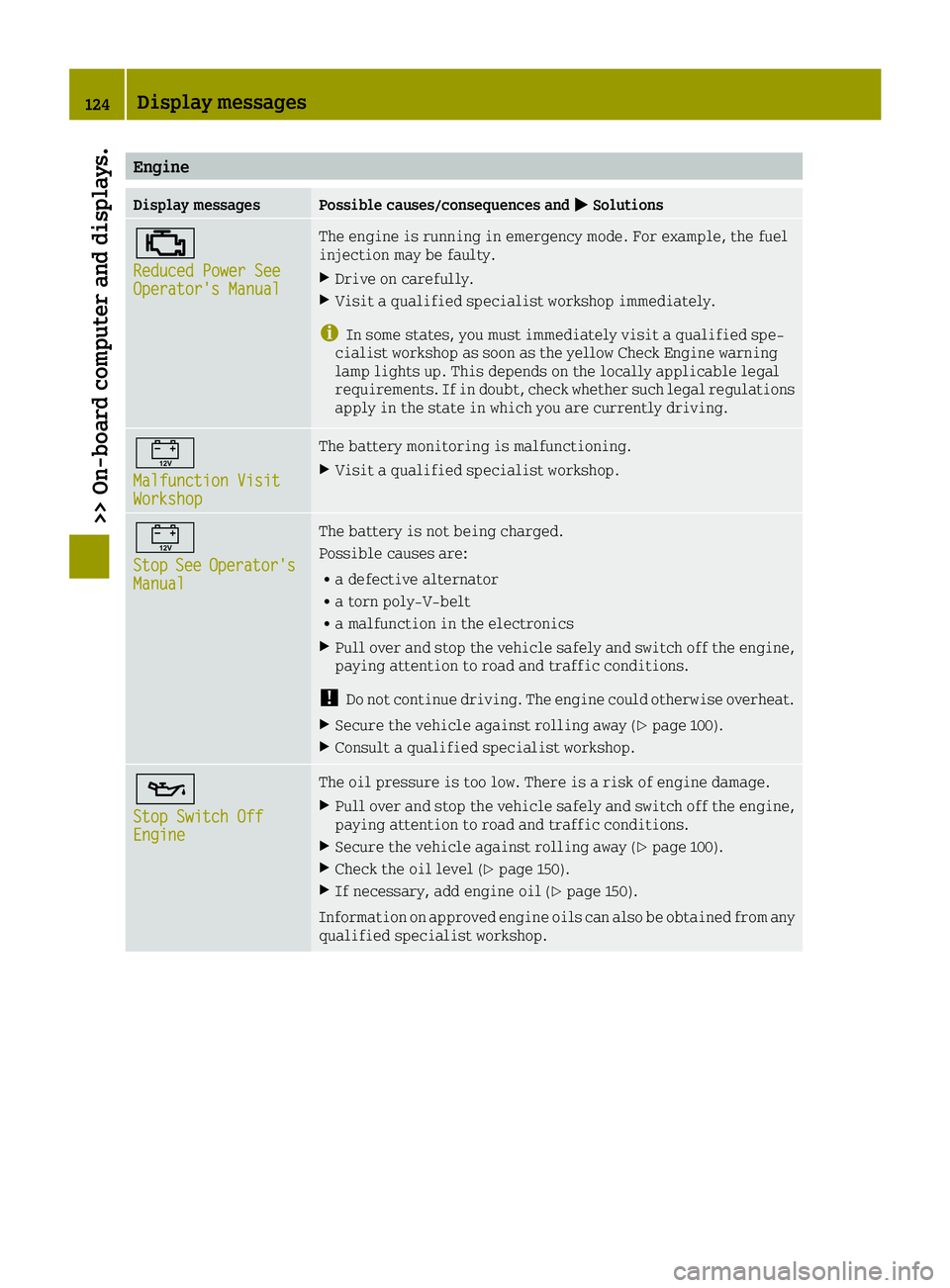
Engine
Display messagesPossible causes/consequences and0050Solutions
00B9
Reduced Power SeeOperator's Manual
The engine is running in emergency mode. For example, the fuel
injection may be faulty.
XDrive on carefully.
XVisit a qualified specialist workshop immediately.
iIn some states, you must immediately visit a qualified spe-
cialist workshop as soon as the yellow Check Engine warning
lamp lights up. This depends on the locally applicable legal
requirements. If in doubt, check whether such legal regulations
apply in the state in which you are currently driving.
00EF
Malfunction VisitWorkshop
The battery monitoring is malfunctioning.
XVisit a qualified specialist workshop.
00EF
StopSeeOperator'sManual
The battery is not being charged.
Possible causes are:
Ra defective alternator
Ra torn poly-V-belt
Ra malfunction in the electronics
XPull over and stop the vehicle safely and switch off the engine,
paying attention to road and traffic conditions.
!Do not continue driving. The engine could otherwise overheat.
XSecure the vehicle against rolling away (Ypage 100).
XConsult a qualified specialist workshop.
00B3
Stop Switch OffEngine
The oil pressure is too low. There is a risk of engine damage.
XPull over and stop the vehicle safely and switch off the engine,
paying attention to road and traffic conditions.
XSecure the vehicle against rolling away (Ypage 100).
XCheck the oil level (Ypage 150).
XIf necessary, add engine oil (Ypage 150).
Information on approved engine oils can also be obtained from any
qualified specialist workshop.
124Display messages
>> On-board computer and displays.
Page 140 of 214
ProblemPossible causes/consequences and0050Solutions
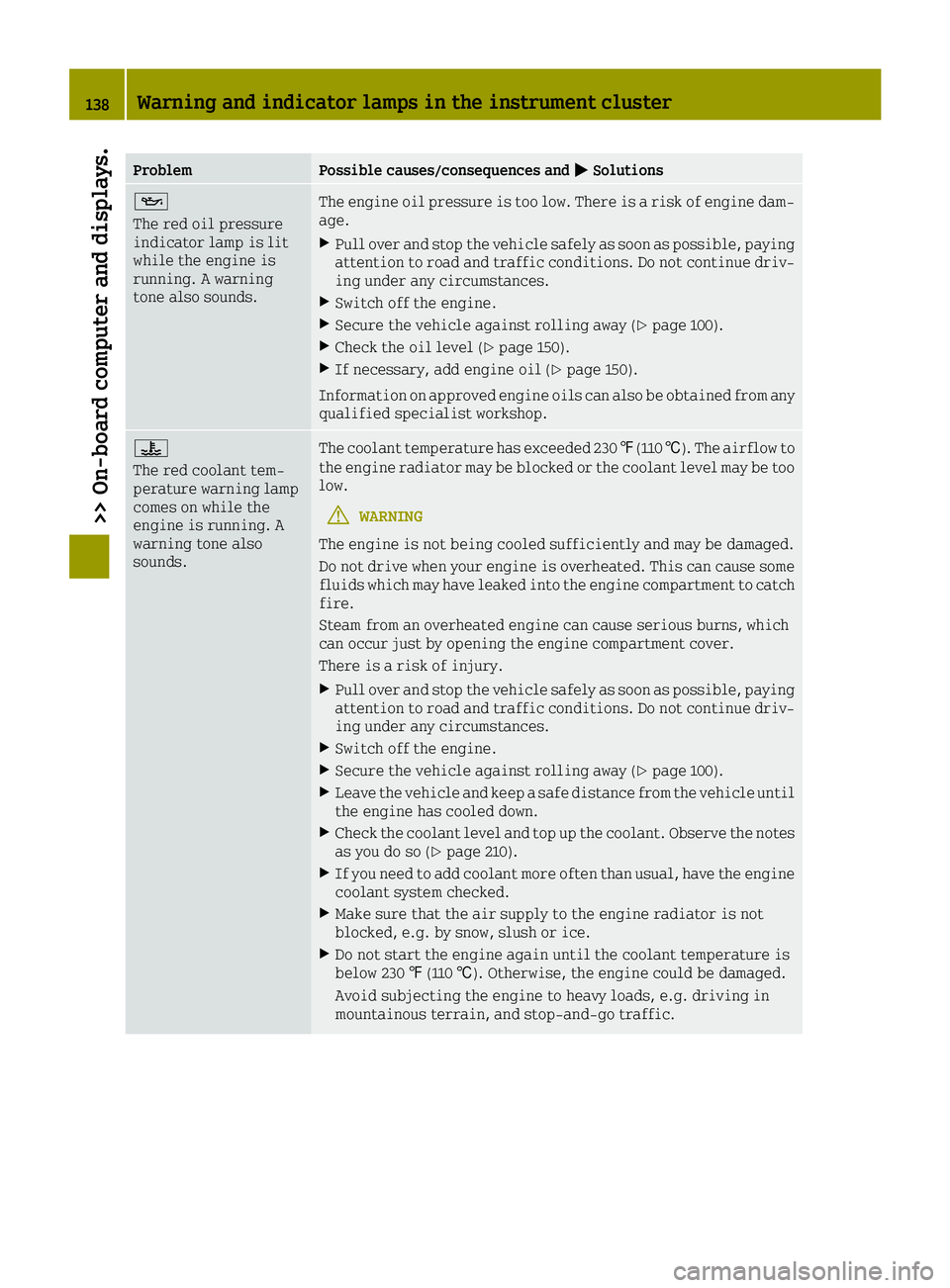
00B3
The red oil pressure
indicator lamp is lit
while the engine is
running. A warning
tone also sounds.The engine oil pressure is too low. There is a risk of engine dam-
age.
XPull over and stop the vehicle safely as soon as possible, paying
attention to road and traffic conditions. Do not continue driv-
ing under any circumstances.
XSwitch off the engine.
XSecure the vehicle against rolling away (Ypage 100).
XCheck the oil level (Ypage 150).
XIf necessary, add engine oil (Ypage 150).
Information on approved engine oils can also be obtained from any
qualified specialist workshop.
00AC
The red coolant tem-
perature warning lamp
comes on while the
engine is running. A
warning tone also
sounds.The coolant temperature has exceeded 230 ‡(110 †). The airflow to
the engine radiator may be blocked or the coolant level may be too
low.
GWARNING
The engine is not being cooled sufficiently and may be damaged.
Do not drive when your engine is overheated. This can cause some
fluids which may have leaked into the engine compartment to catch
fire.
Steam from an overheated engine can cause serious burns, which
can occur just by opening the engine compartment cover.
There is a risk of injury.
XPull over and stop the vehicle safely as soon as possible, paying attention to road and traffic conditions. Do not continue driv-
ing under any circumstances.
XSwitch off the engine.
XSecure the vehicle against rolling away (Ypage 100).
XLeave the vehicle and keep a safe distance from the vehicle until
the engine has cooled down.
XCheck the coolant level and top up the coolant. Observe the notes
as you do so (Ypage 210).
XIf you need to add coolant more often than usual, have the engine
coolant system checked.
XMake sure that the air supply to the engine radiator is not
blocked, e.g. by snow, slush or ice.
XDo not start the engine again until the coolant temperature is
below 230 ‡(110 †). Otherwise, the engine could be damaged.
Avoid subjecting the engine to heavy loads, e.g. driving in
mountainous terrain, and stop-and-go traffic.
138Warning and indicator lamps in the instrument cluster
>> On-board computer and displays.
Page 151 of 214
Useful information
i
This Operator's Manual describes all
models and all standard and optional
equipment of your vehicle available at the
time of publication of the Operator's Man- ual. Country-specific differences are pos-
sible. Bear in mind that your vehicle may
not feature all functions described here.
This also applies to safety-relevant sys-
tems and functions.
iRead the information on qualified spe-
cialist workshops: (Ypage 20).
Checking service products
Engine compartment (rear)
Engine compartment cover
GWARNING
The engine compartment cover may become
very hot. If you remove the cover to do work on the engine compartment, there is a risk
of injury!
Allow the engine to cool down and then
remove the engine compartment cover after
cooling has taken place.
GWARNING
Combustion engines emit poisonous
exhaust gases such as carbon monoxide. If
the engine compartment cover has not been installed correctly, when the engine is
running, particularly if the vehicle is
moving, exhaust fumes could enter the
passenger compartment. There is a risk of
poisoning.
Always switch off the engine before remov-
ing the engine compartment cover. Make
sure that the engine compartment cover has
been installed correctly.
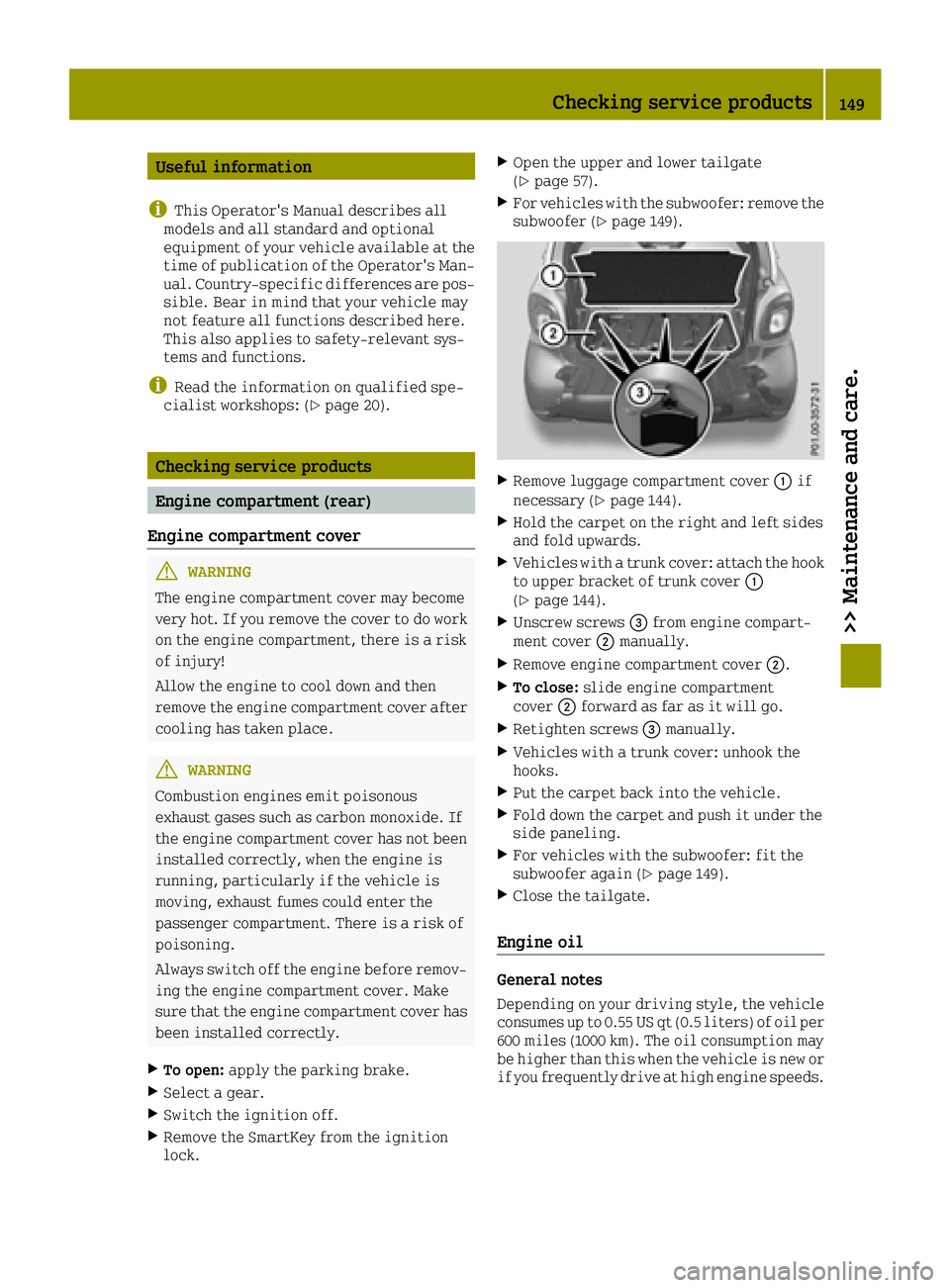
XTo open: apply the parking brake.
XSelect a gear.
XSwitch the ignition off.
XRemove the SmartKey from the ignition
lock.
XOpen the upper and lower tailgate
(Ypage 57).
XFor vehicles with the subwoofer: remove the
subwoofer (Ypage 149).
XRemove luggage compartment cover 0043if
necessary (Ypage 144).
XHold the carpet on the right and left sides
and fold upwards.
XVehicles with a trunk cover: attach the hook to upper bracket of trunk cover 0043
(
Ypage 144).
XUnscrew screws 0087from engine compart-
ment cover 0044manually.
XRemove engine compartment cover 0044.
XTo close:slide engine compartment
cover 0044forward as far as it will go.
XRetighten screws 0087manually.
XVehicles with a trunk cover: unhook the
hooks.
XPut the carpet back into the vehicle.
XFold down the carpet and push it under the
side paneling.
XFor vehicles with the subwoofer: fit the
subwoofer again (Ypage 149).
XClose the tailgate.
Engine oil
General notes
Depending on your driving style, the vehicle
consumes up to 0.55 US qt (0.5 liters) of oil per
600 miles (1000 km). The oil consumption may
be higher than this when the vehicle is new or
if you frequently drive at high engine speeds.
Checking service products149
>> Maintenance and care.
Z
Page 152 of 214
When checking the oil level:
Rpark the vehicle on a level surface.
Rthe engine should be switched off for
approximately 5 minutes if the engine is at
normal operating temperature
Rif the engine is not at normal operating
temperature, e.g. if the engine was only
started briefly, wait approximately
30 minutes before carrying out the meas-
urement
Checking the oil level using the oil dip-
stick
GWARNING
Certain components in the engine compart- ment, such as the engine, radiator and parts
of the exhaust system, can become very hot.
Working in the engine compartment poses a risk of injury.
Where possible, let the engine cool down
and touch only the components described in
the following.
GWARNING
Opening the hood when the engine is over-
heated or when there is a fire in the engine
compartment could expose you to hot gases
or other service products. There is a risk of injury.
Let an overheated engine cool down before
opening the hood. If there is a fire in the
engine compartment, keep the hood closed
and contact the fire department.
GWARNING
The engine compartment contains moving
components. Certain components, such as
the radiator fan, may continue to run or
start again suddenly when the ignition is
off. There is a risk of injury.
If you need to do any work inside the engine compartment:
Rswitch off the ignition
Rnever reach into the area where there is a
risk of danger from moving components,
such as the fan rotation area
Rremove jewelry and watches
Rkeep items of clothing and hair, for
example, away from moving parts
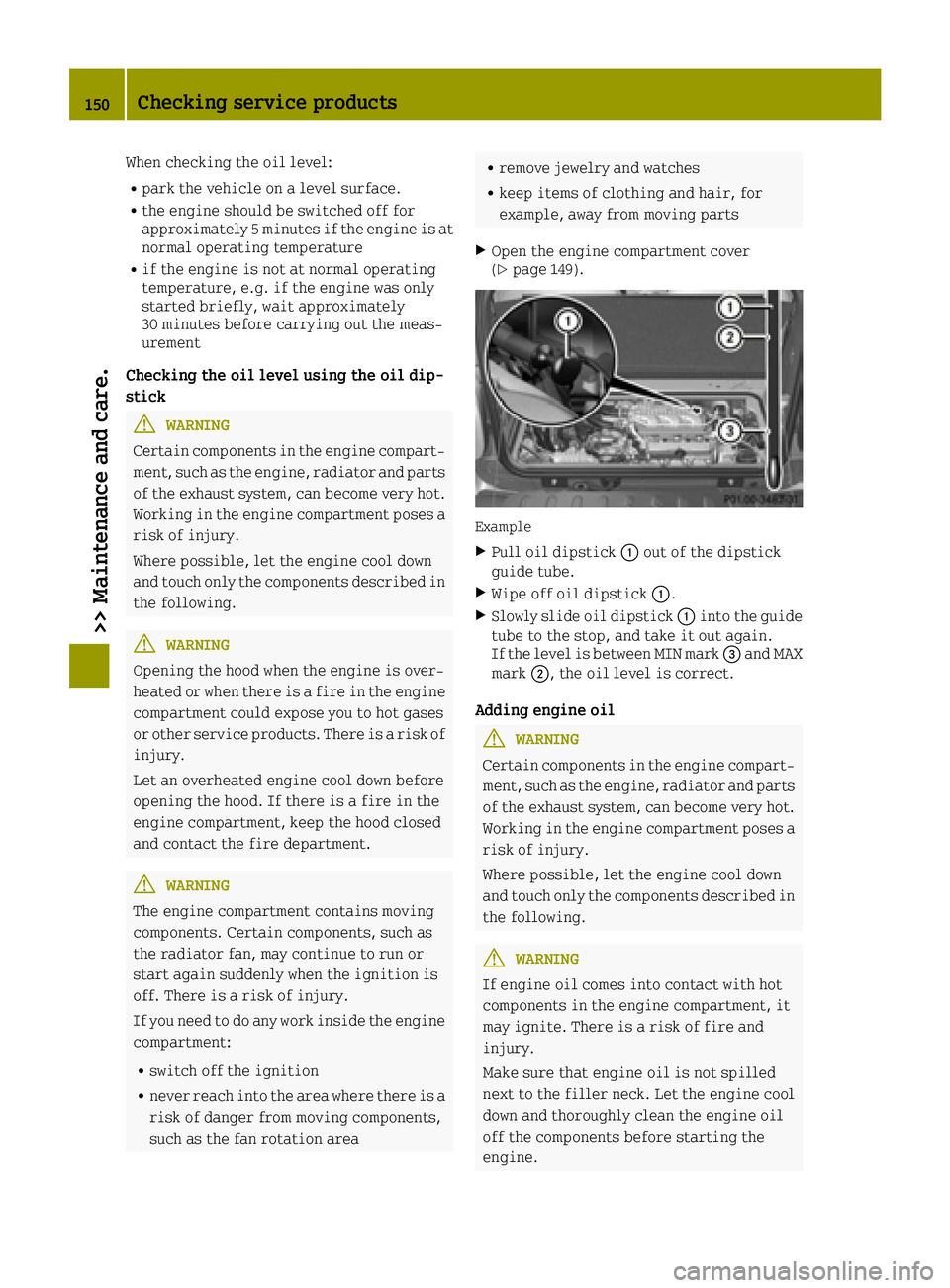
XOpen the engine compartment cover
(Ypage 149).
Example
XPull oil dipstick 0043out of the dipstick
guide tube.
XWipe off oil dipstick 0043.
XSlowly slide oil dipstick 0043into the guide
tube to the stop, and take it out again.
If the level is between MIN mark 0087and MAX
mark 0044, the oil level is correct.
Adding engine oil
GWARNING
Certain components in the engine compart- ment, such as the engine, radiator and parts
of the exhaust system, can become very hot.
Working in the engine compartment poses a risk of injury.
Where possible, let the engine cool down
and touch only the components described in
the following.
GWARNING
If engine oil comes into contact with hot
components in the engine compartment, it
may ignite. There is a risk of fire and
injury.
Make sure that engine oil is not spilled
next to the filler neck. Let the engine cool down and thoroughly clean the engine oil
off the components before starting the
engine.
150Checking service products
>> Maintenance and care.
Page 153 of 214
HEnvironmental note
When adding oil, take care not to spill any.
If oil enters the soil or waterways, it is
harmful to the environment.
!Do not add too much oil. adding too much
engine oil can result in damage to the
engine or to the catalytic converter. Have
excess engine oil siphoned off.
You will find further information on engine
oils you can use in the "Technical data" sec-
tion (
Ypage 209).
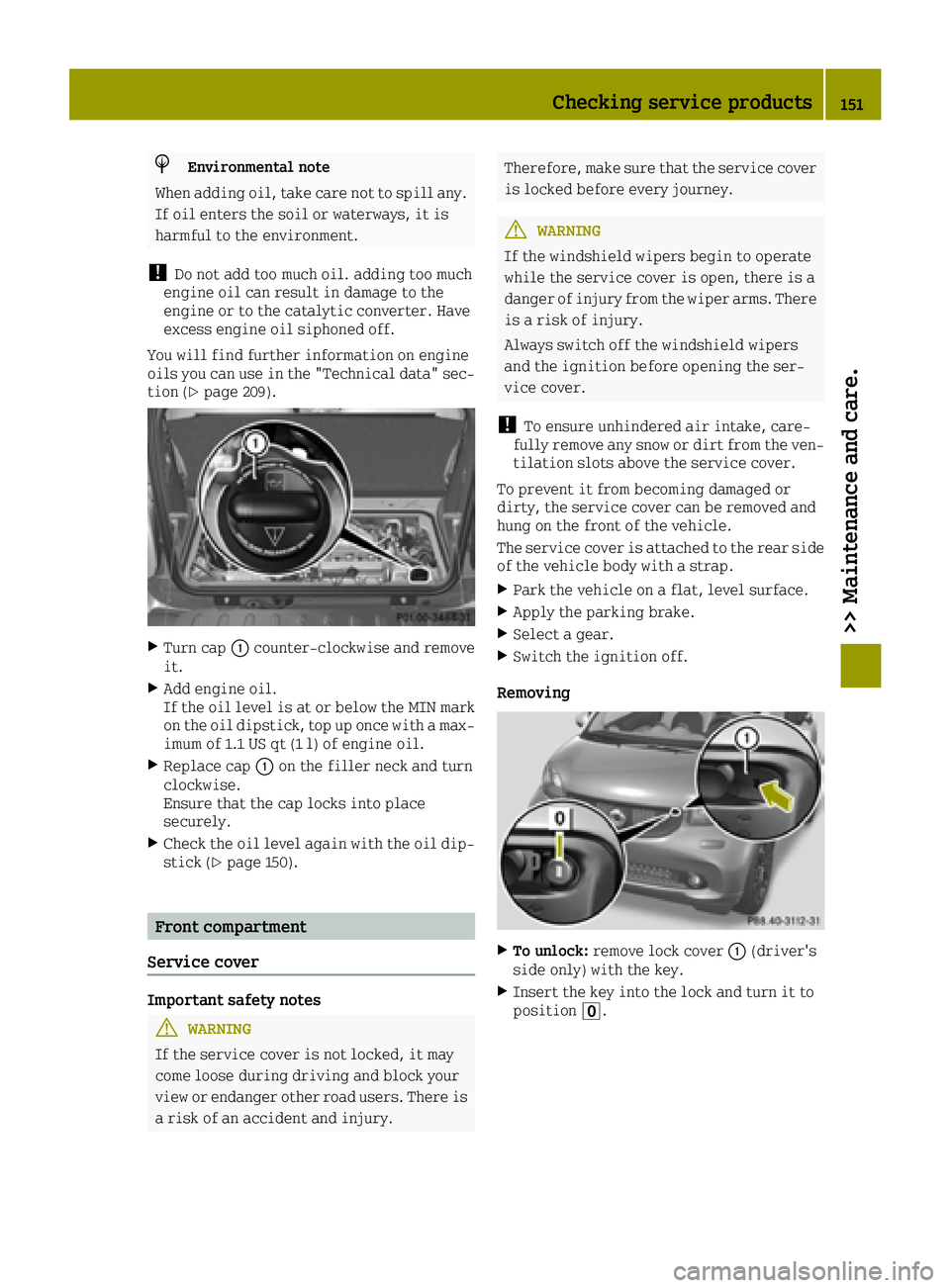
XTurn cap 0043counter-clockwise and remove
it.
XAdd engine oil.
If the oil level is at or below the MIN mark on the oil dipstick, top up once with a max-
imum of 1.1 US qt (1 l) of engine oil.
XReplace cap 0043on the filler neck and turn
clockwise.
Ensure that the cap locks into place
securely.
XCheck the oil level again with the oil dip- stick (Ypage 150).
Front compartment
Service cover
Important safety notes
GWARNING
If the service cover is not locked, it may
come loose during driving and block your
view or endanger other road users. There is
a risk of an accident and injury.
Therefore, make sure that the service cover
is locked before every journey.
GWARNING
If the windshield wipers begin to operate
while the service cover is open, there is a
danger of injury from the wiper arms. There
is a risk of injury.
Always switch off the windshield wipers
and the ignition before opening the ser-
vice cover.
!To ensure unhindered air intake, care-
fully remove any snow or dirt from the ven- tilation slots above the service cover.
To prevent it from becoming damaged or
dirty, the service cover can be removed and
hung on the front of the vehicle.
The service cover is attached to the rear side
of the vehicle body with a strap.
XPark the vehicle on a flat, level surface.
XApply the parking brake.
XSelect a gear.
XSwitch the ignition off.
Removing
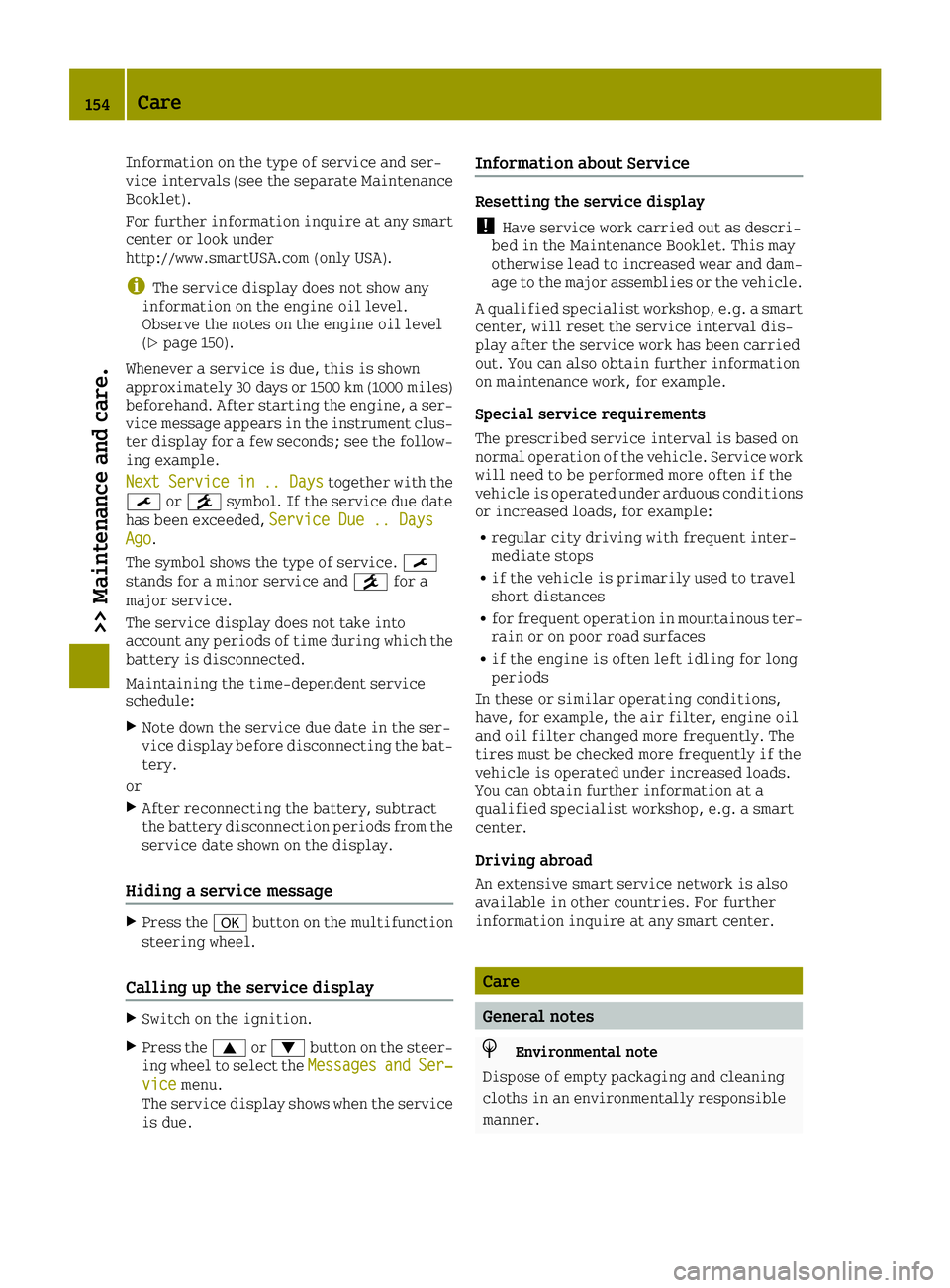
XTo unlock: remove lock cover 0043(driver's
side only) with the key.
XInsert the key into the lock and turn it to
position 0092.
Checking service products151
>> Maintenance and care.
Z
Page 156 of 214
Information on the type of service and ser-
vice intervals (see the separate Maintenance
Booklet).
For further information inquire at any smart
center or look under
http://www.smartUSA.com (only USA).
iThe service display does not show any
information on the engine oil level.
Observe the notes on the engine oil level
(
Ypage 150).
Whenever a service is due, this is shown
approximately 30 days or 1500 km (1000 miles)
beforehand. After starting the engine, a ser-
vice message appears in the instrument clus-
ter display for a few seconds; see the follow-
ing example.
Next
Servicein.. Daystogether with the
0099 or009A symbol. If the service due date
has been exceeded, Service Due .. Days
Ago.
The symbol shows the type of service. 0099
stands for a minor service and 009Afor a
major service.
The service display does not take into
account any periods of time during which the
battery is disconnected.
Maintaining the time-dependent service
schedule:
XNote down the service due date in the ser-
vice display before disconnecting the bat-
tery.
or
XAfter reconnecting the battery, subtract
the battery disconnection periods from the
service date shown on the display.
Hiding a service message
XPress the 0076button on the multifunction
steering wheel.
Calling up the service display
XSwitch on the ignition.
XPress the 0063or0064 button on the steer-
ing wheel to select the MessagesandSer‐vicemenu.
The service display shows when the service
is due.
Information about Service
Resetting the service display
!Have service work carried out as descri-
bed in the Maintenance Booklet. This may
otherwise lead to increased wear and dam-
age to the major assemblies or the vehicle.
A qualified specialist workshop, e.g. a smart center, will reset the service interval dis-
play after the service work has been carried
out. You can also obtain further information
on maintenance work, for example.
Special service requirements
The prescribed service interval is based on
normal operation of the vehicle. Service work
will need to be performed more often if the
vehicle is operated under arduous conditions
or increased loads, for example:
Rregular city driving with frequent inter-
mediate stops
Rif the vehicle is primarily used to travel
short distances
Rfor frequent operation in mountainous ter-
rain or on poor road surfaces
Rif the engine is often left idling for long
periods
In these or similar operating conditions,
have, for example, the air filter, engine oil
and oil filter changed more frequently. The
tires must be checked more frequently if the
vehicle is operated under increased loads.
You can obtain further information at a
qualified specialist workshop, e.g. a smart
center.
Driving abroad
An extensive smart service network is also
available in other countries. For further
information inquire at any smart center.
Care
General notes
HEnvironmental note
Dispose of empty packaging and cleaning
cloths in an environmentally responsible
manner.
154Care
>> Maintenance and care.