radio SMART FORTWO 2016 Owners Manual
[x] Cancel search | Manufacturer: SMART, Model Year: 2016, Model line: FORTWO, Model: SMART FORTWO 2016Pages: 214, PDF Size: 4.93 MB
Page 9 of 214
Emergency releaseDriver's door ........................... .55
Vehicle ................................... 55
Emergency Tensioning Devices
Activation ............................... 40
Emissions control
Service and warranty informa-
tion ........................................ 17
Engine
Check Engine warning lamp ........1 36
Display message ...................... 124
Engine number ......................... 206
Irregular running ...................... 90
Jump-starting ......................... 168
Starting problems ..................... 90
Starting the engine with the
SmartKey ................................. 88
Switching off ........................... 101
Tow-starting (vehicle) .............. 172
Engine compartment cover .............. 149
Engine electronics
Problem (malfunction) ................ 90
Engine oil
Adding ................................... 150
Additives ............................... 209
Checking the oil level ............... 150
Display message ...................... 124
Filling capacity ...................... 209
Notes about oil grades .............. 209
Notes on oil level/consumption ... 149
Viscosity ............................... 210
Warning lamp .......................... 138
Engine oil additives
see Additives (engine oil)
ESP
®(Electronic Stability Program)
Characteristics ........................4 9
Crosswind Assist ....................... 50
Display message ....................... 121
ETS .........................................4 9
Function/notes ......................... 49
General notes ........................... 49
Important safety information ....... 49
Warning and indicator lamps ...... 134
ETS (Electronic Traction System) ...... 49
Exhaust check .............................. 103
Exhaust pipe (cleaning instruc-
tions) ......................................... 158 Exterior lighting
Cleaning ................................ 158
Setting options ......................... 67
Exterior mirrors
Adjusting (electrically) ............. 66
Adjusting (manually) .................. 66
Out of position (troubleshoot-
ing) ........................................ 66
F
Filler capsee Refueling
Filling capacities (Technical data) .. 207
Flat tire
Preparing the vehicle ............... 161
TIREFIT kit ............................. 161
Floormats .................................... 148
Fog lamps
Switching on/off ....................... 68
Frequencies
Mobile phone .......................... 204
Two-way radio ......................... 204
Front cover
see Service cover
Front fog lamps
Changing bulbs ......................... 72
Switching on/off ....................... 68
Front-passenger seat
Folding down ............................ 63
Frontal area cover
see Service cover
Fuel
Additives ............................... 208
Consumption information .......... 209
Displaying the current con-
sumption ................................ 112
Driving tips ........................... 102
Fuel gauge .............................. 110
Grade (gasoline) ...................... 208
Important safety notes .............. 207
Problem (malfunction) ............... 100
Refueling ................................ 97
Tank content/reserve fuel .......... 207
Fuel filler flap
Opening .................................. 98
Fuel tank
Capacity ................................ 207
Index7
Page 12 of 214
Restraint system warning lamp ..... 30
Seat belt .................................. 31
OCS
Conditions ............................... 36
Faults ..................................... 40
Operation ................................ 37
System self-test ........................ 39
Odometer ..................................... 112
Oil
see Engine oil
On-board computer
Displaying a service message ..... 154
Important safety notes ............... 109
Menu overview .......................... 111
Message memory ....................... 113
Messages menu ......................... 113
Operating (color display) ........... 111
Operation ............................... 111
Selecting the language .............. 117
Service menu ........................... 113
Settings menu .......................... 114
Submenu display ....................... 115
On-board diagnostic interface
see Diagnostics connection
Operating safety
Declaration of conformity ........... 19
Important safety notes ................ 18
Operating system
see On-board computer
Operator's Manual
Vehicle equipment ..................... 17
Outside temperature display
Notes ..................................... 109
Setting the units ...................... 116
Overhead control panel .................... 27
Overrevving range ......................... 110
P
Paint code number........................ 205
Paintwork (cleaning instructions) .... 156
Panic alarm .................................. 29
Panoramic roof
Cleaning ................................ 157
Operating the roller sunblind ...... 60
Park brake
see Parking brake Parking
...................................... 100
Important safety notes ............... 100
Parking brake .......................... 101
Switching off the engine ............ 101
Parking brake
Display message ....................... 119
Notes/function ......................... 101
Warning lamp .......................... 132
Parking lamps
Switching on and off .................. 68
PASSENGER AIR BAG
Indicator lamps ........................ 30
Pets in the vehicle ......................... 46
Plastic trim (cleaning instruc-
tions) ......................................... 158
Power washers .............................. 155
Power windows
see Side windows
Program selector button .................. 94
Protection against theft
Anti-theft alarm system .............. 46
Immobilizer ............................. 46
Protection of the environment
General notes ............................ 16
Pulling away
Automatic transmission .............. 88
General notes ........................... 88
Manual transmission .................. 88
Q
QR codeRescue card .............................. 20
Qualified specialist workshop ......... 20
R
Radio-wave reception/transmis-
sion in the vehicle
Declaration of conformity ........... 19
Rain and light sensor (display mes-
sage) .......................................... 130
Reading lamp ................................ 69
Rear fog lamp
Changing bulbs ......................... 73
Switching on/off ....................... 68
Rear lamps
Changing bulbs ......................... 73
10Index
Page 16 of 214
Tire size (data) ....................... 200
Tire size designation, load-
bearing capacity, speed rating ... 191
Tire tread ...............................178
Tire tread (definition) .............. 196
Total load limit (definition) ...... 196
Traction .................................1 90
Traction (definition) ................ 196
Tread wear .............................. 190
Uniform Tire Quality Grading
Standards ............................... 189
Uniform Tire Quality Grading
Standards (definition) .............. 194
Wear indicator (definition) ....... 196
Wheel and tire combination ....... 202
Wheel rim (definition) .............. 195
see Flat tire
Tool
see Vehicle tool kit
Top Tether .................................... 44
Total distance recorder
Setting the display unit .............1 16
Tow-starting
Emergency engine starting ......... 172
Important safety notes ............... 170
Towing away
Important safety guidelines .......1 70
Installing the towing eye ........... 171
Removing the towing eye ............ 171
With both axles on the ground ...... 171
With the rear axle raised ........... 171
Transmission
see Automatic transmission
see Manual transmission
Transmission position display .........92
Transporting the vehicle ................ 172
Trip computer (on-board computer) ... 112
Trip meter
Setting the display unit .............1 16
Setting the display units ........... 116
Trip odometer
Calling up .............................. 112
Trunk
Fitting the cover ..................... 144
Installing/removing the cover ....1 45
see Tailgate
Trunk (front)
see Service cover Turn signals
Changing bulbs (front) ................ 72
Changing bulbs (rear) ................. 73
Switching on/off ....................... 68
Turn signals
see Turn signals
Two-way radio
Frequencies ............................ 204
Installation ............................ 204
Transmission output (maximum) .. 204
Type identification plate
see Vehicle identification plate
U
UnlockingEmergency unlocking .................. 55
From inside the vehicle (central
unlocking button) ...................... 54
V
VehicleCorrect use .............................. 20
Data acquisition ....................... 20
Electronics malfunction (dis-
play message) .......................... 130
Electronics malfunction (warn-
ing lamp) ................................ 141
Equipment ................................ 17
Loading .................................. 185
Locking (in an emergency) ........... 55
Locking (SmartKey) .................... 51
Lowering ................................ 200
Maintenance ............................. 17
Parking for a long period .......... 102
Pulling away ............................. 88
Raising .................................. 197
Reporting problems ................... 20
Securing from rolling away ........ 197
Tow-starting ........................... 170
Towing away ............................ 170
Transporting ........................... 172
Unlocking (in an emergency) ........ 55
Unlocking (SmartKey) ................. 51
Vehicle data ........................... 212
Vehicle battery
see Battery (vehicle)
Vehicle data ................................ 212
14Index
Page 21 of 214
electronic equipment carried out at a
qualified specialist workshop.
If you make any changes to the vehicle elec-
tronics, the general operating permit is ren-
dered invalid.
!There is a risk of damage to the vehicle if:
Rthe vehicle becomes stuck, e.g. on a high
curb or an unpaved road
Ryou drive too fast over an obstacle, e.g. a
curb or a hole in the road
Ra heavy object strikes the undercarriage
or parts of the chassis
In situations like this, the body, the under-
carriage, chassis parts, wheels or tires
could be damaged without the damage being
visible. Components damaged in this way
can unexpectedly fail or, in the case of an
accident, no longer withstand the strain
they are designed to.
If the underbody paneling is damaged,
combustible materials such as leaves,
grass or twigs can gather between the
underbody and the underbody paneling. If
these materials come in contact with hot
parts of the exhaust system, they can catch
fire.
In such situations, have the vehicle
checked and repaired immediately at a
qualified specialist workshop. If on con-
tinuing your journey you notice that driv-
ing safety is impaired, pull over and stop
the vehicle immediately, paying attention
to road and traffic conditions. In such
cases, consult a qualified specialist work-
shop.
Declarations of conformity
Vehicle components which receive
and/or transmit radio waves
USA: "The wireless devices of this vehicle
comply with Part 15 of the FCC Rules. Opera-
tion is subject to the following two condi-
tions: 1) These devices may not cause harmful interference, and 2) These devices must
accept any interference received, including
interference that may cause undesired oper-
ation. Changes or modifications not
expressly approved by the party responsible for compliance could void the user’s author-
ity to operate the equipment."
Canada:
"The wireless devices of this vehicle
comply with Industry Canada license-exempt
RSS standard(s). Operation is subject to the
following two conditions: (1) These devices
may not cause interference, and (2) These
devices must accept any interference,
including interference that may cause unde-
sired operation of the device."
Diagnostics connection
The diagnostics connection is only intended
for the connection of diagnostic equipment
at a qualified specialist workshop.
GWARNING
If you connect equipment to the diagnostics
connection in the vehicle, it may affect the
operation of the vehicle systems. As a
result, the operating safety of the vehicle
could be affected. There is a risk of an
accident.
Do not connect any equipment to a diagnos-
tics connection in the vehicle.
GWARNING
Objects in the driver's footwell can
restrict the pedal travel or obstruct a
depressed pedal. The operating and road
safety of the vehicle is jeopardized. There
is a risk of an accident.
Make sure that all objects in the vehicle are
stowed correctly, and that they cannot enter
the driver's footwell. Install the floormats securely and as specified in order to
ensure sufficient clearance for the pedals.
Do not use loose floormats and do not place
floormats on top of one another.
!If the engine is switched off and equip-
ment on the diagnostics connection is used,
the starter battery may discharge.
Connecting equipment to the diagnostics
connection can lead to emissions monitoring
information being reset, for example. This
may lead to the vehicle failing to meet the
>> Introduction.19
Z
Page 55 of 214
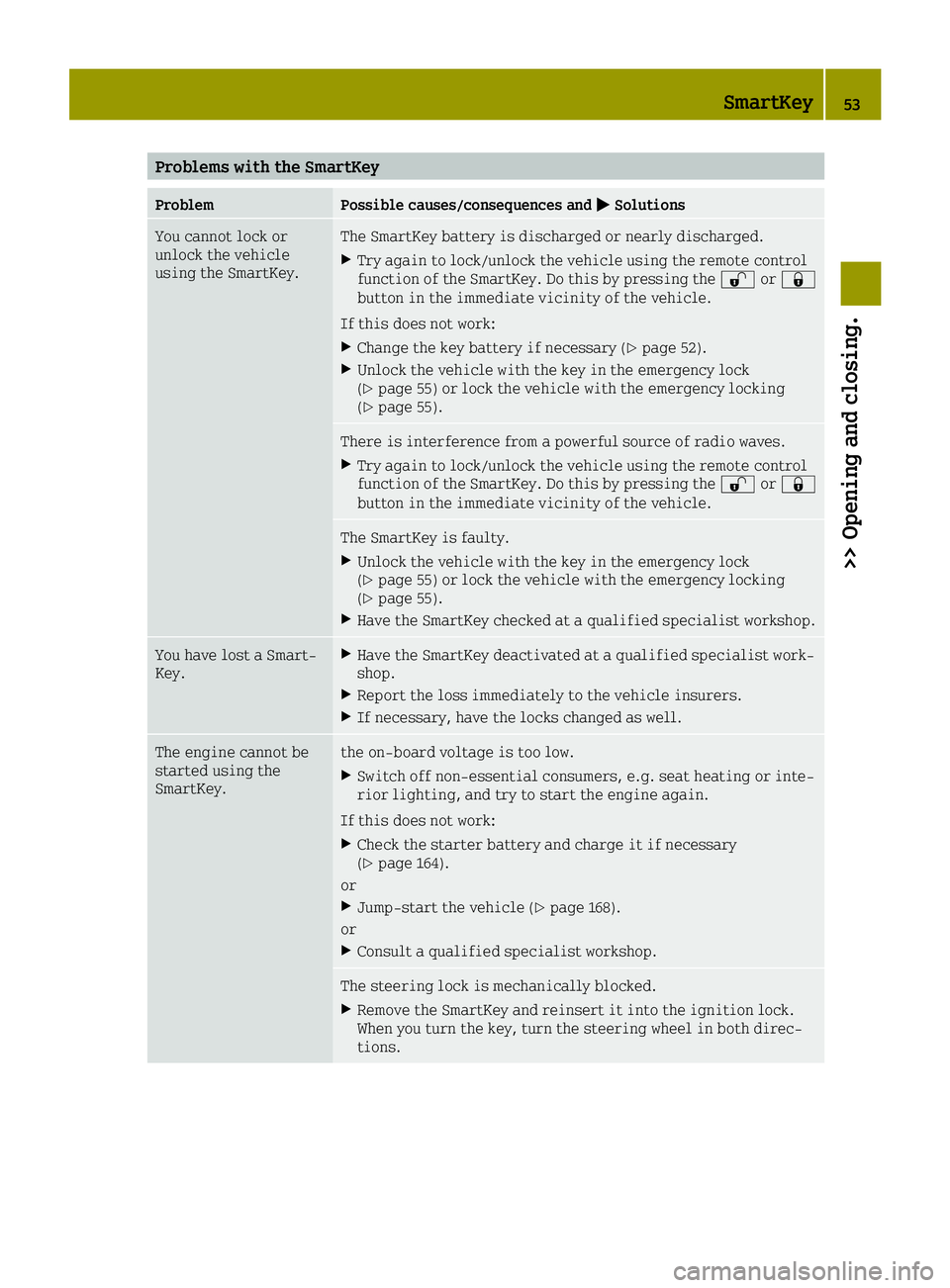
Problems with the SmartKey
ProblemPossible causes/consequences and0050Solutions
You cannot lock or
unlock the vehicle
using the SmartKey.The SmartKey battery is discharged or nearly discharged.
XTry again to lock/unlock the vehicle using the remote control
function of the SmartKey. Do this by pressing the 0036or0037
button in the immediate vicinity of the vehicle.
If this does not work:
XChange the key battery if necessary (Ypage 52).
XUnlock the vehicle with the key in the emergency lock
(Ypage 55) or lock the vehicle with the emergency locking
(Ypage 55).
There is interference from a powerful source of radio waves.
XTry again to lock/unlock the vehicle using the remote control
function of the SmartKey. Do this by pressing the 0036or0037
button in the immediate vicinity of the vehicle.
The SmartKey is faulty.
XUnlock the vehicle with the key in the emergency lock
(Ypage 55) or lock the vehicle with the emergency locking
(Ypage 55).
XHave the SmartKey checked at a qualified specialist workshop.
You have lost a Smart-
Key.XHave the SmartKey deactivated at a qualified specialist work-
shop.
XReport the loss immediately to the vehicle insurers.
XIf necessary, have the locks changed as well.
The engine cannot be
started using the
SmartKey.the on-board voltage is too low.
XSwitch off non-essential consumers, e.g. seat heating or inte-
rior lighting, and try to start the engine again.
If this does not work:
XCheck the starter battery and charge it if necessary
(Ypage 164).
or
XJump-start the vehicle (Ypage 168).
or
XConsult a qualified specialist workshop.
The steering lock is mechanically blocked.
XRemove the SmartKey and reinsert it into the ignition lock.
When you turn the key, turn the steering wheel in both direc-
tions.
SmartKey53
>> Opening and closing.
Z
Page 125 of 214
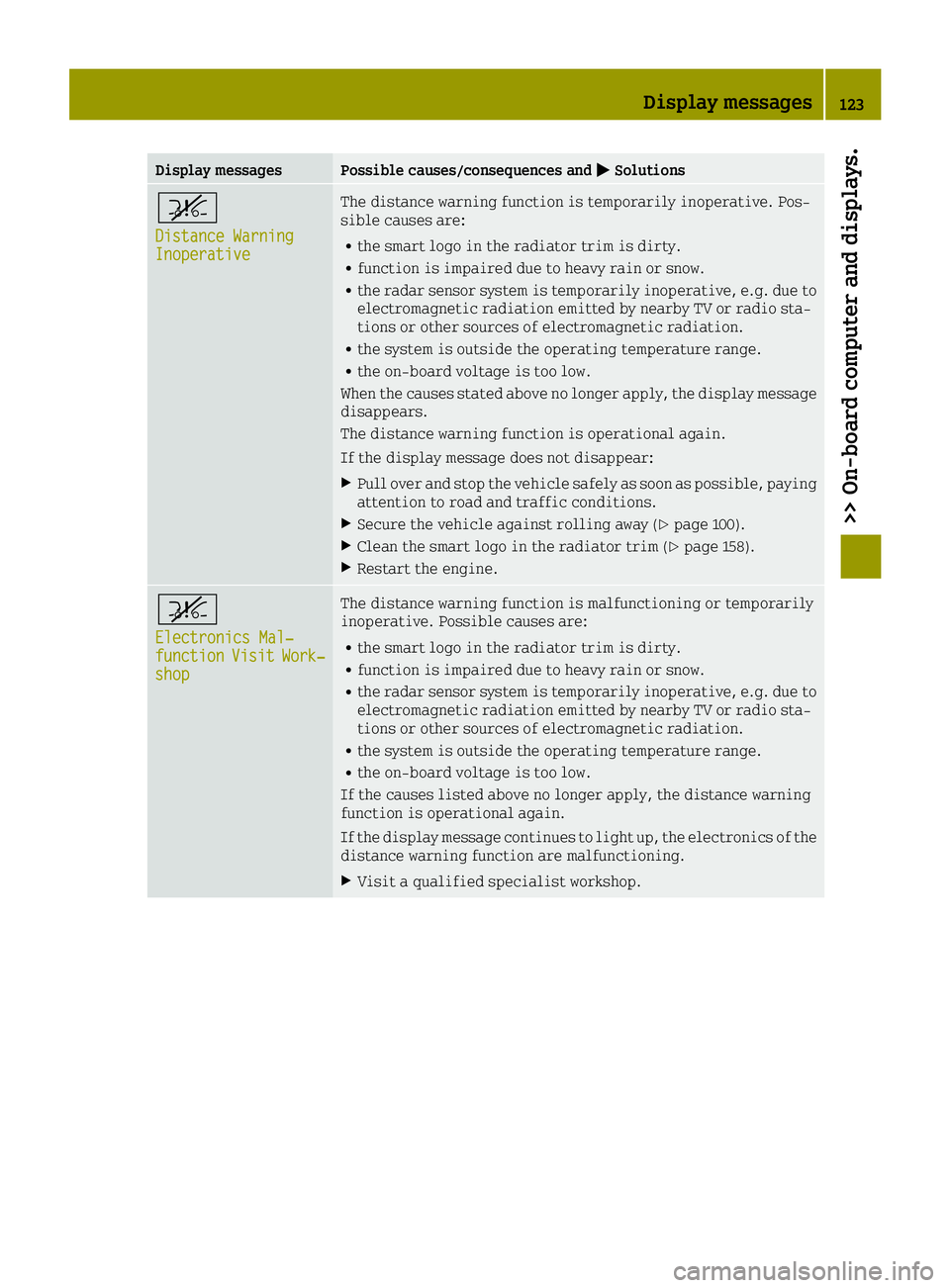
Display messagesPossible causes/consequences and0050Solutions
^
Distance WarningInoperative
The distance warning function is temporarily inoperative. Pos-
sible causes are:
Rthe smart logo in the radiator trim is dirty.
Rfunction is impaired due to heavy rain or snow.
Rthe radar sensor system is temporarily inoperative, e.g. due to
electromagnetic radiation emitted by nearby TV or radio sta-
tions or other sources of electromagnetic radiation.
Rthe system is outside the operating temperature range.
Rthe on-board voltage is too low.
When the causes stated above no longer apply, the display message
disappears.
The distance warning function is operational again.
If the display message does not disappear:
XPull over and stop the vehicle safely as soon as possible, paying
attention to road and traffic conditions.
XSecure the vehicle against rolling away (Ypage 100).
XClean the smart logo in the radiator trim (Ypage 158).
XRestart the engine.
^
Electronics Mal‐functionVisitWork‐shop
The distance warning function is malfunctioning or temporarily
inoperative. Possible causes are:
Rthe smart logo in the radiator trim is dirty.
Rfunction is impaired due to heavy rain or snow.
Rthe radar sensor system is temporarily inoperative, e.g. due to
electromagnetic radiation emitted by nearby TV or radio sta-
tions or other sources of electromagnetic radiation.
Rthe system is outside the operating temperature range.
Rthe on-board voltage is too low.
If the causes listed above no longer apply, the distance warning
function is operational again.
If the display message continues to light up, the electronics of the
distance warning function are malfunctioning.
XVisit a qualified specialist workshop.
Display messages123
>> On-board computer and displays.
Z
Page 138 of 214
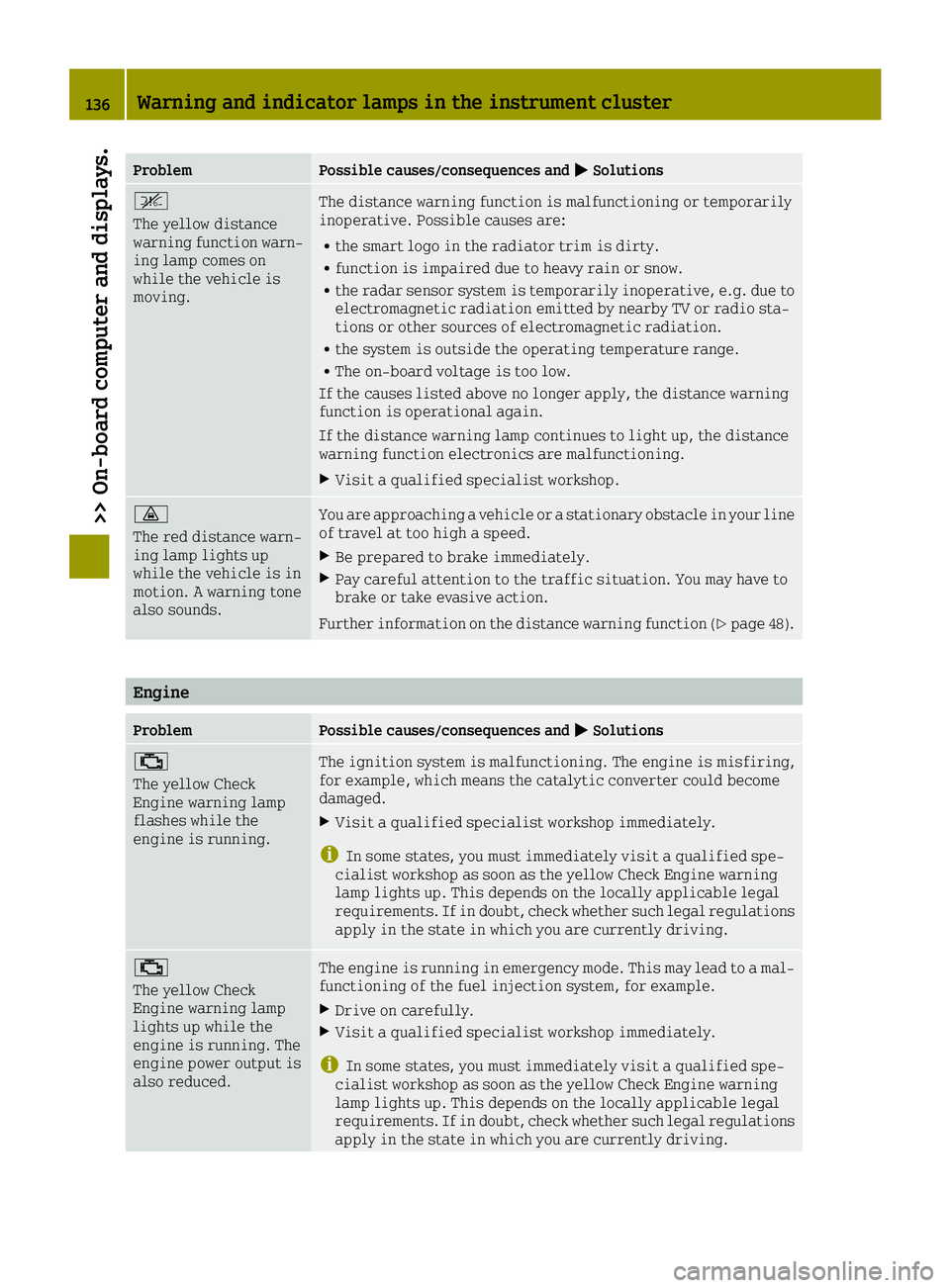
ProblemPossible causes/consequences and0050Solutions
^
The yellow distance
warning function warn-
ing lamp comes on
while the vehicle is
moving.The distance warning function is malfunctioning or temporarily
inoperative. Possible causes are:
Rthe smart logo in the radiator trim is dirty.
Rfunction is impaired due to heavy rain or snow.
Rthe radar sensor system is temporarily inoperative, e.g. due to
electromagnetic radiation emitted by nearby TV or radio sta-
tions or other sources of electromagnetic radiation.
Rthe system is outside the operating temperature range.
RThe on-board voltage is too low.
If the causes listed above no longer apply, the distance warning
function is operational again.
If the distance warning lamp continues to light up, the distance
warning function electronics are malfunctioning.
XVisit a qualified specialist workshop.
00BA
The red distance warn-
ing lamp lights up
while the vehicle is in
motion. A warning tone
also sounds.You are approaching a vehicle or a stationary obstacle in your line
of travel at too high a speed.
XBe prepared to brake immediately.
XPay careful attention to the traffic situation. You may have to
brake or take evasive action.
Further information on the distance warning function (
Ypage 48).
Engine
ProblemPossible causes/consequences and 0050Solutions
00B9
The yellow Check
Engine warning lamp
flashes while the
engine is running.The ignition system is malfunctioning. The engine is misfiring,
for example, which means the catalytic converter could become
damaged.
XVisit a qualified specialist workshop immediately.
iIn some states, you must immediately visit a qualified spe-
cialist workshop as soon as the yellow Check Engine warning
lamp lights up. This depends on the locally applicable legal
requirements. If in doubt, check whether such legal regulations
apply in the state in which you are currently driving.
00B9
The yellow Check
Engine warning lamp
lights up while the
engine is running. The
engine power output is
also reduced.The engine is running in emergency mode. This may lead to a mal-
functioning of the fuel injection system, for example.
XDrive on carefully.
XVisit a qualified specialist workshop immediately.
iIn some states, you must immediately visit a qualified spe-
cialist workshop as soon as the yellow Check Engine warning
lamp lights up. This depends on the locally applicable legal
requirements. If in doubt, check whether such legal regulations
apply in the state in which you are currently driving.
136Warning and indicator lamps in the instrument cluster
>> On-board computer and displays.
Page 178 of 214
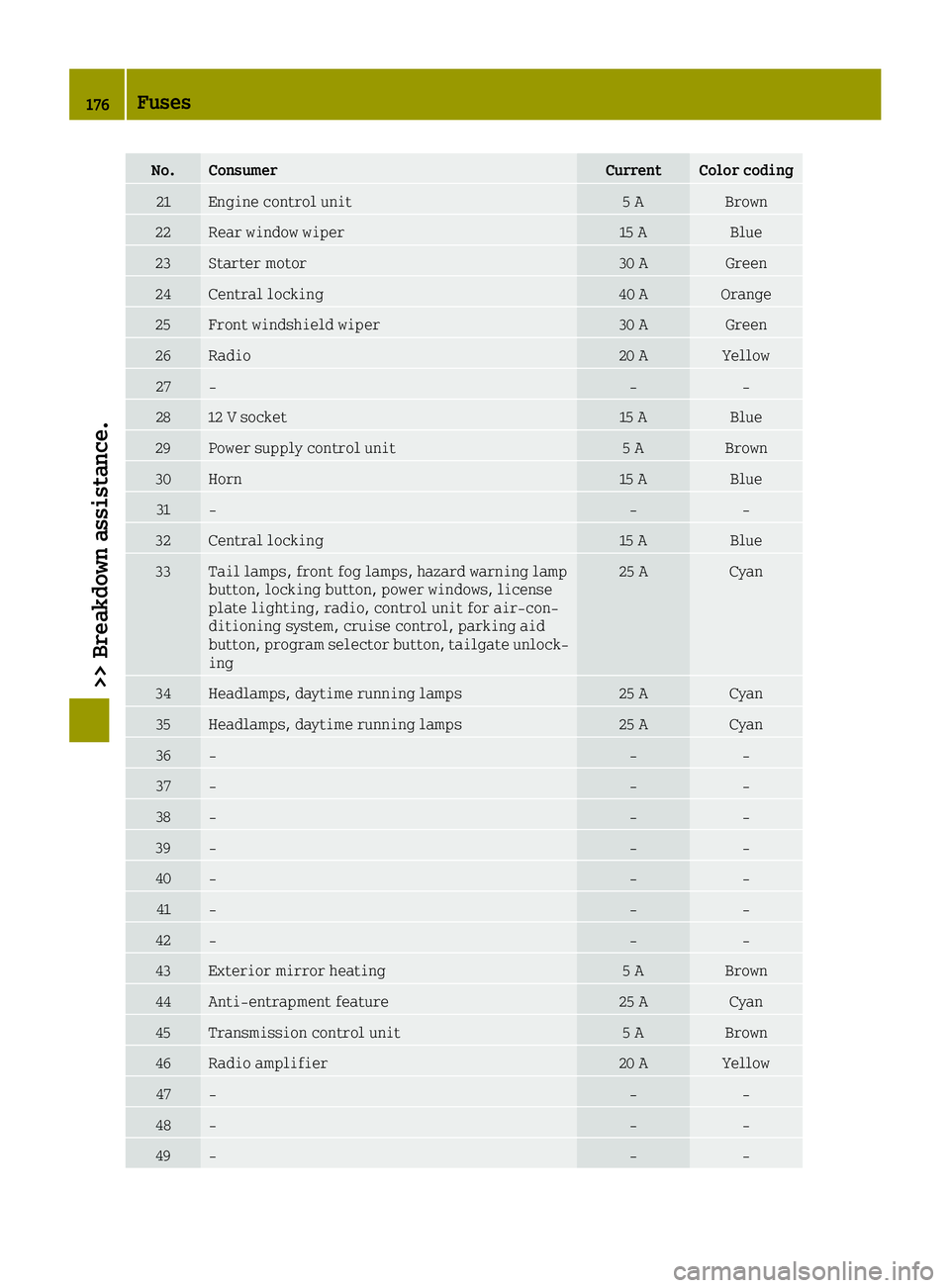
No.ConsumerCurrentColor coding
21Engine control unit5 ABrown
22Rear window wiper15 ABlue
23Starter motor30 AGreen
24Central locking40 AOrange
25Front windshield wiper30 AGreen
26Radio20 AYellow
27‑‑‑
2812 V socket15 ABlue
29Power supply control unit5 ABrown
30Horn15 ABlue
31‑‑‑
32Central locking15 ABlue
33Tail lamps, front fog lamps, hazard warning lamp
button, locking button, power windows, license
plate lighting, radio, control unit for air-con-
ditioning system, cruise control, parking aid
button, program selector button, tailgate unlock-
ing25 ACyan
34Headlamps, daytime running lamps25 ACyan
35Headlamps, daytime running lamps25 ACyan
36‑‑‑
37‑‑‑
38‑‑‑
39‑‑‑
40‑‑‑
41‑‑‑
42‑‑‑
43Exterior mirror heating5 ABrown
44Anti-entrapment feature25 ACyan
45Transmission control unit5 ABrown
46Radio amplifier20 AYellow
47‑‑‑
48‑‑‑
49‑‑‑
176Fuses
>> Breakdown assistance.
Page 186 of 214
warning lamp will flash for approximately
a minute and then remain continuously
illuminated. This sequence will be repea-
ted every time the vehicle is started as long
as the malfunction exists. When the mal-
function indicator is illuminated, the sys-
tem may not be able to detect or signal low
tire pressure as intended.
TPMS malfunctions may occur for a variety
of reasons, including the installation of
incompatible replacement or alternate
tires or wheels on the vehicle that prevent
the TPMS from functioning properly. Always
check the TPMS malfunction telltale after
replacing one or more tires or wheels on
your vehicle to ensure that the replacement
or alternate Tires and wheels allow the
TPMS to continue to function properly.
It is the driver's responsibility to set the
tire pressure to that recommended for cold
tires which is suitable for the operating sit-
uation (
Ypage 180). Note that the correct tire
pressure for the current operating situation
must first be taught-in to the tire pressure
monitor. If there is a substantial loss of
pressure, the warning threshold for the warn-
ing message is aligned to the reference val-
ues taught-in. Restart the tire pressure mon-
itor after adjusting to the cold tire pressure.
The current pressures are saved as new ref-
erence values. As a result, a warning message
will appear if the tire pressure drops sig-
nificantly.
The tire pressure monitor does not warn you of
an incorrectly set tire pressure. Observe the notes on the recommended tire pressure
(
Ypage 180).
The tire pressure monitor is not able to warn
you of a sudden loss of pressure, e.g. if the
tire is penetrated by a foreign object. In the
event of a sudden loss of pressure, bring the
vehicle to a halt by braking carefully. Avoid
abrupt steering maneuvers. The tire pressure monitor has a yellow warn-
ing lamp in the instrument cluster for indi-
cating a pressure loss or malfunction.
Whether the warning lamp flashes or lights up
indicates whether a tire pressure is too low
or the tire pressure monitor is malfunction-
ing:
RIf the warning lamp is lit continuously, the
tire pressure on one or more tires is sig-
nificantly too low. The tire pressure mon-
itor is not malfunctioning.
RIf the warning lamp flashes for around a
minute and then remains lit constantly, the
tire pressure monitor is malfunctioning.
iA message appears in the display in addi-
tion to the warning lamp.
Observe the information on display mes-
sages (
Ypage 126).
If the tire pressure monitor is malfunction-
ing, it may take up to ten minutes for the tire
pressure warning lamp to inform you of the
malfunction. The malfunction will be indi-
cated first by the tire pressure warning lamp
flashing for approximately one minute and
then remaining lit. When the malfunction has
been rectified, the tire pressure warning
lamp goes out after a few minutes of driving.
The operation of the tire pressure monitor
can be affected by interference from radio
transmitting equipment (e.g. radio head-
phones, two-way radios) that may be being
operated in or near the vehicle.
Tire pressure monitor warning messages
If the tire pressure monitor detects a pres-
sure loss in one or more tires, a warning mes-
sage is shown in the display. The yellow warn-
ing light in the tire pressure monitor lights
up. For certain display messages a warning
tone also sounds.
RIf the Correct Tire Pressuremessage
appears in the display, the tire pressure in
at least one tire is too low. Correct the tire
pressure at the next opportunity.
RIf the Tire Pressure Warning TireFailuremessage appears in the display,
the tire pressure in one or more tires has
dropped suddenly and the tires must be
checked.
Observe the instructions and safety notes for the display messages in the "Tires" section
184Tire pressure
>> Wheels and tires.
Page 187 of 214
(Ypage 126) and the indicator and warning
lamps in the instrument cluster in the "Tires" section (
Ypage 139).
Restarting the tire pressure monitor
When you restart the tire pressure monitor,
all existing warning messages are deleted
and the warning lamps go out. The monitor
uses the currently set tire pressures as the
reference values for monitoring. In most
cases, the tire pressure monitor will auto-
matically detect the new reference values
after you have changed the tire pressure.
However, you can also define reference values
manually as described here. The tire pres-
sure monitor then monitors the new tire pres-
sure values.
XSet the tire pressure to the value recom-
mended for the corresponding driving sit-
uation on the Tire and Loading Information
placard on the B-pillar on the driver's side
(
Ypage 180).
Additional tire pressure values for dif-
ferent loads can also be found on the tire
pressure table on the inside of the fuel
filler flap (
Ypage 180).
XMake sure that the tire pressure is correct on all four wheels.
On-board computer with a color display
XTo restart the tire pressure monitor: press
the 0063 or0064 button on the steering
wheel to select the Settings
menu and
press 0076on the steering wheel to con-
firm.
XPress the 0063or0064 button to select the
TirePressureMonitorsubmenu and con-
firm with 0076.
The Tire Pressure Monitor Use Cur‐
rentPressuresAsNewReferenceVal‐ues?message appears in the display.
If you wish to confirm the restart:
XPress the 0063or0064 button to select yesand press the0076button to confirm.
The Tire Pressure Monitor Restarted
message appears in the display.
XPress 0076to confirm.
After a short while, the message is also
hidden without pressing the 0076button.
After driving for a few minutes, the system
checks whether the current tire pressures are within the specified range. The new
tire pressures are then accepted as refer-
ence values and monitored.
iIf the
Tire Pressure Monitor Restar‐tedmessage does not appear after approx-
imately 5 seconds, the restart was not suc-
cessful. If this occurs, repeat the restart.
If you wish to cancel the restart:
XPress the 0063or0064 button to select noand press the0076button to confirm.
The tire pressure values stored at the last
restart will continue to be monitored.
Radio type approval for the tire pressure
monitor
CountryRadio type approval number
USAFCC ID: MRXMW2433A
FCC ID: MRXGG4
FCC ID: MRXMC34MA4
CanadaIC: 2546A-MW2433A
IC: 2546A-GG4
IC: 2546A-MC34MA4
Loading the vehicle
Instruction labels for tires and loads
GWARNING
Overloaded tires can overheat, causing a
blowout. Overloaded tires can also impair
the steering and driving characteristics
and lead to brake failure. There is a risk of
accident.
Observe the load rating of the tires. The
load rating must be at least half of the GAWR
of your vehicle. Never overload the tires by exceeding the maximum load.
Two instruction labels on your vehicle show
the maximum possible load.
(1) The Tire and Loading Information plac- ard is on the B-pillar on the driver's
side. The Tire and Loading Information
placard shows the maximum permissible
number of occupants and the maximum
permissible vehicle load. It also con-
Loading the vehicle185
>> Wheels and tires.
Z