Tire SMART FORTWO COUPE 2010 User Guide
[x] Cancel search | Manufacturer: SMART, Model Year: 2010, Model line: FORTWO COUPE, Model: SMART FORTWO COUPE 2010Pages: 216, PDF Size: 9.7 MB
Page 17 of 216
your vehicle will be determined by our
authorized smart center technician or the
tow service provider on a case-by-case
basis and may be a factor in our ability to
respond.
Additional charges may be applicable for
a breakdown location determined not to be
a reasonably accessible roadside location
as determined by our authorized
technician and tow service provider.
For additional information refer to the
smart Roadside Assistance Program
brochure in your vehicle literature
portfolio.
Change of address or ownership
In the USA: If you change your address, be
sure to send in the “Information Change
Card” found in the Warranty Information
Booklet.
In Canada: If you change your address, be
sure to send in the “Change of Address
Notice” found in the Warranty Booklet, or
simply call the Customer Service at
1-800-387-0100.
Maintaining your current address
information with smart will enable us to
contact you should important new
information about the vehicle, such as
recalls, become available.
If you sell your smart, please leave all
literature with the vehicle to make it
available to the next operator.
In the USA: If you bought this vehicle used,
be sure to send in the “Information Change
Card” found in the Warranty Information
Booklet.
In Canada: If you bought this vehicle used,
be sure to send in the “Notice of Pre‑Owned
Vehicle Purchase” found in the Warranty
Booklet, or call the Customer Service at
1-800-387-0100.
Operating your vehicle outside the
USA or Canada
If you plan to operate your vehicle in
foreign countries, please be aware that:
R Service facilities or replacement parts
may not be readily available,
R Unleaded gasoline for vehicles with
catalytic converters may not be
available; the use of leaded fuels will
damage the catalysts.
R Gasoline may have a considerably lower
octane rating, and improper fuel can
cause engine damage.
Operating safety
GWarning!
Work improperly carried out on electronic
components and associated software could
cause them to cease functioning. Because
the vehicle’s electronic components are
interconnected, any modifications made
may produce an undesired effect on other
systems. Electronic malfunctions could
seriously impair the operating safety of
your vehicle.
See an authorized smart center for repairs
or modifications to electronic
components.
Improper work or modifications on other
vehicle systems could also have a negative
impact on the operating safety of the
vehicle.
GWarning!
Some safety systems only function while the
engine is running. You should therefore
never turn off the engine while driving.
GWarning!
Heavy blows against the vehicle underbody
or tires/wheels, for example when running
>> Introduction.15451_AKB; 3; 22, en-USd2ureepe,Version: 2.11.8.12009-07-27T09:36:34+02:00 - Seite 15Z
Page 18 of 216
over an obstacle, road debris or a pothole,
may cause serious damage and impair the
operating safety of your vehicle.
If you feel a sudden significant vibration
or ride disturbance, or you suspect that
damage to your vehicle has occurred, you
should turn on your hazard warning
flashers, carefully slow down, and drive
with caution to an area which is a safe
distance from the road.
Inspect the vehicle underbody and tires/
wheels for possible damage. If the vehicle
appears unsafe, have it towed to the nearest
authorized smart center or other qualified
maintenance or repair facility for further
inspection or repairs.
Proper use of the vehicle
Proper use of the vehicle requires that you
are familiar with the following
information and rules:
R the safety precautions in this manual
R the “Technical data” section in this
manual
R traffic rules and regulations
R motor vehicle laws and safety standards
GWarning!
Various warning labels are attached to your
vehicle. These warning labels are intended
to make you and others aware of various
risks. You should not remove any of these
warning labels unless explicitly
instructed to do so by information on the
label itself. Removal of any of these labels
may cause you and others to be unaware of
certain risks which may result in an
accident and/or personal injury.
Problems with your vehicle
If you should experience a problem with
your vehicle, particularly one that you
believe may affect its safe operation, we
urge you to immediately contact an
authorized smart center to have the
problem diagnosed and corrected if
required. Do not drive the vehicle if you
believe it may not be safely operated. If the
matter is not handled to your satisfaction,
please discuss the problem with the smart
center management, or if necessary contact
us at one of the following addresses:
In the USA:
smart USA Distributor LLC.
Customer Assistance Center
1765 Telegraph Rd.
Bloomfield Hills, MI 48302
In Canada:
Customer Relations Department
Mercedes-Benz Canada, Inc.
98 Vanderhoof Avenue
Toronto, Ontario, M4G 4C9
Reporting safety defects
For the USA only: The following text is
published as required of manufacturers
under Title 49, Code of U.S. Federal
Regulations, Part 575 pursuant to the
National Traffic and Motor Vehicle Safety
Act of 1966.
Reporting safety defects
If you believe that your vehicle has a defect
which could cause a crash or could cause
injury or death, you should immediately
inform the National Highway Traffic Safety
Administration (NHTSA) in addition to
notifying smart USA Distributor LLC.
If NHTSA receives similar complaints, it
may open an investigation, and if it finds
that a safety defect exists in a group of
vehicles, it may order a recall and remedy
campaign. However, NHTSA cannot become
involved in individual problems between
you, your dealer, or smart USA Distributor
LLC.
16>> Introduction.451_AKB; 3; 22, en-USd2ureepe,Version: 2.11.8.12009-07-27T09:36:34+02:00 - Seite 16
Page 22 of 216
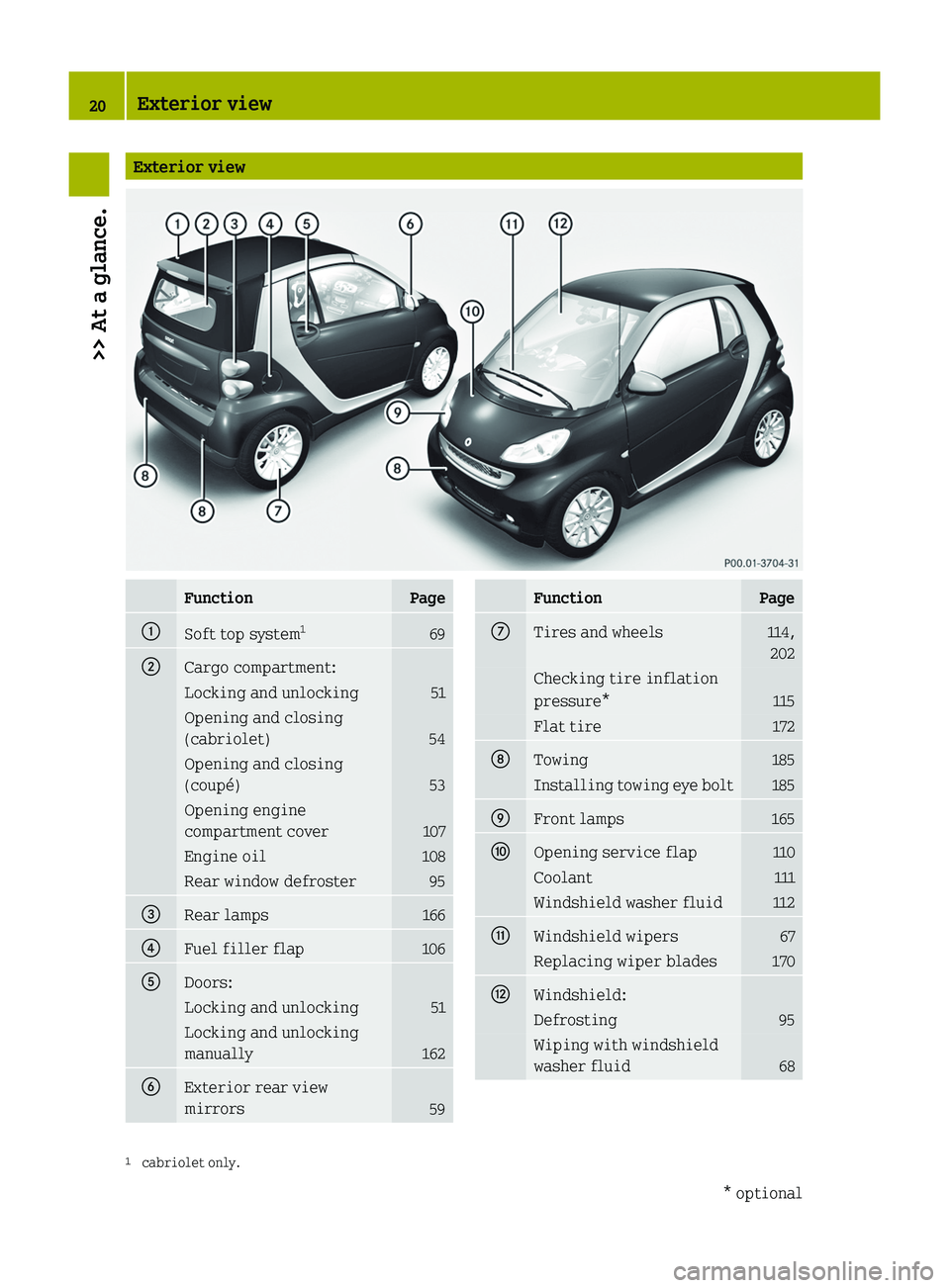
Exterior viewFunctionPage0046Soft top system1690047Cargo compartment:Locking and unlocking51Opening and closing
(cabriolet)
54
Opening and closing
(coupé)
53
Opening engine
compartment cover
107
Engine oil108Rear window defroster95008ARear lamps1660088Fuel filler flap1060086Doors:Locking and unlocking51Locking and unlocking
manually
162
0087Exterior rear view
mirrors
59
FunctionPage006ETires and wheels114, 202Checking tire inflation
pressure*
115
Flat tire172006FTowing185Installing towing eye bolt1850070Front lamps1650071Opening service flap110Coolant111Windshield washer fluid1120072Windshield wipers67Replacing wiper blades1700073Windshield:Defrosting95Wiping with windshield
washer fluid
681 cabriolet only.20Exterior view>> At a glance.* optional451_AKB; 3; 22, en-USd2ureepe,Version: 2.11.8.12009-07-27T09:36:34+02:00 - Seite 20
Page 25 of 216
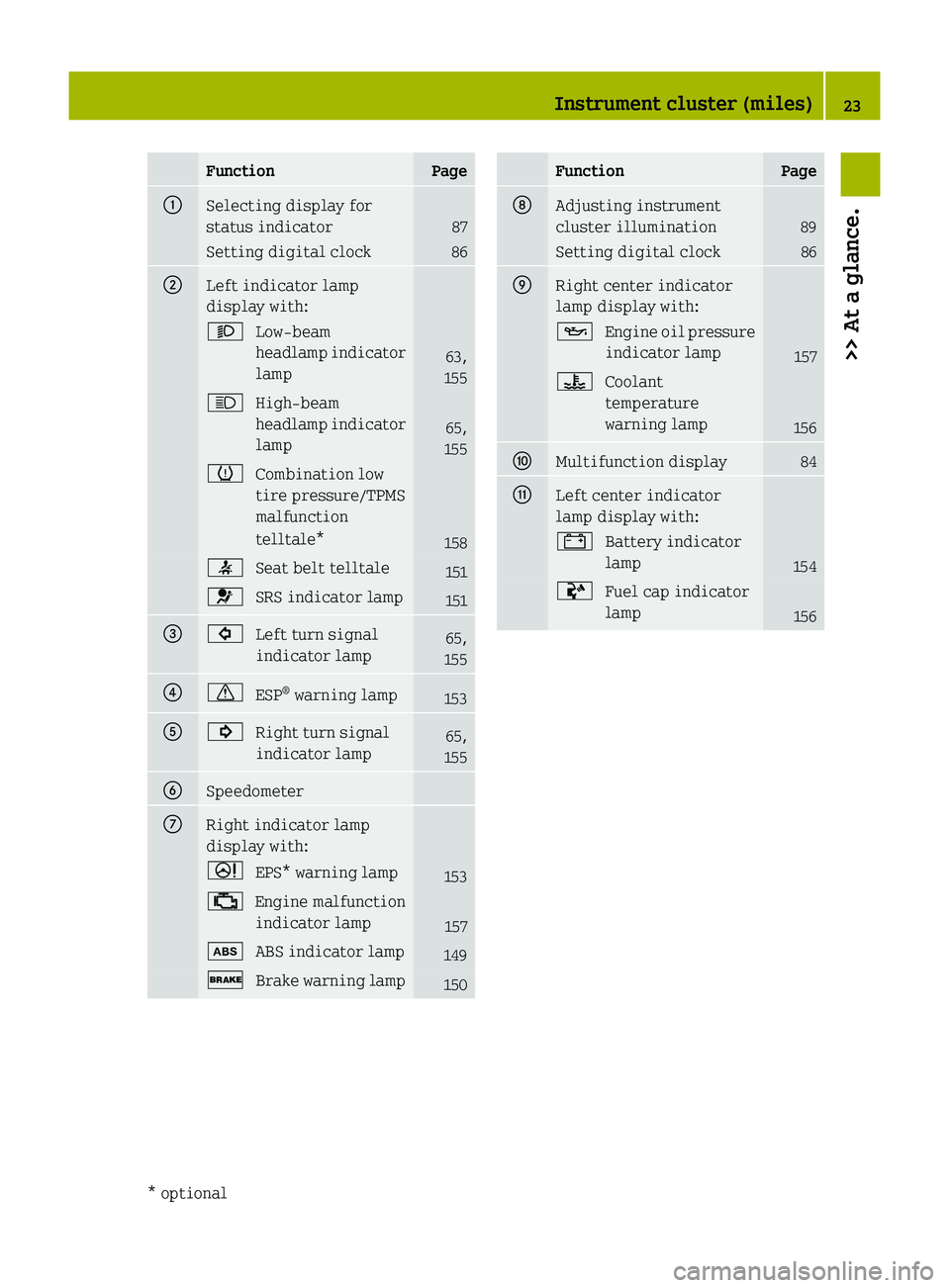
FunctionPage0046Selecting display for
status indicator
87
Setting digital clock860047Left indicator lamp
display with:0065Low‑beam
headlamp indicator
lamp
63,
155
0063High‑beam
headlamp indicator
lamp
65,
155
0077Combination low
tire pressure/TPMS
malfunction
telltale*
158
0082Seat belt telltale1510081SRS indicator lamp151008A0026Left turn signal
indicator lamp65,
15500880067ESP ®
warning lamp15300860024Right turn signal
indicator lamp65,
1550087Speedometer006ERight indicator lamp
display with:0052EPS* warning lamp15300BBEngine malfunction
indicator lamp
157
00EBABS indicator lamp1490027Brake warning lamp150FunctionPage006FAdjusting instrument
cluster illumination
89
Setting digital clock860070Right center indicator
lamp display with:00B5Engine oil pressure
indicator lamp
157
00AECoolant
temperature
warning lamp
156
0071Multifunction display840072Left center indicator
lamp display with:003FBattery indicator
lamp
154
00ACFuel cap indicator
lamp
156
Instrument cluster (miles)23>> At a glance.* optional451_AKB; 3; 22, en-USd2ureepe,Version: 2.11.8.12009-07-27T09:36:34+02:00 - Seite 23
Page 27 of 216
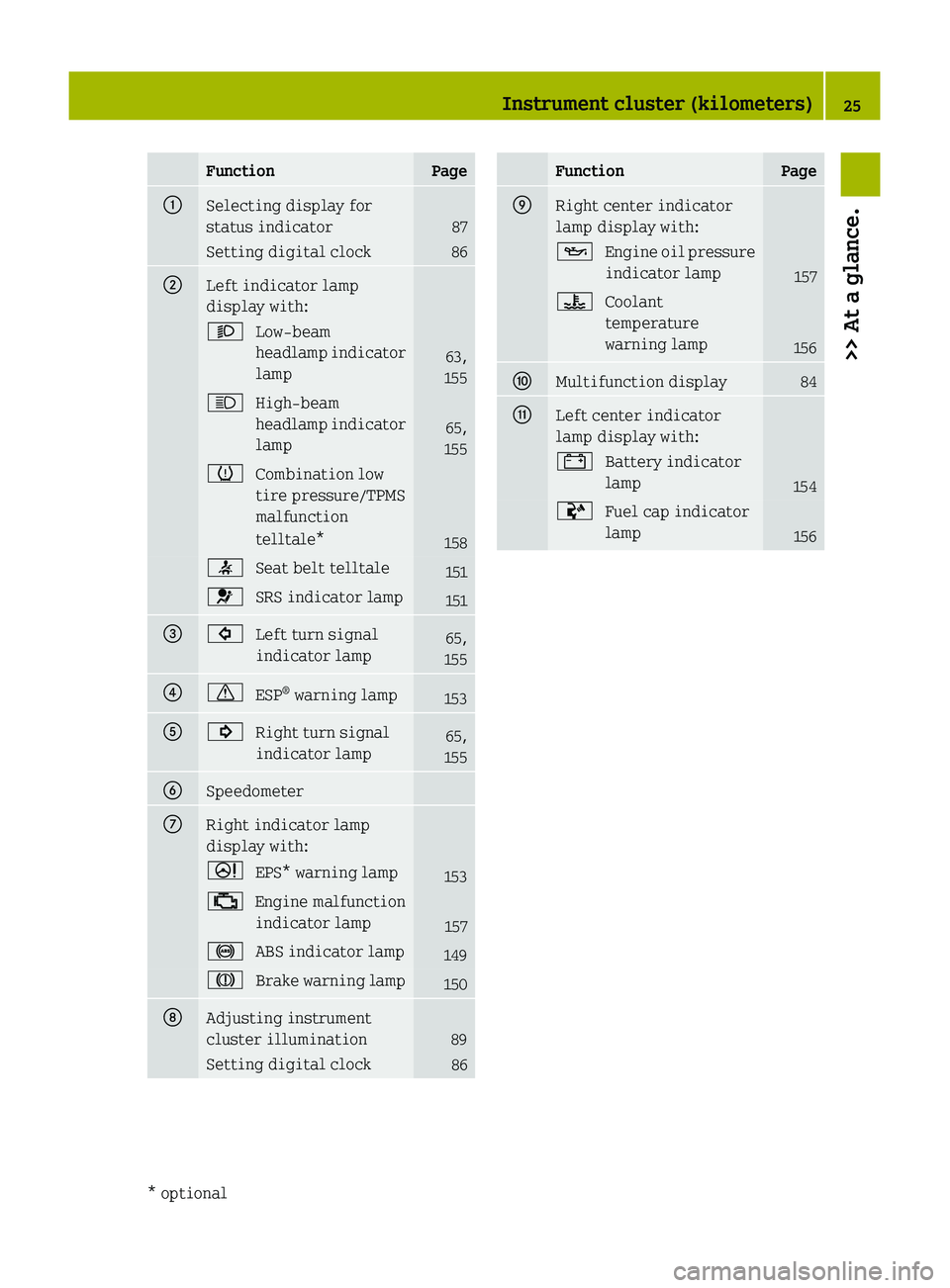
FunctionPage0046Selecting display for
status indicator
87
Setting digital clock860047Left indicator lamp
display with:0065Low‑beam
headlamp indicator
lamp
63,
155
0063High‑beam
headlamp indicator
lamp
65,
155
0077Combination low
tire pressure/TPMS
malfunction
telltale*
158
0082Seat belt telltale1510081SRS indicator lamp151008A0026Left turn signal
indicator lamp65,
15500880067ESP ®
warning lamp15300860024Right turn signal
indicator lamp65,
1550087Speedometer006ERight indicator lamp
display with:0052EPS* warning lamp15300BBEngine malfunction
indicator lamp
157
0031ABS indicator lamp149004DBrake warning lamp150006FAdjusting instrument
cluster illumination
89
Setting digital clock86FunctionPage0070Right center indicator
lamp display with:00B5Engine oil pressure
indicator lamp
157
00AECoolant
temperature
warning lamp
156
0071Multifunction display840072Left center indicator
lamp display with:003FBattery indicator
lamp
154
00ACFuel cap indicator
lamp
156
Instrument cluster (kilometers)25>> At a glance.* optional451_AKB; 3; 22, en-USd2ureepe,Version: 2.11.8.12009-07-27T09:36:34+02:00 - Seite 25
Page 46 of 216
would no longer be properly supported or
positioned to provide its intended
benefit. That could cause serious or even
fatal injuries.
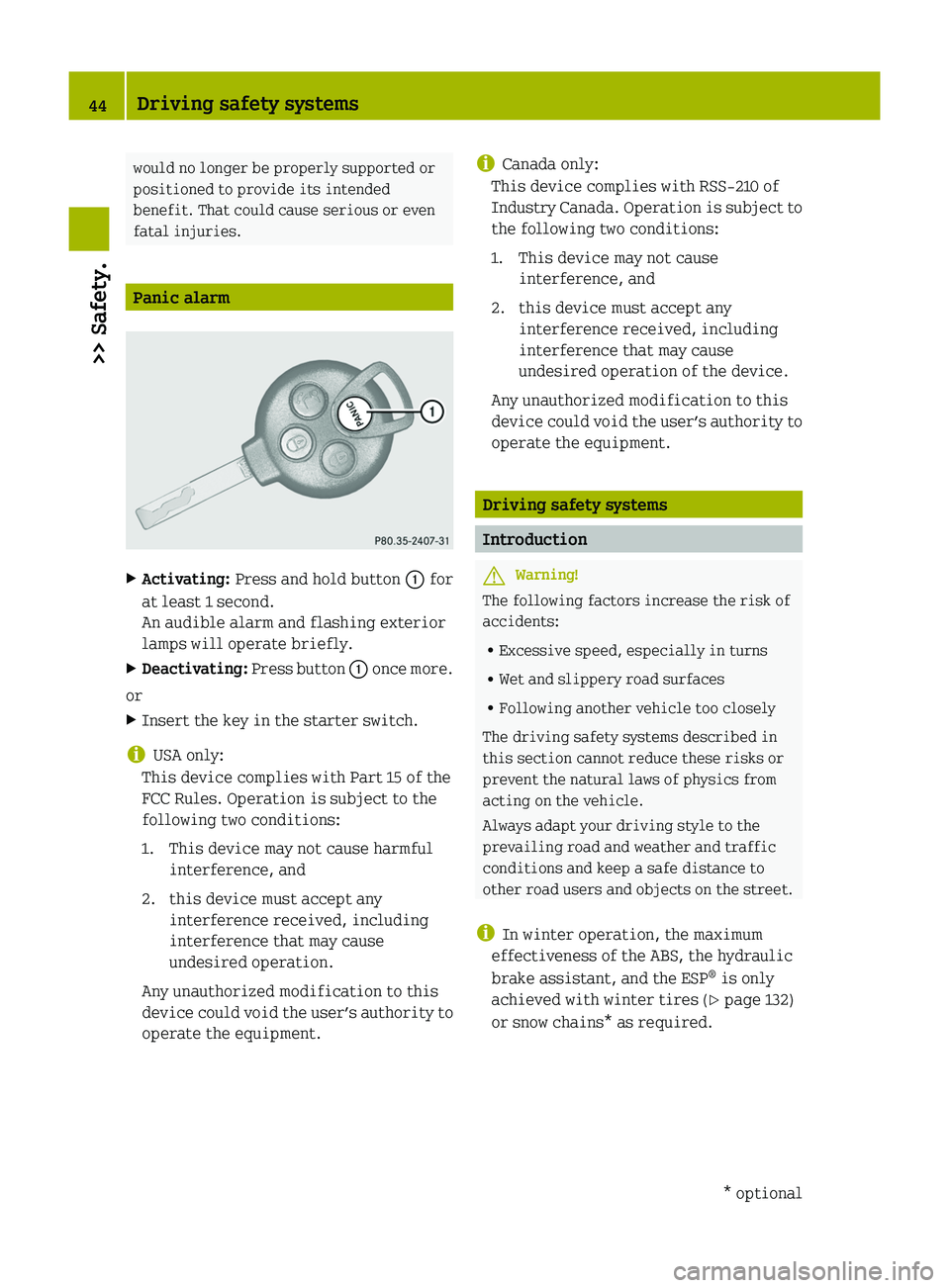
Panic alarm
XActivating: Press and hold button 0046 for
at least 1 second.
An audible alarm and flashing exterior
lamps will operate briefly.XDeactivating: Press button 0046 once more.
or
XInsert the key in the starter switch.
i USA only:
This device complies with Part 15 of the
FCC Rules. Operation is subject to the
following two conditions:
1. This device may not cause harmful interference, and
2. this device must accept any interference received, including
interference that may cause
undesired operation.
Any unauthorized modification to this
device could void the user’s authority to
operate the equipment.
i Canada only:
This device complies with RSS‑210 of
Industry Canada. Operation is subject to
the following two conditions:
1. This device may not cause interference, and
2. this device must accept any interference received, including
interference that may cause
undesired operation of the device.
Any unauthorized modification to this
device could void the user’s authority to
operate the equipment.
Driving safety systems
Introduction
GWarning!
The following factors increase the risk of
accidents:
R Excessive speed, especially in turns
R Wet and slippery road surfaces
R Following another vehicle too closely
The driving safety systems described in
this section cannot reduce these risks or
prevent the natural laws of physics from
acting on the vehicle.
Always adapt your driving style to the
prevailing road and weather and traffic
conditions and keep a safe distance to
other road users and objects on the street.
i In winter operation, the maximum
effectiveness of the ABS, the hydraulic
brake assistant, and the ESP ®
is only
achieved with winter tires ( Y page 132)
or snow chains* as required.
44Driving safety systems>> Safety.* optional451_AKB; 3; 22, en-USd2ureepe,Version: 2.11.8.12009-07-27T09:36:34+02:00 - Seite 44
Page 47 of 216
Antilock Brake System (ABS)GWarning!
Do not pump the brake pedal. Use firm,
steady brake pedal pressure instead.
Pumping the brake pedal defeats the
purpose of the ABS and significantly
reduces braking effectiveness.
The
Antilock Brake System (ABS) regulates
the brake pressure so that the wheels do not
lock during braking. This allows you to
maintain the ability to steer your vehicle.
On slippery road surfaces, the ABS will
respond even to light brake pressure.
The ABS indicator lamp in the instrument
cluster ( Y page 22) comes on when you
switch on the ignition. It goes out when the
engine is running.
Braking
At the instant one of the wheels is about to
lock up, a slight pulsation can be felt in
the brake pedal, indicating that the ABS is
regulating the brake pressure.
XKeep firm and steady pressure on the
brake pedal while experiencing the
pulsation.
Continuous, steady brake pedal pressure
yields the advantages provided by the ABS,
namely braking power and the ability to
steer the vehicle.
A pulsating brake pedal can be an
indication of hazardous road conditions
and functions as a reminder to take extra
care while driving.
Emergency brake maneuver
XKeep continuous full pressure on the
brake pedal.GWarning!
When the ABS is malfunctioning, the
hydraulic brake assistant and the ESP ®
are
also switched off.
When the ABS is malfunctioning, the wheels
may lock during hard braking, reducing
steering capability and extending the
braking distance.GWarning!
The ABS cannot prevent the natural laws of
physics from acting on the vehicle, nor can
it increase braking or steering efficiency
beyond that afforded by the condition of the
vehicle brakes and tires or the traction
afforded. The ABS cannot prevent
accidents, including those resulting from
excessive speed in turns, following
another vehicle too closely, or
hydroplaning. Only a safe, attentive, and
skillful driver can prevent accidents. The
capabilities of an ABS equipped vehicle
must never be exploited in a reckless or
dangerous manner which could jeopardize
the user’s safety or the safety of others.
Electronic Stability Program (ESP ®
)
Your vehicle is equipped with the
Electronic Stability Program (ESP ®
). The
ESP ®
is operational as soon as the engine
is running and it monitors the vehicle’s
traction (force of adhesive friction
between the tires and the road surface) and
handling.
The ESP ®
recognizes when a wheel is
spinning or if the vehicle starts to skid.
By applying brakes to the appropriate
wheel and by limiting the engine output,
the ESP ®
works to stabilize the vehicle. The
ESP ®
is especially useful while driving off
and on wet or slippery road surfaces. The
ESP ®
also stabilizes the vehicle during
braking and steering maneuvers.
The ESP ®
warning lamp 0067 in the
instrument cluster flashes when the ESP ®
is
engaged.
The ESP ®
warning lamp 0067 in the
instrument cluster comes on when you
Driving safety systems45>> Safety.451_AKB; 3; 22, en-USd2ureepe,Version: 2.11.8.12009-07-27T09:36:34+02:00 - Seite 45Z
Page 48 of 216
switch on the ignition. It goes out when the
engine is running.
Depending on the driving situation, the
ESP ®
R reduces the speed
R selectively brakes individual wheels
R equalizes the speed of the driven wheels
R stabilizes the vehicle when braking
R assists you in evasive maneuvers on all
roadsGWarning!
If the ESP ®
warning lamp 0067 in the
instrument cluster flashes, proceed as
follows:
R While driving off, apply as little
throttle as possible.
R While driving, ease up on the accelerator
pedal.
R Adapt your speed and driving style to the
prevailing road conditions.
Failure to observe these guidelines could
cause the vehicle to skid.
The ESP ®
cannot prevent accidents
resulting from excessive speed.
GWarning!
The ESP ®
cannot prevent the natural laws of
physics from acting on the vehicle, nor can
it increase the traction afforded. The
ESP ®
cannot prevent accidents, including
those resulting from excessive speed in
turns, or hydroplaning. Only a safe,
attentive, and skillful driver can prevent
accidents. The capabilities of an ESP ®
equipped vehicle must never be exploited
in a reckless or dangerous manner which
could jeopardize the user’s safety or the
safety of others.
! Because the ESP ®
operates
automatically, the engine must be turned
off (ignition switched off) when the
parking brake is being tested on a brake
test dynamometer. Active braking action
through the ESP ®
may otherwise seriously
damage the brake system which is not
covered by the smart Limited Warranty.
i The ESP ®
will only function properly if
you use wheels of the recommended tire
size ( Y page 202).
Hydraulic brake assistant
The hydraulic brake assistant operates in
emergency situations. If you apply the
brakes very quickly, the hydraulic brake
assistant automatically provides full
brake boost, thereby potentially reducing
the braking distance.
XApply continuous full braking pressure
until the emergency braking situation is
over.
The ABS will prevent the wheels from
locking.
When you release the brake pedal, the
brakes function again as normal. The
hydraulic brake assistant is then
deactivated.
GWarning!
When the hydraulic brake assistant is
malfunctioning, the brake system is still
functioning normally, but without the
additional brake boost that would normally
be provided during an emergency braking
maneuver. Therefore, the braking distance
may increase.
GWarning!
The hydraulic brake assistant cannot
prevent the natural laws of physics from
acting on the vehicle, nor can it increase
braking efficiency beyond that afforded by
the condition of the vehicle brakes and
tires or the traction afforded. The
hydraulic brake assistant cannot prevent
accidents, including those resulting from
excessive speed in turns, following
46Driving safety systems>> Safety.
451_AKB; 3; 22, en-USd2ureepe,Version: 2.11.8.12009-07-27T09:36:34+02:00 - Seite 46
Page 72 of 216
the vehicle interior, vehicle
electronics could be damaged which is
not covered by the smart Limited
Warranty.
Opening and closing the retractable
soft top
You can open and close the retractable soft
top when the vehicle is either stationary
or in motion.
GWarning!
Never operate the retractable soft top if
there is the possibility of anyone being
harmed by the opening or closing
procedure.
GWarning!
The retractable soft top is made out of
fabric. In the event of an accident, the
fabric may tear. This may result in an
opening in the roof.
In a vehicle rollover, occupants not
wearing their seat belts or not wearing
them properly may be thrown out of the
opening. Such an opening also presents a
potential for injury for occupants wearing
their seat belts properly as entire body
parts or portions of them may protrude from
the passenger compartment.
GWarning!
When leaving the vehicle, always remove the
key from the starter switch, take it with
you, and lock the vehicle. Do not leave
children unattended in the vehicle, or with
access to an unlocked vehicle. A child’s
unsupervised access to a vehicle could
result in an accident and/or serious
personal injury.
! To avoid damaging the seals, do not
transport any objects with sharp edges
which can stick out of the retractable
soft top.
Do not open the retractable soft top if
there is snow or ice on the roof, as this
could result in malfunctions.
If you cannot open or close the
retractable soft top due to a malfunction
contact Roadside Assistance or an
authorized smart center.
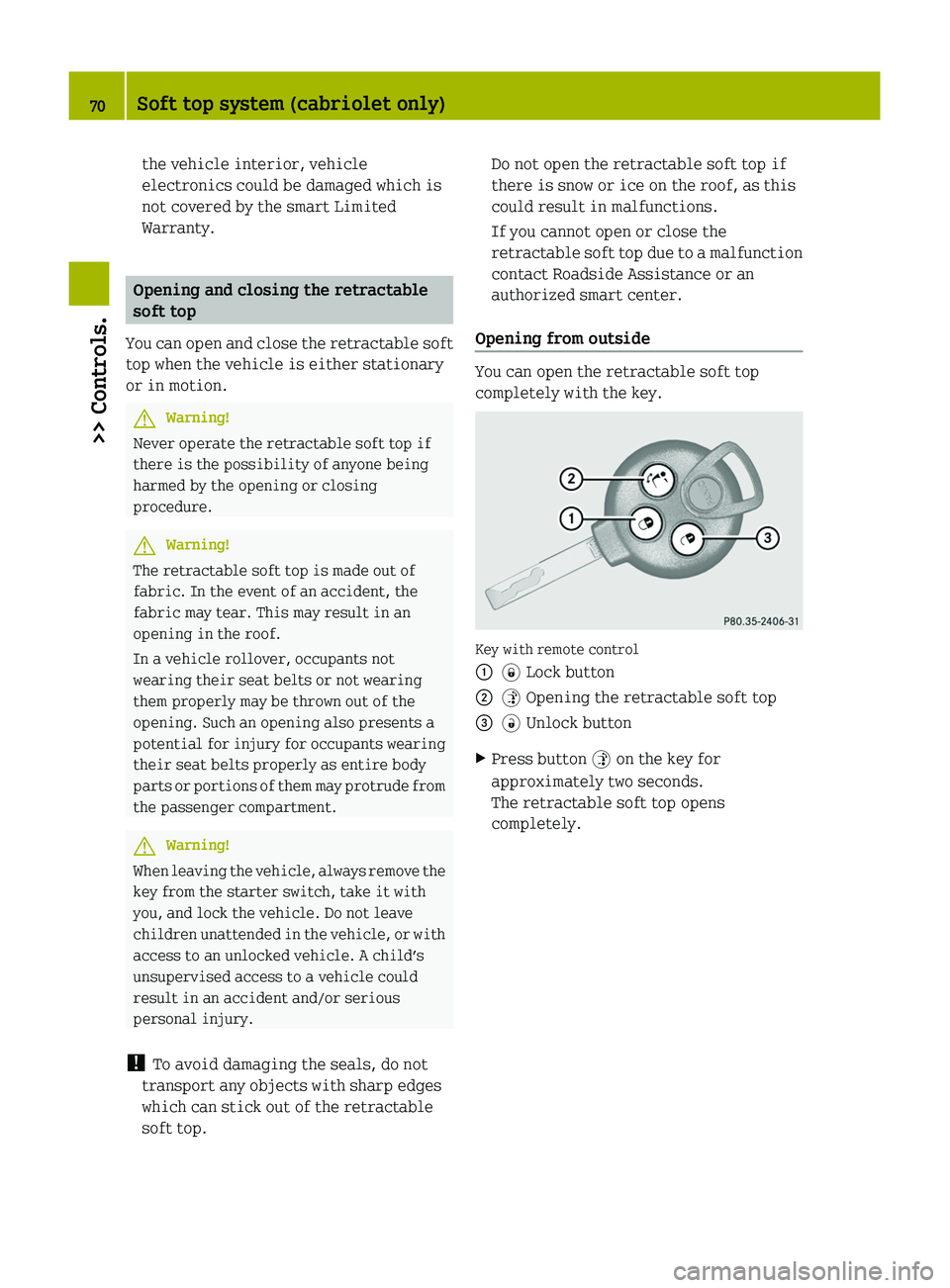
Opening from outside
You can open the retractable soft top
completely with the key.
Key with remote control
00460038 Lock button00470035 Opening the retractable soft top008A0034 Unlock buttonXPress button 0035 on the key for
approximately two seconds.
The retractable soft top opens
completely.70Soft top system (cabriolet only)>> Controls.
451_AKB; 3; 22, en-USd2ureepe,Version: 2.11.8.12009-07-27T09:36:34+02:00 - Seite 70
Page 104 of 216
Glare through the windshield
XSwing sun visor 0046 down.
Glare through a side window
XSwing sun visor 0046 down.XDisengage sun visor 0046 from
mounting 0047.XPivot sun visor 0046 to the side.
Sun screen* (coupé only)
The sun screen provides protection from
sun rays and from heat generated by the
panorama roof*.
The sun screen can be adjusted to any
desired position.
XOpening or closing: Move sun screen 0046
forward or backward using the handle.Auxiliary power outlet
The auxiliary power outlet supplies power
to the following electrical accessories
when the key is turned to starter switch
position 1:
R the cigarette lighter*, available in
conjunction with the ashtray*
R the electric air pump, available in
conjunction with the tire repair kit*
R other consumers which operate up to a
maximum of 60 W
! The auxiliary power outlet can
accommodate 12V DC electrical
accessories designed for use with the
standard “cigarette lighter” plug type.
Keep in mind, however, that connecting
accessories to the auxiliary power outlet
(for example extensive connecting and
disconnecting, or using plugs that do not
fit properly) can damage the auxiliary
power outlet. With the auxiliary power
outlet damaged, the cigarette lighter*
may no longer be able to be placed in the
heating (pushed-in) position, or may pop
out before it is hot enough.
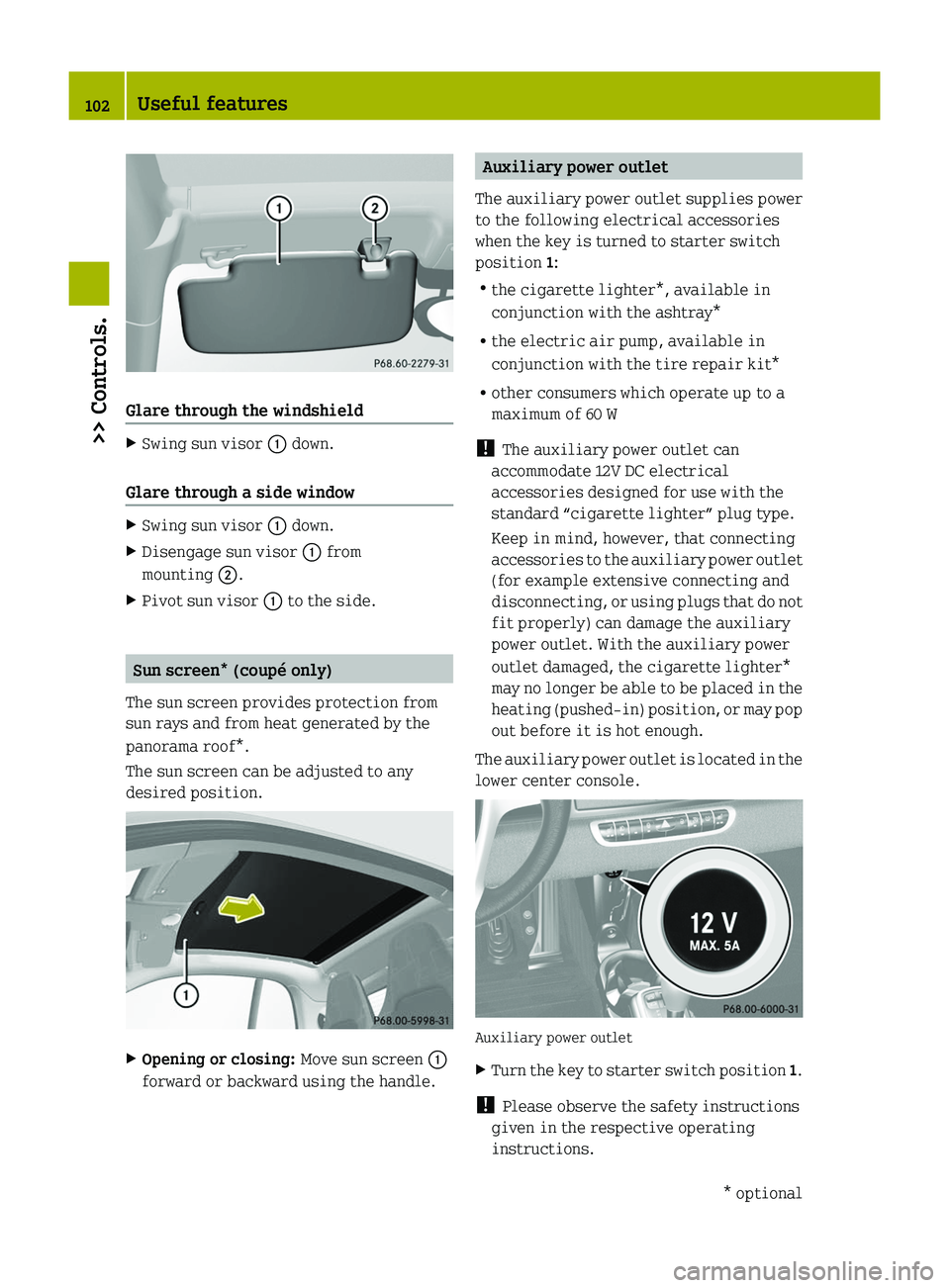
The auxiliary power outlet is located in the
lower center console.
Auxiliary power outlet
XTurn the key to starter switch position 1.
!
Please observe the safety instructions
given in the respective operating
instructions.
102Useful features>> Controls.* optional451_AKB; 3; 22, en-USd2ureepe,Version: 2.11.8.12009-07-27T09:36:34+02:00 - Seite 102