instrument cluster SMART FORTWO COUPE 2010 Owner's Manual
[x] Cancel search | Manufacturer: SMART, Model Year: 2010, Model line: FORTWO COUPE, Model: SMART FORTWO COUPE 2010Pages: 216, PDF Size: 9.7 MB
Page 87 of 216
Multifunction display illumination
The multifunction display illumination
comes on when the starter switch is in
position 1. It goes out after approximately
30 seconds when the starter switch is in
position 0.
For adjusting the multifunction display
illumination, see “Adjusting instrument
cluster illumination” ( Y page 89).
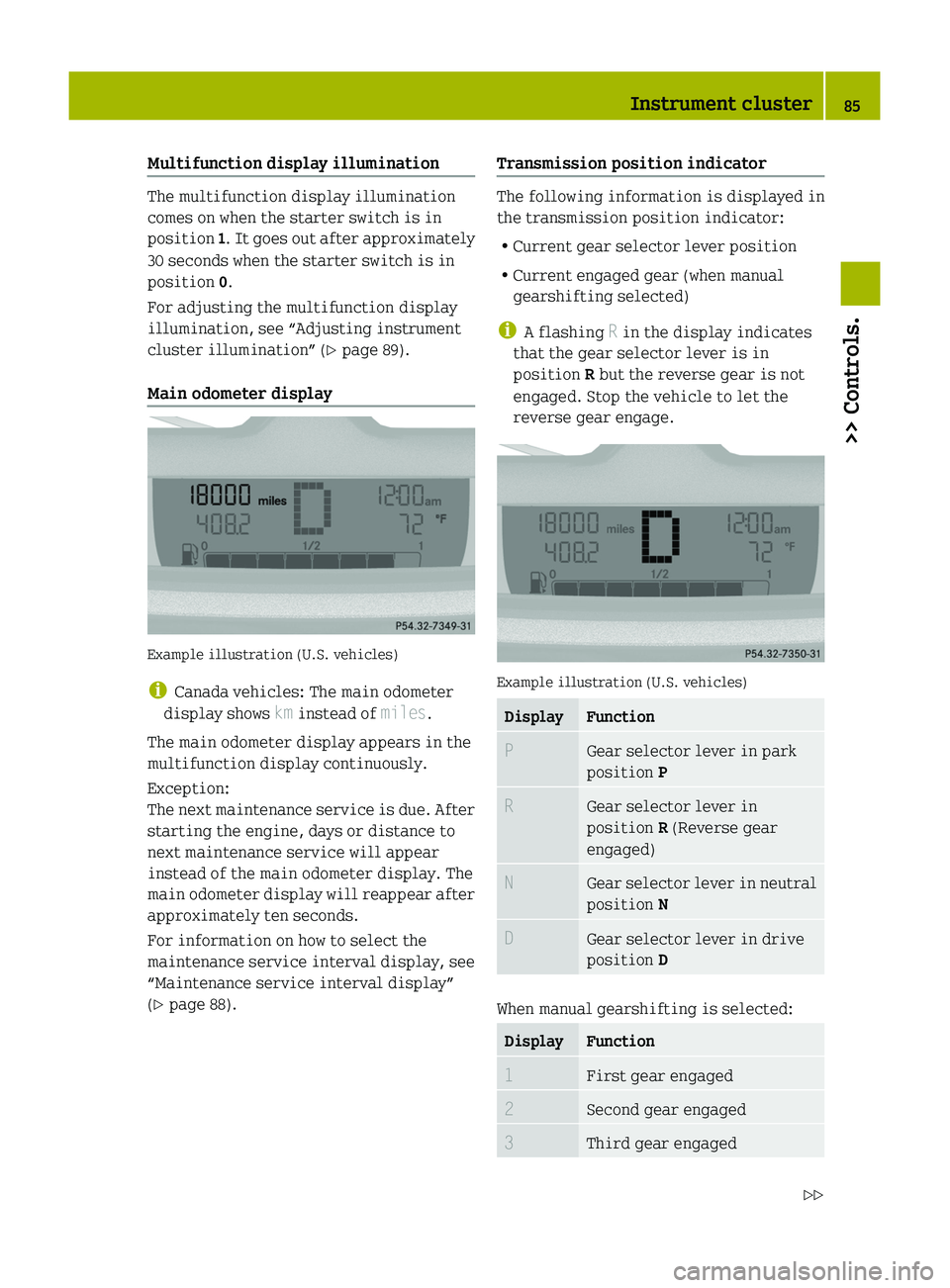
Main odometer display
Example illustration (U.S. vehicles)
i Canada vehicles: The main odometer
display shows km instead of miles.
The main odometer display appears in the
multifunction display continuously.
Exception:
The next maintenance service is due. After
starting the engine, days or distance to
next maintenance service will appear
instead of the main odometer display. The
main odometer display will reappear after
approximately ten seconds.
For information on how to select the
maintenance service interval display, see
“Maintenance service interval display”
( Y page 88).
Transmission position indicator
The following information is displayed in
the transmission position indicator:
R Current gear selector lever position
R Current engaged gear (when manual
gearshifting selected)
i A flashing R in the display indicates
that the gear selector lever is in
position R but the reverse gear is not
engaged. Stop the vehicle to let the
reverse gear engage.
Example illustration (U.S. vehicles)
DisplayFunctionPGear selector lever in park
position PRGear selector lever in
position R (Reverse gear
engaged)NGear selector lever in neutral
position NDGear selector lever in drive
position D
When manual gearshifting is selected:
DisplayFunction1First gear engaged2Second gear engaged3Third gear engagedInstrument cluster85>> Controls.451_AKB; 3; 22, en-USd2ureepe,Version: 2.11.8.12009-07-27T09:36:34+02:00 - Seite 85Z
Page 88 of 216
DisplayFunction4Fourth gear engaged5Fifth gear engaged
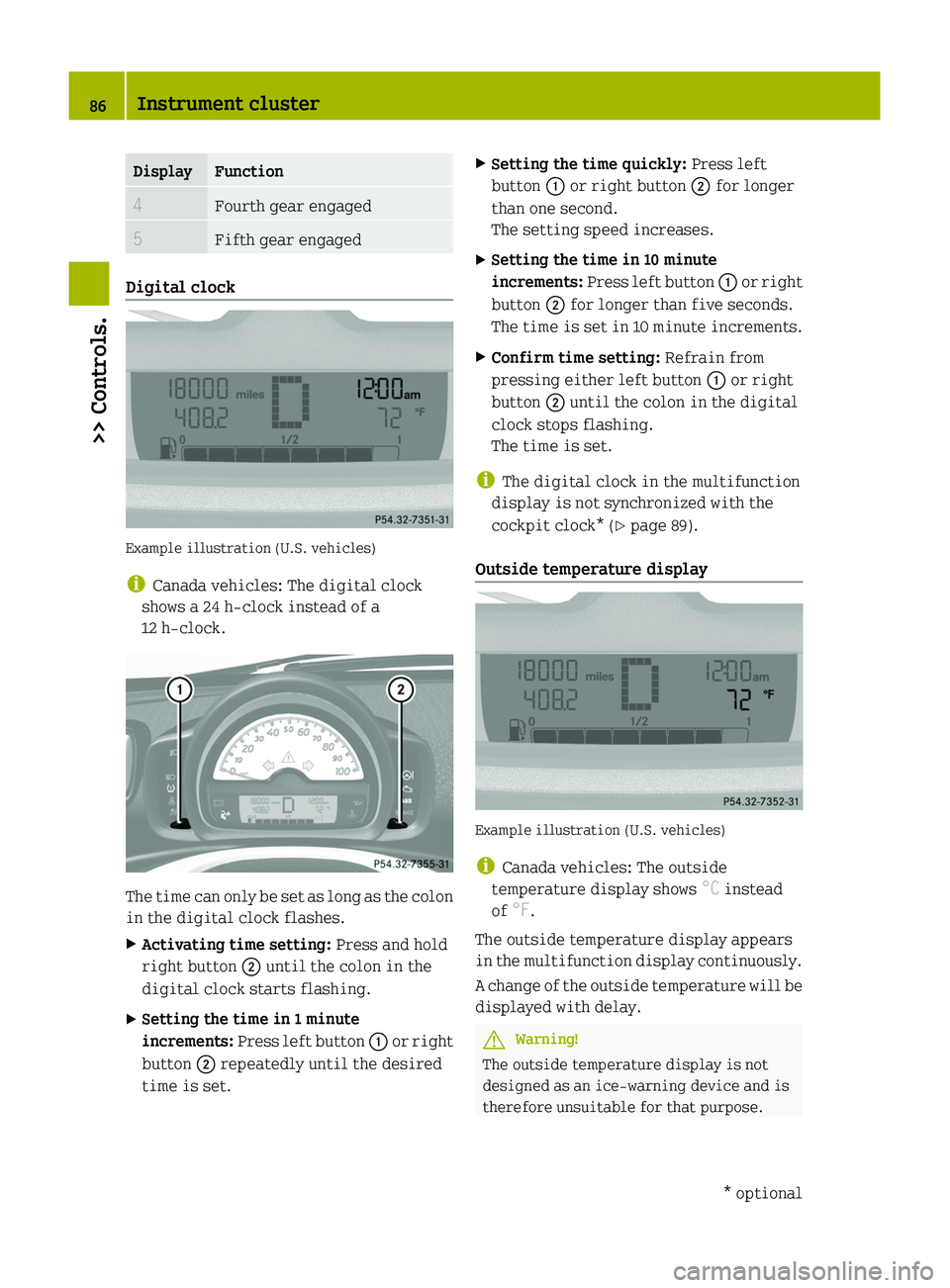
Digital clock
Example illustration (U.S. vehicles)
i Canada vehicles: The digital clock
shows a 24 h-clock instead of a
12 h-clock.
The time can only be set as long as the colon
in the digital clock flashes.
XActivating time setting: Press and hold
right button 0047 until the colon in the
digital clock starts flashing.XSetting the time in 1 minute
increments: Press left button 0046 or right
button 0047 repeatedly until the desired
time is set.XSetting the time quickly: Press left
button 0046 or right button 0047 for longer
than one second.
The setting speed increases.XSetting the time in 10 minute
increments: Press left button 0046 or right
button 0047 for longer than five seconds.
The time is set in 10 minute increments.XConfirm time setting: Refrain from
pressing either left button 0046 or right
button 0047 until the colon in the digital
clock stops flashing.
The time is set.
i The digital clock in the multifunction
display is not synchronized with the
cockpit clock* ( Y page 89).
Outside temperature display
Example illustration (U.S. vehicles)
i Canada vehicles: The outside
temperature display shows °C instead
of °F.
The outside temperature display appears
in the multifunction display continuously.
A change of the outside temperature will be
displayed with delay.
GWarning!
The outside temperature display is not
designed as an ice-warning device and is
therefore unsuitable for that purpose.
86Instrument cluster>> Controls.* optional451_AKB; 3; 22, en-USd2ureepe,Version: 2.11.8.12009-07-27T09:36:34+02:00 - Seite 86
Page 89 of 216

Indicated temperatures just above the
freezing point do not guarantee that the
road surface is free of ice. The road may
still be icy, especially in wooded areas or
on bridges. Your vehicle could start to skid
if you do not adjust your driving style
accordingly.
Therefore, always adjust your driving style
to the prevailing road and weather
conditions.
Freeze warning (Canada vehicles only)
When the outside temperature falls below
3 ¥ , the multifunction display makes you
aware of the fact that the road may be icy.
An additional freeze warning, i.e. an ice
crystal symbol, in the multifunction
display flashes. After 60 seconds, the
freeze warning stops flashing but
continues to be displayed. When the
outside temperature rises above 3 ¥, the
freeze warning goes out.
Fuel level display
Example illustration (U.S. vehicles)
The fuel level display shows the tank’s fuel
level with the aid of eight segments. The
number of dark segments indicates the fuel
level in the tank. If all eight segments are
dark, the tank is full.
You are driving on reserve fuel if there are
no more than 1.0 US gal (3.78 l) of fuel in the
tank.
If this occurs,
R the fuel pump symbol in the fuel level
display flashes
R the reserve fuel indicator shows the fuel
level in the tank in 0.1 US gal (0.5 l)
increments
For selecting the reserve fuel indicator to
be displayed in the status indicator, see
“Reserve fuel indicator” ( Y page 88).
Selecting display for status indicator
You can select the information to be
displayed in the status indicator:
R Trip odometer display ( Y page 88)
R Maintenance service interval display
( Y page 88)
R Reserve fuel indicator ( Y page 88)
0046Selecting display for status indicator,
setting the clock, activating
maintenance service interval display0047Setting the clock, adjusting instrument
cluster illuminationInstrument cluster87>> Controls.451_AKB; 3; 22, en-USd2ureepe,Version: 2.11.8.12009-07-27T09:36:34+02:00 - Seite 87Z
Page 90 of 216

Trip odometer display
Example illustration (U.S. vehicles)
XSelecting trip odometer display: Press
left button 0046 (Y page 87) repeatedly
until the trip odometer display appears
in the status indicator.XResetting trip odometer display: Press
and hold left button 0046 (Y page 87) until
the value is set to 0.
Maintenance service interval display
Example illustration (U.S. vehicles)
i Canada vehicles: The maintenance
service interval display shows km
instead of miles.
The maintenance service interval display
will notify you approximately one month
before the next maintenance service is
due.
The following information will be
displayed after starting the engine:
R Days or distance to next maintenance
service
This information will be displayed
instead of the main odometer display.
The main odometer display will reappear
after approximately ten seconds
( Y page 85).
R Type of service that is due
This information will be displayed in
the status indicator.XStart the engine.XSelecting maintenance service interval
display: Press left button 0046 (Y page 87)
repeatedly until the maintenance
service interval display appears in the
status indicator.
Depending on the type of maintenance
service that is due, symbol ¬ or } is
displayed.XClearing maintenance service interval
display: Press left button 0046 (Y page 87)
once.
The maintenance service interval
display is cleared.XActivating maintenance service
interval display: Press left button 0046
( Y page 87) twice in quick succession.
Reserve fuel indicator
Example illustration (U.S. vehicles)
88Instrument cluster>> Controls.
451_AKB; 3; 22, en-USd2ureepe,Version: 2.11.8.12009-07-27T09:36:34+02:00 - Seite 88
Page 91 of 216
The reserve fuel indicator is only
displayed when driving on reserve fuel.XSelecting reserve fuel indicator: Press
left button 0046 (Y page 87) repeatedly
until the reserve fuel indicator appears
in the status indicator.
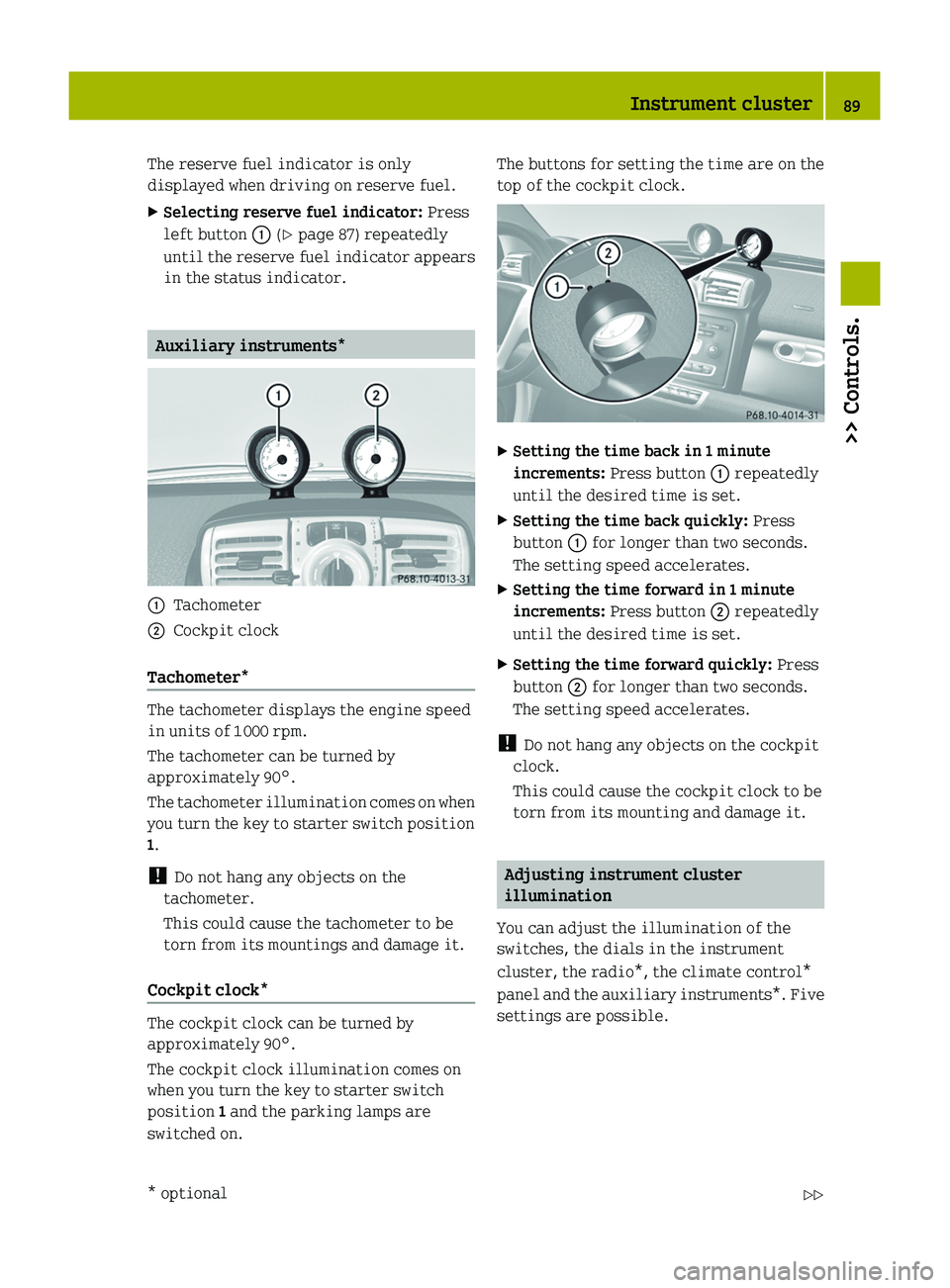
Auxiliary instruments*
0046Tachometer0047Cockpit clock
Tachometer*
The tachometer displays the engine speed
in units of 1 000 rpm.
The tachometer can be turned by
approximately 90°.
The tachometer illumination comes on when
you turn the key to starter switch position
1 .
! Do not hang any objects on the
tachometer.
This could cause the tachometer to be
torn from its mountings and damage it.
Cockpit clock*
The cockpit clock can be turned by
approximately 90°.
The cockpit clock illumination comes on
when you turn the key to starter switch
position 1 and the parking lamps are
switched on.
The buttons for setting the time are on the
top of the cockpit clock.XSetting the time back in 1 minute
increments: Press button 0046 repeatedly
until the desired time is set.XSetting the time back quickly: Press
button 0046 for longer than two seconds.
The setting speed accelerates.XSetting the time forward in 1 minute
increments: Press button 0047 repeatedly
until the desired time is set.XSetting the time forward quickly: Press
button 0047 for longer than two seconds.
The setting speed accelerates.
! Do not hang any objects on the cockpit
clock.
This could cause the cockpit clock to be
torn from its mounting and damage it.
Adjusting instrument cluster
illumination
You can adjust the illumination of the
switches, the dials in the instrument
cluster, the radio*, the climate control*
panel and the auxiliary instruments*. Five
settings are possible.
Instrument cluster89>> Controls.* optional451_AKB; 3; 22, en-USd2ureepe,Version: 2.11.8.12009-07-27T09:36:34+02:00 - Seite 89Z
Page 114 of 216
cooling system, or if the coolant
temperature warning lamp 00AE in the
instrument cluster indicates that the
coolant is overheated.
R Do not remove the pressure cap on coolant
reservoir if coolant temperature is
above 158 ¦ (70 ¥). Allow engine to cool
down before removing cap. The coolant
reservoir contains hot fluid and is under
pressure.
R Using a rag, slowly turn the cap
approximately 1
/ 2 turn to relieve excess
pressure. If opened immediately,
scalding hot fluid and steam will be
blown out under pressure.
The engine coolant is a mixture of water
and anticorrosion/antifreeze. To check the
coolant level the vehicle must be parked on
level ground and the engine must have
cooled down. For more information, see
“Coolants” ( Y page 209).
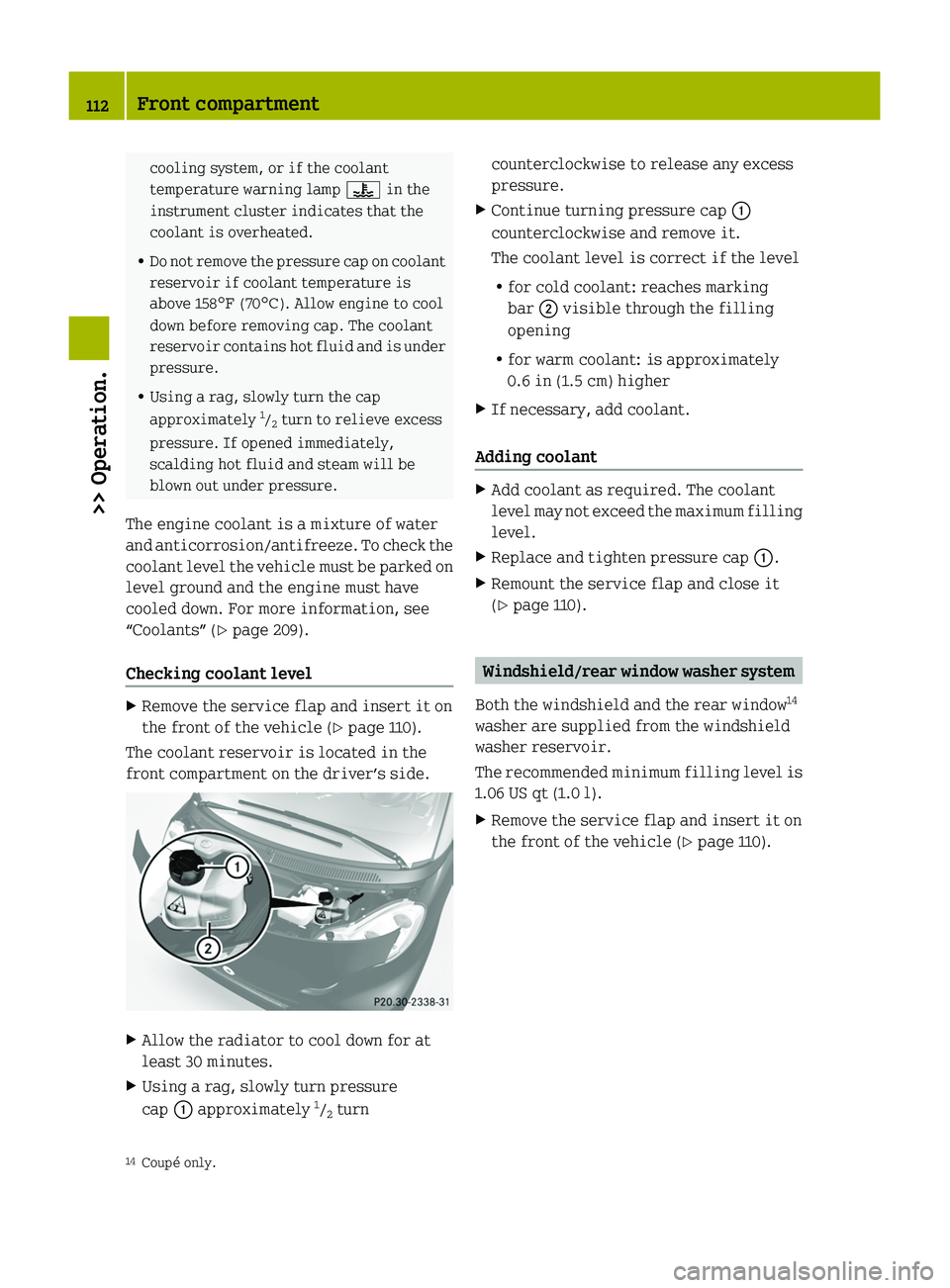
Checking coolant levelXRemove the service flap and insert it on
the front of the vehicle ( Y page 110).
The coolant reservoir is located in the
front compartment on the driver’s side.
XAllow the radiator to cool down for at
least 30 minutes.XUsing a rag, slowly turn pressure
cap 0046 approximately 1
/ 2 turncounterclockwise to release any excess
pressure.XContinue turning pressure cap 0046
counterclockwise and remove it.
The coolant level is correct if the level
R for cold coolant: reaches marking
bar 0047 visible through the filling
opening
R for warm coolant: is approximately
0.6 in (1.5 cm) higherXIf necessary, add coolant.
Adding coolant
XAdd coolant as required. The coolant
level may not exceed the maximum filling
level.XReplace and tighten pressure cap 0046.XRemount the service flap and close it
( Y page 110).
Windshield/rear window washer system
Both the windshield and the rear window 14
washer are supplied from the windshield
washer reservoir.
The recommended minimum filling level is
1.06 US qt (1.0 l).
XRemove the service flap and insert it on
the front of the vehicle ( Y page 110).14
Coupé only.112Front compartment>> Operation.
451_AKB; 3; 22, en-USd2ureepe,Version: 2.11.8.12009-07-27T09:36:34+02:00 - Seite 112
Page 115 of 216
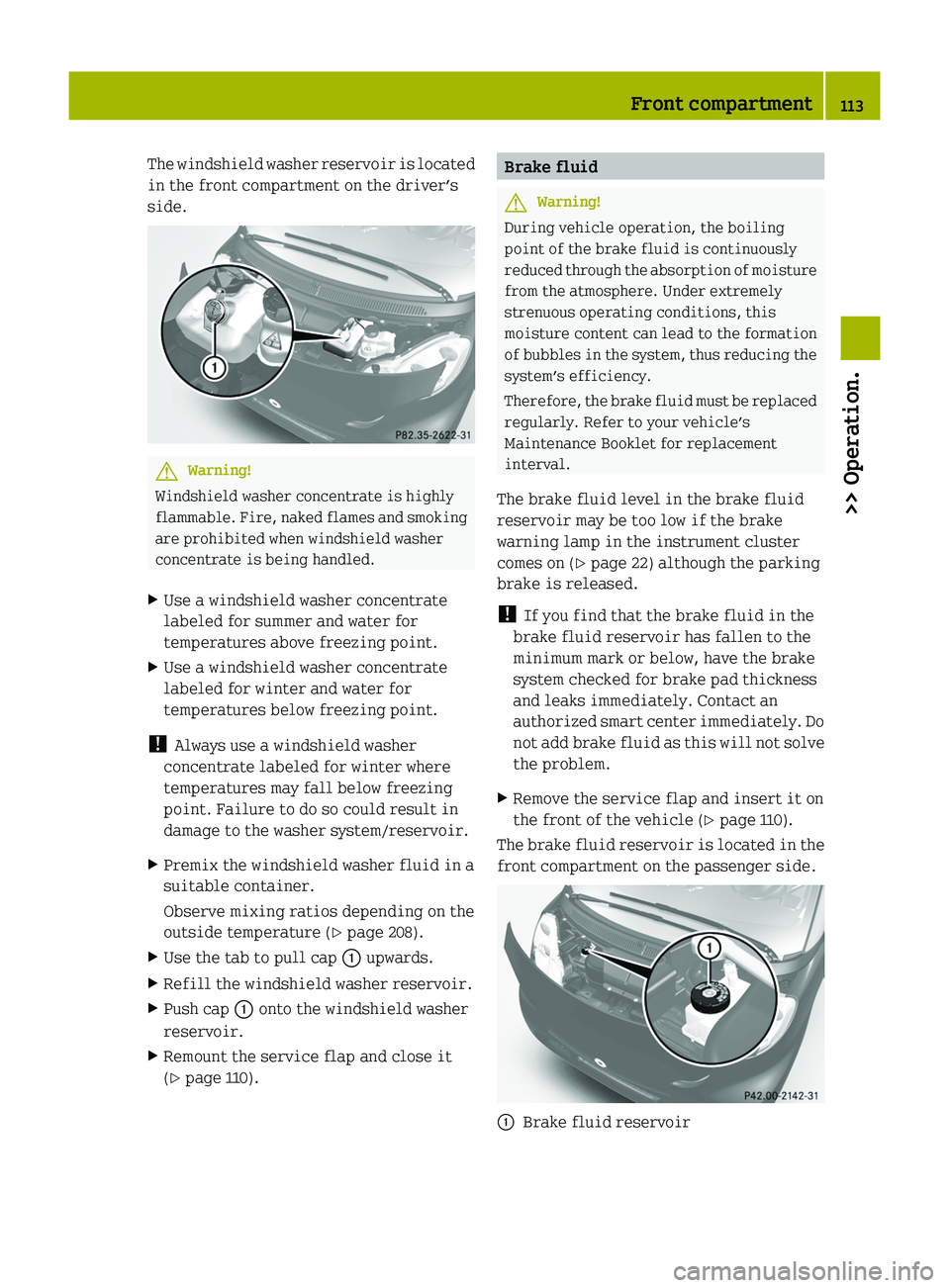
The windshield washer reservoir is located
in the front compartment on the driver’s
side.GWarning!
Windshield washer concentrate is highly
flammable. Fire, naked flames and smoking
are prohibited when windshield washer
concentrate is being handled.
XUse a windshield washer concentrate
labeled for summer and water for
temperatures above freezing point.XUse a windshield washer concentrate
labeled for winter and water for
temperatures below freezing point.
! Always use a windshield washer
concentrate labeled for winter where
temperatures may fall below freezing
point. Failure to do so could result in
damage to the washer system/reservoir.
XPremix the windshield washer fluid in a
suitable container.
Observe mixing ratios depending on the
outside temperature ( Y page 208).XUse the tab to pull cap 0046 upwards.XRefill the windshield washer reservoir.XPush cap 0046 onto the windshield washer
reservoir.XRemount the service flap and close it
( Y page 110).Brake fluidGWarning!
During vehicle operation, the boiling
point of the brake fluid is continuously
reduced through the absorption of moisture
from the atmosphere. Under extremely
strenuous operating conditions, this
moisture content can lead to the formation
of bubbles in the system, thus reducing the
system’s efficiency.
Therefore, the brake fluid must be replaced
regularly. Refer to your vehicle’s
Maintenance Booklet for replacement
interval.
The brake fluid level in the brake fluid
reservoir may be too low if the brake
warning lamp in the instrument cluster
comes on ( Y page 22) although the parking
brake is released.
! If you find that the brake fluid in the
brake fluid reservoir has fallen to the
minimum mark or below, have the brake
system checked for brake pad thickness
and leaks immediately. Contact an
authorized smart center immediately. Do
not add brake fluid as this will not solve
the problem.
XRemove the service flap and insert it on
the front of the vehicle ( Y page 110).
The brake fluid reservoir is located in the
front compartment on the passenger side.
0046Brake fluid reservoirFront compartment113>> Operation.451_AKB; 3; 22, en-USd2ureepe,Version: 2.11.8.12009-07-27T09:36:34+02:00 - Seite 113Z
Page 119 of 216

Do not overinflate tires. Overinflated
tires can adversely affect handling and
ride comfort, wear unevenly, increase
stopping distance, and result in sudden
deflation (blowout) because they are more
likely to become punctured or damaged by
road debris, potholes etc.
Do not overload the tires by exceeding the
specified load limit as indicated on the
Tire and Loading Information placard on
the driver’s door B‑pillar. Overloading the
tires can overheat them, possibly causing
a blowout. Overloading the tires can also
result in handling or steering problems, or
brake failure.
Check the tire inflation pressure at least
once a month.
Check and adjust the tire inflation
pressure when the tires are cold
( Y page 115).
Checking tire inflation pressure
manually
Follow the steps below to achieve correct
tire inflation pressure:
XRemove the cap from the valve on one tire.XFirmly press a tire gauge onto the valve.XRead the tire inflation pressure on tire
gauge and check against the
recommended tire inflation pressure on
the Tire and Loading Information
placard on the driver’s door B‑pillar
( Y page 120). If necessary, add air to
achieve the recommended tire inflation
pressure.XIf you have overfilled the tire, release
tire inflation pressure by pushing the
metal stem of the valve with e.g. a tip of
a pen. Then recheck the tire inflation
pressure with the tire gauge.XInstall the valve cap.XRepeat this procedure for each tire.Tire Pressure Monitoring System
(TPMS)*
Your vehicle may be equipped with a Tire
Pressure Monitoring System (TPMS).
It monitors the tire inflation pressure in
all four tires. A warning is issued to alert
you to a decrease in pressure in one or more
of the tires.
The Tire Pressure Monitoring System
(TPMS) is equipped with a combination low
tire pressure/TPMS malfunction telltale in
the instrument cluster. Depending on how
the telltale illuminates, it indicates a low
tire pressure condition or a malfunction in
the TPMS system itself:
R If the telltale illuminates continuously,
one or more of your tires is significantly
underinflated. There is no malfunction
in the TPMS.
R If the telltale flashes for 60 seconds and
then stays illuminated, the TPMS system
itself is not operating properly.
The TPMS only functions on wheels that are
equipped with the proper electronic
sensors.
GWarning!
The TPMS does not indicate a warning for
wrongly selected inflation pressures.
Always adjust tire inflation pressure
according to the Tire and Loading
Information placard on the driver’s door
B‑pillar.
The TPMS is not able to issue a warning due
to a sudden dramatic loss of pressure (e.g.
tire blowout caused by a foreign object). In
this case bring the vehicle to a halt by
carefully applying the brakes and avoiding
abrupt steering maneuvers.
GWarning!
Each tire should be checked monthly when
cold and inflated to the inflation pressure
recommended by the vehicle manufacturer
on the Tire and Loading Information
Tires and wheels117>> Operation.* optional451_AKB; 3; 22, en-USd2ureepe,Version: 2.11.8.12009-07-27T09:36:34+02:00 - Seite 117Z
Page 121 of 216
interference that may cause
undesired operation of the device.
Any unauthorized modification to this
device could void the user’s authority to
operate the equipment.
Restarting the TPMSGWarning!
It is the driver’s responsibility to
calibrate the TPMS on the recommended
cold inflation pressure. Underinflated
tires affect the ability to steer or brake
and might cause you to lose control of the
vehicle.
When you restart the TPMS, the system sets
new reference values for each tire.
The TPMS must be restarted when you have
adjusted the tire inflation pressure to a
new level (e.g. because of different load or
driving conditions). The TPMS is then
recalibrated to the current tire inflation
pressures.
XUsing the Tire and Loading Information
placard on the driver’s door B‑pillar
( Y page 120), make sure the tire
inflation pressure of all four tires is
correct.
i Restart the TPMS after adjusting the
tire inflation pressure to the inflation
pressure recommended for the vehicle
operating condition. Tire pressure
should only be adjusted on cold tires.
Observe the recommended tire inflation
pressure on the Tire and Loading
Information placard on the driver’s door
B‑pillar ( Y page 120).
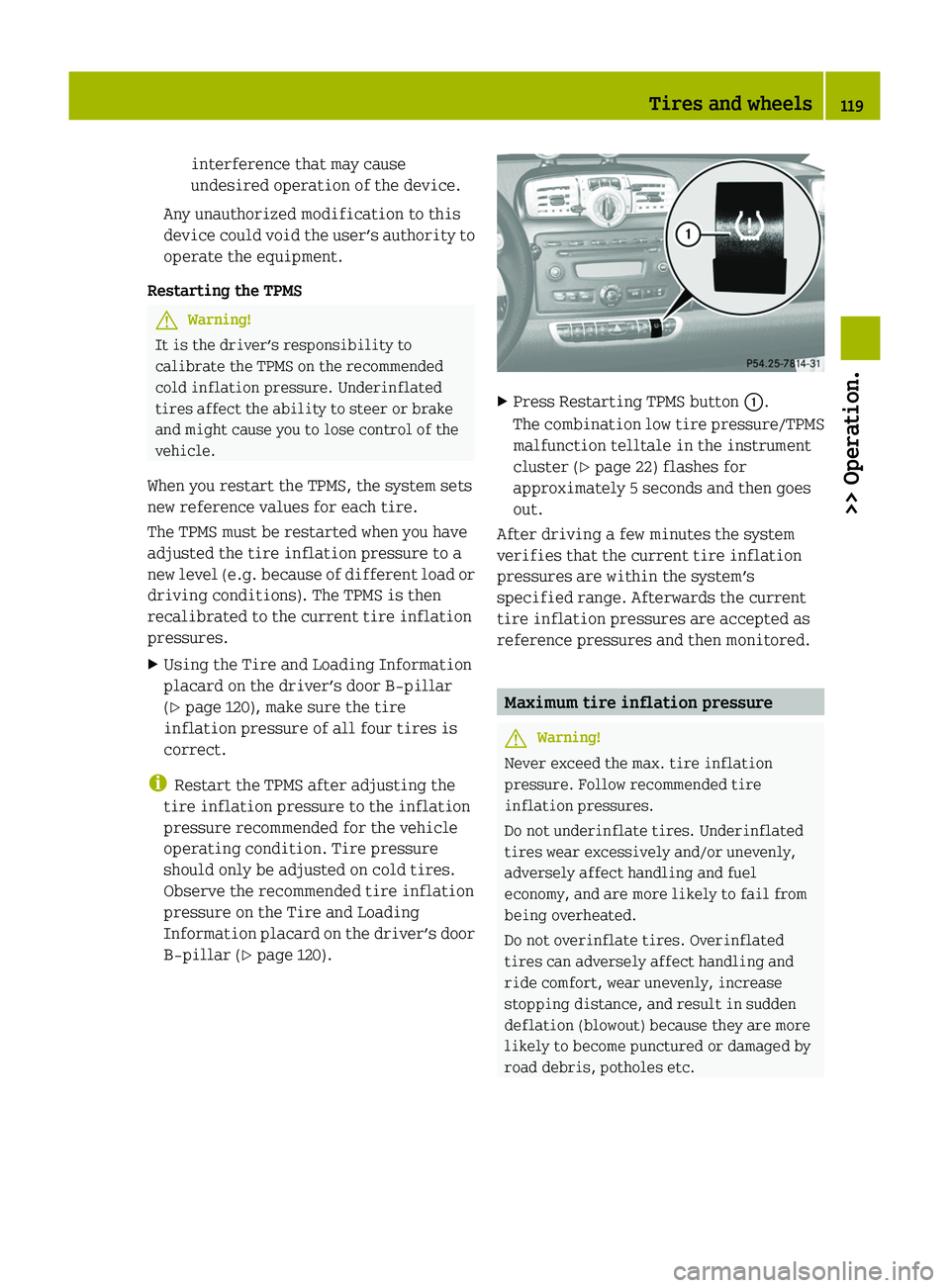
XPress Restarting TPMS button 0046.
The combination low tire pressure/TPMS
malfunction telltale in the instrument
cluster ( Y page 22) flashes for
approximately 5 seconds and then goes
out.
After driving a few minutes the system
verifies that the current tire inflation
pressures are within the system’s
specified range. Afterwards the current
tire inflation pressures are accepted as
reference pressures and then monitored.
Maximum tire inflation pressure
GWarning!
Never exceed the max. tire inflation
pressure. Follow recommended tire
inflation pressures.
Do not underinflate tires. Underinflated
tires wear excessively and/or unevenly,
adversely affect handling and fuel
economy, and are more likely to fail from
being overheated.
Do not overinflate tires. Overinflated
tires can adversely affect handling and
ride comfort, wear unevenly, increase
stopping distance, and result in sudden
deflation (blowout) because they are more
likely to become punctured or damaged by
road debris, potholes etc.
Tires and wheels119>> Operation.451_AKB; 3; 22, en-USd2ureepe,Version: 2.11.8.12009-07-27T09:36:34+02:00 - Seite 119Z
Page 136 of 216
Driving instructions
Drinking and driving
GWarning!
Do not drink alcohol or take drugs and drive
or allow anyone to drive who has been
drinking alcohol or taking drugs. Even a
small amount of alcohol or drugs can affect
your reflexes, perceptions and judgment.
The possibility of a serious or even fatal
accident are greatly increased when you
drink or take drugs and drive.
Pedals
GWarning!
Make sure absolutely no objects are
obstructing the pedals’ range of motion.
Keep the driver’s footwell clear of all
obstacles. If there are any floormats* or
carpets in the footwell, make sure the
pedals still have sufficient clearance.
During sudden acceleration or braking
maneuvers, the objects could get caught
between or beneath the pedals and restrict
your ability to brake or accelerate. This
could lead to accidents and/or injury.
Power assistance
GWarning!
With the engine not running, there is no
power assistance for the brake and
steering* systems. In this case, it is
important to keep in mind that a
considerably higher degree of effort is
necessary to brake and steer the vehicle.
Adapt your driving accordingly.
BrakesGWarning!
Make sure not to endanger any other road
users when carrying out braking
maneuvers.
Refer to the description of the hydraulic
brake assistant ( Y page 46).
! Because the ESP ®
operates
automatically, the engine must be turned
off (ignition switched off) when the
parking brake is being tested on a brake
test dynamometer. Active braking action
through the ESP ®
may otherwise seriously
damage the brake system which is not
covered by the smart Limited Warranty.
Brake pad wear or a leak in the brake system
may be the reason for low brake fluid level
in the brake fluid reservoir.
The brake fluid level in the brake fluid
reservoir may be too low if the brake
warning lamp in the instrument cluster
comes on ( Y page 22) although the parking
brake is released.
Have the brake system inspected
immediately. Contact an authorized smart
center.
All checks and service work on the brake
system should be carried out by qualified
technicians only. Contact an authorized
smart center.
Only install brake pads and use brake fluid
recommended by smart.
Inclines
! When driving down long and steep
grades, relieve the load on the brakes by
shifting into a lower gear to use the
engine’s braking power. This helps
prevent overheating of the brakes and
reduces brake pad wear.
When using the engine’s braking power, a
drive wheel may not spin for an extended
period of time, e.g. on slippery road
134Driving instructions>> Operation.* optional451_AKB; 3; 22, en-USd2ureepe,Version: 2.11.8.12009-07-27T09:36:34+02:00 - Seite 134