fuel SMART FORTWO COUPE 2012 User Guide
[x] Cancel search | Manufacturer: SMART, Model Year: 2012, Model line: FORTWO COUPE, Model: SMART FORTWO COUPE 2012Pages: 228, PDF Size: 12.76 MB
Page 55 of 228
!
The remote control has an operating
range
of approximately 50 ft (15 meters).
This can fluctuate greatly as a
consequence of local conditions
(reflective or absorbing objects) and
interference emitted by other radio
transmission systems. Similarly, the
operating range fluctuates in line with
the direction from which the remote
control is activated.
To prevent theft, however, it is advisable
to only unlock the vehicle when you are
in close proximity to it. Locking and unlocking from the
outside
X Selective unlocking: Press button # on
the key once.
All turn signal lamps flash once.
The anti-theft warning system* is
disarmed.
The
driver’s door and the fuel filler flap
are unlocked.
X Global unlocking:
Press button # on the
key twice.
All turn signal lamps flash once again.
The passenger door and the tailgate are
unlocked in addition to the driver’s door
and the fuel filler flap.
X Global locking: Press button * on the
key.
With the doors, the tailgate(s), and the
fuel filler flap closed, the turn signal
lamps flash three times.
The
anti-theft warning system* is armed.
The indicator lamp on the central
locking switch flashes (Y page 54).
The interior and exterior 8
lamps come on
and then go out again after 12 seconds.
i In vehicles with anti-theft warning
system*, an acoustic signal will sound
when locking or unlocking the vehicle. When unlocking, the acoustic signal
sounds once. When locking, the acoustic
signal sounds three times.
The acoustic signal is activated at the
factory. If you wish to deactivate the
feature, contact an authorized smart
center.
Automatic locking
Auto-relock function The vehicle will lock again automatically
within approximately 60 seconds of
unlocking with the key if neither the
driver’s nor passenger door is opened.
!
To prevent an inadvertent lockout,
never
leave your key lying in the vehicle.
Drive lock function The vehicle locks automatically when the
ignition
is switched on and the wheels are
turning at vehicle speeds of approximately
8 mph (14 km/h) or more. The drive lock
function is enabled at the factory.
X Switching on: Switch off the ignition.
X Press the central locking switch
(Y page 54) and button * on the key
simultaneously.
An acoustic signal sounds.
The drive lock function is switched on.
X Switching off: Switch off the ignition.
X Press the central unlocking switch
(Y page 54) and button # on the key
simultaneously.
An acoustic signal sounds.
The drive lock function is switched off.
8 Vehicles with rain-light sensor* only. Opening and closing
53
>> Controls.
* optional Z
Page 89 of 228
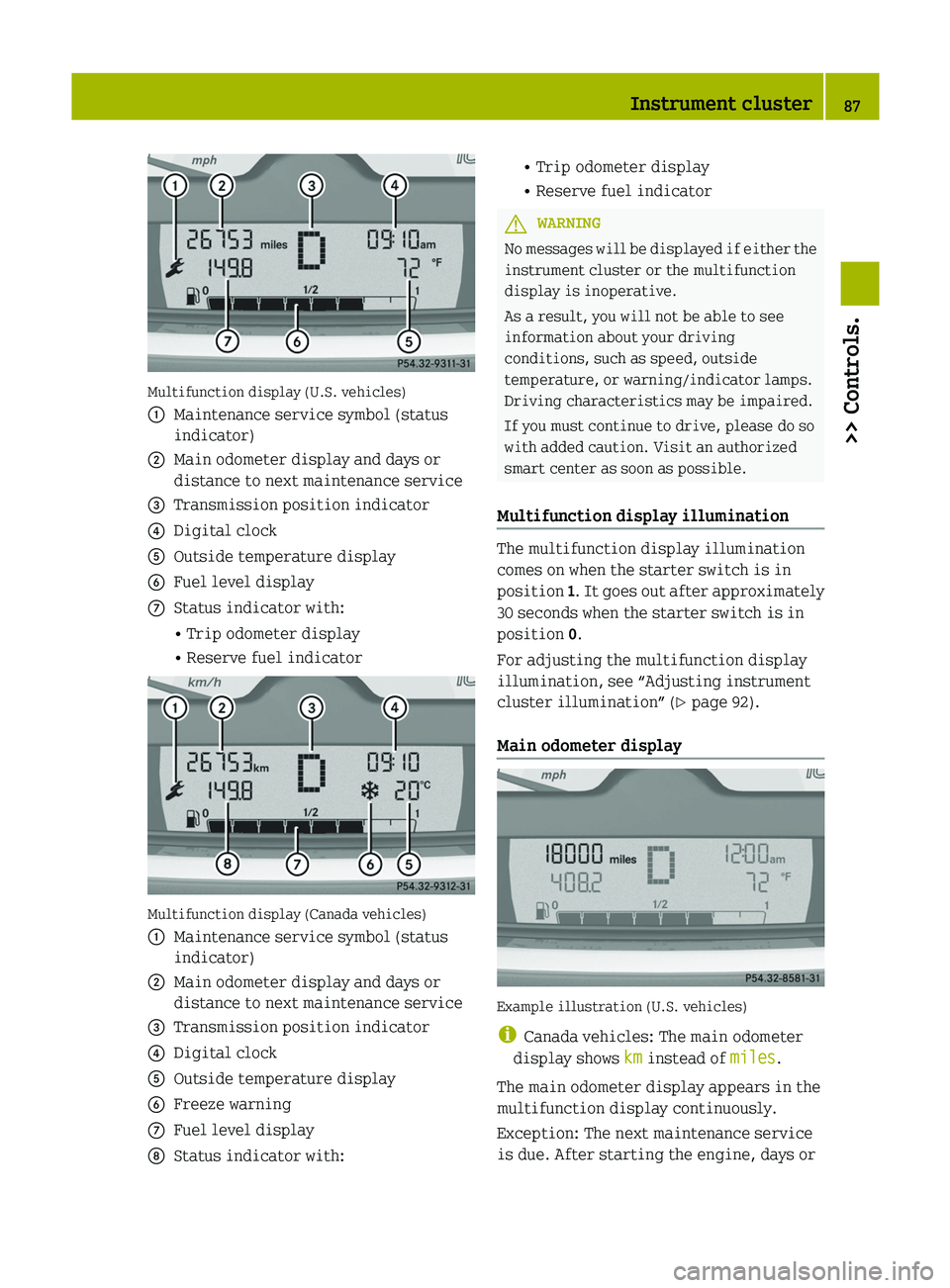
Multifunction display (U.S. vehicles)
:
Maintenance service symbol (status
indicator)
; Main odometer display and days or
distance to next maintenance service
= Transmission position indicator
? Digital clock
A Outside temperature display
B Fuel level display
C Status indicator with:
• Trip odometer display
• Reserve fuel indicator Multifunction display (Canada vehicles)
:
Maintenance service symbol (status
indicator)
; Main odometer display and days or
distance to next maintenance service
= Transmission position indicator
? Digital clock
A Outside temperature display
B Freeze warning
C Fuel level display
D Status indicator with: • Trip odometer display
• Reserve fuel indicator
G
WARNING
No messages will be displayed if either the
instrument cluster or the multifunction
display is inoperative.
As a result, you will not be able to see
information about your driving
conditions, such as speed, outside
temperature, or warning/indicator lamps.
Driving characteristics may be impaired.
If you must continue to drive, please do so
with added caution. Visit an authorized
smart center as soon as possible.
Multifunction display illumination The multifunction display illumination
comes on when the starter switch is in
position
1.
It goes out after approximately
30 seconds when the starter switch is in
position 0.
For adjusting the multifunction display
illumination, see “Adjusting instrument
cluster illumination” ( Y page 92).
Main odometer display Example illustration (U.S. vehicles)
i
Canada vehicles: The main odometer
display shows km instead of miles.
The main odometer display appears in the
multifunction display continuously.
Exception: The next maintenance service
is due. After starting the engine, days or Instrument cluster
87
>> Controls. Z
Page 92 of 228
Fuel level display
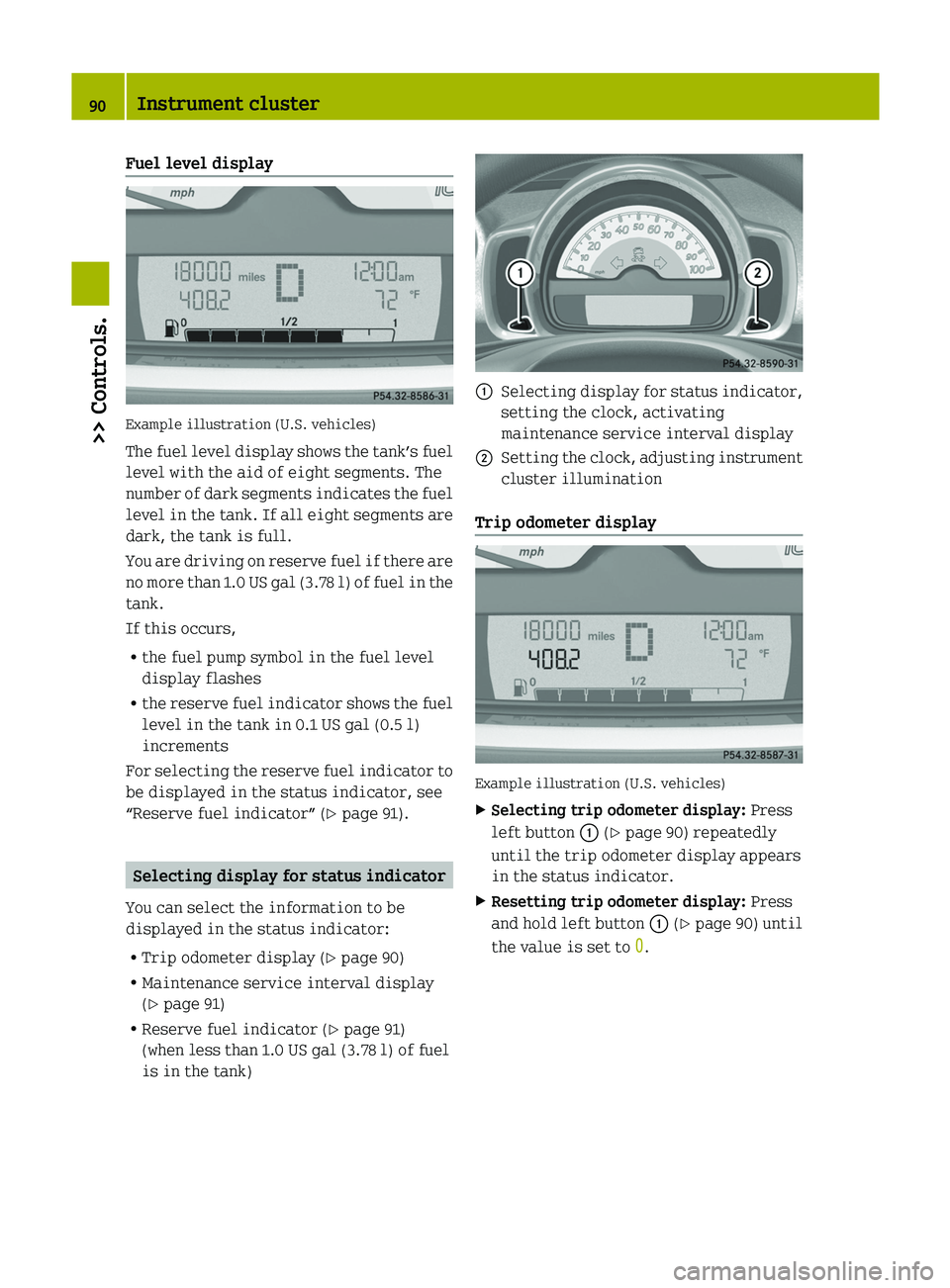
Example illustration (U.S. vehicles)
The
fuel level display shows the tank’s fuel
level with the aid of eight segments. The
number of dark segments indicates the fuel
level in the tank. If all eight segments are
dark, the tank is full.
You are driving on reserve fuel if there are
no more than 1.0 US gal (3.78 l) of fuel in the
tank.
If this occurs,
R the fuel pump symbol in the fuel level
display flashes
R the reserve fuel indicator shows the fuel
level in the tank in 0.1 US gal (0.5 l)
increments
For selecting the reserve fuel indicator to
be displayed in the status indicator, see
“Reserve fuel indicator” (Y page 91). Selecting display for status indicator
You can select the information to be
displayed in the status indicator:
R Trip odometer display ( Y page 90)
R Maintenance service interval display
(Y page 91)
R Reserve fuel indicator (Y page 91)
(when less than 1.0 US gal (3.78 l) of fuel
is in the tank) :
Selecting display for status indicator,
setting the clock, activating
maintenance service interval display
; Setting the clock, adjusting instrument
cluster illumination
Trip odometer display Example illustration (U.S. vehicles)
X
Selecting trip odometer display: Press
left button : (Y page 90) repeatedly
until the trip odometer display appears
in the status indicator.
X Resetting trip odometer display: Press
and hold left button : (Y page 90) until
the value is set to 0.90
Instrument cluster>> Controls.
Page 93 of 228
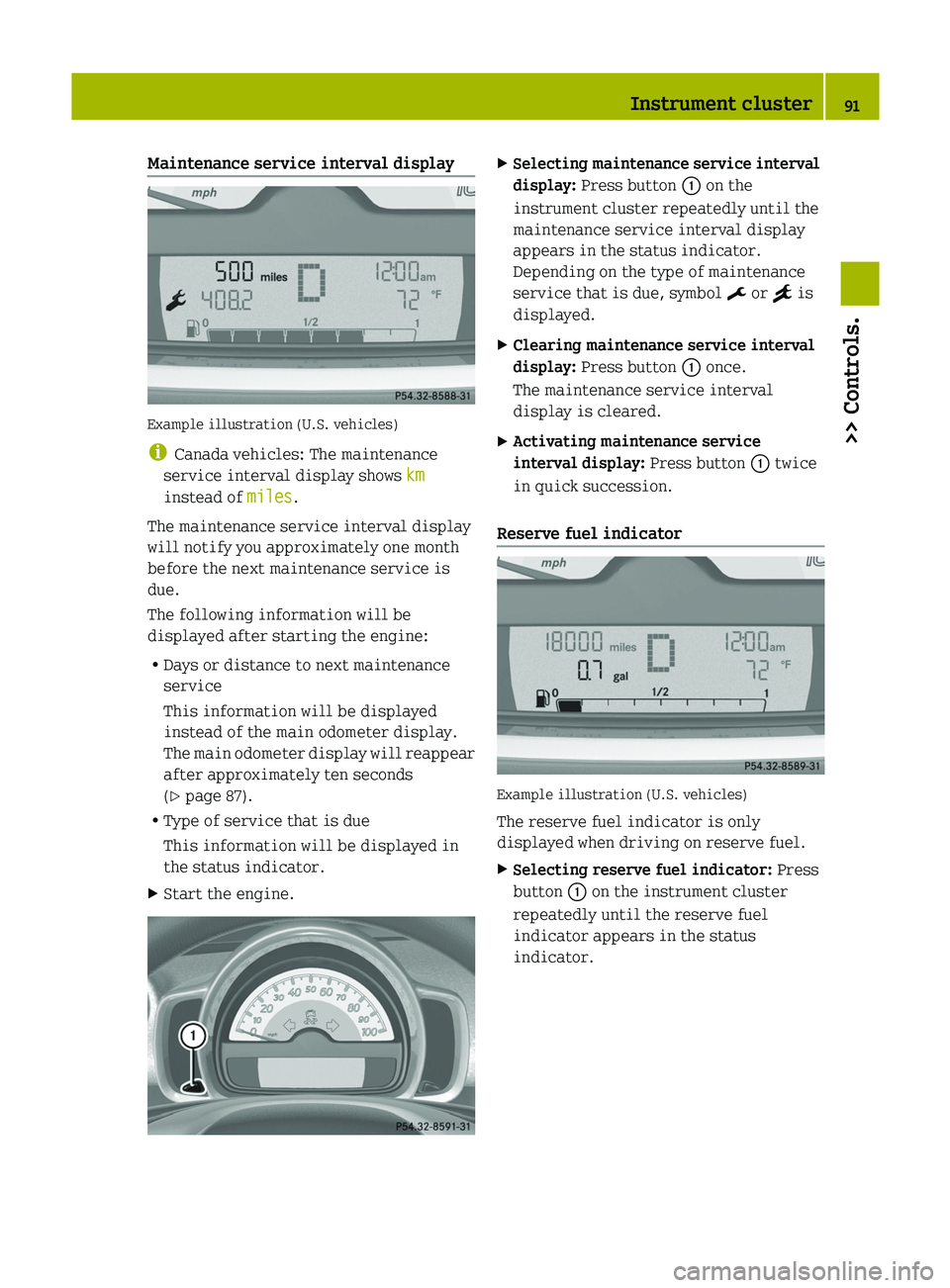
Maintenance service interval display
Example illustration (U.S. vehicles)
i
Canada vehicles: The maintenance
service interval display shows km
instead of miles.
The maintenance service interval display
will notify you approximately one month
before the next maintenance service is
due.
The following information will be
displayed after starting the engine:
R Days or distance to next maintenance
service
This information will be displayed
instead of the main odometer display.
The
main odometer display will reappear
after approximately ten seconds
(Y page 87).
R Type of service that is due
This information will be displayed in
the status indicator.
X Start the engine. X
Selecting maintenance service interval
display: Press button : on the
instrument cluster repeatedly until the
maintenance service interval display
appears in the status indicator.
Depending on the type of maintenance
service that is due, symbol ¬ or } is
displayed.
X Clearing maintenance service interval
display: Press button : once.
The maintenance service interval
display is cleared.
X Activating maintenance service
interval display: Press button : twice
in quick succession.
Reserve fuel indicator Example illustration (U.S. vehicles)
The reserve fuel indicator is only
displayed when driving on reserve fuel.
X
Selecting reserve fuel indicator: Press
button : on the instrument cluster
repeatedly until the reserve fuel
indicator appears in the status
indicator. Instrument cluster
91>> Controls. Z
Page 96 of 228
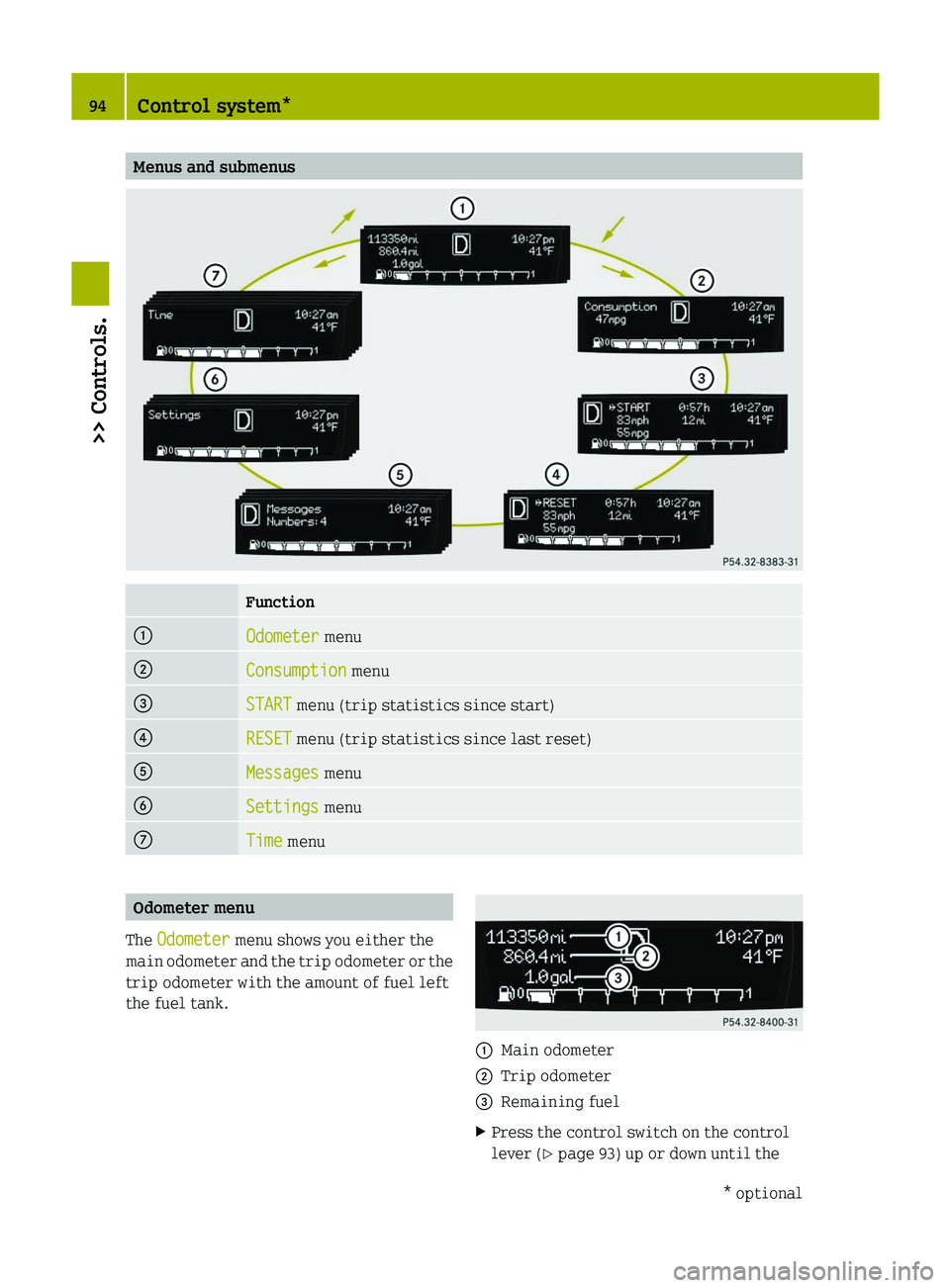
Menus and submenus
Function
:
Odometer menu
;
Consumption menu
=
START menu (trip statistics since start)
?
RESET menu (trip statistics since last reset)
A
Messages menu
B
Settings menu
C
Time menu
Odometer menu
The Odometer menu shows you either the
main
odometer and the trip odometer or the
trip odometer with the amount of fuel left
the fuel tank. :
Main odometer
; Trip odometer
= Remaining fuel
X Press the control switch on the control
lever (Y page 93) up or down until the 94
Control system*
>> Controls.
* optional
Page 97 of 228
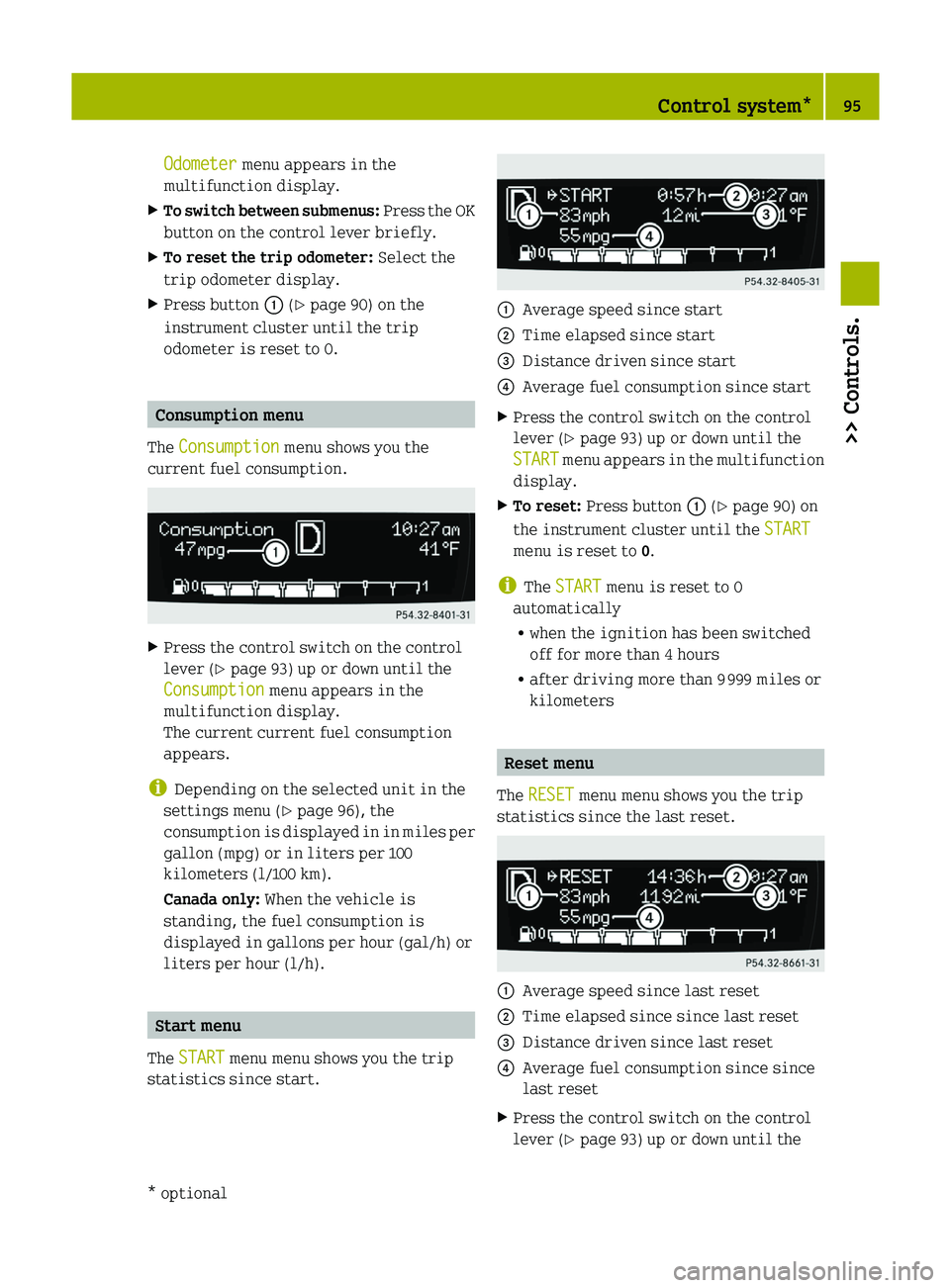
Odometer menu appears in the
multifunction display.
X To switch between submenus: Press the OK
button on the control lever briefly.
X To reset the trip odometer: Select the
trip odometer display.
X Press button : (Y page 90) on the
instrument cluster until the trip
odometer is reset to 0. Consumption menu
The Consumption menu shows you the
current fuel consumption. X
Press the control switch on the control
lever (Y page 93) up or down until the
Consumption menu appears in the
multifunction display.
The current current fuel consumption
appears.
i Depending on the selected unit in the
settings menu (Y page 96), the
consumption
is displayed in in miles per
gallon (mpg) or in liters per 100
kilometers (l/100 km).
Canada only: When the vehicle is
standing, the fuel consumption is
displayed in gallons per hour (gal/h) or
liters per hour (l/h). Start menu
The START menu menu shows you the trip
statistics since start. :
Average speed since start
; Time elapsed since start
= Distance driven since start
? Average fuel consumption since start
X Press the control switch on the control
lever (Y page 93) up or down until the
START
menu appears in the multifunction
display.
X To reset: Press button : (Y page 90) on
the instrument cluster until the START
menu is reset to 0.
i The START menu is reset to 0
automatically
R when the ignition has been switched
off for more than 4 hours
R after driving more than 9 999 miles or
kilometers Reset menu
The RESET menu menu shows you the trip
statistics since the last reset. :
Average speed since last reset
; Time elapsed since since last reset
= Distance driven since last reset
? Average fuel consumption since since
last reset
X Press the control switch on the control
lever (Y page 93) up or down until the Control system*
95
>> Controls.
* optional Z
Page 114 of 228
X
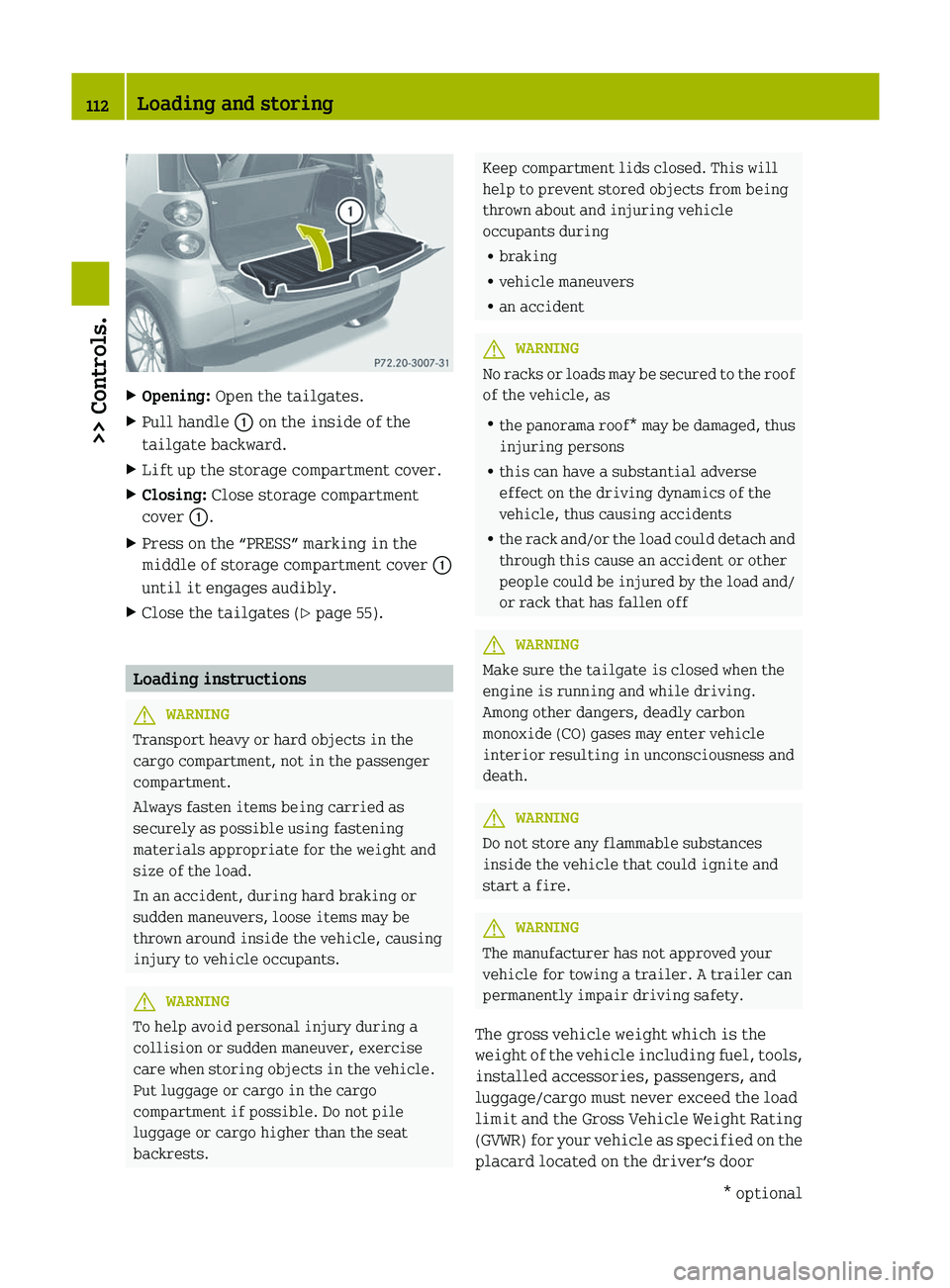
Opening: Open the tailgates.
X Pull handle : on the inside of the
tailgate backward.
X Lift up the storage compartment cover.
X Closing: Close storage compartment
cover :.
X Press on the “PRESS” marking in the
middle of storage compartment cover :
until it engages audibly.
X Close the tailgates ( Y page 55).Loading instructions
G
WARNING
Transport heavy or hard objects in the
cargo compartment, not in the passenger
compartment.
Always fasten items being carried as
securely as possible using fastening
materials appropriate for the weight and
size of the load.
In an accident, during hard braking or
sudden maneuvers, loose items may be
thrown around inside the vehicle, causing
injury to vehicle occupants. G
WARNING
To help avoid personal injury during a
collision or sudden maneuver, exercise
care when storing objects in the vehicle.
Put luggage or cargo in the cargo
compartment if possible. Do not pile
luggage or cargo higher than the seat
backrests. Keep compartment lids closed. This will
help to prevent stored objects from being
thrown about and injuring vehicle
occupants during
R
braking
R vehicle maneuvers
R an accident G
WARNING
No racks or loads may be secured to the roof
of the vehicle, as
R the
panorama roof* may be damaged, thus
injuring persons
R this can have a substantial adverse
effect on the driving dynamics of the
vehicle, thus causing accidents
R the rack and/or the load could detach and
through this cause an accident or other
people could be injured by the load and/
or rack that has fallen off G
WARNING
Make sure the tailgate is closed when the
engine is running and while driving.
Among other dangers, deadly carbon
monoxide (CO) gases may enter vehicle
interior resulting in unconsciousness and
death. G
WARNING
Do not store any flammable substances
inside the vehicle that could ignite and
start a fire. G
WARNING
The manufacturer has not approved your
vehicle for towing a trailer. A trailer can
permanently impair driving safety.
The gross vehicle weight which is the
weight
of the vehicle including fuel, tools,
installed accessories, passengers, and
luggage/cargo must never exceed the load
limit and the Gross Vehicle Weight Rating
(GVWR) for your vehicle as specified on the
placard located on the driver’s door 112
Loading and storing
>> Controls.
* optional
Page 118 of 228
The first 1000 miles (1500 km)
In the Operation section you will find
detailed information on operating,
maintaining and caring for your vehicle.
The
more cautiously you treat your vehicle
during the break-in period, the more
satisfied you will be with its performance
later on.
R Drive your vehicle during the first
1 000 miles (1 500 km) at varying but
moderate vehicle and engine speeds.
R During this period, avoid heavy loads
(full throttle driving) and excessive
engine speeds (no more than 2
/ 3 of
maximum rpm in each gear).
R Shift gears in a timely manner.
R Do not attempt to slow the vehicle down
by shifting to a lower gear.
R Avoid accelerating by kickdown.
After 1 000 miles (1 500 km), you may
gradually increase vehicle and engine
speeds to the permissible maximum.
All of the above instructions also apply
when driving the first 1 000 miles (1 500 km)
after the engine has been replaced.
i Always obey applicable speed limits. At the gas station
Refueling
G
WARNING
Gasoline is highly flammable and
poisonous.
It burns violently and can cause
serious personal injury.
Never allow sparks, flame or smoking
materials near gasoline!
Turn off the engine before refueling.
Whenever you are around gasoline, avoid
inhaling fumes and skin or clothing
contact. Extinguish all smoking materials. Direct skin contact with fuels and the
inhalation of fuel vapors are damaging to
your health.
! Do not put diesel fuel in vehicles with
gasoline engines. Do not mix gasoline
with diesel fuel. Even small quantities
of diesel fuel will damage the injection
system. Damage caused by adding diesel
fuel will not be covered by the smart
Limited Warranty.
If diesel fuel has mixed with gasoline,
do not start the engine. Otherwise the
catalytic converter will be irreparably
damaged.
Contact an authorized smart center or
Roadside Assistance immediately and
have the vehicle towed.
! Damage
resulting from mixing gasoline
with diesel fuel is not covered by the
smart Limited Warranty.
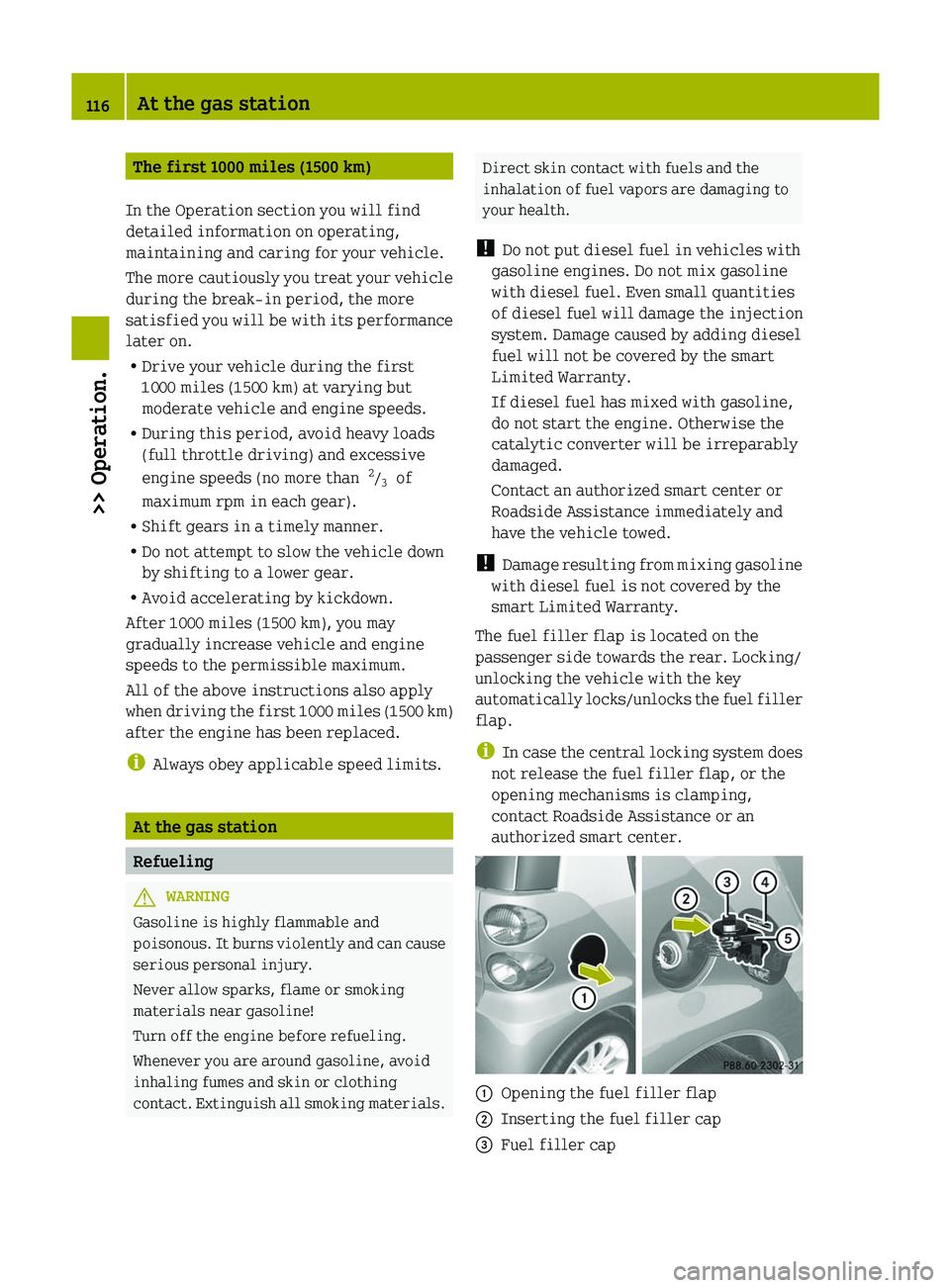
The fuel filler flap is located on the
passenger side towards the rear. Locking/
unlocking the vehicle with the key
automatically locks/unlocks the fuel filler
flap.
i In case the central locking system does
not release the fuel filler flap, or the
opening mechanisms is clamping,
contact Roadside Assistance or an
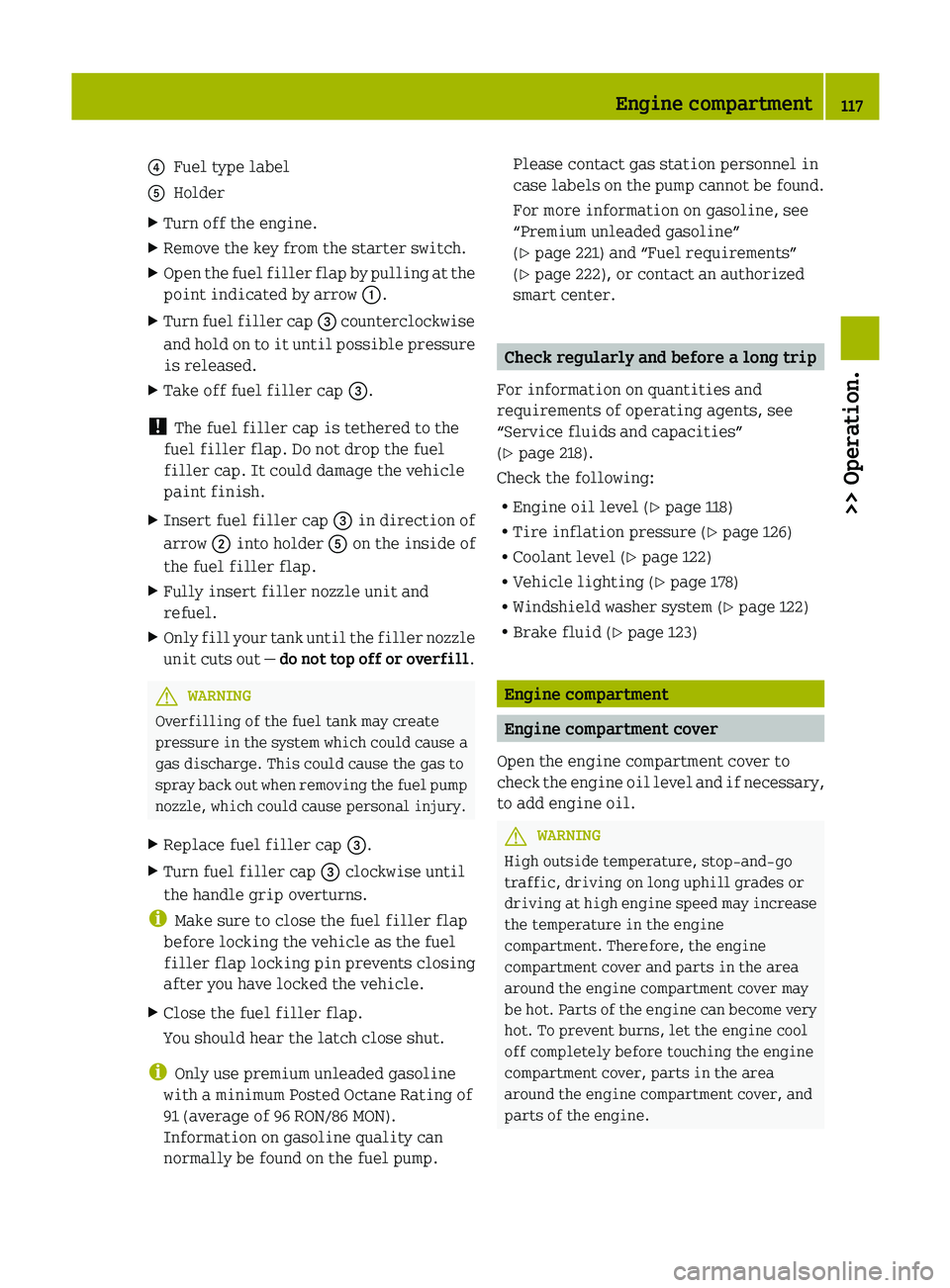
authorized smart center. :
Opening the fuel filler flap
; Inserting the fuel filler cap
= Fuel filler cap116
At the gas station
>> Operation.
Page 119 of 228
?
Fuel type label
A Holder
X Turn off the engine.
X Remove the key from the starter switch.
X Open the fuel filler flap by pulling at the
point indicated by arrow :.
X Turn fuel filler cap = counterclockwise
and hold on to it until possible pressure
is released.
X Take off fuel filler cap =.
! The fuel filler cap is tethered to the
fuel filler flap. Do not drop the fuel
filler cap. It could damage the vehicle
paint finish.
X Insert fuel filler cap = in direction of
arrow ; into holder A on the inside of
the fuel filler flap.
X Fully insert filler nozzle unit and
refuel.
X Only fill your tank until the filler nozzle
unit
cuts out — do not top off or overfill .G
WARNING
Overfilling of the fuel tank may create
pressure in the system which could cause a
gas discharge. This could cause the gas to
spray
back out when removing the fuel pump
nozzle, which could cause personal injury.
X Replace fuel filler cap =.
X Turn fuel filler cap = clockwise until
the handle grip overturns.
i Make sure to close the fuel filler flap
before locking the vehicle as the fuel
filler flap locking pin prevents closing
after you have locked the vehicle.
X Close the fuel filler flap.
You should hear the latch close shut.
i Only use premium unleaded gasoline
with a minimum Posted Octane Rating of
91 (average of 96 RON/86 MON).
Information on gasoline quality can
normally be found on the fuel pump. Please contact gas station personnel in
case
labels on the pump cannot be found.
For more information on gasoline, see
“Premium unleaded gasoline”
(Y page 221) and “Fuel requirements”
(Y page 222), or contact an authorized
smart center. Check regularly and before a long trip
For information on quantities and
requirements of operating agents, see
“Service fluids and capacities”
(Y page 218).
Check the following:
R Engine oil level ( Y page 118)
R Tire inflation pressure ( Y page 126)
R Coolant level ( Y page 122)
R Vehicle lighting ( Y page 178)
R Windshield washer system (Y page 122)
R Brake fluid (Y page 123) Engine compartment
Engine compartment cover
Open the engine compartment cover to
check
the engine oil level and if necessary,
to add engine oil. G
WARNING
High outside temperature, stop-and-go
traffic, driving on long uphill grades or
driving
at high engine speed may increase
the temperature in the engine
compartment. Therefore, the engine
compartment cover and parts in the area
around the engine compartment cover may
be hot. Parts of the engine can become very
hot. To prevent burns, let the engine cool
off completely before touching the engine
compartment cover, parts in the area
around the engine compartment cover, and
parts of the engine. Engine compartment
117
>> Operation. Z
Page 127 of 228
R
If vehicle is heavily loaded, check tire
inflation pressure and correct as
required.
R Do not allow your tires to wear down too
far.
Adhesion properties on wet roads are
sharply reduced at tread depths of less
than 1
/ 8 in (3 mm). Recommended tire inflation pressure
G
WARNING
Follow recommended tire inflation
pressures.
Do not underinflate tires. Underinflated
tires wear excessively and/or unevenly,
adversely affect handling and fuel
economy, and are more likely to fail from
being overheated.
Do not overinflate tires. Overinflated
tires can adversely affect handling and
ride comfort, wear unevenly, increase
stopping distance, and result in sudden
deflation (blowout) because they are more
likely to become punctured or damaged by
road debris, potholes etc.
Do not overload the tires by exceeding the
specified load limit as indicated on the
Tire and Loading Information placard on
the
driver’s door B‑pillar. Overloading the
tires can overheat them, possibly causing
a blowout. Overloading the tires can also
result in handling or steering problems, or
brake failure.
Your vehicle is equipped with the Tire and
Loading Information placard located on
the driver’s door B‑pillar ( Y page 130).
The tire inflation pressure should be
checked regularly. Only adjust the tire
inflation pressure on cold tires. The tires
can be considered cold if the vehicle has
been parked for at least 3 hours or driven
less than 1 mile (1.6 km). Depending on the
ambient temperature, the driving speed
and the tire load, the tire temperature
changes. When the tire temperature changes by 18¦ (10¥), the tire inflation
pressure will change by approximately
10 kpa (0.1 bar, 1.5 psi). Keep this in mind
when checking tire inflation pressure on
warm tires and adjust the tire pressure
only if the tire inflation pressure is too
low for the current operating conditions.
If you check the tire inflation pressure
when the tires are warm, the reading will
be higher than the cold reading. This is
normal. Do not let air out to match the
specified cold tire inflation pressure.
Otherwise, the tire will be underinflated.
Follow recommended cold tire inflation
pressures listed on Tire and Loading
Information placard on the driver’s door
B‑pillar.
Keeping the tires properly inflated
provides the best handling, tread life and
riding comfort.
In addition to the Tire and Loading
Information placard on the driver’s door
B‑pillar, also consult the tire inflation
pressure
label (if available) on the inside
of the filler flap for any additional
information pertaining to special driving
situations. For more information, see
“Important notes on tire inflation
pressure” ( Y page 126).
i Data shown on Tire and Loading
Information placard example are for
illustration purposes only. Tire data are
specific to each vehicle and may vary
from data shown in the following
illustration. Refer to Tire and Loading
Information placard on vehicle for
actual data specific to your vehicle. Tires and wheels
125
>> Operation. Z