brake SMART FORTWO COUPE 2012 Owner's Manual
[x] Cancel search | Manufacturer: SMART, Model Year: 2012, Model line: FORTWO COUPE, Model: SMART FORTWO COUPE 2012Pages: 228, PDF Size: 12.76 MB
Page 82 of 228
X
Depress the brake pedal.
X Press the release button (Y page 79) to
disengage the gear selector lever lock.
X Move the gear selector lever to reverse
gear R.
R appears in the transmission position
indicator.
X Release the brake pedal.
X Carefully depress the accelerator pedal. Parking
G
WARNING
Do not park this vehicle in areas where
combustible materials such as grass, hay or
leaves can come into contact with the hot
exhaust system. These materials could be
ignited and cause a vehicle fire.
Vehicle movement can cause serious
personal injury or damage to the vehicle or
the vehicle drivetrain. Therefore, always
do the following before turning off the
engine and leaving the vehicle:
R Keep right foot on the brake pedal.
R Engage the parking brake.
R Move the gear selector lever to park
position P.
R Slowly release the brake pedal.
R When parked on an incline, always turn
the front wheels towards the curb.
R Turn the key to starter switch position 0
and remove the key from the starter
switch.
R Take the key with you and lock the vehicle
when leaving. G
WARNING
With the engine not running, there is no
power assistance for the brake and
steering* systems. In this case, it is
important to keep in mind that a
considerably higher degree of effort is
necessary to brake and steer the vehicle.
Adapt your driving accordingly. X
Properly stop and park the vehicle.
X Depress the brake pedal.
X Engage the parking brake ( Y page 80).
When the ignition is switched on or the
engine is running, the brake warning
lamp $ (USA only) or J (Canada
only)
in the instrument cluster comes on.
X Release the brake pedal.
Parking brake The parking brake serves to secure the
vehicle against rolling away when it is
stationary or parked.
G
WARNING
Engaging the parking brake while the
vehicle is in motion can cause the rear
wheels
to lock up. You could lose control of
the vehicle and cause an accident. In
addition, the vehicle’s brake lights do not
light up when the parking brake is engaged. X
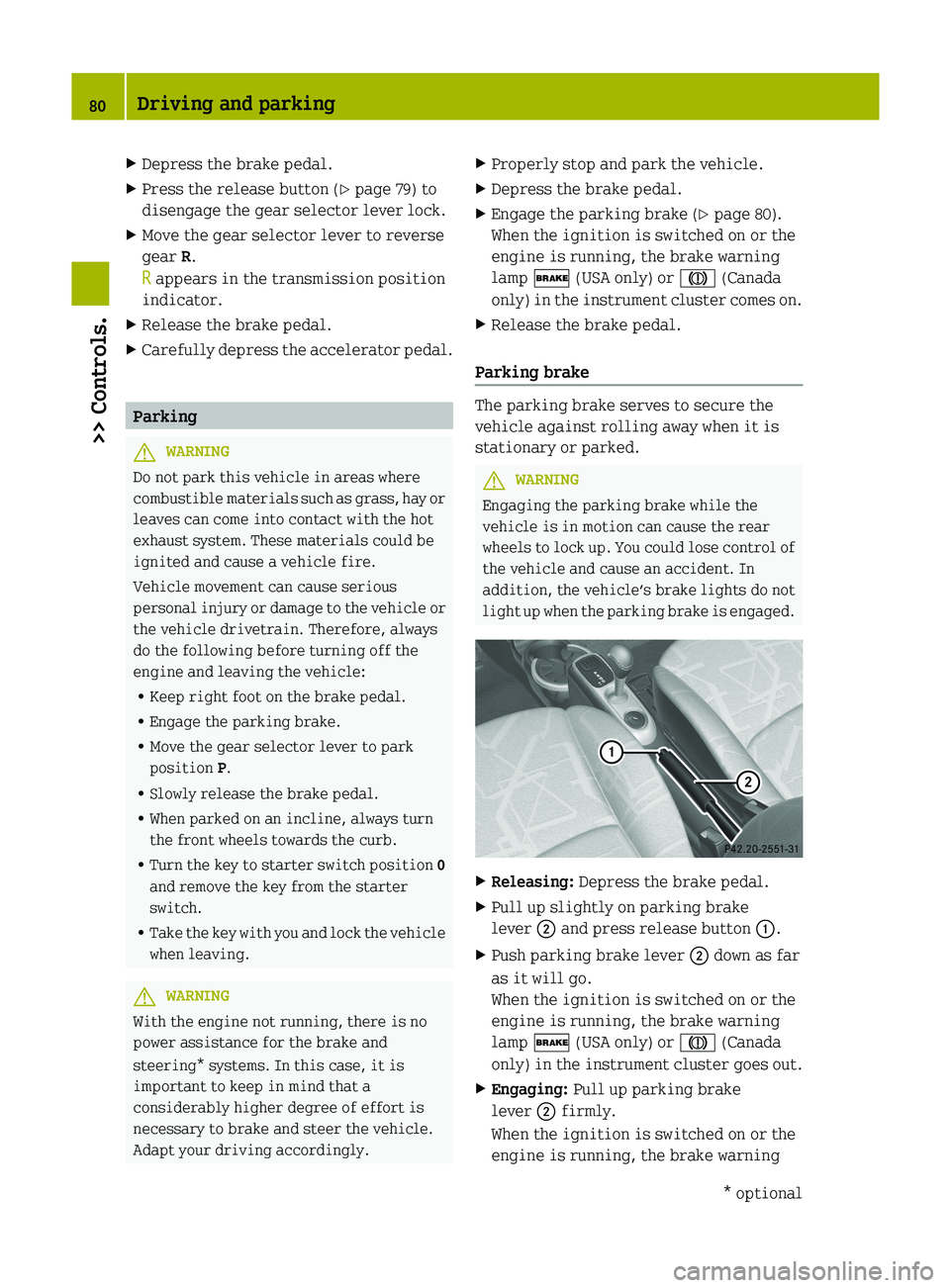
Releasing: Depress the brake pedal.
X Pull up slightly on parking brake
lever ; and press release button :.
X Push parking brake lever ; down as far
as it will go.
When the ignition is switched on or the
engine is running, the brake warning
lamp $ (USA only) or J (Canada
only)
in the instrument cluster goes out.
X Engaging: Pull up parking brake
lever ; firmly.
When the ignition is switched on or the
engine is running, the brake warning 80
Driving and parking
>> Controls.
* optional
Page 83 of 228
lamp $ (USA only) or J (Canada
only)
in the instrument cluster comes on. G
WARNING
Getting out of your vehicle with the
transmission not fully engaged in park
position P
is dangerous. When the engine is
shut off and the brakes are released, the
vehicle can be moved freely with the gear
selector lever in all positions except park
position P. Also, when parked on an incline,
park position P alone may not prevent your
vehicle from moving, possibly hitting
people or objects.
Always engage the parking brake in
addition to shifting to park position P.
When parked on an incline, always turn the
front wheels towards the curb. G
WARNING
When leaving the vehicle, always remove the
key from the starter switch, take it with
you, and lock the vehicle. Do not leave
children
unattended in the vehicle, or with
access to an unlocked vehicle. Children
could release the parking brake and/or
move the gear selector lever from park
position P, either of which could result in
an accident and/or serious personal
injury.
Brake pedal The brake pedal has two brake circuits
independent
of each other. A brake servo is
used during braking (when the engine is
running) to increase pedal force. G
WARNING
Make sure absolutely no objects are
obstructing the pedals’ range of motion.
Keep the driver’s footwell clear of all
obstacles. If there are any floormats*
or
carpets in the footwell, make sure the
pedals still have sufficient clearance.
During sudden acceleration or braking
maneuvers, the objects could get caught between or beneath the pedals and restrict
your ability to brake or accelerate. This
could lead to accidents and/or injury.
G
WARNING
Considerably more effort will be required
to apply the brakes if
R the brake servo has failed
R a brake circuit has failed
R the engine is switched off, e.g. for
towing the vehicle
The braking distance is likewise greater.
Make sure the engine is running whenever
the vehicle is rolling. Have the brake
system repaired at an authorized smart
center, if there is a fault in the brake
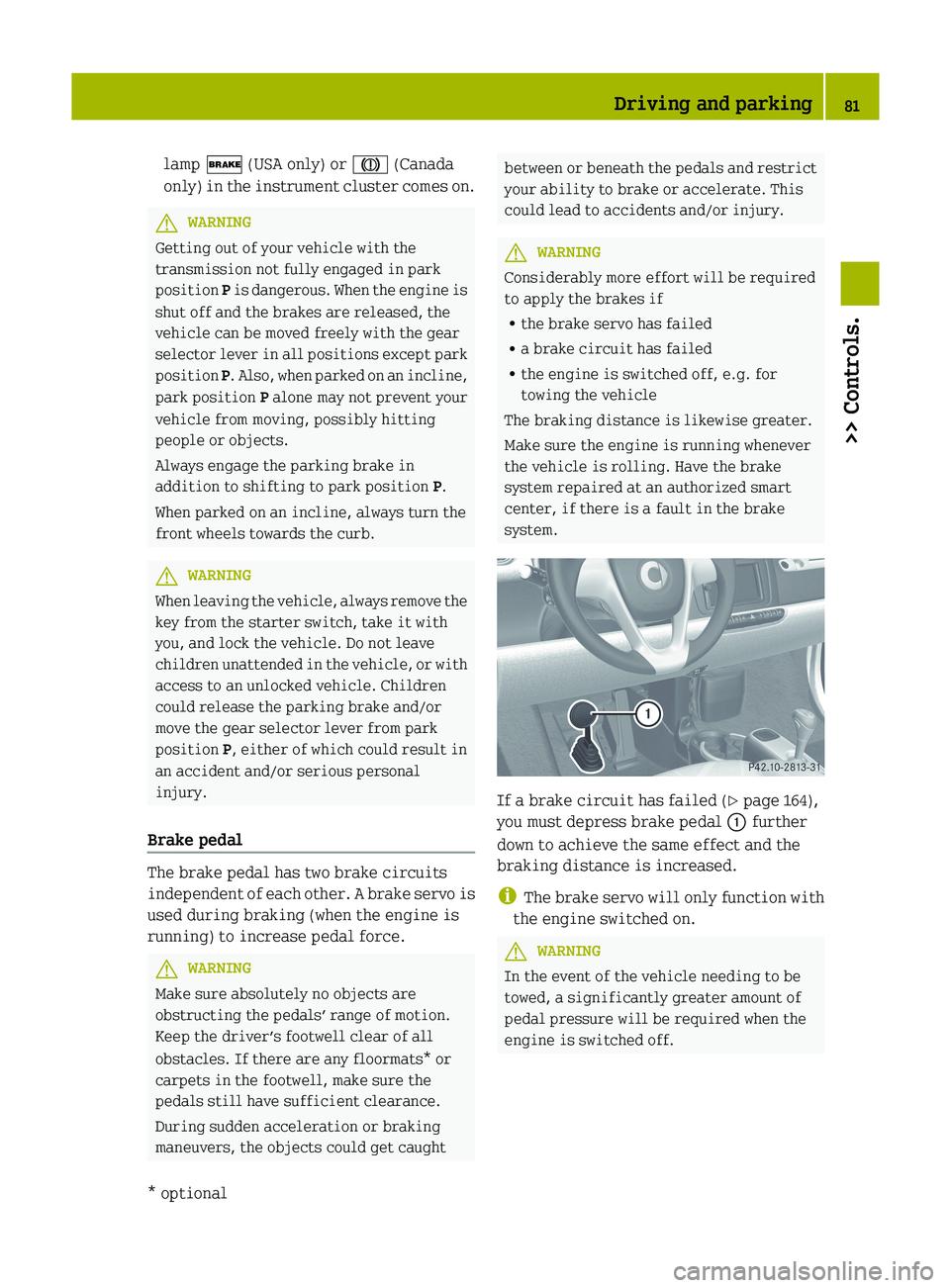
system. If a brake circuit has failed (
Y page 164),
you must depress brake pedal : further
down to achieve the same effect and the
braking distance is increased.
i The
brake servo will only function with
the engine switched on. G
WARNING
In the event of the vehicle needing to be
towed, a significantly greater amount of
pedal pressure will be required when the
engine is switched off. Driving and parking
81
>> Controls.
* optional Z
Page 84 of 228

Turning off the engine
G
WARNING
Do not turn off the engine before the
vehicle has come to a complete stop. With
the engine not running, there is no power
assistance for the brake and steering*
systems. In this case, it is important to
keep in mind that a considerably higher
degree of effort is necessary to brake and
steer the vehicle.
X Depress the brake pedal.
X Press the release button (Y page 79) to
disengage the gear selector lever lock.
X Move the gear selector lever to park
position P.
The transmission position indicator
should be on P
! Always engage the parking brake in
addition to shifting to park position P.
X Release the brake pedal.
X Turn the key to starter switch position
0.
X Remove the key from the starter switch.
The electronic immobilizer is
activated. Transmission
Introduction
Your vehicle is equipped with a 5‑speed
automated transmission with manual or
automatic mode. For information on
driving with the transmission see also
“Starting” ( Y page 78).G
WARNING
Make sure absolutely no objects are
obstructing the pedals’ range of motion.
Keep the driver’s footwell clear of all
obstacles. If there are any floormats*
or
carpets in the footwell, make sure the
pedals still have sufficient clearance. During sudden acceleration or braking
maneuvers, the objects could get caught
between
or beneath the pedals and restrict
your ability to brake or accelerate. This
could lead to accidents and/or injury. Gear selector lever
Gearshift pattern for transmission
:
Release button j
Park position
k
Reverse gear
i
Neutral position
h
Drive position
p
Manual gearshifting
q
Upshifting
±
Downshifting
The current gear selector lever position
appears in the transmission position
indicator. When manual gearshifting M is
selected, the currently selected gear
appears ( Y page 88). G
WARNING
It is dangerous to shift the transmission
out of park position P or neutral position
N if the engine speed is higher than idle
speed.
If your foot is not firmly on the brake
pedal, the vehicle could accelerate quickly
forward or in reverse. You could lose 82
Transmission
>> Controls.
* optional
Page 85 of 228
control of the vehicle and hit someone or
something. Only shift into gear when the
engine is idling normally and when your
right foot is firmly on the brake pedal.
Shifting procedure
The transmission selects individual gears
automatically, depending on:
R the gear selector lever position D
(Y page 83)
R the position of the accelerator pedal
(Y page 84)
R the vehicle speed
R uphill or downhill grades
Press release button : (Y page 82) to
disengage the gear selector lever lock
when moving the gear selector lever from
R P to R, N, or D
R R to P
R N to R or P
! Allow the engine to warm up under low
load use. Do not place full load on the
engine until the operating temperature
has been reached.
Shift into reverse gear R or parking
position P only when the vehicle is
stopped.
Avoid spinning of a drive wheel for an
extended period when driving off on
slippery road surfaces. Otherwise, the
drivetrain could be damaged, which is
not covered by the smart Limited
Warranty.
With manual gearshifting M selected
(Y page 84), you can use the gear selector
lever or steering wheel gearshift control
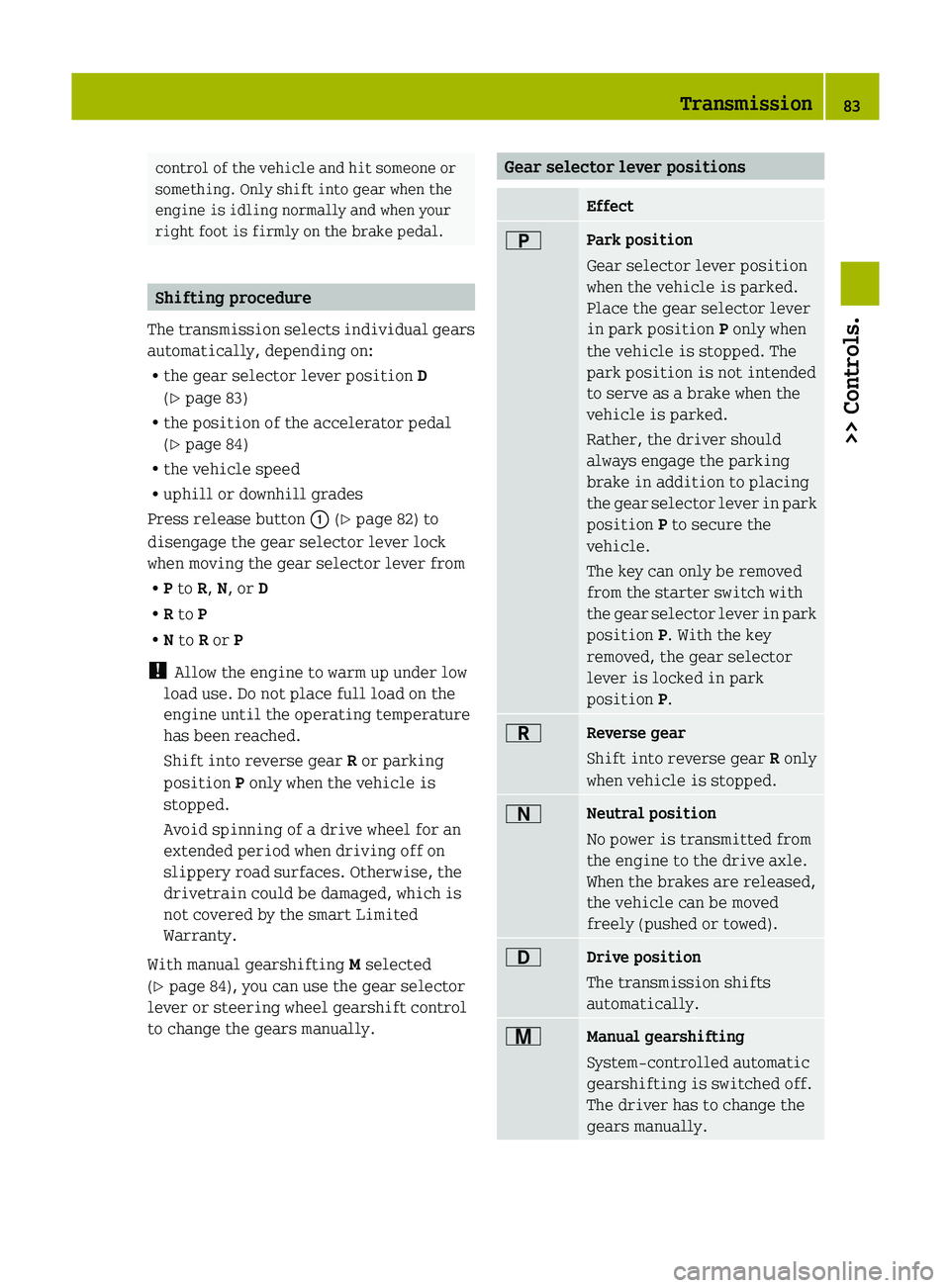
to change the gears manually. Gear selector lever positions
Effect
B
Park position
Gear selector lever position
when the vehicle is parked.
Place the gear selector lever
in park position
P only when
the vehicle is stopped. The
park position is not intended
to serve as a brake when the
vehicle is parked.
Rather, the driver should
always engage the parking
brake in addition to placing
the
gear selector lever in park
position P to secure the
vehicle.
The key can only be removed
from the starter switch with
the gear selector lever in park
position P. With the key
removed, the gear selector
lever is locked in park
position P. C
Reverse gear
Shift into reverse gear
R only
when vehicle is stopped. A
Neutral position
No power is transmitted from
the engine to the drive axle.
When the brakes are released,
the vehicle can be moved
freely (pushed or towed).
7
Drive position
The transmission shifts
automatically.
x
Manual gearshifting
System-controlled automatic
gearshifting is switched off.
The driver has to change the
gears manually. Transmission
83
>> Controls. Z
Page 86 of 228
The current gear selector lever position
appears in the transmission position
indicator (Y page 88).
Driving tips
Accelerator pedal position Your driving style influences the
transmission’s shifting behavior:
Less throttle earlier upshifting
More throttle later upshifting
Kickdown
Use kickdown when you want maximum
acceleration.
X
Press the accelerator pedal past the
point of resistance.
Depending on the engine speed the
transmission shifts into a lower gear.
X Ease up on the accelerator pedal when you
have reached the desired speed.
The transmission shifts up again.
Stopping When you stop briefly, e.g. at traffic
lights:
X
Leave the transmission in gear.
X Hold the vehicle with the brake.
When you stop for a longer period with the
engine idling and/or on a hill:
X Engage the parking brake.
X Move the gear selector lever to park
position P.
Working on the vehicle G
WARNING
When working on the vehicle, engage the
parking brake and move the gear selector
lever to park position P. Otherwise the
vehicle could roll away which could result in an accident and/or serious personal
injury.
Driving on uphill grades Your vehicle has a hill‑start assist system.
G
WARNING
The hill-start assist system is not
designed to function as a parking brake and
does not prevent the vehicle from moving
when parked on an incline.
Always engage the parking brake in
addition to shifting to park position P.
On uphill grades the hill‑start assist
system maintains the pressure in the brake
system for approximately one second after
you have released the brake pedal.
Therefore, you can start off smoothly
without the vehicle moving immediately
after releasing the brake pedal.
X Release the brake pedal.
X Apply sufficient pressure to the
accelerator pedal.
! After approximately one second, the
hill‑start assist system stops braking
the vehicle, which then can roll
backwards. If you open the driver’s door
within this time, the hill‑start assist
system is deactivated and a warning
signal sounds.
i The
hill‑start assist system is inactive
if you start off with the parking brake
engaged. Manual gearshifting
With manual gearshifting M selected,
system-controlled automatic gearshifting
is switched off and you need to change the
gears by upshifting or downshifting
manually using the gear selector lever or
the steering wheel gearshift control 10
.
10 Model passion and BRABUS only. 84
Transmission
>> Controls.
Page 88 of 228
Deactivating manual gearshifting
X
With drive position D selected: Pull and
hold right shift paddle ; (Y page 85)
towards you for longer than two seconds.
or
X With manual gearshifting M selected:
Move the gear selector lever to drive
position D (Y page 82).
System-controlled automatic
gearshifting is switched on again. Emergency operation (limp-home
mode)
In this mode only a certain gear or a
certain
gear combination can be selected.
This mode is triggered in case of
transmission malfunctions and enables you
driving to the nearest workshop such as a
smart center.
If vehicle acceleration becomes less
responsive or sluggish or the transmission
no longer shifts, the transmission is most
likely operating in limp-home (emergency
operation) mode. The transmission
position indicator flashes and the ¬
symbol appears in the multifunction
display.
Driving in limp-home mode:
X Move the gear selector lever to drive
position D (Y page 82).
X Continue to drive.
X Have the transmission checked at an
authorized smart center as soon as
possible.
i It is possible that a gear combination
including the reverse gear can not be
selected. Keep in mind when parking,
that reversing the vehicle might be
impossible.
In case of a minor transmission
malfunction,
it might be possible to teach-
in the transmission in order to restore the
normal transmission mode. i
If the attempt to teach-in the
transmission fails, you cannot continue
to drive. Therefore we strongly
recommend that you have the
transmission taught-in at a qualified
workshop or at an authorized smart
center.
Teaching-in the transmission system:
X Stop the vehicle in a safe location.
X Move the gear selector lever to park
position P.
X Turn off the engine.
X Wait at least 30 seconds before
restarting.
X Press the brake pedal.
X Restart the engine
Three bars instead of P appear in the
multifunction display.
X Wait at least 30 seconds.
The transmission is taught in.
When teaching-in was successful: P
appears
in the multifunction display again
and normal transmission operating is
restored.
X Continue to drive.
After an unsuccessful teaching-in: Three
bars instead of P appear in the
multifunction display.
X Do not continue to drive.
X Turn off the engine.
X Engage the parking brake when leaving
the vehicle.
X Contact Roadside Assistance or an
authorized smart center. Instrument cluster
Multifunction display
The following displays and indicators
appear in the multifunction display: 86
Instrument cluster
>> Controls.
Page 102 of 228
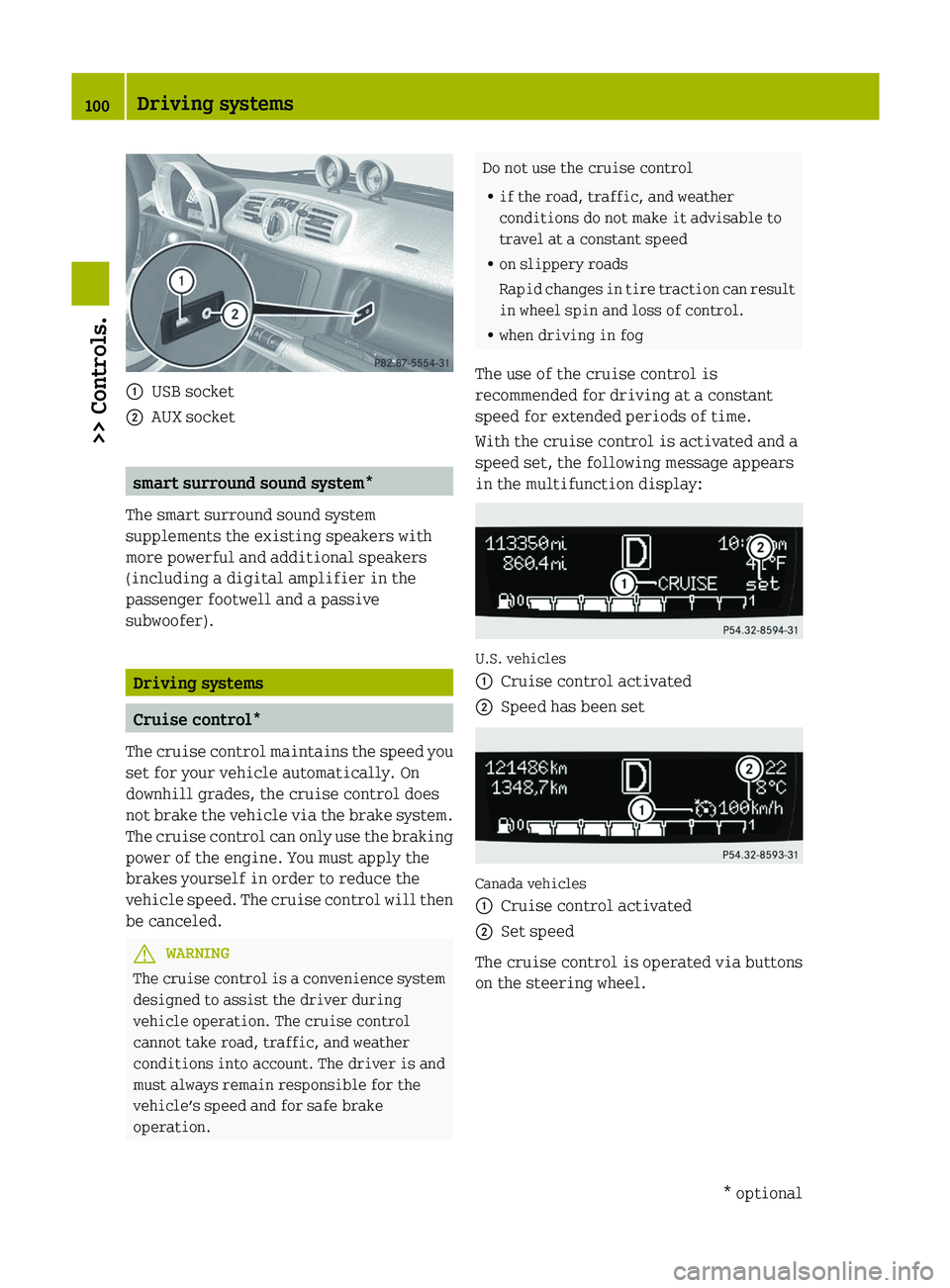
:
USB socket
; AUX socket smart surround sound system*
The smart surround sound system
supplements the existing speakers with
more powerful and additional speakers
(including a digital amplifier in the
passenger footwell and a passive
subwoofer). Driving systems
Cruise control*
The cruise control maintains the speed you
set for your vehicle automatically. On
downhill grades, the cruise control does
not brake the vehicle via the brake system.
The cruise control can only use the braking
power of the engine. You must apply the
brakes yourself in order to reduce the
vehicle speed. The cruise control will then
be canceled. G
WARNING
The cruise control is a convenience system
designed to assist the driver during
vehicle operation. The cruise control
cannot take road, traffic, and weather
conditions into account. The driver is and
must always remain responsible for the
vehicle’s speed and for safe brake
operation. Do not use the cruise control
R
if the road, traffic, and weather
conditions do not make it advisable to
travel at a constant speed
R on slippery roads
Rapid
changes in tire traction can result
in wheel spin and loss of control.
R when driving in fog
The use of the cruise control is
recommended for driving at a constant
speed for extended periods of time.
With the cruise control is activated and a
speed set, the following message appears
in the multifunction display: U.S. vehicles
:
Cruise control activated
; Speed has been set Canada vehicles
:
Cruise control activated
; Set speed
The cruise control is operated via buttons
on the steering wheel. 100
Driving systems
>> Controls.
* optional
Page 103 of 228
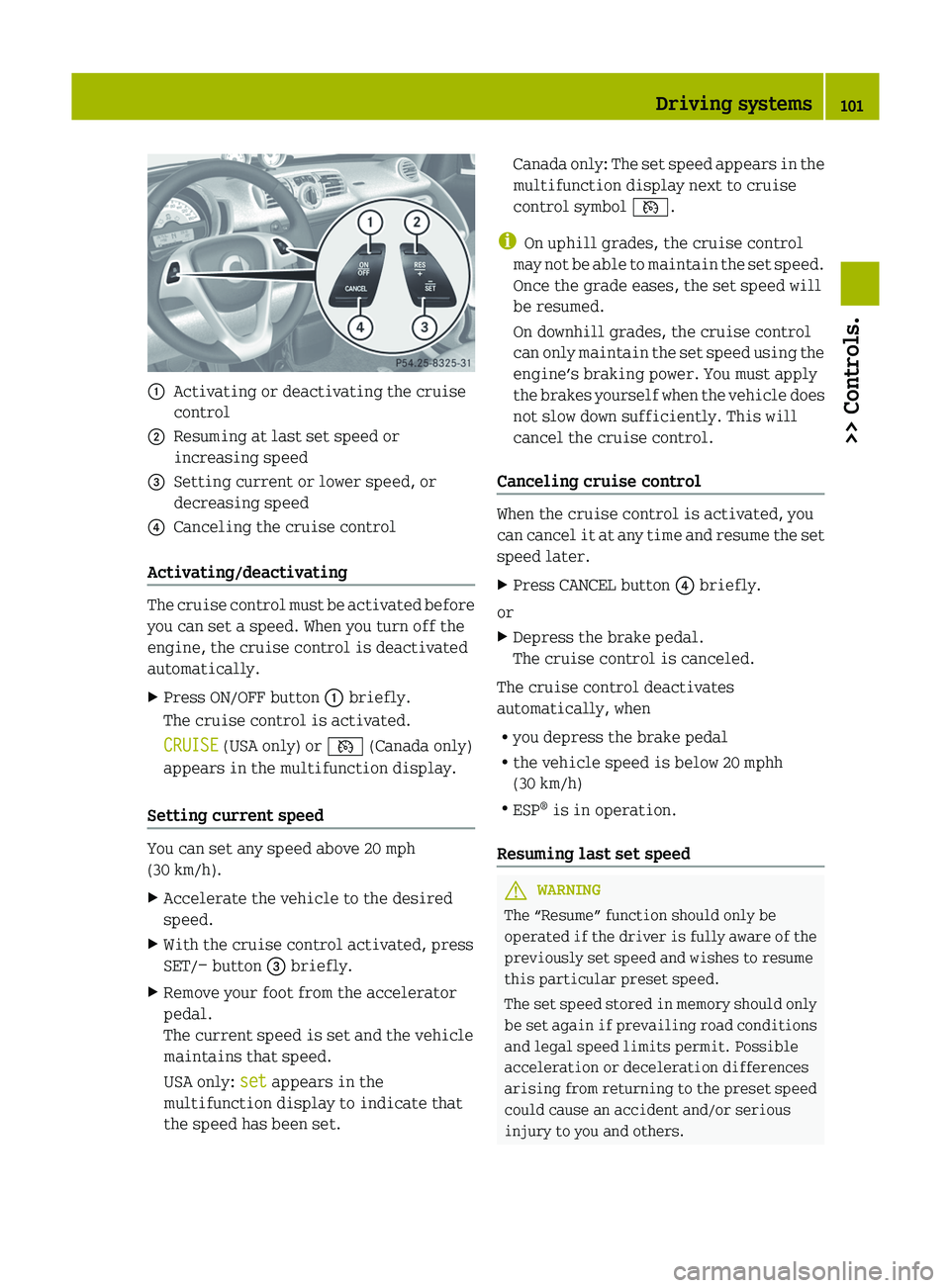
:
Activating or deactivating the cruise
control
; Resuming at last set speed or
increasing speed
= Setting current or lower speed, or
decreasing speed
? Canceling the cruise control
Activating/deactivating The cruise control must be activated before
you can set a speed. When you turn off the
engine, the cruise control is deactivated
automatically.
X
Press ON/OFF button : briefly.
The cruise control is activated.
CRUISE (USA only) or V (Canada only)
appears in the multifunction display.
Setting current speed You can set any speed above 20 mph
(30 km/h).
X
Accelerate the vehicle to the desired
speed.
X With the cruise control activated, press
SET/− button = briefly.
X Remove your foot from the accelerator
pedal.
The current speed is set and the vehicle
maintains that speed.
USA only: set appears in the
multifunction display to indicate that
the speed has been set. Canada only: The set speed appears in the
multifunction display next to cruise
control symbol V.
i On uphill grades, the cruise control
may
not be able to maintain the set speed.
Once the grade eases, the set speed will
be resumed.
On downhill grades, the cruise control
can only maintain the set speed using the
engine’s braking power. You must apply
the brakes yourself when the vehicle does
not slow down sufficiently. This will
cancel the cruise control.
Canceling cruise control When the cruise control is activated, you
can
cancel it at any time and resume the set
speed later.
X Press CANCEL button ? briefly.
or
X Depress the brake pedal.
The cruise control is canceled.
The cruise control deactivates
automatically, when
R you depress the brake pedal
R the vehicle speed is below 20 mphh
(30 km/h)
R ESP ®
is in operation.
Resuming last set speed G
WARNING
The “Resume” function should only be
operated
if the driver is fully aware of the
previously set speed and wishes to resume
this particular preset speed.
The set speed stored in memory should only
be set again if prevailing road conditions
and legal speed limits permit. Possible
acceleration or deceleration differences
arising from returning to the preset speed
could cause an accident and/or serious
injury to you and others. Driving systems
101
>> Controls. Z
Page 112 of 228
the pedals. This could restrict your ability
to brake or accelerate and could lead to
accidents and injury.
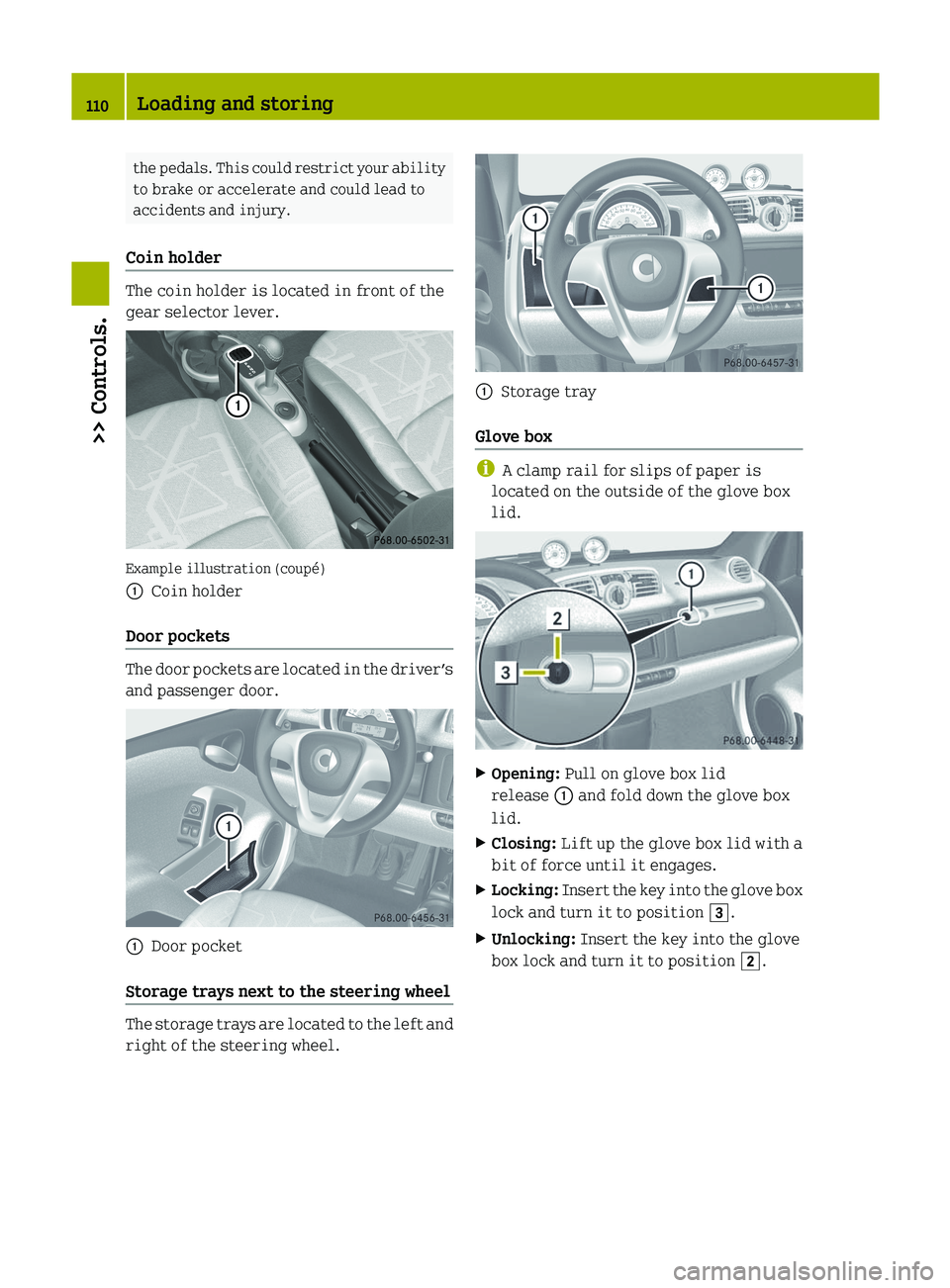
Coin holder The coin holder is located in front of the
gear selector lever.
Example illustration (coupé)
:
Coin holder
Door pockets The door pockets are located in the driver’s
and passenger door.
:
Door pocket
Storage trays next to the steering wheel The storage trays are located to the left and
right of the steering wheel. :
Storage tray
Glove box i
A clamp rail for slips of paper is
located on the outside of the glove box
lid. X
Opening: Pull on glove box lid
release : and fold down the glove box
lid.
X Closing: Lift up the glove box lid with a
bit of force until it engages.
X Locking: Insert the key into the glove box
lock and turn it to position 3.
X Unlocking: Insert the key into the glove
box lock and turn it to position 2.110
Loading and storing
>> Controls.
Page 119 of 228
?
Fuel type label
A Holder
X Turn off the engine.
X Remove the key from the starter switch.
X Open the fuel filler flap by pulling at the
point indicated by arrow :.
X Turn fuel filler cap = counterclockwise
and hold on to it until possible pressure
is released.
X Take off fuel filler cap =.
! The fuel filler cap is tethered to the
fuel filler flap. Do not drop the fuel
filler cap. It could damage the vehicle
paint finish.
X Insert fuel filler cap = in direction of
arrow ; into holder A on the inside of
the fuel filler flap.
X Fully insert filler nozzle unit and
refuel.
X Only fill your tank until the filler nozzle
unit
cuts out — do not top off or overfill .G
WARNING
Overfilling of the fuel tank may create
pressure in the system which could cause a
gas discharge. This could cause the gas to
spray
back out when removing the fuel pump
nozzle, which could cause personal injury.
X Replace fuel filler cap =.
X Turn fuel filler cap = clockwise until
the handle grip overturns.
i Make sure to close the fuel filler flap
before locking the vehicle as the fuel
filler flap locking pin prevents closing
after you have locked the vehicle.
X Close the fuel filler flap.
You should hear the latch close shut.
i Only use premium unleaded gasoline
with a minimum Posted Octane Rating of
91 (average of 96 RON/86 MON).
Information on gasoline quality can
normally be found on the fuel pump. Please contact gas station personnel in
case
labels on the pump cannot be found.
For more information on gasoline, see
“Premium unleaded gasoline”
(Y page 221) and “Fuel requirements”
(Y page 222), or contact an authorized
smart center. Check regularly and before a long trip
For information on quantities and
requirements of operating agents, see
“Service fluids and capacities”
(Y page 218).
Check the following:
R Engine oil level ( Y page 118)
R Tire inflation pressure ( Y page 126)
R Coolant level ( Y page 122)
R Vehicle lighting ( Y page 178)
R Windshield washer system (Y page 122)
R Brake fluid (Y page 123) Engine compartment
Engine compartment cover
Open the engine compartment cover to
check
the engine oil level and if necessary,
to add engine oil. G
WARNING
High outside temperature, stop-and-go
traffic, driving on long uphill grades or
driving
at high engine speed may increase
the temperature in the engine
compartment. Therefore, the engine
compartment cover and parts in the area
around the engine compartment cover may
be hot. Parts of the engine can become very
hot. To prevent burns, let the engine cool
off completely before touching the engine
compartment cover, parts in the area
around the engine compartment cover, and
parts of the engine. Engine compartment
117
>> Operation. Z