light SMART FORTWO COUPE 2012 Owner's Manual
[x] Cancel search | Manufacturer: SMART, Model Year: 2012, Model line: FORTWO COUPE, Model: SMART FORTWO COUPE 2012Pages: 228, PDF Size: 12.76 MB
Page 70 of 228
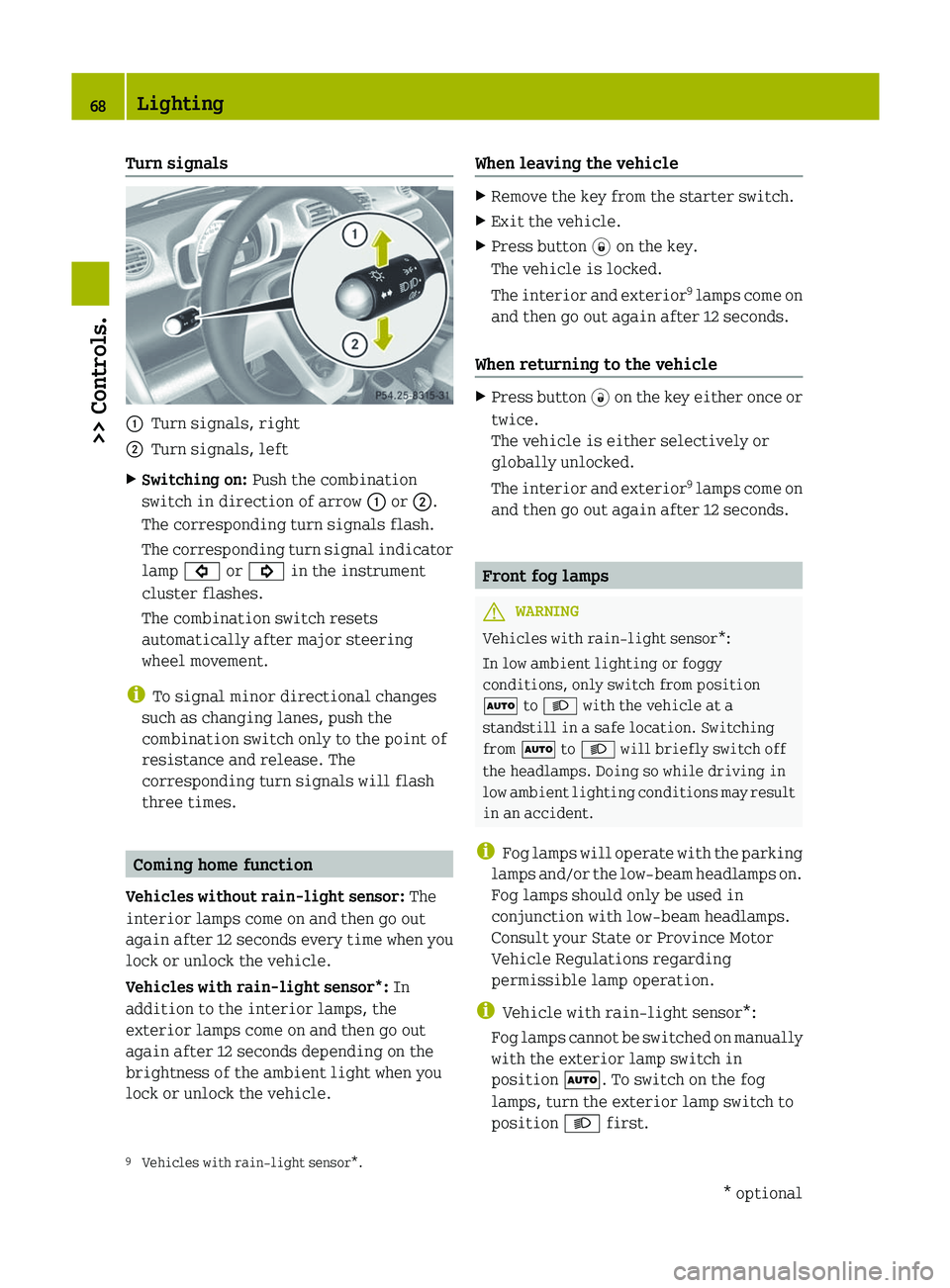
Turn signals
:
Turn signals, right
; Turn signals, left
X Switching on: Push the combination
switch in direction of arrow : or ;.
The corresponding turn signals flash.
The
corresponding turn signal indicator
lamp # or ! in the instrument
cluster flashes.
The combination switch resets
automatically after major steering
wheel movement.
i To signal minor directional changes
such as changing lanes, push the
combination switch only to the point of
resistance and release. The
corresponding turn signals will flash
three times. Coming home function
Vehicles without rain-light sensor: The
interior lamps come on and then go out
again
after 12 seconds every time when you
lock or unlock the vehicle.
Vehicles with rain-light sensor*: In
addition to the interior lamps, the
exterior lamps come on and then go out
again after 12 seconds depending on the
brightness of the ambient light when you
lock or unlock the vehicle. When leaving the vehicle X
Remove the key from the starter switch.
X Exit the vehicle.
X Press button * on the key.
The vehicle is locked.
The
interior and exterior 9
lamps come on
and then go out again after 12 seconds.
When returning to the vehicle X
Press button #
on the key either once or
twice.
The vehicle is either selectively or
globally unlocked.
The interior and exterior 9
lamps come on
and then go out again after 12 seconds. Front fog lamps
G
WARNING
Vehicles with rain-light sensor*:
In low ambient lighting or foggy
conditions, only switch from position
à to L with the vehicle at a
standstill in a safe location. Switching
from à to L will briefly switch off
the headlamps. Doing so while driving in
low
ambient lighting conditions may result
in an accident.
i Fog lamps will operate with the parking
lamps and/or the low‑beam headlamps on.
Fog lamps should only be used in
conjunction with low‑beam headlamps.
Consult your State or Province Motor
Vehicle Regulations regarding
permissible lamp operation.
i Vehicle with rain-light sensor*:
Fog lamps cannot be switched on manually
with the exterior lamp switch in
position Ã. To switch on the fog
lamps, turn the exterior lamp switch to
position L first.
9 Vehicles with rain-light sensor*. 68
Lighting
>> Controls.
* optional
Page 71 of 228
X
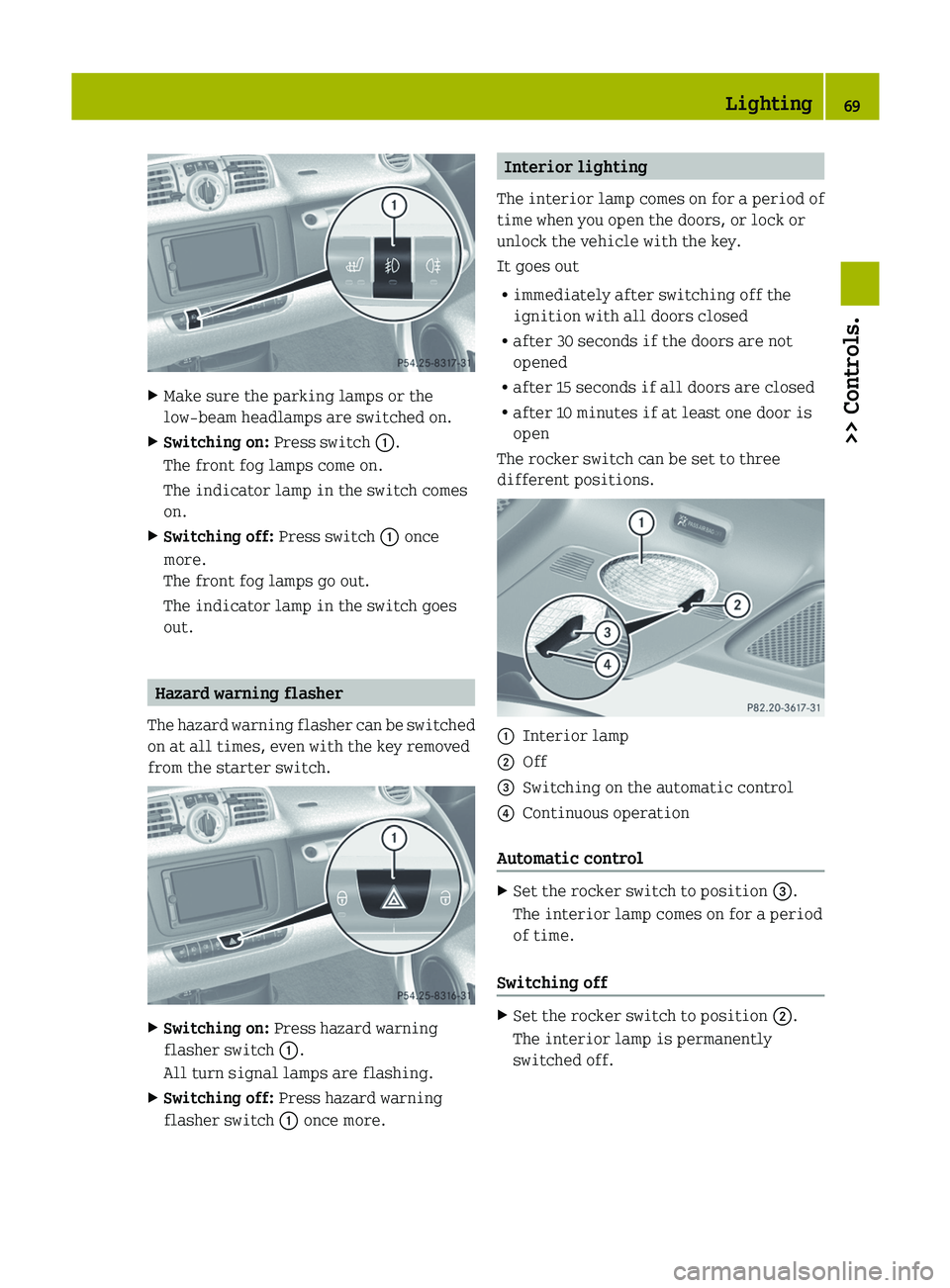
Make sure the parking lamps or the
low‑beam headlamps are switched on.
X Switching on: Press switch :.
The front fog lamps come on.
The indicator lamp in the switch comes
on.
X Switching off: Press switch : once
more.
The front fog lamps go out.
The indicator lamp in the switch goes
out. Hazard warning flasher
The hazard warning flasher can be switched
on at all times, even with the key removed
from the starter switch. X
Switching on: Press hazard warning
flasher switch :.
All turn signal lamps are flashing.
X Switching off: Press hazard warning
flasher switch : once more. Interior lighting
The
interior lamp comes on for a period of
time when you open the doors, or lock or
unlock the vehicle with the key.
It goes out
R immediately after switching off the
ignition with all doors closed
R after 30 seconds if the doors are not
opened
R after 15 seconds if all doors are closed
R after 10 minutes if at least one door is
open
The rocker switch can be set to three
different positions. :
Interior lamp
; Off
= Switching on the automatic control
? Continuous operation
Automatic control X
Set the rocker switch to position =.
The interior lamp comes on for a period
of time.
Switching off X
Set the rocker switch to position ;.
The interior lamp is permanently
switched off. Lighting
69
>> Controls. Z
Page 72 of 228
Continuous operation
X
Set the rocker switch to position ?.
The interior lamp is permanently
switched on.
! When leaving the vehicle, make sure the
interior lamp is not set to continuous
operation and none of the doors is left
open for a long period of time.
Doing otherwise could result in a
discharged battery.
Ambient lighting* The ambient lighting illuminates the
vehicle
interior with 6 LEDs when the low-
beam headlamps are switched on. The LEDs
can be dimmed.
The LEDS are located
R in the overhead control panel
R in the door pockets, driver’s and
passenger side
R in the storage trays to the left and right
of the steering wheel
R in the storage compartment, passenger
side
In addition to the ambient lighting, the
footwells on the driver’s and passenger
side are also illuminated by separate
lamps.
i When you open a door, the interior
lighting comes on and the brightness of
lamps in the footwells increases. X
Make sure the key is in starter switch
position 1.
X Switch on the low-beam headlamps.
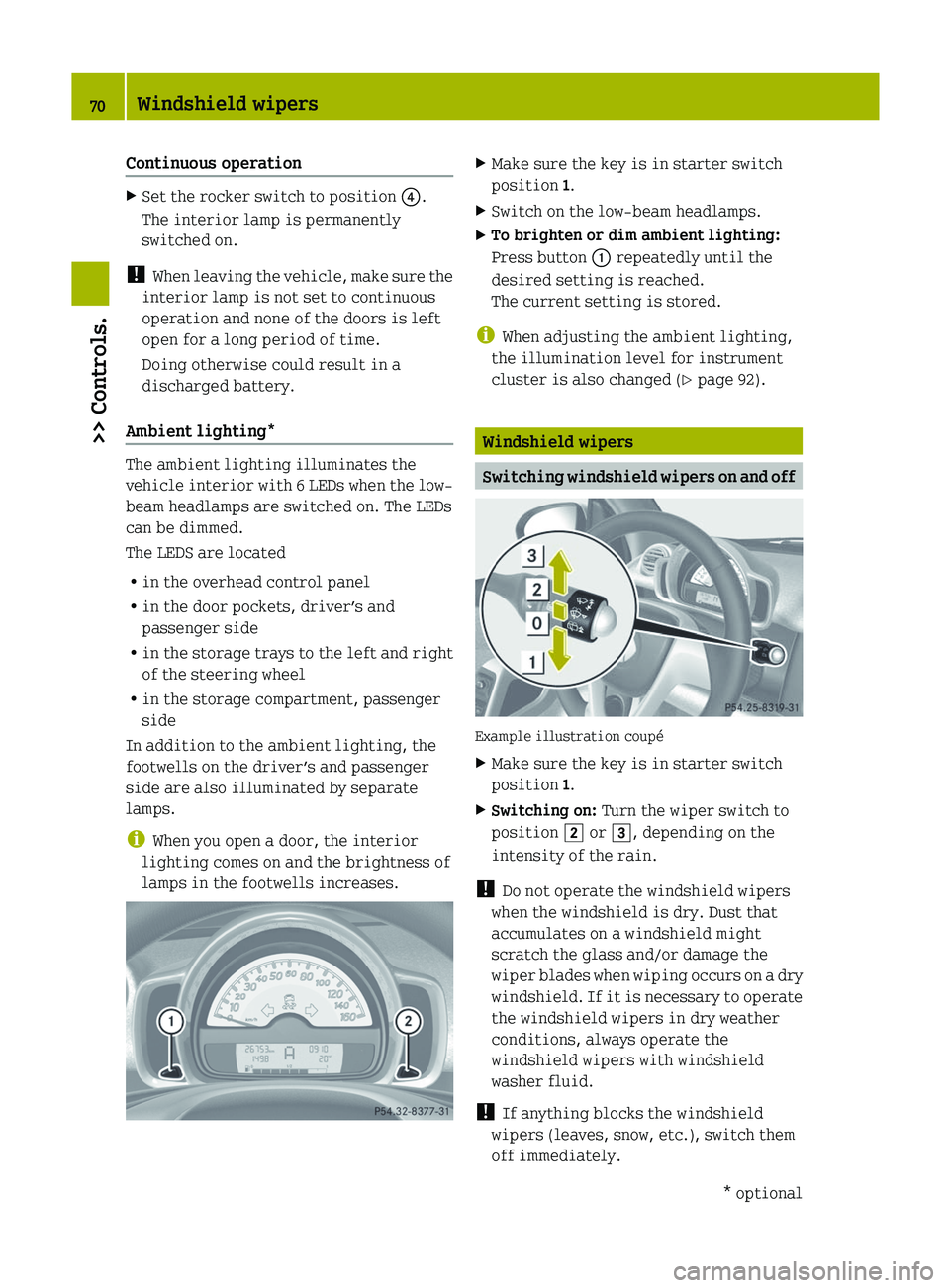
X To brighten or dim ambient lighting:
Press button : repeatedly until the
desired setting is reached.
The current setting is stored.
i When adjusting the ambient lighting,
the illumination level for instrument
cluster is also changed (Y page 92). Windshield wipers
Switching windshield wipers on and off
Example illustration coupé
X
Make sure the key is in starter switch
position 1.
X Switching on: Turn the wiper switch to
position 2 or 3, depending on the
intensity of the rain.
! Do not operate the windshield wipers
when the windshield is dry. Dust that
accumulates on a windshield might
scratch the glass and/or damage the
wiper
blades when wiping occurs on a dry
windshield. If it is necessary to operate
the windshield wipers in dry weather
conditions, always operate the
windshield wipers with windshield
washer fluid.
! If anything blocks the windshield
wipers (leaves, snow, etc.), switch them
off immediately. 70
Windshield wipers
>> Controls.
* optional
Page 73 of 228
For safety reasons, stop the vehicle in a
safe location and
R
-
remove the key from the starter
switch
- engage the parking brake
before attempting to remove any
blockage.
R Remove blockage.
R Turn the windshield wipers on again.
X Switching off: Turn the wiper switch to
position g. Intermittent wiping
Only switch on intermittent wiping under
wet weather conditions or in the presence
of precipitation.
Vehicles
with rain-light sensor*: When you
select intermittent wiping, the sensor is
activated. The sensor automatically sets a
suitable wiping interval depending on the
wetness of the sensor surface.
! Vehicles with rain-light sensor*:
Do not leave windshield wipers in
intermittent setting when the vehicle is
taken to an automatic car wash or during
windshield cleaning. Windshield wipers
will operate in the presence of water
sprayed on the windshield, and
windshield wipers may be damaged as a
result.
! Vehicles with rain-light sensor*:
If you have set intermittent wiping, dirt
on the surface of the sensor or optical
effects may cause the windshield wipers
to wipe in an undesired fashion. This
could then damage the windshield wiper
blades or scratch the windshield. You
should therefore switch off the
windshield wipers when weather
conditions are dry. X
Make sure the key is in starter switch
position 1.
X Activating intermittent wiping:
Turn the
wiper switch to position 1.
After the initial wipe, pauses between
wipes are automatically controlled
depending on the vehicle speed and by the
rain-light sensor*.
X Deactivating intermittent wiping: Turn
the wiper switch to position g. Wiping with windshield washer fluid
Example illustration coupé
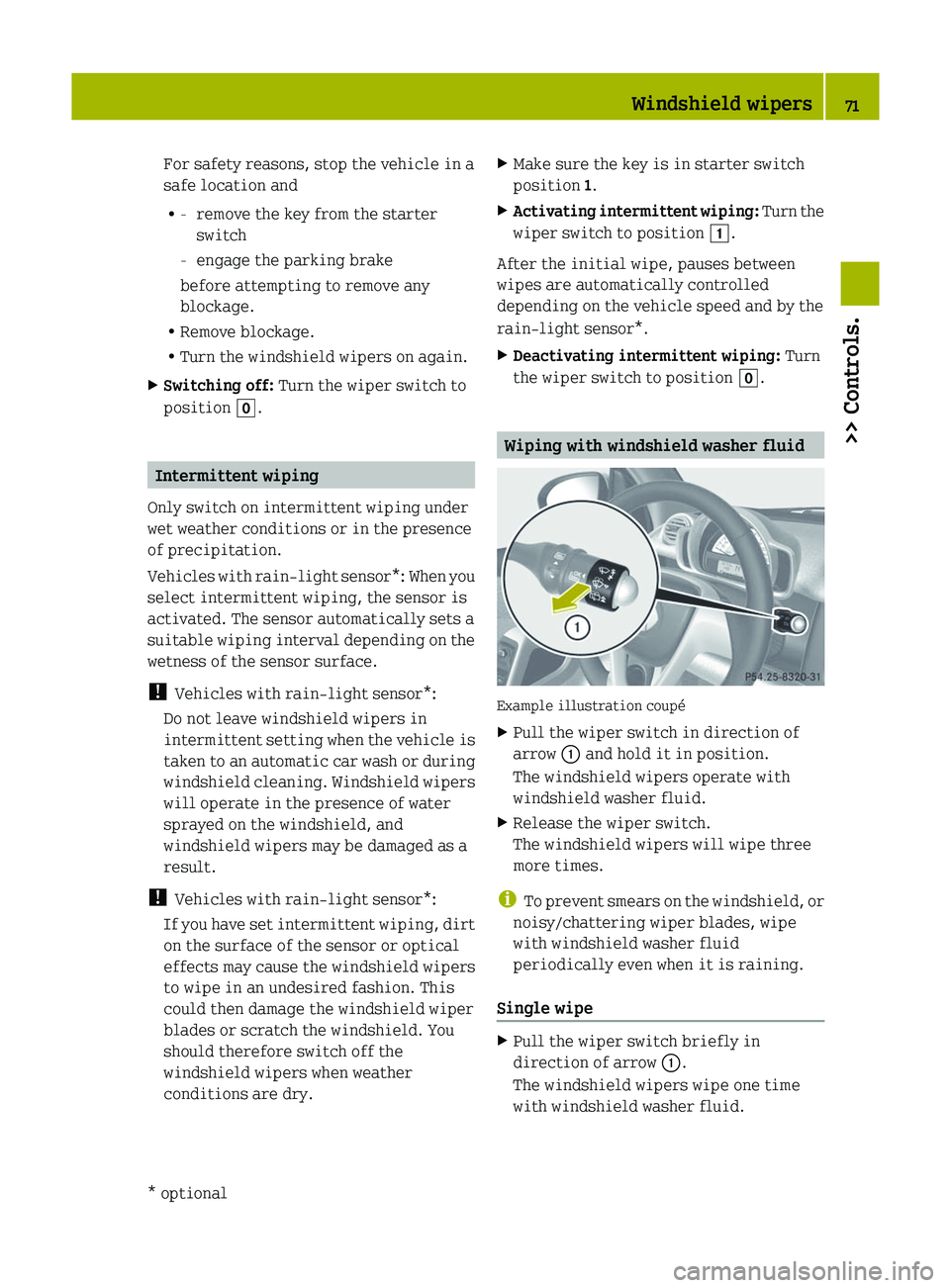
X
Pull the wiper switch in direction of
arrow : and hold it in position.
The windshield wipers operate with
windshield washer fluid.
X Release the wiper switch.
The windshield wipers will wipe three
more times.
i To
prevent smears on the windshield, or
noisy/chattering wiper blades, wipe
with windshield washer fluid
periodically even when it is raining.
Single wipe X
Pull the wiper switch briefly in
direction of arrow :.
The windshield wipers wipe one time
with windshield washer fluid. Windshield wipers
71
>> Controls.
* optional Z
Page 82 of 228
X
Depress the brake pedal.
X Press the release button (Y page 79) to
disengage the gear selector lever lock.
X Move the gear selector lever to reverse
gear R.
R appears in the transmission position
indicator.
X Release the brake pedal.
X Carefully depress the accelerator pedal. Parking
G
WARNING
Do not park this vehicle in areas where
combustible materials such as grass, hay or
leaves can come into contact with the hot
exhaust system. These materials could be
ignited and cause a vehicle fire.
Vehicle movement can cause serious
personal injury or damage to the vehicle or
the vehicle drivetrain. Therefore, always
do the following before turning off the
engine and leaving the vehicle:
R Keep right foot on the brake pedal.
R Engage the parking brake.
R Move the gear selector lever to park
position P.
R Slowly release the brake pedal.
R When parked on an incline, always turn
the front wheels towards the curb.
R Turn the key to starter switch position 0
and remove the key from the starter
switch.
R Take the key with you and lock the vehicle
when leaving. G
WARNING
With the engine not running, there is no
power assistance for the brake and
steering* systems. In this case, it is
important to keep in mind that a
considerably higher degree of effort is
necessary to brake and steer the vehicle.
Adapt your driving accordingly. X
Properly stop and park the vehicle.
X Depress the brake pedal.
X Engage the parking brake ( Y page 80).
When the ignition is switched on or the
engine is running, the brake warning
lamp $ (USA only) or J (Canada
only)
in the instrument cluster comes on.
X Release the brake pedal.
Parking brake The parking brake serves to secure the
vehicle against rolling away when it is
stationary or parked.
G
WARNING
Engaging the parking brake while the
vehicle is in motion can cause the rear
wheels
to lock up. You could lose control of
the vehicle and cause an accident. In
addition, the vehicle’s brake lights do not
light up when the parking brake is engaged. X
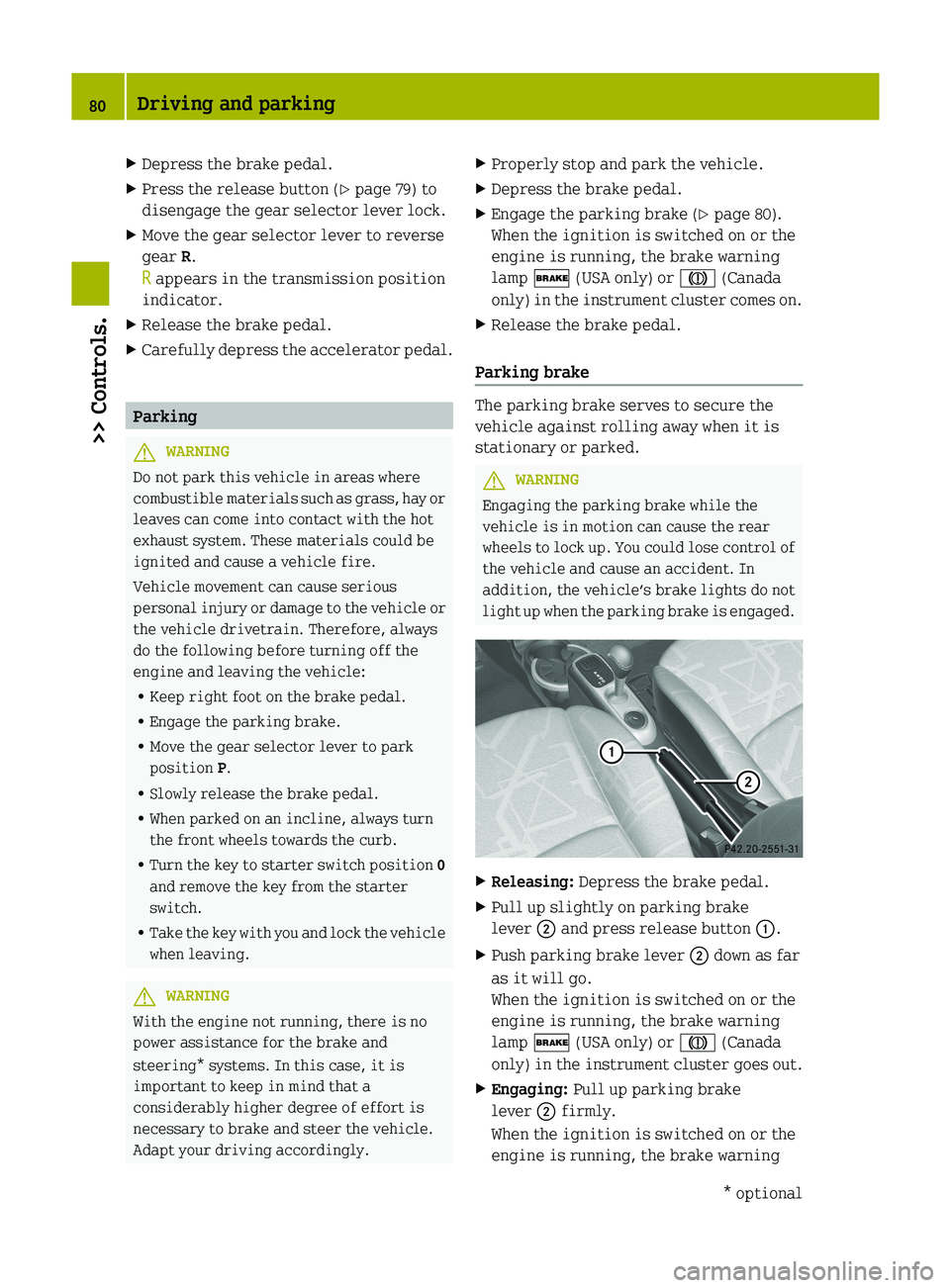
Releasing: Depress the brake pedal.
X Pull up slightly on parking brake
lever ; and press release button :.
X Push parking brake lever ; down as far
as it will go.
When the ignition is switched on or the
engine is running, the brake warning
lamp $ (USA only) or J (Canada
only)
in the instrument cluster goes out.
X Engaging: Pull up parking brake
lever ; firmly.
When the ignition is switched on or the
engine is running, the brake warning 80
Driving and parking
>> Controls.
* optional
Page 86 of 228
The current gear selector lever position
appears in the transmission position
indicator (Y page 88).
Driving tips
Accelerator pedal position Your driving style influences the
transmission’s shifting behavior:
Less throttle earlier upshifting
More throttle later upshifting
Kickdown
Use kickdown when you want maximum
acceleration.
X
Press the accelerator pedal past the
point of resistance.
Depending on the engine speed the
transmission shifts into a lower gear.
X Ease up on the accelerator pedal when you
have reached the desired speed.
The transmission shifts up again.
Stopping When you stop briefly, e.g. at traffic
lights:
X
Leave the transmission in gear.
X Hold the vehicle with the brake.
When you stop for a longer period with the
engine idling and/or on a hill:
X Engage the parking brake.
X Move the gear selector lever to park
position P.
Working on the vehicle G
WARNING
When working on the vehicle, engage the
parking brake and move the gear selector
lever to park position P. Otherwise the
vehicle could roll away which could result in an accident and/or serious personal
injury.
Driving on uphill grades Your vehicle has a hill‑start assist system.
G
WARNING
The hill-start assist system is not
designed to function as a parking brake and
does not prevent the vehicle from moving
when parked on an incline.
Always engage the parking brake in
addition to shifting to park position P.
On uphill grades the hill‑start assist
system maintains the pressure in the brake
system for approximately one second after
you have released the brake pedal.
Therefore, you can start off smoothly
without the vehicle moving immediately
after releasing the brake pedal.
X Release the brake pedal.
X Apply sufficient pressure to the
accelerator pedal.
! After approximately one second, the
hill‑start assist system stops braking
the vehicle, which then can roll
backwards. If you open the driver’s door
within this time, the hill‑start assist
system is deactivated and a warning
signal sounds.
i The
hill‑start assist system is inactive
if you start off with the parking brake
engaged. Manual gearshifting
With manual gearshifting M selected,
system-controlled automatic gearshifting
is switched off and you need to change the
gears by upshifting or downshifting
manually using the gear selector lever or
the steering wheel gearshift control 10
.
10 Model passion and BRABUS only. 84
Transmission
>> Controls.
Page 94 of 228
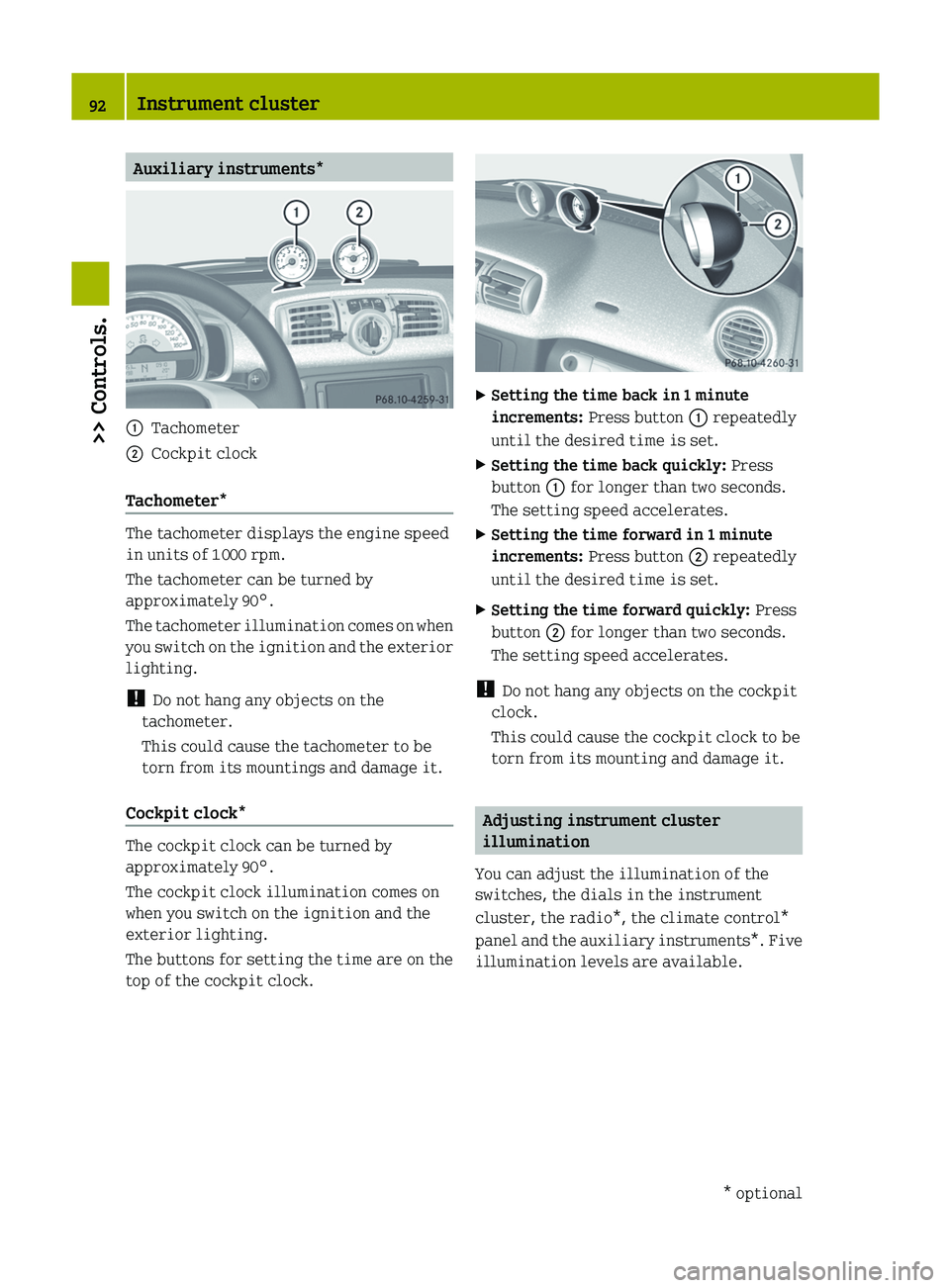
Auxiliary instruments*
:
Tachometer
; Cockpit clock
Tachometer* The tachometer displays the engine speed
in units of 1
000 rpm.
The tachometer can be turned by
approximately 90°.
The
tachometer illumination comes on when
you switch on the ignition and the exterior
lighting.
! Do not hang any objects on the
tachometer.
This could cause the tachometer to be
torn from its mountings and damage it.
Cockpit clock* The cockpit clock can be turned by
approximately 90°.
The cockpit clock illumination comes on
when you switch on the ignition and the
exterior lighting.
The
buttons for setting the time are on the
top of the cockpit clock. X
Setting the time back in 1 minute
increments: Press button : repeatedly
until the desired time is set.
X Setting the time back quickly: Press
button : for longer than two seconds.
The setting speed accelerates.
X Setting the time forward in 1 minute
increments: Press button ; repeatedly
until the desired time is set.
X Setting the time forward quickly: Press
button ; for longer than two seconds.
The setting speed accelerates.
! Do not hang any objects on the cockpit
clock.
This could cause the cockpit clock to be
torn from its mounting and damage it. Adjusting instrument cluster
illumination
You can adjust the illumination of the
switches, the dials in the instrument
cluster, the radio*, the climate control*
panel
and the auxiliary instruments*. Five
illumination levels are available. 92
Instrument cluster
>> Controls.
* optional
Page 101 of 228
Audio system basic*
The audio system basic contains the
following functions:
R Radio (FM/AM)
R Radio Broadcast Data System (RBDS) and
radio text
R AUX and USB socket ( Y page 99)
! Please be sure to read the operating
instructions for the audio system basic
before using the unit. Familiarize
yourself
with the various functions of the
unit so that you are able to operate it
easily, reliably and correctly at any
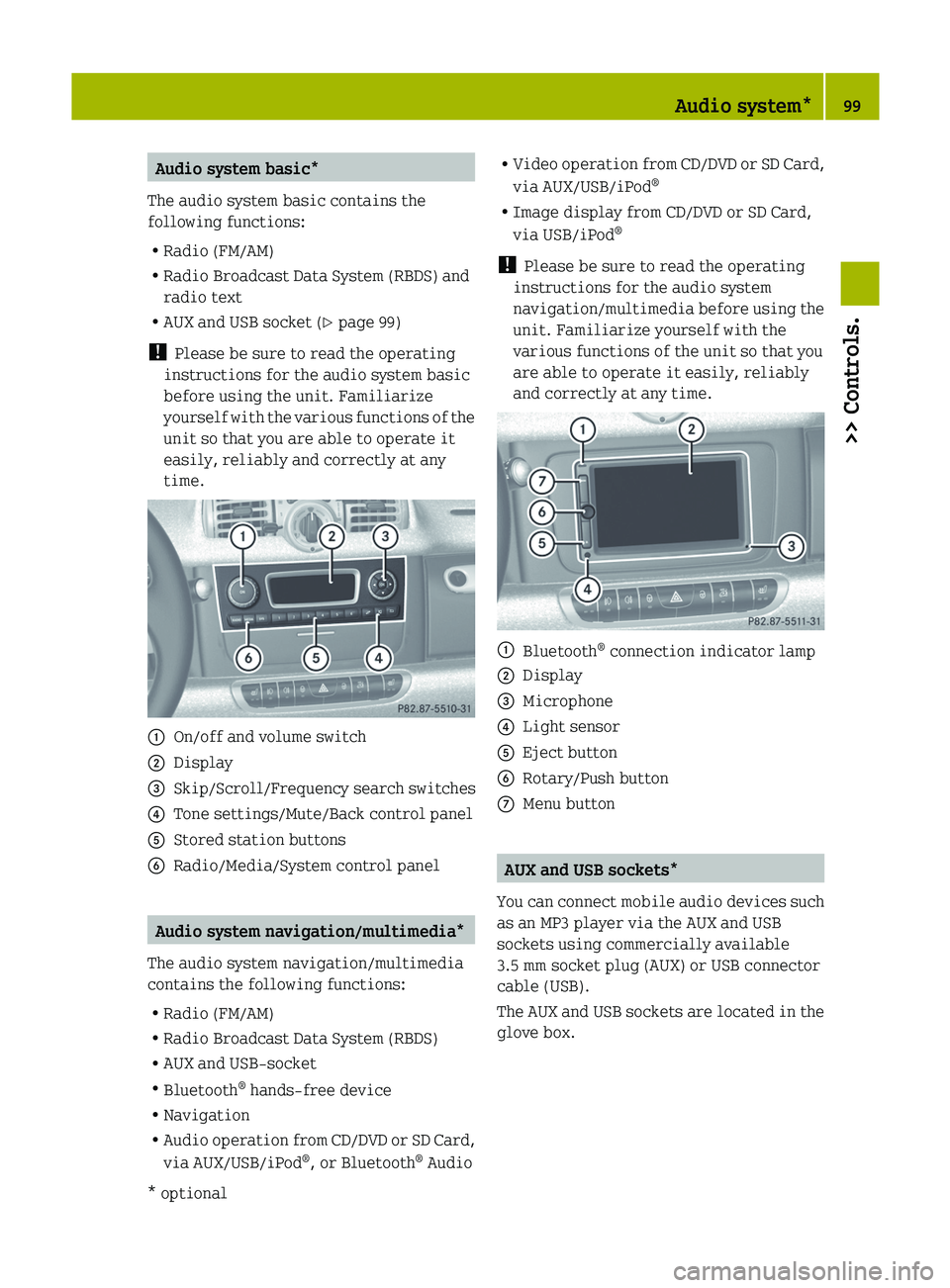
time. :
On/off and volume switch
; Display
= Skip/Scroll/Frequency search switches
? Tone settings/Mute/Back control panel
A Stored station buttons
B Radio/Media/System control panel Audio system navigation/multimedia*
The audio system navigation/multimedia
contains the following functions:
R Radio (FM/AM)
R Radio Broadcast Data System (RBDS)
R AUX and USB-socket
R Bluetooth ®
hands-free device
R Navigation
R Audio
operation from CD/DVD or SD Card,
via AUX/USB/iPod ®
, or Bluetooth ®
Audio R
Video
operation from CD/DVD or SD Card,
via AUX/USB/iPod ®
R Image display from CD/DVD or SD Card,
via USB/iPod ®
! Please be sure to read the operating
instructions for the audio system
navigation/multimedia before using the
unit. Familiarize yourself with the
various functions of the unit so that you
are able to operate it easily, reliably
and correctly at any time. :
Bluetooth ®
connection indicator lamp
; Display
= Microphone
? Light sensor
A Eject button
B Rotary/Push button
C Menu button AUX and USB sockets*
You
can connect mobile audio devices such
as an MP3 player via the AUX and USB
sockets using commercially available
3.5 mm socket plug (AUX) or USB connector
cable (USB).
The AUX and USB sockets are located in the
glove box. Audio system*
99
>> Controls.
* optional Z
Page 110 of 228
event of an accident. For this reason, heavy
objects must be tied down.
Vehicle occupants could be injured by
objects
being thrown around in the vehicle
in the event of
R hard braking
R a change of direction
R an accident G
WARNING
Do not place any objects on the mounted
cargo compartment cover blind.
Vehicle occupants could be injured by
objects
being thrown around in the vehicle
in the event of
R hard braking
R a change of direction
R an accident G
WARNING
Only place light loads in the parcel net
bag.
Do not transport heavy, sharp-edged or
fragile objects in the parcel net bag. The
parcel net bag cannot sufficiently secure
loads in an accident.
Vehicle occupants could be injured by
objects being thrown around in the vehicle
in the event of
R hard braking
R a change of direction
R an accident
Observe the loading guidelines.
The cargo compartment cover blind
R serves to protect objects that are stored
in the vehicle’s cargo compartment from
prying eyes
R prevents smaller objects from
penetrating into the passenger
compartment from the cargo
compartment; however, it is not intended
to act as a load restraining device The parcel net bag
R
is
for storing small, lightweight objects
R prevents small objects from sliding
around inside the passenger
compartment
! If objects are placed on the cargo
compartment cover blind when mounted,
the cover may be damaged.
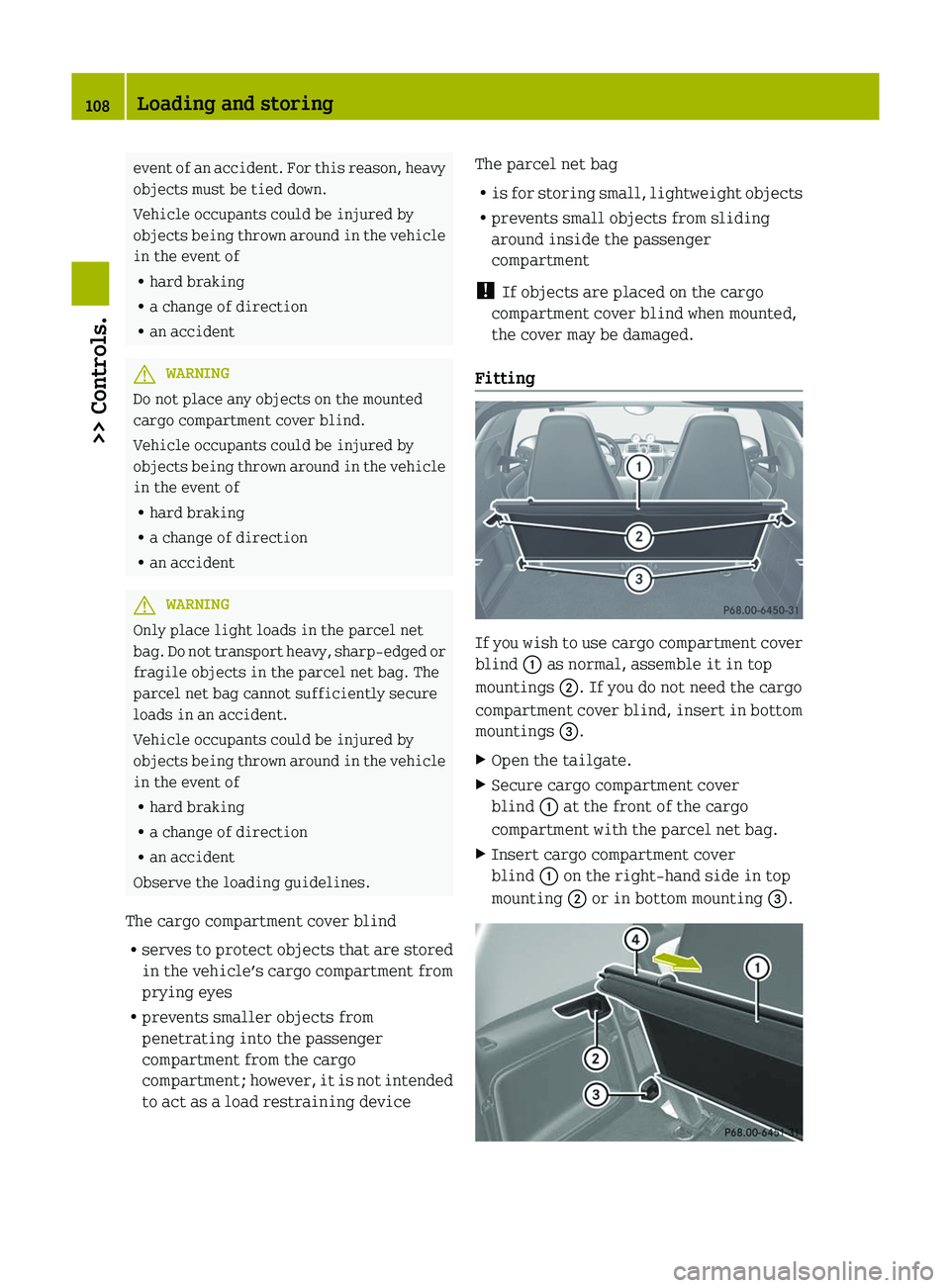
Fitting If you wish to use cargo compartment cover
blind : as normal, assemble it in top
mountings ;. If you do not need the cargo
compartment
cover blind, insert in bottom
mountings =.
X Open the tailgate.
X Secure cargo compartment cover
blind : at the front of the cargo
compartment with the parcel net bag.
X Insert cargo compartment cover
blind : on the right-hand side in top
mounting ; or in bottom mounting =.108
Loading and storing
>> Controls.
Page 111 of 228
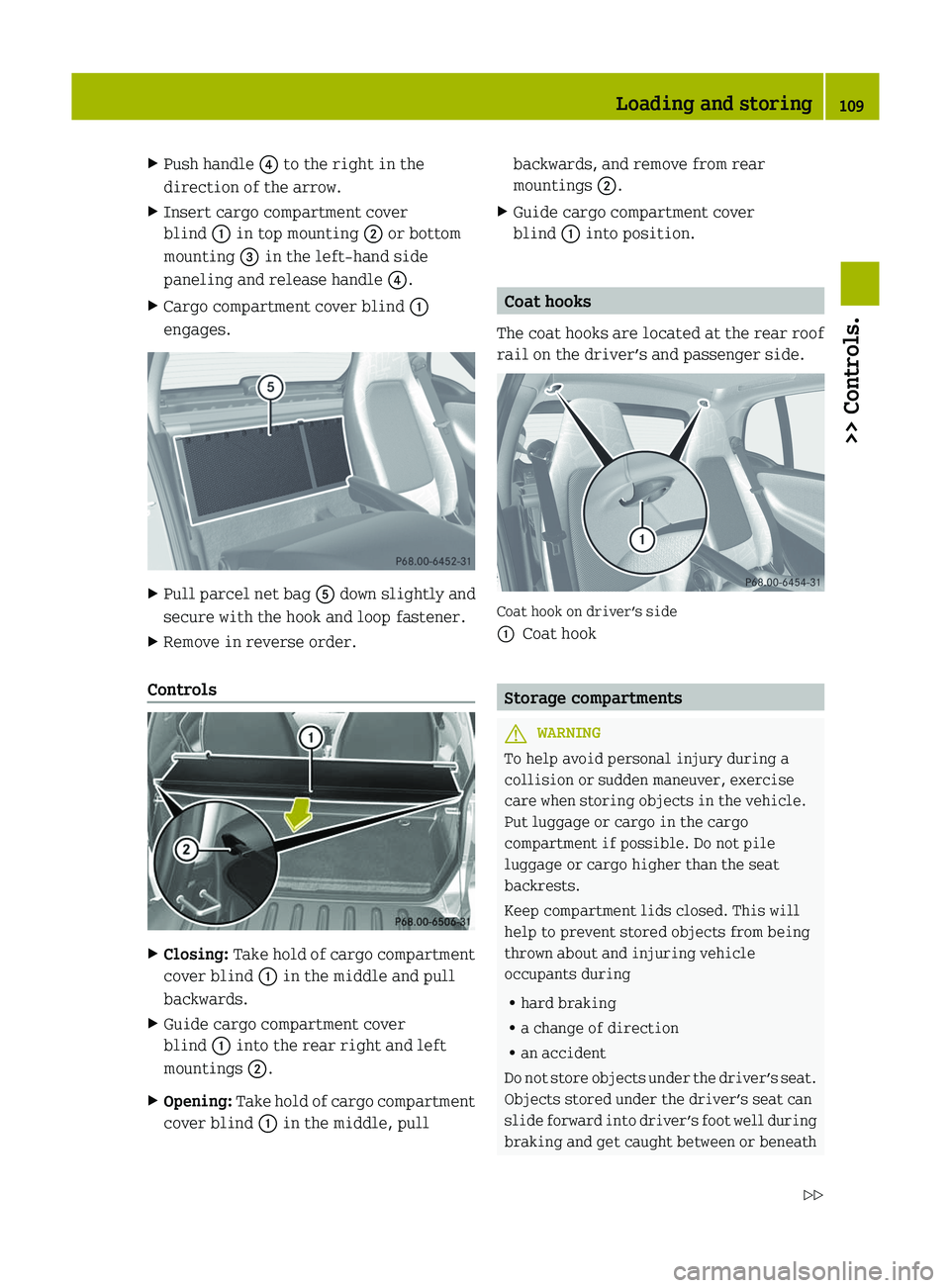
X
Push handle ? to the right in the
direction of the arrow.
X Insert cargo compartment cover
blind : in top mounting ; or bottom
mounting = in the left-hand side
paneling and release handle ?.
X Cargo compartment cover blind :
engages. X
Pull parcel net bag A down slightly and
secure with the hook and loop fastener.
X Remove in reverse order.
Controls X
Closing: Take hold of cargo compartment
cover blind : in the middle and pull
backwards.
X Guide cargo compartment cover
blind : into the rear right and left
mountings ;.
X Opening:
Take hold of cargo compartment
cover blind : in the middle, pull backwards, and remove from rear
mountings ;.
X Guide cargo compartment cover
blind : into position. Coat hooks
The coat hooks are located at the rear roof
rail on the driver’s and passenger side. Coat hook on driver’s side
:
Coat hook Storage compartments
G
WARNING
To help avoid personal injury during a
collision or sudden maneuver, exercise
care when storing objects in the vehicle.
Put luggage or cargo in the cargo
compartment if possible. Do not pile
luggage or cargo higher than the seat
backrests.
Keep compartment lids closed. This will
help to prevent stored objects from being
thrown about and injuring vehicle
occupants during
R hard braking
R a change of direction
R an accident
Do
not store objects under the driver’s seat.
Objects stored under the driver’s seat can
slide forward into driver’s foot well during
braking and get caught between or beneath Loading and storing
109
>> Controls.
Z