key battery SMART FORTWO COUPE 2013 User Guide
[x] Cancel search | Manufacturer: SMART, Model Year: 2013, Model line: FORTWO COUPE, Model: SMART FORTWO COUPE 2013Pages: 218, PDF Size: 2.69 MB
Page 85 of 218
By charging the high-voltage battery, the
reduced availability of power can be
improved (Y page 112). ECO indicator
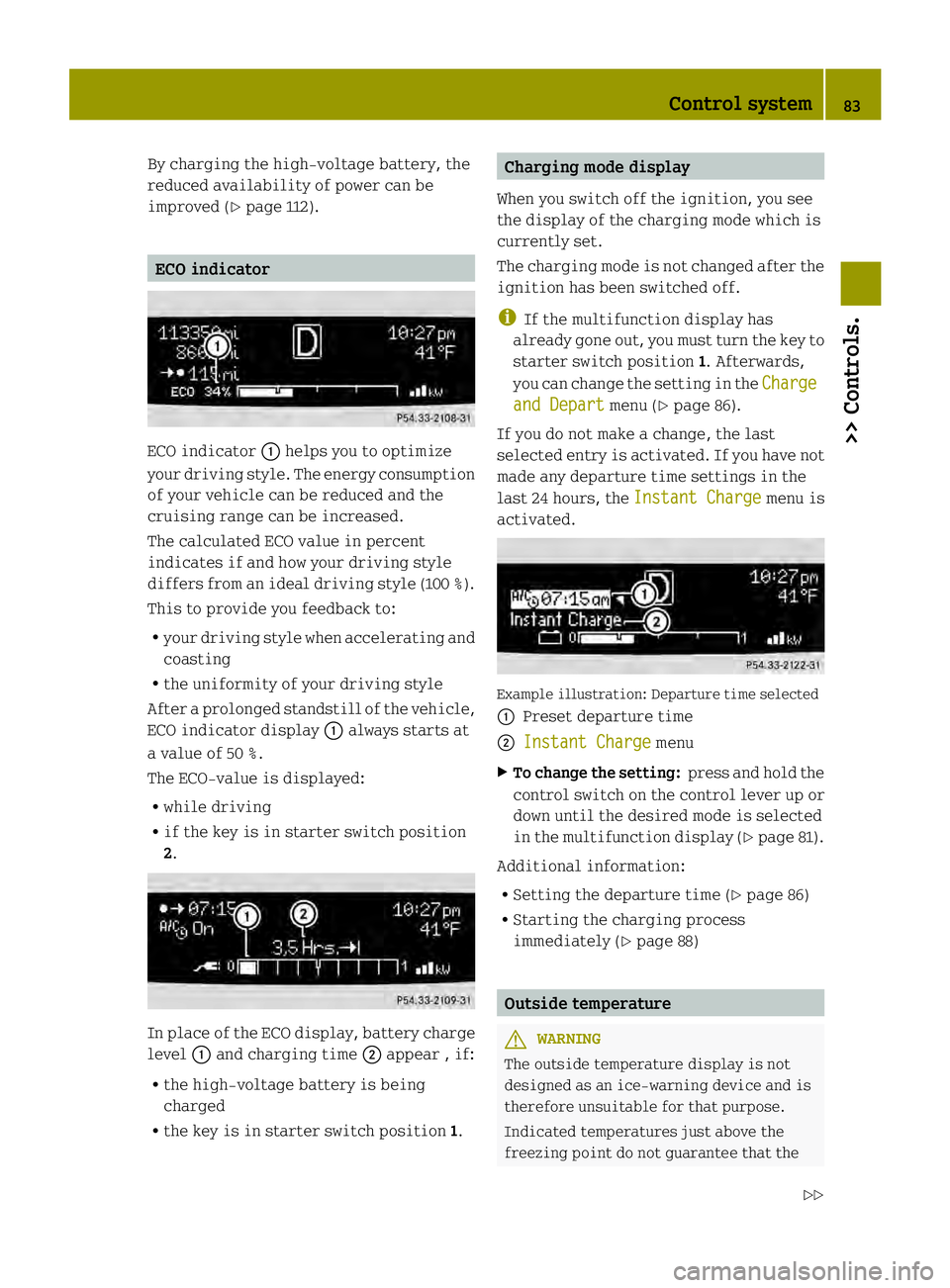
ECO indicator
0002helps you to optimize
your driving style. The energy consumption
of your vehicle can be reduced and the
cruising range can be increased.
The calculated ECO value in percent
indicates if and how your driving style
differs from an ideal driving style (100 %).
This to provide you feedback to:
R your driving style when accelerating and
coasting
R the uniformity of your driving style
After aprolonged standstill of the vehicle,
ECO indicator display 0002always starts at
a value of 50 %.
The ECO-value is displayed:
R while driving
R if the key is in starter switch position
2. In place of the ECO display, battery charge
level 0002and charging time 0003appear , if:
R the high‑voltage battery is being
charged
R the key is in starter switch position 1. Charging mode display
When you switch off the ignition, you see
the display of the charging mode which is
currently set.
The charging mode is not changed after the
ignition has been switched off.
i If the multifunction display has
already gone out, you must turn the key to
starter switch position 1. Afterwards,
you can change the setting in the Charge and Depart menu (Y
page 86).
If you do not make a change, the last
selected entry is activated. If you have not
made any departure time settings in the
last 24 hours, the Instant Charge menu is
activated. Example illustration: Departure time selected
0002
Preset departure time
0003 Instant Charge menu
X To change the setting: press and hold the
control switch on the control lever up or
down until the desired mode is selected
in the multifunction display (Y page 81).
Additional information:
R Setting the departure time (Y page 86)
R Starting the charging process
immediately (Y page 88) Outside temperature
G
WARNING
The outside temperature display is not
designed as an ice-warning device and is
therefore unsuitable for that purpose.
Indicated temperatures just above the
freezing point do not guarantee that the Control system
83>> Controls.
Z
Page 101 of 218

X
Turn air distribution control 0029to the
desired symbol.
The air distribution is controlled
depending on the position of the air
distribution control. Adjusting air volume
The air volume is controlled depending on
the blower speed selected. Five blower
speeds are available. 0
Off
1
Slow
2
Medium
3
High/defrosting
4
Maximum
X
Increasing or decreasing: Push air
volume control 0002up or down. Defrosting
G
WARNING
Never drive with iced up or fogged
windows. Visibility will be significantly
impaired. Impaired visibility could
endanger yourself and others. This may
prevent you from observing the traffic
conditions, thereby causing an accident.
The best defrosting of windows is achieved
if the ice is completely removed from the
windows manually with an ice scraper
before driving off.
Also use the "Air conditioning before
start" function (Y page 86).
Control panel (Y page 97). X
Switching on: Push air volume
control 0002to level 3.
X Turn air distribution control 0029to
position 0006.
X Push temperature control 0028fully up. Rear window defroster
The rear window defroster serves to de-ice
the rear window quickly and clear the view
if the rear window is fogged.
The rear window defroster uses a large
amount of power. To keep battery drain to a
minimum, switch off the rear window
defroster as soon as the rear window is
clear. The rear window defroster is
automatically deactivated after
approximately 10 minutes of operation. X
Make sure the key is in starter switch
position 1.
X Switching on: Press rear window
defroster switch 0002.
The indicator lamp in rear window
defroster switch 0002comes on.
X Switching off: Press rear window
defroster switch 0002once more.
The indicator lamp in rear window
defroster switch 0002goes out. Air recirculation mode
Switch to air recirculation mode to prevent
unpleasant odors from entering the vehicle Air conditioning with climate control
99>> Controls. Z
Page 108 of 218
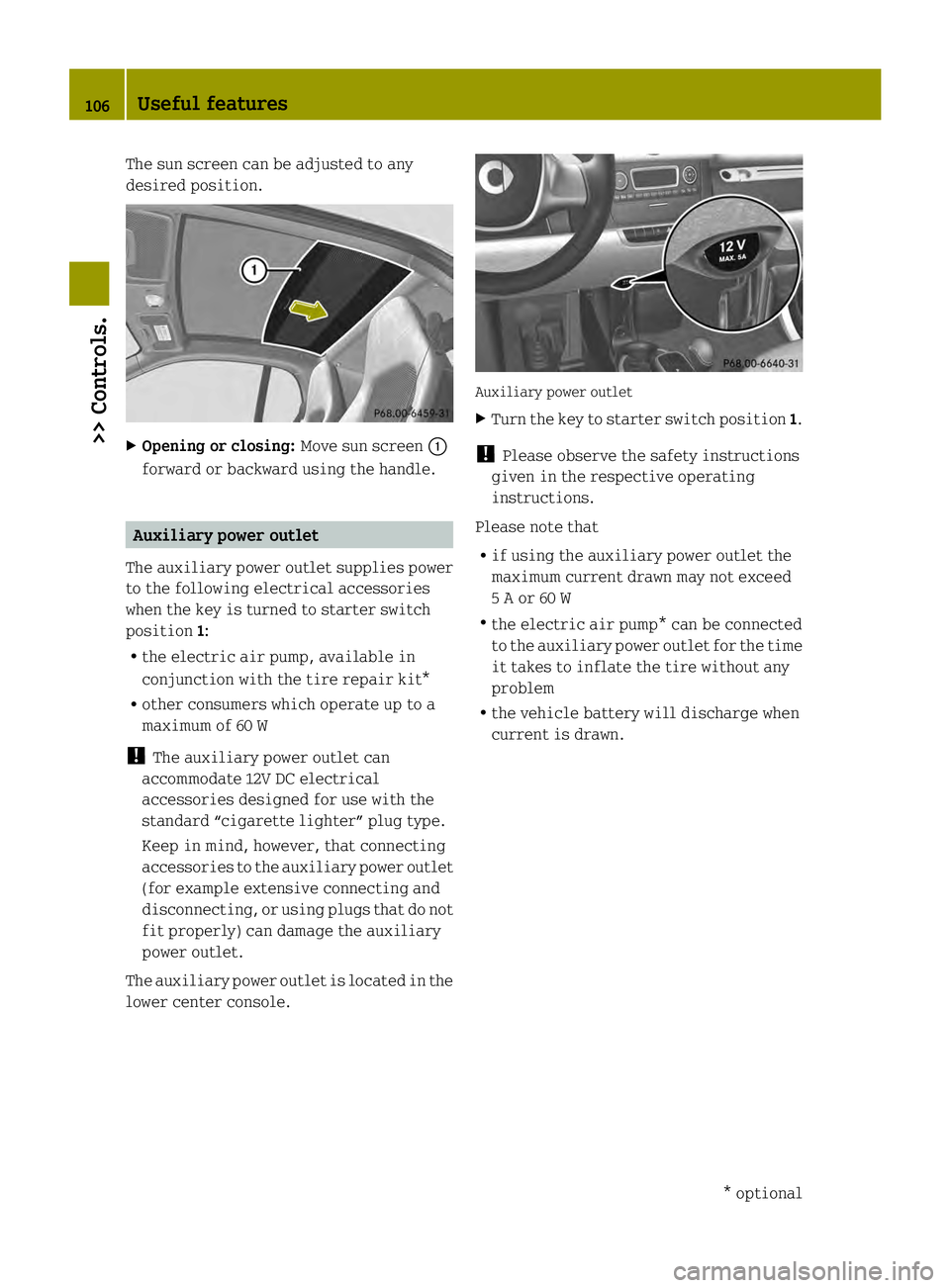
The sun screen can be adjusted to any
desired position.
X
Opening or closing: Move sun screen0002
forward or backward using the handle. Auxiliary power outlet
The auxiliary power outlet supplies power
to the following electrical accessories
when the key is turned to starter switch
position 1:
R the electric air pump, available in
conjunction with the tire repair kit*
R other consumers which operate up to a
maximum of 60 W
! The auxiliary power outlet can
accommodate 12V DC electrical
accessories designed for use with the
standard “cigarette lighter” plug type.
Keep in mind, however, that connecting
accessories to the auxiliary power outlet
(for example extensive connecting and
disconnecting, or using plugs that do not
fit properly) can damage the auxiliary
power outlet.
The auxiliary power outlet is located in the
lower center console. Auxiliary power outlet
X
Turn the key to starter switch position 1.
! Please observe the safety instructions
given in the respective operating
instructions.
Please note that
R if using the auxiliary power outlet the
maximum current drawn may not exceed
5 A or 60 W
R the electric air pump* can be connected
to the auxiliary power outlet for the time
it takes to inflate the tire without any
problem
R the vehicle battery will discharge when
current is drawn. 106
Useful features>> Controls.
* optional
Page 119 of 218

Problems with the charging process
Problem Possible causes/consequences and
0001 Solutions
The charge socke
tflap
does not open. The charge socket flap is not unlocked.
X
Unlock the vehicle (Y page 51). The batteries of the key are discharged.
X
Unlock the vehicle with the key manually (Y page 170). The charge socket flap is unlocked but the opening mechanism
is jammed.
X
Lock and unlock the vehicle again.
If the opening mechanism is still jammed:
X Contact an authorized electric drive smart center. The charging cable
cannot be inserted
into the vehicle power
socket. The vehicle power socket is locked.
X
Make sure that the gear selector lever is in position P.The charging cable
plug cannot be
removed from the
vehicle power socket. The charging cable plug is not unlocked.
X
Press the 0007button on the key.
The charging cable plug in the vehicle power socket is
released.
X Remove the charging cable plug from the vehicle power
socket. Intelligent charging management
If you wish to charge economically and with
minimal damage to the battery, you must set
a departure time (Y page 86). This option
to optimize the charging process depends
on your electricity contract and the local
power supplier. Your vehicle detects this
option automatically. Depending on the
departure time which is set, the charging
process of the high-voltage battery may not
be started immediately or may be
interrupted during the process. Front compartment
Service flap
Remove the service flap to check the
battery coolant level, windshield washer
reservoir level, and brake fluid level.
Insert the service flap on the front of the
vehicle so that it does not get damaged or
dirty.
i The service flap has a strap on the rear
side that ties it to the vehicle body. G
WARNING
Always turn the key to starter switch
position 0and remove the key from the Front compartment
117>> Operation.
Z
Page 172 of 218

Problem Possible causes/consequences and
0001 Solutions
A warning signal
sounds when parking. You have not engaged the parking brake before releasing the
brake pedal and switching off the drive system.
X
Switch on the ignition to deactivate the acoustic warning.
X Engage the parking brake.
X Make sure the gear selector lever is in park position P.
X Turn the key to starter switch position 0.
X Remove the key from the starter switch.
For safety, it is important that you perform the parking
procedure as described (Y page 75).You can hear a
continuous noise from
the front axle when
braking. The vehicle is equipped with a mechanical/acoustic brake pad
indicator.
X
Have the brake pads checked at an authorized electric drive
smart center. Unlocking/locking manually
Unlocking the vehicle
You can unlock the driver’s door and the
charge socke tflap by unlocking the
driver’s door using the key. The lock
cylinder is fitted with a cap.
X Press button 0006on the key.
i For replacing the transmitter battery
(Y page 171). X
Remove cap 0002from lock cylinder 0003.
X Unlock the driver’s door.
The driver’s door and the charge socket
flap are unlocked. i
To unlock the vehicle centrally press
the central unlocking switch in the upper
center console (Y page 25). Locking the vehicle
If you can no longer lock the vehicle using
the remote control and you do not have a
spare transmitter battery at hand, please
proceed as follows:
X Open the driver’s door.
X Press the central locking switch
(Y page 51).
The indicator lamp on the central
locking switch comes on, when the starter
switch is in position 1.
The indicator lamp on the central
locking switch flashes, when the starter
switch is in position 0.
X Remove the key from the starter switch,
take it with you, and close all doors.
The vehicle is now locked. 170
Unlocking/locking manually>> Practical hints.
Page 173 of 218

Closing the rear soft top
If the rear soft top does not lock properly
after being closed, proceed as follows:
X Stop the vehicle in a safe location.
X Engage the parking brake.
X Make sure the key is in starter switch
position 1.
X Fold up the rear soft top completely.
The rear soft top stops in the unlocked
position.
X Within one minute, press and hold symbol
0003 on the retractable soft top switch
for 15 seconds twice.
The rear soft top closes the locking
hooks.
X Close the retractable soft top
completely.
X Have the rear soft top checked at an
authorized electric drive smart center. Replacing transmitter battery
Notes
The remot econtrol’s transmitter battery is
almost spent when the turn signals flash
rapidly nine times in a row when locking
the vehicle.
i If you do not replace the transmitter
battery, after about 100 more times you
will no longer be able to lock or unlock
the vehicle using the remote control.
X Replace the transmitter battery.
or
X Have the transmitter battery replaced at
an authorized electric drive smart
center. G
WARNING
Batteries contain poisonous and corrosive
substances. Therefore keep the batteries
out of reach of children.
If a battery is swallowed, seek medical help
immediately. Batteries contain materials that can harm
the environment if disposed of improperly.
Recycling of batteries is the preferred
method of disposal. Many states/provinces
require sellers of batteries to accept old
batteries for recycling.
Replacing battery
Replacement battery: CR 2016 button cell
! Replace the remote control’s
transmitter battery every two years at
the latest. Otherwise there is a danger of
leakage. The remote control could be
damaged. X
Insert a suitable object such as a coin
into the slot at the eyelet of the key
housing.
X Carefully turn the coin until key housing
top half 0002is unlatched.
X Open key housing top half 0002to the side. X
Remove transmitter battery 0003from the
board. Replacing transmitter battery
171>> Practical hints. Z
Page 174 of 218

!
Check the polarity when inserting the
new transmitter battery. You could
otherwise damage parts of the electrical
system. When inserting the batteries,
make sure they are clean and free of lint.
X Insert the new transmitter battery.
X Press both halves of the key housing
together again.
X Check the operation of the remote
control. Replacing bulbs
About replacing bulbs
Safe vehicle operation depends on proper
exterior lighting and signaling. It is
therefore essential that all bulbs and lamp
assemblies are in good working order at all
times.
Correct headlamp adjustment is extremely
important. Have headlamps checked and
readjusted at regular intervals and when a
bulb has been replaced. Contact an
authorized electric drive smart center for
headlamp adjustment. G
WARNING
Bulbs and bulb sockets can be very hot.
Allow the lamp to cool down before changing
a bulb. Otherwise you could be burned if you
touch them.
Keep bulbs out of the reach of children.
Halogen lamps contain pressurized gas. A
bulb can explode if you:
R touch or move it when hot
R drop the bulb
R scratch the bulb
Wear eye and hand protection.
i If the headlamps or front fog lamps* are
fogged up on the inside as a result of
high humidity, driving the vehicle a
distance with the lights on should clear
up the fogging. Notes on bulb replacement:
R
Only use bulbs of the same type and with
the specified watt rating.
R Switch the lights off before replacing a
bulb to prevent short circuits.
R Always use aclean lint-free cloth when
handling bulbs.
R Your hands should be dry and free of oil
and grease.
R Avoid touching the glass of the bulb with
bare fingers.
R If the newly installed bulb does not come
on, contact an authorized electric drive
smart center.
R Have the bulbs for the front fog lamps*
and the LED daytime running lamps*
replaced at an authorized electric drive
smart center. 172
Replacing bulbs>> Practical hints.
* optional
Page 185 of 218

X
Screw the end of filler hose 002Aonto tire
valve 001D.
X Insert electrical plug 0029into the
auxiliary power outlet (Y page 106).
X Insert the key in the starter switch and
turn it to position 1.
i The vehicle’s 12‑volt battery is drained
by use of the electric air pump. You
should therefore keep the drive system
running while inflating the tire. X
Press Ion electric air pump switch 0018.
The electric air pump is switched on and
inflates the tire.
i First, the sealant is pumped into the
tire. The pressure may briefly increase
to a high value. This is normal and not an
indication of a malfunction. Do not
switch off the electric air pump.
X Let the electric air pump inflate the tire
for a maximum of ten minutes.
Pressure gauge 0003must display at least
180 kPa (1.8 bar, 26 psi). !
Do not operate the electric air pump
longer than ten minutes without
interruption. Otherwise it may overheat.
You may operate the electrical air pump
again after it has cooled off.
X If a tire inflation pressure of at least
180 kPa (1.8 bar, 26 psi) is not attained,
turn off the electric air pump by
pressing 0on electric air pump switch
0018.
X Unscre wthe end of filler hose 002Afrom
tire valve 001D.
X After clearing the area around the
vehicle of people and obstacles, drive
vehicle back or forth very slowly
approximately 30 ft (10 m).
This serves to better distribute the tire
sealant material inside the tire.
X Screw the end of filler hose 002Aonto tire
valve 001D.
X Inflate the tire again. G
WARNING
If a tire inflation pressure of
180 kPa (1.8 bar, 26 psi) is not attained, the
tire is too severely damaged for the tire
sealant to provide a reliable tire repair.
In this case, the tire sealant cannot
properly seal the tire.
Do not drive the vehicle.
Contact the nearest authorized electric
drive smart center for assistance or call
Roadside Assistance.
X After attaining a tire inflation pressure
of at least 180 kPa (1.8 bar, 26 psi), press
0on electric air pump switch 0018.
The electric air pump is switched off.
X Turn the key in the starter switch to
position 0.
X Unscrew the end of filler hose 002Afrom
tire valve 001D. Flat tire
183>> Practical hints. Z
Page 187 of 218

result in handlin
gor steering problems, or
brake failure.
X Drive to the nearest authorized electric
drive smart center, to have the damaged
tire replaced.
X Contact an authorized electric drive
smart center as soon as possible to
obtain a new filler hose and a new tire
sealant container.
X Bring used tire sealant materials to an
authorized electric drive smart center
for proper disposal.
X Replace your tire sealant container
every 4 years. Replacement containers
are available at any authorized electric
drive smart center. G
WARNING
After changing a tire, contact an
authorized electric drive smart center to
make sure the bolts holding the wheel to the
car are tight enough .Otherwise, the wheels
could come off. Each bolt should be
tightened to a torque of 81 lb‑ft (110 Nm). Sealing a tire (Version 2)
X Take the tire repair kit from the
passenger footwell (Y page 154). X
Take electrical plug 002Band filler hose
0029 from the bottom of the electric air
pump housing.
X Engage the yello wplug of filler hose 0029
in the opening in yellow closure cap 0028.
X With the O-ring seals towards the
electric air pump housing, insert yellow
closure cap 0028into fixture 0003.
X Push tire sealant container 0002into
fixture 0003until both hooks of yellow
closure cap 0028engage. X
Unscrew the valve cap from tire valve
0018 of the damaged tire.
X Screw the end of filler hose 0029onto tire
valve 0018.
X Insert electrical plug 002Binto the
auxiliary power outlet (Y page 106).
X Insert the key in the starter switch and
turn it to position 1.
i The vehicle’s 12‑volt battery is drained
by use of the electric air pump. You
should therefore keep the drive system
running while inflating the tire.
X Press ONon electric air pump switch 002A.
The electric air pump is switched on and
inflates the tire.
i First, the sealant is pumped into the
tire. The pressure may briefly increase
to a high value. This is normal and not an
indication of a malfunction. Do not
switch off the electric air pump.
X Let the electric air pump inflate the tire
for a maximum of ten minutes. Flat tire
185>> Practical hints. Z
Page 193 of 218
G
WARNING
Failure to follow these instructions can
result in severe injury or death.
Observe all safety instructions and
precautions when handling automotive
batteries.
Never lean over batteries while
connecting, you might get injured.
Batter yfluid contains sulfuric acid. Do not
allow this fluid to come in contact with
eyes, skin or clothing. In case it does,
immediately flush affected area with water
and seek medical help if necessary.
A battery will also produce hydrogen gas,
which is flammable and explosive. Keep
flames or sparks away from battery, avoid
improper connection of jumper cables,
smoking, etc. G
WARNING
Do not place any metal objects on a battery.
You could otherwise cause a short circuit
and the battery’s highly flammable
chemicals could ignite.
Never allow any metal object to contact both
battery terminals or the positive terminal
and the vehicle body at the same time. This
might short circuit the battery and ignite
the highly flammable and explosive
hydrogen gas generated by the battery,
causing serious personal injury. G
WARNING
Keep flames or sparks away from battery,
avoid improper connection of jumper
cables, smoking, etc.
R When disconnecting the battery, always
disconnect the negative terminal first,
followed by positive terminal.
R When connecting the battery, always
connect the positive terminal first,
followed by the negative terminal.
R Do not loosen or disconnect the battery
terminal clips while the drive system is running or the key is in the starter
switch.
! Never loosen or detach battery terminal
clamps while the drive system is running
or the key is in the starter switch.
Otherwise, electronic components could
be severely damaged.
Have the battery checked regularly at an
authorized electric drive smart center.
Refer to Maintenance Booklet for
maintenance intervals or contact an
authorized electric drive smart center
for further information.
! Never invert the terminal connections! Notes on the high‑voltage battery
Have work on the high-voltage battery
performed by an authorized electric drive
smart center only. Observe the safety notes
on (Y page 15) as well as the notes on the 12-
volt battery (Y page 190). G
WARNING
The electrolyte of the high-voltage
battery, i.e. the battery fluid, is toxic and
caustic. Do not allow this fluid to come in
contact with eyes, skin or clothing, for
example in case of an accident.
In case it does, immediately flush affected
area with water and seek medical help
immediately.
The high-voltage battery is located in the
vehicle underbody. Keep this in mind when
jacking up the vehicle. The vehicle has
designated take-up brackets for the jack.
For more information, see (Y page 189).
! Only position the jack on the
designated take-up brackets.
You must not position the jack under the
high-voltage battery. Otherwise, the
high-voltage battery could be damaged. Batteries
191>> Practical hints. Z