wheel SMART FORTWO COUPE 2013 Owner's Manual
[x] Cancel search | Manufacturer: SMART, Model Year: 2013, Model line: FORTWO COUPE, Model: SMART FORTWO COUPE 2013Pages: 218, PDF Size: 2.69 MB
Page 78 of 218

X
Releasing: Depress the brake pedal.
X Pull up slightly on parking brake
lever 0003and press release button 0002.
X Push parking brake lever 0003down as far
as it will go.
When the ignition is switched on, the
brake warning lamp 0002(USA only) or
0001 (Canada only) in the instrument
cluster goes out.
X Engaging: Pull up parking brake
lever 0003firmly.
When the ignition is switched on, the
brake warning lamp 0002(USA only) or
0001 (Canada only) in the instrument
cluster comes on. G
WARNING
Getting out of your vehicle with the
transmission not fully engaged in park
position Pis dangerous. When the drive
system is switched off and the brakes are
released, the vehicle can be moved freely
with the gear selector lever in all
positions except park position P. Also,
when parked on an incline, park position
P alone may not prevent your vehicle from
moving, possibly hitting people or
objects.
Always engage the parking brake in
addition to shifting to park position P.
When parked on an incline, always turn the
front wheels towards the curb. G
WARNING
When leaving the vehicle, always remove the
key from the starter switch, take it with
you, and lock the vehicle. Do not leave
children unattended in the vehicle, or with
access to an unlocked vehicle. Children
could release the parking brake and/or
move the gear selector lever from park
position P, either of which could result in
an accident and/or serious personal
injury.
Brake pedal The brake pedal has two brake circuits
independent of each other. When the
ignition is switched on, a brake servo is
used during braking to increase pedal
force.
G
WARNING
Make sure absolutely no objects are
obstructing the pedals’ range of motion.
Keep the driver’s footwell clear of all
obstacles. If there are any floormats* or
carpets in the footwell, make sure the
pedals still have sufficient clearance.
During sudden acceleration or braking
maneuvers, the objects could get caught
between or beneath the pedals and restrict
your ability to brake or accelerate. This
could lead to accidents and/or injury. G
WARNING
Considerably more effort will be required
to apply the brakes if
R the brake servo has failed
R a brake circuit has failed
R the ignition is switched off, e.g. for
towing the vehicle
The braking distance is likewise greater.
Make sure the drive system is active
whenever the vehicle is rolling. Have the
brake system repaired at an authorized
electric drive smart center, if there is a
fault in the brake system. 76
Driving and parking>> Controls.
* optional
Page 79 of 218

If a brake circuit has failed (Y
page 160),
you must depress brake pedal 0002further
down to achieve the same effect and the
braking distance is increased.
i The brake servo will only function with
the ignition switched on. Switching off the drive system
G
WARNING
Do not turn off the drive system before the
vehicle has come to a complete stop. With
the drive system not running, there is no
power assistance for the brake and steering
systems. In this case, it is important to
keep in mind that a considerably higher
degree of effort is necessary to brake and
steer the vehicle.
X Depress the brake pedal.
X Move the gear selector lever to park
position P.
The transmission position indicator
should be on P !
Always engage the parking brake in
addition to shifting to park position P.
X Release the brake pedal.
X Turn the key to starter switch position
0.
X Remove the key from the starter switch.
The electronic immobilizer is
activated. Transmission
Shifting procedure
Gearshift pattern for transmission
0010
Park position
0009
Reverse gear
000B
Neutral position
000F
Drive position
Select a gear:
X
Switch on the ignition.
X Depress the brake pedal.
X Move the gear selector lever to the
desired position. Steering wheel paddle shifters (for
recuperation)*
G
WARNING
The operating condition of the high-
voltage battery (e.g. not yet at normal
operating temperature or fully charged)
influences the braking effect of the
electric motor.
In overrun or braking mode, the motor's
braking effect may therefore be reduced or
may not be present at all.
As a result of the reduced engine braking
effect, you may cause an accident and
injure yourself or others. Transmission
77>> Controls.
* optional Z
Page 80 of 218

Compensate for the reduced engine braking
effect by pressing the brake pedal
accordingly, as required.
Using the steering wheel paddle shifters,
you can increase or decrease the
recuperation in overrun phases.
Recuperation means that energy is
recovered while driving - the electric
motor functions as a generator. The kinetic
energy of the vehicle is converted into
electric power and stored in the high-
voltage battery. The more the recuperation
increases, the more the vehicle will be
decelerated.
In overrun phases, there are three levels of
recuperation:
R no recuperation (level 0, coasting)
R mid-level recuperation (level 1)
R high-level recuperation (level 2)
The amount of recuperation in overrun
mode is displayed in the power gauge
(Y page 79).
When you switch on the ignition, level 1 is
automatically preset. X
Decrease recuperation: Pull left
steering wheel paddle shifter 0002.
X Increase recuperation: Pull right
steering wheel paddle shifter 0003.Use the different levels 0 to 2 for
conditions as described below: Level 0 Driving without frequent
breaking. No sharp bends on
the road ahead.
Maximum kinetic energy
remains for the vehicle.
Level 1 Normal driving, standard
setting.
Level 2 Sporty driving.
The break pedal has to be
depressed less often, as the
deceleration due to
recuperation is higher than
in level 1.
The energy efficiency is
substantially higher than if
the vehicle is decelerated by
depressing the brake pedal.
At levels
1and 2the vehicle can be
steplessly decelerated by depressing the
brake pedal.
i Under certain circumstances, in
overrun phases recuperation does not
work as described above. This may be e. g
the case if the high-voltage battery is
already fully charged or has not reached
operating temperature. Driving tips
Driving on uphill grades G
WARNING
The hill-start assist system is not
designed to function as a parking brake and
does not prevent the vehicle from moving
when parked on an incline.
Always engage the parking brake in
addition to shifting to park position P.78
Transmission>> Controls.
Page 82 of 218

Power gauge
G
WARNING
The operating condition of the high-
voltage battery (e.g. not yet at normal
operating temperature or fully charged)
influences the braking effect of the
electric motor.
In overrun or braking mode, the motor's
braking effect may therefore be reduced or
may not be present at all.
As a result of the reduced engine braking
effect, you may cause an accident and
injure yourself or others.
Compensate for the reduced engine braking
effect by pressing the brake pedal
accordingly, as required.
! Do not hang any objects on the power
gauge.
This could cause the power gauge to be
torn from its mountings and be damaged.
Power gauge 0003contains two segments:
R Section right of 0
Power gauge 0003indicates the current
power that the drive system delivers to
the rear wheels. 100 % correspond to
55 kW peak power.
R Section left of 0
When you release the accelerator pedal
or when you depress the brake pedal, the
electric motor operates as a generator.
Electric current is produced and stored
in the high-voltage battery. As long as
the high-voltage battery is being
charged, the electric motor simulates an
engine brake.
When the pointer of power gauge 0003is in
the "OFF “position, the vehicle is not ready
to drive, because:
R the drive system has not been started
R the gear selector lever has not been
moved to position Nor Pwhen starting
the drive system R
the charging cable is connected to the
vehicle
R there is not enough power from the high-
voltage battery
R a problem occured in the high-voltage
system
After the drive system has been started, the
pointer of power gauge 0003moves to
position 0.READY appears in the
multifunction display (Y page 82). The
vehicle is ready to drive. Adjusting instrument cluster
illumination
You can adjust the illumination of
R the switches and dials in the instrument
cluster
R the radio
R the climate control panel
R the charge level and power gauges
Five illumination levels are available. X
Make sure the key is in starter switch
position 1.
X Switch on the parking lamps.
X To brighten or dim illumination: Press
button 0002on the instrument cluster
repeatedly until the desired setting is
reached.
The current setting is stored. 80
Instrument cluster>> Controls.
Page 95 of 218
AUX and USB sockets
You can connect mobile audio devices such
as an MP3 player via the AUX and USB
sockets using commercially available
3.5 mm socket plug (AUX) or USB connector
cable (USB).
The AUX and USB sockets are located in the
glove box. 0002
USB socket
0003 AUX socket smart surround sound system*
The smart surround sound system
supplements the existing speakers with
more powerful and additional speakers
(including a digital amplifier in the
passenger footwell and a passive
subwoofer). Driving systems
Cruise control*
The cruise control maintains the speed you
set for your vehicle automatically. On
downhill grades, the cruise control does
not brake the vehicle via the brake system.
The cruise control can only use the braking
power of the engine. You must apply the
brakes yourself in order to reduce the
vehicle speed. The cruise control will then
be canceled. G
WARNING
The cruise control is aconvenience system
designed to assist the driver during
vehicle operation. The cruise control
cannot take road, traffic, and weather
conditions into account. The driver is and
must always remain responsible for the
vehicle’s speed and for safe brake
operation.
Do not use the cruise control
R if the road, traffic, and weather
conditions do not make it advisable to
travel at a constant speed
R on slippery roads
Rapid changes in tire traction can result
in wheel spin and loss of control.
R when driving in fog
The use of the cruise control is
recommended for driving at a constant
speed for extended periods of time.
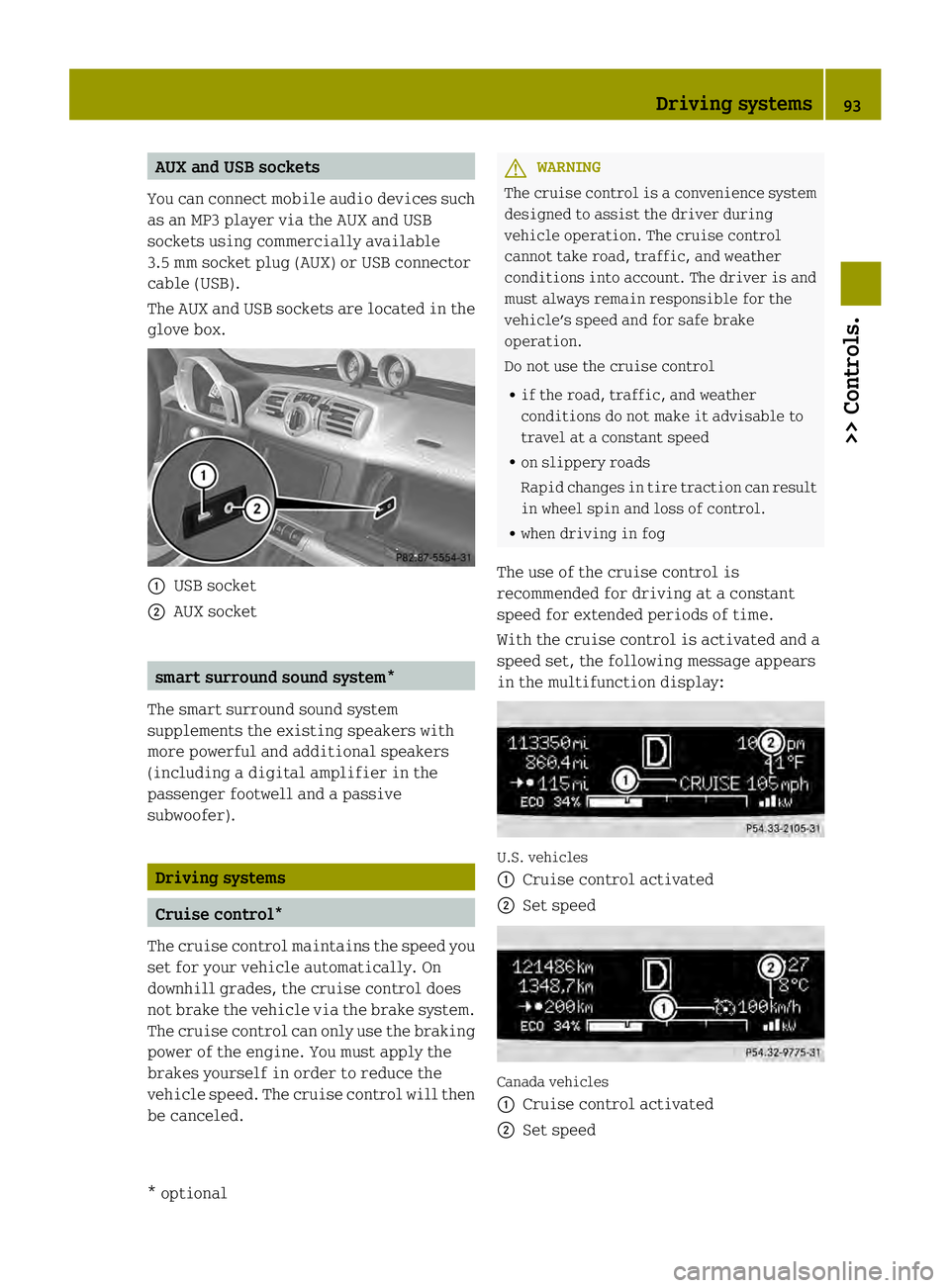
With the cruise control is activated and a
speed set, the following message appears
in the multifunction display: U.S. vehicles
0002
Cruise control activated
0003 Set speed Canada vehicles
0002
Cruise control activated
0003 Set speed Driving systems
93>> Controls.
* optional Z
Page 96 of 218

The cruise control is operated via buttons
on the steering wheel.
0002
Activating or deactivating the cruise
control
0003 Resuming at last set speed or
increasing speed
002B Setting current or lower speed, or
decreasing speed
002A Canceling the cruise control
Activating/deactivating The cruise control must be activated before
you can set
aspeed. When you switch off the
drive system, the cruise control is
deactivated automatically.
X Press ON/OFF button 0002briefly.
The cruise control is activated.
CRUISE (USA only) or
0003(Canada only)
appears in the multifunction display.
Setting current speed You can set any speed above 20 mph
(30 km/h).
X
Accelerate the vehicle to the desired
speed.
X With the cruise control activated, press
SET/− button 002Bbriefly.
X Remove your foot from the accelerator
pedal.
The current speed is set and the vehicle
maintains that speed. USA only:
set appears in the
multifunction display to indicate that
the speed has been set.
Canada only: The set speed appears in the
multifunction display next to cruise
control symbol 0003.
i On uphill grades, the cruise control
may not be able to maintain the set speed.
Once the grade eases, the set speed will
be resumed.
On downhill grades, the cruise control
can only maintain the set speed using the
drive systems braking power. You must
apply the brakes yourself when the
vehicle does not slow down sufficiently.
This will cancel the cruise control.
Canceling cruise control When the cruise control is activated, you
can cancel it at any time and resume the set
speed later.
X Press CANCEL button 002Abriefly.
or
X Depress the brake pedal.
The cruise control is canceled.
The cruise control deactivates
automatically, when
R you depress the brake pedal
R the vehicle speed is below 20 mphh
(30 km/h)
R ESP ®
is in operation.
Resuming last set speed G
WARNING
The “Resume” function should only be
operated if the driver is fully aware of the
previously set speed and wishes to resume
this particular preset speed.
The set speed stored in memory should only
be set again if prevailing road conditions
and legal speed limits permit. Possible
acceleration or deceleration differences
arising from returning to the preset speed 94
Driving systems>> Controls.
Page 104 of 218

Coat hook on driver’s side
0002
Coat hook Storage compartments
G
WARNING
To help avoid personal injury during a
collision or sudden maneuver, exercise
care when storing objects in the vehicle.
Put luggage or cargo in the cargo
compartment if possible. Do not pile
luggage or cargo higher than the seat
backrests.
Keep compartment lids closed. This will
help to prevent stored objects from being
thrown about and injuring vehicle
occupants during
R hard braking
R a change of direction
R an accident
Do not store objects under the driver’s seat.
Objects stored under the driver’s seat can
slide forwar dinto driver’s foot well during
braking and get caught between or beneath
the pedals .This could restrict your ability
to brake or accelerate and could lead to
accidents and injury.
Coin holder The coin holder is located in front of the
gear selector lever. Example illustration (coupé)
0002
Coin holder
Door pockets The door pockets are located in the driver’s
and passenger door.
0002
Door pocket
Storage trays next to the steering wheel The storage trays are located to the left and
right of the steering wheel.
0002
Storage tray 102
Loading and storing>> Controls.
Page 109 of 218

>> Operation.High-voltage battery
........................108
Front compartment ............................ 117
Tires and wheel s.............................. 122
Winte rdriving ................................ 140
Driving instructions ........................141
Driving abroad ................................ 146
Vehicle care ................................... 147
Page 124 of 218

Tires and wheels
Safety notes
Contact an authorized electric drive smart
center for information on tested and
recommended rims and tires for summer
and winter operation. They can also offer
advice concerning tire service and
purchase. G
WARNING
Replace rims or tires with the same
designation, manufacturer and type as
shown on the original part. For further
information contact an authorized electric
drive smart center. If incorrectly sized
rims and tires are mounted, the wheel
brakes or suspension components can be
damaged. Also, the operating clearance of
the wheels and the tires may no longer be
correct. G
WARNING
Worn, old tires can cause accidents. If the
tire tread is worn to minimum tread depth,
or if the tires have sustained damage,
replace them.
When replacing rims, only use genuine
smart wheel bolts specified for the
particular rim type. Failure to do so can
result in the bolts loosening and possibly
an accident.
Retreaded tires are not tested or
recommended by smart, since previous
damage cannot always be recognized on
retreads. The operating safety of the
vehicle cannot be assured when such tires
are used. G
WARNING
If you feel a sudden significant vibration
or ride disturbance, or you suspect that
possible damage to your vehicle has
occurred, you should turn on the hazard
warning flashers, carefully slow down, and
drive with caution to an area which is a safe
distance from the road. Inspect the tires and the vehicle underbody
for possible damage. If the vehicle or tires
appear unsafe, have the vehicle towed to the
nearest authorized electric drive smart
center or tire dealer for repairs.
G
WARNING
Do not drive with a flat tire. A flat tire
affects the ability to steer or brake the
vehicle. You could lose control of the
vehicle. Continued driving with aflat tire
or driving at high speed with a flat tire
will cause excessive heat build-up and
possibly a fire.
Modifications to the brake system and
wheels and the use of brake dust rings are
not permissible. Important guidelines
R Only use sets of tires and rims of the same
type and make.
R Tires must be of the correct size for the
rim.
R Break in new tires for approximately
60 miles (100 km) at moderate speeds.
R Regularly check the tires and rims for
damage. Dented or bent rims can cause
tire pressure loss and damage to the tire
beads.
R If vehicle is heavily loaded, check tire
inflation pressure and correct as
required.
R Do not allow your tires to wear down too
far. Adhesion properties on wet roads are
sharply reduced at tread depths of less
than 1
/ 8 in (3 mm). Recommended tire inflation pressure
G
WARNING
Follow recommended tire inflation
pressures. 122
Tires and wheels>> Operation.
Page 125 of 218

Do not underinflate tires. Underinflated
tires wear excessively and/or unevenly,
adversely affec thandling and energy
consumption of the vehicle, and are more
likely to fail from being overheated.
Do not overinflate tires. Overinflated
tires can adversely affect handling and
ride comfort, wear unevenly, increase
stopping distance, and result in sudden
deflation (blowout) because they are more
likely to become punctured or damaged by
road debris, potholes etc.
Do not overload the tires by exceeding the
specified load limit as indicated on the
Tire and Loading Information placard on
the driver’s door B‑pillar. Overloading the
tires can overheat them, possibly causing
a blowout. Overloading the tires can also
result in handlin gor steering problems, or
brake failure.
Your vehicle is equipped with the Tire and
Loading Information placard located on
the driver’s door B‑pillar (Y page 128).
The tire inflation pressure should be
checked regularly. Only adjust the tire
inflation pressure on cold tires. The tires
can be considered cold if the vehicle has
been parked for at least 3 hours or driven
less than 1 mile (1.6 km). Depending on the
ambient temperature, the driving speed
and the tire load, the tire temperature
changes. When the tire temperature
changes by 18¦ (10¥), the tire inflation
pressure will change by approximately
10 kpa (0.1 bar, 1.5 psi). Keep this in mind
when checking tire inflation pressure on
warm tires and adjust the tire pressure
only if the tire inflation pressure is too
low for the current operating conditions.
If you check the tire inflation pressure
when the tires are warm, the reading will
be higher than the cold reading. This is
normal. Do not let air out to match the
specified cold tire inflation pressure.
Otherwise, the tire will be underinflated. Follow recommended cold tire inflation
pressures listed on Tire and Loading
Information placard on the driver’s door
B‑pillar.
Keeping the tires properly inflated
provides the best handling, tread life and
riding comfort.
In addition to the Tire and Loading
Information placard on the driver’s door
B‑pillar, also consult the tire inflation
pressure label (if available) on the inside
of the filler flap for any additional
information pertaining to special driving
situations. For more information, see
“Important notes on tire inflation
pressure” (Y
page 124).
i Data shown on Tire and Loading
Information placard example are for
illustration purposes only. Tire data are
specific to each vehicle and may vary
from data shown in the following
illustration. Refer to Tire and Loading
Information placard on vehicle for
actual data specific to your vehicle. The Tire and Loading Information placard
lists the recommended cold tire inflation
pressures
0002for maximum loaded vehicle
weight. The tire inflation pressures listed
apply to the tires installed as original
equipment. Tires and wheels
123>> Operation. Z