brake SMART FORTWO COUPE 2014 User Guide
[x] Cancel search | Manufacturer: SMART, Model Year: 2014, Model line: FORTWO COUPE, Model: SMART FORTWO COUPE 2014Pages: 222, PDF Size: 16.17 MB
Page 49 of 222
When the ABS is malfunctioning, the wheels
may lock during hard braking, reducing
steering capability and extending the
braking distance. G
WARNING
The ABS cannot prevent the natural laws of
physics from acting on the vehicle, nor can
it increase braking or steering efficiency
beyond that afforded by the condition of the
vehicle brakes and tires or the traction
afforded. The ABS cannot prevent acci-
dents, including those resulting from
excessive speed in turns, following
another vehicle too closely, or hydroplan-
ing. Only a safe, attentive, and skillful
driver can prevent accidents. The capabil-
ities of an ABS equipped vehicle must never
be exploited in a reckless or dangerous
manner which could jeopardize the user’s
safety or the safety of others. Electronic Stability Program (ESP
®
)
Your vehicle is equipped with the Elec-
tronic Stability Program (ESP ®
). The ESP ®
is operational as soon as the drive system
is switched on and it monitors the vehicle’s
traction (force of adhesive friction
between the tires and the road surface) and
handling.
The ESP ®
recognizes when a wheel is spin-
ning or if the vehicle starts to skid. By
applying brakes to the appropriate wheel
and by limiting the power output, the ESP ®
works to stabilize the vehicle. The ESP ®
is
especially useful while driving off and on
wet or slippery road surfaces. The ESP ®
also
stabilizes the vehicle during braking and
steering maneuvers.
The ESP ®
warning lamp 00E5in the instru-
ment cluster flashes when the ESP ®
is
engaged.
The ESP ®
warning lamp 00E5in the instru-
ment cluster comes on when you switch on the ignition. It goes out when the drive
system is active.
Depending on the driving situation, the
ESP ®
R reduces the speed
R selectively brakes individual wheels
R equalizes the speed of the driven wheels
R stabilizes the vehicle when braking
R assists you in evasive maneuvers on all
roads G
WARNING
If the ESP ®
warning lamp 00E5in the
instrument cluster flashes, proceed as fol-
lows:
R While driving off, apply as little throt-
tle as possible.
R While driving, ease up on the accelerator
pedal.
R Adapt your speed and driving style to the
prevailing road conditions.
Failure to observe these guidelines could
cause the vehicle to skid.
The ESP ®
cannot prevent accidents result-
ing from excessive speed. G
WARNING
The ESP ®
cannot prevent the natural laws of
physics from acting on the vehicle, nor can
it increase the traction afforded. The
ESP ®
cannot prevent accidents, including
those resulting from excessive speed in
turns, or hydroplaning. Only a safe, atten-
tive, and skillful driver can prevent acci-
dents. The capabilities of an ESP ®
equip-
ped vehicle must never be exploited in a
reckless or dangerous manner which could
jeopardize the user’s safety or the safety of
others.
! Because the ESP ®
operates automati-
cally, the ignition must be switched off
when the parking brake is being tested
on a brake test dynamometer. Active
braking action through the ESP ®
may oth- Driving safety systems
47>> Safety. Z
Page 50 of 222
erwise seriously damage the brake sys-
tem which is not covered by the smart
Limited Warranty.
i The ESP ®
will only function properly if
you use wheels of the recommended tire
size (Y page 216). Hydraulic brake assistant
The hydraulic brake assistant operates in
emergency situations. If you apply the
brakes very quickly, the hydraulic brake
assistant automatically provides full
brake boost, thereby potentially reducing
the braking distance.
X Apply continuous full braking pressure
until the emergency braking situation is
over.
The ABS will prevent the wheels from
locking.
When you release the brake pedal, the
brakes function again as normal. The
hydraulic brake assistant is then deacti-
vated. G
WARNING
When the hydraulic brake assistant is mal-
functioning, the brake system is still func-
tioning normally, but without the addi-
tional brake boost that would normally be
provided during an emergency braking
maneuver. Therefore, the braking distance
may increase. G
WARNING
The hydraulic brake assistant cannot pre-
vent the natural laws of physics from acting
on the vehicle, nor can it increase braking
efficiency beyond that afforded by the con-
dition of the vehicle brakes and tires or the
traction afforded. The hydraulic brake
assistant cannot prevent accidents,
including those resulting from excessive
speed in turns, following another vehicle
too closely, or hydroplaning. Only a safe,
attentive, and skillful driver can prevent accidents. The capabilities of a hydraulic
brake assistant equipped vehicle must
never be exploited in a reckless or dan-
gerous manner which could jeopardize the
user’s safety or the safety of others.
Activating the hazard warning flasher
after an emergency braking maneuver
If you bring the vehicle to a complete stop
by strongly braking at a speed of more than
43 mph (70 km/h), the hazard warning
flasher comes on automatically as soon as
the vehicle is at a standstill. The hazard
warning flasher will remain on until it is
switched off using the hazard warning
flasher switch (Y page 68) or until the
speed of the vehicle has exceeded 6 mph
(10 km/h). Acoustic Vehicle Indication*
Vehicles with electric motors develop con-
siderably lower driving noises than vehi-
cles with combustion engines. Therefore
your vehicle in traffic might not be acous-
tically noticed by other road users in cer-
tain situations.
In order to avoid this, a built-in sound
generator emits a certain noise (Acoustic
Vehicle Indication) within a speed range
between 0 to 20 mph (30 km/h). Thus, other
road users, especially pedestrians and
bicycle riders can notice your vehicle bet-
ter. Acoustic Vehicle Indication can also
be heard inside of the vehicle.
The volume of Acoustic Vehicle Indication
depends on the current engine speed (rpm).
The stronger you accelerate, the louder the
noise. At speed of more than 20 mph
30 km/h the noise is switched off. From this
speed on the natural noises of the vehicle
are sufficient so that other road users can
notice the vehicle on time. 48
Driving safety systems>> Safety.
* optional
Page 60 of 222

Seats
Safety notes
G
WARNING
All seat adjustments, as well as fastening
of seat belts, must be done before the vehi-
cle is operated. G
WARNING
When adjusting the seat, make sure no one
becomes trapped.
Do not adjust the driver’s seat while driv-
ing. Adjusting the seat while driving could
cause the driver to lose control of the vehi-
cle.
Never ride in a moving vehicle with the seat
backrest in an excessively reclined posi-
tion as this can be dangerous. You could
slide under the seat belt in a collision. If
you slide under the seat belt, it could apply
force at the abdomen or neck, potentially
causing serious or fatal injuries. The seat
backrest and seat belts provide the best
restraint when the wearer is in a position
that is as upright as possible and seat belts
are properly positioned on the body.
Your seat must be adjusted so that you can
correctly fasten your seat belt.
Observe the following points:
R Adjust the seat backrest until your arms
are slightly angled when holding the
steering wheel.
R Adjust the seat to a comfortable seating
position that still allows you to reach the
accelerator/brake pedal safely. The
position should be as far back as possi-
ble with the driver still able to operate
the controls properly.
R Never place hands under the seat or near
any moving parts while a seat is being
adjusted.
Failure to do so could result in an accident
and/or serious personal injury.
Observe the notes on the air bag system. G
WARNING
Children 12 years old and under must be
seated and properly secured in an appro-
priately sized infant restraint, toddler
restraint, or booster seat recommended for
the size and weight of the child. For addi-
tional information, see “Children in the
vehicle”.
A child’s risk of serious or fatal injuries
is significantly increased if the child
restraints are not properly secured in the
vehicle and/or the child is not properly
secured in the child restraint. G
WARNING
Contact an authorized electric drive smart
center if the seats have become damaged.
The seat is an integral part of the vehicle’s
safety system in the same way as seat belts
and air bags. Damage to the seats may
reduce their ability to protect the occu-
pants in an accident. Seat adjustment
0043
Seat backrest tilt
0044 Seat fore and aft adjustment
Seat backrest tilt X
Adjusting: Sit down on the front seat.
X Pull adjustment lever 0043upwards and
adjust the seat backrest until your arms
are slightly angled when holding the
steering wheel. 58
Seats>> Controls.
Page 61 of 222

X
Release adjustment lever 0043when the
desired seat backrest tilt is reached.
When you hear an audible click, the seat
backrest is again fixed into place.
X Check for proper engagement before
driving.
i When adjusting the tilt of the backrest
without any load on the seat then hold on
to the backrest with one hand.
Seat fore and aft adjustment X
Pull adjustment handle 0044upwards and
slide the seat to a seating position that
still allows you to reach the accelerator/
brake pedal safely.
X Release adjustment handle 0044when the
desired seating position is reached.
When you hear an audible click, the seat
is again fixed into place.
X Check for proper engagement before
driving.
Seat height The seat guide is inclined in the horizon-
tal plane. Seat fore and aft adjustment also
alters the seat height.
Armrest* on driver’s seat Folding up and down
X
Folding up: Hold front of armrest and fold
it up in direction of arrow 0043.
X Folding down: Hold front of armrest and
fold it down in direction of arrow 0044.
Adjusting armrest angle
You can adjust the angle of the armrest when
it is folded down.
X Turn thumb wheel 0087.
R Direction of arrow 0085: down
R Direction of arrow 0083: up Passenger seat
You can expand the cargo compartment by
folding down the passenger seat.
Observe the loading instructions
(Y page 108).
Folding down X
Remove the seat belt from seat belt
guide 0043.
X Move the passenger seat backward as far
as it will go. Seats
59>> Controls.
* optional Z
Page 66 of 222

R
you have adjusted seat backrest 0087to
a position that is as upright as possi-
ble
R you can move your legs freely
R you can depress the brake and accel-
erator pedal safely.
X Make sure the seat belt is fastened prop-
erly (Y page 62). Lighting
Exterior lamp switch
For safety, smart recommends that you
drive with your low‑beam headlamps on
during the day. In certain countries, local
laws dictate that low‑beam headlamps are
switched on automatically during opera-
tion of the vehicle.
i If you drive in countries where vehi-
cles drive on the other side of the road
than the country in which the vehicle is
registered, you must have the headlamps
modified for symmetrical low beams.
Relevant information can be obtained at
any authorized electric drive smart
center. Exterior lamp switch
003F
Lamps off
Daytime running lamp mode*
0060 Parking lamps
0058 Low‑beam headlamps or high‑beam
headlamps
0058 Automatic headlamp mode* Parking lamps You can switch on and off the parking lamps
with the exterior lamp switch using the
manual headlamp mode.
X
Switching on: Turn the exterior lamp
switch to position 0060.
The parking lamps come on.
The following lamps also come on:
R Tail lamps
R License plate lamps
R Side marker lamps
Low‑beam headlamps You can switch on and off the low‑beam
headlamps with the exterior lamp switch
using the manual headlamp mode.
X
Switching on: Turn the exterior lamp
switch to position 0058.
The low‑beam headlamps come on.
The low‑beam headlamp indicator lamp
0059 in the instrument cluster comes on.
The following lamps also come on:
R Tail and parking lamps
R License plate lamps
R Side marker lamps
Automatic headlamp mode* This feature is only available on vehicles
with rain-light sensor*.
The following lamps come on and go out
automatically depending on the brightness
of the ambient light:
R
Low‑beam headlamps
R Tail and parking lamps
R License plate lamps
R Side marker lamps G
WARNING
If the exterior lamp switch is set to posi-
tion 0058, the headlamps will not be auto-
matically switched on under foggy condi-
tions. 64
Lighting>> Controls.
* optional
Page 71 of 222
Windshield wipers
Switching windshield wipers on and off
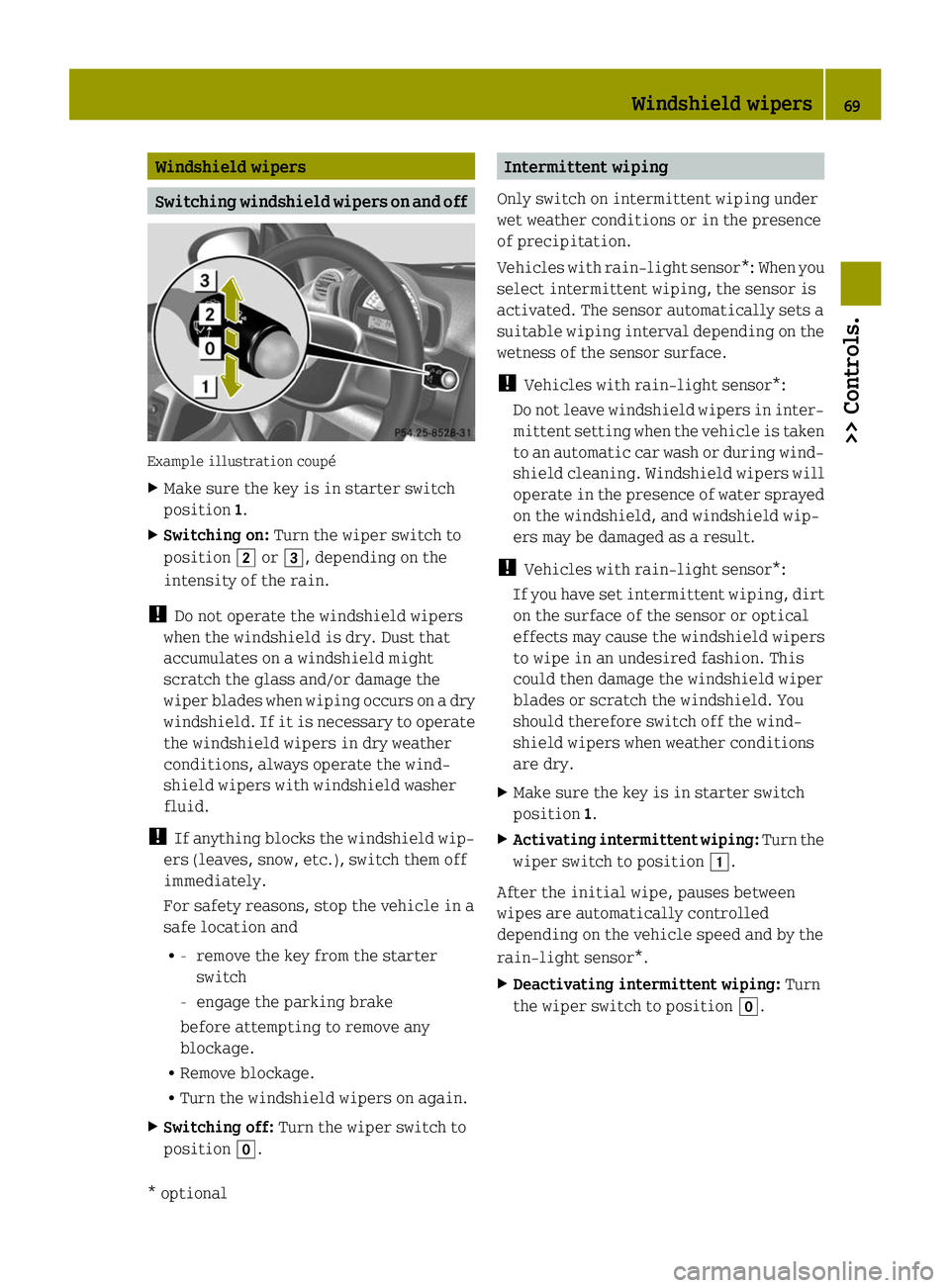
Example illustration coupé
X
Make sure the key is in starter switch
position 1.
X Switching on: Turn the wiper switch to
position 0048or0049, depending on the
intensity of the rain.
! Do not operate the windshield wipers
when the windshield is dry. Dust that
accumulates on a windshield might
scratch the glass and/or damage the
wiper blades when wiping occurs on a dry
windshield. If it is necessary to operate
the windshield wipers in dry weather
conditions, always operate the wind-
shield wipers with windshield washer
fluid.
! If anything blocks the windshield wip-
ers (leaves, snow, etc.), switch them off
immediately.
For safety reasons, stop the vehicle in a
safe location and
R -
remove the key from the starter
switch
- engage the parking brake
before attempting to remove any
blockage.
R Remove blockage.
R Turn the windshield wipers on again.
X Switching off: Turn the wiper switch to
position 005A. Intermittent wiping
Only switch on intermittent wiping under
wet weather conditions or in the presence
of precipitation.
Vehicles with rain-light sensor*: When you
select intermittent wiping, the sensor is
activated. The sensor automatically sets a
suitable wiping interval depending on the
wetness of the sensor surface.
! Vehicles with rain-light sensor*:
Do not leave windshield wipers in inter-
mittent setting when the vehicle is taken
to an automatic car wash or during wind-
shield cleaning. Windshield wipers will
operate in the presence of water sprayed
on the windshield, and windshield wip-
ers may be damaged as a result.
! Vehicles with rain-light sensor*:
If you have set intermittent wiping, dirt
on the surface of the sensor or optical
effects may cause the windshield wipers
to wipe in an undesired fashion. This
could then damage the windshield wiper
blades or scratch the windshield. You
should therefore switch off the wind-
shield wipers when weather conditions
are dry.
X Make sure the key is in starter switch
position 1.
X Activating intermittent wiping: Turn the
wiper switch to position 0047.
After the initial wipe, pauses between
wipes are automatically controlled
depending on the vehicle speed and by the
rain-light sensor*.
X Deactivating intermittent wiping: Turn
the wiper switch to position 005A. Windshield wipers
69>> Controls.
* optional Z
Page 73 of 222
When loading, make sure no sharp objects
come into contact with the soft top or the
rear window.
Do not place any evenly distributed loads
with a weight of more than 165 lbs (75 kg)
on the rear soft top when folded down.
Make sure the high-mounted brake lamp
is not concealed.
! Do not block the soft top system’s lock-
ing apertures.
Only place the side rails in the desig-
nated storage space of the tailgate.
! Do not sit on the folded-down rear soft
top.
Do not fold down the rear soft top at tem-
peratures below 14¦ (-10¥).
Do not place any pointed, sharp-edged,
hot (above 176 ¦[80¥]), incandescent or
burning objects on the soft top’s lining.
Do not apply wax to the soft top fabric and
select only wax-free washing products
when using an automatic car wash.
Only drive with the retaining clips
closed, as exhaust fumes could otherwise
reach the vehicle’s interior.
! Please keep in mind that weather con-
ditions can sometimes change rapidly.
Make sure to close the retractable soft
top and the rear soft top when leaving the
vehicle. If water enters the vehicle
interior, vehicle electronics could be
damaged which is not covered by the
smart Limited Warranty. Opening and closing the retractable
soft top
You can open and close the retractable soft
top when the vehicle is either stationary
or in motion. G
WARNING
Never operate the retractable soft top if
there is the possibility of anyone being harmed by the opening or closing proce-
dure.
G
WARNING
The retractable soft top is made out of fab-
ric. In the event of an accident, the fabric
may tear. This may result in an opening in
the roof.
In a vehicle rollover, occupants not wear-
ing their seat belts or not wearing them
properly may be thrown out of the opening.
Such an opening also presents a potential
for injury for occupants wearing their seat
belts properly as entire body parts or por-
tions of them may protrude from the
passenger compartment. G
WARNING
When leaving the vehicle, always remove the
key from the starter switch, take it with
you, and lock the vehicle. Do not leave chil-
dren unattended in the vehicle, or with
access to an unlocked vehicle. A child’s
unsupervised access to a vehicle could
result in an accident and/or serious per-
sonal injury.
! To avoid damaging the seals, do not
transport any objects with sharp edges
which can stick out of the retractable
soft top.
Do not open the retractable soft top if
there is snow or ice on the roof, as this
could result in malfunctions.
If you cannot open or close the retracta-
ble soft top due to a malfunction contact
Roadside Assistance or an authorized
electric drive smart center.
i To avoid draining the battery, leave the
drive system running when opening and
closing the retractable soft top.
Opening from outside You can open the retractable soft top com-
pletely with the key. Soft top system (cabriolet only)
71>> Controls. Z
Page 78 of 222
result in an accident and/or serious per-
sonal injury.
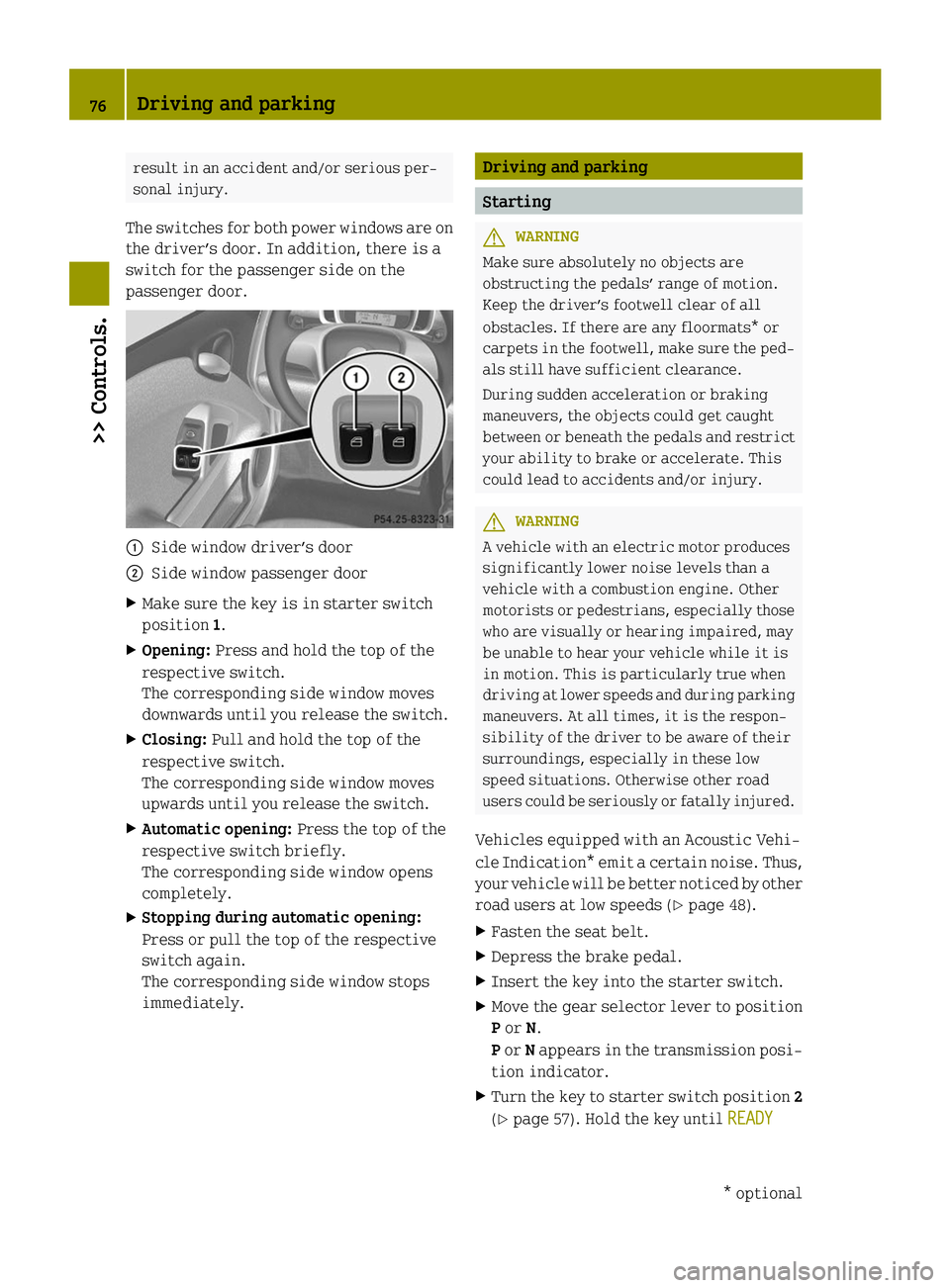
The switches for both power windows are on
the driver’s door. In addition, there is a
switch for the passenger side on the
passenger door. 0043
Side window driver’s door
0044 Side window passenger door
X Make sure the key is in starter switch
position 1.
X Opening: Press and hold the top of the
respective switch.
The corresponding side window moves
downwards until you release the switch.
X Closing: Pull and hold the top of the
respective switch.
The corresponding side window moves
upwards until you release the switch.
X Automatic opening: Press the top of the
respective switch briefly.
The corresponding side window opens
completely.
X Stopping during automatic opening:
Press or pull the top of the respective
switch again.
The corresponding side window stops
immediately. Driving and parking
Starting
G
WARNING
Make sure absolutely no objects are
obstructing the pedals’ range of motion.
Keep the driver’s footwell clear of all
obstacles. If there are any floormats* or
carpets in the footwell, make sure the ped-
als still have sufficient clearance.
During sudden acceleration or braking
maneuvers, the objects could get caught
between or beneath the pedals and restrict
your ability to brake or accelerate. This
could lead to accidents and/or injury. G
WARNING
A vehicle with an electric motor produces
significantly lower noise levels than a
vehicle with a combustion engine. Other
motorists or pedestrians, especially those
who are visually or hearing impaired, may
be unable to hear your vehicle while it is
in motion. This is particularly true when
driving at lower speeds and during parking
maneuvers. At all times, it is the respon-
sibility of the driver to be aware of their
surroundings, especially in these low
speed situations. Otherwise other road
users could be seriously or fatally injured.
Vehicles equipped with an Acoustic Vehi-
cle Indication* emit a certain noise. Thus,
your vehicle will be better noticed by other
road users at low speeds (Y page 48).
X Fasten the seat belt.
X Depress the brake pedal.
X Insert the key into the starter switch.
X Move the gear selector lever to position
Por N.
P or Nappears in the transmission posi-
tion indicator.
X Turn the key to starter switch position 2
(Y page 57). Hold the key until READY READY76
Driving and parking>> Controls.
* optional
Page 79 of 222
appears in the multifunction display
(Y
page 87).
The pointer of the power gauge moves
from "OFF“ to "0“ (Y page 81).Driving
i The vehicle has a crawler function. The
vehicle moves forward when the brake
pedal is released.
X Depress the brake pedal.
X Move the gear selector lever to drive
position D.
D D appears in the transmission position
indicator.
X Release the brake pedal.
The vehicle moves forward.
X Depress the accelerator pedal smoothly.
The vehicle accelerates. Reversing the vehicle
! Shift the transmission into reverse
gear Ronly when the vehicle is stopped
in order to avoid damaging the trans-
mission.
You can drive in reverse gear at a speed
of up to 9 mph (15 km/h).
i The vehicle has a crawler function.
Thevehicle moves forward when the
brakepedal is released.
X Depress the brake pedal.
X Move the gear selector lever to reverse
gear R.
R R appears in the transmission position
indicator.
X Release the brake pedal.
The vehicle moves forward.
X Depress the accelerator pedal smoothly.
The vehicle accelerates. Parking
G
WARNING
With the drive system inactive, there is no
power assistance for the brake and steering
systems. In this case, it is important to
keep in mind that a considerably higher
degree of effort is necessary to brake and
steer the vehicle. Adapt your driving
accordingly. G
WARNING
Vehicle movement can cause serious per-
sonal injury. Therefore, always do the fol-
lowing before exiting and leaving the
vehicle:
R Keep right foot on the brake pedal.
R Engage the parking brake.
R Move the gear selector lever to park
position P.
R Slowly release the brake pedal.
R When parked on an incline, always turn
the front wheels towards the curb.
R Turn the key to starter switch position 0
and remove the key from the starter
switch.
R Take the key with you and lock the vehicle
when leaving.
X Properly stop and park the vehicle.
X Depress the brake pedal.
X Engage the parking brake (Y page 77).
When the ignition is switched on, the
brake warning lamp 0027(USA only) or
004D (Canada only) in the instrument
cluster comes on.
X Release the brake pedal.
Parking brake The parking brake serves to secure the
vehicle against rolling away when it is
stationary or parked. Driving and parking
77>> Controls. Z
Page 80 of 222
G
WARNING
Engaging the parking brake while the vehi-
cle is in motion can cause the rear wheels
to lock up. You could lose control of the
vehicle and cause an accident. In addition,
the vehicle’s brake lights do not light up
when the parking brake is engaged. X
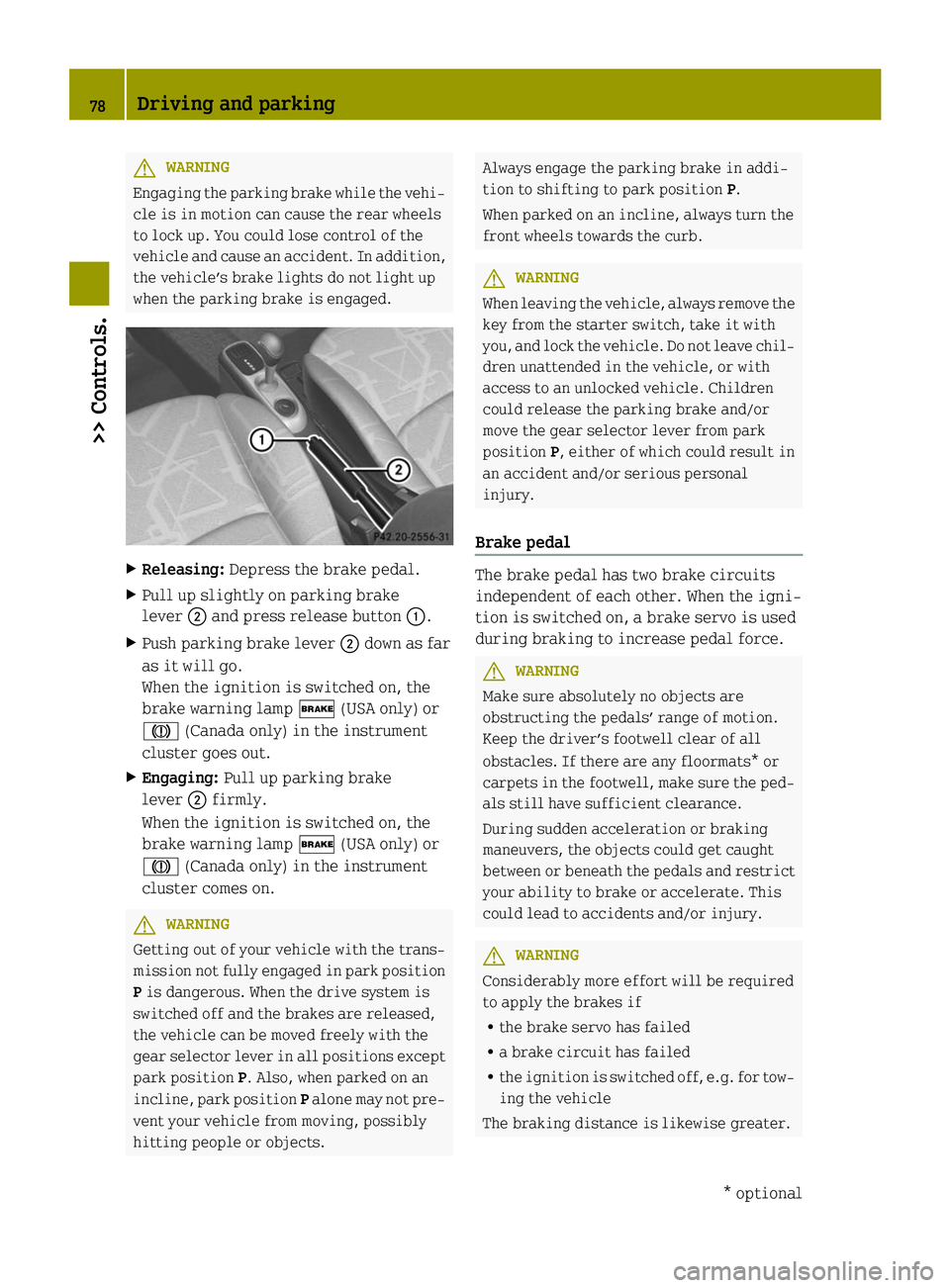
Releasing: Depress the brake pedal.
X Pull up slightly on parking brake
lever 0044and press release button 0043.
X Push parking brake lever 0044down as far
as it will go.
When the ignition is switched on, the
brake warning lamp 0027(USA only) or
004D (Canada only) in the instrument
cluster goes out.
X Engaging: Pull up parking brake
lever 0044firmly.
When the ignition is switched on, the
brake warning lamp 0027(USA only) or
004D (Canada only) in the instrument
cluster comes on. G
WARNING
Getting out of your vehicle with the trans-
mission not fully engaged in park position
P is dangerous. When the drive system is
switched off and the brakes are released,
the vehicle can be moved freely with the
gear selector lever in all positions except
park position P. Also, when parked on an
incline, park position Palone may not pre-
vent your vehicle from moving, possibly
hitting people or objects. Always engage the parking brake in addi-
tion to shifting to park position
P.
When parked on an incline, always turn the
front wheels towards the curb. G
WARNING
When leaving the vehicle, always remove the
key from the starter switch, take it with
you, and lock the vehicle. Do not leave chil-
dren unattended in the vehicle, or with
access to an unlocked vehicle. Children
could release the parking brake and/or
move the gear selector lever from park
position P, either of which could result in
an accident and/or serious personal
injury.
Brake pedal The brake pedal has two brake circuits
independent of each other. When the igni-
tion is switched on, a brake servo is used
during braking to increase pedal force.
G
WARNING
Make sure absolutely no objects are
obstructing the pedals’ range of motion.
Keep the driver’s footwell clear of all
obstacles. If there are any floormats* or
carpets in the footwell, make sure the ped-
als still have sufficient clearance.
During sudden acceleration or braking
maneuvers, the objects could get caught
between or beneath the pedals and restrict
your ability to brake or accelerate. This
could lead to accidents and/or injury. G
WARNING
Considerably more effort will be required
to apply the brakes if
R the brake servo has failed
R a brake circuit has failed
R the ignition is switched off, e.g. for tow-
ing the vehicle
The braking distance is likewise greater. 78
Driving and parking>> Controls.
* optional