display SMART FORTWO COUPE 2014 Owner's Manual
[x] Cancel search | Manufacturer: SMART, Model Year: 2014, Model line: FORTWO COUPE, Model: SMART FORTWO COUPE 2014Pages: 222, PDF Size: 16.17 MB
Page 97 of 222

Setting the period of day
X
Press the control switch on the control
lever (Y page 83) up or down until the
am am pm pmsubmenu appears in the multifunc-
tion display.
X Press the OK button on the control lever
briefly.
X Press the control switch on the control
lever (Y page 83) up or down until the
desired setting is selected.
X Press the OK button on the control lever
briefly to confirm.
The selected mode is stored.
Setting the hours X
Press the control switch on the control
lever (Y page 83) up or down until the
Hour Hour submenu appears in the multifunc-
tion display.
X Press the OK button on the control lever
briefly.
X Press the control switch on the control
lever (Y page 83) up or down until the
desired setting is selected.
X Press the OK button on the control lever
briefly to confirm.
The selected hours are stored.
Setting the minutes X
Press the control switch on the control
lever (Y page 83) up or down until the
Minute Minute submenu appears in the multi-
function display.
X Press the OK button on the control lever
briefly.
X Press the control switch on the control
lever (Y page 83) up or down until the
desired setting is selected.
X Press the OK button on the control lever
briefly to confirm.
The selected minutes are stored. Audio system*
G
WARNING
In order to avoid distraction which could
lead to an accident, the driver should enter
system settings with the vehicle at a stand-
still and operate the system only when road
and traffic conditions permit. Always pay
full attention to traffic conditions first
before operating system controls while
driving.
Bear in mind that at a speed of just 30 mph
(approximately 50 km/h), your vehicle is
covering a distance of 44 feet (approx-
imately 14 m) every second. G
WARNING
Always select a volume that allows you to
still hear ambient sound in your immediate
vicinity (e.g. horns, emergency rescue
vehicles, police vehicles, etc.). You could
otherwise cause an accident. G
WARNING
If you wish to have an audio system other
than an original smart audio system fitted
in your vehicle, please always have the nec-
essary work performed at an authorized
smart center.
This is particularly important if your
vehicle is fitted with a radio preinstalla-
tion. Improper connection can result in the
failure of important vehicle functions,
thereby endangering the operating safety
of your vehicle and thus your own safety and
that of other people.
The following pages contain a brief
description of the audio systems available
for the coupé and cabriolet.
The devices are described with their full
complement of equipment. The description
for your individual equipment specifica-
tion applies.
Please refer to the separate operating
instructions for detailed functions. Audio system*
95>> Controls.
* optional Z
Page 98 of 222

Audio system basic
The audio system basic contains the fol-
lowing functions:
R Radio (FM/AM)
R Radio Broadcast Data System (RBDS) and
radio text
R AUX and USB socket (Y page 96)
! Please be sure to read the operating
instructions for the audio system basic
before using the unit. Familiarize your-
self with the various functions of the
unit so that you are able to operate it
easily, reliably and correctly at any
time. 0043
On/off and volume switch
0044 Display
0087 Skip/Scroll/Frequency search switches
0085 Tone settings/Mute/Back control panel
0083 Stored station buttons
0084 Radio/Media/System control panel Audio system navigation/multimedia*
The audio system navigation/multimedia
contains the following functions:
R Radio (FM/AM)
R Radio Broadcast Data System (RBDS)
R AUX and USB-socket
R Bluetooth ®
hands-free device
R Navigation
R Audio operation from CD/DVD or SD Card,
via AUX/USB/iPod ®
, or Bluetooth ®
Audio R
Video operation from CD/DVD or SD Card,
via AUX/USB/iPod ®
R Image display from CD/DVD or SD Card,
via USB/iPod ®
! Please be sure to read the operating
instructions for the audio system navi-
gation/multimedia before using the
unit. Familiarize yourself with the var-
ious functions of the unit so that you are
able to operate it easily, reliably and
correctly at any time. 0043
Bluetooth ®
connection indicator lamp
0044 Display
0087 Microphone
0085 Light sensor
0083 Eject button
0084 Rotary/Push button
006B Menu button AUX and USB sockets
You can connect mobile audio devices such
as an MP3 player via the AUX and USB sock-
ets using commercially available 3.5 mm
socket plug (AUX) or USB connector cable
(USB).
The AUX and USB sockets are located in the
glove box. 96
Audio system*>> Controls.
* optional
Page 99 of 222

0043
USB socket
0044 AUX socket smart surround sound system*
The smart surround sound system supple-
ments the existing speakers with more
powerful and additional speakers (includ-
ing a digital amplifier in the passenger
footwell and a passive subwoofer). Driving systems
Cruise control*
The cruise control maintains the speed you
set for your vehicle automatically. On
downhill grades, the cruise control does
not brake the vehicle via the brake system.
The cruise control can only use the braking
power of the engine. You must apply the
brakes yourself in order to reduce the
vehicle speed. The cruise control will then
be canceled. G
WARNING
The cruise control is a convenience system
designed to assist the driver during vehi-
cle operation. The cruise control cannot
take road, traffic, and weather conditions
into account. The driver is and must always
remain responsible for the vehicle’s speed
and for safe brake operation. Do not use the cruise control
R
if the road, traffic, and weather condi-
tions do not make it advisable to travel
at a constant speed
R on slippery roads
Rapid changes in tire traction can result
in wheel spin and loss of control.
R when driving in fog
The use of the cruise control is recom-
mended for driving at a constant speed for
extended periods of time.
With the cruise control is activated and a
speed set, the following message appears
in the multifunction display: U.S. vehicles
0043
Cruise control activated
0044 Set speed Canada vehicles
0043
Cruise control activated
0044 Set speed
The cruise control is operated via buttons
on the steering wheel. Driving systems
97>> Controls.
* optional Z
Page 100 of 222

0043
Activating or deactivating the cruise
control
0044 Resuming at last set speed or increas-
ing speed
0087 Setting current or lower speed, or
decreasing speed
0085 Canceling the cruise control
Activating/deactivating The cruise control must be activated before
you can set a speed. When you switch off the
drive system, the cruise control is deac-
tivated automatically.
X Press ON/OFF button 0043briefly.
The cruise control is activated.
CRUISE
CRUISE (USA only) or 0085(Canada only)
appears in the multifunction display.
Setting current speed You can set any speed above 20 mph
(30 km/h).
X
Accelerate the vehicle to the desired
speed.
X With the cruise control activated, press
SET/− button 0087briefly.
X Remove your foot from the accelerator
pedal.
The current speed is set and the vehicle
maintains that speed.
USA only: set
set appears in the multifunc-
tion display to indicate that the speed
has been set. Canada only: The set speed appears in the
multifunction display next to cruise
control symbol
0085.
i On uphill grades, the cruise control
may not be able to maintain the set speed.
Once the grade eases, the set speed will
be resumed.
On downhill grades, the cruise control
can only maintain the set speed using the
drive systems braking power. You must
apply the brakes yourself when the vehi-
cle does not slow down sufficiently. This
will cancel the cruise control.
Canceling cruise control When the cruise control is activated, you
can cancel it at any time and resume the set
speed later.
X
Press CANCEL button 0085briefly.
or
X Depress the brake pedal.
The cruise control is canceled.
The cruise control deactivates automati-
cally, when
R you engage the parking brake
R the vehicle speed is below 20 mphh
(30 km/h)
R ESP ®
is in operation.
Resuming last set speed G
WARNING
The “Resume” function should only be oper-
ated if the driver is fully aware of the pre-
viously set speed and wishes to resume this
particular preset speed.
The set speed stored in memory should only
be set again if prevailing road conditions
and legal speed limits permit. Possible
acceleration or deceleration differences
arising from returning to the preset speed
could cause an accident and/or serious
injury to you and others. 98
Driving systems>> Controls.
Page 115 of 222
Use only charging cables which have been
approved and recommended for the vehicle.
Do not use:
R extension chords
R cable reels
R multiple sockets
R travel adapters
i When possible, only charge the high-
voltage battery when the charge level is
below 80 %.
It is recommended to charge the high-
voltage battery prior to reaching less
than 20% state of charge.
Discharged high-voltage battery When the high-voltage battery is com-
pletely discharged, the drive system is
switched off. This protects the battery
from exhaustive discharge.
i By switching the ignition off and on
again, the drive system can be briefly
reactivated once. This allows you to park
the vehicle safely.
Do not allow your vehicle to remain sta-
tionary for more than 14 days with a dis-
charged, or nearly discharged, high-volt-
age battery. You can check the charge level
with the charge level gauge (Y page 81).
High or low outside temperatures The efficiency of the high-voltage battery
is temperature-dependent and decreases
at high or low temperatures. Additionally,
the electrolytes used can gel at very low
temperatures.
You can check the maximum capacity avail-
able using the indicator in the multifunc-
tion display (Y page 87). Energy consumption and range The available energy of the high-voltage
battery is reduced by:
R
low outside temperatures
R switching on electrical consumers
At low temperatures and after being parked
for an extended period without charging,
the physical properties of the high-volt-
age battery:
R can cause a significant reduction in the
performance of the battery
R can lead to longer charging times
In extreme cases, you will not be able to
start the vehicle. For this reason, always
connect the charging cable or make sure the
battery is completely charged when park-
ing the vehicle in low outside tempera-
tures or for an extended period of time.
Due to its physical properties, the capa-
city of a high-voltage battery decreases
over its lifespan.
Thus, the following are reduced:
R the maximum attainable range of the
vehicle
R the maximum performance output (accel-
eration) of the vehicle
You can actively contribute to the reduc-
tion of the vehicle's energy consumption
by:
R driving conservatively
R maintaining the vehicle regularly
R decreasing the use of electrical consum-
ers
Notes on battery care Avoid storing and transporting the vehicle
at high temperatures for extended periods
of time (e. g. container transport).
When out of use for longer periods of time,
connect the vehicle to a voltage supply.
If the vehicle is not connected to a voltage
supply, it must remain within a tempera- High-voltage battery
113>> Operation. Z
Page 118 of 222
compartment as shown in the illustra-
tion.
When doing so, observe that the display
and buttons on control element 0085both
point upwards.
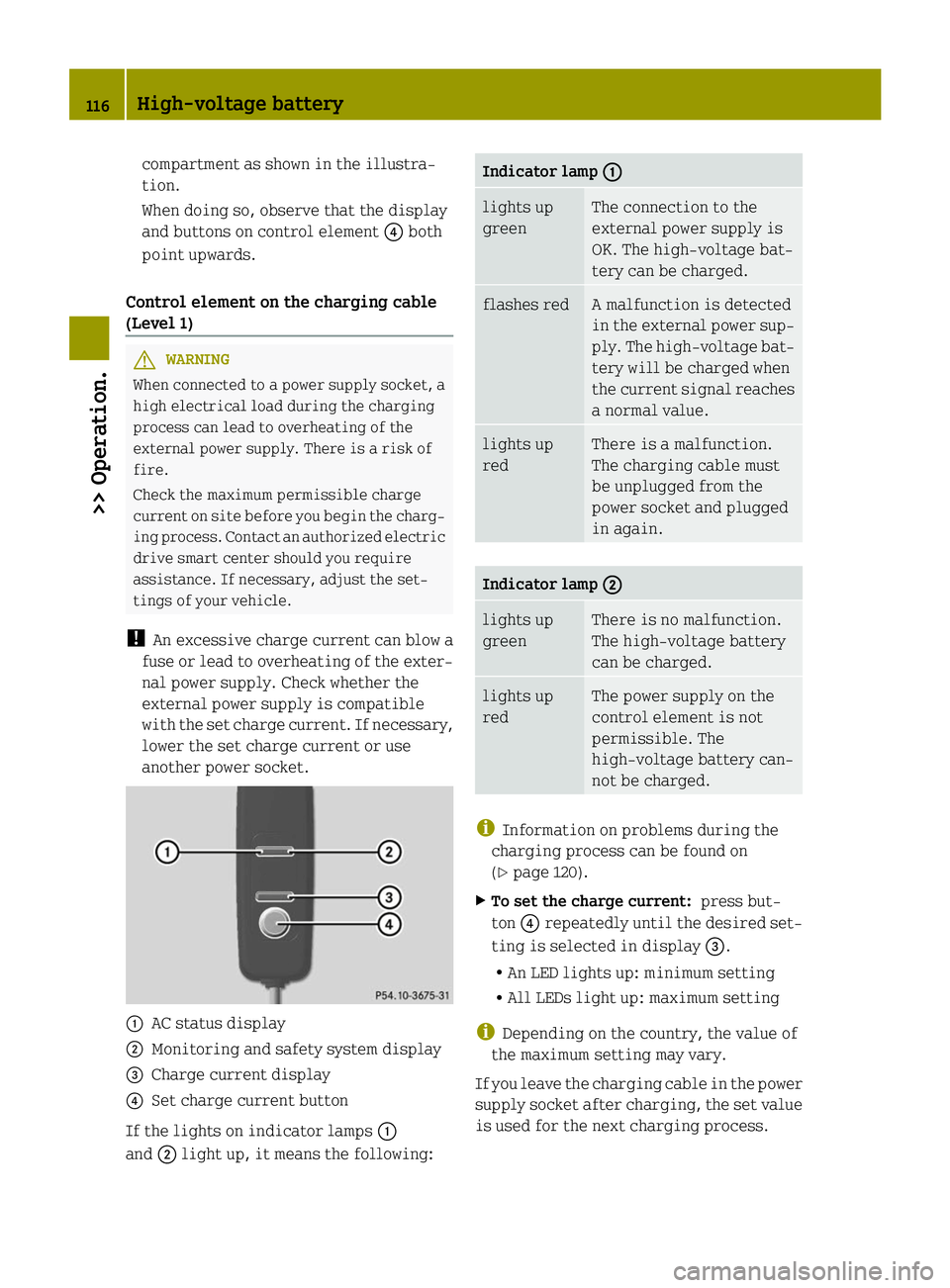
Control element on the charging cable
(Level 1) G
WARNING
When connected to a power supply socket, a
high electrical load during the charging
process can lead to overheating of the
external power supply. There is a risk of
fire.
Check the maximum permissible charge
current on site before you begin the charg-
ing process. Contact an authorized electric
drive smart center should you require
assistance. If necessary, adjust the set-
tings of your vehicle.
! An excessive charge current can blow a
fuse or lead to overheating of the exter-
nal power supply. Check whether the
external power supply is compatible
with the set charge current. If necessary,
lower the set charge current or use
another power socket. 0043
AC status display
0044 Monitoring and safety system display
0087 Charge current display
0085 Set charge current button
If the lights on indicator lamps 0043
and 0044light up, it means the following: Indicator lamp
0043 0043 lights up
green The connection to the
external power supply is
OK. The high‑voltage bat-
tery can be charged.
flashes red A malfunction is detected
in the external power sup-
ply. The high‑voltage bat-
tery will be charged when
the current signal reaches
a normal value.
lights up
red There is a malfunction.
The charging cable must
be unplugged from the
power socket and plugged
in again.
Indicator lamp
0044 0044 lights up
green There is no malfunction.
The high‑voltage battery
can be charged.
lights up
red The power supply on the
control element is not
permissible. The
high‑voltage battery can-
not be charged.
i
Information on problems during the
charging process can be found on
(Y page 120).
X To set the charge current: press but-
ton 0085repeatedly until the desired set-
ting is selected in display 0087.
R An LED lights up: minimum setting
R All LEDs light up: maximum setting
i Depending on the country, the value of
the maximum setting may vary.
If you leave the charging cable in the power
supply socket after charging, the set value
is used for the next charging process. 116
High-voltage battery>> Operation.
Page 120 of 222
Observe the provider's instructions at the
charging station.
Charging station with charging commu-
nication („Plug&Charge“) You do not have to activate charging sta-
tions with charging communication before
the charging process. This is done by the
vehicle. This function is called "Plug &
Charge". Information is exchanged
between the vehicle and the charging sta-
tion via the charging cable for activation.
This is for:
R mutual authorization of the vehicle and
the charging station
R verification of contract data
R automatic billing of the energy costs
Electronic certificates are used here for
secure exchange of data.
If the verification of contract data is suc-
cessful, the charging process is initiated.
i A preliminary version of the
ISO/IEC 15118 standard is used for com-
munication between the vehicle and the
charging station. If it is necessary to
update your vehicle, consult an author-
ized electric drive smart center.
In order to use "Plug & Charge", you have to
configure the functions of your vehicle on
the "Vehicle Homepage" (Y page 120). For
this you require a "Plug & Charge" certif-
icate which you receive from your power
company after concluding a suitable con-
tract. Consult an authorized electric drive
smart center if you have problems with the
configuration or have no access to the
Internet.
The charging station offers information on
the availability of electricity and costs.
This information is processed by the vehi-
cle and is used for an optimum charging of
the high‑voltage battery (Y page 123). The
energy costs are automatically calculated
after the charging process is complete. With your existing electricity contract,
you and others who have access to your vehi-
cle can charge the costs to your electricity
bill. For this reason, cancel your existing
electricity contract for this vehicle
before you sell it. Delete your "Plug &
Charge" certificate by all means.
i
You can delete the certificate from the
vehicle's data on the "Vehicle Home-
page". Please consult an authorized
electric drive smart center if you do not
have access to the Internet.
If the charging station allows the con-
nected vehicle access to the Internet, you
can call up and change information per-
taining to the vehicle on the "Vehicle
Homepage" (Y page 120).
Connecting the charging cable X
Engage the parking brake.
X Move the gear selector lever to park
position P.
X Switch off the ignition.
X Open the charge socket flap.
X Remove the cover from the charge socket.
X Insert plug of the charging cable into the
charge socket to the stop.
The high‑voltage battery is being
charged.
i The vehicle must not be moved during
charging.
The 00E5 indicator lamp in the multi-
function display comes on when the igni-
tion is switched on and the charging
cable is connected.
i The drive system and battery cooling
systems may switch on audibly during the
charging process, depending on the tem-
perature. 118
High-voltage battery>> Operation.
Page 153 of 222

approximately
1
/ 6 in (4 mm) on all four
wheels for the winter season to ensure nor-
mal balanced handling characteristics. On
packed snow, they can reduce your stopping
distance compared to summer tires.
Stopping distance, however, is still con-
siderably greater than when the road is not
covered with snow or ice. Exercise appro-
priate caution.
! Avoid spinning of a drive wheel for an
extended period when driving off on
slippery road surfaces. Otherwise, the
drivetrain could be damaged, which is
not covered by the smart Limited War-
ranty. Tire speed rating
Regardless of the tire speed rating, local
speed limits should be obeyed. Use prudent
driving speeds appropriate to prevailing
conditions. G
WARNING
Even when permitted by law, never operate
a vehicle at speeds greater than the maxi-
mum speed rating of the tires.
Exceeding the maximum speed for which
tires are rated can lead to sudden tire fail-
ure, causing loss of vehicle control and
possibly resulting in an accident and/or
personal injury and possible death, for you
and for others.
Make sure your tires have the required tire
speed rating as specified for your vehicle
in the “Technical data section”
(Y page 216), for example when purchasing
new tires.
For information on how to identify the tire
speed rating on a tire’s sidewall, see “Tire
size designation, load and speed rating”
(Y page 140).
If you are uncertain about the correct read-
ing of the information given on a tire’s sidewall, any authorized electric drive
smart center will be glad to assist you.
i
For information on speed ratings for
winter tires, see “All-season and winter
tires” (Y page 141). Winter driving instructions
The most important rule for slippery or icy
roads is to drive sensibly and to avoid
abrupt acceleration, braking and steering
maneuvers.
For information on driving with snow
chains*, see “Snow chains*” (Y page 146).
Road salts and chemicals can adversely
affect braking efficiency. Increased pedal
force may become necessary to produce the
normal braking effect.
Depressing the brake pedal periodically
when traveling at length on salt-strewn
roads can bring road-salt-impaired brak-
ing efficiency back to normal.
If the vehicle is parked after being driven
on salt-treated roads, the braking effi-
ciency should be tested as soon as possible
after driving is resumed. G
WARNING
Make sure not to endanger any other road
users when carrying out these braking
maneuvers. G
WARNING
The outside temperature display is not
designed to serve as an ice-warning device
and is therefore unsuitable for that pur-
pose. Indicated temperatures just above
the freezing point do not guarantee that the
road surface is free of ice.
For more information, see “Winter driving”
(Y page 146). Driving instructions
151>> Operation.
* optional Z
Page 161 of 222
>> Practical hints.Where will I find ...
.......................... 160
Display messages ............................. 161
What to do if ... ............................... 166
Unlocking/locking manually ...............177
Replacing transmitter battery ............178
Replacing bulbs .............................. .179
Replacing wiper blades .....................185
Flat tire ........................................ 187
Wheel change .................................. 195
Batteries ....................................... 197
Jump starting ................................. 200
Towing .......................................... 203
Fuses ............................................ 205
Page 163 of 222

Display messages
The following display messages appear in the multifunction display (Y page 83).
You can confirm certain display messages.
X Confirming messages: Press the OK button on the control lever briefly (Y page 83).Display messages Possible causes/consequences and
0050
0050Solutions 00AC
Switch Off Engine Switch Off Engine The coolant is too hot.
In addition, the
00ACwarning lamp in the instrument cluster
lights up and a warning signal sounds.
X Stop the vehicle immediately as soon as it is safe to do so.
X Switch off the drive system immediately.
X Engage the parking brake.
X Make sure the air supply for the radiator is uninterrupted.
X Only start the drive system again after the display message
disappears. You could otherwise damage the drive system. 0027
(USA only)
004D (Canada only)
Release Parking Release Parking
Brake Brake You are driving with the parking brake engaged.
In addition, the
0027(USA only), 004D(Canada only) warning
lamp in the instrument cluster lights up and a warning signal
sounds.
X Release the parking brake. 0027
(USA only)
004D (Canada only)
Brake System See Brake System See
Operator's Manual Operator's Manual There is a slight malfunction in the vacuum supply of the brak-
ing system.
X
When braking, continue to depress the brake pedal.
X Contact an authorized electric drive smart center. 0027
(USA only)
004D (Canada only)
Brake Malfunction Brake Malfunction
0096Service Required Service Required There is a serious malfunction in the vacuum supply of the
braking system.
In addition, a warning signal sounds.
X
Contact an authorized electric drive smart center. 0068
Shift Shift
to
toN
Nor
or P
Pto
to
Start
Start You have attempted to start the engine while the automatic
transmission was in reverse gear
Ror drive position D.
X Shift the automatic transmission into park position Por
neutral position N.
X Make sure that Nor Pis shown in the multifunction display. Display messages
161>> Practical hints. Z